AgentHub
Health Pass
- License — License: Apache-2.0
- Description — Repository has a description
- Active repo — Last push 0 days ago
- Community trust — 67 GitHub stars
Code Pass
- Code scan — Scanned 12 files during light audit, no dangerous patterns found
Permissions Pass
- Permissions — No dangerous permissions requested
This SDK provides a unified interface for connecting to various Large Language Models (such as GPT and Claude) with zero code changes. It is designed to help developers build autonomous agents by standardizing tool-use execution and providing built-in tracing for debugging and auditing.
Security Assessment
Overall Risk: Low. The automated code scan reviewed 12 files and found no dangerous patterns, hardcoded secrets, or requests for excessive permissions. Because this tool acts as a bridge to external AI APIs, it naturally makes outbound network requests to LLM providers. Developers should be aware that any data, prompts, or context passed to the SDK will be transmitted over the internet to the respective AI vendor. The tool does not appear to execute arbitrary shell commands or access local sensitive files directly.
Quality Assessment
The project demonstrates strong health and active maintenance. It is licensed under the standard and permissive Apache-2.0. The repository is highly active, with its most recent code push happening just today. It enjoys a moderate level of community trust with 67 GitHub stars and appears to follow good development practices by including dedicated testing workflows for both Python and Javascript environments.
Verdict
Safe to use, though developers should remain mindful of standard data privacy practices when routing sensitive information through external AI APIs.
AgentHub is the LLM API Hub for the Agent era, built for high-precision autonomous agents. (GPT-5.4/Claude 4.6/Gemini 3.1)
AgentHub SDK - Unified and Precise LLM SDK





AgentHub is the LLM API Hub for the Agent era, built for high-precision autonomous agents.
📢 Follow us on X: 
Why AgentHub?
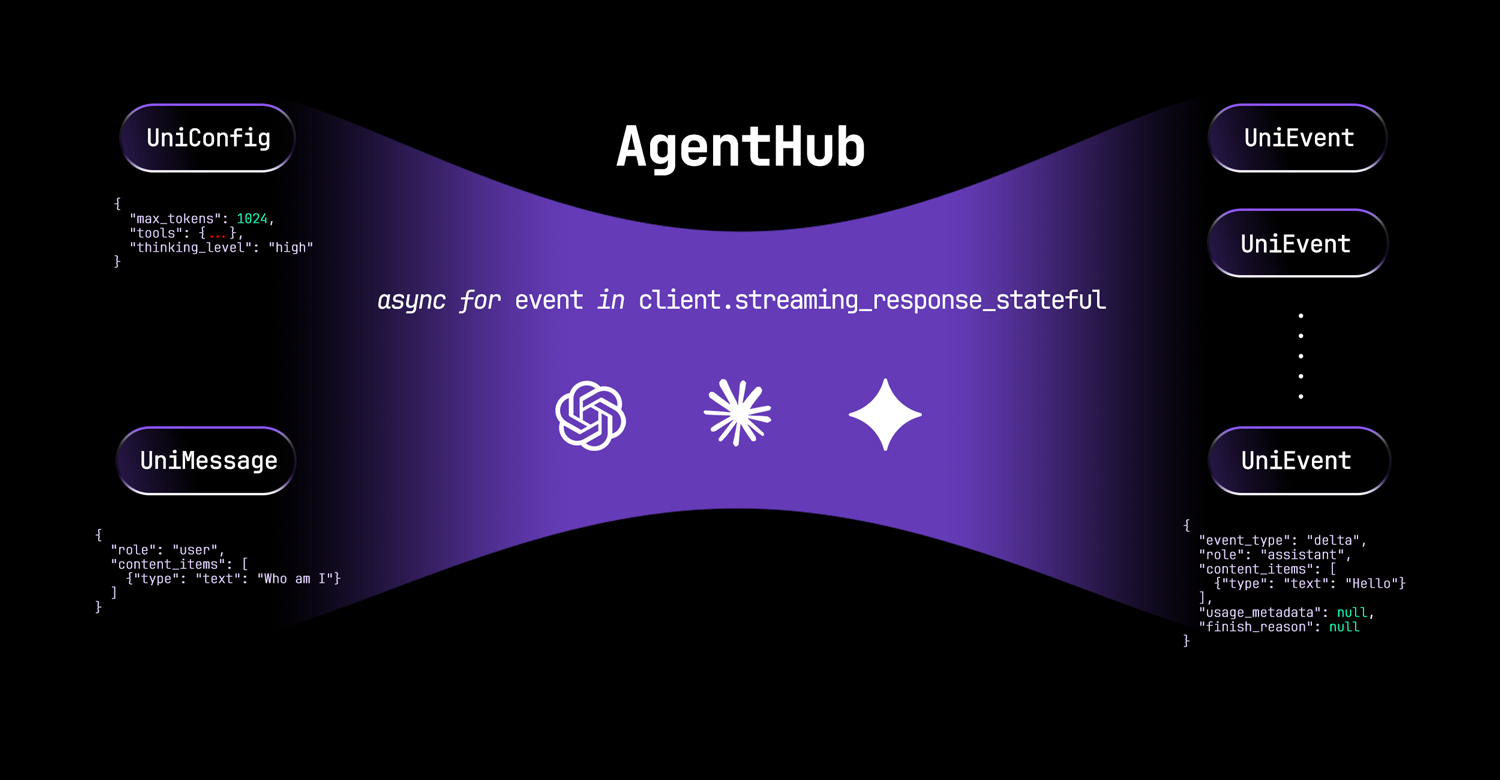
🔗 Unified: A consistent and intuitive interface for developing agents across different LLMs.
🎯 Precise: Automatically handles interleaved thinking during multi-step tool calls, preventing performance degradation.
🧭 Traceable: Provides lightweight yet fine-grained tracing for debugging and auditing LLM executions.
Features
AutoLLMClient (Python & TypeScript)
Switch different LLMs with zero code changes and no performance loss.
Built-in Tracer
Audit LLM executions by adding a single trace_id parameter, no database required.
https://github.com/user-attachments/assets/c49a21a1-5bf9-4768-a76d-f73c9a03ca87
Supported Models
| Model Name | Vendor | Reasoning | Tool Use | Image Understanding |
|---|---|---|---|---|
| Gemini 3/3.1 | Official/Google Vertex AI | :white_check_mark: | :white_check_mark: | :white_check_mark: |
| Claude 4.6 | Official/Amazon Bedrock | :white_check_mark: | :white_check_mark: | :white_check_mark: |
| GPT-5.4 | Official | :white_check_mark: | :white_check_mark: | :white_check_mark: |
| Kimi-K2.5 | Official/OpenRouter/SiliconFlow | :white_check_mark: | :white_check_mark: | :white_check_mark: |
| GLM-5 | Official/OpenRouter/SiliconFlow | :white_check_mark: | :white_check_mark: | :negative_squared_cross_mark: |
| Qwen3 | OpenRouter/SiliconFlow/vLLM | :white_check_mark: | :white_check_mark: | :negative_squared_cross_mark: |
Installation
Python package
Install from PyPI:
uv add agenthub-python
# or
pip install agenthub-python
Build from source:
cd src_py && make
See src_py/README.md for comprehensive usage examples and API documentation.
TypeScript package
Install from npm:
npm install @prismshadow/agenthub
Build from source:
cd src_ts && make install && make build
See src_ts/README.md for comprehensive usage examples and API documentation.
APIs
AutoLLMClient is the main class for interacting with the AgentHub SDK. It provides the following methods:
(async) streaming_response(messages, config): Streams the response of LLMs in a stateless manner.(async) streaming_response_stateful(message, config): Streams the response of LLMs in a stateful manner.clear_history(): Clears the history of the stateful LLM client.get_history(): Returns the history of the stateful LLM client.
Basic Usage
[!NOTE]
We recommend using the stateful interface when calling the AgentHub SDK.
OpenAI GPT-5.4
Python Example:
import asyncio
import os
from agenthub import AutoLLMClient

os.environ["OPENAI_API_KEY"] = "your-openai-api-key"

async def main():
    client = AutoLLMClient(model="gpt-5.4")
    async for event in client.streaming_response_stateful(
        message={
            "role": "user",
            "content_items": [{"type": "text", "text": "Say 'Hello, World!'"}]
        },
        config={"temperature": 1.0}
    ):
        print(event)

asyncio.run(main())
# {'role': 'assistant', 'event_type': 'delta', 'content_items': [{'type': 'text', 'text': 'Hello'}], 'usage_metadata': None, 'finish_reason': None}
# {'role': 'assistant', 'event_type': 'delta', 'content_items': [{'type': 'text', 'text': ','}], 'usage_metadata': None, 'finish_reason': None}
# {'role': 'assistant', 'event_type': 'delta', 'content_items': [{'type': 'text', 'text': ' World'}], 'usage_metadata': None, 'finish_reason': None}
# {'role': 'assistant', 'event_type': 'delta', 'content_items': [{'type': 'text', 'text': '!'}], 'usage_metadata': None, 'finish_reason': None}
# {'role': 'assistant', 'event_type': 'stop', 'content_items': [], 'usage_metadata': {'cached_tokens': 0, 'prompt_tokens': 12, 'thoughts_tokens': 0, 'response_tokens': 8}, 'finish_reason': 'stop'}
TypeScript Example:
import { AutoLLMClient } from "@prismshadow/agenthub";

process.env.OPENAI_API_KEY = "your-openai-api-key";

async function main() {
  const client = new AutoLLMClient({ model: "gpt-5.4" });
  for await (const event of client.streamingResponseStateful({
    message: {
      role: "user",
      content_items: [{ type: "text", text: "Say 'Hello, World!'" }]
    },
    config: {}
  })) {
    console.log(event);
  }
}

main().catch(console.error);
// {'role': 'assistant', 'event_type': 'delta', 'content_items': [{'type': 'text', 'text': 'Hello'}], 'usage_metadata': null, 'finish_reason': null}
// {'role': 'assistant', 'event_type': 'delta', 'content_items': [{'type': 'text', 'text': ','}], 'usage_metadata': null, 'finish_reason': null}
// {'role': 'assistant', 'event_type': 'delta', 'content_items': [{'type': 'text', 'text': ' World'}], 'usage_metadata': null, 'finish_reason': null}
// {'role': 'assistant', 'event_type': 'delta', 'content_items': [{'type': 'text', 'text': '!'}], 'usage_metadata': null, 'finish_reason': null}
// {'role': 'assistant', 'event_type': 'stop', 'content_items': [], 'usage_metadata': {'cached_tokens': 0, 'prompt_tokens': 12, 'thoughts_tokens': 0, 'response_tokens': 8}, 'finish_reason': 'stop'}
Anthropic Claude 4.6
Python Exampleimport asyncio
import os
from agenthub import AutoLLMClient
os.environ["ANTHROPIC_API_KEY"] = "your-anthropic-api-key"
async def main():
client = AutoLLMClient(model="claude-sonnet-4-6")
async for event in client.streaming_response_stateful(
message={
"role": "user",
"content_items": [{"type": "text", "text": "Say 'Hello, World!'"}]
},
config={}
):
print(event)
asyncio.run(main())
import { AutoLLMClient } from "@prismshadow/agenthub";

process.env.ANTHROPIC_API_KEY = "your-anthropic-api-key";

async function main() {
  const client = new AutoLLMClient({ model: "claude-sonnet-4-6" });
  for await (const event of client.streamingResponseStateful({
    message: {
      role: "user",
      content_items: [{"type": "text", "text": "Say 'Hello, World!'"}]
    },
    config: {}
  })) {
    console.log(event);
  }
}

main().catch(console.error);
OpenRouter GLM-5
Python Exampleimport asyncio
import os
from agenthub import AutoLLMClient
os.environ["GLM_API_KEY"] = "your-openrouter-api-key"
os.environ["GLM_BASE_URL"] = "https://openrouter.ai/api/v1"
async def main():
client = AutoLLMClient(model="z-ai/glm-5")
async for event in client.streaming_response_stateful(
message={
"role": "user",
"content_items": [{"type": "text", "text": "Say 'Hello, World!'"}]
},
config={}
):
print(event)
asyncio.run(main())
import { AutoLLMClient } from "@prismshadow/agenthub";

process.env.GLM_API_KEY = "your-openrouter-api-key";
process.env.GLM_BASE_URL = "https://openrouter.ai/api/v1";

async function main() {
  const client = new AutoLLMClient({ model: "z-ai/glm-5" });
  for await (const event of client.streamingResponseStateful({
    message: {
      role: "user",
      content_items: [{"type": "text", "text": "Say 'Hello, World!'"}]
    },
    config: {}
  })) {
    console.log(event);
  }
}

main().catch(console.error);
SiliconFlow Qwen3-8B
Python Exampleimport asyncio
import os
from agenthub import AutoLLMClient
os.environ["QWEN3_API_KEY"] = "your-siliconflow-api-key"
os.environ["QWEN3_BASE_URL"] = "https://api.siliconflow.cn/v1"
async def main():
client = AutoLLMClient(model="Qwen/Qwen3-8B")
async for event in client.streaming_response_stateful(
message={
"role": "user",
"content_items": [{"type": "text", "text": "Say 'Hello, World!'"}]
},
config={}
):
print(event)
asyncio.run(main())
import { AutoLLMClient } from "@prismshadow/agenthub";

process.env.QWEN3_API_KEY = "your-siliconflow-api-key";
process.env.QWEN3_BASE_URL = "https://api.siliconflow.cn/v1";

async function main() {
  const client = new AutoLLMClient({ model: "Qwen/Qwen3-8B" });
  for await (const event of client.streamingResponseStateful({
    message: {
      role: "user",
      content_items: [{ type: "text", text: "Say 'Hello, World!'" }],
    },
    config: {}
  })) {
    console.log(event);
  }
}

main().catch(console.error);
Concepts: UniConfig, UniMessage and UniEvent
UniConfig
UniConfig is an object that contains the configuration for LLMs.
Example UniConfig:
{
  "max_tokens": 1024,
  "temperature": 1.0,
  "tools": [
    {
      "name": "get_current_weather",
      "description": "Get the current weather in a given location",
      "parameters": {
          "type": "object",
          "properties": {
              "location": {
                  "type": "string",
                  "description": "The city and state, e.g. San Francisco, CA"
              }
          },
          "required": ["location"]
      }
    }
  ],
  "thinking_summary": true,
  "thinking_level": "none | low | medium | high",
  "tool_choice": "auto | required | none",
  "system_prompt": "You are a helpful assistant.",
  "prompt_caching": "enable | disable | enhance",
  "trace_id": null
}
UniMessage
UniMessage is an object that contains the input for LLMs.
Example UniMessage:
{
  "role": "user | assistant",
  "content_items": [
    {"type": "text", "text": "How are you doing?"},
    {"type": "image_url", "image_url": "https://example.com/image.jpg"},
    {"type": "thinking", "thinking": "I am thinking.", "signature": "0x123456"},
    {"type": "tool_call", "name": "math", "arguments": {"expression": "2 + 3"}, "tool_call_id": "123"},
    {"type": "tool_result", "text": "2 + 3 = 5", "images": [], "tool_call_id": "123"}
  ]
}
UniEvent
UniEvent is an object that contains streaming output of LLMs.
Example UniEvent:
{
  "role": "assistant",
  "event_type": "delta",
  "content_items": [
    {"type": "partial_tool_call", "name": "math", "arguments": "", "tool_call_id": "123"}
  ],
  "usage_metadata": {
    "cached_tokens": null,
    "prompt_tokens": 10,
    "thoughts_tokens": null,
    "response_tokens": 1
  },
  "finish_reason": null
}
Token Usage
AgentHub provides detailed token usage information through the usage_metadata field in streaming events.
The usage_metadata object contains four fields:
cached_tokens: Cached input tokensprompt_tokens: Non-cached input tokensthoughts_tokens: Chain-of-thought output tokensresponse_tokens: Non-chain-of-thought output tokens
You can calculate the total token usage as follows:
input_tokens = cached_tokens + prompt_tokensoutput_tokens = thoughts_tokens + response_tokenstotal_tokens = input_tokens + output_tokens
█████████████  ░░░░░░░░░░░░░ → LLM → ███████████████  ░░░░░░░░░░░░░░░
cached_tokens  prompt_tokens         thoughts_tokens  response_tokens
        input_tokens                          output_tokens
Tracing LLM Executions
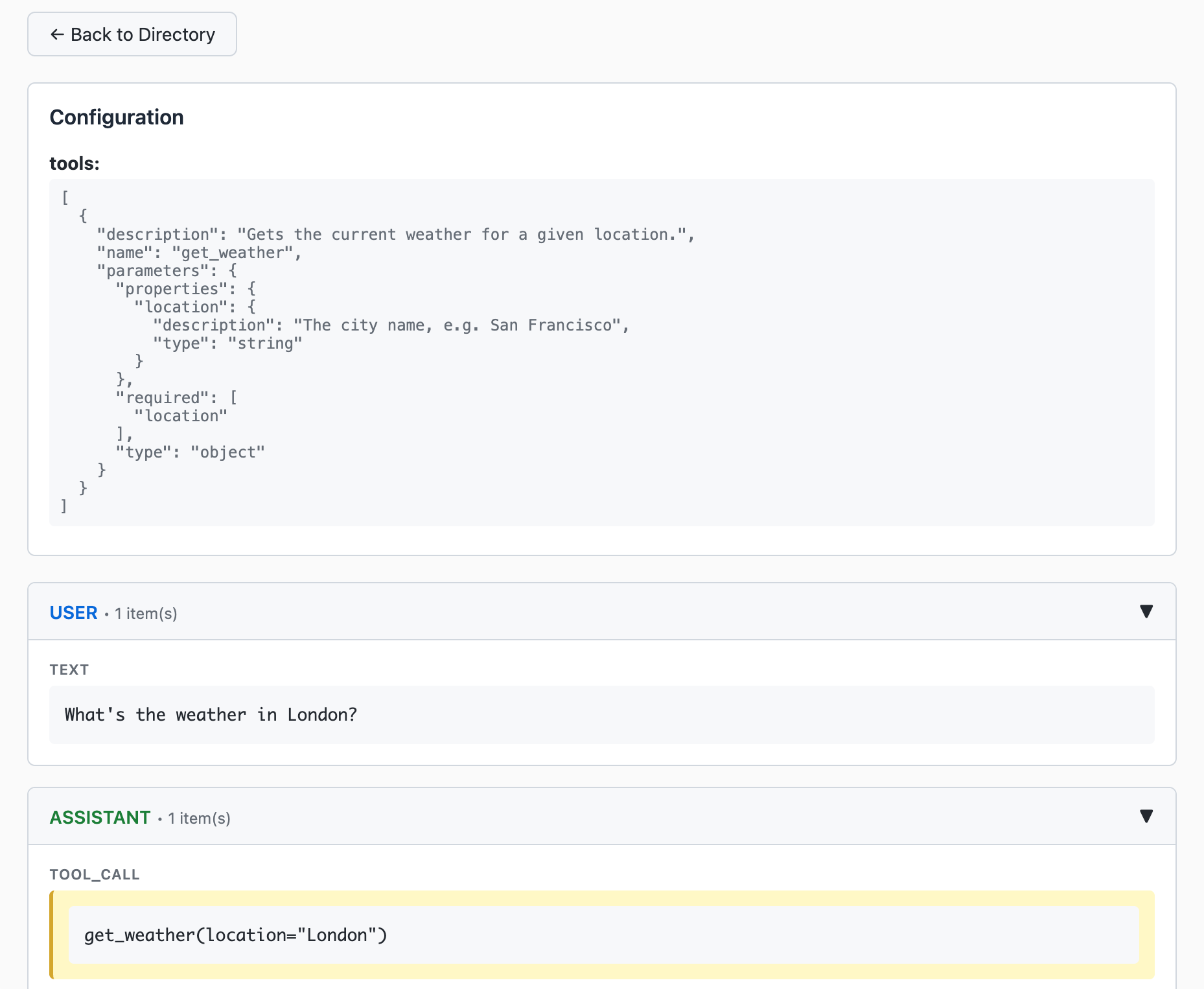
We provide a tracer to help you monitor and debug your LLM executions. You can enable tracing by setting the trace_id parameter to a unique identifier in the config object.
async for event in client.streaming_response_stateful(
    message={
        "role": "user",
        "content_items": [{"type": "text", "text": "Say 'Hello, World!'"}]
    },
    config={"trace_id": "unique-trace-id"}
):
    print(event)
from agenthub.integration.tracer import Tracer

tracer = Tracer()
tracer.start_web_server(host="127.0.0.1", port=25750, debug=False)
Then you can view the tracing output in the dashboard at http://localhost:25750/.
LLM Playground
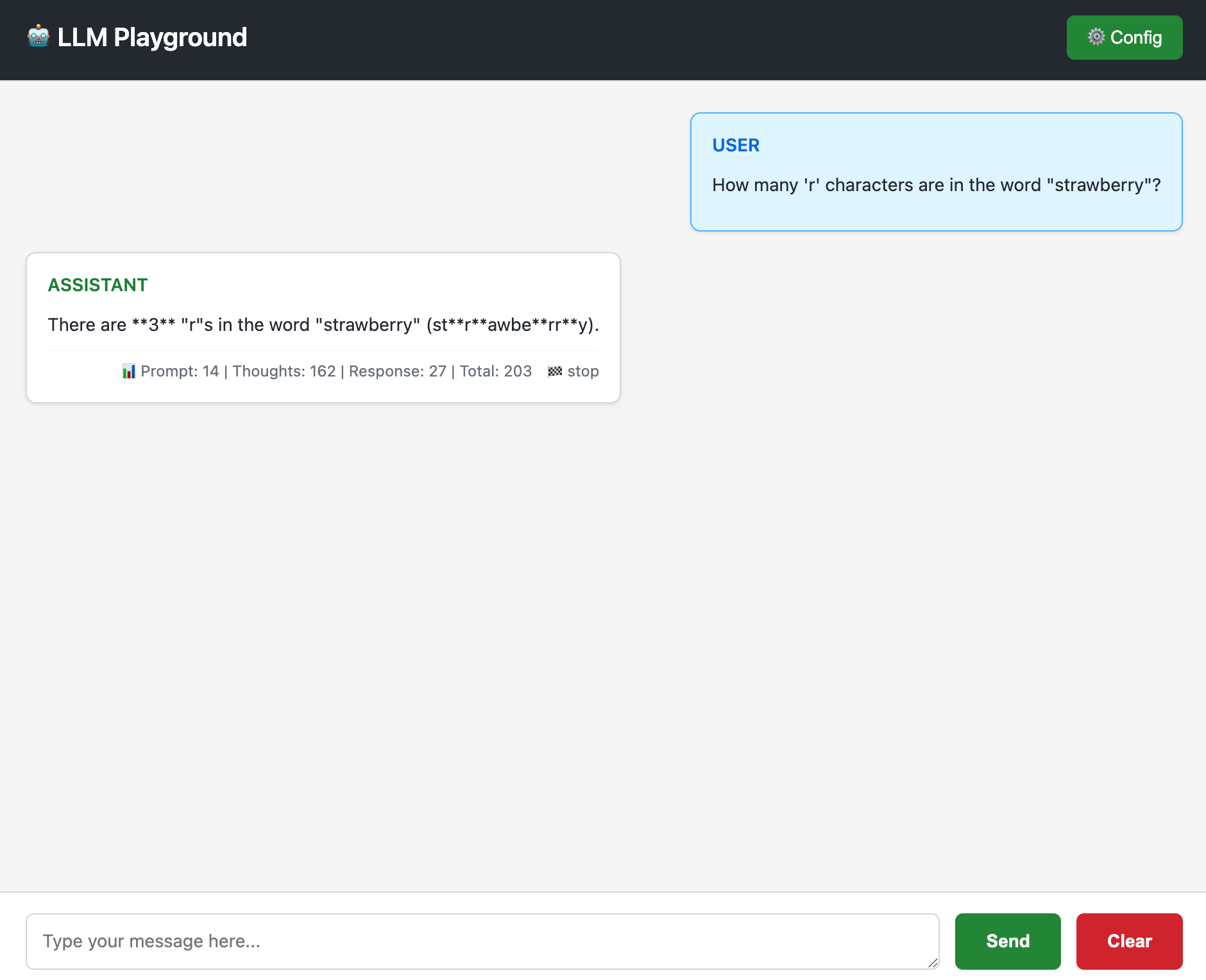
We provide a LLM playground to help you test your LLMs.
from agenthub.integration.playground import start_playground_server

start_playground_server(host="127.0.0.1", port=25751, debug=False)
You can access the playground at http://localhost:25751/.
Related Work
License
Licensed under the Apache License, Version 2.0. See LICENSE for details.
Star History
Reviews (0)
Sign in to leave a review.
Leave a reviewNo results found