travel-agent
Health Pass
- License — License: Apache-2.0
- Description — Repository has a description
- Active repo — Last push 0 days ago
- Community trust — 14 GitHub stars
Code Fail
- process.env — Environment variable access in .github/workflows/desktop-build.yml
- fs module — File system access in .github/workflows/desktop-build.yml
- exec() — Shell command execution in .pi/extensions/subagent-review/index.ts
- rm -rf — Recursive force deletion command in .pi/extensions/subagent-review/index.ts
- fs.rmSync — Destructive file system operation in .pi/extensions/subagent-review/index.ts
- process.env — Environment variable access in .pi/extensions/subagent-review/index.ts
- rm -rf — Recursive force deletion command in packages/browser-cli/package.json
- fs.rmSync — Destructive file system operation in packages/browser-cli/scripts/build-client-bundles.ts
- process.env — Environment variable access in packages/browser-cli/scripts/build-client-bundles.ts
Permissions Pass
- Permissions — No dangerous permissions requested
No AI report is available for this listing yet.
An open-source travel agent that works on real websites: plan trips, book in a browser beside the chat, stop at the payment page. Desktop app for macOS, Windows and Linux.

Travel Agent
An open-source travel agent that works on real websites.
See the app · Download · Run from source · Chrome extension · Documentation · Contribute


A browser beside your conversation
Travel Agent is a desktop travel assistant. Describe what you need, then follow the agent as
it navigates travel websites, reads pages and fills forms. The conversation and the browser are
part of the same workflow.
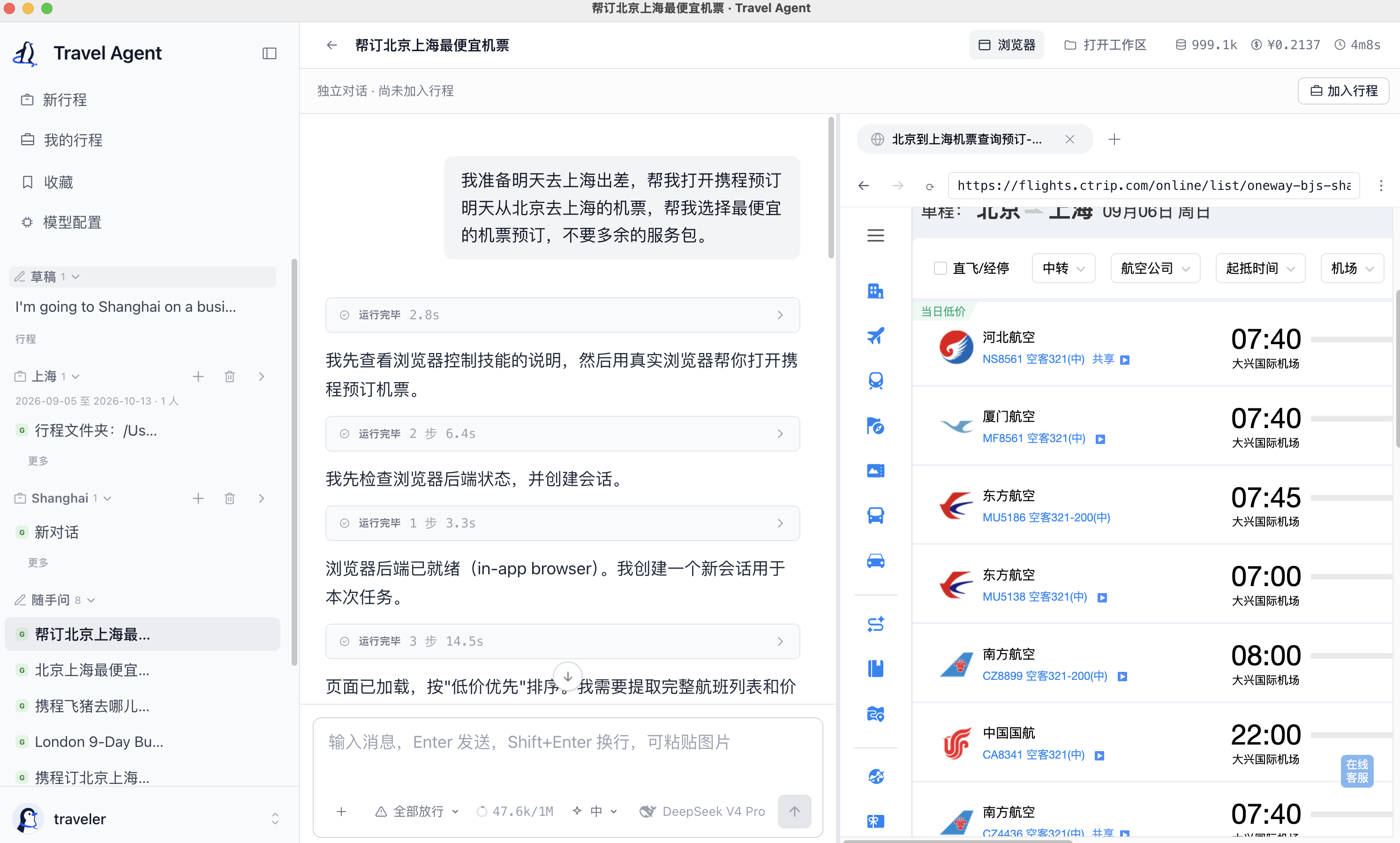
Booking flights on Ctrip with Travel Agent: describe your trip in one message and follow the agent as it searches for flights in the browser beside your conversation.
“I'm travelling from Beijing to Shanghai for work tomorrow. Help me book the cheapest flight on Ctrip, without extra service packages.”
Two ways to browse
| In-app browser · default | Your Google Chrome · optional | |
|---|---|---|
| Where the page opens | Beside the conversation in the desktop app | In your own Chrome window |
| Browser profile | The app's own browser profile | Your Chrome profile, including its website sign-ins |
| Setup | Included with the desktop app | Load the Chrome extension, then choose it in the app |
| Best fit | Work and watch the page in one window | Work with websites you already use in Chrome |
Both modes start in Travel Agent Desktop. The extension connects the agent to your Chrome;
keep the desktop app running. Choose a browser for each conversation before starting a task.
From a question to a trip
New trip opens a conversation without an upfront form. Explore an idea, ask the agent to work
on a webpage, then choose Add to trip when you want to organize it. Discuss accommodation,
transport and daily plans in separate chats within the same trip: destination, dates, travellers,
budget and shared notes carry across them, while conversation histories stay separate.
Useful conversations can also be kept in Saved.
Task demos
01 · From Xiaohongshu tips to an Amap itinerary
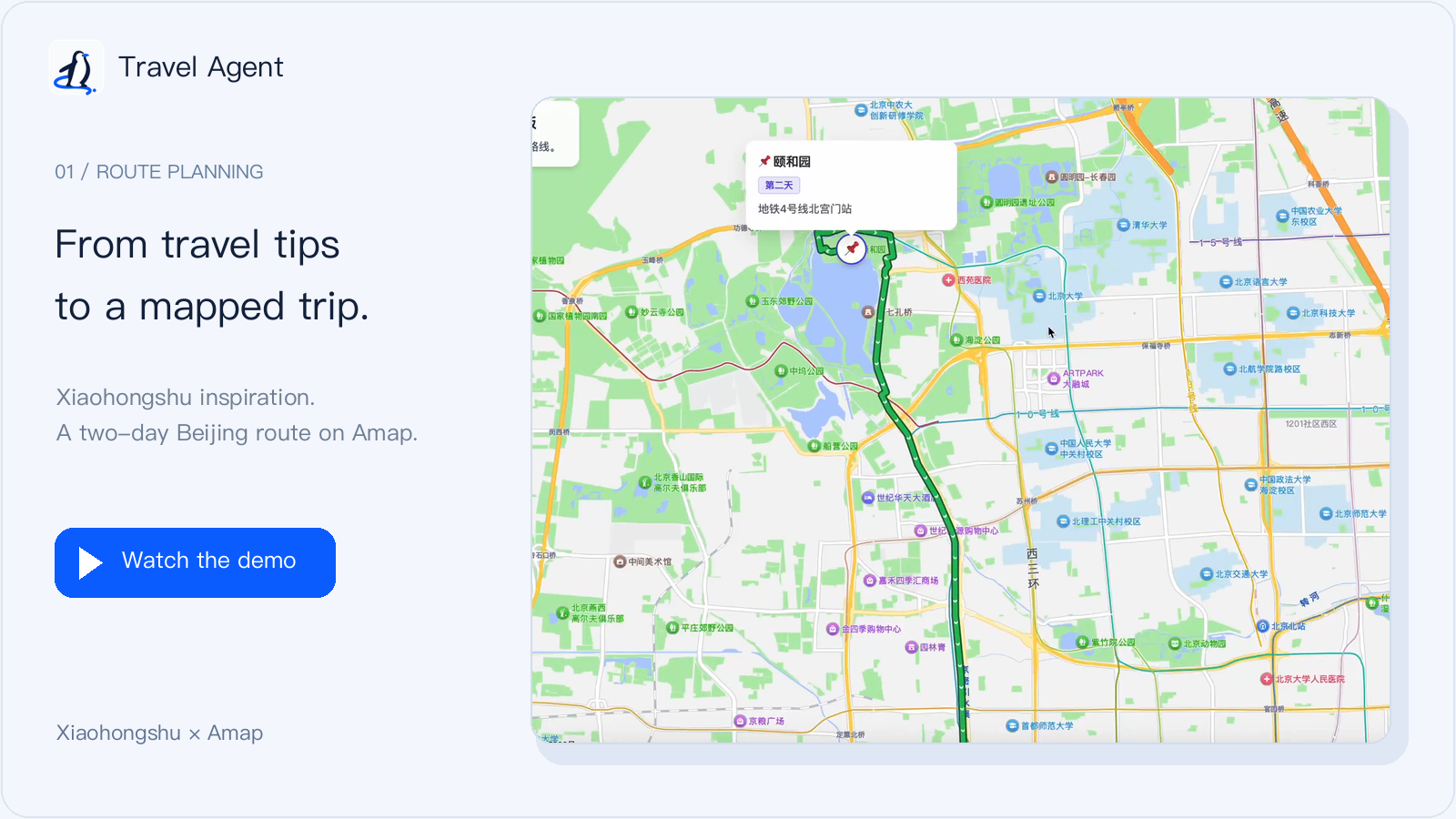
Read travel posts, organize the stops into a two-day plan, then open the generated map link.
02 · Find a hotel on Ctrip, then stop at payment
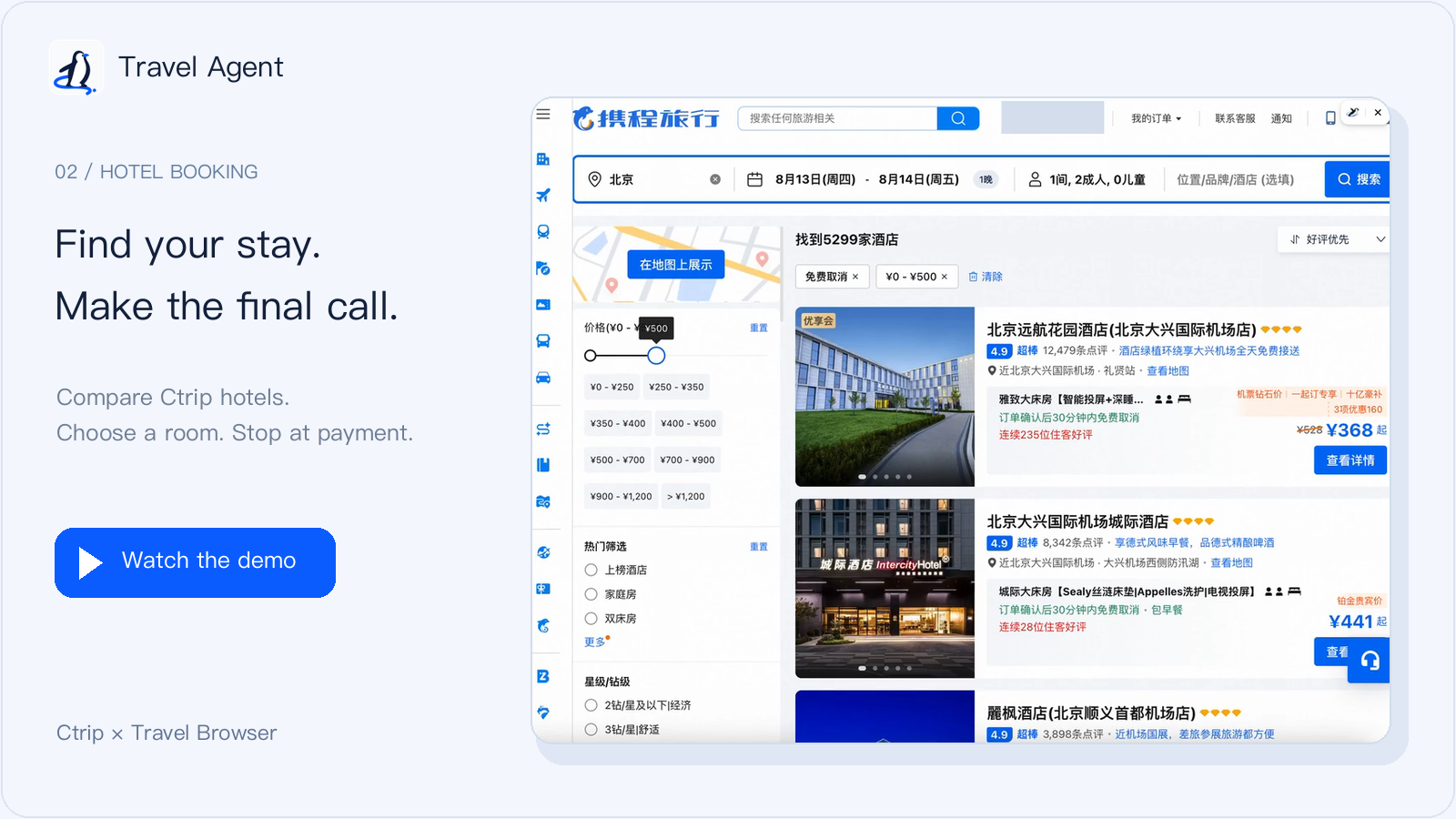
Compare hotels and room options, confirm a choice, then review the booking form. The user makes
the final payment.
Download
Desktop app · macOS, Windows and Linux · Bring your own model API key
The links below always point at the latest release;SHA256SUMS there covers every installer.
| Platform | Download |
|---|---|
| macOS (Apple Silicon) | travel-agent-darwin-arm64.dmg |
| macOS (Intel) | travel-agent-darwin-x64.dmg |
| Windows (x64) | travel-agent-win32-x64.exe |
| Linux (AppImage) | travel-agent-linux-x86_64.AppImage |
| Linux (Debian / Ubuntu) | travel-agent-linux-amd64.deb |
The builds are not code-signed yet, so both desktop platforms warn on first launch:
- macOS refuses to open the app at first ("Apple could not verify…"). Open System Settings →
Privacy & Security, find the message about Travel Agent and choose Open Anyway — or runxattr -cr "/Applications/Travel Agent.app"once in Terminal. - Windows shows a SmartScreen warning. Choose More info → Run anyway.
- Linux needs no bypass:
chmod +xthe AppImage, orsudo apt install ./travel-agent-linux-amd64.deb.
The app window signs in automatically. If you ever meet the sign-in page, every new installation
starts as traveler / traveler-2026 — change the password after your first sign-in. Then
follow steps 1–4 under Quickstart: the app needs your model API key before its
first conversation. Installed-app data lives in ~/.penguin/data.
Quickstart
Development preview · Run from source · Bring your own model API key
Install Node.js 24+ and pnpm 11, then run:
git clone https://github.com/Prism-Shadow/travel-agent.git
cd travel-agent
pnpm install
pnpm desktop
This builds the workspace and opens the desktop app with its embedded server and browser.
The app window signs in automatically; the sign-in page (for example pnpm dev in a browser)
takes the same initial credentials as an installed app, traveler / traveler-2026.
- Open Models and add your model provider's API key.
- Choose New trip. New conversations use the in-app browser by default.
- Ask the agent to open a travel page and help you explore it. Follow the webpage beside the chat.
- Choose Add to trip when you want to keep related conversations and plans together.
Source-run data lives in ~/.penguin/dev-data, separate from an installed app's ~/.penguin/data.
You can also configure ANTHROPIC_API_KEY or DEEPSEEK_API_KEY in a local .env file copied from
.env.example.
Travel Browser extension
Use your own Chrome, with the travel websites and accounts you already know. Travel Browser
connects Travel Agent to your Chrome profile so you can work with your existing website sign-ins.
Keep Travel Agent Desktop running while you use the extension.
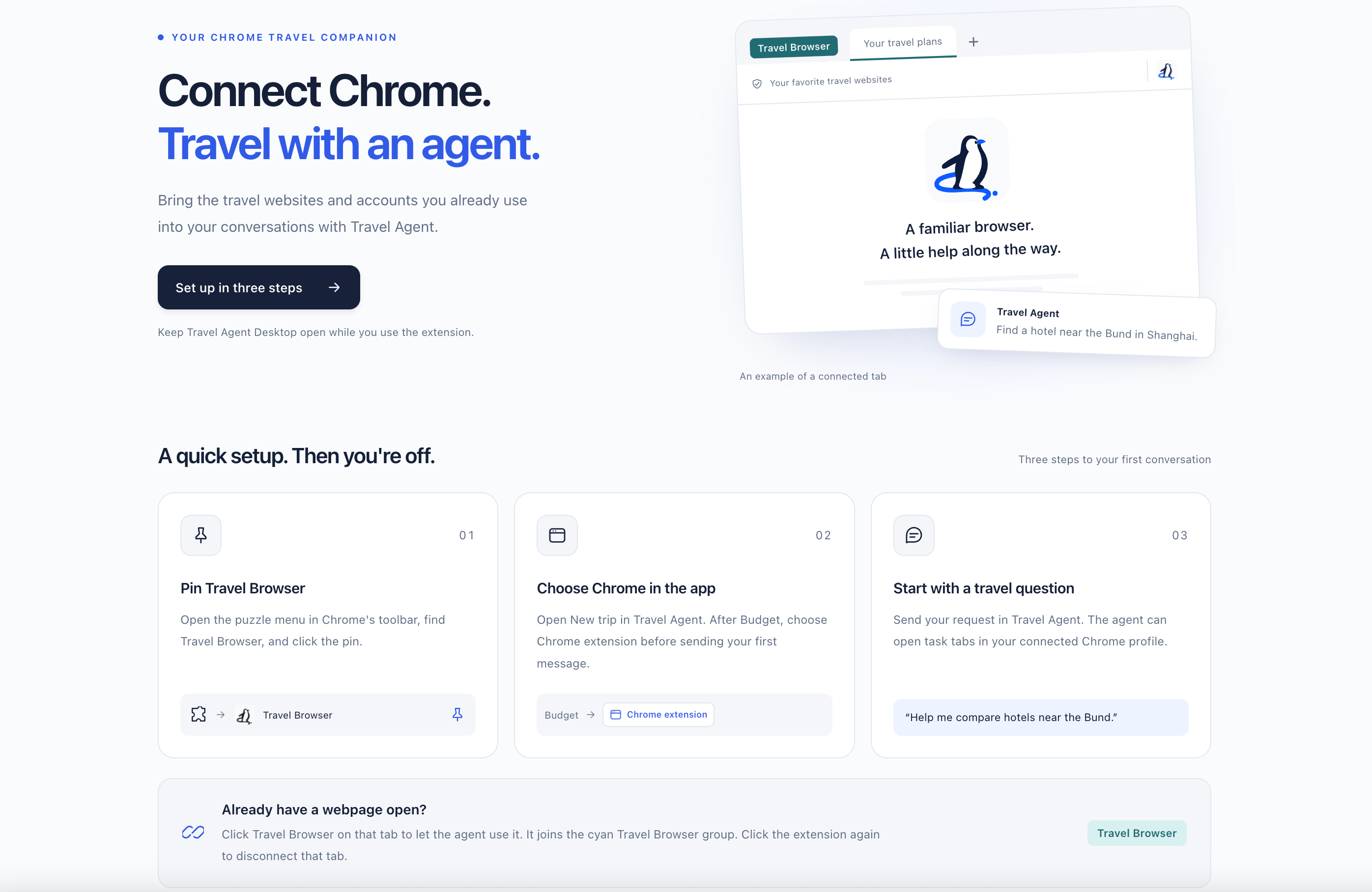
The extension's welcome guide. The browser illustration shows an example connected tab.
Install in Chrome
The extension is included in this repository and is currently loaded from source. The desktop
command in Quickstart builds it along with the app.
- In Chrome, open
chrome://extensionsand enable Developer mode. - Choose Load unpacked, then select
packages/browser-extension/distinside your checkout.
Chrome lists the extension as Travel Browser. - Open Chrome's puzzle menu and pin Travel Browser to the toolbar.
Desktop connects automatically and remembers the pairing across restarts. If multiple apps are
running, use Connection on the extension welcome page to choose one. After updating, restart
Desktop and reload the extension; Chrome may ask you to enable its local connection permission.
Start a travel task
- Open New trip in Travel Agent Desktop. Use the browser button after Budget to select
Chrome extension before your first message. - Send a request, such as “Help me compare hotels near the Bund in Shanghai.” The agent can open
task tabs in your connected Chrome profile.
For an existing chat, choose My own Chrome (extension) in the Browser panel's ⋮ menu
between tasks. New chats use the in-app browser by default.
Already have a webpage open? Click the Travel Browser icon on that tab to authorize the agent
to use it. The tab joins the cyan Travel Browser group. Click the icon again to disconnect
that tab.
After rebuilding the extension, click Reload on its card in chrome://extensions.
See the extension guide for more detail.
Your choices, your data
- You decide at payment. The booking workflow is designed around options with reasons,
your explicit selection, form filling and a stop at payment. Browser payment controls are
blocked by an unconditional gate. Complete booking-flow validation is ongoing; see the
acceptance plan. - Browser choice stays explicit. It is saved per conversation, stays fixed during a run and
never silently switches when unavailable. Choosing Chrome and authorizing an existing tab are
separate actions. - Your trip files stay on your disk. Model requests go to your configured provider, and browser
tasks contact the websites they visit. Local storage does not mean offline processing. Advanced
secret-entry capabilities remain gated pending the
runtime isolation decision.
Contributing
The active UI is shared by web and desktop. For UI development with Vite, see the
web development guide; use the desktop app to work on and validate the
complete browser-control experience. The main pieces are:
| Layer | Packages |
|---|---|
| Product UI | packages/web |
| Desktop and visible browser | packages/desktop |
| Agent runtime and application API | packages/core, packages/server |
| Browser control and Chrome bridge | packages/browser-cli, packages/browser-extension |
| Built-in skills | packages/skills |
Start with the architecture, development plan or
known issues. Keep changes focused and update the owning spec when behavior changes.
pnpm typecheck
pnpm test
pnpm format:check
Built on
Travel Agent is built on PenguinHarness.
License
Reviews (0)
Sign in to leave a review.
Leave a reviewNo results found