ratatui-skill
Health Pass
- License — License: MIT
- Description — Repository has a description
- Active repo — Last push 0 days ago
- Community trust — 15 GitHub stars
Code Pass
- Code scan — Scanned 11 files during light audit, no dangerous patterns found
Permissions Pass
- Permissions — No dangerous permissions requested
No AI report is available for this listing yet.
an agent skill that makes ai assistants build ratatui terminal uis with current apis, a deliberate design, tested code, and no filler


Make your AI assistant write Ratatui apps that actually work.
Current APIs. A deliberate design. Tested code. No filler.
Quick start · What changes · How it works · Demo · FAQ · Sponsor
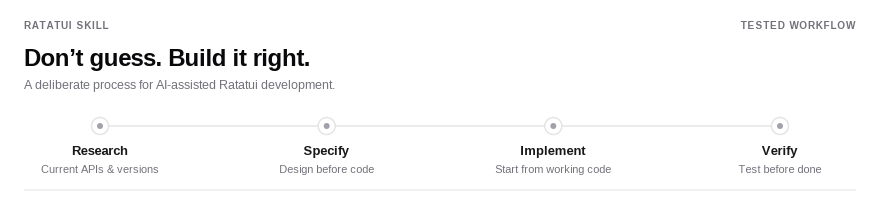
AI assistants write ratatui from memory. They reach for old APIs and wrong crate versions, then ship a UI that looks generated: neon defaults, decorative panels, keys that do nothing.
ratatui-skill replaces that with a fixed process and a tested template. The assistant looks up what is current, writes a design brief before any code, builds from a working codebase, and proves the result before it says "done".
Quick start
Copy the skill into your assistant's skills directory. For Claude Code:
mkdir -p ~/.claude/skills && cp -r skills/ratatui ~/.claude/skills/   # all projects
mkdir -p .claude/skills && cp -r skills/ratatui .claude/skills/         # one project
Ask for a terminal UI:
Use the ratatui skill. Build a simple TUI in Rust: a todo list. Add items,
mark them done, delete them, and save to a file so they're still there next time.
Watch it research versions, write a brief, build, and run its own checks.
Assistants that read AGENTS.md instead of loading skills can use the one at the repo root. It carries the same process in short form and points at the skill files.
What changes
| Without the skill | With it |
|---|---|
| Versions and APIs written from memory | Newest stable versions looked up and quoted, release notes read, uncertain calls compiled |
| Design is whatever comes to mind first | A written brief: layout, one accent color, density, keys, every empty, error and too-small state |
| Decorative panels, fake data, dead keys | Everything visible works |
One long main.rs |
State with no terminal types, rendering with no side effects, one key table |
| "Done" with nothing run | fmt, clippy, tests, screen dumps, a real pseudo-terminal run, and a slop scan |
| Silent about what was skipped | A report that names anything it could not check |
How it works
Five steps, in order- Research. Look up the newest stable version and minimum Rust version of every crate, read the release notes, confirm widget crates match the ratatui version, and compile anything uncertain.
- Design brief. Before any code: layout archetype, one accent color, density, keys, and what each empty or failed state shows, justified from the app's data.
- Build from a tested template with a strict split: state with no terminal types, rendering with no side effects, and one key table that drives input, footer hints and help.
- Verify.
cargo fmt --check, clippy with warnings denied, tests, text dumps of the screen at several sizes, a run in a real pseudo-terminal, and a slop scan. - Report honestly, including anything it could not check.
- Everything visible works. No fake data, decorative panels or dead keys.
- One key table drives input, footer hints and the
?help, so a documented key always works. - Text is measured with
unicode-width, untrusted text is sanitized, only visible rows are drawn. - Colors by role in one file, 16 ANSI colors by default,
NO_COLORrespected, no forced background, no emoji. - No
.unwrap()outside tests, no swallowed errors, no TODOs, comments say why. - Destructive actions confirm. Slow work never blocks the draw loop.
Demo
The skill was used to build todo/, a persistent todo list. It is a header and list of tasks: a adds one, Space marks it done, d then y deletes it, and every change is written to a plain text file on disk. The screenshot shows the opt-in Catppuccin Mocha theme.
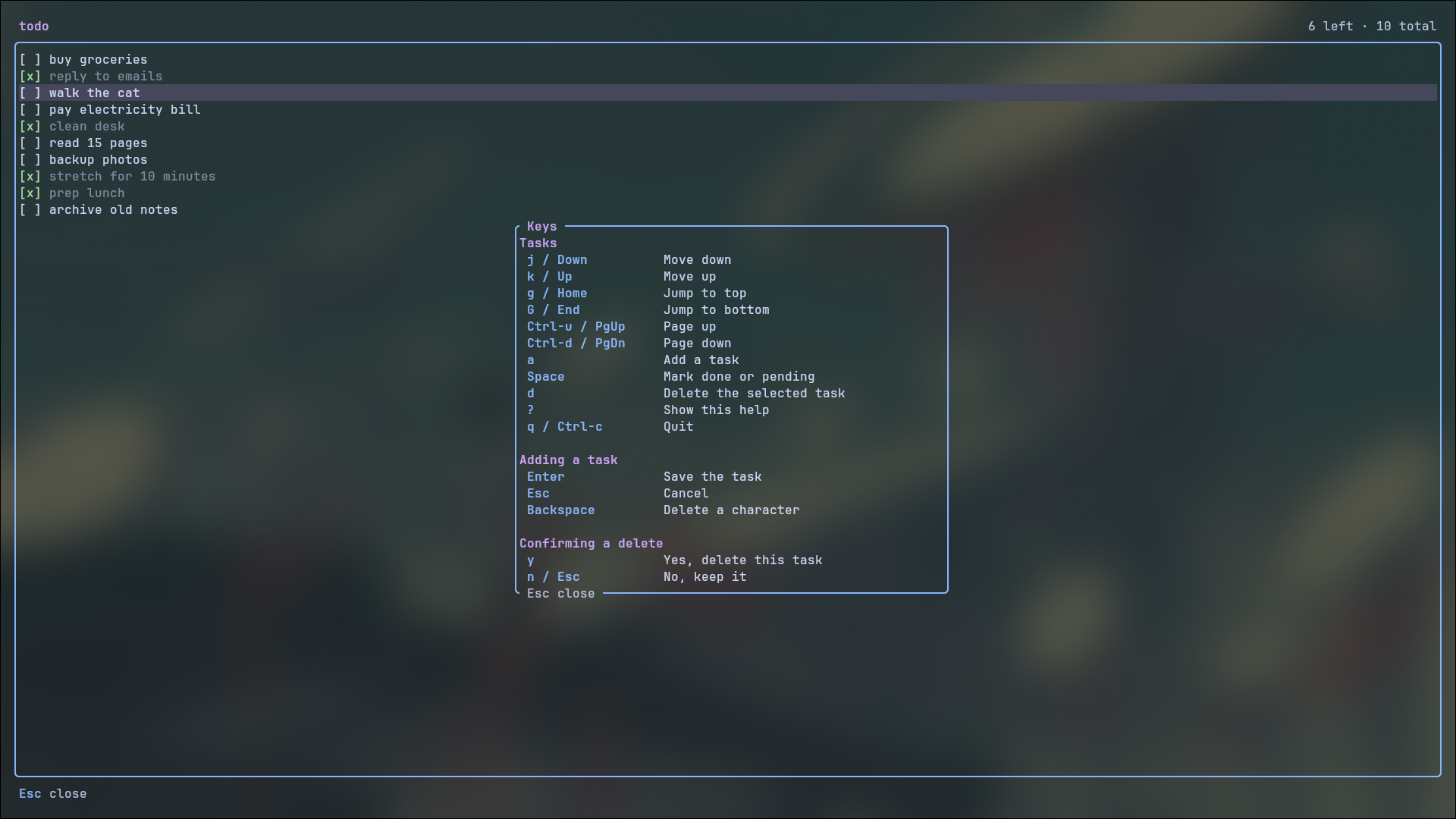
cd todo
TODO_THEME=catppuccin cargo run --bin todo
The default uses the 16 ANSI colors from your terminal palette. NO_COLOR renders monochrome. Source, keys and the file format are in todo/README.md.
What's inside
AGENTS.md                      the process in short form, for agents without skill support
assets/                        banner, demo, faq and sponsor images
docs/                          version-aware distribution proposal
evals/                         10 evaluation tasks, harness, scoring rubric, results
skills/ratatui/
  SKILL.md                     the process
  references/
    research-checklist.md      finding current versions and APIs; pitfalls found in practice
    ux-principles.md           layouts, keys, color, responsiveness
    slop-tells.md              what reads as generated, with before and after
  scripts/
    crate-versions.sh          newest stable version and MSRV from the crates.io index
    lint-slop.sh               mechanical slop scanner; exit status gates CI
    pty-smoke.py               run a TUI in a pseudo-terminal and check it behaves
  templates/dirview/           a complete ratatui 0.30 directory browser
todo/                          the demo todo app built with the skill
.github/                       issue and PR templates, sponsors, CI for both crates
The template
dirview is a working program, not a sketch: list and preview panes, filtering, sorting, hidden files, a generated help overlay, empty and error states, a too-small message, NO_COLOR, and wide-character-safe layout. It has unit tests for state and keys, headless render tests, and passes clippy with warnings denied.
cd skills/ratatui/templates/dirview
cargo run -- .
FAQ
Compatibility · Versions · Slop scan · AI-written?
Compatibility
Does it only work with Claude Code?No. Any assistant that can run commands works.
The skill format is read by assistants that support skills, and anything that
reads AGENTS.md can use the short version at the repo root. The scripts and
template are plain shell, Python and Rust.
Versions
Will it always pick the newest ratatui?It looks the version up every time instead of trusting the docs.
The versions in this repo are what the template was tested with, ratatui 0.30.2
on its minimum supported Rust version, 1.88. They are not a promise about what is newest when you read this. The skill
tells the assistant to:
- Run
crate-versions.shfor each dependency. - Read the release notes for the version it returns.
- Compile any API it is unsure about before using it.
Slop scan
Why a "slop scan"?Generated UIs are recognizable, so the scanner fails CI on the mechanical tells.
Emoji icons, neon gradients, placeholder rows and comments that narrate the code
are checked by lint-slop.sh. The rest are
judgment calls listed inreferences/slop-tells.md.
AI-written?
Is the code AI-written?Yes, with AI assistance, and verified in CI.
Every template file is compiled and tested, and the process is written down so
you can check the result yourself.
Still stuck? Open an issue or ask in Discussions.
Provenance
The tells and principles come from public discussions of AI-generated projects and from lazygit's published design principles. references/ marks where a rule is this project's own judgment. The template was built and tested with ratatui 0.30.2 at Rust 1.88. Versions in the docs are examples; the skill tells the assistant to look them up again.
Contributing
Issues and pull requests are welcome. Good first contributions: a pitfall you hit with a ratatui release, a slop tell the scanner misses, or a second template (an async dashboard is the most requested gap). Run the checks before opening a PR:
cd skills/ratatui/templates/dirview && cargo fmt --check && cargo clippy --all-targets -- -D warnings && cargo test
cd todo && cargo fmt --check && cargo clippy --all-targets -- -D warnings && cargo test
python3 skills/ratatui/scripts/pty-smoke.py target/debug/<binary>
skills/ratatui/scripts/lint-slop.sh .
If this saved you time, a star helps other people find it.
Sponsor
License
Reviews (0)
Sign in to leave a review.
Leave a reviewNo results found