RoboRun
Health Pass
- License — License: MIT
- Description — Repository has a description
- Active repo — Last push 0 days ago
- Community trust — 12 GitHub stars
Code Fail
- execSync — Synchronous shell command execution in bin/roborun.mjs
- process.env — Environment variable access in bin/roborun.mjs
Permissions Pass
- Permissions — No dangerous permissions requested
No AI report is available for this listing yet.
Quickly run and manage ROS 1/2 robots. MCP server for Claude, Cursor, or any AI client. YOLO vision, MuJoCo sim, hot-reload Python behaviors, and a merkle-sealed tamper-evident black box for every run. pip install ros-agent
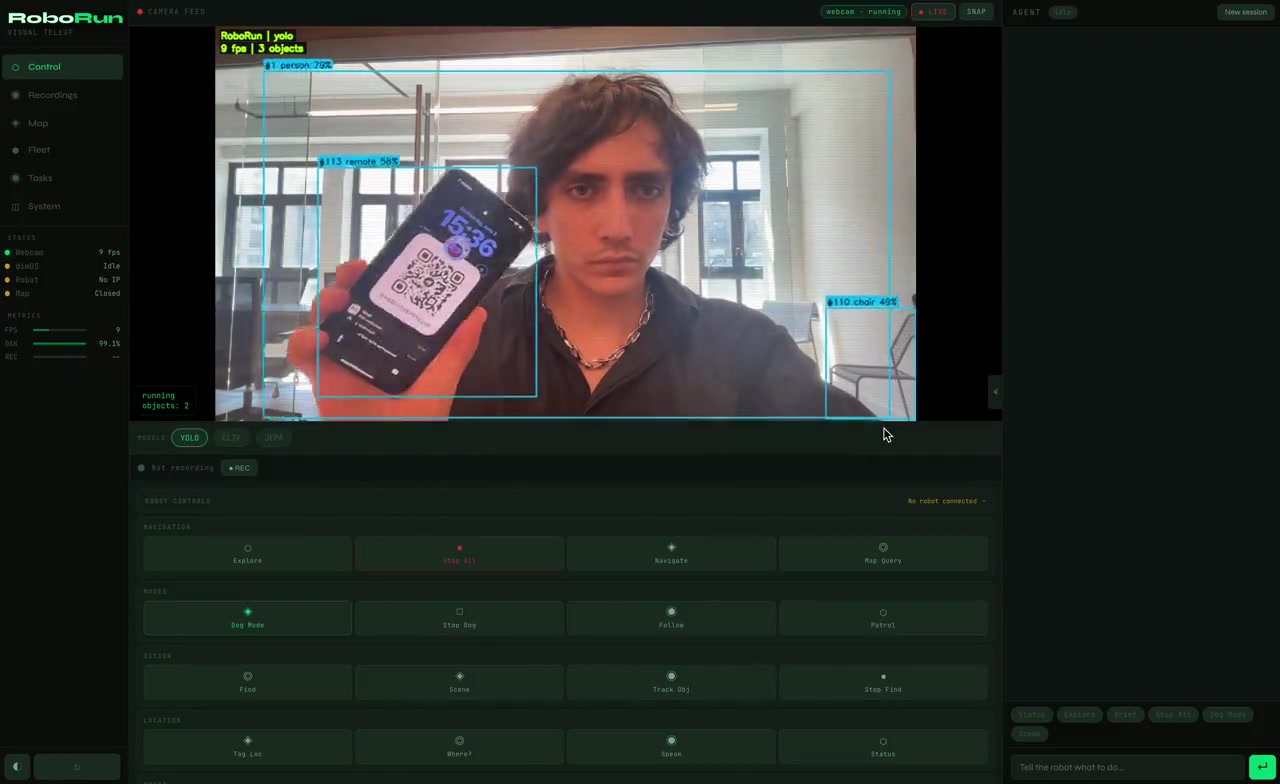
RoboRun: Write a Robot Behavior Once, Run It on Any ROS 1/2 Robot
The base layer for coding robots: see / move / ask primitives, hot-reload Python behaviors,
the same file from webcam + MuJoCo to real hardware. MCP-native for AI agents, every run flight-recorded.


60 seconds, no robot required
pip install ros-agent     # the package keeps its PyPI name; the command is roborun
roborun
The browser opens live, and a behaviors/ folder appears with the robot's brain. Two ways to give it a world: open /arena — a robot dog in a browser sim, body and eyes in the same world (what it does changes what it sees) — or point the webcam at your room and use it as a pure perception playground. Either way, the same brain:
# behaviors/follow_person.py (already running)
from roborun.behaviors import behavior

@behavior(hz=10)
def follow_person(robot):
    people = robot.see("person")
    if not people:
        return robot.stop()
    robot.move(
        forward=0.3 if people[0].h < 0.6 else 0.0,  # stop when close
        turn=-1.2 * (people[0].cx - 0.5),           # steer toward center
    )
Change 0.3 to 0.6. Save. The robot speeds up while it's running. No restart, no build, no launch files, no framework to learn. That's the whole loop: see, think, move, in a file you can read in ten seconds.
The robot handle
| Call | Does |
|---|---|
robot.see("person") |
live detections, normalized .cx .cy .w .h .label .conf |
robot.move(forward, strafe, turn) |
drives the sim or a real robot, always safety-clamped |
robot.ask("is the door open?", image=True) |
LLM with the camera frame — Anthropic/OpenAI/Gemini/local Ollama, model="fast" or "smart" |
robot.say(...) / robot.log(...) |
speak into the event timeline |
robot.think("…") / robot.thought() |
async LLM — fire at 10 Hz, collect when ready, loop never blocks |
robot.delegate("fix my search pattern") |
async LLM with tools — it can call any MCP tool, including rewriting the running policy (hot reload applies it live) |
robot.tool("navigate", x=2, y=3) |
call any MCP tool from inside the policy |
robot.lidar() |
360° ranges in meters, [0] = straight ahead |
robot.remember(k, v) / robot.recall(k) |
memory that survives restarts |
robot.state |
dict that survives across loop ticks |
@behavior(hz=10) for control loops, @behavior(every=10.0) for slow ones (LLM narration, patrol logic). Files hot-reload on save. Broken files report into the timeline and never crash the runtime: a behavior that throws keeps its slot and tells you why.
LLMs, local or online
robot.ask() is provider-agnostic and tiered. Anthropic, OpenAI, Gemini, local Ollama, or any OpenAI-compatible endpoint (vLLM, LM Studio, Groq — set OPENAI_BASE_URL); the provider is whichever API key you set, falling back to local Ollama, no SDKs required. Calls declare a tier, not a vendor — robot.ask(..., model="fast") for frequent cheap calls, model="smart" for reasoning — and you map tiers to whatever wins for you:
export ROBORUN_MODEL_FAST=ollama:llama3.2          # frequent checks stay local & free
export ROBORUN_MODEL_SMART=anthropic:claude-opus-4-8   # or openai:…, gemini:…
There's no always-on narration burning tokens. Instead there's a heartbeat: write a HEARTBEAT.md (in the project or ~/.roborun/) with your own supervision prompt and an optional every: 600 first line, and the shipped heartbeat.py behavior runs it on your schedule against live system status — behavior states, recording state — and reports into the timeline. No file, no LLM calls, zero cost.
The whole robot is also an MCP server. With roborun running, point any agent at the live endpoint:
claude mcp add --transport http roborun http://localhost:8765/mcp     # Claude Code
codex mcp add roborun -- npx -y mcp-remote http://localhost:8765/mcp  # Codex
(There's also a standalone stdio server, roborun-mcp, for driving robots without the deck — but the live HTTP endpoint is the one that sees the arena, the camera, and your behaviors. The arena page has a ⚡ CONNECT AGENT button with all the copy-paste configs.)
The black box
Press M in the flight deck (or POST /api/run/record/start) and everything — camera keyframes, YOLO detections, CLIP embeddings, agent events, pose — records into one MCAP file, the same container Foxglove Studio replays natively. As the file is written, every flushed chunk is hashed into a chain in a live sidecar, so the recording is tamper-evident while it's being written, not just after. Stopping seals it: an O(1) seal (a Merkle root over chunk hashes, signed Ed25519) whose root is anchored to an RFC 3161 trusted timestamp authority — the same mechanism behind code signing — so the proof references an external clock, not our word:
python -m roborun.recorder verify ~/.roborun/runs/local/run_20260610_120000.mcap
# VERIFIED + ANCHORED: unchanged since trusted timestamp 2026-06-10T12:01:07Z (RFC 3161)
python -m roborun.recorder clip <run.mcap> <start_ts> <end_ts>
# cuts a window + a signed proof binding those exact frames to the sealed run
One flipped byte is caught instantly, with the exact chunk and byte range named. Hash chain + SHA-256 Merkle tree + Ed25519 + a trusted timestamp: the same primitives as Git, Certificate Transparency, and code signing. The merkle root is 64 characters — share it anywhere (an email, a ticket, a printout) and anyone holding it can later prove the run wasn't quietly edited and resealed. No cloud required, works offline (verify is three-state: verified + anchored, internally consistent (unanchored) for a robot that was offline — it anchors when connectivity returns — or broken). When your robot does something weird at 3am, you replay the run and you can prove nobody edited it.
Tap mode (the telemetry_stream MCP tool) records ROS topics into the run at full rate with no LLM in the loop, over DDS direct (common message families, vendored in roborun.transport) or rosbridge.
On run close, the MCAP is extracted into a local SQLite index (indexed label search, CLIP cosine, spatial queries) and optionally exported as Parquet to R2, where embedded DuckDB queries the whole fleet — search_clip("red mug") across every robot — and robots share Ed25519-signed beacons through the same bucket. Local files and R2 only: no brokers, no database servers, nothing to operate.
What this proves: the recorded run — images, detections, and decisions included — hasn't been altered since a moment an external clock witnessed. What it doesn't prove: that the robot's sensors observed reality correctly. We're precise about this distinction on purpose.
The UI at http://localhost:8765 is the flight deck itself: live camera with YOLO boxes, the black box streaming, the live anchor badge, a command bar, and director keys. M record/seal · V verify · T tamper · R runs/replay · C sources.
Connect a real robot
roborun connect 192.168.1.42          # finds rosbridge, classifies the robot, remembers it
roborun connect 192.168.1.42 --move   # proves it: clamped 0.5s nudge, then stop
roborun connect --scan                # DDS discovery — nothing to install on the robot
If rosbridge isn't running on the robot yet, the command prints the exact two lines to run there — that's the whole setup. No ROS install on your machine. Once connected, plain roborun drives that robot and the same behaviors/*.py files now move real hardware: Unitree Go2/G1, TurtleBot, arms, drones, NVIDIA Isaac Sim, Gazebo. robot.move() goes to the sim if it's running, otherwise to the connected robot, always through the same safety clamps.
Optional extras: pip install ros-agent[vision] (YOLO + CLIP), [sim] (MuJoCo), [ros] (direct DDS), [crypto] (Ed25519 signing), [anchor] (RFC 3161 timestamping), [fleet] (R2 + DuckDB cross-robot), [all].
Skills — fork, vibecode, install from GitHub
A skill packages tools and autonomous behaviors for reuse. There's no registry to publish to — a skill is a GitHub repo:
roborun skill add someuser/their-skill     # clone, validate, pin the commit SHA
roborun skill add ./my-skill               # dev mode: symlink a local checkout
roborun skill list                         # installed skills + pin state
Install validates the skill without executing it (AST check of the required exports and the REQUIRES version range) and pins the exact commit in ~/.roborun/skills.lock. If the installed tree ever drifts from the pinned SHA, it is refused at load — vibecoded on the way in, set in stone once installed.
To write one: fork roborun-skill-template, open it in Claude Code or Cursor, and describe what you want — the template's AGENTS.md/CLAUDE.md teach the agent the whole skill API. roborun skill validate ., push, done.
Configuration
| Variable | Default | |
|---|---|---|
ROBORUN_PORT |
8765 |
Server port |
ROBOT_IP |
unset | Robot IP (or set in UI) |
ANTHROPIC_API_KEY |
unset | robot.ask() + built-in Claude agent |
OLLAMA_MODEL |
llama3.2 |
Local model for robot.ask() |
ROBORUN_BEHAVIOR_PATHS |
unset | Extra behavior directories (comma-separated) |
ROBORUN_AUTOSTART |
1 |
Autostart camera/sim on boot |
ROBORUN_MAX_LINEAR_VEL |
1.0 |
Safety clamp, m/s |
ROBORUN_MAX_ANGULAR_VEL |
1.5 |
Safety clamp, rad/s |
Why this instead of a robot framework
Robot frameworks make you learn their world first: module systems, typed streams, blueprints, launch graphs, all before the robot does anything. roborun inverts it. The robot is already running, and you change its mind by saving a file. Python you already know, hot-reloaded, with vision, an LLM, and motion in one handle, plus a cryptographic record of everything it did.
Contributing
git clone https://github.com/publu/RoboRun.git && cd RoboRun
pip install -e ".[all]"
python -m roborun.server
pytest tests/
MIT. Built by Manifest Intelligence, Inc.
Reviews (0)
Sign in to leave a review.
Leave a reviewNo results found