MCPanel
Health Warn
- License — License: MIT
- Description — Repository has a description
- Active repo — Last push 0 days ago
- Low visibility — Only 7 GitHub stars
Code Pass
- Code scan — Scanned 12 files during light audit, no dangerous patterns found
Permissions Pass
- Permissions — No dangerous permissions requested
No AI report is available for this listing yet.
Lightweight desktop app for managing local MCP servers. Postman for MCP. Tauri + Rust, ~7 MB.
MCPanel
A lightweight desktop app for managing local MCP (Model Context Protocol) servers: "Postman for MCP." No Electron, no bundled runtime, ~7 MB binary.
MCP servers are the small stdio programs that give AI clients access to tools. Today you babysit them with raw terminals, hand-edited JSON configs, and zero visibility. MCPanel gives you a control panel instead.
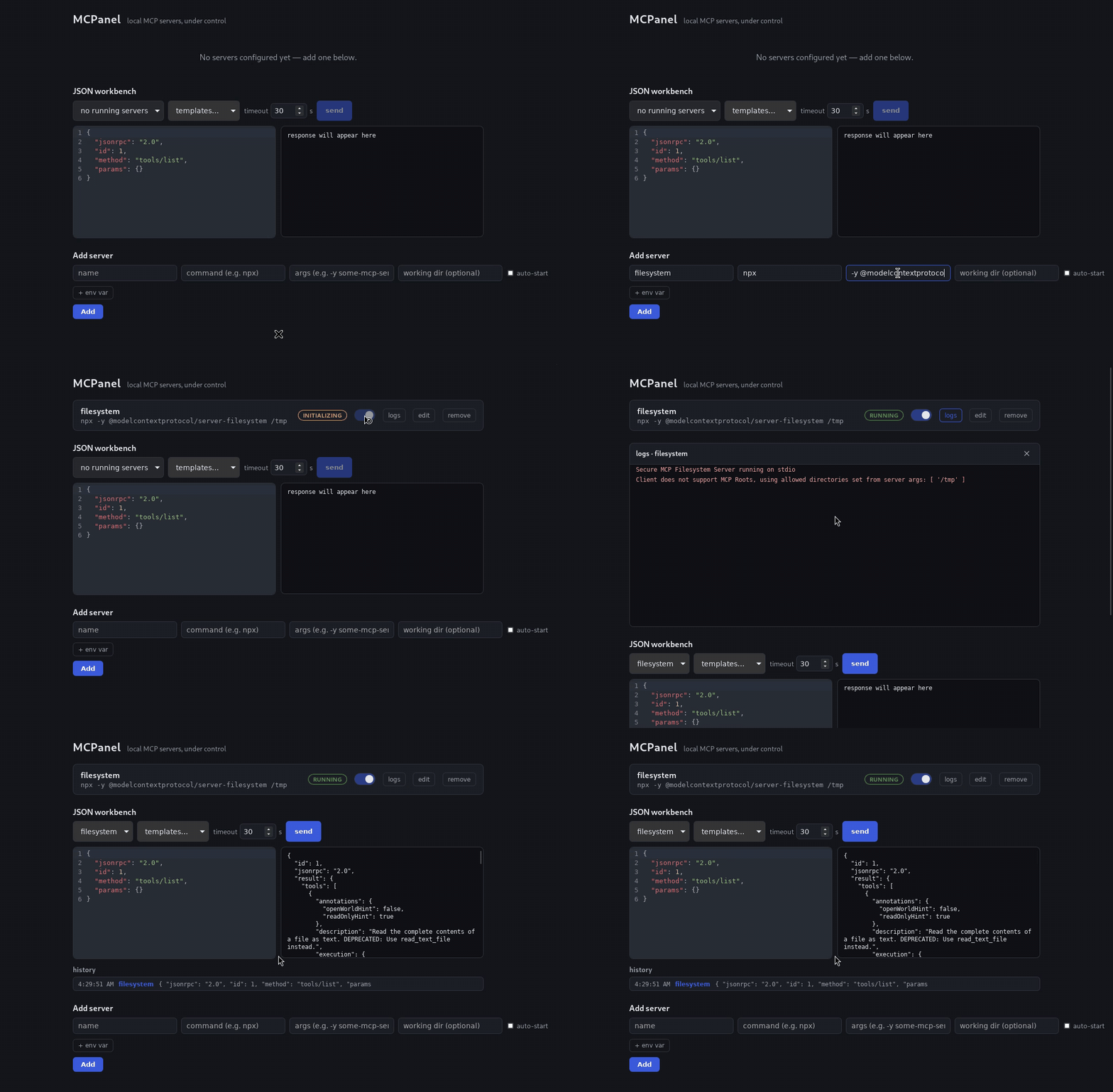
Features
- Import from the clients you already use. MCPanel reads the MCP servers already configured in Claude Desktop, Claude Code, Cursor, VS Code, and Windsurf, and offers them for import — no retyping. Credential-looking environment variables are moved straight from those plaintext config files into your OS keyring on the way in.
- Service-style toggles. Flip a server on and MCPanel spawns the process and completes the MCP
initializehandshake before showing it as running. "Running" means it's genuinely ready for tool calls, not just "the process exists." - Live log streaming, flood-proof. stdout/stderr of every server, line by line, ANSI escapes stripped. Oversized lines are capped at 64 KiB and bursts beyond the buffer are counted and reported as dropped, so a misbehaving server logging thousands of lines per second can't freeze the UI.
- Tools browser. Pick a running server and its tools are listed; pick a tool and its
inputSchemabecomes a form — strings, numbers, booleans, enums as the right controls, anything richer as a JSON field — with strict typing on the way out ("12abc"is not a number,1.5is not an integer, an empty optional is omitted rather than sent as""). Call it and read the result as text, not as an envelope. This is the "Postman" part. - Raw JSON-RPC editor. One tab over: a CodeMirror editor to hand-craft any request and inspect the exact response. Every tool call lands in the shared history as the JSON-RPC it amounted to, and open in editor hands a tool's request over for tweaking.
- No orphaned processes. Servers are spawned into Unix process groups with PDEATHSIG (Linux) or Windows Job Objects with kill-on-close. If MCPanel exits or crashes, the servers it started die with it.
- Sane secrets handling. API keys live in the OS credential manager (Keychain / Windows Credential Manager / Secret Service), never in plaintext config. They're resolved only at spawn time and never appear in logs or events.
Install
Grab the latest build from Releases.
Heads up: builds are currently unsigned. Your OS will complain the first time. This is expected for a young open-source project; code signing certificates are on the roadmap.
macOS (Apple Silicon & Intel)
Download the .dmg. Gatekeeper will likely claim the app is "damaged and can't be opened." It isn't; that's macOS's message for unsigned downloads. Either:
Right-click the app → Open → Open in the dialog, or
remove the download quarantine attribute:
xattr -d com.apple.quarantine /Applications/MCPanel.app
Windows
Download the .msi or .exe installer. SmartScreen will warn on first run: click More info → Run anyway.
Linux
Download the .deb, .rpm, or .AppImage. The AppImage needs no install: chmod +x and run. The deb/rpm packages pull in the WebKitGTK runtime automatically.
Quickstart
- Launch MCPanel and click Import… — if you already run MCP servers in another client, they're listed and ready to bring over. Otherwise click Add server.
- Enter the command and args, e.g.
npxwith args-y @modelcontextprotocol/server-filesystem /tmp. - Add env vars if the server needs them; mark API keys as secret and they go straight to the OS keyring.
- Flip the toggle. Watch the status walk Starting → Initializing → Running while logs stream in below.
- In the workbench, pick a tool from the list, fill in its inputs, and click call. Switch to Raw JSON-RPC when you want to hand-craft the request yourself.
That's it: you now have a supervised MCP server with live logs and a request console.
Build from source
Linux prerequisites:
sudo apt install libwebkit2gtk-4.1-dev build-essential libxdo-dev libssl-dev \
  libayatana-appindicator3-dev librsvg2-dev
Then (Rust stable ≥ 1.95 and Node 20+ required):
npm ci && npm run build        # required once before any cargo command:
                               # the Tauri build embeds dist/ at compile time
npm run tauri dev              # dev app: vite on :1420 + the Rust backend
Tests and checks:
cargo test   --locked --manifest-path src-tauri/Cargo.toml
cargo clippy --locked --manifest-path src-tauri/Cargo.toml --all-targets -- -D warnings
npm test && npm run lint && npm run typecheck
Security model
The UI talks to the backend over a local HTTP gateway. In short:
- The gateway binds
127.0.0.1on an ephemeral port, never an external interface. - Every request needs a random 32-byte bearer token, generated fresh per launch, held in memory only, and compared in constant time.
- The
Hostheader is validated against the bound address to block DNS-rebinding attacks. - CORS is pinned to the app's own webview origins, so browsers can't script against the gateway.
- Secrets are resolved from the OS keyring just-in-time at process spawn; they are never written to config, events, or logs.
Found a vulnerability? See SECURITY.md and please report privately.
Importing from other clients
Import… scans the standard config locations for Claude Desktop, Claude Code
(~/.claude.json), Cursor, VS Code, and Windsurf. If yours lives somewhere else
— a project-local .mcp.json, say — paste its path into the dialog.
- Only stdio servers can be imported. Entries with a
urlor anhttp/sse
transport are listed with the reason they were skipped rather than silently
dropped; see the limitation below. - Credentials go to the keyring, not to MCPanel's config. Environment
variables whose names look like credentials (*_TOKEN,*_API_KEY,*_SECRET,*_PASSWORD, …) are written to the OS credential manager and
stored here only as a marker. Their values are read from the source file
backend-side and never reach the UI. - Nothing is overwritten. A name that's already taken is imported as
name (2), and the dialog says so before and after. Imported servers are
never armed to auto-start. - Your original config is untouched. Import only reads.
Known limitations
- Import covers stdio servers only. Remote (
http/sse) MCP servers in a
client's config are reported as skipped, because MCPanel itself speaks stdio
only — remote transport support is on the roadmap. - On Unix, if MCPanel itself is SIGKILLed, a reparented grandchild process can survive (PDEATHSIG covers direct children only). Normal exits and crashes are fully covered.
- Windows graceful shutdown is compile-verified but untested on real hardware and likely degrades to grace-then-terminate. Windows testers wanted: if you can try it on a real box, open an issue with what you find.
Contributing
See CONTRIBUTING.md for setup, test commands, and PR conventions. Scoped changes, one concern per PR.
License
MIT © Oussema Taleb
Reviews (0)
Sign in to leave a review.
Leave a reviewNo results found