mainframe
Health Warn
- License — License: MIT
- Description — Repository has a description
- Active repo — Last push 0 days ago
- Low visibility — Only 5 GitHub stars
Code Fail
- fs.rmSync — Destructive file system operation in .github/workflows/prepare-release.yml
- fs module — File system access in .github/workflows/prepare-release.yml
Permissions Pass
- Permissions — No dangerous permissions requested
No AI report is available for this listing yet.
AI-native development environment for orchestrating agents
Mainframe
AI-native development environment for orchestrating agents


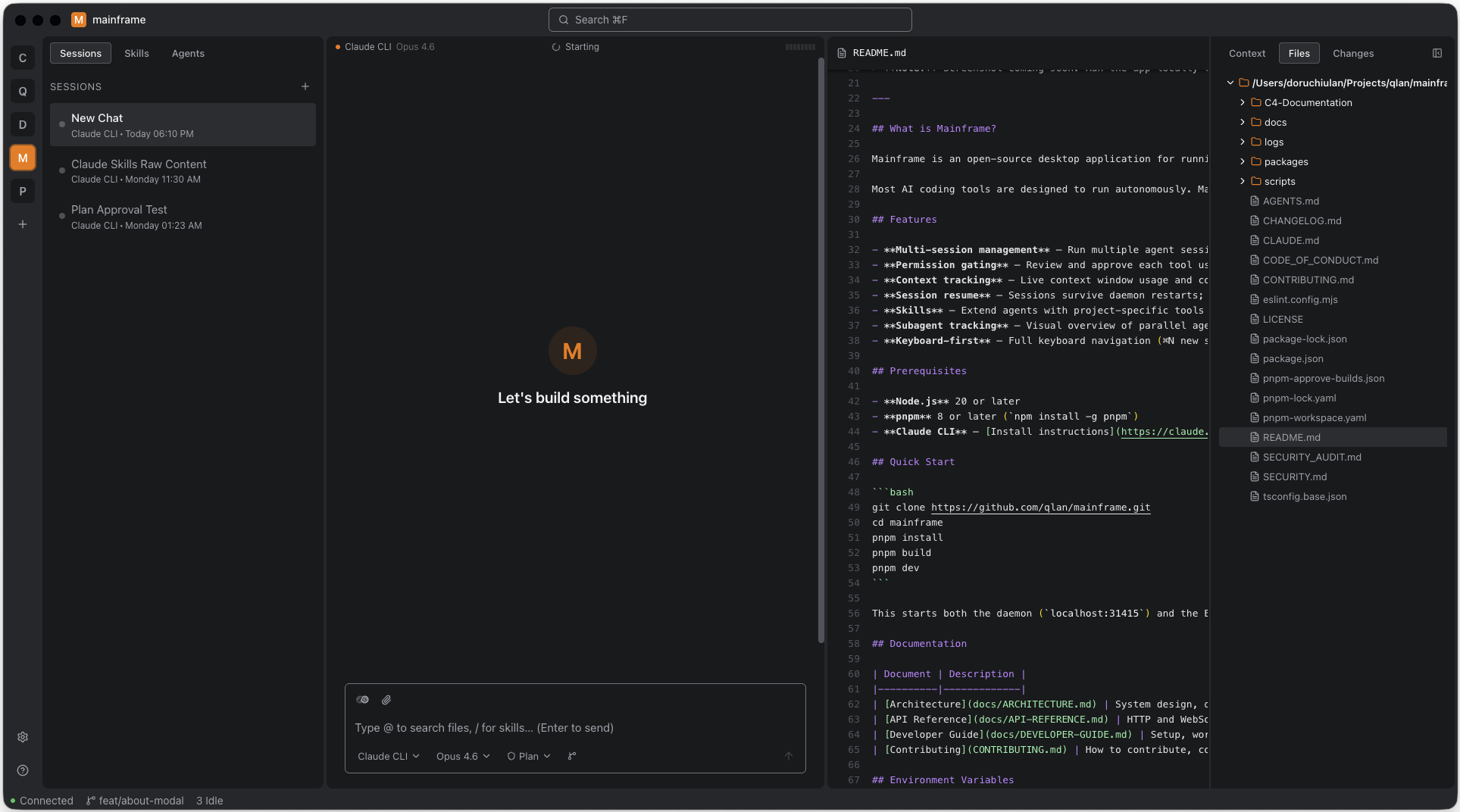
What is Mainframe?
Mainframe is an open-source desktop app that brings all your AI coding agents into one interface. Instead of juggling terminal windows, switching between your IDE and CLI, and losing track of what each agent is doing across projects — Mainframe gives you a single place to manage it all.
AI CLI tools are powerful, but they live in the terminal. Mainframe adds the layer terminals can't: visual file editing, live sandbox previews, task management, cross-project session history, and a mobile companion for working on the go.
Work in progress. Mainframe is under active development — some features are incomplete and the mobile companion app is not yet published. Expect rough edges.
Features
- Unified provider interface — One app for Claude, Gemini, and other AI coding agents — switch providers without changing your workflow
- Multi-project session management — Run sessions across multiple projects with instant context switching and full session history
- In-app file editing — View and edit files, diffs, and code directly in Mainframe without switching to your IDE
- Sandbox preview — Launch dev servers and preview your app with a built-in browser and inspector for adding precise context
- Task management — Integrated kanban board to track agent work and your own todos alongside sessions
- Content referencing — @-mention files, add context on diff viewer, add context from the file editor, to give agents exactly the context they need
- AI tools management — Makes sure your project is AI ready. Handling Subagents, Skills, MCPs, context files.
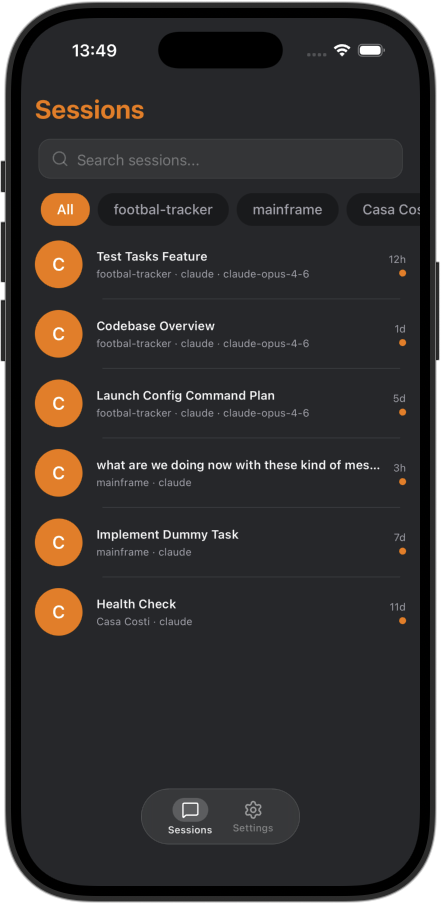
- Mobile companion — Monitor and interact with your sessions from your phone — review, approve, and respond on the go
- Extensible plugin system — Add UI panels, databases, event listeners, and new AI adapters through a capability-based plugin API
- API-first daemon — Run the daemon standalone and build your own UI, integrations, or automations on top of its HTTP and WebSocket API
Getting Started
Desktop App
Download the latest release for your platform from GitHub Releases.
Daemon Only
Install the standalone daemon if you want to run it headless or build your own interface:
curl -fsSL https://raw.githubusercontent.com/qlan-ro/mainframe/main/scripts/install.sh | bash
Remote Access (e.g. Mobile App)
The mobile companion app and any remote access require a Cloudflare Tunnel — a secure outbound connection from your machine to Cloudflare's edge, so you don't need to open ports or configure a firewall.
- Desktop app: Enable the tunnel from Settings → Tunnel.
- Standalone daemon: Set
TUNNEL=truewhen starting the daemon, or configure it in~/.mainframe/config.json.
See the Cloudflare Tunnel guide for named tunnels with a persistent URL, self-managed setups, and troubleshooting.
Mobile Companion App
Pairing with your desktop:
- Open the desktop app and go to Settings → Devices → Pair New Device
- A pairing code (and QR code) appears on screen
- Open the mobile app, tap Connect, and scan the QR code or enter the code manually
- The daemon issues a token — your phone is now paired and can send messages, respond to permissions, and receive push notifications
Pairing from the CLI (headless/daemon-only):
mainframe-daemon pair
This prints a pairing code to the terminal. Enter it in the mobile app to complete pairing.
Prerequisites
Mainframe orchestrates AI coding agents — you'll need at least one installed:
- Claude CLI (requires a Claude account)
- cloudflared (optional — only needed for remote/mobile access via tunnel)
Development
See the Developer Guide for full setup instructions.
git clone https://github.com/qlan-ro/mainframe.git
cd mainframe
pnpm install && pnpm build && pnpm dev
Configuration
Env vars override ~/.mainframe/config.json, which overrides defaults.
| Variable | Default | Description |
|---|---|---|
DAEMON_PORT |
31415 | Daemon HTTP + WebSocket port |
VITE_PORT |
5173 | Vite dev server port |
MAINFRAME_DATA_DIR |
~/.mainframe |
Data directory (DB, config, plugins, logs) |
LOG_LEVEL |
info | Logging verbosity |
AUTH_TOKEN_SECRET |
auto-generated | JWT signing secret for mobile pairing |
TUNNEL |
— | Set true to enable Cloudflare tunnel |
TUNNEL_URL |
— | Named tunnel URL |
TUNNEL_TOKEN |
— | Cloudflare tunnel token |
VITE_DAEMON_HOST |
127.0.0.1 |
Daemon host for desktop renderer |
VITE_DAEMON_HTTP_PORT |
31415 | Daemon HTTP port for desktop renderer |
VITE_DAEMON_WS_PORT |
31415 | Daemon WebSocket port for desktop renderer |
See the Developer Guide for details on IntelliJ run configurations and precedence.
| Document | Description |
|---|---|
| Architecture | System design, data flow, package breakdown |
| API Reference | HTTP and WebSocket API for the daemon |
| Developer Guide | Setup, workflow, monorepo conventions |
| Plugin Developer Guide | Build plugins: manifest, APIs, UI panels, events |
| Contributing | How to contribute, code standards, PR process |
Plugin System
Mainframe is built to be extended. Plugins can add UI panels, store data in isolated databases, listen to daemon events, expose HTTP endpoints, and even register new AI CLI adapters.
What ships built-in:
- Claude adapter — the Claude CLI integration is itself a plugin
- Task board — the kanban task manager is a plugin with its own database, attachment storage, and fullview panel
Build your own: Write a manifest.json declaring your capabilities, export an activate() function in index.js, and drop it in ~/.mainframe/plugins/. The daemon loads it on startup.
See the Plugin Developer Guide for the full API reference — manifest schema, database access, UI zones, event bus, attachments, config, services, and adapter integration.
We welcome plugin contributions. If you've built something useful, open a PR to include it as a builtin or share it with the community.
Contributing
See CONTRIBUTING.md. Bug reports and feature requests go in GitHub Issues.
License
MIT — © 2026 Mainframe Contributors
Reviews (0)
Sign in to leave a review.
Leave a reviewNo results found