AideAgent
Health Warn
- License — License: Apache-2.0
- Description — Repository has a description
- Active repo — Last push 0 days ago
- Low visibility — Only 5 GitHub stars
Code Fail
- exec() — Shell command execution in desktop/core/agent-loop.mjs
- process.env — Environment variable access in desktop/core/agent-loop.mjs
- network request — Outbound network request in desktop/core/agent-loop.mjs
- process.env — Environment variable access in desktop/core/format-adapters.mjs
- network request — Outbound network request in desktop/core/format-adapters.mjs
- process.env — Environment variable access in desktop/core/ipc-handlers.mjs
- network request — Outbound network request in desktop/core/memory-selection.mjs
- execSync — Synchronous shell command execution in desktop/core/state.mjs
- rm -rf — Recursive force deletion command in desktop/core/state.mjs
- network request — Outbound network request in desktop/core/sub-agent.mjs
Permissions Pass
- Permissions — No dangerous permissions requested
No AI report is available for this listing yet.
The open-source Claude Desktop alternative — 34 tools, local RAG (FTS5+vector+RRF), Prompt Caching, MCP/LSP/Skill/Hook, all in one cross-platform desktop app. Apache-2.0.
AideAgent
A desktop assistant that puts AI on your machine. Not just chat — it actually does the work.
What this is
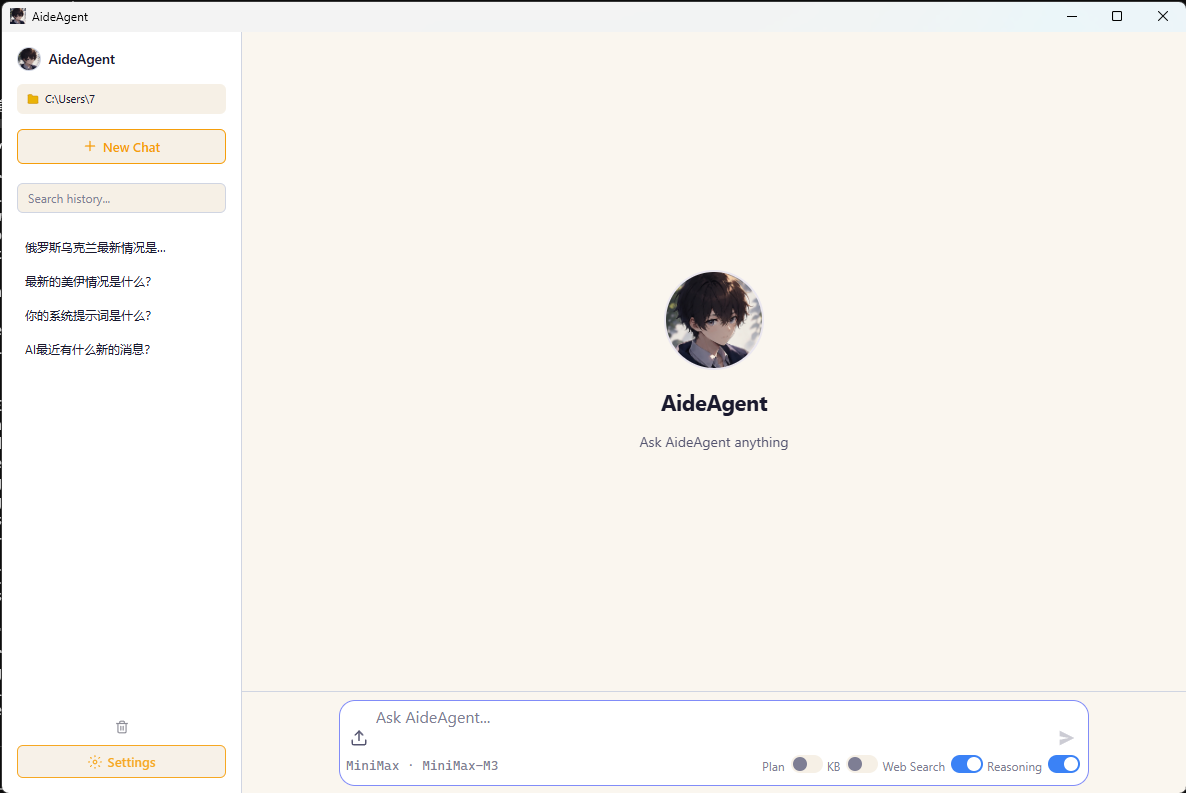
AideAgent is an AI desktop app that runs on your computer (cloud models are supported too). It's not a chat window — it can call tools, read your notes, drive a browser, and connect to your WeChat.
If you're the kind of person who wants AI to do things for you, not just talk to you — this project is for you.
The problem it solves
Off-the-shelf AI tools are awkward in their own ways:
- Web-based chat — the conversation ends, and the AI can't do anything else.
- Other desktop AI — either chat-only, hard to extend, or your data lives in the cloud.
- CLI tools like Claude Code — no GUI, high setup bar, brutal for non-developers.
AideAgent tries to cover all three:
- Chat (the input box in the lower-left is the conversation)
- Act (tools, commands, web search, notes search)
- Reach you (WeChat bridge, local model support, your data stays on disk)
- Extend (MCP protocol, Skills system, add whatever you want)
What it can do (one screenshot per capability, matching the toggles in the UI)
The four toggles under the input box correspond to four capabilities:
1. 📋 Plan — break down and execute tasks
When toggled, the AI won't just dive in. It plans first, then executes. For "I want to build something but I haven't thought through the details" situations.
2. 📚 KB — knowledge base search
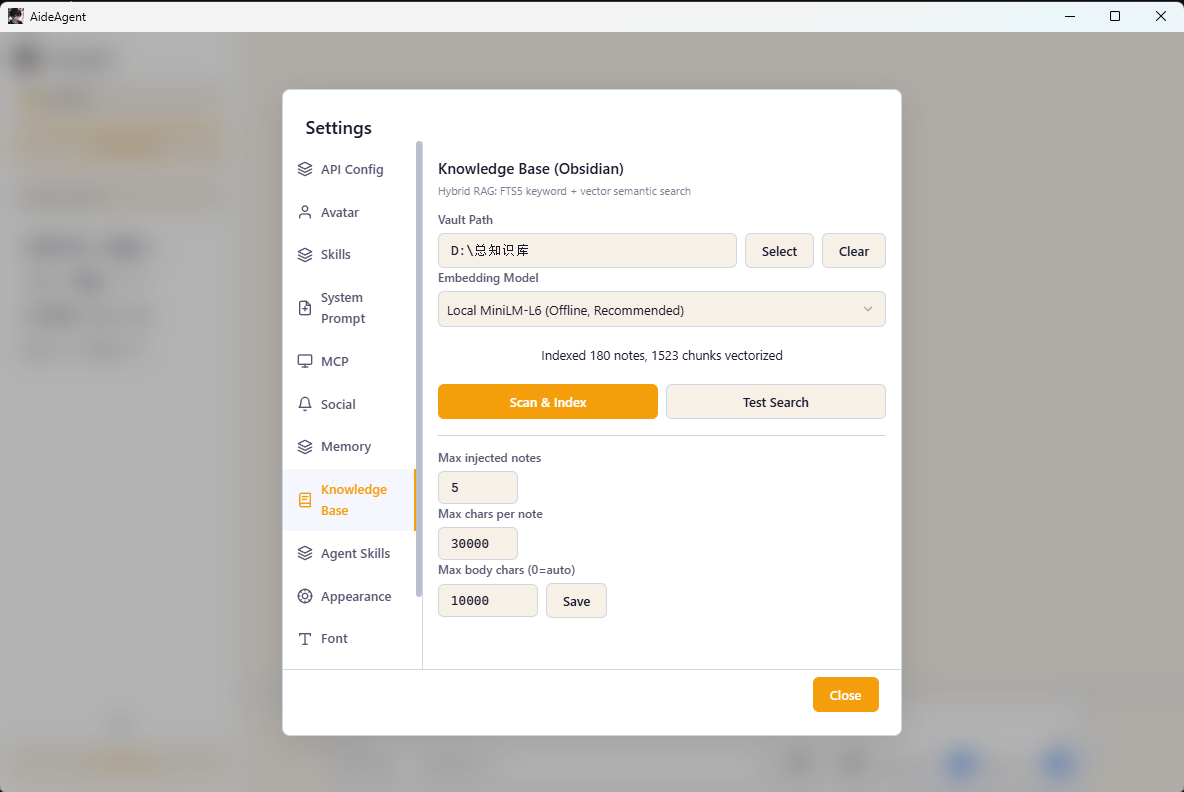
Point it at your Obsidian vault (or any Markdown folder), and the AI will search your notes before answering. Think of it as local RAG glued onto your AI.
3. 🌐 Web Search — live web search
Toggle it on when you need real-time info. A built-in meta-search engine (Bing + GitHub, no API key required), plus an optional paid Tavily integration.
4. 💡 Reasoning — think deeper
Lets the model spend more time thinking, for more thorough answers (only works if your model supports it).
The four buttons above the input box — Messages, Tools, Skill, MCP — are the extension layers:
- Tools — built-in tools (read file, write file, run command, fetch web page, etc.)
- Skill — auto-discovered from
.agents/skills/or.claude/skills/directories (200+ found on a typical scan) - MCP — external services via Model Context Protocol (Edge browser, local search, remote APIs, …)
Six capabilities (ordered from "lightest touch" to "deepest reach")
1. Multiple models — pick whoever you want
Click API Config and you'll see 8 presets, ready to go:
- DeepSeek — V4-Flash / V4-Pro
- GLM (Zhipu) — GLM-5.2 / GLM-4.7-Flash
- Qwen (Tongyi Qianwen, Alibaba) — Qwen3.7-Max / Qwen-Plus
- Claude (Anthropic) — Sonnet 4.6 / Opus 4.8 / Haiku 4.5
- MiniMax — M3 / M3-Highspeed
- Ollama — local, drop in any model you've pulled
- LM Studio — local, with the GUI
- llama.cpp — local, the server mode
Both OpenAI-compatible and Anthropic API formats are supported, so you can swap in any third-party proxy or self-hosted endpoint that speaks the same language. Custom base URLs are also fine — just paste your own.
API keys are encrypted by the operating system keychain (Windows DPAPI / macOS Keychain / Linux libsecret), never stored in plaintext.
2. Knowledge base — AI reads your notes
Tell it where your Obsidian vault lives, and the AI will search your notes before answering.
Under the hood: SQLite + FTS5 full-text search + ONNX running a local embedding model (all-MiniLM-L6-v2, 384 dimensions), fused with RRF. Fully offline. Nothing leaves your machine.
On first launch, model files download automatically (via a postinstall hook, pulling from hf-mirror.com or huggingface.co).
3. Skills system — teach AI to do specific things
A Skill is a folder under .agents/skills/ or .claude/skills/ containing a SKILL.md that says "I can do X". The AI invokes the right one when it fits.
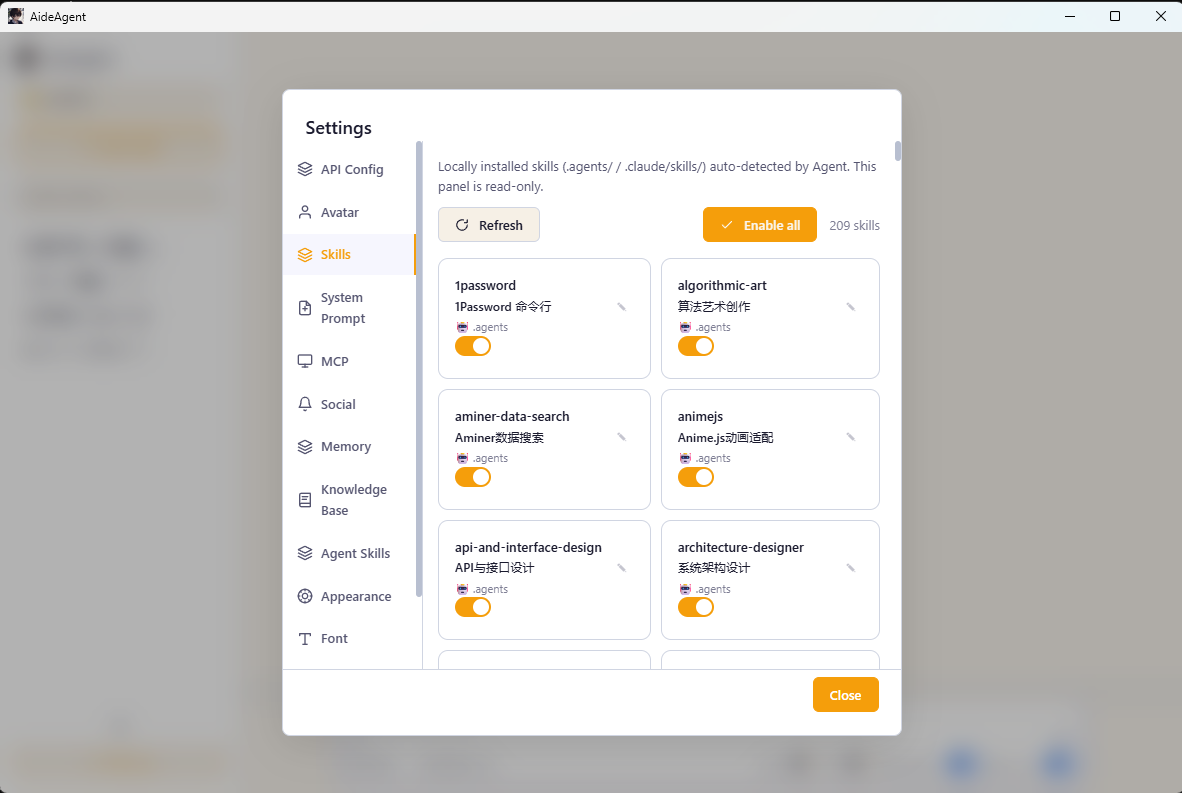
- Local Skills — auto-scanned, individually toggleable (the screenshot shows 209 skills enabled)
- Agent Skills — skills you create yourself
- Writing a Skill is just writing a Markdown file — low barrier
4. MCP ecosystem — plug in any external service
MCP (Model Context Protocol) is Anthropic's protocol — think of it as a "USB port" for AI apps. AideAgent ships with several one-click services:
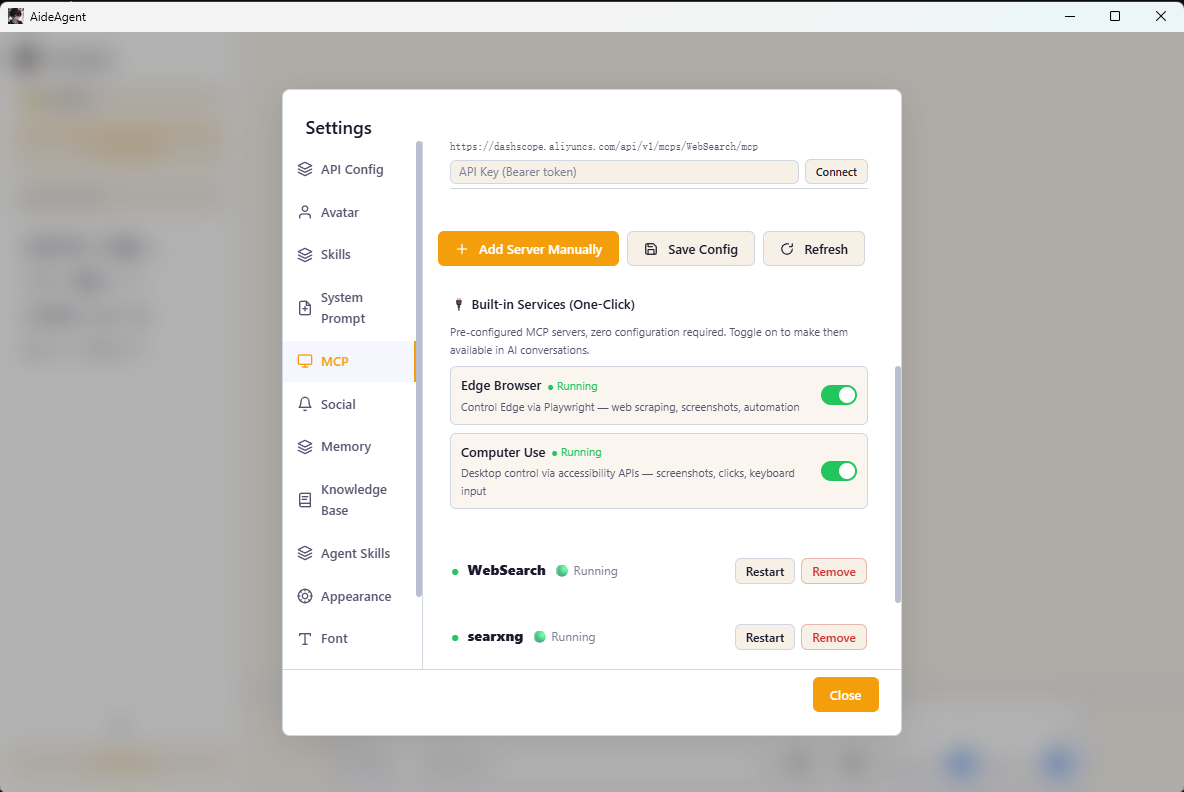
- Edge Browser — Playwright-driven Edge, can screenshot, fill forms, scrape data
- Computer Use — simulates mouse and keyboard through system accessibility APIs (off by default, turn on with care)
- Web Search (built-in) — keyless meta-search
- filesystem — controlled file read/write, scoped to your user directory
- Remote MCP — HTTP with custom headers, plug in whatever you want
You can also add any MCP server that npx can run.
5. WeChat bot — bring AI into your WeChat
On startup the app tries to launch the WeChat iLink Bot bridge. Scan to log in and you get:
- Desktop chats with the AI auto-mirrored to WeChat
- Messages you send in WeChat get replied to by the AI
API config syncs to the WeChat side too (same conversation context).
Implementation lives in
desktop/core/wechat-bridge.mjs— QR scan → polling → bearer token → bidirectional message push, all wired up.
6. Extensibility and automation — for developers
If you're a developer, these will keep you busy for a while:
- Full IPC interface — every feature exposed as an IPC handler, script it however you like
- Safe state — every callable subcommand is gated by a
GH_SAFEallowlist; no accidentalrm -rf - Test coverage — Vitest unit tests + Playwright E2E (in Electron mode)
- Type checking —
tsc --noEmitpasses across the whole project (JS source with JSDoc type annotations) - Cross-platform packaging —
electron-builderproduces Windows NSIS, macOS DMG, and Linux deb+AppImage in one shot - Auto-update —
electron-updaterpulls new versions from GitHub Releases
Project layout
AideAgent/
├── desktop/                       # Electron desktop app
│   ├── main.mjs                   # main process entry
│   ├── preload.cjs                # preload bridge (CJS)
│   ├── core/                      # core modules (IPC, tool execution, state, ...)
│   │   ├── wechat-bridge.mjs      # WeChat bot bridge
│   │   ├── agent-loop.mjs
│   │   ├── ipc-handlers.mjs
│   │   ├── state.mjs
│   │   ├── tool-executor.mjs
│   │   └── ...
│   ├── renderer/                  # renderer (vanilla JS, no framework)
│   │   └── modules/
│   ├── mcp-manager.mjs            # MCP protocol manager
│   ├── lsp-manager.mjs            # LSP client (TS/JS)
│   ├── session-db.mjs             # session storage (SQLite + FTS5)
│   ├── knowledge-store.mjs        # knowledge base (FTS5 + vector)
│   ├── memory-store.mjs           # memory storage
│   ├── skills-store.mjs           # skills catalog
│   ├── prompts-store.mjs          # prompts storage
│   ├── update-manager.mjs         # auto-update manager
│   ├── search-engine/             # meta-search engine (Bing + GitHub)
│   └── scripts/
│       └── download-model.mjs     # downloads ONNX model on first run
├── kb/                            # default knowledge base directory
├── models/                        # local model files (generated at runtime)
└── docs/                          # documentation
Tech stack, one line: Electron 40 + vanilla JS (no frontend framework) + node:sqlite + ONNX Runtime + MCP.
Quick start
Requirements
- Node.js 22.5+ (because we use the built-in
node:sqlitemodule) - npm (the project ships a lockfile)
Run it
cd desktop
npm install         # automatically downloads the embedding model (~25MB)
npm start
If the model download fails (network issues), set an env var and retry:
# China mirror takes priority (default order in download-model.mjs)
HF_ENDPOINT=https://hf-mirror.com npm install
Build installers
npm run dist:win     # Windows NSIS
npm run dist:mac     # macOS DMG
npm run dist:linux   # Linux deb + AppImage
npm run dist:all     # all three platforms
Built installers land in desktop/release/.
Development mode
npm run dev          # Electron + DevTools
npm run test         # Vitest unit tests
npm run test:e2e     # Playwright E2E (Electron mode)
npm run lint         # ESLint
npm run typecheck    # tsc --noEmit
Nice details
- Local-first data — sessions, note indexes, skills, and memory all live in
~/.aideagent/, never uploaded - Encrypted API keys — OS Keychain, never plaintext
- Auto-migration on first launch — upgrading from an older version (
~/.goodagent/)? Config migrates automatically - Strict CSP — the renderer ships with a complete Content Security Policy
- MCP config compatible with Claude Code format — copy your existing
.mcp.jsonover and it just works
Contact & thanks
The repo lives at github.com/quanzefeng/AideAgent.
If you find this useful, a ⭐ Star is the biggest encouragement for the author.
Issues, PRs — all welcome. Feature ideas, bug reports, usage questions — any of those.
A final word
This project doesn't have a fancy roadmap, and it doesn't claim to be "building AGI". It's just a small tool written by people who thought "AI should be able to actually help me do things".
If you feel the same way, feel free to use it, and feel free to change it.
If you've read this whole README and still don't know what it does — install it and play with it for two minutes. Skip the docs.
Reviews (0)
Sign in to leave a review.
Leave a reviewNo results found