cmux-conductor-sidebar
Health Warn
- License — License: MIT
- Description — Repository has a description
- Active repo — Last push 0 days ago
- Low visibility — Only 5 GitHub stars
Code Fail
- rm -rf — Recursive force deletion command in uninstall.sh
Permissions Pass
- Permissions — No dangerous permissions requested
No AI report is available for this listing yet.
Conductor sidebar for cmux — live per-tab agent status in the workspace sidebar: spinner while running, red dot when waiting for input, done when finished. Works with Claude Code & trae.
Conductor Sidebar for cmux
A Conductor-style custom sidebar for cmux, with live per-tab agent status — see at a glance which Claude Code / trae session is running, waiting for input, or done.
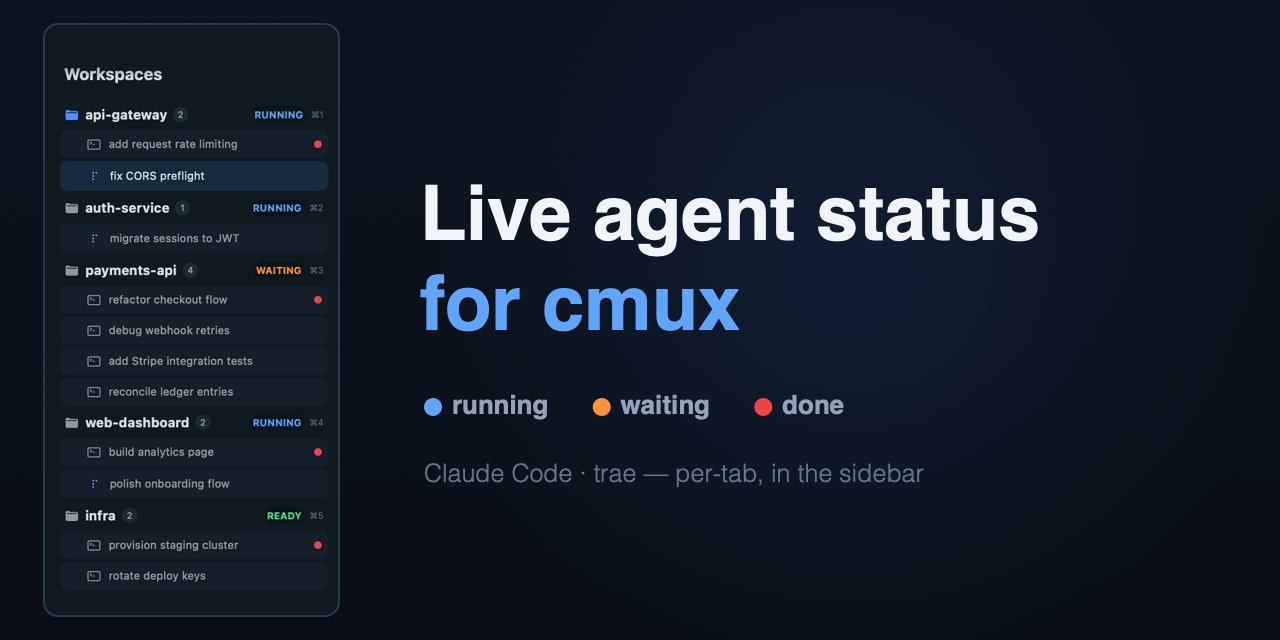
Features
- Workspace-grouped sidebar: every tab listed under its workspace, click to jump, drag to reorder.
- Live per-tab status (the main point):
- 🔵 an animated spinner while an agent is working — keeps spinning even when the tab is in the background (self-drawn from
clock, not the terminal's own cursor). - 🟠 a
WAITINGpill when the agent needs your input. - 🔴 a red dot the moment a task finishes — clears when you open that tab.
- 🔵 an animated spinner while an agent is working — keeps spinning even when the tab is in the background (self-drawn from
- Right-click menu on a workspace: rename, pin, move up/down/top, mark read, new tab, close.
- Works with both Claude Code and trae.
- One-command install that backs up your existing config first; clean uninstall; re-run install to update safely.
Requirements
- macOS + cmux
python3(bundled with macOS)
Install
git clone https://github.com/qucooln/cmux-conductor-sidebar.git
cd cmux-conductor-sidebar
bash install.sh
Install backs up your existing ~/.claude/settings.json, ~/.config/cmux/cmux.json, and ~/.trae/hooks.json to ~/.config/cmux/conductor-backup-<timestamp>/. All config changes are idempotent merges — your other hooks/settings are left alone. Re-running install.sh is a safe update.
The sidebar auto-activates. If it doesn't: right-click cmux's sidebar-toggle button → pick conductor, or run cmux sidebar select conductor.
How it works
cmux's custom-sidebar DSL can only read cmux's built-in data, which has no per-tab agent status. This project bridges that gap:
- A small hook (
cmux-status.sh) is registered on Claude Code / trae lifecycle events (UserPromptSubmit→running,PreToolUse→running,Notification→waiting,Stop→done, …). - It records each session's state under
~/.cache/cmux-status/and aggregates it into that workspace'sprogress.label, e.g.RUNNING run:<uuid> done:<uuid>. - The sidebar (
conductor.swift) parses that label to draw the per-tab spinner / red dot, animated via the DSL'sclockso it keeps moving for backgrounded tabs. - Opening a tab sends a "seen" signal (a tiny internal notification intercepted by a notification hook) that clears its red dot.
A 3-minute watchdog also downgrades any running that stops refreshing (e.g. a session killed without a Stop), so nothing gets stuck spinning.
Speed mode
cmux can feel ~10x slower than its own terminal engine when an agent streams a lot of output. The cause isn't rendering — it's that cmux floods its main thread on every terminal-title-change escape, and Claude Code updates the title constantly while it works (see cmux #4681). A quick benchmark on the same machine: 30k lines of output with frequent title changes took 2.1s in cmux vs 0.2s in iTerm2; with the title flood removed, cmux drops to 0.2s — identical to iTerm2.
Speed mode (on by default) sets CLAUDE_CODE_DISABLE_TERMINAL_TITLE=1 in your settings.json env, so Claude Code stops streaming title escapes. This is surgical — other programs (vim/ssh/shell) keep setting their titles normally; only Claude Code's flood stops. With titles no longer streamed, each tab keeps a stable name (its working directory, or whatever you set via right-click → Rename), instead of changing on every turn.
The env var takes effect on the next Claude Code session. To opt out, install with CONDUCTOR_SPEED=0 bash install.sh.
Optional — per-turn tab naming. If you'd rather have each tab auto-named from your latest prompt (like the old streamed titles, but throttled to once per turn), install with CONDUCTOR_TABNAME=1 bash install.sh. It's off by default because it overwrites the tab title every turn, which fights manual/stable names.
Alternative: if the env var doesn't work on your Claude Code version, you can instead lock the title at the terminal with a non-empty value in
~/.config/ghostty/config—title = cmux(a blanktitle = " "does not lock). That's global to cmux (all tabs stop auto-titling), so the env var is preferred.
Uninstall
bash uninstall.sh
Precisely removes only what this package added (hooks, files, config keys). Your other config and the install-time backup are kept.
Files
| file | purpose |
|---|---|
files/conductor.swift |
the sidebar UI (cmux custom-sidebar DSL) |
files/cmux-status.sh |
per-session status reporting + workspace aggregation |
files/cmux-rename-hook.sh |
rename dialog + "seen" red-dot clear (notification hook) |
files/cmux-tabname.sh |
speed mode: name each tab from the prompt, once per turn |
install.sh / uninstall.sh |
orchestration (backup → files → config merge → activate) |
merge.py |
idempotent merge/removal for settings.json / trae + traex hooks / cmux.json |
Notes & limitations
- Status hooks are read per-event by Claude Code / trae, so changes take effect on already-running sessions without a restart.
- A red dot clears when you click the tab from this sidebar (that's what sends the "seen" signal). Switching via
cmd+numberor the top tab bar won't clear it; sending a new prompt to that agent also clears it. - If you turn on cmux's
workspaceAutoNaming, its background auto-namer briefly registers as "running" — this package leaves that setting off. - trae's newer CLI (
traex) reads its hooks from~/.trae/traecli.toml, not the legacy~/.trae/hooks.json; both are written, so either version reports status. traex gates each hook behind a trust prompt, so the first session after installing asks you to approve it once.
License
MIT — see LICENSE.
Disclaimer
This is an independent, community-built project. It is not affiliated with, endorsed by, or sponsored by Conductor (conductor.build), cmux, or Anthropic. "Conductor", "cmux", and "Claude" are trademarks of their respective owners; they are referenced here only to describe compatibility and design inspiration. All code and assets in this repository are original work by the author.
Made for the cmux community. Questions & feedback welcome on the cmux Discord.
Reviews (0)
Sign in to leave a review.
Leave a reviewNo results found