multiclaude
Health Pass
- License — License: Apache-2.0
- Description — Repository has a description
- Active repo — Last push 0 days ago
- Community trust — 15 GitHub stars
Code Fail
- rm -rf — Recursive force deletion command in build.sh
Permissions Pass
- Permissions — No dangerous permissions requested
No AI report is available for this listing yet.
Unofficial macOS menu bar app to run several Claude desktop accounts side by side: one profile per account, sign-in in the right window, Claude Code per account, MCP server copy, token usage, keep-awake and a Go CLI. Apache 2.0. Not affiliated with Anthropic.
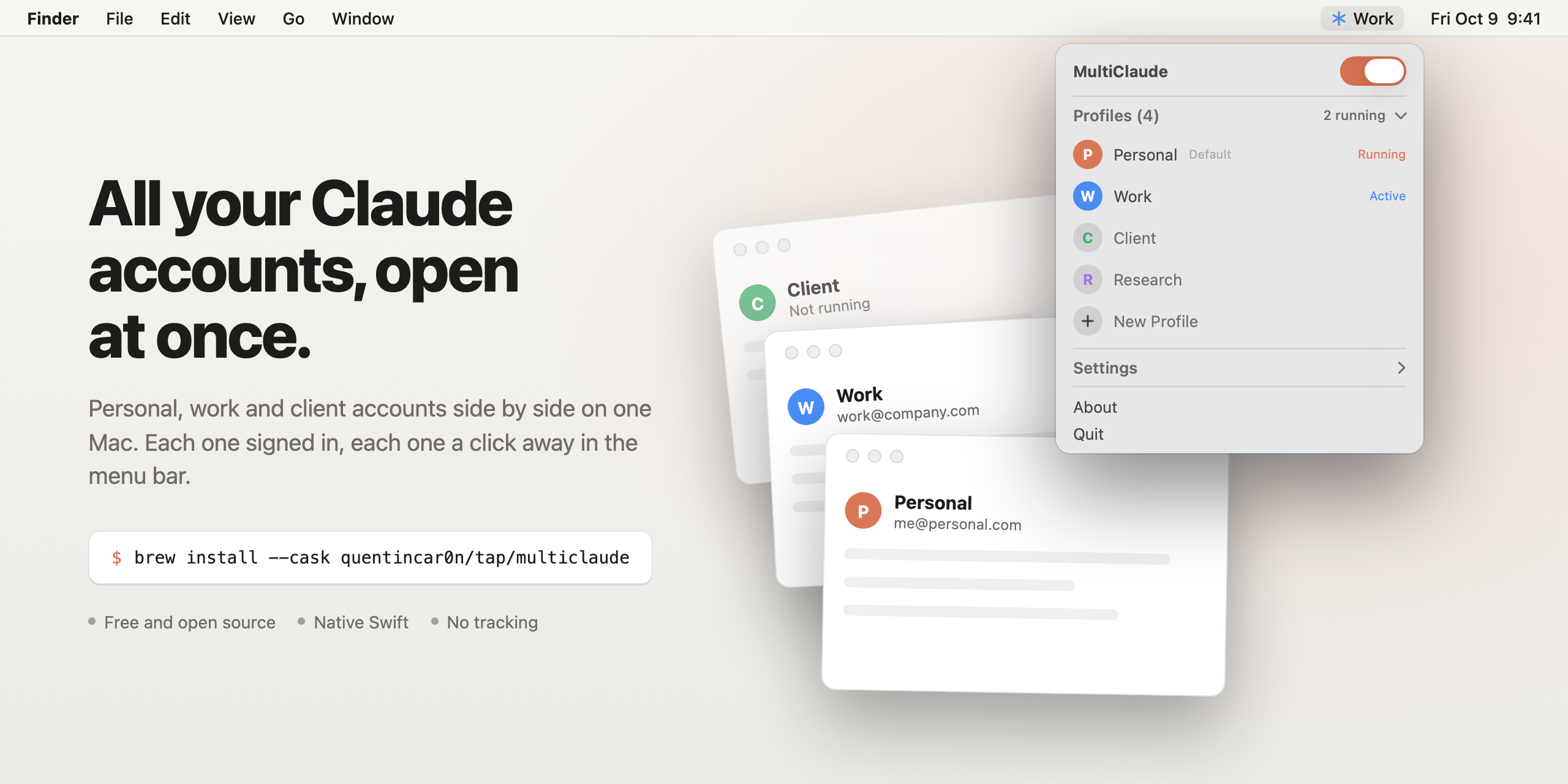
MultiClaude
MultiClaude is a free, open source macOS menu bar app for people with more than one Claude account: it runs several Claude desktop accounts side by side, each in its own profile (its own --user-data-dir folder), and adds a multiclaude command for the terminal.
All your Claude accounts, open at once. Apache 2.0, macOS 15 or later, Apple silicon and Intel, version 1.11.
Unofficial: not affiliated with or endorsed by Anthropic.





brew install --cask quentincar0n/tap/multiclaude
Download the latest release · Website · Why · Features · How it works · FAQ · Docs
At a glance
| What it is | A menu bar manager for several Claude desktop accounts on one Mac, with a multiclaude command line tool |
| License | Apache License 2.0 |
| Written in | Swift (the app: main.swift and Groups.swift, SwiftUI inside an AppKit panel) and Go (the cli/ tool) |
| Platforms | macOS 15 or later, universal binary (arm64 and x86_64) |
| Current version | 1.11 (build 19), released 2026-11-18 (CHANGELOG) |
| Install | brew install --cask quentincar0n/tap/multiclaude |
| Requires | The Claude desktop app in /Applications |
| Dependencies | None for the app; golang.org/x/sys for the CLI |
| Network use | A daily update check against GitHub; claude.ai only if you turn on Show Chat Limits. No analytics |
| Homepage | quentincar0n.github.io/multiclaude |
| Status | Independent and unofficial. Claude is a trademark of Anthropic, PBC |
Why
The Claude desktop app signs in to one account at a time. Plenty of people have more than one:
- a personal Pro or Max plan, and a Team or Enterprise seat from work,
- a separate organization per client, so their projects and data never mix,
- a test account to try a setup before rolling it out to a team.
Switching means signing out, signing back in, waiting for the email code and losing your place. The app can't run two accounts at once.
Claude desktop does accept --user-data-dir: give each copy its own folder and each one keeps its own sign-in, chats and settings. Power users wire that into shell aliases. It works, but you can't see what's open, re-running an alias doesn't bring the right window forward, and every new account means editing ~/.zshrc.
MultiClaude is that trick with a proper interface.
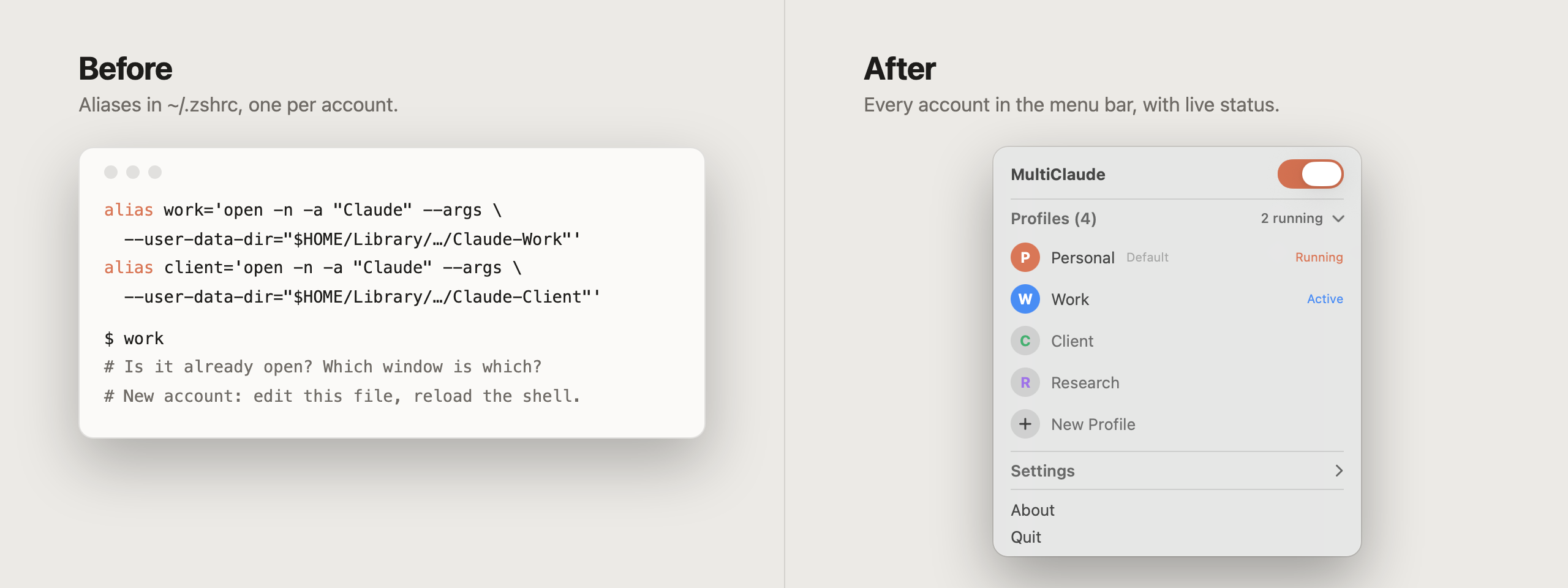
| Shell aliases | MultiClaude | |
|---|---|---|
| Open an account | type its alias in a terminal | one click in the menu bar |
| See which accounts are open | no | yes, live |
| Bring an open account forward | re-run the alias and hope | click it again |
| Quit one account | find the right window, ⌘Q | hover, click ✕ |
| Add an account | edit ~/.zshrc, reload the shell |
type a name, press Return |
| Rename, reorder, find its data | by hand | right-click |
| Keep your existing aliases | imported on first launch | |
| Tell accounts apart | every window has the same icon | a color per account, active one named in the menu bar, a named and colored app per account for the Dock and Spotlight |
| After Claude updates itself | windows come back on the default account | profiles reopen on their own accounts |
| Tokens spent per account | no | today in the panel, 6 months in a heatmap |
| Long runs with the lid closed | caffeinate and pmset by hand |
Keep Awake, undone when the lid opens |
Features
Accounts and profiles
- One profile per account. Each profile is its own Claude data folder, so sign-ins and chats never leak between accounts.
- Live status. A filled badge marks every account that is running. The menu bar shows how many are open.
- Click to open, click again to focus. No duplicate windows.
- Hover to quit a single account. The header switch opens or quits all of them at once.
- New Profile in one line: type a name, press Return, sign in to the new account in the window that opens.
- Open accounts at startup. Right-click a profile and tick Open When MultiClaude Starts. With Launch at Login on, your accounts are waiting every morning.
- Duplicate a profile. Duplicate as New Profile clones a profile's whole data folder, sign-in and chats included, into a new one. Handy for keeping your current history under a name like "Personal" before signing the default app in to another account. On APFS the copy is instant and takes no extra space.
- Right-click a profile to rename it, move it, show its data folder in Finder, copy a shell alias for it, take it off the list, or delete it with Delete Profile….
- Imports your setup. First launch picks up your default Claude account, any
--user-data-diraliases in~/.zshrc, and anyClaude-*folder in Application Support. AClaude-*folder created later, by an alias for example, joins the list on its own. - Folders follow names. Rename a profile and its folder becomes
Claude-<Name>the next time that account is closed. A link stays at the old path, so old aliases and Claude's own saved paths keep working. - Quit them all together. Turn on Quit Profiles with MultiClaude and quitting MultiClaude closes every account it opened.
- Survives Claude updates. When Claude updates itself it relaunches on the default account, which breaks every
--user-data-dirsetup. MultiClaude notices and reopens each profile on its own account.
Sign-in
- Sign-in that lands in the right window. Claude's Google and SSO sign-in normally comes back to whichever Claude window opened first. MultiClaude makes each account sign in inside its own window, with nothing to click first.
See Fix Google or SSO sign-in for a second Claude account.
Telling accounts apart
- A color per account. Each profile gets its own color, so you can tell Personal from Work at a glance. Right-click to change it.
- An app and an icon for each account. Turn on Colored Claude Icon per Account (App for Each Profile in earlier versions) and MultiClaude makes a small app per profile in
~/Applications/MultiClaude Launchers, named "Claude Work", "Claude Client" and so on, with Claude's own icon recolored in the profile's color. Find them in Spotlight and Launchpad, or right-click a profile and choose Add to Dock. Rename one with Rename App…. Each account's window then runs with that icon too, in the Dock, ⌘-Tab and Mission Control, so you can tell them apart while they're open. The apps follow renames and color changes, and go away with their profile. - Know which account is in front. While a Claude window is active, the menu bar shows its account name in that account's color.
Claude Code, MCP servers and usage
- Claude Code per account. Right-click a profile and choose Open Claude Code in Terminal: the CLI runs signed in as that account, with its own
CLAUDE_CONFIG_DIR. - Account groups. Right-click a profile and choose Group…. Accounts in one group share Claude Code (memory,
CLAUDE.md, skills, plugins, settings and session history); an account alone in its group keeps its own. Handy to keep a work account's Claude Code apart from your personal ones. MultiClaude checks that each grouped account's Code tab sessions really use the group's folder and tells you what to set if not. - Copy MCP servers between accounts. Set your MCP servers up once, then right-click another profile and choose Copy MCP Servers From. Its config is backed up first.
- Token usage per account and in all. Claude Code logs every reply's tokens on your Mac (Code tab, Cowork and terminal). MultiClaude credits each session to the account it ran in and shows today's output per account in the panel, plus a window with a 6-month heatmap, each account's share, and a by-model table. Regular chats keep no token counts on the Mac; turn on Show Chat Limits for each account's 5-hour and weekly limits from claude.ai.
- Keeps your Claude Code conversations. Claude Code deletes transcripts after 30 days by default. MultiClaude keeps a copy of each one per account (an APFS clone, so no extra space while the original exists), lists them with search, shows them, and exports any one to Markdown.
Guides: Claude Code with multiple accounts, account groups, MCP servers, token usage.
Keep Awake and scrolling
Keep your Mac awake. The Keep Awake section holds off sleep until you turn it off or for a set time (15 minutes to 8 hours, or anything up to 24 hours on the slider), with a countdown and a bolt in the menu bar. Options cover the display, a closed lid, power and battery triggers, a left-click toggle and ⌃⌥⌘A. Handy for long Claude Code runs.
Lid closed, done right. Turn on Keep Awake with Lid Closed for long agent runs. When the lid closes, each of these is its own option, on by default:
- Turn the Screen Off, Mute Sound and Pause Chat Apps (Slack, WhatsApp and Discord with their helpers stop syncing and pinging; meeting and recording apps are never paused),
- Low Power Mode while the lid is closed, and Low Power Mode Below 40% on battery,
- Ease Off When Hot: Low Power Mode when the Mac runs hot, and the session ends when it gets critical.
Opening the lid undoes all of it, and MultiClaude only turns off a Low Power Mode it turned on. If MultiClaude is gone while a session had changed something, a small recovery agent puts it back within a minute. No Password Prompt (optional) installs one sudoers rule so the sleep and Low Power Mode commands stop asking for your password. Design after Insomnia.
Keep-awake only, if you like. Turn off Manage Claude Accounts and MultiClaude leaves Claude alone and keeps just the keep-awake and scroll features. Your profiles wait for you to turn it back on.
Scroll your own way. Reverse the scroll direction of a mouse and a trackpad separately, in Settings (needs Accessibility permission). Smooth-scrolling mice, like an MX Master with Logi Options+, follow the mouse setting.
The app
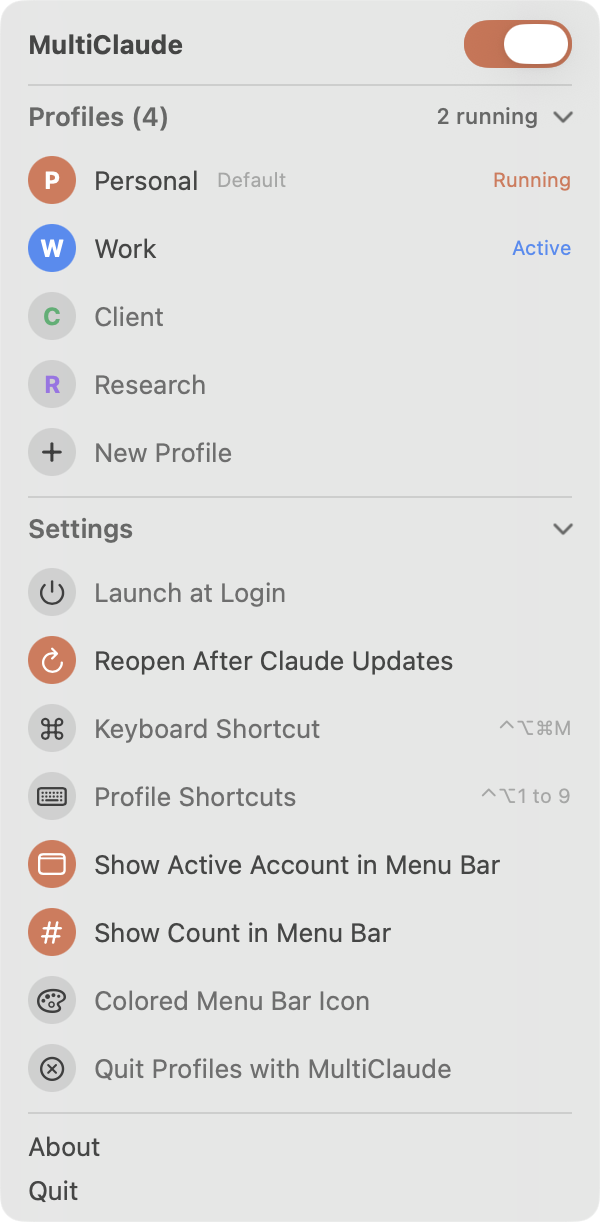
- Global shortcuts. ⌃⌥⌘M opens the panel; turn on Profile Shortcuts and ⌃⌥1 to ⌃⌥9 jump straight to each account.
- Updates itself. Once a day MultiClaude checks for a new release, installs it in the background and restarts while the panel is closed. Your Claude windows stay open. Set Update MultiClaude in Settings to Ask First to get a window with the release notes and Install, Later or Skip This Version instead, or to Off to stop checking. Check for Updates… in the panel, or
multiclaude updatein the terminal, checks right away in any mode. - Launch at login, light and dark mode, colored menu bar icon.
- Small. Two Swift files, no dependencies, a 1.6 MB download.
How updates are checked: How MultiClaude updates are verified.
Use cases
- Use MultiClaude to keep a personal Pro or Max plan and a Team or Enterprise seat open at the same time.
- Use MultiClaude to give each client its own Claude organization, so their projects and data never mix.
- Use MultiClaude to try a setup on a test account before rolling it out to a team.
- Use MultiClaude to run Claude Code signed in as a specific account (
multiclaude code work), or to share one Claude Code memory and skill set between some accounts with account groups. - Use MultiClaude to set MCP servers up once and copy them to every account.
- Use MultiClaude to see Claude Code token usage per account and keep Claude Code transcripts past their 30-day cleanup.
- Use MultiClaude to keep your Mac awake, lid closed if you like, during long Claude Code runs.
- Use MultiClaude to replace a set of
--user-data-dirshell aliases; it imports them on first launch.
Install
Homebrew
brew install --cask quentincar0n/tap/multiclaude
Manual
Download
MultiClaude-<version>.zipfrom Releases and unzip it.Move
MultiClaude.appto Applications.MultiClaude is not notarized by Apple yet, so macOS blocks the first launch. Right-click the app and choose Open, or run:
xattr -dr com.apple.quarantine /Applications/MultiClaude.app
Requires macOS 15 or later and the Claude desktop app in /Applications.
Use
- Click the ✳ icon in the menu bar.
- Click New Profile, type a name such as
Work, press Return. - Click the new profile. A fresh Claude window opens: sign in to your work account there.
- From now on, click
Workto open or focus it, and hover it to quit it.
Your default Claude account is always the first profile. It uses the app's normal data folder, so nothing changes for it.
From the terminal
MultiClaude comes with a multiclaude command. Homebrew puts it on your PATH; with a manual install, link it yourself:
ln -s /Applications/MultiClaude.app/Contents/Helpers/multiclaude /usr/local/bin/multiclaude
$ multiclaude list
#  ACCOUNT  COLOR   STATE   FOLDER
1  Claude   orange  open    ~/Library/Application Support/Claude
2  Work     blue    closed  ~/Library/Application Support/Claude-Work

$ multiclaude add Client         # new account with its own Claude folder
$ multiclaude login client       # sign in to it in its own window
$ multiclaude open work          # open it, or bring it forward
$ multiclaude quit work          # also --all
$ multiclaude rename client Acme # the folder follows once it's closed
$ multiclaude duplicate work Lab # copy an account, sign-in and chats included
$ multiclaude remove lab         # off the list, folder kept
$ multiclaude delete lab         # folder and Claude Code sign-in to the Trash (asks first)
$ multiclaude color work teal    # also: move work up, mcp work, mcp copy work acme
$ multiclaude code work          # Claude Code signed in as Work (extra arguments go to claude)
$ eval "$(multiclaude env work)" # point this shell's Claude Code at Work
$ multiclaude usage --days 30    # Claude Code tokens per account
$ multiclaude awake 90           # keep the Mac awake 90 minutes; awake off, awake status
$ multiclaude update            # install the latest MultiClaude; update --check only looks
An account can be named by its number, its name in any case, or the start of it. list and usage take --json.
The app is optional. The command and the app share one account list. While MultiClaude runs, the command hands it each action, so profile icons and the sign-in relay keep working, and it tells the app to reload the list after a change. Without the app, the command does the work itself and never starts the app:
- it builds the first account list and adopts new
Claude-*folders, like the app does at launch; openstarts Claude with the account's folder,quitasks Claude to quit;logincloses your other accounts, opens this one alone so the browser sign-in can only come back to it, waits for the sign-in in Claude's log, then reopens the others;usagereads the Claude Code transcripts itself and keeps the same counts file as the app;awakerunscaffeinatein the background, for the set minutes or untilawake off.
It's written in Go and lives in cli/. Every command, alias and multiclaude:// link: multiclaude command line reference.
How it works
- Opening a profile runs
open -n -b com.anthropic.claudefordesktop --args --user-data-dir=<folder>, the alias with Claude found by its bundle id. The default profile runsopen -b com.anthropic.claudefordesktop. - Profile apps are tiny bundles whose executable is a shell script: it sends
multiclaude://open?profile=<id>to MultiClaude, which opens or brings forward that account, and opens Claude directly if MultiClaude is gone. - Profile icons on open windows. With profile apps on, each account runs from its own copy of Claude.app in
~/Library/Application Support/MultiClaude/Runtimes.noindex. The copy is an APFS clone, so it takes no extra disk space, and it wears the profile icon as a Finder icon, outside the signed part of the bundle. Nothing inside the bundle changes: its signature stays Anthropic's, Gatekeeper accepts it, and Claude keeps its Keychain access and its own folders. A copy is refreshed from Claude.app after Claude updates, while that account is closed. If Claude's updater restarts a copy without its account folder, MultiClaude closes it and reopens the account. Claude.app itself is never touched. - Status comes from the running Claude processes: MultiClaude reads each one's
--user-data-dirargument and matches it to a profile. - Profiles are a small list in MultiClaude's own preferences (
me.somalabs.multiclaude). Data folders live in~/Library/Application Support/Claude-<Name>, next to Claude's own. MultiClaude never moves the folder of an account that is open. Remove from List keeps the folder and stops MultiClaude from adding it back. - Token usage comes from the JSONL transcripts Claude Code writes to
~/.claude/projectsand each account's Cowork folder. A session is credited to the profile whose folder lists it, or to "Terminal" when none does. Replies seen twice are counted once. - Keep Awake holds a macOS power assertion. With the lid closed it also runs
pmset disablesleep 1(andpmset lowpowermodefor Low Power Mode), mutes the default output device, and pauses chat apps withSIGSTOP, then sendsSIGCONTwhen the lid opens. What a session changed is written to a small state file, which the launchd agentme.somalabs.multiclaude.recoveryreads to undo it if MultiClaude quits or crashes.
Privacy
MultiClaude has no analytics. Its only network requests are the daily update check and, if you turn on Show Chat Limits, claude.ai's usage numbers. The update check: it asks GitHub for this repo's latest release, and downloads it from GitHub when it's newer. Every release is signed with a private key kept outside this repository, and MultiClaude refuses any update whose signature doesn't match the public key built into the app. It also checks the bundle identifier, the version and the code signature before swapping itself. Set Update MultiClaude to Off in Settings to stop it. Usage and conversations are read and kept on your Mac only: MultiClaude reads Claude Code's transcripts (in ~/.claude and each account's folder) to count tokens, and keeps copies in ~/Library/Application Support/MultiClaude/Archive, readable only by you. Turn off Track Token Usage and Keep Claude Code Conversations to stop both; delete that folder to remove the copies. Show Chat Limits is off until you turn it on and confirm: it then reads each account's claude.ai sign-in cookie (macOS asks you to allow "Claude Safe Storage" in the Keychain) and sends it to claude.ai only, never anywhere else; it is kept in memory and never written or logged. It does not modify the Claude app. The scroll reverser, when you turn it on, flips the direction of scroll events as they pass and keeps nothing. Keep Awake with Lid Closed asks for your password for each pmset change, unless you install No Password Prompt: that writes /etc/sudoers.d/multiclaude (checked with visudo), which lets the four pmset commands for sleep and Low Power Mode run without a password. Any app running as you could run those four commands too. Remove the rule from the same row. Removing a profile only takes it off the list: the folder stays on disk until you delete it yourself.
Comparison with other ways to run several Claude accounts
As of November 2026, based on how each approach works.
| Sign out and back in | claude.ai in separate browser profiles | --user-data-dir shell aliases |
MultiClaude | |
|---|---|---|---|---|
| Accounts open at once | one | one per browser profile | one per alias | one per profile |
| Uses the Claude desktop app | yes | no, the web app | yes | yes |
| Extra software | none | none | none | MultiClaude (Apache 2.0) |
| See which accounts are open | n/a | n/a | no | live, in the menu bar |
| Google or SSO sign-in lands in the right window | n/a | n/a | not always | yes, with the sign-in relay |
| Accounts reopen on their own folder after Claude updates | n/a | n/a | no | yes |
| Claude Code per account | set CLAUDE_CONFIG_DIR yourself |
set CLAUDE_CONFIG_DIR yourself |
set CLAUDE_CONFIG_DIR yourself |
multiclaude code <account>, or a menu item |
More detail: Run Claude desktop with a separate profile using --user-data-dir.
FAQ
Is this made by Anthropic?
No. MultiClaude is an independent open source tool. It launches the official Claude app and does not change it.
Does it work with Claude Code?
Yes. In the desktop app, each Claude window and the Code tab inside it run with the account of its profile. For the CLI, run multiclaude code <profile>, right-click a profile and choose Open Claude Code in Terminal, or Copy Claude Code Alias for your shell. Each profile gets its own ~/.claude-<name> folder, and Claude Code keeps a separate sign-in for each. eval "$(multiclaude env work)" points the current shell at an account. See Use Claude Code with multiple accounts.
Can I still use my aliases?
Yes. MultiClaude reads the same folders, so an account opened from an alias shows as running in the panel. Right-click a profile and choose Copy Shell Alias to get one for a new profile.
I already use the Claude app. How do I keep my chats when adding accounts?
Right-click your default profile and choose Duplicate as New Profile, named for example Personal. The copy keeps your sign-in and history. You can then sign the default app out and in to another account, or simply add new profiles next to it.
An account keeps logging out, or its sign-in never finishes.
Claude asks every account to sign in again from time to time. Google and SSO sign-in returns from the browser through a claude:// link that macOS gives to the first Claude window it finds, so with several accounts open it often lands in the wrong one. With Sign In in Each Account's Window on (the default), MultiClaude keeps the claude:// links, and Claude then signs in through Apple's sign-in sheet inside the window that asked. Just click Continue with Google in the account that needs it; your other accounts stay open.
Does an open account's window show its own name and icon?
The icon, yes: with Colored Claude Icon per Account on, each open account shows its profile icon in the Dock, ⌘-Tab and Mission Control. The name, no. A running app takes its name from inside its signed bundle, and renaming it there breaks the signature: Gatekeeper then reports the app as damaged. So an open window is still called Claude. The profile apps carry the name in Spotlight, Launchpad and on a pinned Dock tile, and the menu bar names the account in front.
How do I remove an account completely?
Right-click it and choose Delete Profile…. MultiClaude closes the account and moves its data folder, its Claude Code folder and its app to the Trash, so you can still restore them from there. Your Keychain is not touched. Remove from List only takes it off the panel and keeps the data.
What about Windows and Linux?
MultiClaude is a native macOS app. A port is welcome.
How do I run two Claude accounts at the same time on a Mac?
Install MultiClaude, click New Profile, name it, click it and sign in to the second account in the window that opens. Each profile is its own Claude data folder. Step by step: How to use two Claude accounts at the same time on a Mac.
Is MultiClaude free?
Yes. It's open source under the Apache License 2.0, with no paid tier. Each Claude account keeps its own Anthropic plan.
Does MultiClaude change the Claude app or see my password?
No. It starts the official Claude app with --user-data-dir and never touches Claude.app. Profile icons use APFS-cloned copies whose signed contents stay Anthropic's. You sign in inside Claude's own window; MultiClaude only reads a sign-in cookie if you turn on Show Chat Limits, and then sends it to claude.ai only.
Does MultiClaude collect data?
No. It has no analytics. Its only network requests are the daily update check on GitHub and, if you turn it on, claude.ai's usage numbers. See Privacy.
Can I share MCP servers between Claude accounts?
Yes. Right-click a profile, Copy MCP Servers From, or run multiclaude mcp copy <from> <to>. The target's claude_desktop_config.json is backed up first. See Share MCP servers between Claude profiles.
How do I know an update is genuine?
Each release zip is signed with an Ed25519 key kept outside the repository, and MultiClaude refuses any update whose signature doesn't match the public key built into the app. See How MultiClaude updates are verified.
Why does macOS refuse to open MultiClaude the first time?
It isn't notarized by Apple yet. Right-click the app and choose Open, or run xattr -dr com.apple.quarantine /Applications/MultiClaude.app. Homebrew installs avoid the manual step.
Documentation
Guides, one question each:
- How to use two Claude accounts at the same time on a Mac
- How to run Claude desktop with a separate profile using --user-data-dir
- How to use Claude Code with multiple accounts (CLAUDE_CONFIG_DIR)
- How to share Claude Code between some Claude accounts and keep others apart
- How to fix Google or SSO sign-in for a second Claude account
- How to share MCP servers between Claude profiles
- How to track Claude Code token usage per account
- multiclaude command line reference
- How to install MultiClaude with Homebrew
- How MultiClaude updates are verified (Ed25519 signatures)
Also in this repository:
- CHANGELOG.md: release notes for every version
- CONTRIBUTING.md: bug reports, feature ideas, pull requests
- AGENTS.md: build, test and layout notes for coding agents
- specs/: design notes, such as account groups
- llms.txt: a map of these docs for language models
- Website
Build from source
git clone https://github.com/QuentinCar0n/multiclaude.git
cd multiclaude
./build.sh              # builds, installs to ~/Applications and launches
./build.sh --no-install # stops after build/MultiClaude-<version>.zip
Needs Xcode command line tools with Swift 6 and Go 1.26. The app is in main.swift, SwiftUI views inside an AppKit menu bar panel, plus Groups.swift for account groups. The multiclaude command is in cli/; test it with cd cli && go test ./.... ./build.sh links it into ~/.local/bin when that folder is on your PATH.
Screenshots for this README come from a demo mode with sample profiles:
MULTICLAUDE_DEMO=1 MULTICLAUDE_PREVIEW=panel MULTICLAUDE_APPEARANCE=dark \
  ~/Applications/MultiClaude.app/Contents/MacOS/MultiClaude
Releases
Push a v* tag and GitHub Actions builds a universal app, signs it, and publishes the release with the matching CHANGELOG section. Tags with a suffix, like v1.7-rc1, publish pre-releases that the updater and the cask ignore.
Contributing
Issues and pull requests are welcome. See CONTRIBUTING.md. Ideas on the list: notarized builds, keyboard and VoiceOver access to the profile rows, and a Windows port.
Related
- QuentinCar0n/homebrew-tap: the Homebrew tap that carries the
multiclaudecask.
License
Apache License 2.0. You can use, share and modify MultiClaude freely, including commercially. Contributors grant a patent license with their code, and anyone who sues over a patent in this project loses theirs.
The lid-closed part of Keep Awake follows Insomnia by Krish Garg (MIT); see NOTICE.
Claude is a trademark of Anthropic, PBC. MultiClaude is not affiliated with or endorsed by Anthropic.
Reviews (0)
Sign in to leave a review.
Leave a reviewNo results found