inhouse
Health Pass
- License — License: Apache-2.0
- Description — Repository has a description
- Active repo — Last push 0 days ago
- Community trust — 40 GitHub stars
Code Pass
- Code scan — Scanned 12 files during light audit, no dangerous patterns found
Permissions Pass
- Permissions — No dangerous permissions requested
No AI report is available for this listing yet.
Your own app platform on one box, with your tailnet as the front door
inhouse
Your own app platform on one box, with your tailnet as the front door.
[!WARNING]
inhouse is alpha software. It runs real workloads, but the stack spec,
API, MCP tools, database schema and host layout may change without a
migration path, and it has had little use outside its author's own host.
Don't trust it with data you can't restore.
Describe a stack of containers in a short YAML file and deploy it. It comes
up at https://<name>.<tailnet>.ts.net with a real certificate, reachable
only by the people and devices your Tailscale policy allows. People use theinhouse CLI or the web console; AI agents use the built-in MCP server,
with their own, narrower permissions.
There are no API tokens, no accounts and no public ports. Tailscale is the
edge, the TLS provider, the identity system and the permission system;
inhouse keeps containers running behind it and keeps them matching a SQLite
database.
$ inhouse deploy examples/hello.yaml
deploy hello: operation 3f6c… (idempotency key 9b1e…)
{
  "operation": {"operation_id": "3f6c…", "kind": "deploy", "service": "hello", "rev": 1, "state": "succeeded"},
  "url": "https://hello.tail1234.ts.net"
}
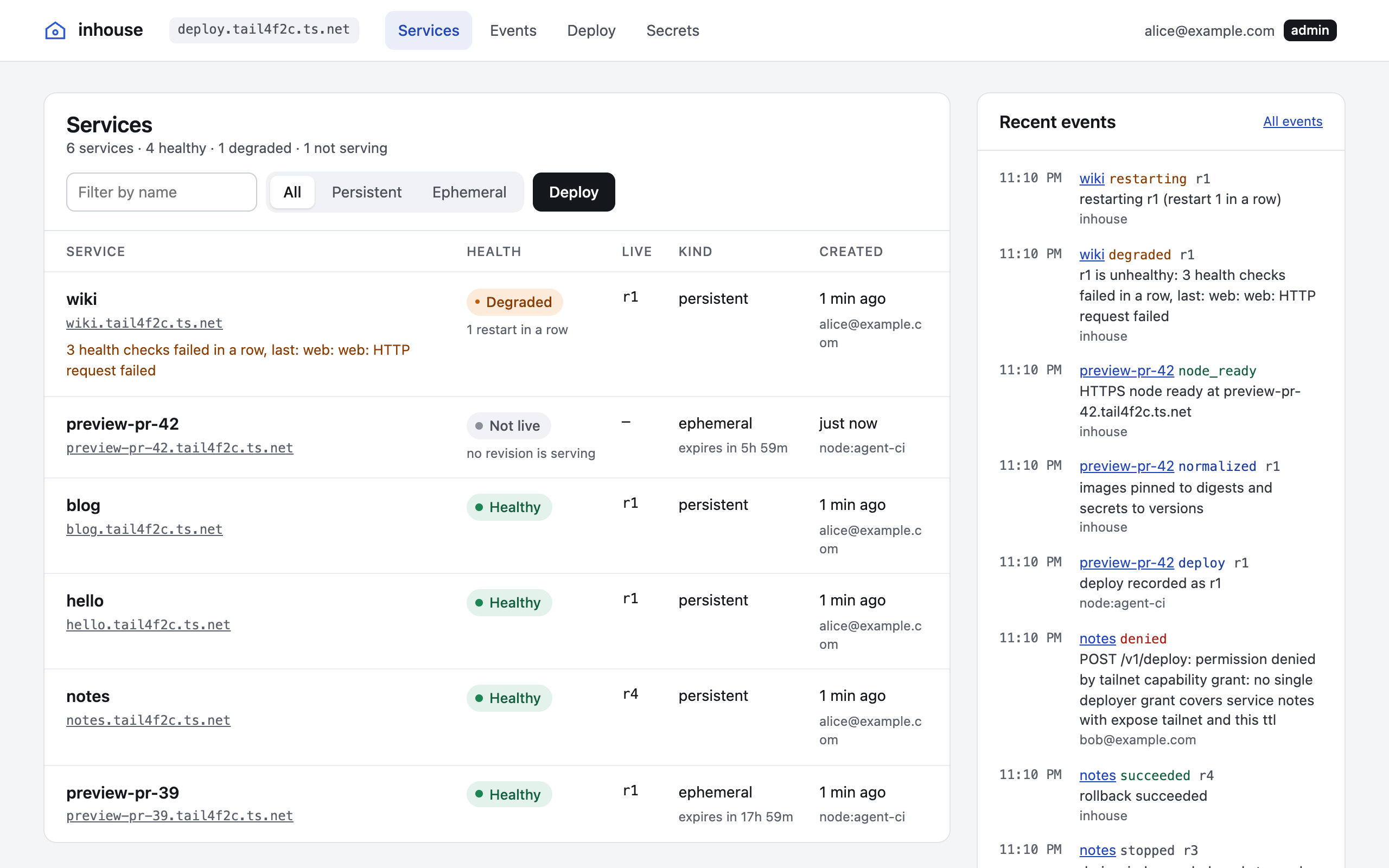
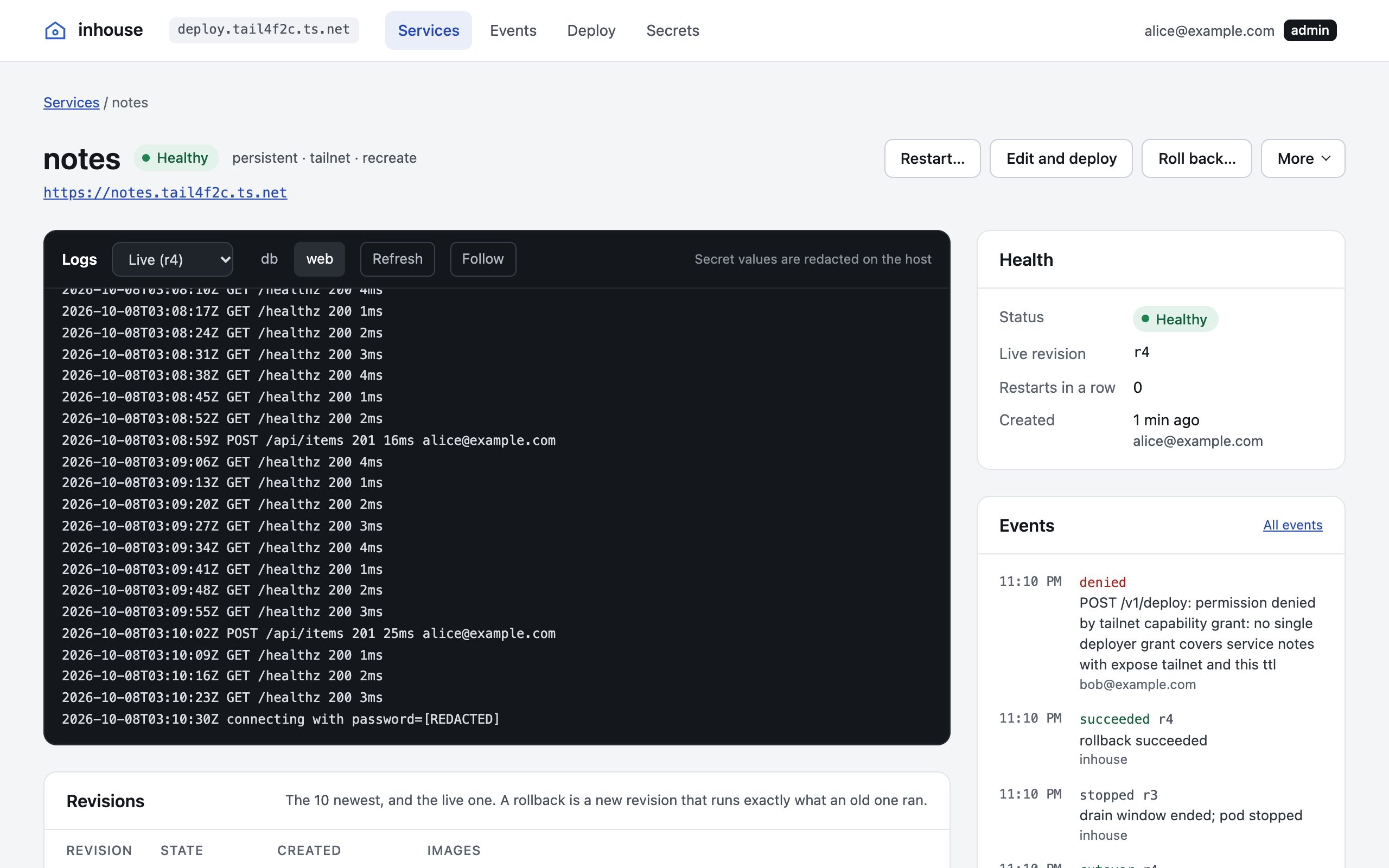
The web console at https://deploy.<tailnet>.ts.net shows every service,
its health and who deployed it, with live logs, revisions and the event
timeline one click away.
Admins also get a Platform page showing the daemon's version and uptime,
the host's available storage, CPU use and memory pressure, and every running
operation. Each service page shows its running operations to everyone who
can read that service.
What you get
- One node per service. Every service is its own tailnet device with its
own HTTPS name and policy tag. Apps receive trustworthyTailscale-User-Loginheaders, so private apps need no login code. - Real-time ready. HTTP/2 and gRPC, WebSockets, server-sent events, path
routes to sidecars, and raw TCP and UDP ports on the service's own tailnet
address, so WebRTC servers such as LiveKit run without STUN or TURN
(example). Long-lived calls and streams keep
their revision through a deploy for as long as the stack'sdrain. - Safe deploys. Images are pinned to digests, new revisions take traffic
only after passing health checks, and cutover is an atomic swap with no
dropped requests. A failed deploy leaves the live revision untouched.
Rollbacks run exactly the bytes they ran before. Restart, stop, start or
redeploy with rotated secrets from the CLI, the console or MCP. - Agents as first-class operators. Plan, deploy, wait, read logs, roll
back, restart and delete through MCP. Give an agent a tagged identity that may only
createpreview-*services that expire within a day, and every call it
makes is attributed to it. - Ephemeral services. Add
ttl: 6hand the service, its data and its
tailnet device disappear on their own. - Real data handling. btrfs volumes with pre-deploy snapshots, write-only
age-encrypted secrets that are redacted from logs, continuous database
replication and nightly encrypted backups. - Reboots are boring. State is written before every action; after a crash
or reboot the reconciler simply carries on.
Quick start
You need:
- A Linux machine you can dedicate to inhouse, with a separate data disk. The
provided provisioning installs Fedora CoreOS with btrfs and rootless
Podman, and erases both disks. - A Tailscale tailnet where you can edit the policy and create OAuth clients,
and whose plan has room for one device per service. - Podman or Docker on your laptop, to render the host's Ignition config.
Operating a host covers each step in full.
1. Install the CLI on your laptop, with Go 1.26 or later:
go install github.com/quinnovator/inhouse/cmd/inhouse@latest
Or download inhouse_<version>_<os>_<arch>.tar.gz from
Releases and check that
GitHub built it from this repo:
gh attestation verify inhouse_*.tar.gz -R quinnovator/inhouse
2. Prepare your tailnet. Enable MagicDNS and HTTPS certificates. Mergedeploy/policy/policy.hujson into your
policy, replacing [email protected] with your login andexample.com/cap/inhouse with a capability name on a domain you control.
Create the enroll and lifecycle OAuth clients
(details).
3. Provision the host. Render the Ignition config withdeploy/host/render.sh, install Fedora CoreOS with it, join the tailnet and
close public SSH (details).
4. Install the daemon. On the host, with your OAuth secrets already in/etc/inhouse/enroll-secret and /etc/inhouse/lifecycle-secret (root,
0600):
VERSION=0.2.2 ARCH=amd64   # or arm64
base=https://github.com/quinnovator/inhouse/releases/download/v$VERSION
curl -fsSLO "$base/inhoused_${VERSION}_linux_$ARCH.tar.gz"
curl -fsSLO "$base/checksums.sha512"
sha512sum -c --ignore-missing checksums.sha512
tar -xzf "inhoused_${VERSION}_linux_$ARCH.tar.gz"
sha512sum inhoused > inhoused.sha512
sudo bash install.sh example.com/cap/inhouse <enroll-client-id> <lifecycle-client-id>
journalctl -fu inhoused   # wait for "control ready at https://deploy.<tailnet>.ts.net"
5. Deploy something from your laptop:
export INHOUSE_URL=https://deploy.<tailnet>.ts.net
inhouse whoami            # your login and grants, including "role": "admin"
curl -fsSLO https://raw.githubusercontent.com/quinnovator/inhouse/main/examples/hello.yaml
inhouse deploy hello.yaml
Open https://hello.<tailnet>.ts.net: the page echoes your request,
including the Tailscale-User-Login header inhouse added. Next, write a spec
for your own app (stack spec,
more examples) or
connect an agent.
Documentation
| How it works | The model, the deploy lifecycle, the edge, isolation, data |
| Stack spec | Every field of the YAML file |
| Access, agents and MCP | Grants, roles, connecting agents, the MCP tools and HTTP API |
| Operating a host | Provisioning, installing, upgrading, backups, restore, troubleshooting |
| Security | Threat model and reporting |
| Roadmap | What comes next |
Limits
- One host. No clustering, no multi-tenancy, and no sandbox for untrusted
code beyond rootless containers with per-service user namespaces. - One HTTPS address per service. Raw TCP and UDP ports are reachable from
the tailnet only, never through Funnel, and carry no identity headers. - All tailnet listeners share the daemon process: restarting
inhoused
briefly interrupts HTTPS for every service (containers keep running). - Services with volumes update by stopping the old revision first, so they
see a few seconds of downtime per deploy. - The default subordinate ID range supports 64 services. A persistent
service holds its slot for the host's lifetime, even after deletion; an
ephemeral one frees its slot when it is deleted.
Some of these are on the roadmap.
Development
go test -race ./...                 # unit tests; tsnet runs against an in-process control server
INHOUSE_TEST_PODMAN_SOCKET=/run/user/$UID/podman/podman.sock \
  go test -run TestPodmanIntegration ./internal/podman   # against real rootless Podman
pnpm -C console install && pnpm -C console build          # the web console, embedded by the next step
go build ./cmd/inhoused ./cmd/inhouse
Without the console build, inhoused still builds and serves a page saying
the console isn't built. console/README.md covers
working on the console itself.
Contributing
Contributions aren't accepted yet; they will be once inhouse reaches beta.
Questions, bug reports and ideas are welcome in
Discussions.
See CONTRIBUTING.md.
License
Apache 2.0. inhouse is not affiliated with or endorsed by
Tailscale Inc.
Reviews (0)
Sign in to leave a review.
Leave a reviewNo results found