vinga
Health Warn
- License — License: MIT
- Description — Repository has a description
- Active repo — Last push 0 days ago
- Low visibility — Only 5 GitHub stars
Code Pass
- Code scan — Scanned 12 files during light audit, no dangerous patterns found
Permissions Pass
- Permissions — No dangerous permissions requested
No AI report is available for this listing yet.
Conversational AI. Sweded. A self-hostable home for voice agents: mix and match the LLM, voices, and MCP tools that fill every stage, spoken through small ESP32-S3 boards.

vinga 💬
vinga (interj.) Catalan for "come on, let's go".
Come on, speak, on your own terms.
Conversational AI. Sweded.





What is it? • Features • Getting Started • Hardware • Documentation • Credits • Changelog
[!WARNING]
Early development. This README describes the intended v1. Sections marked 🚧 are not implemented yet. Everything else works today: the conversation loop runs end to end on real hardware, fully local or with the cloud providers you configure.
What is vinga?
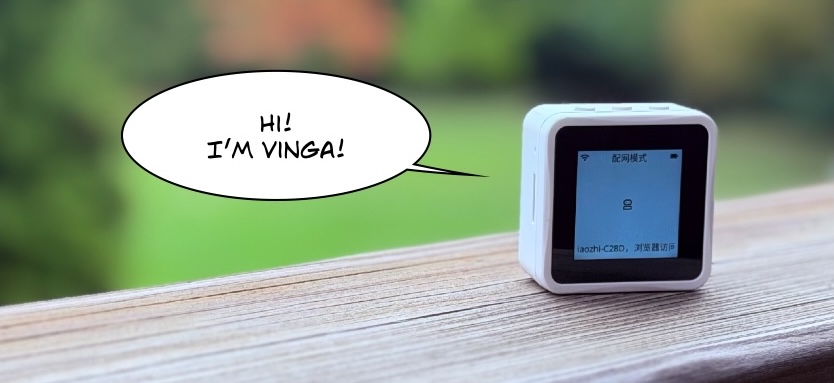
vinga is a self-hostable home for voice agents. Define as many as you like on a conversation server you run yourself, and talk to them through small ESP32-S3 boards with a microphone, a speaker, and a display. Agents live on the server, not in the hardware. Several can share one board, and an agent can move from board to board. And every stage of the conversation (listening, transcribing, thinking, speaking) is a provider you mix and match: local engines, cloud services, or any blend of the two, down to a conversation that runs entirely on your own hardware.
You take what you like and mix it with some other things you like and make a new thing. Your thing!
-- from the movie Be Kind Rewind (2008)
We took what we liked: the 78/xiaozhi-esp32 firmware, whose board support, audio pipeline, and device protocol were already excellent, and the small Waveshare ESP32-S3 boards it runs on. From xinnan-tech/xiaozhi-esp32-server we took an idea rather than code: the proof that a self-hosted backend was possible. Then we made the conversation server our own: a new implementation in Python, written from the firmware's protocol docs up, with the board talking to your server and nothing else.
Features
One premise makes all of this possible, a thin device and a smart server: the board's only tie to a backend is a single config URL, and everything else (endpoints, credentials, even firmware updates) is delivered by your server at runtime. Changing what vinga does means changing server configuration, never reflashing a board.
- 🎭 A cast of agents, not one assistant. Define as many as you like, each with its own personality, providers, and tools. Bind boards to them, switch mid-conversation just by asking, and let an agent follow you from board to board. One device can be a whole cast.
- 🎛️ Mix and match every stage. Who listens, who transcribes, who thinks, who speaks: each is a provider you pick, a local Ollama, Anthropic, any OpenAI-compatible endpoint, a cloud voice or a local one, and swap without touching the rest. Choose a better voice, or an ear that copes with a noisy room, the day you want one.
- 🏠 Fully local when you want it. Silero, faster-whisper, Ollama and Piper make a conversation that runs entirely on your own hardware: no API key anywhere, nothing billed per word, and heard nowhere else.
- 🧰 Tools via MCP, on both sides. Give your agents tools from any MCP server, and the board offers its own controls (volume, brightness, screen) as tools over the same channel, so you can ask it to turn itself down.
- 💬 Speech in, speech out, everything visible. Recognized text and responses render on the device display as the conversation happens.
- 🔒 Your server is the only one it talks to. Point a board at your server once and it connects: no account to create, no vendor cloud in between, no phone app in the way. Run the server on a laptop while you are trying it, or deploy the published container image to your own infrastructure.
Getting Started
Here is a path to get a Waveshare ESP32-S3-Touch-LCD-1.54 talking to a vinga server and nothing you say leaves your computer: the transcription, the model and the voice all run locally.
[!NOTE]
This path has been walked on macOS, in zsh, and nowhere else. Where Linux is known to differ, the step that differs says so, as step 3 does about reaching Ollama from inside a container. The shell is named because it matters: a block zsh accepts is not always one bash accepts.
Prerequisites
- Ollama, which serves the LLM model.
- Docker with Compose v2, for the two containers.
- uv, for the CLI.
- A Waveshare board from the Supported Hardware table (see below) and a USB cable to connect the board to your computer.
curl,opensslandgit, which steps 0, 1 and 2 invoke directly. macOS ships all three, which is why they went unnoticed while this was being walked rather than read; a stripped-down Linux may not have them.
Step 0. Setup Ollama
Any model Ollama serves works, and any endpoint that speaks the OpenAI chat completions API does too. This one is a good starting point: it answers fast enough for speech, and it is reliable at the tool calls the device exposes, which is what lets you ask the board to change its own volume or brightness.
ollama pull llama3.1:8b
A pull puts the model on disk without loading it, and the two questions have two commands: ollama list says what you have, ollama ps says what is in memory right now. Straight after a pull, ollama ps prints its header and no rows.
ollama ps
That distinction matters here, because Ollama unloads a model after five minutes idle, and loading it again takes longer than the server waits for the model's first word, so a reply that meets a cold model is dropped and the device stays silent. One request both loads the model and keeps it resident, with no prompt to answer and nothing to restart:
curl -s http://localhost:11434/api/generate \
  -d '{"model":"llama3.1:8b","keep_alive":-1}'
It answers {"done_reason":"load"} once the weights are in memory. ollama ps then shows the model with Forever under UNTIL, and that column is the one to read: any duration there is a countdown to the silent device above. Requests that name no expiry of their own, which is what the server sends, leave the pin as it is.
The pin lasts as long as the Ollama process does, so the request above is also how it comes back after Ollama restarts, and ollama stop llama3.1:8b is how you end it deliberately. Until you do, the model holds the memory it loaded into.
Step 1. Configure and start the vinga server
Create a directory for vinga:
mkdir vinga && cd vinga
vinga uses a Postgres database it keeps everything in, so fetch the Docker compose and Postgres provisioning script:
curl -O https://raw.githubusercontent.com/rafacm/vinga/main/docker-compose.yml

curl --create-dirs -o deploy/postgres-init.sql \
  https://raw.githubusercontent.com/rafacm/vinga/main/deploy/postgres-init.sql
Find the address your computer has on the local network, which is what boards will dial:
LAN_IP=$(ipconfig getifaddr en0 2>/dev/null || hostname -I | awk '{print $1}')
echo "$LAN_IP"
[!IMPORTANT]
Check this is really the address your board can reach: on a machine with more than one interface the command picks the first it finds, and a127.address means it found none. SetLAN_IPby hand if so.Boards store this address rather than resolving it, so give this machine a static DHCP reservation now: if the IP address of your computer changes later, this will break every board already onboarded.
Create the .env file that the vinga server and the CLI both read:
# Stop here rather than write a half-configured file
: "${LAN_IP:?empty; set it to the address this machine has on the local network}"

# .env holds secrets, so create it readable only by you
umask 077
cat > .env <<EOF
# The bearer token for the configuration API
VINGA_API_SECRET=$(openssl rand -hex 32)

# Where the CLI reaches that API, which is this machine. Loopback
# because the token above grants every write, and plain http is
# allowed to a loopback address and to nothing else. Administering a
# deployment you do not host is https, and this is the line to change.
VINGA_API_URL=http://127.0.0.1:8003/api

# The secret that signs device tokens
VINGA_AUTH_SECRET=$(openssl rand -hex 32)

# The address boards on your LAN reach this machine on.
# The server listens on 0.0.0.0 and cannot tell which interface that is.
VINGA_SERVER__PUBLIC_URL=http://$LAN_IP:8003
EOF
Keep any comment you add on its own line: a # after a value is a comment to the CLI and part of the value to Docker.
Start the server with:
docker compose --profile server up -d --wait
The Postgres server is published on loopback while vinga server's port 8003 is published on every interface, because boards on your LAN have to reach it.
Step 2. Install the CLI and check vinga server status
vinga is a client of the vinga-server configuration API, so this is how a deployment is administered from here on, whether it runs on this machine or across the network.
uv tool install "git+https://github.com/rafacm/vinga#subdirectory=vinga-server"
If your shell then reports vinga as not found, uv installed it into a directory that is not on your PATH; uv tool update-shell fixes that for new shells.
Or install nothing. The image from step 1 already carries the same CLI, built together with the server it talks to, so the pair cannot disagree about the grammar. From the same directory, a shell function makes it the same word, shadowing an installed vinga for as long as the shell defining it lives:
vinga() { docker compose exec -T vinga vinga "$@"; }
Every command below then reads the same as it would from an installed CLI, with one difference: a file on this machine is piped in rather than named, because a path is resolved inside the container.
Check the vinga server status with:
vinga info
# ...
# configured:
#   providers: 0
#   mcp_servers: 0
#   prompt_fragments: 0
#   agents: 0
#   devices: 0
#   default_agent: (none)
It answers with the API it reached, which build is serving, the URL a board will be given in step 4, and the tally above: everything at zero, which is the shape step 3 fills in. Run it from the directory you created above. The CLI finds that same .env itself, searching upwards from wherever it is invoked. Everything else it can do is on its own page.
Step 3. Configure an agent
Which engines, which agents, which devices: this is the other half of the configuration, and it goes in as one document. The stack it builds is fully local and needs no account anywhere: Silero listens for the end of a phrase, faster-whisper transcribes, Ollama answers and Piper speaks.
vinga import -f - <<'EOF'
providers:
  llm:
    local:
      type: openai_compatible
      # The server dials Ollama from inside its container, where
      # localhost would mean the container itself. The compose file
      # resolves this name to the host. On Linux that is not enough:
      # Ollama listens on loopback there too, and a container cannot
      # reach a loopback-only service, so widen it with OLLAMA_HOST
      # (https://github.com/ollama/ollama/blob/main/docs/faq.md).
      # Untested here, which was walked on macOS.
      base_url: http://host.docker.internal:11434/v1
      model: llama3.1:8b
      # openai_compatible cannot know its own egress, since base_url
      # decides it. False asserts this endpoint stays on this machine.
      egress: false
  asr:
    # Transcription, on this machine. The weights download on the
    # first apply, which is what makes that one slow.
    whisper:
      type: faster_whisper
      model: small
      vad_filter: true
  tts:
    # The voice. Piper's voices download on that first apply too.
    voice:
      type: piper
      voice: en_US-lessac-medium
  vad:
    # What hears the end of a phrase, so a turn can end.
    ears:
      type: silero

# What every agent uses unless it names something else.
agent_defaults:
  llm: local
  asr: whisper
  tts: voice
  vad: ears

agents:
  assistant:
    # State the reply language explicitly: models otherwise pick one by
    # their training bias.
    prompt: >
      You are a helpful voice assistant. Keep replies short, plain, and
      speakable: one or two sentences, no lists, no markdown. Always
      reply in the language the user spoke.

# Which agent a board reaches when nothing has bound it. Bind one
# board instead, by the MAC on its sticker:
#   vinga device bind aa:bb:cc:dd:ee:ff assistant
default_agent: assistant
EOF
That saved the document as your configuration and left the running server alone. It is all or nothing: a mistake anywhere in it means nothing was saved, rather than half a deployment. apply is what puts it into service, without a restart and without cutting off a conversation in progress.
Give this first apply a few minutes, since it downloads the transcription and voice models:
vinga apply
Importing is additive and never deletes, so the same document twice changes nothing and a section it does not name is left alone; editing later means editing the document and importing it again.
Step 4. Set up the board
A board needs three things before it can reach your server: the xiaozhi firmware, your WiFi, and this server's URL. All three go in over the USB cable, so nothing here needs the board's screen or a second device. This step was walked on a Waveshare ESP32-S3-Touch-LCD-1.54 running the xiaozhi app at version 2.4.0.
Every command below names a serial port. ls /dev/cu.* says which one your board is; the name changes between replugs, so read it rather than reusing one.
Firmware. Upstream publishes one archive per board on 78/xiaozhi-esp32's releases; this was walked with v2.4.0_waveshare-esp32-s3-touch-lcd-1.54.zip, which unpacks to a merged-binary.bin. A board already running xiaozhi can skip this, since a server's address is one key in the board's NVS rather than a property of its firmware. Do not assume a new board is one of them: the unit here arrived running the vendor's own demo, which speaks nothing a vinga server understands.
uvx --from esptool esptool --chip esp32s3 --port /dev/cu.usbmodem1101 \
    --baud 460800 write-flash 0x0 merged-binary.bin
docs/devices/flashing.md covers the rest of it: how to tell what a board is running before you overwrite it, the backup worth taking first, and why 460800 rather than a faster rate.
Get the address to give it. The server derives it and answers it over the API, so this runs from the directory step 1 made like everything else:
vinga info
# ...
# the URL to type into a device's captive portal, from server.public_url:
# http://192.168.1.10:8003/x/AB2C4D5E/
Write your WiFi and that address into the board. Both live in the same place, the board's NVS, so they go in together. The flash above erased it, so this writes it whole:
# it carries your WiFi password, so create it readable only by you
umask 077
cat > nvs.csv <<EOF
key,type,encoding,value
wifi,namespace,,
ssid,data,string,Your Network
password,data,string,your-wifi-password
ota_url,data,string,http://192.168.1.10:8003/x/AB2C4D5E/
EOF

uvx --with esp-idf-nvs-partition-gen python -m esp_idf_nvs_partition_gen \
    generate nvs.csv nvs.bin 0x4000

uvx --from esptool esptool --chip esp32s3 --port /dev/cu.usbmodem1101 \
    --baud 460800 write-flash 0x9000 nvs.bin
Then rm nvs.csv, since it holds your WiFi password in clear text.
Three things that line up with your board rather than with this page: the address 0x9000 and the size 0x4000 come from your board's own partition table, which its guide in docs/devices/ records; the SSID must be a 2.4 GHz network, because these boards have no 5 GHz radio; and this writes the partition whole, which is right after a flash and destructive on a board that is already provisioned, where the procedure on the common page says what to carry over.
You can provision WiFi from the board's own captive portal instead, if you would rather not put a password in a file: the guide for your board says which button raises it. The server's address still comes over the cable, because this board's portal has no field for it.
The board reboots into your network and checks in by itself. When it does not turn up, docker compose exec vinga vinga-server doctor says what a device would be told on that URL, or what is wrong.
Step 5. Talk
Step 3 set a default_agent, so any board that reaches the server is covered: short-press PWR, the button on its own edge, and speak. Your board's guide in docs/devices/ says which wake word it ships with, if any, and saying that opens a session with no button at all. Leave the default agent unset instead and an unbound board shows and speaks a six-digit code, and one command binds it; the device polls while it waits, so it connects seconds later.
vinga device pending list                     # which board is showing what
vinga device pending claim 418293 assistant   # bind the one showing 418293
When a turn does not go the way you expected, vinga events is the first place to look: it is the server's own account of what it decided, turn by turn, and it names the stage that failed rather than leaving you to read a container log. A turn that worked reads heard, then the model's rounds, then speaking_started and replied; speaking_started is the one worth finding, because it says audio frames went out rather than that the server decided to speak.
Swede it yourself
The trial ran four engines on this machine, and each is one entry in the document from step 3. Take what you like and swap the rest. Changing one is editing that entry and importing it again, so a deployment can be all local, all vendor, or any mix. Every fragment below is a file you can pass to vinga import -f, and each carries the measured numbers behind its defaults as comments:
- 🧠 The model.
llm-openai-compatible.yamlis any endpoint speaking the OpenAI chat completions API, which is another local runner (LM Studio, vLLM,llama.cpp) or a vendor, the difference being abase_urland a credential.llm-anthropic.yamlis the one type that is not OpenAI-shaped. Whatever you choose has to support tool calls, or the board's own controls stop working. - 👂 What it hears with.
asr-openai.yamlbeside the localasr-faster-whisper.yaml. - 🗣️ What it sounds like.
tts-elevenlabs.yamlandtts-openai.yamlbeside the localtts-piper.yaml. Two agents that should sound different name two entries. - 🧰 What it can do. An MCP server gives an agent tools beyond the ones the board publishes:
mcp-server-stdio.yamlfor a local process,mcp-server-streamable-http.yamlfor one over the network.
The same deployment you built in step 3 ships as presets/local-stack.yaml, and the same thing on vendor APIs as presets/cloud-stack.yaml, which is what -f normally points at once a document is bigger than a screen. Every field of every type is documented in docs/reference/domain-config.md, generated from the models the server validates against, and vinga-server/README.md explains what each provider is for and what its numbers do. A credential never goes in the document: name the variable holding it with api_key_env, or store it encrypted with vinga provider secret set.
That was the trial. Running vinga somewhere it stays up is docs/deployment.md: the same server in a Docker Compose lane and a Kubernetes lane, with the manifests and the hardened compose file committed under deploy/. Which image tag to deploy from, and the slim variant that carries neither local engine, are in Choosing an image. Everything else this project knows is indexed in docs/.
Supported Hardware
Any board xiaozhi-esp32 supports can work, since the device runs upstream's firmware. These three are the ones vinga cares about, and they are not in the same state. The Touch-LCD-1.54 at the top is the board vinga is developed and tested on; the two under it are targets, with a guide each and no hands-on run behind them yet.
| Board | Display | Audio | Links | Status |
|---|---|---|---|---|
| Waveshare ESP32-S3-Touch-LCD-1.54 | 240×240 LCD, touch | dual-mic with hardware echo cancellation | guide · wiki | working (upstream firmware) |
| Waveshare ESP32-S3-Touch-AMOLED-2.16 | 480×480 AMOLED, touch | dual-mic with hardware echo cancellation | guide · wiki | planned 🚧 |
| Waveshare ESP32-S3-ePaper-1.54 | 200×200 e-paper | single mic | guide · wiki | planned 🚧 |
Documentation
docs/ is the index, and it says which class each page belongs to and therefore what that page may claim. Four doors into it:
- system-overview.md: one conversation turn end to end, from the wake word to the spoken reply, diagrammed and explained a step at a time.
- devices/: a guide per board. Which button starts a conversation, which wake word is enabled, what the display shows, and the serial procedures that get a server's address into a board.
- reference/: generated from the code and diffed by CI, so it cannot come to describe a server this repository does not build. Every CLI command, every configuration field, the API contract, and the structured events.
- architecture/: the promises vinga makes to whoever runs it, the guidelines that keep them, and the design and CLI standards every change is held to.
The other two READMEs are pages in their own right: vinga-server/ for every provider option, the security defaults, the container and onboarding a device, and vinga-esp32/ for the firmware side.
Credits
vinga is assembled on top of two MIT-licensed projects, and would be nothing without them:
- 78/xiaozhi-esp32 provides the ESP32 firmware: board support, audio pipeline, wake word, display UI, and the device↔server protocol.
- xinnan-tech/xiaozhi-esp32-server proved the self-hosted backend was possible; vinga-server is a new implementation written against the firmware's protocol docs, keeping upstream's device-token scheme so stock firmware connects unchanged.
License notices are preserved in THIRD_PARTY_LICENSES.md.
Those two are the foundation rather than the neighbourhood. docs/related-projects.md is the survey of the rest: what each nearby voice assistant is, where it overlaps, where vinga is deliberately different, and what vinga borrows. Several of them are older than vinga and better at what they set out to do, and the page says so.
The word sweded, and the whole idea of remaking something you love with your own hands, comes from the film Be Kind Rewind (2008); its creators explain How To Swede on YouTube.
Changelog
Notable changes are recorded in CHANGELOG.md, following the Keep a Changelog format with dated sections.
License
Released under the MIT License. Copyright (c) 2026 Rafael Cordones.
Reviews (0)
Sign in to leave a review.
Leave a reviewNo results found