app-store-audit-skill
Health Warn
- License — License: MIT
- Description — Repository has a description
- Active repo — Last push 0 days ago
- Low visibility — Only 6 GitHub stars
Code Warn
- Code scan incomplete — No supported source files were scanned during light audit
Permissions Pass
- Permissions — No dangerous permissions requested
No AI report is available for this listing yet.
AI-powered pre-submission audit for Apple App Store & Google Play Store. 95+ rules across 21 categories to catch rejection risks before you submit. Works with Cursor, Claude.ai, Gemini, Copilot, Windsurf & any AI coding assistant.
🛡️ App Store Audit Skill
AI-powered pre-submission audit for Apple App Store & Google Play Store
Catch rejection risks before you submit. Save days of review cycles.
Works with any mobile framework — Flutter • React Native • Swift • Kotlin • KMP • Jetpack Compose • Java








📸 See It In Action
Real audit report generated on a Flutter project — no setup, just one prompt.
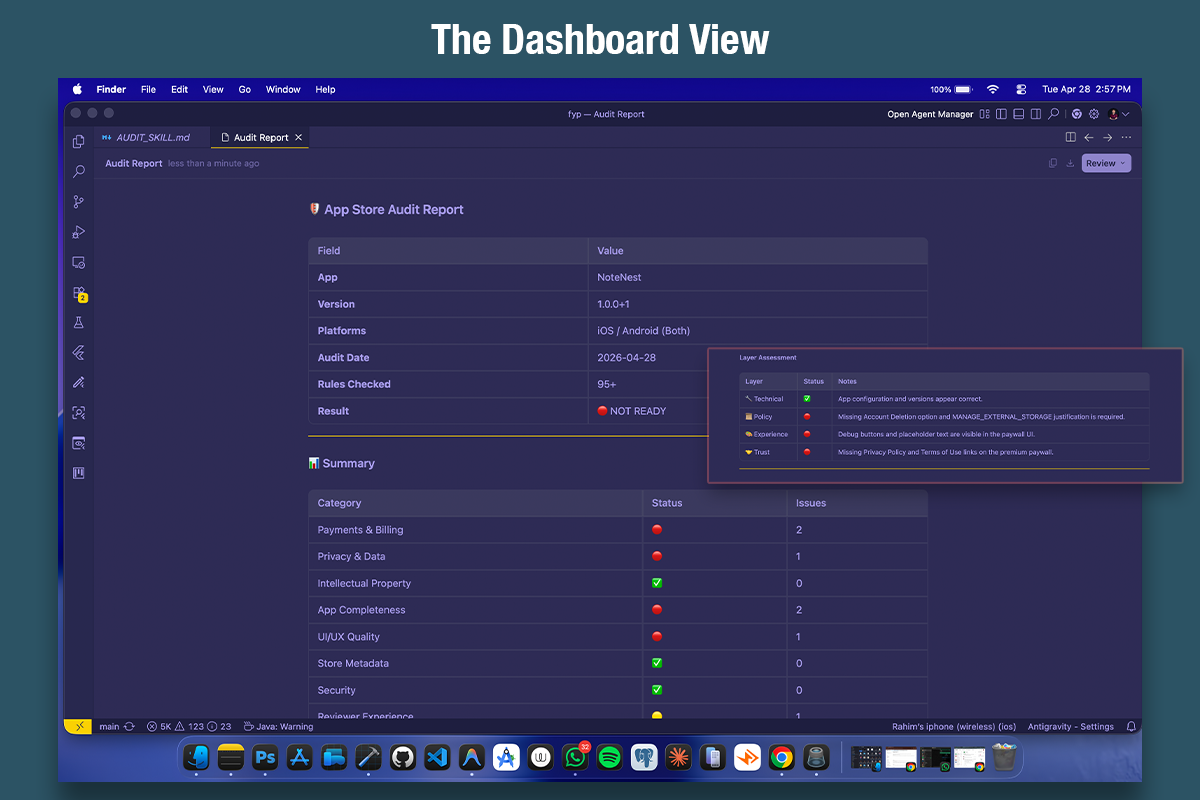
1. The Dashboard View
Instant overview of your app's submission readiness across all categories and the 4 Layers of Review.
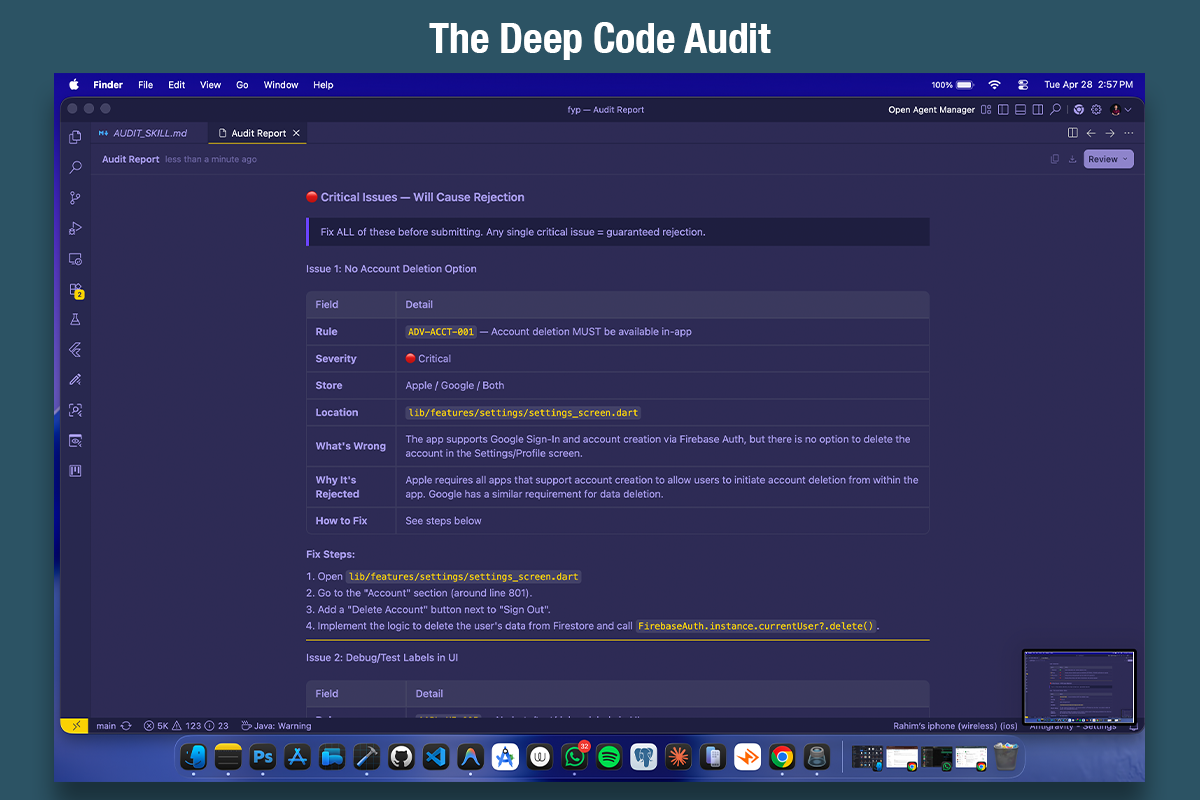
2. The Deep Code Audit
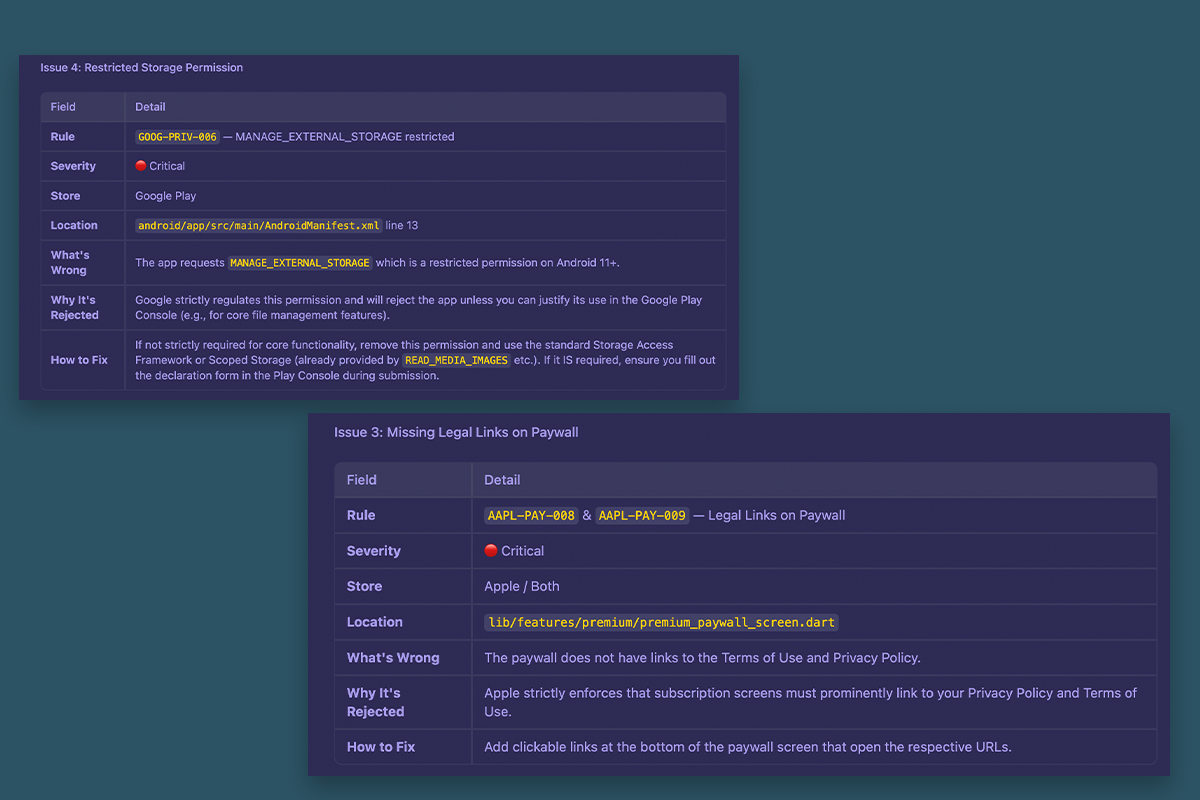
Finds exact files, line numbers, and tells you precisely what's wrong and how to fix it.
💡 Why This Exists
Every mobile developer has been there:
You spend days polishing your app → upload to the store → wait 24-48 hours → REJECTED.
Fix one issue → resubmit → wait again → REJECTED for something else.
Repeat until you question your career choices.
This skill was born from real rejections. It's a comprehensive ruleset that teaches AI coding assistants to audit your app before you submit — catching the same issues Apple and Google reviewers look for.
Framework-agnostic: App Store and Play Store reviewers don't care if you built with Flutter, React Native, Swift, or Kotlin. A rejection is a rejection. This skill works with any mobile framework.
What It Catches
| Category | Apple | Examples | |
|---|---|---|---|
| 💳 Payments & Billing | ✅ | ✅ | Custom promo codes, missing restore button, external payment links |
| 🔒 Privacy & Permissions | ✅ | ✅ | Missing privacy policy, excessive permissions, ATT compliance |
| ⚖️ Intellectual Property | ✅ | ✅ | Content rights, trademark misuse, video downloading |
| 🎨 UI & Design Quality | ✅ | ✅ | Broken layouts, confusing navigation, unreadable text |
| 🐛 App Completeness | ✅ | ✅ | Crashes, broken buttons, placeholder content, dead APIs |
| ⚡ Performance | ✅ | ✅ | Lag, battery drain, memory leaks, ANR |
| 🔐 Security & Malware | ✅ | ✅ | Hidden features, data stealing, obfuscated code |
| 📋 Store Metadata | ✅ | ✅ | Screenshot issues, version mismatch, misleading description |
| 🚫 Spam & Duplicates | ✅ | ✅ | Clone apps, no user value, template apps |
| ⚠️ Content Policy | ✅ | ✅ | Adult content, hate speech, gambling, dangerous activities |
| 🎭 Misleading Functionality | ✅ | ✅ | Fake features, hidden functionality, fake buttons |
| 📱 Platform-Specific | ✅ | ✅ | Target SDK, 64-bit, .aab format, Info.plist flags |
| 🤖 AI & Machine Learning | ✅ | ✅ | Safety filters, content moderation, dynamic code execution |
| 🛡️ Privacy Manifests | ✅ | — | PrivacyInfo.xcprivacy, Required Reason APIs, SDK signatures |
| 🔑 Authentication | ✅ | ✔️ | Sign in with Apple enforcement, social login compliance |
| 🗑️ Account & Data Deletion | ✅ | ✅ | In-app deletion, SIWA token revocation, web deletion URL |
| 👶 Families & Kids | — | ✅ | COPPA compliance, ad ID restrictions, age-gating |
| 📷 Media Permissions | — | ✅ | Photo Picker API, broad media access declarations |
| ⚙️ Foreground Services | — | ✅ | Service type declarations, geofencing restrictions |
| 🇪🇺 EU DMA Compliance | ✅ | — | Alternative payments, browser engines, offers promotion |
140+ audit rules across 32 categories — based on official guidelines and real-world rejections.
Quick Start
Step 1: Add to Your Project
Copy the app-store-audit-skill/ folder to your project root:
Flutter:
your-flutter-project/
├── app-store-audit-skill/
│   ├── README.md          ← You're reading this
│   └── AUDIT_SKILL.md     ← The audit rules (the AI reads this)
├── lib/
├── pubspec.yaml
└── ...
React Native:
your-rn-project/
├── app-store-audit-skill/
│   ├── README.md
│   └── AUDIT_SKILL.md
├── src/
├── package.json
└── ...
Native iOS (Swift / SwiftUI):
your-ios-project/
├── app-store-audit-skill/
│   ├── README.md
│   └── AUDIT_SKILL.md
├── MyApp/
├── MyApp.xcodeproj
└── ...
Native Android (Kotlin / Java / Jetpack Compose):
your-android-project/
├── app-store-audit-skill/
│   ├── README.md
│   └── AUDIT_SKILL.md
├── app/src/main/
├── build.gradle.kts
└── ...
KMP (Kotlin Multiplatform):
your-kmp-project/
├── app-store-audit-skill/
│   ├── README.md
│   └── AUDIT_SKILL.md
├── shared/
├── androidApp/
├── iosApp/
└── ...
Step 2: Run the Audit
Open your AI coding assistant (Cursor, Windsurf, Gemini CLI, etc.) and ask:
Audit my app for App Store and Play Store rejection risks.
Use the audit skill in app-store-audit-skill/AUDIT_SKILL.md
Or be more specific:
I'm about to submit my iOS app to the App Store.
Read app-store-audit-skill/AUDIT_SKILL.md and audit my codebase for rejection risks.
Focus on payments and subscription compliance.
Step 3: Review the Report
The AI will generate a report like this:
🛡️ App Store Audit Report

App: My Awesome App
Version: 2.1.0
Platforms: iOS, Android

🔴 Critical Issues (Will Cause Rejection)
━━━━━━━━━━━━━━━━━━━━━━━━━━━━━━━━━━━━━━━━
1. [AAPL-3.1.1-001] Custom promo code field found on paywall
   → File: lib/views/paywall.dart:142
   → Fix: Remove promo code field from iOS. Use Apple Offer Codes instead.

2. [AAPL-3.1.2-001] Missing "Restore Purchases" button
   → File: lib/views/paywall.dart
   → Fix: Add a Restore Purchases button on the subscription screen.

🟡 Warnings (May Cause Rejection)
━━━━━━━━━━━━━━━━━━━━━━━━━━━━━━━━━━━━━━━━
1. [AAPL-META-002] Version "2.0.0" shown in Profile doesn't match
   pubspec.yaml version "2.1.0"
   → File: lib/views/profile.dart:89

✅ Passed: Privacy, Content, UI, Performance
Step 4: Fix & Submit
Fix the flagged issues, then submit with confidence! 🚀
📁 File Structure
| File | Purpose | Who Reads It |
|---|---|---|
README.md |
Introduction, setup guide, examples | You (the developer) |
AUDIT_SKILL.md |
Complete audit rules, checklists, AI instructions | Your AI assistant |
Note: The AI reads
AUDIT_SKILL.mdto understand the rules. You don't need to memorize them — that's the AI's job.
🎯 Supported Platforms & Frameworks
| Platform | Supported | Guidelines Covered |
|---|---|---|
| 🍎 Apple App Store | ✅ | Review Guidelines 2.x – 5.x, HIG, Metadata |
| 🤖 Google Play Store | ✅ | Developer Program Policy, Billing, Data Safety |
| 🌐 Web (PWA) | 🔜 | Coming soon |
| Framework | Supported | Auto-detected |
|---|---|---|
| Flutter (Dart) | ✅ | ✅ |
| React Native (JS/TS) | ✅ | ✅ |
| Native iOS (Swift / SwiftUI) | ✅ | ✅ |
| Native Android (Kotlin / Jetpack Compose) | ✅ | ✅ |
| Native Android (Java) | ✅ | ✅ |
| Kotlin Multiplatform (KMP) | ✅ | ✅ |
| Xamarin / .NET MAUI | ✅ | ✅ |
| Ionic / Capacitor | ✅ | — |
🛠️ Supported AI Tools
This skill works with any AI coding assistant that can read files:
| Tool | How to Use |
|---|---|
| Gemini CLI / Antigravity | Point to AUDIT_SKILL.md in your prompt |
| Cursor | Add AUDIT_SKILL.md to .cursor/rules/ or reference in chat |
| GitHub Copilot | Reference the file in Copilot Chat |
| Windsurf | Add to Cascade rules or reference in chat |
| Cline / Aider | Include in system prompt or reference file |
🏆 Real-World Rejection Cases
These are actual rejections that led to rules in this skill:
| App | Store | What Happened | Rule Added |
|---|---|---|---|
| B3G TV | Apple | Custom promo code field on paywall — rejected even though codes were tracking-only, no discount | AAPL-3.1.1-001 |
| B3G TV | Apple | Streaming app content rights questioned — required ownership statement | AAPL-5.2.3-002 |
| B3G TV | Apple | App Privacy section not filled — required Admin role in App Store Connect | AAPL-META-007 |
Have a rejection story? Open an issue or submit a PR to add your case!
🤝 Contributing
We welcome contributions! Here's how:
- Found a new rejection case? Add it to
AUDIT_SKILL.md - Know a rule we missed? Open an issue or PR
- Built something cool with this? Let us know!
Rule ID Format
When adding rules, follow this format:
PLATFORM-CATEGORY-NUMBER

Examples:
AAPL-3.1.1-001  → Apple, Guideline 3.1.1, Rule #001
GOOG-BILL-003   → Google, Billing, Rule #003
📊 Stats
- 140+ audit rules
- 2 store platforms covered (Apple + Google)
- 7+ frameworks supported (Flutter, React Native, Swift, Kotlin, KMP, Java, Compose)
- 32 categories (including AI content, privacy manifests, account deletion, families policy)
- 4 Layers of Rejection framework
- Auto-detection of project framework by AI
- Complete implementation guides for account deletion (Apple + Google)
- Built from real rejections — not just docs
⭐ Support
If this saved you from a rejection, please:
- Star this repo ⭐ — it helps other developers find it
- Share with your team — save everyone's time
- Report new cases — help us grow the ruleset
License
MIT License — use freely in personal and commercial projects.
Built with frustration, tested with real rejections.
Because no developer should waste days on preventable App Store rejections.
Made with ❤️ by RahimDev
Reviews (0)
Sign in to leave a review.
Leave a reviewNo results found