caliper
Health Warn
- License — License: MIT
- Description — Repository has a description
- Active repo — Last push 0 days ago
- Low visibility — Only 5 GitHub stars
Code Fail
- rm -rf — Recursive force deletion command in .github/workflows/ci.yml
- rm -rf — Recursive force deletion command in .github/workflows/release.yml
- network request — Outbound network request in .github/workflows/release.yml
- network request — Outbound network request in scripts/live-release-smoke.sh
- rm -rf — Recursive force deletion command in scripts/publish.sh
- network request — Outbound network request in scripts/release-smoke.sh
Permissions Pass
- Permissions — No dangerous permissions requested
No AI report is available for this listing yet.
See what your AI coding cost and produced, from the logs already on your disk. Offline, no account.
Caliper
Caliper shows what your AI coding cost and what it produced. It reads the logs
already on your disk from Codex CLI and Claude Code, prices the usage at API
rates, and breaks it down by project, PR, model, and session. It runs offline.
No account. No upload. No telemetry.


Run it on built-in sample data, without installing anything:
uvx --isolated --from caliper-ai caliper dashboard --demo --open
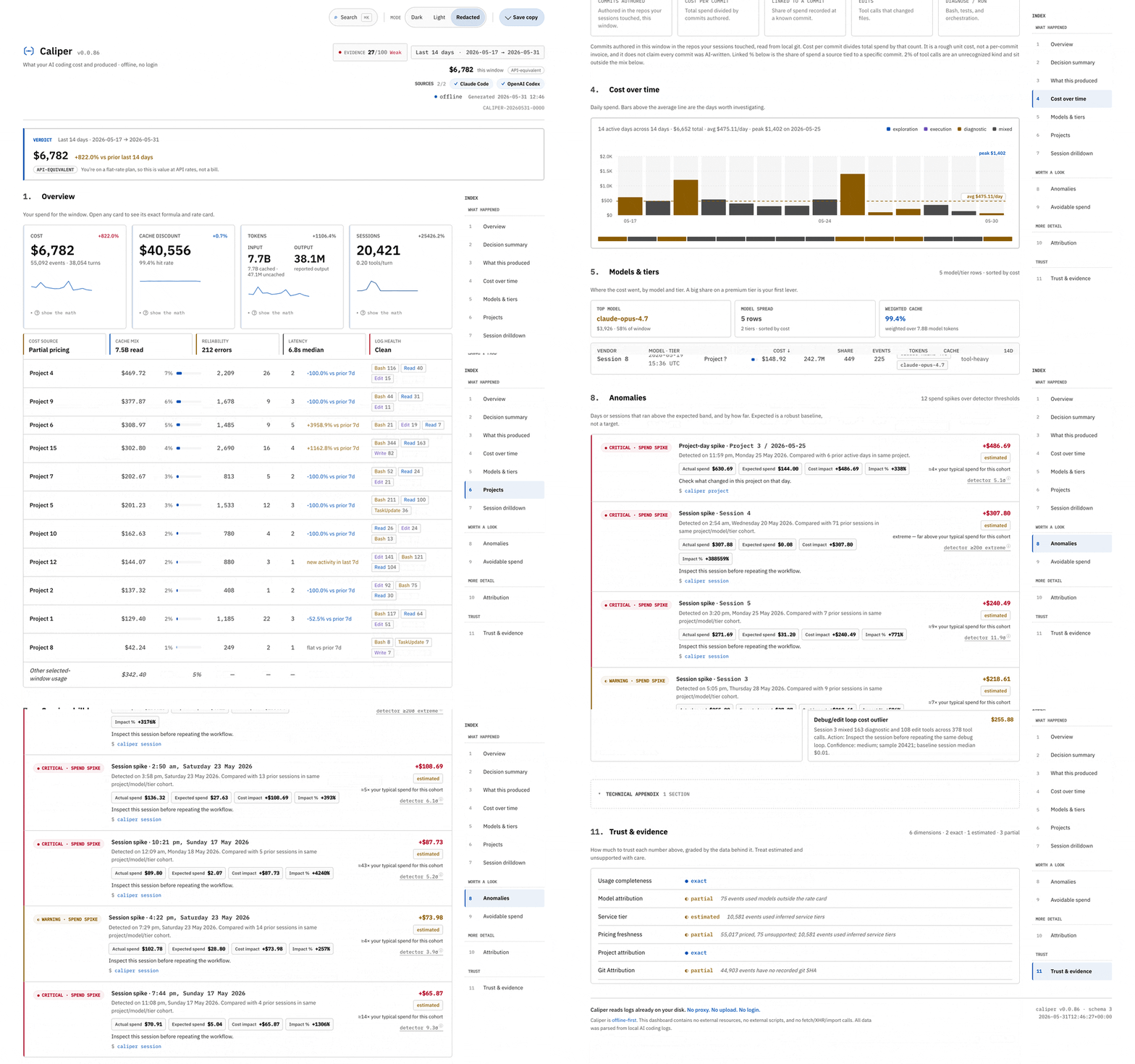
A real caliper dashboard --days 14 report from the author's own machine, in Safe Share mode (--share-safe): project names, paths, and session labels are redacted, every cost and evidence grade is real. On your own machine the dashboard shows your real labels by default — add --share-safe only when you forward the file.
Quickstart
Three commands, in order. Nothing is uploaded, and no account is created.
# 1. Install it (Python 3.11+)
uv tool install caliper-ai

# 2. Build a dashboard from the logs already on your disk
caliper dashboard

# 3. No logs yet? Open the full report on built-in sample data first
caliper dashboard --demo
caliper dashboard writes one self-contained HTML file and opens it in your
browser. If step 2 finds nothing, caliper doctor shows exactly which tools and
logs it detected. Don't want to install anything yet? The one-liner above runs
the demo straight from PyPI.
What your spend produced
The dashboard's first section is built from the git history and tool calls
already on your machine:
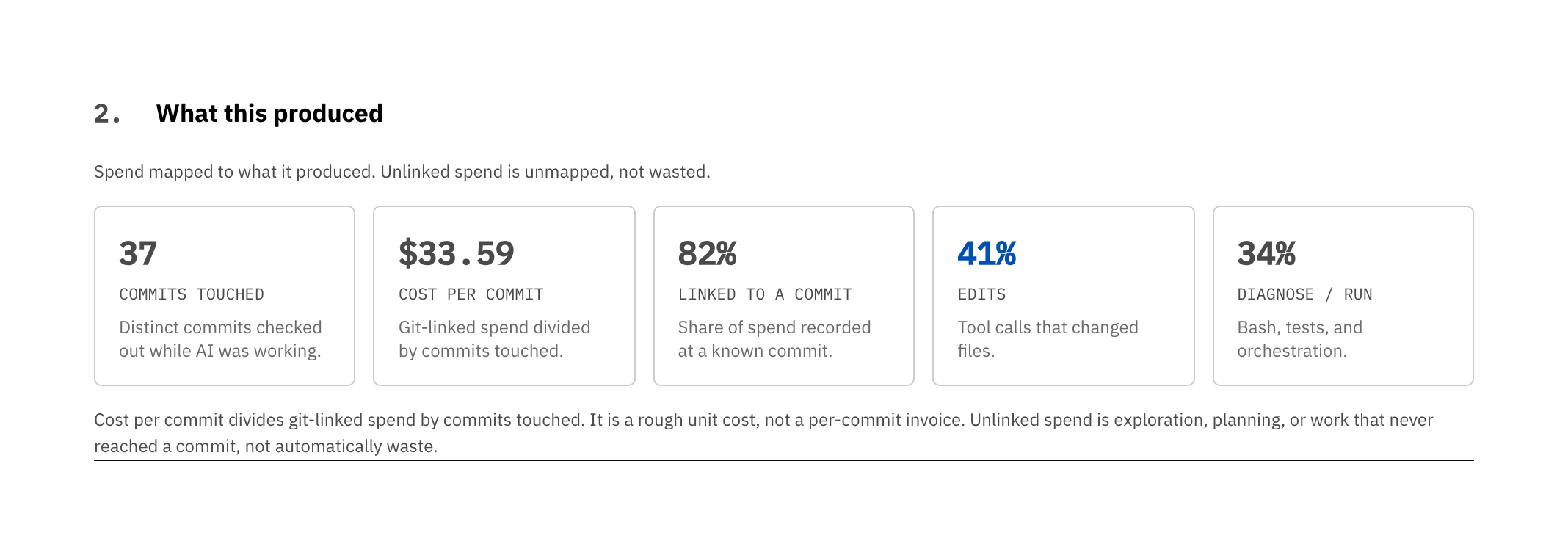
- Commits touched / authored. The card adapts to your data. With full local
git logaccess it reads Commits authored — commits authored this window
in the repos your sessions touched. When only the commit SHAs your tools
logged are available (as in the demo above) it reads Commits touched —
distinct commits checked out while the AI was working. Neither claims the AI
wrote them. - Cost per commit. Git-linked spend divided by commits touched, or total
spend divided by commits authored when git history is readable. A rough unit
cost, not a per-commit invoice. - Linked to a commit. The share of spend recorded against a known commit.
The rest is exploration, planning, or work that never reached a commit — not
automatically waste, and Caliper says so. - Edits vs. diagnose/run. The share of classified tool calls that changed
files versus ran shells and tests. A lot of diagnosing and very little editing
is the rough shape of a session that spun instead of shipped.
These are signals, not a verdict. Each is labeled with its assumption. Caliper
measures cost and effort, not whether the code is good.
What it answers
Vendor dashboards are per-tool, behind a login, and a flat subscription hides
the per-token cost behind one price. None of them know your git history, your
PRs, or which project caused the work. Caliper reads local logs, prices them
with dated rate cards, and answers:
- What did this PR cost?
- Which project is driving the spend?
- Where is spend avoidable, and how confident is that number?
- On a flat plan, what would the same usage cost at API rates?
- Is each number exact, estimated, partial, or unsupported?
Reading the dashboard
The verdict sits at the top of every report: the period, the cost, and the
trend. Nothing prescriptive competes with it.
Caliper · Last 30 days · $1,243 · trend +8.2% · top fix: Move low-output
                                  fast tier calls to standard ($96.40)
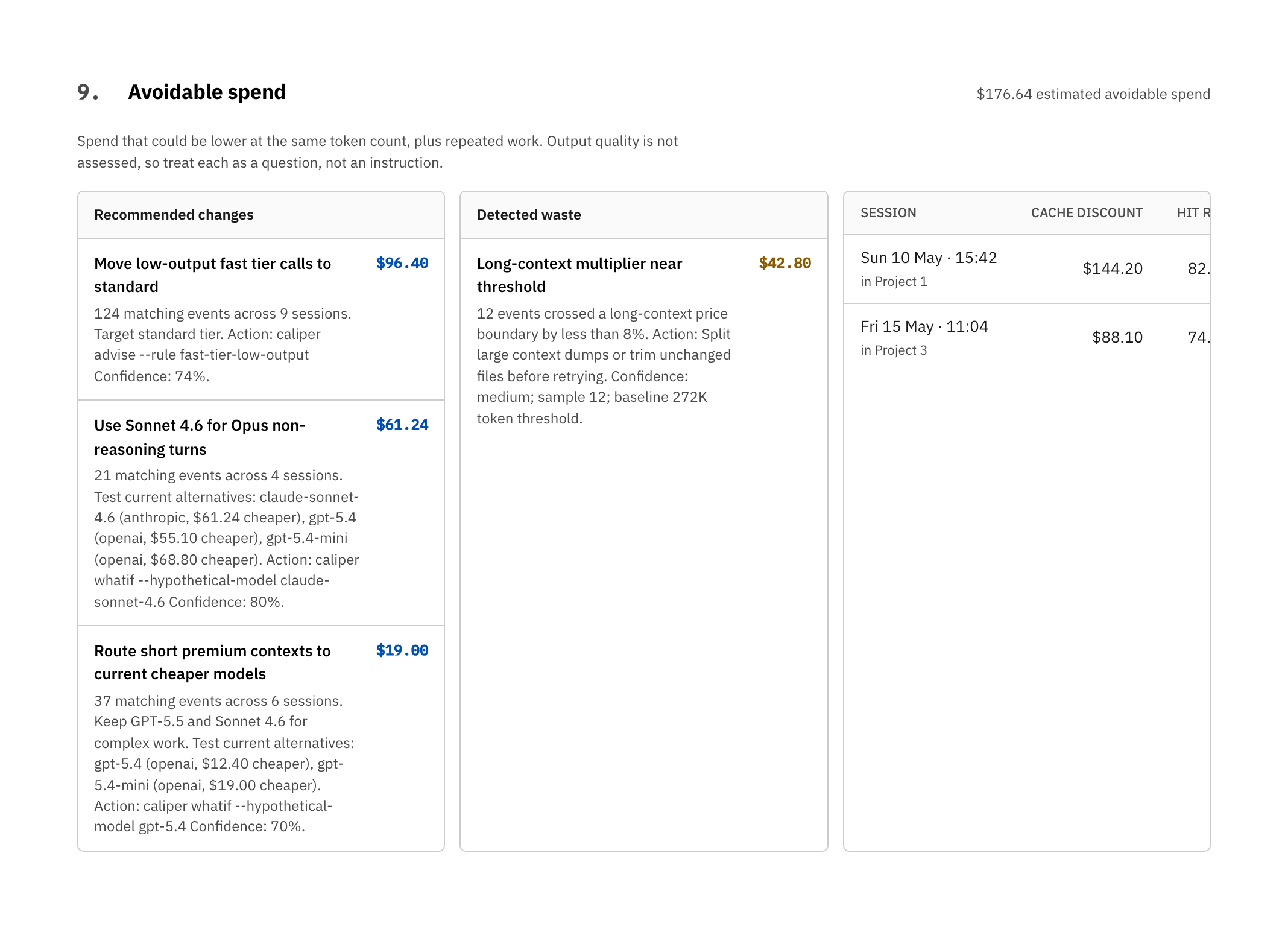
Avoidable: $176.64 across 3 recommendations. Reproduce with `caliper recommend`.
Theme: dark · local-only · re-render: caliper dashboard --open
By default the dashboard shows your real project names, paths, and session
labels — it's your machine and your analysis. When you want to forward the file,
add --share-safe (or set dashboard.privacy = "always") and Caliper swaps every
name for an indexed placeholder, tags the filename, and keeps the costs and
evidence intact.
If Caliper detects a flat-rate subscription, it labels the headline cost
API-equivalent value, not a bill, right where you read it. Nobody mistakes
what your usage is worth for what you owe.
Every KPI on the page has a "show the math" disclosure: the formula, the
rate card date, and the sample size. Evidence, anomalies, avoidable spend, and
session rows show the source quality behind each number, so you never trust an
unexplained total.
Large first runs spend a moment indexing your local log history. Later runs
reuse the parse cache. Inspect it with caliper cache status, clear it withcaliper cache clear, or relocate it with CALIPER_CACHE_DIR.
Rate cards stay current, on your terms
Costs are priced from a rate card embedded at release time. See exactly which
card is active and how old it is:
caliper rates show # active rate card, its sources, and its age
Caliper is offline by default and never fetches on its own. When you want the
latest published pricing, opt in explicitly:
caliper rates refresh --allow-network
This is the auditable backing for every dollar: rates show names the dated,
sourced rate card behind the prices, and the dashboard's per-KPI "show the math"
disclosures expand the formula and sample size on top of it.
Dashboard tour
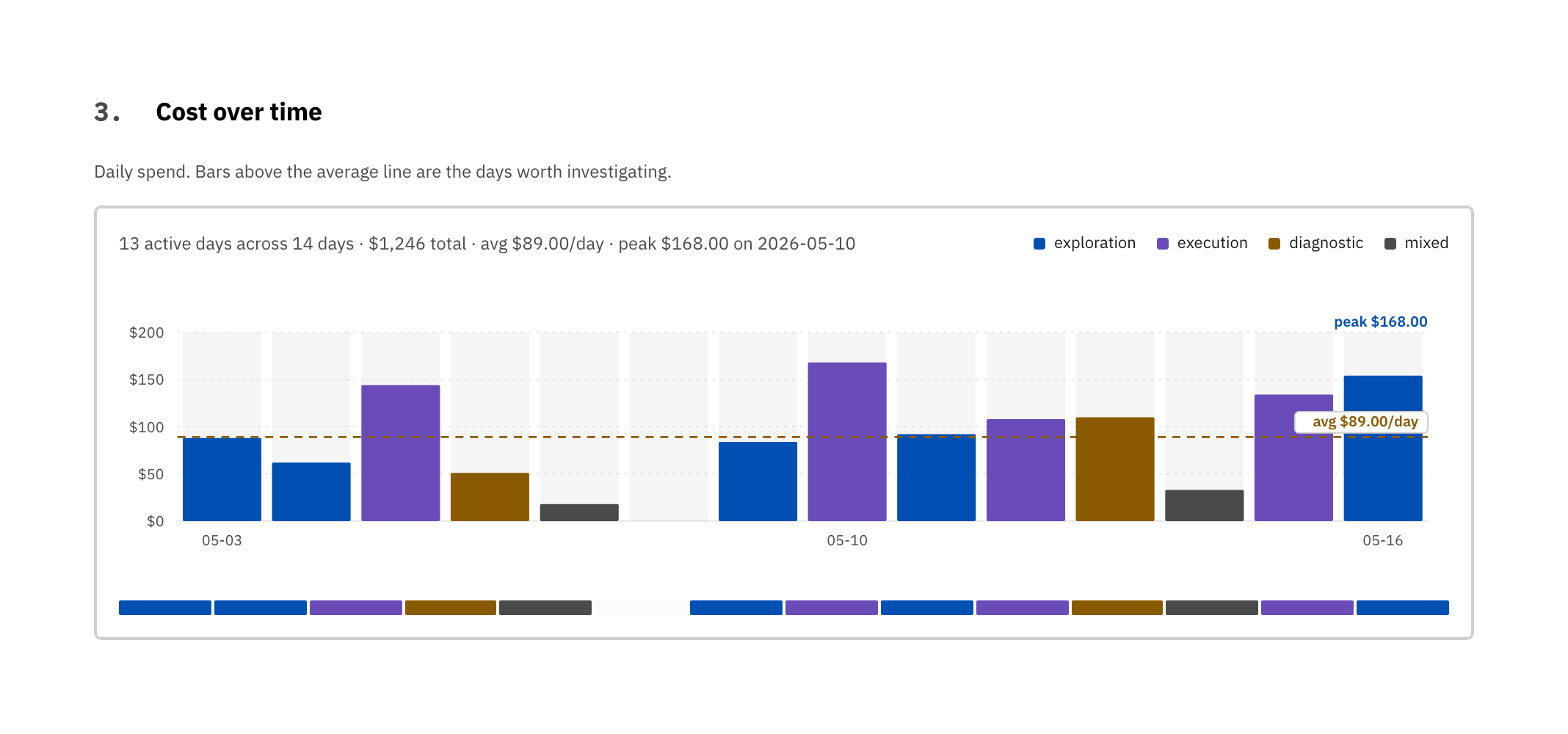
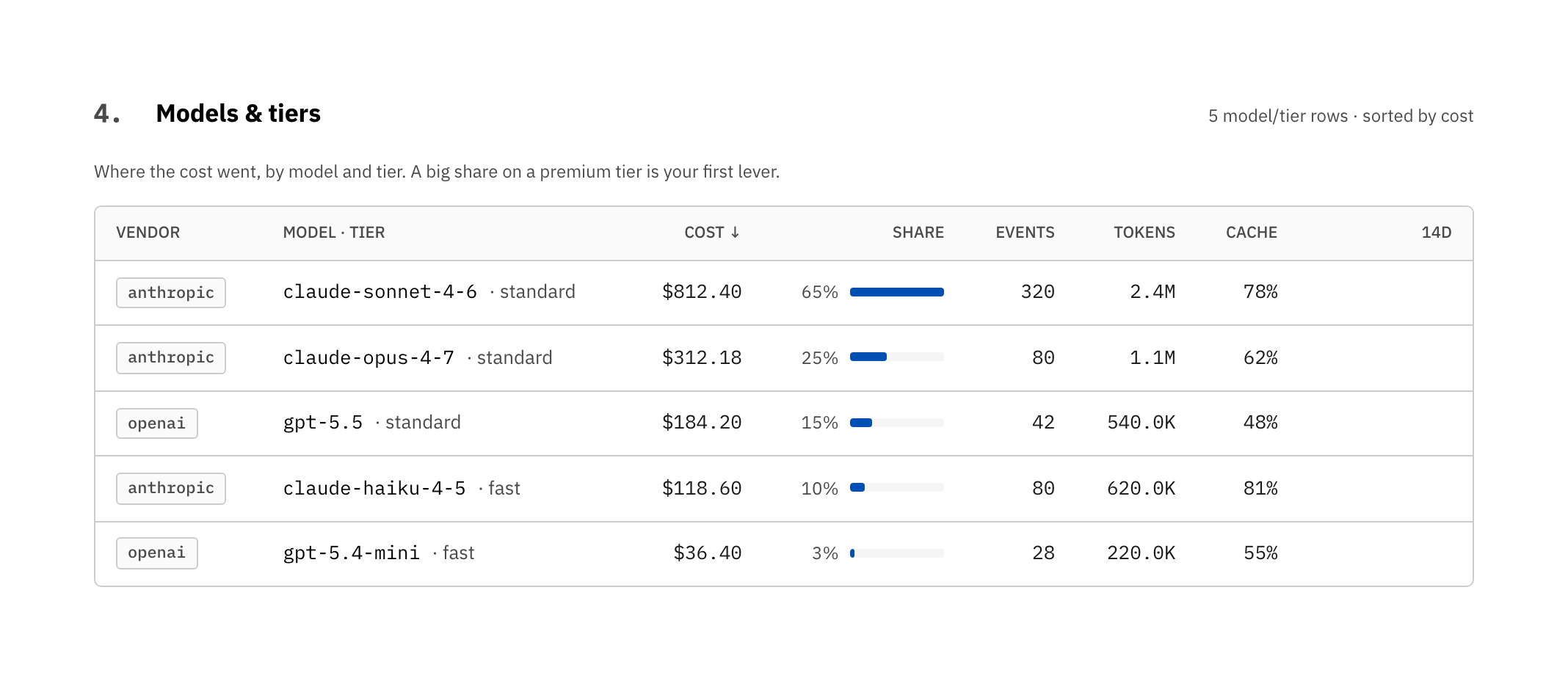
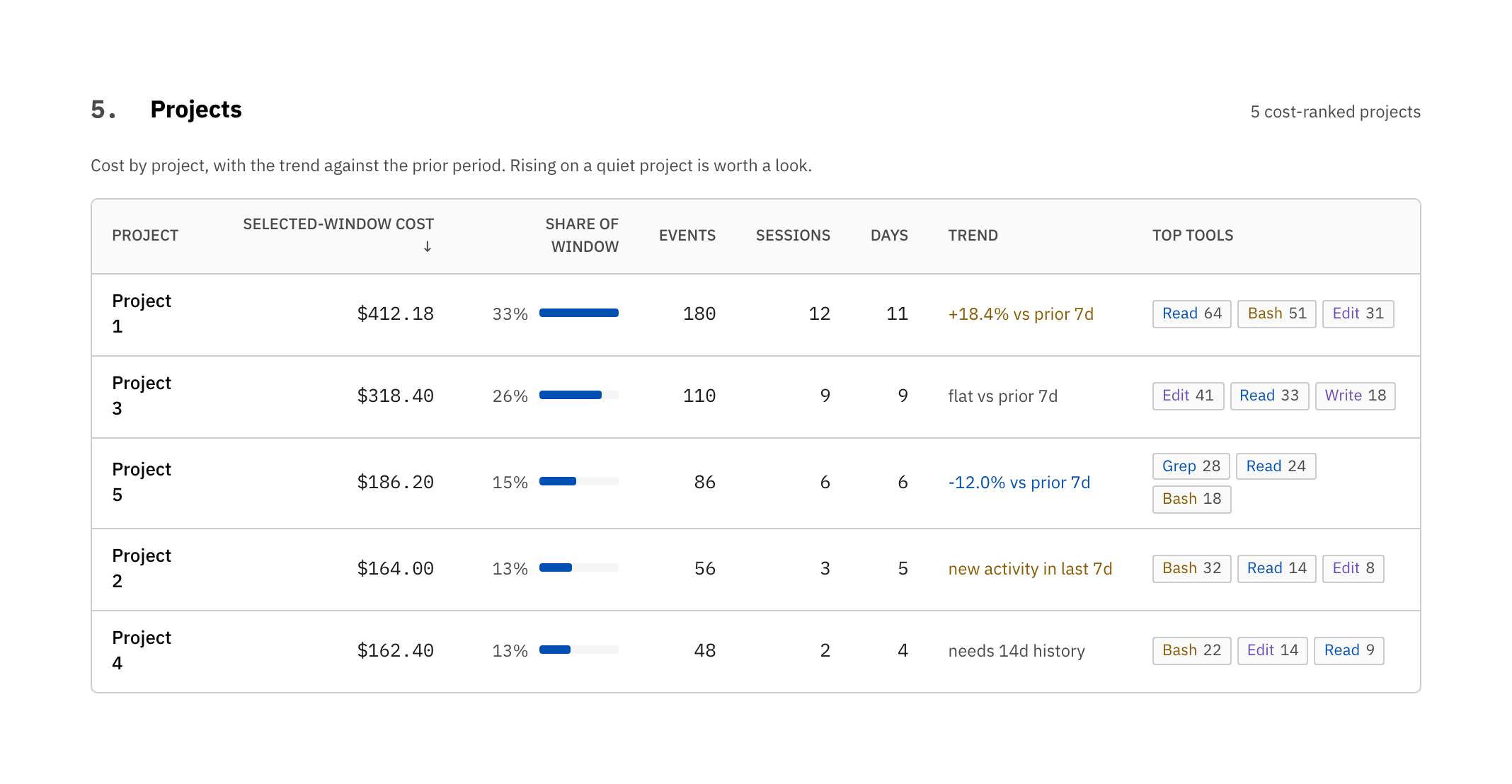
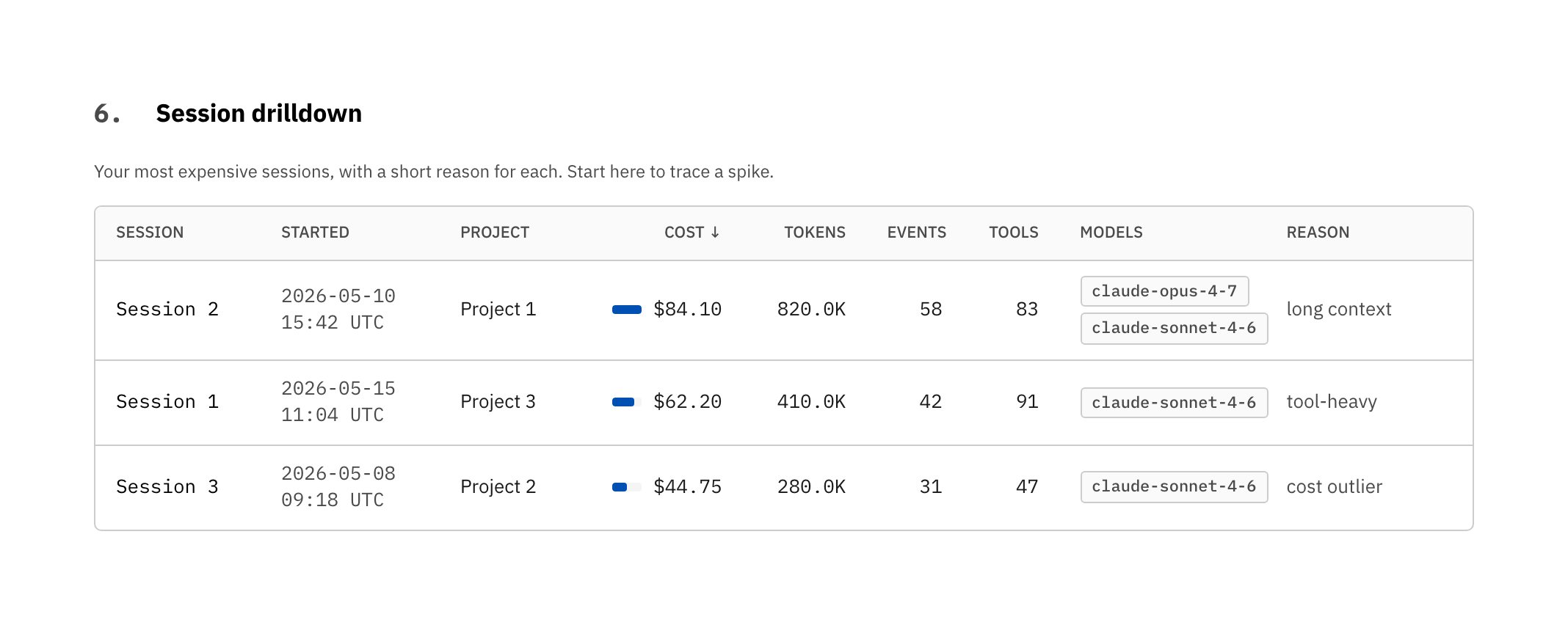
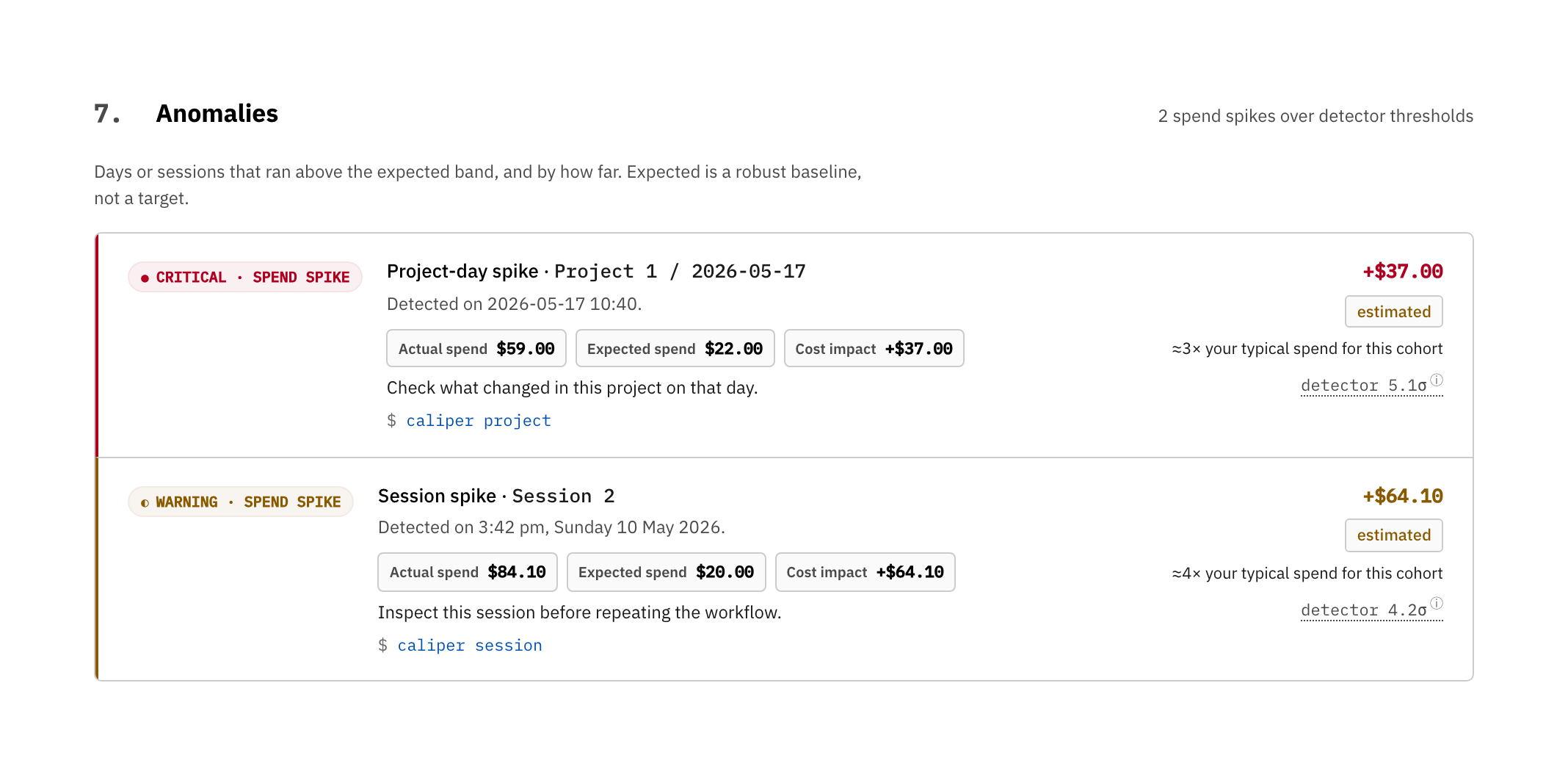
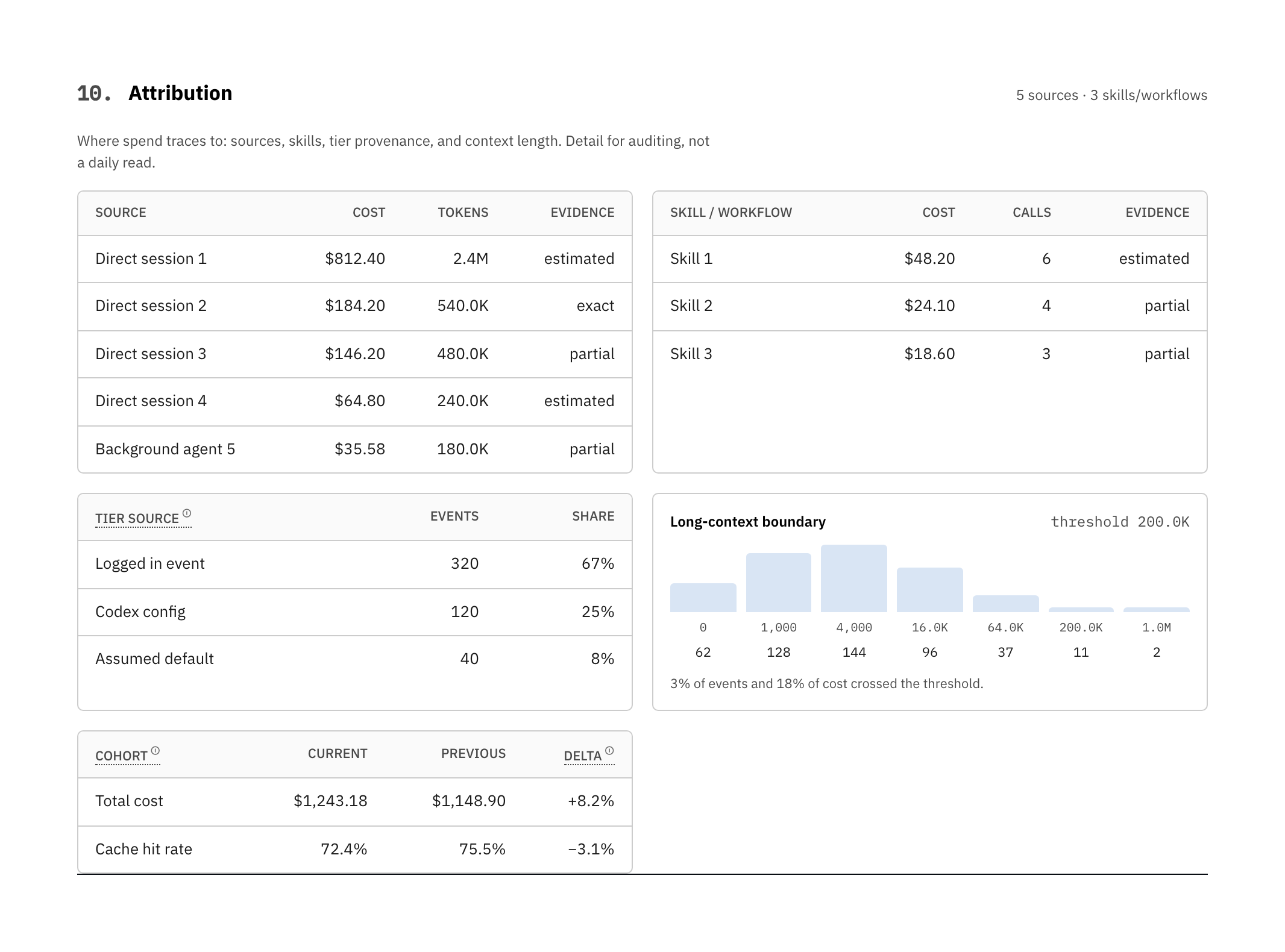
These come from the built-in demo in Safe Share mode (caliper dashboard --demo --share-safe), so they show the real report layout with project names and paths
redacted.
| Cost over time | Models & tiers |
|---|---|
 |
 |
| Projects | Session drilldown |
|---|---|
 |
 |
| Anomalies | Avoidable spend |
|---|---|
 |
 |
Anomalies go past "you spent a lot that day" — which is usually just a busy day
you already know about. Alongside raw spikes, Caliper flags efficiency
regressions: a session that paid more per 1M tokens than prior sessions of
the same size in the same project and model (cache loss, model drift, tool
thrash), with the extra dollars quantified. Each row ends in the command that
opens its source — paste it and you are looking at the cause, not just the spike.
How it's different
| Caliper | Hosted proxies (Helicone, Langfuse, …) | |
|---|---|---|
| Where data lives | Local disk | Their servers |
| Sits on the request path | No | Yes — proxy or SDK |
| Login required | No | Yes |
| Reads existing AI-tool logs | Yes — Codex, Claude Code | No — needs you to route through them |
| Per-PR / per-project cost | Yes — local git attribution | If you instrument it |
| Works with WiFi off | Yes | No |
If you need a request-path proxy, use one of those. If you want to know what
last month cost without sending prompts to a third party, use Caliper.
What you get
| Surface | Command | Purpose |
|---|---|---|
| Browser dashboard | caliper dashboard |
What your spend produced, cost over time, models, projects, sessions, then any real flags (anomalies, budgets, avoidable spend) and the evidence behind every number. |
| PR receipt | caliper pr 42 |
Cost of events that recorded the PR's commit SHAs (it states how much of window spend that covers). |
| Overview | caliper overview |
Rolling 7 / 30 / 90 day spend. |
| Project rollup | caliper project |
Spend by repository or folder. |
| Model rollup | caliper models |
Spend by model and vendor. |
| Evidence report | caliper evidence |
How trustworthy each dimension is. |
| Advisor | caliper advise --strict |
Ranked, dollar-anchored fixes. |
| Doctor | caliper doctor |
Local setup + data coverage. |
| Budgets | caliper budgets check |
CI-friendly warning / breach exits. |
| TUI | caliper tui |
Interactive terminal workspace. |
PR receipt
caliper pr 42
Caliper · PR #42
128 events  432,118 tokens  $4.82   ·   7 commits

  Vendor        Model                 Events   Tokens (in/out)    Cached   $
  openai-codex  gpt-5.4 standard          74   210,000 /  31,000    61%   $2.10
  claude-code   claude-sonnet-4.6         31    88,000 /  12,000    48%   $1.12
Missing git attribution is surfaced as partial evidence instead of being
silently treated as exact.
What the dollar figures mean
Caliper is precise about what its numbers are, because the framing changes with
how you pay:
- Metered API usage (API keys, usage-based billing). The cost total is your
actual bill, and avoidable-spend findings are real money you would stop
spending. - Flat-rate subscription (a fixed monthly plan). The cost total is the
API-equivalent value of your usage, what the same work would cost on the
meter. It's not an invoice, and a flat plan has nothing to refund. Avoidable
spend here means wasted tokens, slower loops, and rate-limit pressure, not
cash back. Caliper labels this everywhere it shows the number.
Pricing math is identical in both modes. Only the label changes, and Caliper
never pretends a flat-plan total is a bill.
Trust model
| Boundary | Default |
|---|---|
| Login | none |
| Upload | none |
| Telemetry | none |
| Daemon | none |
| Request proxy | none |
| Network calls during usage analysis | none |
| Pricing refresh | explicit --allow-network |
| GitHub PR lookup | explicit --allow-network |
| Prompt output | redacted |
| Absolute paths | redacted in machine-readable output |
| Parse cache | local SQLite only; may contain local paths/session metadata |
The privacy invariant is enforced in CI. The generated HTML contains zero
external resources, zero <script src>, zero fetch/XMLHttpRequest/import().
Interactive dashboards use one inline UI script and one JSON data block. Pass--no-interactive for script-free HTML.
The parse cache is not telemetry and is never uploaded. It stores parsed usage
events, source file fingerprints, and enough local metadata to avoid reparsing
unchanged logs. Disable it per run with --no-parse-cache.
You can verify it on the file Caliper wrote (default location shown):
grep -E "://|<link|<script src|fetch\(|XMLHttpRequest|import\(" ~/Downloads/caliper-dashboard-*.html
# no matches
Accuracy
Caliper does not pretend every local log is perfect. It reports what the
evidence supports.
- Costs use
Decimal. - Cached input, cache creation, output, and reasoning tokens are tracked
separately when vendors expose them. - Long-context multipliers are applied per model.
- Codex Fast mode is priced with sourced model-family multipliers and kept
separate from standard-tier usage in dashboard spend drivers. - Unknown pricing is surfaced as a warning, not silently guessed.
- Anomaly detection uses robust σ (MAD × 1.4826, IQR / 1.349) with a $1
absolute floor — no more "354,210σ" on a sparse Tuesday. Beyond raw spikes,
an efficiency-regression detector flags sessions that cost more per 1M tokens
than their project/model peers, so the section surfaces waste you can act on,
not just busy days. - Tool-mix shares disclose any unrecognized-tool remainder instead of quietly
normalizing it away, and per-day token sparklines plot tokens, not event
counts. - Velocity and quality signals mined from the session data: a typical turn
response time (median and p90), a callout for any session that spun more
than it shipped (mostly diagnostics, almost no edits), the tool-error
rate (how often the AI's commands fail), and code churn (lines added /
removed and a rough cost per line changed). - Evidence is graded
exact,estimated,partial, orunsupported. Each
KPI exposes its formula inline.
caliper evidence
caliper doctor
caliper rates show
Budgets in CI
# .caliper.toml
[budgets]
daily_cost_usd = 25
weekly_cost_usd = 100
monthly_cost_usd = 500
caliper budgets check
| Exit | Meaning |
|---|---|
0 |
ok |
1 |
warning threshold crossed |
2 |
breach threshold crossed |
Supported sources
| Source | What Caliper reads |
|---|---|
| OpenAI Codex CLI | Local session logs, state DB, model + token fields. |
| Claude Code | Project JSONL logs, tool-use, cache token fields. |
Files that are transcript-only or missing token counts are surfaced bycaliper doctor so coverage stays explicit.
Install
Requires Python 3.11+.
# Recommended.
uv tool install caliper-ai
uv tool upgrade caliper-ai
The PyPI package is caliper-ai; the command is caliper.
# pipx
pipx install caliper-ai
pipx upgrade caliper-ai

# venv + pip
python -m venv .venv && source .venv/bin/activate
python -m pip install caliper-ai

# uvx one-off (use --from to avoid name-collision resolution)
uvx --isolated --from caliper-ai caliper dashboard --demo --open
If uv can't see a just-published version (stale PyPI index or resolver
cache):
UV_NO_CACHE=1 uv tool install --force caliper-ai
FAQ
Will Caliper save me money? Not on a flat plan. There's nothing to save.
It gives you visibility: what your usage is worth at API rates, where it goes,
and where it's avoidable. On metered API usage, the avoidable-spend findings
are real money.
What does the cost number mean on a subscription? It's the API-equivalent
value of your usage, not a bill. Caliper labels it that way everywhere it shows
the number. Run caliper evidence for the full breakdown.
Does it measure whether AI is actually making me productive? It measures the
honest, local half of that: cost per commit, how much spend linked to a commit
at all, and the ratio of editing to diagnosing. It does not judge whether the
code was good, and it never claims a commit equals value. Those are signals to
read, not a score to trust blindly.
How accurate are the costs? As accurate as your local logs and rate card
allow. Run caliper evidence to see which dimensions are exact, estimated,
partial, or unsupported.
Does Caliper upload prompts? No. Default usage analysis is local-only and
redacts prompt-like fields from normal output. CI tests the privacy invariant
on every commit.
Is there a hosted version? No. There is no hosted version on the roadmap.
Caliper is intentionally a tool you run, not a service you log into.
Development
uv sync --all-extras --dev
uv run ruff check . && uv run ruff format --check .
uv run pytest
See CONTRIBUTING.md for rate-card updates, new vendor
parsers, schema changes, and release hygiene.
Who built this
Rajdeep Mondal. I had a four-figure
AI coding bill, a strong hunch about which work caused it, and no offline way
to prove it. Then I moved heavy work onto a flat plan and realized I now had
the opposite problem: no idea what I was actually getting. Caliper answers both
questions from the logs already on your disk, without sending anything anywhere.
License
MIT. See LICENSE.
Reviews (0)
Sign in to leave a review.
Leave a reviewNo results found