Wombat
Health Pass
- License — License: MIT
- Description — Repository has a description
- Active repo — Last push 0 days ago
- Community trust — 12 GitHub stars
Code Fail
- rm -rf — Recursive force deletion command in eval/faults/run.sh
Permissions Pass
- Permissions — No dangerous permissions requested
No AI report is available for this listing yet.
General agent written in go for lighter , faster and more token efficent sessions. Agents no longer iterate mindlessly even after making viable outcome


(wombat's site is made by wombat itself)
Wombat is a general purpose agent.
Can do anything and beyond than your standard agent harness , that too for lesser tokens at times.
Quick start
macOS / Linux — latest release. Install, configure, and start:
curl -fsSL https://raw.githubusercontent.com/ramsterr/Wombat/main/install.sh | bash
wombat setup
wombat
Current main — newest features. The tagged release can lag behind this
branch. With Go 1.26.3+:
go install github.com/ramsterr/Wombat/cmd/wombat@main
wombat setup
wombat
go install writes wombat to $(go env GOPATH)/bin; add that directory toPATH if the command is not found. Update a release build with wombat upgrade;
rerun the go install command to update a main build (upgrade switches it to
the latest tagged release).
Windows — install WSL2 and Ubuntu (wsl --install), then run the
macOS/Linux command inside Ubuntu. Git Bash works for the native Windows build,
but Wombat's bash tool needs a POSIX sh; native PowerShell/cmd is not fully
supported.
wombat setup runs automatically on first launch and saves your provider,
model, and API key in ~/.wombat/config.json.
Install
The release installers below install the latest tagged release. Use the source
build when you want the current main features.
Build from source (current main)
You only need Go 1.26.3+ and git. This fetches only the latest main commit and no old tags; omit the flags if you need full repository history.
git clone --depth 1 --single-branch --no-tags https://github.com/ramsterr/Wombat.git
cd Wombat
go build -o wombat ./cmd/wombat
./wombat version
./wombat setup
./wombat
Already have the checkout? Update it and rebuild the binary:
git pull
go build -o wombat ./cmd/wombat
./wombat
Install it somewhere on your PATH:
go build -o /usr/local/bin/wombat ./cmd/wombat
Requirements: Go 1.26.3+ for building from source. The core agent has no runtime
dependencies. Optional features use standard tools: a Chromium browser forbrowser, a language server for lsp, git for isolated workers,
and sh for bash.
Release installers
The one-line installer, Homebrew, and go install ...@latest install the
latest tagged release, not unreleased changes on main.
macOS or Linux
curl -fsSL https://raw.githubusercontent.com/ramsterr/Wombat/main/install.sh | bash
If wombat is not found:
echo 'export PATH="$HOME/.local/bin:$PATH"' >> ~/.zshrc
source ~/.zshrc
Homebrew
brew tap ramsterr/wombat
brew install ramsterr/wombat/wombat
Go
go install github.com/ramsterr/Wombat/cmd/wombat@latest
Windows — WSL2
Install Ubuntu from PowerShell with wsl --install, then run the macOS/Linux
installer inside Ubuntu. If wombat is not found, add ~/.local/bin to yourPATH as shown above.
First run
wombat setup       # choose a provider, paste an API key, choose a model
wombat doctor      # check config, permissions, and connectivity
wombat             # open the chat UI
wombat setup runs automatically on first launch. Your provider, model, and
API key are saved in ~/.wombat/config.json.
Without a terminal UI:
wombat run "summarize this repository and find the test command"
wombat run --yolo "fix the failing tests and explain the change"
--yolo auto-approves tool permissions; use it for trusted, non-interactive
runs.
Common commands
| command | what it does |
|---|---|
wombat |
open the chat UI |
wombat run "<task>" |
run one task and exit |
wombat run -c "<task>" |
continue the latest session |
wombat resume [id|last] |
reopen a session |
wombat sessions |
list sessions for this directory |
wombat setup |
change provider, key, or model |
wombat models [provider] |
list available models |
wombat doctor |
diagnose config and connectivity |
wombat config |
show config, with keys redacted |
wombat config set <key> <value> |
change one setting |
wombat mcp add/list/test |
add and check MCP servers |
wombat mcp login/logout |
sign in to an OAuth MCP server |
wombat checkpoint list |
list shadow-git checkpoints |
wombat checkpoint restore <id> |
restore a checkpoint |
wombat upgrade |
install the latest stable release |
wombat version |
print the version |
Inside the chat
Type a request and press Enter. Useful shortcuts:
esc— stop the current run, close an overlayctrl+c— quit/— command palette (options appear inline)@— file picker with tab completionctrl+v— attach an image from the clipboard (macOS/Linux)ctrl+b— toggle the inspector panelctrl+o— open the live previewctrl+gor?— help and key mapctrl+t— cycle colour themesctrl+p/ctrl+n— prompt historyctrl+r— add a project reference (file, folder, or URL)ctrl+y— copy the last reply;/copypicks any reply;/copy allcopies
the whole transcriptalt+1..5— jump between chat, sessions, models, usage, and doctorpgup/pgdnorctrl+up/down— scroll the transcript- mouse wheel — mouse reporting is off by default so you can select and copy
text normally; run/mouseto enable wheel scrolling
Common slash commands:
/help          keyboard map and every command
/keys          alias for /help
/reference     keep files and links in the inspector
/sources       browse the sites and files the session used
/preview [n]   open a preview; /previews lists them all
/copy [n|all]  pick a reply to copy, or copy the transcript
/model         switch model
/configure     choose and configure a provider
/providers     list every provider
/reasoning     off, low, medium, high, or max
/mode          chat or create mode
/attach <path> attach a file
/panel         toggle the inspector
/theme         open the live theme picker
/new           new session
/compact       compact context now
/status        current provider, model, and directory
/cost          token and cache usage
/exit          quit
whats preview first?
agents are notorious for iterating for multiple minutes in the name of "improvement" and "polishing" without even making any considerable improvements.
wombat gives the user the power to review fast and feed back faster.
example:
Themes ship with the app: wombat, tokyo, catppuccin, gruvbox, nord,rosepine, dracula, everforest, kanagawa, solarized, monokai,iceberg, nightfox, onedark, and github. Pick one with /theme, or cycle
with ctrl+t; the choice is saved in ~/.wombat/config.json. The welcome screen
shows the Wombat banner, and the inspector keeps a compact WOMBAT mark at the
bottom. The theme also tints the terminal background while Wombat is open and
restores it on exit (wombat config set paint_background false disables this).
References are project-scoped notes that stay in the right-hand inspector.
Press ctrl+r to add a path or URL, or use /reference add <path|url>. Remove
them with /reference rm <n> or clear the list with /reference clear. They are
stored under ~/.wombat/references/, never in your repository.
Sources (/sources) opens an interactive browser of every site and file the
session has used. Switch tabs with tab, move with the arrows, and press enter
to open a URL or attach a file.
Previews are collected as the agent works: local dev servers, HTML pages,
PDFs, images, and video. They are de-duplicated by site origin or file path, the
newest is shown in the banner, and the left preview rail keeps the ordered
list. Use ctrl+o to open the newest or /previews to choose from all of them.
Wombat inherits your terminal's font; a terminal UI cannot install a font.
For the intended look and complete glyph set, use a Nerd Font such as JetBrains
Mono, Berkeley Mono, or MesloLGS NF in your terminal profile.
When the agent starts a local web server, a highlighted preview ready bar
appears under the header. Use /preview to open it, and esc to stop when it
looks right. For a new site, the agent builds the complete first version, checks
one desktop and one mobile view, then waits for your feedback before iterating.
Browser screenshots stay in memory and are not saved in the project.
See other features
The features you expect from a serious coding agent, and the parts that make
Wombat different.
Standard
| Feature | What it does |
|---|---|
| Code editing | Read, write, edit, and atomic multi-file patches. |
| Shell and jobs | Run commands, manage background jobs, run tests and builds. |
| Git | Use bash git for status, diff, log, and commits. |
| Verification | verify, browser assertions, and project checks. |
| Code intelligence | Language-server definitions, references, diagnostics, and completions. |
| Search | Glob and grep. |
| Web | Search and fetch with caching, retries, readable-text extraction, and page excerpts. |
| MCP | Add local stdio or remote HTTP/SSE Model Context Protocol servers, with interactive OAuth; their tools appear as mcp__<server>__<tool>. |
| Browser | Local and web automation, screenshots, clicks, typing, scrolling, and JS evaluation. |
| Media | Read images, video, audio, and documents; search images when enabled. |
| Sessions | Resumable sessions, browsing, continuation, and JSONL transcripts. |
| Context | Automatic pruning, summarization, compaction, and token accounting. |
| Checkpoints | Shadow-git snapshots with list and restore. |
| Permissions | Per-class gates for bash, writes, edits, network, sensitive reads, and each MCP server. |
| Providers | OpenAI-compatible APIs, Anthropic, OpenCode, and local model servers. |
| TUI basics | Command palette, file picker, history, copy, themes, and scrollback. |
Unique
| Feature | What it does |
|---|---|
| Parallel fleet | Lead plus scouts and writers in isolated git worktrees; changes are reviewed and three-way merged. |
| Continuous plan scheduler | A dependency DAG where free slots start newly-ready work, slow steps do not block independent work, and interrupted steps resume. |
| Resumable workers | A worker that needs a decision returns needs_input and can be resumed in the same session and worktree. |
| Visual hand-off gate | After the first complete visual artifact, Wombat asks Looks good / Needs changes before another pass; headless runs stop after three visual passes. |
| Multi-preview system | Detects local servers, HTML, PDFs, images, and video; de-duplicates by origin or path; keeps an ordered left rail and a /previews picker. |
| Source browser | /sources browses every site and file the session used, with counts and open/attach actions. |
| Project references | ctrl+r / /reference keeps files, folders, and URLs in a per-project inspector list under ~/.wombat/references/. |
| Inspector | Live session facts, context gauge, previews, sources, recent tools, references, and a pinned WOMBAT mark. |
| Search ranking | Merges Brave, Serper, Exa, Tavily, Bing RSS, DuckDuckGo, and Mojeek; boosts trusted docs, engine position, and cross-engine hits; filters adult/SEO spam; caps domains. |
| Image search | Finds direct image URLs via Google Images (Serper), Brave, DuckDuckGo, and Openverse, and downloads them into the workspace. |
| Provider setup | /configure opens a base URL/API-key form; unconfigured models stay selectable but show no key and are blocked from chat. |
| Reasoning picker | After selecting a reasoning model, choose off, low, medium, high, or max; /reasoning reopens it. |
| Themes | Fifteen palettes, a two-column picker, ctrl+t cycling, and a reclaimed terminal background on exit. |
| Copy | ctrl+y for the last reply and /copy for any user, agent, or tool output, with an OSC 52 fallback. |
| File picker | @ path completion with directory navigation and quoted paths for spaces. |
| Built to be driven | Headless wombat run, scriptable sessions, and a TUI designed around the inspector, preview rail, and keyboard flow. |
Coming next
- Images in the terminal
- Premade environments for specific kinds of tasks
- Agent observability
- Source tracking
- Personalisation
Parallel agents
Workers are full-access by default. They can read, write, edit, run commands,
use the network, browse, generate images, and use the coding/research toolset.
Orchestration tools and question stay with the lead.
delegate_manyruns independent workers in one wave. Tasks can declareidanddepends_onto form a DAG; dependents wait for their upstream reports, which are added to their context.run_planexecutes the ledger as a dependency graph with continuous scheduling. Free slots start newly-ready work instead of waiting for a slow step; writers can review and merge while scouts are still running; long dependency chains are scheduled first; timed-out/transient steps retry once; and slots are shared between scouts and writers.background=truereturns immediately,cancel=truestops the plan, and canceled or interrupted steps stay pending so a laterrun_planresumes them.delegate_writegives writers explicit file ownership; writes outside the declared files are refused.resume_workeranswers a worker that reportedneeds_inputand continues the same session and worktree.- Selected custom agents (see below) are first-class workers:
update_plansteps take anagentid, the planner runs them in parallel by dependency, and dependent steps receive the upstream report. - Workers run in git worktrees when possible; warm worktrees are reused between steps, changes are reviewed and merged, and checks run once before merge.
- Token budgets are unlimited by default.
max_parallel_scoutsandmax_parallel_writerslimit concurrency. check_policycontrols where checks run (auto,worktree,merge,both) andreview_policycontrols writer review (always,auto,never).
Use workers for independent files, categories, pages, or audits. Do not use
them for a single shell command or for several agents reading the same data.
Use update_plan to make a scout step and two write steps with disjoint files,
then call run_plan.
Set worker_full_access false for read-only research workers.
Custom agents
Custom agents are specialists you define once and select per session. Each
one has its own system prompt, skills, tool allowlist, permissions, MCP
servers, and optional model/provider. The planner coordinates every selected
specialist with the default agent, running independent steps in parallel and
handing each dependent step its upstream report.
Create a definition:
wombat agent new math-research
wombat agent list
This writes ~/.wombat/agents/math-research.json (or.wombat/agents/<name>.json inside a project that already has .wombat).
Edit it:
{
  "name": "math-research",
  "description": "Verifies mathematical claims and writes clear proofs",
  "prompt": "You are a rigorous mathematician. Justify each step and cite sources.",
  "model": "",
  "tools": ["read", "grep", "websearch", "webfetch"],
  "mcp_servers": [],
  "permissions": { "write": "deny" },
  "skills": ["careful-proofs"],
  "readonly": true
}
Definitions can also be markdown with a flat frontmatter block, and skills are
markdown files in ~/.wombat/skills/<name>.md or .wombat/skills/<name>.md
(project wins on conflicts). Every definition may set:
| Field | Meaning |
|---|---|
description |
When the planner and picker should use this agent. |
prompt, prompt_file |
The agent's system prompt, inline or from a file. |
provider, model |
Run this agent on a different provider/model. |
tools |
Allowlist of names, globs (web*), classes (class:read), or mcp:<server>. Empty means every worker-eligible tool. |
exclude_tools |
Remove tools that would otherwise be included. |
mcp_servers |
Restrict the agent to the named MCP servers. |
permissions |
allow or deny for bash, write, edit, network, dangerous, sensitive-read, outside, mcp, mcp:<server>. Custom agents never prompt, so ask is rejected; credentials reads and dangerous commands stay denied unless explicitly allowed. |
skills |
Skill names whose instructions are appended to the prompt. |
max_steps |
Per-run step budget (0 uses the session default). |
readonly |
Blocks writes, edits, and mutating commands. |
Select agents in the TUI with /agents. The picker is a multi-select list
with a Create a new agent… row (also c). Create opens a sectioned
builder for basics, system prompt, tools, MCP servers, permissions, skills,
and options, then writes the definition file and returns to the picker.space toggles an agent, a selects all or none, and enter applies the
selection. Power users can also use /agents math-research,design, /agents clear, or /agents list. Selections are saved on the session and restored
by wombat resume. Headless runs take the same selection:
wombat run --agents math-research,design "research MCTS and design a deck"
With no agents selected the default agent plans and works exactly as before.
Chat mode forces every selected agent read-only. max_parallel_agents
(default 5) caps how many custom agents run at once.
Skills are reusable instruction files. /skill (or /skills) opens the
skills browser, with enter expanding the selected skill, /skill <name>
printing it in full, and /skill list printing every installed skill with
its source and the agents that enable it. Enable skills per agent with the
builder's Skills section or the skills field.
A planning example: the default agent plans research (agent: math-research)
→ design (agent: design, depends_on: research) → assembles the deck itself.
Research and any independent step run in the first wave; design starts as
soon as research completes and receives its findings automatically.
Configuration
Show the current configuration:
wombat config
Web search and fetch
websearch runs the available backends in parallel — Brave, Serper, Exa, and
Tavily when configured, plus Bing RSS, DuckDuckGo HTML, and Mojeek RSS — then
merges, cross-checks, and ranks their results. It accepts 2–4 query variants,freshness, language, region, and pagination; searches retry transient
failures and allow up to 15 seconds, with a 5-second grace window after the
first backend replies. By default it also fetches the top three pages and adds
a relevant excerpt plus any date and author it can find; depth=deep fetches
up to six pages and depth=fast skips page fetching. Official docs, GitHub,
and trusted domains are boosted, engine position and Exa results carry extra
weight, tracking parameters are removed, adult and SEO-spam hits are filtered,
and a domain can contribute at most three results. Backend failures are
reported instead of hidden. Scraped backends use strict safe search. Results
are cached for ten minutes. Set EXA_API_KEY, TAVILY_API_KEY,BRAVE_API_KEY, or SERPER_API_KEY before starting Wombat to use your own
search account:
export EXA_API_KEY=...
export TAVILY_API_KEY=...
export BRAVE_API_KEY=...
export SERPER_API_KEY=...
webfetch extracts the main article text with its title and description,
pretty-prints JSON, returns text/XML, and gives a clear note for PDFs and
binary payloads. It caches responses for repeated reads, retries transient
connection failures, and shares a 15-second HTTP client with search.
imagesearch returns direct image URLs from Google Images (through Serper),
Brave Images, DuckDuckGo Images, and Openverse, and can download the selected
images into the workspace. Set SERPER_API_KEY for Google Images orBRAVE_API_KEY for Brave Images; DuckDuckGo and Openverse work without a key.
MCP servers
example:
Wombat is an MCP client. Add local stdio servers or remote Streamable HTTP/SSE
servers; their tools appear to the agent as mcp__<server>__<tool>.
Commands
# local stdio
wombat mcp add playwright -- npx -y @playwright/mcp@latest
wombat mcp add github --env GITHUB_TOKEN=... -- \
  npx -y @modelcontextprotocol/server-github

# remote HTTP with a static token
wombat mcp add context7 --url https://mcp.context7.com/mcp
wombat mcp add github --url https://api.githubcopilot.com/mcp/ \
  --header 'Authorization=Bearer ${GITHUB_TOKEN}'

# manage and inspect
wombat mcp list
wombat mcp test [name...]
wombat mcp enable <name>
wombat mcp disable <name>
wombat mcp remove <name>
wombat mcp import .mcp.json
wombat mcp test connects, lists the server's tools, and shows errors and
server stderr. Startup defaults to 15 seconds; use --timeout 60 for a slow
first npx download and --call-timeout 600 for slow tools. import accepts
the Claude Code/Cursor mcpServers format and the OpenCode mcp.servers format.
Interactive OAuth
wombat mcp add notion --url https://mcp.notion.com/mcp
wombat mcp login notion
wombat mcp test notion
wombat mcp logout notion
mcp login opens the browser, completes a loopback OAuth callback with PKCE
and state checks, and stores access and refresh tokens in~/.wombat/mcp-auth/ with 0600 permissions. Tokens refresh automatically.
Agent startup uses cached tokens only and reportsrun wombat mcp login <server> when a login is missing. logout, updating, or
removing a server clears the saved login.
Use "oauth": false for API-key servers, or set oauth_client_id,oauth_client_secret, oauth_scopes, and oauth_redirect_url for a
pre-registered client. Remote MCP endpoints must use HTTPS unless they are
loopback. Some providers restrict OAuth registration to approved clients; use a
PAT-based or local server variant instead.
In chat
/mcp shows each attached server, its tools, status, and this session's call
counts.
Config and permissions
Servers live under mcp_servers in ~/.wombat/config.json:
{
  "mcp_servers": {
    "filesystem": {
      "type": "stdio",
      "command": "npx",
      "args": ["-y", "@modelcontextprotocol/server-filesystem", "."],
      "class": "read"
    },
    "context7": {
      "type": "http",
      "url": "https://mcp.context7.com/mcp",
      "headers": {"Authorization": "Bearer ${CONTEXT7_API_KEY}"}
    }
  }
}
${VAR}, ${VAR:-default}, and {env:VAR} expand when the server starts, so
secrets can stay in the environment. MCP calls are gated bymcp:<server>, falling back to mcp, which defaults to ask:
wombat config set permissions.mcp allow
wombat config set permissions.mcp:github ask
Use --class read to let delegated scouts use a read-only server; other servers
stay lead-only unless you pass --workers. Local servers run as your user with
your environment, so only add servers you trust.
Common settings
wombat config set provider openai
wombat config set model gpt-5
wombat config set mode create
wombat config set tool_profile auto
wombat config set research_mode auto
wombat config set capabilities.semantic off
wombat config set fallback_models gpt-5-mini
wombat config set scout_model gpt-5-mini
wombat config set worker_full_access false
wombat config set review_writers false
wombat config set check_policy auto
wombat config set review_policy always
wombat config set max_parallel_scouts 5
wombat config set permissions.bash ask
The file lives at ~/.wombat/config.json. API keys can also come from provider
environment variables (OPENAI_API_KEY, ANTHROPIC_API_KEY, and so on).wombat setup is the easiest way to create the config.
Troubleshooting
wombat: command not found
Add ~/.local/bin to PATH, or run the binary by its full path.
No provider or model
Run wombat setup, then wombat doctor.
Writers fail with “main workspace has tracked changes”
Commit or stash tracked changes first. Workers use git worktrees and need a
clean tracked tree.
Connection reset by peer
Wombat retries transient connection errors automatically, including after part
of a response has streamed. It clears the partial output, retries with backoff,
and asks the model to continue if the provider retries are exhausted. If it
still fails, check your network, proxy, or VPN and retry.
No preview bar appears
The banner only appears after a tool reports a local URL such ashttp://localhost:5173.
An upgrade replaced my source build
wombat upgrade installs the latest tagged release. Rebuild from source to
stay on the current main.
Uninstall
Delete the binary and, if you want to remove settings and sessions too:
rm -f ~/.local/bin/wombat
rm -rf ~/.wombat
Development
gofmt -w .
go vet ./...
go test ./...
go build -o /tmp/wombat ./cmd/wombat
CI runs on the default branch and on pull requests. Issues and pull requests
are welcome.
Benchmarks
Every benchmark uses the same model, instructions, skill content, MCP server,
and workspace for both agents. Raw data, task definitions, and chart generators
live under eval/benchmarks/.
Wombat vs Pi: 10-task efficiency run
Both agents ran the same 4 simple and 6 multi-step tasks ondeepseek-v4.1-flash.
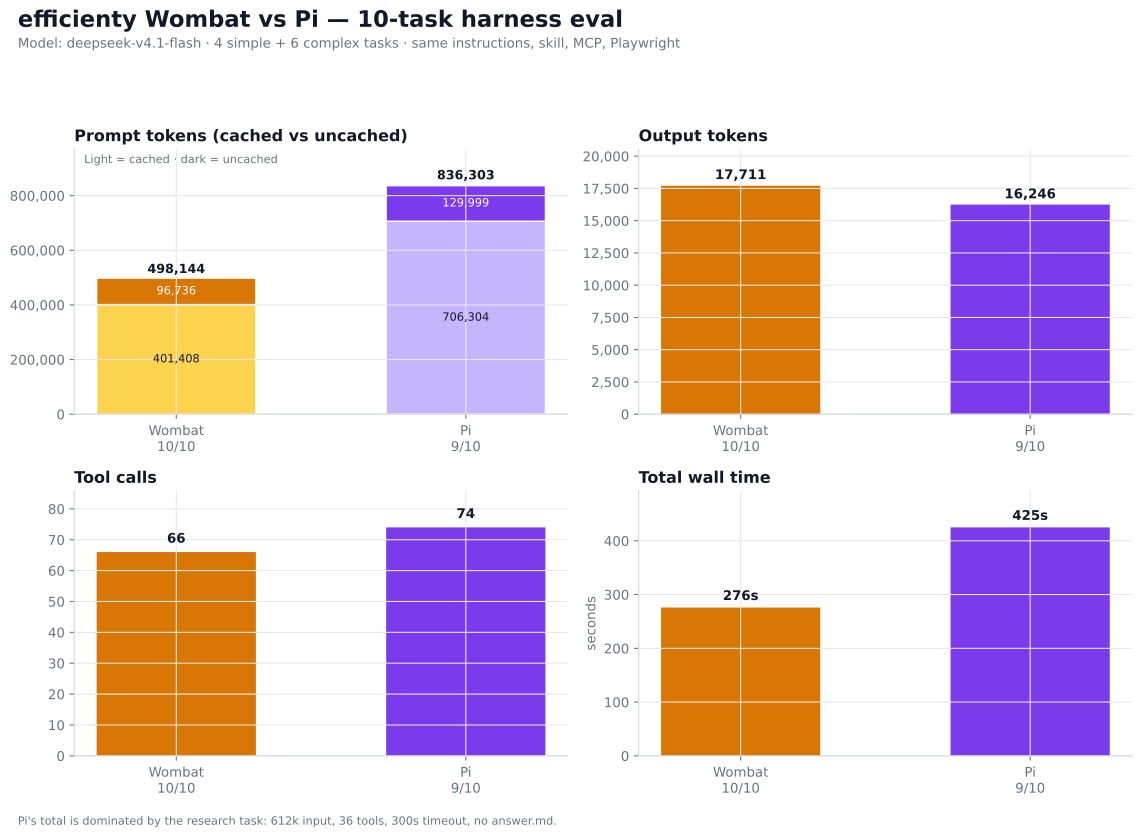
| Metric | Wombat | Pi |
|---|---|---|
| Tasks passed | 10/10 | 9/10 |
| Input tokens | 498,144 | 836,303 |
| Output tokens | 17,711 | 16,246 |
| Tool calls | 66 | 74 |
| Model steps | 61 | 64 |
| Wall time | 275.9s | 424.9s |
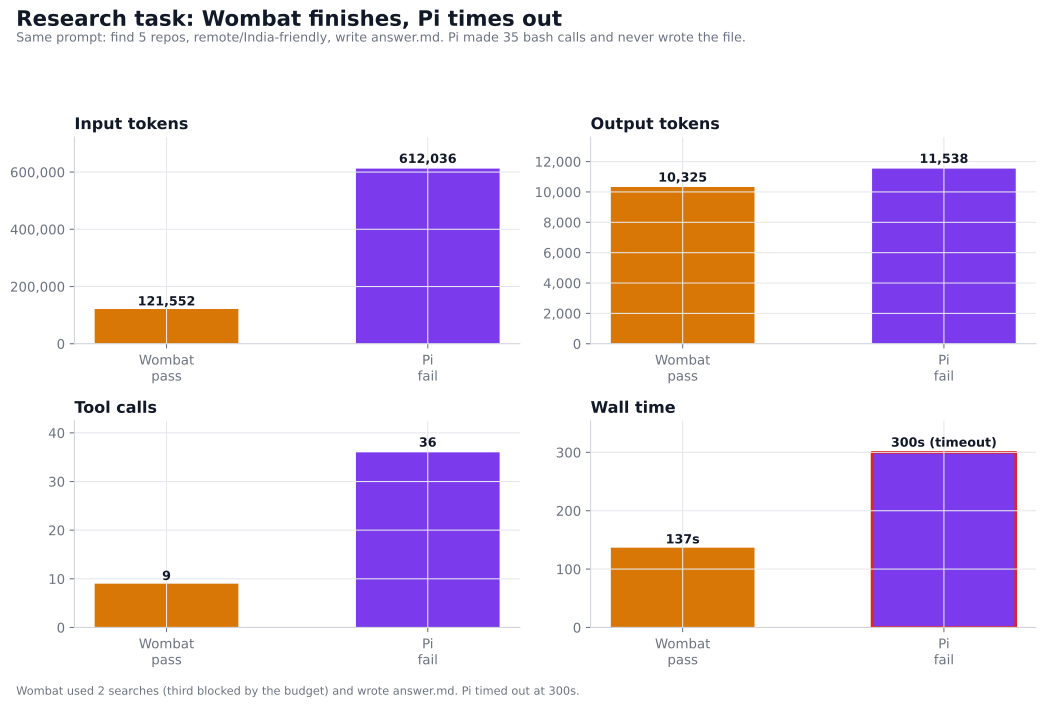
Wombat finished the bounded research task; Pi has no native search tool, made
35 bash calls, accumulated 612k input tokens, and timed out at 300s without
writing answer.md. That one failure skews the totals.
On the nine non-research tasks, Pi was the leaner harness:
| Ordinary tasks only | Wombat | Pi |
|---|---|---|
| Input tokens | 376,592 | 224,267 |
| Output tokens | 7,386 | 4,708 |
| Tool calls | 57 | 38 |
| Wall time | 139.1s | 124.9s |
The full write-up has the task list, per-task table, method, raw data, and
limitations: efficienty-10/README.md.
Other comparisons
- Wombat vs Pi — 18
harness-capability tasks, plus the efficiency investigation on branchefficienty. - Wombat vs OpenCode — 15
mixed coding, research, browser, MCP, and server tasks.
regards
____
Reviews (0)
Sign in to leave a review.
Leave a reviewNo results found