edgecrab
Health Warn
- No license — Repository has no license file
- Description — Repository has a description
- Active repo — Last push 0 days ago
- Low visibility — Only 5 GitHub stars
Code Pass
- Code scan — Scanned 12 files during light audit, no dangerous patterns found
Permissions Pass
- Permissions — No dangerous permissions requested
This is a Rust-native AI assistant and coding agent (MCP server) inspired by NousHermes and OpenClaw. It features a ReAct tool loop, supports 14 LLM providers, and includes file, terminal, and web tools to act as a personal development helper.
Security Assessment
The tool carries inherent risks typical of autonomous coding agents. It explicitly features "terminal" and "file" toolsets, meaning it is designed to execute shell commands and access local files. Additionally, multi-provider LLM support and web tools guarantee that it makes external network requests, likely transmitting your prompts and potentially your local data to third-party AI APIs. However, the automated code audit found no dangerous patterns, no hardcoded secrets, and no overly broad system permissions. Because it is an agent that acts on your behalf, the overall risk is rated Medium.
Quality Assessment
The project is very new and currently has low community visibility, indicated by only 5 GitHub stars. While the README claims an impressive 1629 passing Rust tests and CI pipelines, the repository is currently missing a license file, despite the documentation badges claiming Apache-2.0. The project is highly active, with the most recent code pushed today.
Verdict
Use with caution. While the underlying codebase appears clean and well-engineered, autonomous AI agents inherently require access to your shell, files, and network. Always review the specific permissions granted to the tool during setup.
EdgeCrab 🦀 A Super Powerful Personal Assistant inspired by NousHermes and OpenClaw — Rust-native, blazing-fast terminal UI, ReAct tool loop, multi-provider LLM support, ACP protocol, gateway adapters, and built-in security hardening.
EdgeCrab 🦀
"Your SuperAgent — built in Rust."






EdgeCrab is a SuperAgent — a personal assistant and coding agent forged in Rust. It carries the soul of Nous Hermes Agent (autonomous reasoning, persistent memory, user-first alignment) and the always-on presence of OpenClaw (15 messaging gateways, smart-home integration), compressed into a 15 MB static binary that starts in < 50 ms with zero runtime dependencies.
Architecture
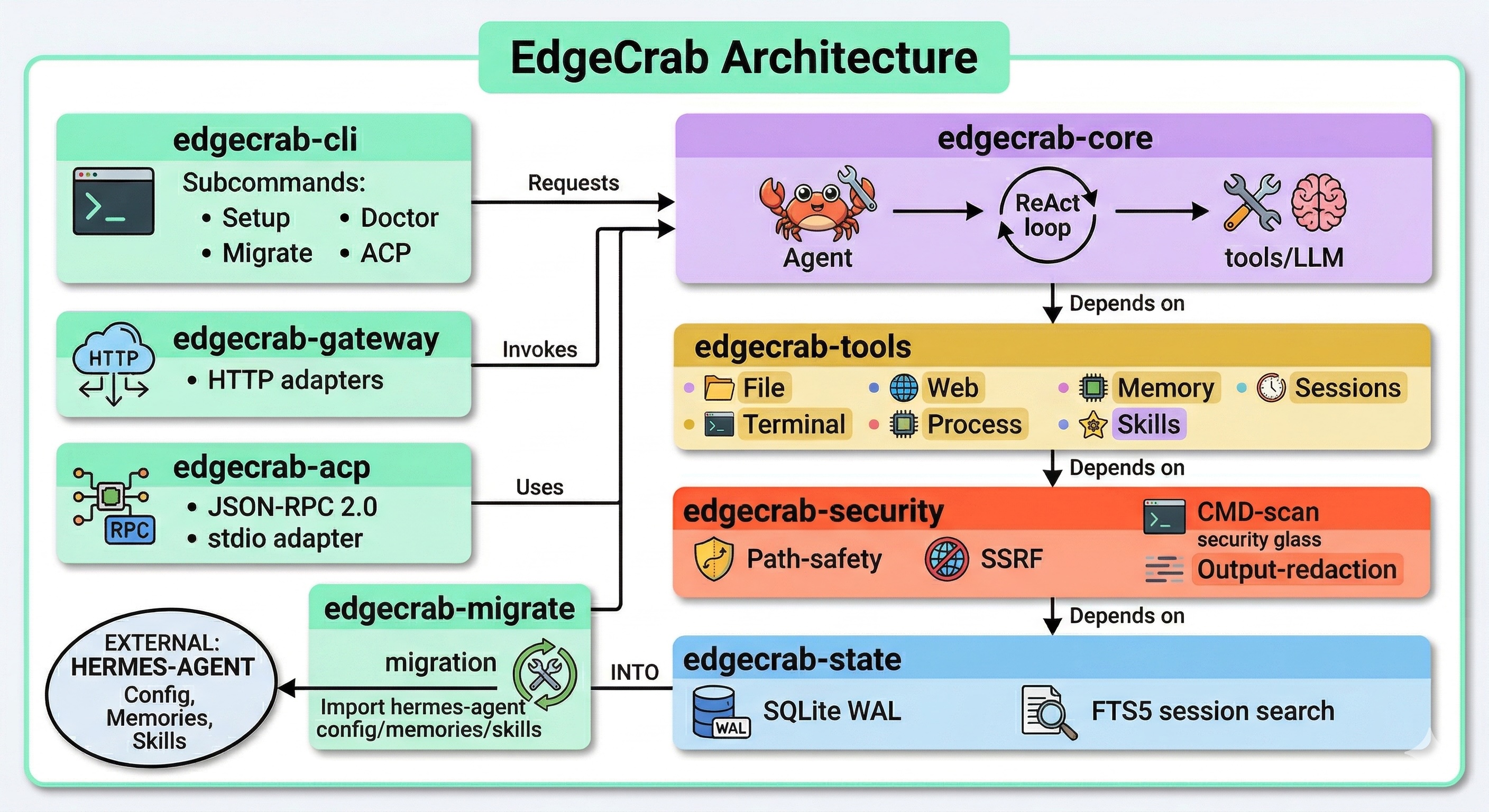
hermes-agent soul  +  OpenClaw vision  =  EdgeCrab
   (reasoning)          (presence)        (Rust)
| Metric | EdgeCrab 🦀 | hermes-agent ☤ |
|---|---|---|
| Binary | 15 MB static | Python venv + uv |
| Startup | < 50 ms | ~1–3 s |
| Memory | ~15 MB resident | ~80–150 MB |
| LLM providers | 14 built-in (+ Azure, Bedrock) | varies |
| Messaging platforms | 15 gateways | 7 platforms |
| Tests | 1629 passing (Rust) | — |
| Migrate from hermes | edgecrab migrate |
N/A |
Table of Contents
- EdgeCrab 🦀
- Architecture
- Table of Contents
- Why EdgeCrab?
- Quick Start (90 seconds)
- What EdgeCrab Can Do
- ReAct Tool Loop
- 74 Built-in Tools
- File Tools (
filetoolset) - Terminal Tools (
terminaltoolset) - Web Tools (
webtoolset) - Browser Tools (
browsertoolset) - Memory & Honcho Tools (
memory+honchotoolsets) - Skills Tools (
skillstoolset) - Session & Search (
sessiontoolset) - Delegation & MoA (
delegation+moatoolsets) - Code Execution (
code_executiontoolset) - MCP Tools (
mcptoolset) - Media Tools (
vision/tts/transcribetoolsets) - Automation Tools
- File Tools (
- Sub-agent Delegation
- Sandboxed Code Execution
- Browser Automation
- 15 Messaging Gateways
- Persistent Memory & Learning
- Skills Library
- Cron Scheduling
- Checkpoints & Rollback
- Profiles & Worktrees
- Vision, TTS & Transcription
- 14 LLM Providers
- 6 Terminal Backends
- MCP Server Integration
- ACP / VS Code Copilot Integration
- ratatui TUI
- All CLI Commands
- All Slash Commands
- Security Model
- Architecture
- Configuration
- SDK: Python & Node.js
- Docker
- Migrating from hermes-agent
- Testing
- Project Structure
- Requirements & Build
- Contributing
- Release Channels
- License
Why EdgeCrab?
Most AI agents are either too constrained (coding agents that forget you exist after the session) or too heavy (Python runtimes, Node daemons, GBs of RAM). EdgeCrab is different.
It learns. Like Nous Hermes Agent, EdgeCrab maintains persistent memory across sessions, auto-generates reusable skills, and builds a cross-session Honcho user model that gets smarter over time.
It's everywhere. Like OpenClaw, EdgeCrab lives in your channels — Telegram, Discord, Slack, WhatsApp, Signal, Matrix, Mattermost, DingTalk, SMS, Email, Home Assistant, and more. Send it a voice memo on WhatsApp and get a PR back.
It's fast and lean. Unlike Python agents, EdgeCrab is a Rust binary. It starts before you finish blinking. It uses ~15 MB of RAM instead of 150 MB. Security is compiled in — path jails, SSRF guards, command scanners — not runtime patches.
It's extensible. MCP servers, custom Rust tools, Python/JS sandboxes, sub-agents, Mixture-of-Agents consensus — the full toolkit for heavy-duty automation.
Quick Start (90 seconds)
Option A — npm (no Rust required)
npm install -g edgecrab-cli
edgecrab setup               # interactive wizard — detects API keys, writes config
edgecrab doctor              # verify health
edgecrab                     # launch TUI
Option B — pip (no Rust required)
pip install edgecrab-cli
# OR: pipx install edgecrab-cli  (isolated install)
edgecrab setup && edgecrab doctor && edgecrab
Option C — cargo
cargo install edgecrab-cli
edgecrab setup && edgecrab doctor && edgecrab
Option D — build from source
git clone https://github.com/raphaelmansuy/edgecrab
cd edgecrab
cargo build --release         # ~30 s first build
./target/release/edgecrab setup
Guided Setup Output
EdgeCrab Setup Wizard
──────────────────────────────────────────────────────────────
✓ Detected GitHub Copilot (GITHUB_TOKEN)
✓ Detected OpenAI (OPENAI_API_KEY)

Choose LLM provider:
  [1] copilot      (GitHub Copilot — gpt-4.1-mini)  ← auto-detected
  [2] openai       (OpenAI — GPT-4.1, GPT-5, o3/o4)
  [3] anthropic    (Anthropic — Claude Opus 4.6)
  [4] ollama       (local — llama3.3)
  ...
Provider [1]: 1

✓ Config written to ~/.edgecrab/config.yaml
✓ Created ~/.edgecrab/memories/
✓ Created ~/.edgecrab/skills/

Run `edgecrab` to start chatting!
First Prompts
edgecrab "summarise the git log for today and open PRs"
edgecrab --model anthropic/claude-opus-4-6 "review this codebase for security issues"
edgecrab --model ollama/llama3.3 "explain this code offline"
edgecrab --quiet "count lines in src/**/*.rs"   # pipe-safe, no banner
edgecrab -C "continue-my-refactor"              # resume named session
edgecrab -w "explore that perf idea"            # isolated git worktree
What EdgeCrab Can Do
EdgeCrab is an autonomous agent. Give it a goal in natural language; it reasons, calls tools, observes results, and loops until the task is done. Here's what it can actually reach.
ReAct Tool Loop
EdgeCrab uses a Reason → Act → Observe loop (ReAct pattern) implemented in crates/edgecrab-core/src/conversation.rs. Each turn:
- System prompt built once per session (SOUL.md, AGENTS.md, memories, skills, date/time, cwd) — cached for Anthropic prompt cache hits
- LLM decides what to do next (including parallel tool calls)
- Security check runs before every tool execution (path jail, SSRF guard, command scan)
- Tool executes — file I/O, shell, web, code, sub-agents, browser, etc.
- Result injected back into context
- Loop until no more tool calls (task done),
Ctrl-C, or 90-iteration budget exhausted - Context compression fires at 50% of context window — prunes old tool outputs, then LLM-summarizes
- Learning reflection auto-fires after ≥5 tool calls — agent can save new skills and update memory
The budget default is 90 iterations (max_iterations in config). Increase it for long autonomous tasks.
74 Built-in Tools
Tools are registered at compile time via the inventory crate — zero startup cost. The ToolRegistry dispatches by exact name with fuzzy (Levenshtein ≤3) fallback suggestions.
File Tools (file toolset)
| Tool | What it does |
|---|---|
read_file |
Read file with optional start_line/end_line — path-jailed, canonicalized |
write_file |
Write or create file (parent dirs auto-created) |
patch_file |
Search-and-replace patch — exact string match, atomic write |
search_files |
Regex + glob search across a directory tree |
Terminal Tools (terminal toolset)
| Tool | What it does |
|---|---|
terminal |
Execute shell command — persistent shell per task, env-var blocklist |
manage_process |
Start/stop/list/kill/read background processes |
Web Tools (web toolset)
| Tool | What it does |
|---|---|
web_search |
Web search via Firecrawl → Tavily → Brave → DuckDuckGo fallback chain |
web_extract |
Full-page extraction — HTML strip + PDF parse (EdgeParse) — SSRF-guarded |
Browser Tools (browser toolset)
| Tool | What it does |
|---|---|
browser_navigate |
Navigate Chrome via CDP |
browser_snapshot |
Accessibility tree snapshot (text, not pixel) |
browser_click |
Click element by @eN ref ID from snapshot |
browser_type |
Type text into focused input |
browser_screenshot |
Annotated screenshot with numbered elements |
browser_console |
Capture/clear browser console log |
Memory & Honcho Tools (memory + honcho toolsets)
| Tool | What it does |
|---|---|
memory_read |
Read MEMORY.md and USER.md from ~/.edgecrab/memories/ |
memory_write |
Write/append to memory files (prompt-injection scanned) |
honcho_profile |
Get/set user profile facts via Honcho cross-session model |
honcho_context |
Retrieve contextually relevant Honcho memories for current task |
Skills Tools (skills toolset)
| Tool | What it does |
|---|---|
skill_manage |
Create, view, patch, delete, list skills |
Session & Search (session toolset)
| Tool | What it does |
|---|---|
session_search |
SQLite FTS5 full-text search across all past sessions |
Delegation & MoA (delegation + moa toolsets)
| Tool | What it does |
|---|---|
delegate_task |
Fork a sub-agent — single task or batch of up to 3 in parallel |
mixture_of_agents |
Run task through Claude Opus 4.6, Gemini 2.5 Pro, GPT-4.1, DeepSeek R1 in parallel; synthesize consensus |
Code Execution (code_execution toolset)
| Tool | What it does |
|---|---|
execute_code |
Sandboxed Python / JS / Bash / Ruby / Perl / Rust execution with tool RPC |
MCP Tools (mcp toolset)
| Tool | What it does |
|---|---|
mcp_list_tools |
List tools exposed by all connected MCP servers |
mcp_call_tool |
Call a named tool on any connected MCP server |
Media Tools (vision / tts / transcribe toolsets)
| Tool | What it does |
|---|---|
vision_analyze |
Analyze image via multimodal model (URL or local path) |
text_to_speech |
Generate audio from text (OpenAI TTS or configured provider) |
transcribe_audio |
Transcribe audio file (Whisper or Groq/OpenAI) |
Automation Tools
| Tool | What it does |
|---|---|
manage_todo_list |
Structured checklist — create, update, complete, delete items |
manage_cron_jobs |
Schedule recurring and one-shot cron jobs |
checkpoint |
Filesystem snapshot for rollback (create, list, restore, diff) |
clarify |
Ask user a clarifying question (with optional choices) |
send_message |
Send message via gateway to any connected platform |
ha_get_states |
Fetch Home Assistant entity states |
ha_call_service |
Call HA service (e.g. light.turn_on) |
ha_trigger_automation |
Trigger HA automation |
ha_get_history |
Fetch HA entity history |
Control which toolsets are active:
edgecrab --toolset file,terminal "add tests"        # minimal dev
edgecrab --toolset all "go wild"                    # full capability
edgecrab --toolset coding "refactor this module"    # file+terminal+search+exec
edgecrab --toolset research "investigate this bug"  # web+browser+vision
Sub-agent Delegation
EdgeCrab can spawn sub-agents that run the full ReAct loop with their own session state. This enables parallelism for complex tasks.
# Example: agent delegates 3 subtasks in parallel
delegate_task([
  { task: "Review auth module for security issues" },
  { task: "Write unit tests for the payment service" },
  { task: "Update API documentation" }
])
# → 3 sub-agents run concurrently, results aggregated
How it works (crates/edgecrab-tools/src/tools/delegate_task.rs):
- Sub-agents share LLM provider Arc + tool registry Arc
- Each child gets its own
SessionState,ProcessTable,TodoStore,IterationBudget - Max concurrent: 3 sub-agents in parallel (configurable via
delegation.max_subagents) - Max depth: 2 levels (parent → child → grandchild blocked)
- Children cannot use
delegation,clarify,memory,code_execution, ormessagingtoolsets
Configure delegation:
delegation:
  enabled: true
  model: "anthropic/claude-sonnet-4"   # use cheaper model for sub-agents
  max_subagents: 3
  max_iterations: 50
Sandboxed Code Execution
The execute_code tool runs code in an isolated subprocess with strict resource limits:
- Languages: Python, JavaScript, Bash, Ruby, Perl, Rust
- Tool RPC: Scripts can call 7 tools via Unix domain socket —
web_search,web_extract,read_file,write_file,search_files,terminal,session_search - Limits: 50-tool call limit, 5-minute timeout, 50 KB stdout cap, 10 KB stderr cap
- Security: API keys/tokens stripped from child environment before execution
# Example: agent writes and executes this in a sandbox
import subprocess
result = subprocess.run(['cargo', 'test', '-p', 'edgecrab-core'], capture_output=True)
print(result.stdout.decode())
Browser Automation
Chrome DevTools Protocol-based browser automation — no Selenium, no Playwright dependency. ElementCrab connects directly to a CDP endpoint.
Requirements: Chrome/Chromium binary, or set CDP_URL to an existing instance
Check:         edgecrab doctor  (reports browser availability)
The browser_snapshot tool returns an accessibility tree — not pixels — so the LLM can reason about page structure without vision costs. browser_screenshot adds numbered element overlays for precise clicking.
15 Messaging Gateways
Start the gateway server and EdgeCrab becomes an always-on assistant in 15 messaging platforms simultaneously:
edgecrab gateway start           # runs in background
edgecrab gateway start --foreground   # keep in foreground
edgecrab gateway status          # check which platforms are live
edgecrab gateway stop
| Platform | Transport | Auth |
|---|---|---|
| Telegram | Long-poll REST | TELEGRAM_BOT_TOKEN |
| Discord | WebSocket gateway | DISCORD_BOT_TOKEN |
| Slack | Socket Mode WebSocket | SLACK_BOT_TOKEN + SLACK_APP_TOKEN |
| Baileys bridge (local Node subprocess) | edgecrab whatsapp QR pairing |
|
| Signal | signal-cli HTTP + SSE | SIGNAL_HTTP_URL + SIGNAL_ACCOUNT |
| Matrix | Client-Server REST + long-poll sync | MATRIX_HOMESERVER + MATRIX_ACCESS_TOKEN |
| Mattermost | REST v4 + WebSocket | MATTERMOST_URL + MATTERMOST_TOKEN |
| DingTalk | Stream SDK (no public webhook) | DINGTALK_APP_KEY + DINGTALK_APP_SECRET |
| SMS | Twilio REST v2010 | TWILIO_ACCOUNT_SID + TWILIO_AUTH_TOKEN |
| SMTP (lettre, rustls) + inbound webhook | EMAIL_PROVIDER + EMAIL_FROM + EMAIL_API_KEY |
|
| Home Assistant | WebSocket + REST | HASS_URL + HASS_TOKEN |
| Webhook | axum HTTP POST | any HTTP caller |
| API Server | axum OpenAI-compatible HTTP | API_SERVER_PORT (optional) |
| Feishu/Lark | REST | FEISHU_APP_ID + FEISHU_APP_SECRET |
| WeCom | REST | WECOM_CORP_ID + WECOM_SECRET |
Streaming delivery: Edit-mode platforms (Telegram, Discord, Slack) receive live token streaming with 300ms edit intervals. Batch-mode platforms (WhatsApp, Signal, SMS, Email) accumulate the full response and send once.
Built-in gateway slash commands (send via chat):
/help      /new       /reset     /stop      /retry
/status    /usage     /background  /approve   /deny
Setup WhatsApp (one-time QR pairing):
edgecrab whatsapp      # launches QR code scanner wizard
# Scan with your phone — session persists across restarts
edgecrab gateway start
Cron-triggered messages: Schedule the agent to proactively message you:
# ~/.edgecrab/cron/daily-standup.json
schedule: "0 9 * * 1-5"     # every weekday at 9am
task: "Summarize open PRs and blockers for today's standup"
target: telegram             # deliver to your Telegram
Persistent Memory & Learning
EdgeCrab has a three-layer memory system:
Layer 1 — MEMORY.md (~/.edgecrab/memories/MEMORY.md): Free-form notes. The agent reads this at session start and can update it. You can also edit it directly.
Layer 2 — SQLite session history (~/.edgecrab/state.db): Every conversation stored in WAL-mode SQLite with FTS5 full-text search. Browse, search, and export sessions:
edgecrab sessions list                           # list recent sessions
edgecrab sessions search "auth bug from last week"  # FTS5 search
edgecrab sessions export <id> --format jsonl     # export session
edgecrab sessions browse                         # interactive browser
Layer 3 — Honcho cross-session user model: EdgeCrab builds a semantic model of you — your preferences, projects, working style — via the Honcho API. This context is injected at the start of new sessions to provide continuity.
Auto-learning: After ≥5 tool calls in a session, a learning reflection fires automatically. The agent can save new skills, update MEMORY.md, and record useful patterns without being asked.
Skills Library
Skills are reusable agent procedures — markdown files that define prompts, steps, and best practices for recurring tasks. Think recipe cards for your agent.
# Create a skill
edgecrab skills list                    # browse installed skills
edgecrab skills view git-workflow       # read a skill
edgecrab skills install my-skill.md    # install from file
edgecrab skills search "code review"   # search skills hub

# Use a skill in a session
edgecrab -S git-workflow "review this branch for prod readiness"
edgecrab -S security,refactor          # load multiple skills
Inside TUI: /skills list, /skills install <path>, /skills view <name>
Skills are saved to ~/.edgecrab/skills/ and loaded on demand. The agent can also create new skills mid-session during learning reflection.
Cron Scheduling
Schedule recurring or one-shot tasks:
edgecrab cron list
edgecrab cron add "0 9 * * 1-5" "Summarize open PRs for standup"
edgecrab cron add "@daily" "Update MEMORY.md with project progress"
edgecrab cron pause <id>
edgecrab cron resume <id>
edgecrab cron remove <id>
edgecrab cron run <id>      # manual trigger
edgecrab cron tick          # process due jobs (called by system cron)
Or from within a TUI session:
/cron list
/cron add "0 18 * * 5" "Generate weekly summary"
The manage_cron_jobs tool also lets the agent schedule its own follow-ups autonomously.
Checkpoints & Rollback
Before destructive operations, EdgeCrab creates filesystem snapshots:
# Manual checkpoint
edgecrab sessions
# → checkpoint auto-created before every file write

# Inside TUI
/rollback                    # restore last checkpoint
/rollback checkpoint-abc123  # restore specific checkpoint
Configuration:
checkpoints:
  enabled: true
  max_snapshots: 50    # keep last 50 checkpoints per session
The checkpoint tool is also available to the agent itself — it can snapshot before risky operations and offer rollback if something goes wrong.
Profiles & Worktrees
Profiles let you switch between different configurations instantly:
edgecrab profile create work         # create "work" profile
edgecrab profile create homelab      # create "homelab" profile
edgecrab profile use work            # switch to work profile
edgecrab profile alias w work        # alias shorthand
edgecrab profile list
Profiles store their config in ~/.edgecrab/profiles/<name>/ — different API keys, default models, memory files, and toolsets per context.
Worktrees isolate each agent session in a separate git worktree:
edgecrab -w "explore that refactor idea safely"
# Creates ~/.edgecrab/worktrees/<name>/, runs there
# Changes stay isolated — merge or discard when done
Vision, TTS & Transcription
# Vision: analyze an image
edgecrab "What's in this screenshot?" --attach screenshot.png

# TTS: speak the response
edgecrab --quiet "Write a haiku about Rust" | say   # pipe to macOS say
# Or the agent can generate audio directly via text_to_speech tool

# Transcription: send a voice note via WhatsApp gateway
# → EdgeCrab transcribes it with Whisper and responds
Vision providers: any multimodal model (Claude, GPT-4o, Gemini).
TTS providers: OpenAI TTS, edge-tts (offline).
Transcription: Whisper (local), Groq Whisper, OpenAI Whisper.
14 LLM Providers
EdgeCrab ships with 14 LLM providers out of the box (12 cloud, 2 local). Over 200 models compiled in, with user override via ~/.edgecrab/models.yaml.
| Provider | Env Var | Notable Models |
|---|---|---|
copilot |
GITHUB_TOKEN |
GPT-4.1-mini, GPT-4.1 — free with GitHub Copilot |
openai |
OPENAI_API_KEY |
GPT-4.1, GPT-5, o3, o4-mini |
anthropic |
ANTHROPIC_API_KEY |
Claude Opus 4.6, Sonnet 4.6, Haiku 4.5 |
google |
GOOGLE_API_KEY |
Gemini 2.5 Pro, Gemini 2.5 Flash |
vertexai |
GOOGLE_APPLICATION_CREDENTIALS |
Gemini via Google Cloud |
xai |
XAI_API_KEY |
Grok 3, Grok 4 |
deepseek |
DEEPSEEK_API_KEY |
DeepSeek V3, DeepSeek R1 |
mistral |
MISTRAL_API_KEY |
Mistral Large, Mistral Small |
groq |
GROQ_API_KEY |
Llama 3.3 70B, Gemma2 9B (blazing fast inference) |
huggingface |
HUGGING_FACE_HUB_TOKEN |
Any HF Inference API model |
zai |
ZAI_API_KEY |
Z.AI / GLM series |
openrouter |
OPENROUTER_API_KEY |
600+ models via one endpoint |
ollama |
(none) | Any model — ollama serve on port 11434 |
lmstudio |
(none) | Any model — LM Studio on port 1234 |
Switch provider at any time:
edgecrab --model anthropic/claude-opus-4-6 "deep code review"
edgecrab --model ollama/llama3.3 "work offline"
edgecrab --model groq/llama-3.3-70b-versatile "quick task"
Hot-swap inside TUI:
/model groq/llama-3.3-70b-versatile
/reasoning high                      # enable extended thinking (Anthropic/OpenAI)
Smart routing (experimental): automatically selects cheap vs full model by turn complexity:
model:
  smart_routing:
    enabled: true
    cheap_model: "groq/llama-3.3-70b-versatile"
Mixture of Agents: Run a single prompt through 4 frontier models simultaneously and get a synthesized consensus:
/model moa # Claude Opus 4.6 + Gemini 2.5 Pro + GPT-4.1 + DeepSeek R1 → aggregated
6 Terminal Backends
The terminal tool is pluggable. Select your execution environment:
| Backend | How to activate | Use case |
|---|---|---|
| Local (default) | EDGECRAB_TERMINAL_BACKEND=local |
Persistent shell on your machine |
| Docker | backend: docker |
Isolated container per task |
| SSH | backend: ssh |
Remote server via ControlMaster |
| Modal | backend: modal |
Cloud sandbox (Modal.com) |
| Daytona | backend: daytona |
Persistent cloud dev sandbox |
| Singularity | backend: singularity |
HPC/Apptainer with persistent overlay |
terminal:
  backend: docker
  docker:
    image: "python:3.12-slim"
    container_name: "edgecrab-sandbox"
MCP Server Integration
EdgeCrab is a full MCP (Model Context Protocol) client. Connect any MCP server and its tools become available to the agent automatically.
# ~/.edgecrab/config.yaml
mcp_servers:
  filesystem:
    command: "npx"
    args: ["-y", "@modelcontextprotocol/server-filesystem", "/tmp/workspace"]

  my-api-server:
    url: "https://my-server.example.com/mcp"
    bearer_token: "${MY_API_TOKEN}"
    enabled: true
edgecrab mcp list               # show connected MCP servers
edgecrab mcp add server-name    # add interactively
edgecrab mcp remove server-name
/reload-mcp                     # hot-reload in TUI without restart
The agent uses mcp_list_tools and mcp_call_tool to discover and invoke MCP server capabilities.
ACP / VS Code Copilot Integration
EdgeCrab implements the Agent Communication Protocol — JSON-RPC 2.0 over stdio — enabling it to run as a VS Code Copilot agent, in Zed, JetBrains, and any ACP-compatible runner.
edgecrab acp           # starts ACP server on stdin/stdout
edgecrab acp init      # scaffold agent.json manifest for a workspace
The acp_registry/agent.json manifest declares capabilities for extension discovery. The ACP adapter uses a restricted ACP_TOOLS subset that excludes interactive-only tools (clarify, send_message, text_to_speech).
ratatui TUI
60 fps capable, GPU-composited full-screen TUI built with ratatui.
Layout:
┌────────────────────────────────────────────────────────────┐
│  output area (markdown-rendered, mouse-scrollable)          │
│  ⚙  file_read  src/main.rs                                  │
│     → 342 lines read                                        │
│                                                             │
│  The `main` function initializes the agent loop and...      │
├────────────────────────────────────────────────────────────┤
│ ● anthropic/claude-opus-4-6  1,234t  $0.023  [/commands]  │
├────────────────────────────────────────────────────────────┤
│ ❯ Type your message…                                        │
└────────────────────────────────────────────────────────────┘
Features:
- Streaming output with token-by-token rendering
- Fish-style ghost text (type-ahead) completion
- Tab-complete slash commands with fuzzy match overlay
- Multi-line input (Shift+Enter for newlines)
- Mouse scroll in output area
- Approval dialogs for dangerous operations (inline, non-blocking)
- Clarify dialogs — agent asks questions without blocking the loop
- Secret-request overlays — prompt for missing API keys mid-session
- Session spinner + model name + token count + cost in status bar
Theme customization (~/.edgecrab/skin.yaml):
user_fg:      "#89b4fa"   # Catppuccin blue
assistant_fg: "#a6e3a1"   # Catppuccin green
system_fg:    "#f9e2af"   # Catppuccin yellow
error_fg:     "#f38ba8"   # Catppuccin red
tool_fg:      "#cba6f7"   # Catppuccin mauve
status_bg:    "#313244"
status_fg:    "#cdd6f4"
border_fg:    "#6c7086"
prompt_symbol: "❯"
tool_prefix:   "⚙"
All CLI Commands
# Launch
edgecrab                          # interactive TUI
edgecrab "prompt here"            # TUI + auto-submit
edgecrab --quiet "prompt"         # no banner, pipe-safe output
edgecrab --model p/m "prompt"     # specify LLM
edgecrab --toolset web,file "p"   # restrict toolsets
edgecrab --session id "p"         # use specific session
edgecrab --resume title "p"       # resume by title
edgecrab -C "p"                   # continue last session
edgecrab -w "p"                   # isolated git worktree
edgecrab -S skill1,skill2 "p"     # preload skills

# Setup & diagnostics
edgecrab setup [--section s] [--force]    # interactive wizard
edgecrab doctor                           # full health check
edgecrab version                          # version + providers
edgecrab migrate [--dry-run]              # import hermes-agent state

# Sessions
edgecrab sessions list
edgecrab sessions browse
edgecrab sessions export <id> [--format jsonl]
edgecrab sessions delete <id>
edgecrab sessions rename <id> <title>
edgecrab sessions prune [--older-than 30d]
edgecrab sessions stats

# Configuration
edgecrab config show
edgecrab config edit
edgecrab config path
edgecrab config set <key> <value>

# Tools
edgecrab tools list
edgecrab tools enable <toolset>
edgecrab tools disable <toolset>

# Providers
edgecrab mcp list
edgecrab mcp add <name>
edgecrab mcp remove <name>

# Plugins
edgecrab plugins list
edgecrab plugins install <path>
edgecrab plugins update
edgecrab plugins remove <name>

# Cron
edgecrab cron list
edgecrab cron add "<schedule>" "<task>"
edgecrab cron run <id>
edgecrab cron tick
edgecrab cron remove <id>
edgecrab cron pause <id>
edgecrab cron resume <id>

# Gateway
edgecrab gateway start [--foreground]
edgecrab gateway stop
edgecrab gateway restart
edgecrab gateway status
edgecrab gateway configure [--platform <name>]
edgecrab whatsapp               # WhatsApp QR pairing wizard
edgecrab status                 # overall gateway status

# Skills
edgecrab skills list
edgecrab skills view <name>
edgecrab skills search <query>
edgecrab skills install <path>
edgecrab skills remove <name>

# Profiles
edgecrab profile list
edgecrab profile use <name>
edgecrab profile create <name>
edgecrab profile delete <name>
edgecrab profile show [name]
edgecrab profile alias <alias> <name>
edgecrab profile rename <old> <new>
edgecrab profile export <name> [--output path]
edgecrab profile import <path>

# ACP
edgecrab acp                    # start ACP stdio server
edgecrab acp init [--workspace] [--force]

# Shell completion
edgecrab completion bash
edgecrab completion zsh
edgecrab completion fish
All Slash Commands
Type these inside the TUI (after ❯):
| Command | Action |
|---|---|
/help |
List all slash commands with descriptions |
/quit / /exit |
Exit EdgeCrab |
/clear |
Clear the output area |
/new |
Start a fresh session |
/model [provider/model] |
Hot-swap LLM without restart |
/reasoning [effort] |
Set reasoning effort (low/medium/high/auto) |
/retry |
Retry the last message |
/undo |
Remove the last turn from history |
/stop |
Interrupt current tool execution and generation |
/history |
Show session message history |
/save [title] |
Save session with a title |
/export [format] |
Export session (jsonl, markdown) |
/title <title> |
Rename current session |
/resume [id-or-title] |
Resume a past session |
/session [list/switch/delete] |
Manage sessions |
/config [show/set] |
View or update config |
/prompt |
Show current system prompt |
/verbose |
Toggle verbose tool output |
/personality [preset] |
Switch agent personality (14 presets) |
/statusbar |
Toggle status bar |
/tools |
List active toolsets and tools |
/toolsets |
Show toolset aliases and expansions |
/reload-mcp |
Hot-reload MCP servers (no restart needed) |
/mcp-token <server> <token> |
Set MCP bearer token at runtime |
/plugins [list/install/remove] |
Manage plugins |
/memory [show/edit] |
View or edit agent memory |
/cost |
Show token costs for this session |
/usage |
Detailed usage breakdown |
/compress |
Force context compression now |
/insights |
Show session statistics and key moments |
/theme [preset] |
List or switch built-in theme |
/paste |
Toggle paste mode (multi-line clipboard input) |
/queue <message> |
Queue a message while agent is running |
/background |
Fork current task to background, free the TUI |
/rollback [checkpoint] |
Restore filesystem to a checkpoint |
/platforms |
Show connected gateway platforms |
/approve |
Approve a pending agent action |
/deny |
Deny a pending agent action |
/sethome |
Set cwd as home directory |
/update |
Check for EdgeCrab updates |
/cron [list/add/remove] |
Manage cron jobs inline |
/voice <on/off/status> |
Toggle voice output |
/skills [list/view/install/remove/hub] |
Manage skills |
/doctor |
Run inline health diagnostics |
/version |
Show version and provider info |
Keyboard shortcuts:
| Key | Action |
|---|---|
Enter |
Submit prompt |
Shift+Enter |
New line in input |
Ctrl+C |
Interrupt running agent |
Ctrl+L |
Clear output area |
Ctrl+U |
Clear input line |
Alt+↑ / Alt+↓ |
Scroll output |
Ctrl+Home / Ctrl+End |
Jump to top/bottom of output |
Tab |
Accept ghost text / cycle slash command completions |
Security Model
Security is compiled in — not an afterthought. EdgeCrab applies defense-in-depth at seven independent layers:
| Layer | Mechanism | Where |
|---|---|---|
| File I/O | All paths canonicalized, checked against allowed_roots. SanitizedPath is a distinct Rust type — bypassing it is a compile error. |
edgecrab-security::path_safety |
| Web tools | SSRF guard blocks private IP ranges (10.x, 192.168.x, 172.16.x, 127.x, ::1) before any outbound HTTP call. SafeUrl distinct type. |
edgecrab-security::ssrf |
| Terminal | Command injection scan (Aho-Corasick + regex) over 8 danger categories rejects shell metacharacters and forbidden patterns. | edgecrab-security::command_scan |
| Context files | Prompt injection patterns (regex + invisible Unicode + homoglyphs) scanned in SOUL.md, AGENTS.md, .cursor/rules. High-severity blocked with [BLOCKED: ...]. |
prompt_builder.rs |
| Code execution sandbox | API keys/tokens stripped from child env. Only 7 whitelisted tool stubs exposed via Unix socket RPC. SIGTERM→SIGKILL escalation on timeout. |
execute_code.rs |
| Skills installation | External skills run through a 23-pattern threat scanner (exfiltration, injection, destructive ops, persistence, obfuscation) before install. | skills_guard |
| LLM output | Redaction pipeline strips secrets and tokens before displaying or logging any LLM response. | edgecrab-security::redact |
Path safety and SSRF use Rust's type system as the primary control — not runtime checks alone. If your code doesn't have a SanitizedPath, it can't call file I/O. Period.
Architecture
EdgeCrab is a 10-crate Rust workspace. The dependency graph is a strict DAG — no circular dependencies, no feature flags that reverse the graph.
edgecrab-types      (shared types — no deps on other crates)
       ↑
edgecrab-security   (path safety, SSRF, cmd scan — types only)
edgecrab-cron       (standalone cron store + schedule parser)
       ↑
edgecrab-tools      (ToolRegistry + 74 tool implementations)
edgecrab-state      (SQLite WAL + FTS5 session store)
       ↑
edgecrab-core       (Agent, ReAct loop, prompt builder, compression)
       ↑
edgecrab-cli    edgecrab-gateway    edgecrab-acp    edgecrab-migrate
| Crate | Responsibility |
|---|---|
edgecrab-types |
Message, Role, ToolCall, ToolSchema, Usage, Cost, AgentError, Trajectory — all shared with no business logic |
edgecrab-security |
Path jail, SSRF, command scan, redaction, approval engine |
edgecrab-state |
SQLite WAL + FTS5 session storage (~/.edgecrab/state.db) |
edgecrab-cron |
Cron expression parser, job store (~/.edgecrab/cron/) |
edgecrab-tools |
ToolRegistry, ToolHandler trait, ToolContext, all 74 tools |
edgecrab-core |
Agent, AgentBuilder, execute_loop(), PromptBuilder, compression, routing, 200+ model catalog |
edgecrab-cli |
ratatui TUI, 42 slash commands, all CLI subcommands, skin engine, profiles |
edgecrab-gateway |
axum HTTP + 15 platform adapters, streaming delivery, MEDIA:// protocol |
edgecrab-acp |
ACP JSON-RPC 2.0 stdio adapter for VS Code / Zed / JetBrains |
edgecrab-migrate |
hermes-agent → EdgeCrab state import, schema migrations |
Key design decisions (from the code):
- Single binary — Static linking embeds all deps (TLS, SQLite, Aho-Corasick). No shared libraries except OS.
- Type-level security —
SanitizedPathandSafeUrlare distinct types inedgecrab-types. Bypassing sanitization is a compile error. - Compile-time tool registry —
inventory::submit!()registers tools at link time. Zero startup cost. All tools present or absent by feature flag, not runtime config. - Single system prompt per session — Built once, cached in
SessionState.cached_system_prompt. Compression never rebuilds it (preserves Anthropic prompt cache hits). - Hot-swappable model —
RwLock<Arc<dyn LLMProvider>>inAgent. In-flight conversations keep their Arc clone; swap affects only new turns.
Configuration
EdgeCrab uses layered config: defaults → ~/.edgecrab/config.yaml → EDGECRAB_* env vars → CLI flags. Later layers win.
# ~/.edgecrab/config.yaml

model:
  default_model: "anthropic/claude-opus-4-6"
  max_iterations: 90          # ReAct loop budget per session
  streaming: true
  smart_routing:
    enabled: false
    cheap_model: ""

display:
  skin: "catppuccin"
  show_reasoning: false

tools:
  enabled_toolsets: null       # null = all toolsets active
  disabled_toolsets: null
  file:
    allowed_roots: []          # empty = cwd only
  custom_groups:
    backend-dev:
      - read_file
      - write_file
      - terminal
      - session_search

memory:
  enabled: true

skills:
  enabled: true
  preloaded: []

delegation:
  enabled: true
  model: null                  # null = use default model
  max_subagents: 3
  max_iterations: 50

terminal:
  backend: local               # local | docker | ssh | modal | daytona | singularity
  docker:
    image: "ubuntu:22.04"

browser:
  record_sessions: false

checkpoints:
  enabled: true
  max_snapshots: 50

gateway:
  host: "0.0.0.0"
  port: 8642
  enabled_platforms: []        # ["telegram", "discord", ...]
  whatsapp:
    enabled: false
    mode: "self-chat"          # self-chat | any-sender
    allowed_users: []

security:
  path_restrictions: []

mcp_servers:
  my-server:
    command: "npx"
    args: ["-y", "@modelcontextprotocol/server-example"]
    enabled: true
Key environment variables:
EDGECRAB_MODEL=anthropic/claude-opus-4-6
EDGECRAB_MAX_ITERATIONS=120
EDGECRAB_TERMINAL_BACKEND=docker
EDGECRAB_SKIP_MEMORY=false
EDGECRAB_SAVE_TRAJECTORIES=true
SDK: Python & Node.js
Both SDKs wrap the OpenAI-compatible HTTP API exposed by EdgeCrab's API server gateway adapter.
Python SDK (edgecrab-sdk)
Python 3.10+ — async-first, streaming, CLI.
pip install edgecrab-sdk
from edgecrab import Agent

# Simple chat
agent = Agent(model="anthropic/claude-opus-4-6")
reply = agent.chat("Explain Rust ownership in 3 sentences")
print(reply)

# Async streaming
import asyncio
from edgecrab import AsyncAgent

async def main():
    agent = AsyncAgent(model="openai/gpt-4o")
    async for token in agent.stream("Write a Rust hello-world"):
        print(token, end="", flush=True)

asyncio.run(main())
Built-in CLI:
edgecrab chat "Hello, EdgeCrab!"
edgecrab models
edgecrab health
Full docs: sdks/python/README.md
Node.js SDK (edgecrab-sdk)
Node 18+ — TypeScript-first, streaming, CLI.
npm install edgecrab-sdk
import { Agent } from 'edgecrab-sdk';

// Simple chat
const agent = new Agent({ model: 'anthropic/claude-opus-4-6' });
const reply = await agent.chat('Explain Rust ownership');
console.log(reply);

// Streaming
for await (const token of agent.stream('Write a README')) {
  process.stdout.write(token);
}
CLI via npx:
npx edgecrab-sdk chat "Hello!"
npx edgecrab-sdk models
Full docs: sdks/node/README.md
Docker
Run EdgeCrab as a gateway server in a container:
# Pull multi-arch GHCR image
docker pull ghcr.io/raphaelmansuy/edgecrab:latest

# Run gateway server
docker run -p 8642:8642 \
  -e ANTHROPIC_API_KEY="$ANTHROPIC_API_KEY" \
  -e TELEGRAM_BOT_TOKEN="$TELEGRAM_BOT_TOKEN" \
  -v "$HOME/.edgecrab:/root/.edgecrab" \
  ghcr.io/raphaelmansuy/edgecrab:latest

# Or with docker-compose
docker compose up -d
The Docker image is multi-stage, ~50 MB (distroless final stage). Multi-arch: linux/amd64 + linux/arm64. Uses rustls-tls — no OpenSSL dependency for clean cross-compilation.
Migrating from hermes-agent
EdgeCrab imports your entire hermes-agent state in one command:
# Preview first (no changes made)
edgecrab migrate --dry-run

# Live migration
edgecrab migrate
| What | From | To |
|---|---|---|
| Config | ~/.hermes/config.yaml |
~/.edgecrab/config.yaml |
| Memories | ~/.hermes/memories/ |
~/.edgecrab/memories/ |
| Skills | ~/.hermes/skills/ |
~/.edgecrab/skills/ |
| Environment | ~/.hermes/.env |
~/.edgecrab/.env |
The migrator is in crates/edgecrab-migrate/. It returns a MigrationReport with per-item MigrationStatus (Success/Skipped/Failed). Config format differences are handled automatically.
Testing
# Run all unit + integration tests
cargo test

# Run only a specific crate
cargo test -p edgecrab-core
cargo test -p edgecrab-tools
cargo test -p edgecrab-gateway

# Run E2E tests (requires a configured LLM provider)
cargo test -- --include-ignored

# Lint (zero warnings policy)
cargo clippy -- -D warnings

# Format check
cargo fmt --check

# Build documentation
cargo doc --no-deps --open
Current: 1629 tests passing (unit + integration). The codebase has a zero-clippy-warnings policy enforced in CI.
Note: 8 gap-audit tests in
edgecrab-clirequire the hermes-agent source tree at../hermes-agent/. Skip them when developing standalone:cargo test --workspace --exclude edgecrab-cli
Project Structure
edgecrab/
├── crates/
│   ├── edgecrab-types/         Shared types — Message, Role, ToolCall, errors
│   ├── edgecrab-security/      Path jail, SSRF, cmd scanner, injection, redact
│   ├── edgecrab-state/         SQLite WAL + FTS5 session store
│   ├── edgecrab-cron/          Cron parser, job store, scheduler
│   ├── edgecrab-tools/         ToolRegistry + all 74 tool implementations
│   │   └── tools/
│   │       ├── file.rs         read_file, write_file, patch_file, search_files
│   │       ├── terminal.rs     terminal, manage_process
│   │       ├── web.rs          web_search, web_extract
│   │       ├── browser.rs      CDP browser automation (6 tools)
│   │       ├── memory.rs       memory_read, memory_write, Honcho tools
│   │       ├── delegate_task.rs Sub-agent delegation + batch parallelism
│   │       ├── execute_code.rs Sandboxed multi-language code execution
│   │       ├── vision.rs       vision_analyze, text_to_speech, transcribe_audio
│   │       └── ...             session, cron, checkpoint, skills, mcp, todo, HA
│   ├── edgecrab-core/
│   │   └── src/
│   │       ├── agent.rs        AgentBuilder, Agent, StreamEvent, fork_isolated
│   │       ├── conversation.rs execute_loop() — the ReAct engine
│   │       ├── compression.rs  Context window compression
│   │       ├── prompt_builder.rs System prompt assembly from 9+ sources
│   │       ├── model_router.rs Smart routing (cheap vs full model)
│   │       └── model_catalog.rs 200+ models, user-overridable YAML
│   ├── edgecrab-cli/           ratatui TUI, slash commands, skin engine, profiles
│   ├── edgecrab-gateway/       axum + 15 platform adapters, streaming delivery
│   ├── edgecrab-acp/           ACP JSON-RPC 2.0 stdio adapter
│   └── edgecrab-migrate/       hermes-agent import + schema migrations
├── sdks/
│   ├── python/                 Python SDK (edgecrab-sdk on PyPI)
│   └── node/                   Node.js SDK (edgecrab-sdk on npm)
├── site/                       Astro documentation website
├── docs/                       Specification documents
├── acp_registry/
│   └── agent.json              VS Code Copilot agent manifest
├── .github/workflows/          CI + 4 release workflows (Rust/Python/Node/Docker)
├── Dockerfile                  Multi-stage, distroless, multi-arch
└── docker-compose.yml          One-command gateway deployment
Requirements & Build
| Tool | Version |
|---|---|
| Rust | 1.86+ |
| Cargo | bundled with Rust |
| OS | macOS, Linux, Windows |
# Debug build (fast iteration)
cargo build

# Release build (optimized, ~3× faster startup than debug)
cargo build --release

# Cross-compile for Linux on macOS
cargo build --release --target x86_64-unknown-linux-musl
The release binary is statically linked — no OpenSSL, no libc versions to worry about. Drop it on any Linux box and it runs.
Contributing
EdgeCrab welcomes contributions. The codebase has a zero-clippy-warnings policy and enforces cargo fmt.
git clone https://github.com/raphaelmansuy/edgecrab
cd edgecrab
cargo build                    # verify it compiles
cargo test                     # run test suite
cargo clippy -- -D warnings    # must be warning-free
Adding a new tool:
- Create
crates/edgecrab-tools/src/tools/my_tool.rs - Implement the
ToolHandlertrait (name, schema, execute, toolset, emoji) - Register with
inventory::submit!(RegisteredTool { handler: &MyTool }) - Declare in
crates/edgecrab-tools/src/tools/mod.rs
Adding a new gateway:
- Create
crates/edgecrab-gateway/src/my_platform.rs - Implement
PlatformAdaptertrait - Register in
crates/edgecrab-gateway/src/run.rs
Security reporting: [email protected]
See CONTRIBUTING.md for full details.
Release Channels
| Channel | Artifact | Install |
|---|---|---|
| npm | edgecrab-cli (binary wrapper — no Rust required) |
npm install -g edgecrab-cli |
| pip | edgecrab-cli (binary wrapper — no Rust required) |
pip install edgecrab-cli |
| cargo | Rust crates (10 crates published) | cargo install edgecrab-cli |
| Python SDK | edgecrab-sdk |
pip install edgecrab-sdk |
| Node SDK | edgecrab-sdk |
npm install edgecrab-sdk |
| Docker | GHCR multi-arch | docker pull ghcr.io/raphaelmansuy/edgecrab:latest |
| Binary | GitHub Release archives | Releases page |
Release automation: .github/workflows/release-rust.yml, release-python.yml, release-node.yml, release-docker.yml.
License
Apache-2.0 — see LICENSE.
Built by Elitizon · inspired by Nous Hermes Agent and OpenClaw.
Reviews (0)
Sign in to leave a review.
Leave a reviewNo results found