operance
Health Uyari
- License — License: MIT
- Description — Repository has a description
- Active repo — Last push 0 days ago
- Low visibility — Only 5 GitHub stars
Code Gecti
- Code scan — Scanned 12 files during light audit, no dangerous patterns found
Permissions Gecti
- Permissions — No dangerous permissions requested
Bu listing icin henuz AI raporu yok.
Local-first AI desktop action layer for controlling your computer with natural language.
 Operance
Turn intent into action.
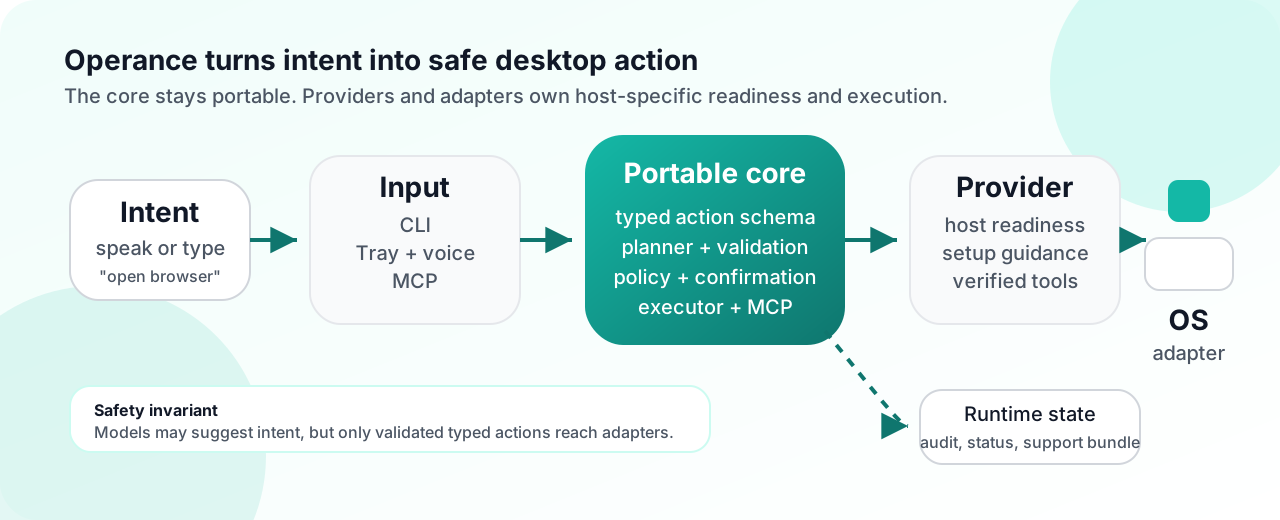
Operance is a local-first AI desktop action layer that lets you control your
computer with natural language. Speak or type what you want, and Operance
turns that intent into safe, typed desktop actions before anything runs.
The current public beta is Fedora KDE Plasma Wayland first and uses a tray-first
click-to-talk workflow. It is ready for outside developers and early adopters to
install, test, report issues, and help extend.
Today, Operance can open apps and websites, focus or quit apps with confirmation,
list recent files, list or search known folders by file name, show basic file
metadata, manage Desktop files or folders with confirmation, list, find, or
switch windows, answer desktop-status questions, and control basic audio state.
It also supports safe JSON desktop skill packs for adding exact phrase shortcuts
that emit existing typed actions without changing the portable core.
The tray and verified commands work without an AI model. A local
OpenAI-compatible model, such as an Ollama-served Qwen model, can be enabled as
a bounded planner fallback after operance --planner-readiness reports it is
safe to enable. Model output is still constrained to Operance's typed action
schema and goes through validation, policy, and confirmation gates.
For developers, Operance is also built to be extended. Under the hood, it has a
shared portable core, per-platform providers and adapters, and an MCP-compatible
control surface. The current delivery scope stays Linux-first while keeping the
core portable for later Windows and macOS adapters.
Platform roadmap:
- Phase 1: Linux/KDE/Wayland
- Phase 2: Windows
- Phase 3: macOS
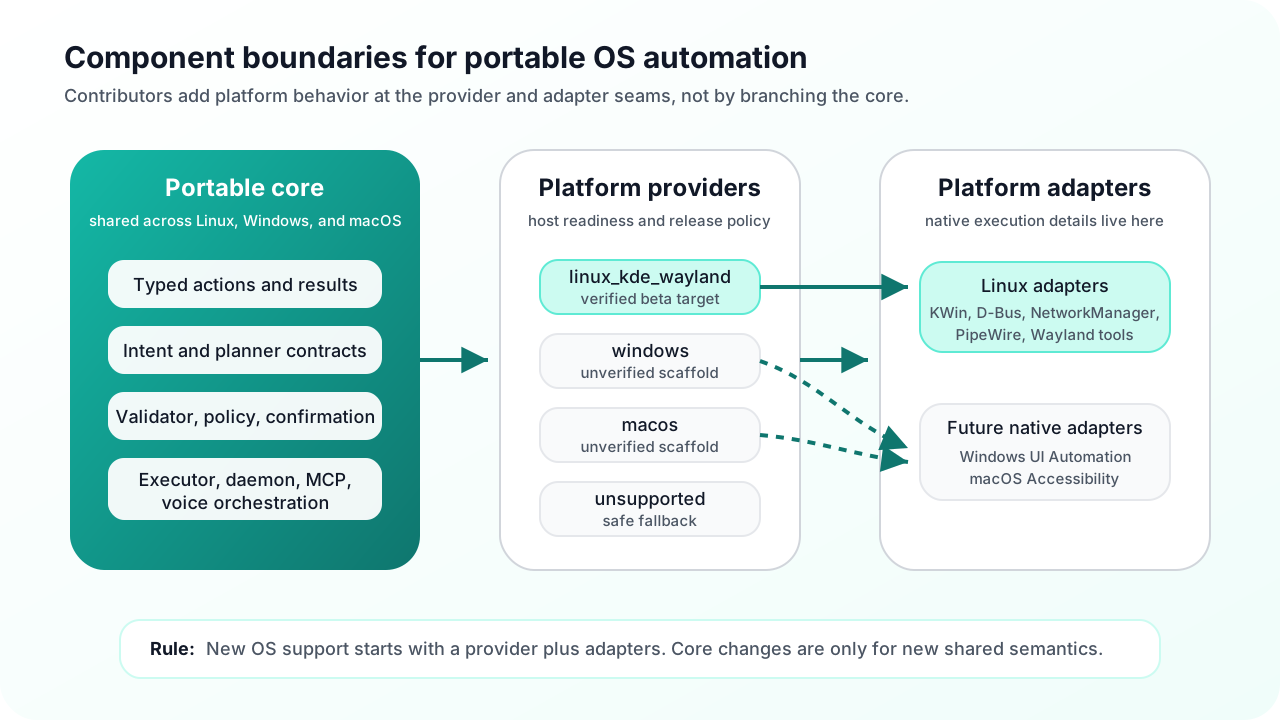
The implementation stays Linux-first today. The portable core remains shared across platforms, including the voice pipeline orchestration, planner, typed action schema, safety model, and MCP server, while platform providers own host-specific readiness, setup workflow, and release-verification rules and OS-specific execution or input translation stays behind per-platform adapters. That keeps the current delivery scope simple without closing off the later Windows and macOS paths.
Windows and macOS provider scaffolds exist for adapter authors, but they are intentionally unverified and block live desktop commands until native adapters are implemented.
Public Beta Quickstart
Use the packaged Fedora RPM for the public beta experience. From the current
GitHub release, run the setup script against that release's asset URL:
curl -fsSLO https://github.com/raunakkathuria/operance/releases/download/<release-tag>/setup.sh
bash ./setup.sh --release-url https://github.com/raunakkathuria/operance/releases/download/<release-tag>
operance --version
operance --installed-smoke
operance --public-beta-checklist
operance --beta-feedback
If you already downloaded the RPM from the same release, the stable local
package setup path is:
bash ./setup.sh --package ./operance-0.1.0-1.noarch.rpm
operance --version
operance --installed-smoke
operance --public-beta-checklist
operance --beta-feedback
operance --installed-smoke, operance --public-beta-checklist, and tray
Setup and status now include one explicit next action. When the install is
ready, the next action is to click the tray icon once and say open browser.
Then click the tray icon and say:
open browser
open the browser
open google.com
go to google.com
search google for linux automation
search the web for linux automation
open firefox
open downloads
open folder downloads
list files in downloads
find file named notes.txt
search documents for invoice
show details for notes.txt
show recent downloads
open the first one
what can I say
what did you hear
are you listening
is local AI ready
why did that fail
what apps are open
is firefox open
switch to it
switch to firefox window
what time is it
wifi status
what is the volume
set volume to 50 percent
If anything fails, collect a support bundle before changing the machine:
operance --support-bundle
The bundle includes issue-report.md, a redacted paste-ready GitHub issue
draft. If you only need the draft without creating an archive, run:
operance --issue-report
For one combined install, verify, try, and report checklist, run:
operance --public-beta-checklist
operance --beta-feedback
The tray menu exposes Setup and status, Try commands, Beta feedback
guide, Supported commands, Report an issue, optional always-on
listening controls, recent interaction details, and release update checks.
Detailed diagnostics such as planner readiness,
installed-smoke output, and raw support snapshots remain available from the CLI
and the setup/status flow instead of crowding the default tray menu.
The release artifact set includes setup.sh beside the RPM, checksums, and
manifest. The repo-local copy lives at scripts/setup.sh. --release-url
downloads the manifest, checksums, setup script, and RPM from the same release
asset base URL, verifies SHA256SUMS, then runs the same install, tray startup,
installed-smoke, command catalog, and support-bundle flow as --package.
Use docs/release/public-beta.md for the public
beta install, local AI planner, release artifact, and feedback path.
The repository also includes a static public landing page at
site/index.html. It explains Operance for new users and links
back to GitHub-rendered canonical Markdown docs for developer details. The
site build entrypoint is ./scripts/build_site.sh, which writes a self-contained
artifact to dist/pages/ by copying the shared brand icon into the deployment
root. The Cloudflare Workers Static Assets deployment is configured inwrangler.toml: use ./scripts/build_site.sh as the build command andnpx wrangler deploy as the deploy command.
Developer Quickstart
Use this path when developing Operance itself from a source checkout:
./scripts/install_linux_dev.sh --ui --voice
.venv/bin/python -m operance.cli --version
.venv/bin/python -m operance.cli --about
.venv/bin/python -m operance.cli --check-updates
.venv/bin/python -m operance.cli --doctor
.venv/bin/python -m operance.cli --getting-started
.venv/bin/python -m operance.cli --supported-commands --supported-commands-available-only
.venv/bin/python -m operance.cli --skills
./scripts/run_mvp.sh
./scripts/run_checkout_smoke.sh
Try a few live commands from the verified subset:
OPERANCE_DEVELOPER_MODE=0 .venv/bin/python -m operance.cli --transcript "what time is it"
OPERANCE_DEVELOPER_MODE=0 .venv/bin/python -m operance.cli --transcript "what is my battery level"
OPERANCE_DEVELOPER_MODE=0 .venv/bin/python -m operance.cli --transcript "wifi status"
OPERANCE_DEVELOPER_MODE=0 .venv/bin/python -m operance.cli --transcript "open firefox"
OPERANCE_DEVELOPER_MODE=0 .venv/bin/python -m operance.cli --transcript "open localhost:3000"
OPERANCE_DEVELOPER_MODE=0 .venv/bin/python -m operance.cli --transcript "show recent files"
OPERANCE_DEVELOPER_MODE=0 .venv/bin/python -m operance.cli --transcript "what can I say"
OPERANCE_DEVELOPER_MODE=0 .venv/bin/python -m operance.cli --transcript "is local AI ready"
OPERANCE_DEVELOPER_MODE=0 .venv/bin/python -m operance.cli --transcript "list windows"
OPERANCE_DEVELOPER_MODE=0 .venv/bin/python -m operance.cli --transcript "switch to window firefox"
OPERANCE_DEVELOPER_MODE=0 .venv/bin/python -m operance.cli --transcript "set volume to 50 percent"
If the MVP path fails or you need to file a bug, collect the current issue artifact with:
.venv/bin/python -m operance.cli --support-bundle
That archive includes a generated issue-report.md draft. For a quick paste-only
draft from a source checkout, use:
.venv/bin/python -m operance.cli --issue-report
For release-readiness work, use the repository gate that combines tests, branding
guard, source-checkout smoke, reset-aware Fedora package gate dry-run, and the
installed desktop smoke checklist. The gate also runs controlled live command
smoke against a temporary desktop fixture, so file-command verification does not
touch your real Desktop directory:
./scripts/run_release_readiness_gate.sh
Before tagging a packaged release candidate on Fedora KDE, run the packaged
evidence gate from the same checkout. It rebuilds the mvp RPM, verifies the
artifact, installs it with stale user-service reset, runs installed desktop
smoke, captures a support bundle from the installed command, and then prints the
manual tray click-to-talk checks that still require your active desktop session:
./scripts/run_package_evidence_gate.sh
Current assumptions for that path:
- Linux
- KDE Plasma on Wayland
- local source checkout
- optional voice and UI extras installed when you want the tray and click-to-talk path
Current Public Position
Operance is ready for a Fedora KDE Wayland public beta for outside developers and early adopters. It is not yet a broad public desktop release.
- Recommended public beta path: Fedora RPM install of the
mvpruntime profile throughsetup.sh - Developer/source path: source checkout with
./scripts/install_linux_dev.sh --ui --voice,.venv/bin/python -m operance.cli --doctor,./scripts/run_mvp.sh, and./scripts/run_checkout_smoke.sh - Default interaction: tray plus click-to-talk
- Optional always-on listening: the tray can start or stop the voice-loop service when the voice runtime is configured
- The supported Fedora package path now vendors the tray UI and STT runtime dependencies needed for the MVP tray plus click-to-talk path
- First installed-package diagnostic:
operance --installed-smoke - Public beta install, verify, try, and report checklist:
operance --public-beta-checklist - 10-minute beta feedback loop:
operance --beta-feedback - First-run activation diagnostic:
operance --getting-started - Explicit release-channel check:
operance --check-updates - Product-facing local AI setup guide:
operance --local-ai-coach - Local AI planner status check:
operance --planner-status - Paste-ready feedback draft:
operance --issue-report - Stable packaged setup entrypoint:
./scripts/setup.sh --package ./operance-0.1.0-1.noarch.rpm - Release-asset setup entrypoint:
./setup.sh --release-url https://github.com/raunakkathuria/operance/releases/download/<release-tag> - Tray-first onboarding: setup/status, try commands, beta feedback guide,
supported commands, issue reporting, recent interaction details, update
checks, and optional always-on listening controls are available from the tray
menu - First-run next action: installed smoke, public beta checklist, and tray
setup/status lead with the next user action, such as clicking the tray icon
and sayingopen browserwhen the package is ready - Public beta distribution guide: docs/release/public-beta.md
- Packaged release-candidate evidence gate:
./scripts/run_package_evidence_gate.sh - Wake-word and TTS assets remain optional and are not part of the packaged support contract; spoken response text is available even when TTS audio is not configured
- Windows and macOS are architecture targets only; their current providers are scaffolds, not supported runtimes
Always-on listening is optional and experimental unless a model-backed wake-word asset is configured. For the current beta, the most reliable path is still click-to-talk. If you start the always-on loop with the built-in energy fallback, treat it as a sound trigger and use two steps:
Operance
<short pause>
open browser
The same pattern applies to other commands, such as go to google.com, search the web for linux automation, or what time is it. You can also try one continuous phrase such as Operance open browser; the voice loop feeds the trigger frame into command capture and trims short wake residue when the command starter is recognized. If the energy fallback triggers and no command follows, the tray reports Sound trigger detected, but no command followed. and returns to waiting. If it only captures a clipped tail fragment such as is it?, the tray reports that it only heard part of a command and asks you to repeat the full command after Operance. A future model-backed public wake phrase is planned as Hey Ops, but the current package does not claim that phrase as supported until a model-backed detector is configured. Click-to-talk remains the recommended beta path when you want the most responsive command capture.
Not yet claimed:
- broad distro or desktop-environment support
- Windows or macOS delivery
- wake-word-first as the default interaction model
- a zero-setup consumer install story
- a skills marketplace or searchable skill registry
Use docs/release/public-beta.md for the public beta distribution path, docs/release/public-handoff.md for the current public handoff, docs/release/release-readiness.md for the release stop line, docs/release/fedora-checklist.md for the exact Fedora gate, docs/release/release-plan.md for the current release sequence, docs/requirements/linux.md for Linux setup, packaging, and advanced diagnostics, and docs/release/public-repo-metadata.md for suggested GitHub About metadata.
How To Contribute
Anyone can contribute right now through one of these paths:
- test Operance on Fedora KDE Wayland and file reproducible issues with a support bundle
- improve onboarding, troubleshooting, and public handoff docs
- add safe JSON phrase shortcuts through desktop skill packs
- add tests and bug fixes that make tray plus click-to-talk more reliable
- harden packaging, setup, doctor, and release-gate workflows
This is still a founder-maintained public beta. Small, focused fixes and high-quality issue reports are more useful than broad rewrites.
Start with CONTRIBUTING.md. For larger product or architecture changes, read docs/specs/README.md, the product PRD in docs/specs/product-prd.md, and the current beta product direction before coding. Non-trivial work should start from a goal-spec GitHub issue so scope, safety, tests, and docs are agreed before implementation. If you want to add a safe phrase shortcut for existing behavior, read docs/contributing/skill-packs.md. If you want to add a new desktop command, read docs/contributing/command-authoring.md before changing core modules. If you are reporting a problem instead of sending a patch, attach the output artifact from .venv/bin/python -m operance.cli --support-bundle whenever possible and paste the bundled issue-report.md draft into the issue body.
This repository already contains the Phase 0A foundation plus the later planner, MCP, Linux-adapter, tray, voice, and release-tooling slices needed for the current public beta. Keep README.md for the public stop line and use CHANGELOG.md when you need the feature-by-feature implementation history.
Current status
Operance already has a coherent Linux-first public beta path: a typed and validated runtime, tray plus click-to-talk MVP flow, and Fedora packaging or support tooling. For the current public handoff, the supported command surface is intentionally narrower than the full implemented runtime. Use CHANGELOG.md for the feature-by-feature implementation history.
What works now:
- Core runtime: typed action models, deterministic intent matching, validator and policy enforcement, local audit logging, bounded local planner fallback, and MCP-compatible control surfaces.
- Verified command subset on Fedora KDE Wayland:
open browser,open the browser,open google.com,go to <website>,search google for <query>,search the web for <query>,open <app name>for installed desktop apps, safe two-step launch phrases such asopen firefox and load localhost:3000oropen firefox and notify me,focus <app name>, confirmation-gatedquit <app name>,open downloads,open folder downloads,open documents,open desktop,show recent files, read-only known-folder discovery such aslist files in downloads,show files in documents,find file named <name>,find folder named <name>, andsearch documents for <name>, read-only metadata commands such asshow details for <name>,how big is <name>,when was <name> modified, andshow recent downloads, contextual follow-ups such asopen it,open the first one,copy the first one to documents,switch to it, andswitch to the first windowafter compatible file or window awareness results, runtime self-status questions such aswhat can I say,what did you hear,are you listening,is local AI ready, andwhy did that fail,create folder on desktop called <name>, safe known-folder entry copy commands such ascopy file on desktop called <name> to documents, confirmation-gated desktop file or folder delete, rename, and move commands, window awareness commands such aslist windows,what apps are open,is <app> open,find window <title>,switch to window <title>, andswitch to <title> window,show a notification saying <message>,what time is it,time,what is my battery level,battery,wifi status,what is the volume,volume,is audio muted,muted,set volume to 50 percent,volume 50 percent,mute audio,mute,unmute audio, andunmute. - Tray feedback: when a command is heard, the tray state changes through
Understanding commandandOpening <target>orExecuting command, and the tooltip showsHeard: ...before the final result notification. Last interaction details includeUnderstood: ...when Operance can explain the typed action it chose. - Command recovery: unclear commands now return concrete examples such as
open browser,open google.com,search google for linux automation, andwhat time is it; unclear contextual follow-ups explain whether a prior file or window result is missing or ambiguous; known Firefox speech variants such asfire fallandfire forceare conservatively mapped tofirefoxfor launch, focus, and quit commands. - Runtime self-status: users can ask
what can I say,what did you hear,are you listening,is local AI ready, andwhy did that failwithout leaving the tray or opening diagnostic CLI output. - Contextual follow-ups: after file or window awareness results, users can say
open it,open the first one,copy it to documents,copy the first one to downloads,switch to it, orswitch to the first window; Operance resolves those phrases into existing typed actions, shows what the reference resolved to, refuses ambiguous or missing context instead of guessing, and still runs validation and policy before execution. - Command coach: the tray exposes
Try commands, and the CLI exposesoperance --command-coach, with guided click-to-talk examples, expected outcomes, and recovery tips for first-run testing. - Voice and tray MVP: tray app, bounded click-to-talk, tray-managed always-on voice-loop controls, confirmation flows, last-interaction reporting, optional wake-word, STT, spoken response text, and TTS probe paths, plus repo-local background voice-loop support.
- Diagnostics and support: version/about provenance, explicit release-channel checks, doctor, setup actions, installed readiness checks, runnable-command catalog, runtime status resources, support snapshot, support bundle, audit inspection, and source-checkout smoke scripts.
- Packaging and release gates: reproducible Linux bootstrap, source-checkout install or uninstall helpers, repo-local systemd helpers, Debian or RPM scaffolds, installed-package smoke, package evidence capture, and the Fedora gate.
What is intentionally not implemented yet:
This is still a narrow public beta. The main remaining gaps are broader platform coverage and deeper Linux coverage, not the absence of a basic runnable product path. Broader implemented commands remain out of the supported verified subset until they are live-verified and graduate into --supported-commands --supported-commands-available-only.
- Native package coverage beyond the current Fedora RPM
mvpruntime path - A bundled Operance wake-word model and tuned default wake-word behavior
- Richer STT and TTS beyond the current optional bounded paths
- Broader KDE execution coverage and live Windows or macOS adapters beyond the current unverified provider scaffolds
- Richer tray UI and planner recovery beyond the current bounded implementation
- Selected-file copy from the active file manager; explicit known-folder copy and contextual copy from prior file results are supported, but current-selection file references need a reliable adapter capability before they are safe to expose
Development and Diagnostics
README intentionally stays narrow for the public beta. Use these docs for the deeper reference material instead of treating the README as a command inventory:
- docs/requirements/linux.md for Linux setup, packaging, systemd, planner, and optional voice diagnostics
- docs/specs/README.md for the spec-to-PR workflow
- docs/specs/product-prd.md for durable product
intent, target users, non-goals, and success metrics - docs/specs/beta-product-direction.md
for the current beta contract and milestone roadmap - docs/release/public-handoff.md for the outside-developer handoff
- docs/release/public-beta.md for public beta install, local AI planner, and feedback flow
- docs/release/fedora-checklist.md for the Fedora release gate
- CONTRIBUTING.md for contributor workflow and verification expectations
Open-source baseline
The local core in this repository is released under the MIT License.
That open-source boundary covers the local daemon, typed action and safety
runtime, desktop adapters, local voice loop, MCP server, and repo-local setup
tooling. Optional hosted relay, sync, or managed inference layers remain outside
the current runnable scope of this repo.
The repo now also includes a baseline public-project trust surface:
- CONTRIBUTING.md for workflow and verification expectations
- SECURITY.md for vulnerability reporting expectations
- CODE_OF_CONDUCT.md for contributor behavior
- docs/architecture/overview.md for the
portable-core versus platform-adapter boundary - docs/architecture/adapter-authoring.md
for the current provider, adapter, and conformance contract - docs/specs/README.md for the required spec-to-PR
workflow before larger product or architecture changes - examples/adapter_sdk/README.md for
executable minimal adapter and provider examples - docs/contributing/command-authoring.md
for adding a typed command without leaking platform details into core - docs/release/fedora-checklist.md
for the current Fedora KDE release gate and stop line - docs/release/public-beta.md for the packaged
public beta distribution and feedback path - docs/requirements/linux.md for Linux machine
setup and live integration status .github/workflows/ci.yml, which runs the full test suite, minimal CLI smoke
checks, and packaging or release dry-run smoke checks on pushes and pull
requests
Development
Use this section as the detailed reference, not the first-run path. The normal loop for a new machine is: bootstrap, run --doctor, run ./scripts/run_mvp.sh, and then use the lower-level commands below only when you are debugging a specific subsystem.
Bootstrap a reproducible local development environment:
./scripts/install_linux_dev.sh
./scripts/install_linux_dev.sh --ui --voice
Run the source-checkout local install orchestrator:
./scripts/install_local_linux_app.sh
./scripts/install_local_linux_app.sh --voice --dry-run
./scripts/install_local_linux_app.sh --voice-loop --dry-run
Roll back the source-checkout local install orchestrator:
./scripts/uninstall_local_linux_app.sh --dry-run
./scripts/uninstall_local_linux_app.sh --remove-venv --dry-run
./scripts/uninstall_local_linux_app.sh --voice-loop --dry-run
Inspect the projected setup-status snapshot:
python3 -m operance.cli --setup-snapshot
python3 -m operance.cli --setup-actions
python3 -m operance.cli --setup-app
python3 -m operance.cli --setup-run-action install_ui_backend --setup-dry-run
python3 -m operance.cli --setup-run-action install_voice_loop_service --setup-dry-run
python3 -m operance.cli --setup-run-action install_voice_loop_user_config --setup-dry-run
python3 -m operance.cli --setup-run-action inspect_voice_loop_config --setup-dry-run
python3 -m operance.cli --setup-run-action enable_voice_loop_service --setup-dry-run
python3 -m operance.cli --setup-run-action probe_planner_health --setup-dry-run
python3 -m operance.cli --setup-run-action build_rpm_package_artifact --setup-dry-run
python3 -m operance.cli --setup-run-recommended --setup-dry-run
python3 -m operance.cli --voice-loop-config
python3 -m operance.cli --voice-loop-service-status
python3 -m operance.cli --voice-loop-status
python3 -m operance.cli --voice-self-test --use-voice-loop-config
python3 -m operance.cli --wakeword-eval-frames 50 --use-voice-loop-config
The manual venv flow remains supported:
python3 -m venv .venv
source .venv/bin/activate
python3 -m pip install -e ".[dev]"
python3 -m pytest
Install the optional voice backends for the wake-word, STT, and TTS probe paths:
python3 -m pip install -e ".[dev,voice]"
Run the optional bounded TTS probe when you have local Kokoro model assets:
python3 -m operance.cli --tts-probe-text "Hello from Operance" --tts-model /path/to/kokoro.onnx --tts-voices /path/to/voices.bin --tts-output /tmp/operance-hello.wav
python3 -m operance.cli --tts-probe-text "Hello from Operance" --tts-model /path/to/kokoro.onnx --tts-voices /path/to/voices.bin --tts-output /tmp/operance-hello.wav --tts-play
If you keep those assets in one of the discovered default locations, the CLI and setup surface can now use them without repeating the flags:
export OPERANCE_TTS_MODEL=/path/to/kokoro.onnx
export OPERANCE_TTS_VOICES=/path/to/voices.bin
python3 -m operance.cli --tts-probe-text "Hello from Operance" --tts-output /tmp/operance-hello.wav --tts-play
For wake-word models, keep the external operance.onnx file in one of the discovered locations or point OPERANCE_WAKEWORD_MODEL at it, then opt into that discovered asset with --wakeword-model auto:
export OPERANCE_WAKEWORD_MODEL=/path/to/operance.onnx
python3 -m operance.cli --wakeword-probe-frames 3 --wakeword-model auto
python3 -m operance.cli --voice-session-frames 40 --wakeword-model auto
python3 -m operance.cli --voice-loop --wakeword-model auto
Run a bounded live voice session that also saves synthesized response audio:
python3 -m operance.cli --voice-session-frames 40 --wakeword-model /path/to/operance.onnx --voice-session-tts-output-dir /tmp/operance-spoken --tts-model /path/to/kokoro.onnx --tts-voices /path/to/voices.bin
python3 -m operance.cli --voice-session-frames 40 --wakeword-model /path/to/operance.onnx --voice-session-tts-output-dir /tmp/operance-spoken --voice-session-tts-play --tts-model /path/to/kokoro.onnx --tts-voices /path/to/voices.bin
Run the continuous live voice loop, optionally with finite stop criteria for local smoke tests:
python3 -m operance.cli --voice-loop --wakeword-model /path/to/operance.onnx
python3 -m operance.cli --voice-loop --voice-loop-max-commands 2 --wakeword-model /path/to/operance.onnx
./scripts/run_voice_loop.sh -- --wakeword-model /path/to/operance.onnx
./scripts/run_voice_loop.sh --args-file .operance/voice-loop.args
./scripts/run_voice_loop.sh -- --voice-loop-max-commands 2 --wakeword-model /path/to/operance.onnx
An optional repo-local .operance/voice-loop.args file is read first, then ~/.config/operance/voice-loop.args is used as a fallback, with one CLI token per line and blank lines or # comments ignored. The repo-local operance-voice-loop.service unit now relies on that launcher search order instead of hardwiring one args file path in the unit itself.
Install the optional tray UI backend:
python3 -m pip install -e ".[dev,ui]"
Run the checked-in deterministic local demo:
./scripts/run_demo.sh
./scripts/run_demo.sh --dry-run
Install the repo-local tray user service scaffold:
./scripts/install_systemd_user_service.sh --dry-run
./scripts/install_systemd_user_service.sh --skip-systemctl
Remove the repo-local tray user service scaffold:
./scripts/uninstall_systemd_user_service.sh --dry-run
./scripts/uninstall_systemd_user_service.sh --skip-systemctl
Tail recent logs for the repo-local tray or voice-loop user service:
./scripts/tail_systemd_user_service_logs.sh --dry-run
./scripts/tail_systemd_user_service_logs.sh --lines 100 --follow
./scripts/tail_systemd_user_service_logs.sh --voice-loop --lines 100
Enable, disable, or otherwise control the repo-local tray or voice-loop user services:
./scripts/control_systemd_user_services.sh status --dry-run
./scripts/control_systemd_user_services.sh enable --voice-loop --dry-run
./scripts/control_systemd_user_services.sh restart --voice-loop --dry-run
./scripts/control_systemd_user_services.sh restart --all --dry-run
Install or remove the repo-local continuous voice-loop user service:
./scripts/install_voice_loop_user_service.sh --dry-run
./scripts/install_voice_loop_user_service.sh --skip-systemctl
./scripts/uninstall_voice_loop_user_service.sh --dry-run
./scripts/uninstall_voice_loop_user_service.sh --skip-systemctl
Render the shared packaged desktop and systemd assets:
./scripts/render_packaged_assets.sh --dry-run
./scripts/render_packaged_assets.sh --output-dir dist/packaged-assets
The packaged voice-loop scaffold now uses /usr/lib/operance/voice-loop-launcher, which prefers optional one-token-per-line args from ~/.config/operance/voice-loop.args and falls back to /etc/operance/voice-loop.args before starting operance --voice-loop. The package scaffolds also ship /etc/operance/voice-loop.args.example as a starting point for that file.
Seed a user-scoped voice-loop config from the packaged or repo example file:
./scripts/install_voice_loop_user_config.sh --dry-run
./scripts/install_voice_loop_user_config.sh --force --dry-run
Update the user-scoped voice-loop config with a calibrated threshold or discovered wake-word model token:
./scripts/update_voice_loop_user_config.sh --wakeword-threshold 0.72 --dry-run
./scripts/update_voice_loop_user_config.sh --wakeword-model auto --dry-run
Stage external voice assets into the discovered user-scoped config paths:
python3 -m operance.cli --voice-asset-paths
./scripts/install_wakeword_model_asset.sh --source /path/to/operance.onnx --dry-run
./scripts/install_tts_assets.sh --model /path/to/kokoro.onnx --voices /path/to/voices.bin --dry-run
If you want the setup surface to run those install helpers directly, export source paths first:
export OPERANCE_WAKEWORD_MODEL_SOURCE=/path/to/operance.onnx
export OPERANCE_TTS_MODEL_SOURCE=/path/to/kokoro.onnx
export OPERANCE_TTS_VOICES_SOURCE=/path/to/voices.bin
python3 -m operance.cli --setup-actions
Render the Debian package staging tree:
./scripts/build_deb_package.sh --dry-run
./scripts/build_deb_package.sh --skip-build --staging-dir dist/deb/operance
Render the RPM package staging tree:
./scripts/build_rpm_package.sh --dry-run
./scripts/build_rpm_package.sh --skip-build --spec-dir dist/rpm
Render both package scaffolds in one pass:
./scripts/build_package_scaffolds.sh --dry-run
./scripts/build_package_scaffolds.sh --root-dir dist/packages
Build package artifacts through the existing helper scripts:
./scripts/build_package_artifacts.sh --dry-run
./scripts/build_package_artifacts.sh --rpm --root-dir dist/package-artifacts
Install the native package build tools used by those helpers:
./scripts/install_packaging_tools.sh --dry-run
./scripts/install_packaging_tools.sh --rpm --dry-run
The RPM helper now copies the built artifact back into dist/package-artifacts/rpm/, so the install helper can consume the documented path directly instead of reaching into the rpmbuild staging tree. That copy step now tolerates Fedora-style internal filenames like operance-0.1.0-1.fc43.noarch.rpm while still writing the documented normalized output path. The Fedora release gate helpers now also fail fast with ./scripts/install_packaging_tools.sh --rpm when rpmbuild is missing, so packaging-host blockers are surfaced before the longer gate steps start.
The current Fedora mvp package installs /usr/bin/operance, the packaged Python source tree, and the tray UI plus STT Python runtime needed for the click-to-talk path under /usr/lib/operance. The packaged command defaults to live Linux adapters (OPERANCE_DEVELOPER_MODE=0), so operance --transcript "open firefox" and tray click-to-talk should affect the desktop instead of returning simulated success. Wake-word and TTS assets remain optional and outside the packaged support contract.
Install a built native package artifact:
./scripts/setup.sh --package dist/package-artifacts/rpm/operance-0.1.0-1.noarch.rpm --dry-run
./scripts/install_package_artifact.sh --package dist/package-artifacts/deb/operance_0.1.0_all.deb --installer apt --dry-run
./scripts/install_package_artifact.sh --package dist/package-artifacts/rpm/operance-0.1.0-1.noarch.rpm --installer dnf --dry-run
./scripts/install_package_artifact.sh --package dist/package-artifacts/rpm/operance-0.1.0-1.noarch.rpm --installer dnf --replace-existing --dry-run
./scripts/install_package_artifact.sh --package dist/package-artifacts/rpm/operance-0.1.0-1.noarch.rpm --installer dnf --replace-existing --reset-user-services --dry-run
Use ./scripts/setup.sh for the outside-developer packaged setup path. It
composes package installation, stale user-service reset, tray startup,
installed readiness, supported-command discovery, support-bundle capture, and
the manual tray smoke checklist behind one stable lifecycle command. Keep this
script name stable across release phases.
Use --replace-existing when testing a rebuilt Fedora RPM with the same package version. The helper removes the installed package when present and then installs the provided artifact, otherwise it keeps the normal first-install path.
Use --reset-user-services when switching from a source-checkout tray service to the packaged tray service. It stops, disables, and removes only user-scoped Operance systemd units before installing, so stale ~/.config/systemd/user units cannot shadow the packaged units.
Smoke-test an installed native package, optionally installing the artifact first:
./scripts/run_installed_package_smoke.sh --dry-run
./scripts/run_installed_package_smoke.sh --package dist/package-artifacts/rpm/operance-0.1.0-1.noarch.rpm --installer dnf --require-mvp-runtime --dry-run
./scripts/run_installed_package_smoke.sh --package dist/package-artifacts/rpm/operance-0.1.0-1.noarch.rpm --installer dnf --require-mvp-runtime --reset-user-services --dry-run
The installed package smoke runs the same package-local diagnostic users can run with operance --installed-smoke. When --require-mvp-runtime is enabled, it also checks that the active tray service is not shadowed by a stale source-checkout user unit.
Run the full Fedora-first release gate from a checkout:
./scripts/run_fedora_release_smoke.sh --dry-run
./scripts/run_fedora_release_smoke.sh --reset-user-services --dry-run
./scripts/run_fedora_release_smoke.sh --support-bundle-out /tmp/operance-release-support.tar.gz --dry-run
Run the full Fedora gate from a checkout:
./scripts/run_fedora_gate.sh --dry-run
./scripts/run_fedora_gate.sh --reset-user-services --dry-run
./scripts/run_fedora_gate.sh --support-bundle-out /tmp/operance-release-support.tar.gz --dry-run
Run the release-readiness gate from a checkout:
./scripts/run_release_readiness_gate.sh --dry-run
./scripts/run_release_readiness_gate.sh
./scripts/run_release_readiness_gate.sh --run-package-gate
The full package gate keeps the RPM installed so the installed desktop smoke and
manual tray click-to-talk checks can run against that package.
Run the packaged evidence gate before tagging a Fedora KDE package release
candidate:
./scripts/run_package_evidence_gate.sh --dry-run
./scripts/run_package_evidence_gate.sh --bundle-python .venv/bin/python
./scripts/run_package_evidence_gate.sh --support-bundle-out /tmp/operance-installed-support.tar.gz
./scripts/run_package_evidence_gate.sh --bundle-python .venv/bin/python --evidence-dir /tmp/operance-release-evidence
This gate rebuilds the mvp RPM, verifies the normalized RPM artifact, installs
it with --replace-existing --reset-user-services, runs installed desktop
smoke, captures installed JSON evidence for build identity, installed smoke,
public beta checklist, command coach, local AI coach, supported commands,
and operance --support-bundle from the installed command, and prints the
manual tray click-to-talk checks to run before tagging.
Run the installed desktop smoke after installing the RPM in an active Fedora KDE
Wayland session:
./scripts/run_installed_desktop_smoke.sh --dry-run
./scripts/run_installed_desktop_smoke.sh
The packaged tray is click-to-talk first, with optional always-on controls for the voice-loop service. Without a model-backed wake-word asset, the always-on loop uses an experimental sound trigger, not true phrase recognition. In that fallback mode, say Operance, pause briefly, then say the command, or try one continuous phrase such as Operance open browser; the trigger path feeds the trigger frame into STT and trims short leading wake residue before known command starters, so transcripts like Operants, open browser can still run as open browser. When a trigger is detected, the tray shows I'm listening; if no command follows, it reports Sound trigger detected, but no command followed. If the loop catches only a clipped tail fragment after a trigger, it reports the incomplete fragment and asks for the full command again instead of guessing. After a completed command, the loop briefly suppresses immediate re-triggering so it is less likely to capture the tail end of the same utterance as a second command. When a model-backed wake-word detector is configured, phrase-aware feedback is allowed, and Hey Ops is the preferred future public wake phrase. Tray notifications stay visible long enough to read, and click-to-talk remains the fastest manual path. A missing continuous voice-loop runtime status file is expected unless the background loop has been started separately, and it should not block click-to-talk result notifications. Spoken response text is recorded in the last-interaction report; audio playback still requires configured TTS assets.
When testing from a source checkout without rebuilding or reinstalling the RPM, run the source tray directly. In source-checkout mode, the tray starts and stops a repo-local python -m operance.cli --voice-loop child process with the same environment instead of controlling the packaged systemd voice-loop service, so click-to-talk and always-on status use the same data directory.
Remove an installed native package:
./scripts/uninstall_native_package.sh --installer apt --dry-run
./scripts/uninstall_native_package.sh --installer dnf --package-name operance --dry-run
Use real Linux desktop adapters instead of mocks:
OPERANCE_DEVELOPER_MODE=0 python3 -m operance.cli --doctor
OPERANCE_DEVELOPER_MODE=0 python3 -m operance.cli --transcript "what is my battery level"
OPERANCE_DEVELOPER_MODE=0 python3 -m operance.cli --transcript "open firefox"
OPERANCE_DEVELOPER_MODE=0 python3 -m operance.cli --transcript "open localhost:3000"
OPERANCE_DEVELOPER_MODE=0 python3 -m operance.cli --transcript "open firefox and load localhost:3000"
OPERANCE_DEVELOPER_MODE=0 python3 -m operance.cli --transcript "browse to localhost 3000"
OPERANCE_DEVELOPER_MODE=0 python3 -m operance.cli --transcript "browse to docs.python.org/3"
OPERANCE_DEVELOPER_MODE=0 python3 -m operance.cli --transcript "open file on desktop called notes.txt"
OPERANCE_DEVELOPER_MODE=0 python3 -m operance.cli --transcript "open recent file called notes.txt"
Probe the Linux microphone and bounded voice-session paths:
python3 -m operance.cli --audio-list-devices
python3 -m operance.cli --audio-capture-frames 3
python3 -m operance.cli --wakeword-probe-frames 3
python3 -m operance.cli --wakeword-calibrate-frames 20
python3 -m operance.cli --wakeword-eval-frames 50
python3 -m operance.cli --voice-self-test
python3 -m operance.cli --wakeword-probe-frames 3 --wakeword-model /path/to/operance.onnx
python3 -m operance.cli --stt-probe-frames 10
python3 -m operance.cli --voice-session-frames 40 --wakeword-model /path/to/operance.onnx
Enable planner fallback against a local chat-completions endpoint:
python3 -m operance.cli --planner-setup-template
python3 -m operance.cli --planner-setup-template llama-cpp
python3 -m operance.cli --planner-setup-template ollama
export OPERANCE_PLANNER_ENDPOINT=http://127.0.0.1:8080/v1/chat/completions
export OPERANCE_PLANNER_MODEL=qwen2.5-7b-instruct
export OPERANCE_PLANNER_TIMEOUT_SECONDS=60
export OPERANCE_PLANNER_MAX_RETRIES=1
python3 -m operance.cli --print-config
python3 -m operance.cli --planner-status
python3 -m operance.cli --planner-health
python3 -m operance.cli --planner-readiness "open firefox and notify me"
python3 -m operance.cli --planner-execute "let me know when this is done"
export OPERANCE_PLANNER_ENABLED=1
--planner-setup-template prints non-mutating setup guidance for generic
OpenAI-compatible servers, llama.cpp, and Ollama. It does not install model
runtimes, download models, start servers, or enable planner fallback for you.
The Ollama template defaults to qwen2.5:3b because that is a more practical
CPU-first readiness target than a 7B model on typical developer laptops.--planner-readiness calls the configured local OpenAI-compatible endpoint,
checks health, runs a non-executing planner smoke, validates the returned plan
against the same typed action registry used by runtime execution, applies
policy, and preserves confirmation gates. Use it before enabling planner
fallback in a live tray or voice session.--planner-execute is the explicit local-model execution test: it bypasses
deterministic matching, calls the configured planner endpoint, validates and
policy-checks the returned typed plan, executes only auto-approved actions, and
stops before confirmation-gated actions. In a source checkout it still uses
simulated adapters unless OPERANCE_DEVELOPER_MODE=0 is set.
Inspect or run the tray surface:
python3 -m operance.cli --tray-snapshot
python3 -m operance.cli --tray-run
./scripts/run_tray_app.sh
Workflow rules
- Use TDD for implementation work: add or update a failing test first, implement the smallest change that makes it pass, then refactor only if needed.
- Apply
KISS: choose the simplest implementation that satisfies the current runnable requirement. - Apply
YAGNI: do not add future-phase abstractions, knobs, or integrations before the current milestone requires them. - Apply
DRY: remove duplication where it clarifies the current slice, but do not introduce abstractions that make small feature work harder to follow. - Treat documentation updates as part of the same change, not follow-up work.
- Create a git commit at the end of each completed implementation step, not just at phase or milestone boundaries.
- Use descriptive commit messages that state the concrete behavior or surface added in that step.
- Keep future-phase work out of the current milestone unless the current tests require it.
Documentation sync
LICENSEdefines the current local-core open-source license.CONTRIBUTING.mddefines contributor workflow and verification expectations.docs/architecture/overview.mddefines the portable-core versus adapter boundary.README.mdshould describe only what is actually runnable in the repository right now.docs/requirements/linux.mdis the focused reference for preparing a real Linux/KDE machine for integration work and tracking live Linux integration status.CHANGELOG.mdtracks completed implementation slices in commit order.docs/specs/contains the product PRD and milestone specs that should guide new PRs.docs/requirements/plan.mdis historical long-form planning context from the start of the project, not the day-to-day scope contract.- Any change to runtime behavior, interfaces, commands, or workflow rules must update the relevant docs in the same slice before commit.
- The pre-commit checklist for each step is: failing test first, implementation, docs update,
.venv/bin/python -m pytest, commit.
CLI
Most developers only need --version, --about, --check-updates, --doctor, --public-beta-checklist, --beta-feedback, --getting-started, --command-coach, --local-ai-coach, --planner-setup-template, --planner-status, --planner-execute, --supported-commands --supported-commands-available-only, --skills, --skill-validate, --transcript, --mvp-launch, --support-bundle, and --issue-report. In the current public beta, --supported-commands --supported-commands-available-only is intentionally conservative: it prints only the commands that are both environment-ready and release-verified for the Fedora KDE Wayland target. The rest of this section is the lower-level CLI reference surface.
Print the effective config:
python3 -m operance.cli --print-config
Emit a tiny developer-mode event sequence:
python3 -m operance.cli --emit-demo-events
Process a transcript end to end and print the final response payload:
python3 -m operance.cli --transcript "open firefox"
In default developer mode, --transcript runs against simulated adapters and the payload includes "simulated": true. Set OPERANCE_DEVELOPER_MODE=0 when you want the real Linux adapters instead.
Installed packages are different: the packaged /usr/bin/operance entrypoint defaults to live adapters. Verify this before testing tray commands:
operance --print-config
operance --installed-smoke
operance --public-beta-checklist
operance --beta-feedback
operance --getting-started
operance --command-coach
operance --local-ai-coach
operance --planner-setup-template
operance --planner-status
operance --check-updates
operance --issue-report
python3 scripts/check_installed_mvp_runtime.py --command operance --check-tray-service
operance --print-config should report "developer_mode": false. operance --about reports whether the command is a packaged install or source checkout plus package profile, build commit, tag when available, build time, and install root. operance --getting-started prints the current first-run path, commands to try, local AI planner state, and contributor next steps. operance --command-coach prints guided click-to-talk examples and expected outcomes. operance --local-ai-coach prints the optional local AI setup path with Ollama defaults, validation commands, an explicit one-shot execution test, and the safety contract; it does not install models, start servers, or enable planner fallback. operance --planner-setup-template prints copy-paste local planner setup templates without mutating the host. operance --planner-status prints non-executing local planner status plus the safety contract that keeps model output bounded to typed actions. operance --issue-report prints a redacted paste-ready GitHub issue draft from the current support snapshot. operance --check-updates checks the configured release channel and prints whether the installed packaged build matches the latest release; it does not auto-install packages or invoke sudo. operance --installed-smoke summarizes installed package readiness, warns when the tray service is not active, fails when packaged build identity or runtime dependencies are missing, catches stale repo-local user units shadowing the packaged service, and includes evidence for build identity, live mode, tray service state, and failed or warning checks. If stale user units are reported, reinstall with ./scripts/install_package_artifact.sh --package dist/package-artifacts/rpm/operance-0.1.0-1.noarch.rpm --installer dnf --replace-existing --reset-user-services. In systemctl --user status, preset: disabled is normal on Fedora; Loaded, Active, and the ExecStart command path are the parts to verify../scripts/run_installed_desktop_smoke.sh starts/enables the packaged tray user service before checking status, so Active: inactive (dead) is a smoke failure rather than a successful desktop state.
The tray menu exposes Check for updates and Setup and status, so users can inspect release-channel status, setup guidance, and installed-smoke next steps without requiring a terminal.
Run the built-in deterministic corpus and print a summary:
python3 -m operance.cli --run-corpus
Validate the active adapter set against the shared tool-to-adapter contract:
python3 -m operance.cli --adapter-conformance
Process one transcript per non-empty line from a file:
python3 -m operance.cli --transcript-file transcripts.txt
Run an interactive typed session until exit or EOF:
python3 -m operance.cli --interactive
Print a structured runtime status snapshot:
python3 -m operance.cli --status
Print the projected tray-state snapshot:
python3 -m operance.cli --tray-snapshot
Print recent runtime audit entries:
python3 -m operance.cli --audit-log
python3 -m operance.cli --audit-log --audit-limit 10
Run the optional PySide6 tray app:
python3 -m operance.cli --tray-run
Preferred MVP path: use the one-command repo-local launcher, or fall back to the explicit tray and click-to-talk wrappers:
./scripts/run_mvp.sh
./scripts/run_tray_app.sh
./scripts/run_click_to_talk.sh
List available Linux audio input devices:
python3 -m operance.cli --audio-list-devices
Capture a few Linux microphone frame metadata samples:
python3 -m operance.cli --audio-capture-frames 3
Process a few captured Linux microphone frames through the current wake-word probe detector:
python3 -m operance.cli --wakeword-probe-frames 3
Calibrate the current energy-based wake-word threshold against ambient microphone input:
python3 -m operance.cli --wakeword-calibrate-frames 20
python3 -m operance.cli --wakeword-calibrate-frames 20 --wakeword-threshold 0.65
Calibration now reports both ambient_detector_confidence and ambient_peak_confidence, because the fallback wake-word path now gates on sustained frame energy instead of a single-sample peak.
Measure idle false activations for the current wake-word detector settings:
python3 -m operance.cli --wakeword-eval-frames 50
python3 -m operance.cli --wakeword-eval-frames 50 --wakeword-model auto
Run one composite voice self-test across capture, wake-word idle evaluation, and optional STT/TTS:
python3 -m operance.cli --voice-self-test
python3 -m operance.cli --voice-self-test --wakeword-model auto
Process a few captured Linux microphone frames through a custom openWakeWord model:
python3 -m operance.cli --wakeword-probe-frames 3 --wakeword-model /path/to/operance.onnx
python3 -m operance.cli --wakeword-probe-frames 3 --wakeword-model auto
Process a few captured Linux microphone frames through the optional STT probe backend:
python3 -m operance.cli --stt-probe-frames 10
Run a bounded live voice session through wake-word detection, optional STT, and the daemon:
python3 -m operance.cli --voice-session-frames 40 --wakeword-model /path/to/operance.onnx
python3 -m operance.cli --voice-session-frames 40 --wakeword-model auto
Run the continuous live voice loop until interrupted or optional stop criteria are met:
python3 -m operance.cli --voice-loop --wakeword-model /path/to/operance.onnx
python3 -m operance.cli --voice-loop --wakeword-model auto
python3 -m operance.cli --voice-loop --voice-loop-max-commands 2 --wakeword-model /path/to/operance.onnx
The repo does not currently ship a default operance wake-word model file, so model-backed wake detection still requires an external asset; --wakeword-model auto only resolves that asset from OPERANCE_WAKEWORD_MODEL, .operance/wakeword/operance.onnx, ~/.config/operance/wakeword/operance.onnx, or /etc/operance/wakeword/operance.onnx.
Print the ActionPlan JSON schema:
python3 -m operance.cli --action-plan-schema
Print the ActionResult JSON schema:
python3 -m operance.cli --action-result-schema
Print environment readiness checks:
python3 -m operance.cli --doctor
Run a replay fixture in JSONL format:
python3 -m operance.cli --replay-file fixture.jsonl
Run a planner payload regression fixture:
python3 -m operance.cli --planner-fixture planner_fixture.jsonl
python3 -m operance.cli --planner-fixture tests/fixtures/planner_mvp.jsonl
Print the planner payload schema:
python3 -m operance.cli --planner-schema
Print the planner prompt messages for a transcript:
python3 -m operance.cli --planner-prompt "open firefox"
python3 -m operance.cli --planner-prompt "also notify me" --planner-context-entry "assistant:Planned action: launch firefox."
Build the planner service request payload for a transcript:
python3 -m operance.cli --planner-request "open firefox"
python3 -m operance.cli --planner-request "also notify me" --planner-context-entry "user:open firefox" --planner-context-entry "assistant:Planned action: launch firefox."
Probe the local planner endpoint health:
python3 -m operance.cli --planner-health
Run a non-executing local planner smoke against the configured endpoint:
python3 -m operance.cli --planner-smoke "open firefox and notify me"
Run an explicit local planner execution test without relying on unmatched
phrasing in the normal transcript path:
python3 -m operance.cli --planner-execute "let me know when this is done"
OPERANCE_DEVELOPER_MODE=0 python3 -m operance.cli --planner-execute "let me know when this is done"
Run the full local planner readiness check before enabling live fallback:
python3 -m operance.cli --planner-readiness "open firefox and notify me"
Print the planner fallback routing decision for a transcript:
python3 -m operance.cli --planner-route "open browser and notify me" --planner-confidence 0.88
Print the current MCP tool metadata:
python3 -m operance.cli --mcp-list-tools
Print the current MCP resource metadata:
python3 -m operance.cli --mcp-list-resources
Invoke an MCP tool through the validated runtime:
python3 -m operance.cli --mcp-call-tool apps.launch --mcp-tool-args '{"app":"firefox"}'
--mcp-call-tool creates a fresh server for each invocation, so confirmation follow-ups must use a stateful MCP session instead of separate CLI calls.
Read one MCP resource directly:
python3 -m operance.cli --mcp-read-resource operance://tools/catalog
Run a stateful MCP fixture through one shared server session:
python3 -m operance.cli --mcp-fixture mcp_fixture.jsonl
Fixture records may also include expected_result to assert a recursive subset of the returned MCP result.
Render a planner payload into a typed plan preview:
python3 -m operance.cli --planner-transcript "open firefox and notify me" --planner-payload '{"actions":[{"tool":"apps.launch","args":{"app":"firefox"}},{"tool":"notifications.show","args":{"title":"Opened","message":"Firefox launched"}}]}'
Run the MCP stdio transport loop on stdin/stdout:
python3 -m operance.cli --mcp-stdio
Within one MCP stdio or fixture-driven session, clients can inspect operance://runtime/undo and call operance.undo_last_action after a reversible action succeeds.
Within one MCP stdio session, clients can call operance.confirm_pending or operance.cancel_pending after a gated tool call returns awaiting_confirmation.
Developer mode uses mock adapters by default and keeps file-side effects inside the repo-local .operance/Desktop path unless OPERANCE_DESKTOP_DIR is overridden.
Yorumlar (0)
Yorum birakmak icin giris yap.
Yorum birakSonuc bulunamadi