sir-thaddeus
Health Warn
- License — License: Apache-2.0
- Description — Repository has a description
- Active repo — Last push 0 days ago
- Low visibility — Only 7 GitHub stars
Code Pass
- Code scan — Scanned 12 files during light audit, no dangerous patterns found
Permissions Pass
- Permissions — No dangerous permissions requested
No AI report is available for this listing yet.
A privacy-first, local AI copilot and permissioned agent runtime for Windows. Powered by the Model Context Protocol (MCP).

Sir Thaddeus
Privacy-first, permission-based local AI copilot for Windows.




Local-First AI Copilot for Windows
Sir Thaddeus runs on your machine.
Sir Thaddeus is a local AI assistant for Windows built for people who want useful AI without giving up control. It connects to local language models (for example, LM Studio), uses permission-based tool access, and keeps execution visible to the operator.
No telemetry by default. No silent background autonomy. No hidden actions.
If it acts, you see it. If you press STOP, it stops.
Documentation
Suggested GitHub Topics
Use these in your repository "About" settings:
local-ai, windows, ai-copilot, offline-first, privacy-first, mcp, lm-studio, openai-compatible, voice-assistant, push-to-talk, asr, tts, avalonia-ui, headless-runtime, tool-orchestration, permissioned-ai
Why Sir Thaddeus?
Most everyday AI tasks do not need a massive cloud model.
They need something that is:
- Private
- Reliable
- Fast enough on modest hardware
- Simple to run
- Respectful of user boundaries
Sir Thaddeus lowers the barrier to entry for local AI on Windows while keeping the user in charge.
What It Feels Like to Use
Hold the push-to-talk hotkey and say:
"When is the local grocery store open?"
Before doing anything, Sir Thaddeus proposes the next step. You can see:
- What access is requested
- Why it is needed
- How long the permission lasts
You approve. It runs. You get the result. Permission expires.
That same interaction model applies throughout the runtime:
- Nothing runs silently
- Nothing lingers in the background without approval
- Every important action is recorded locally
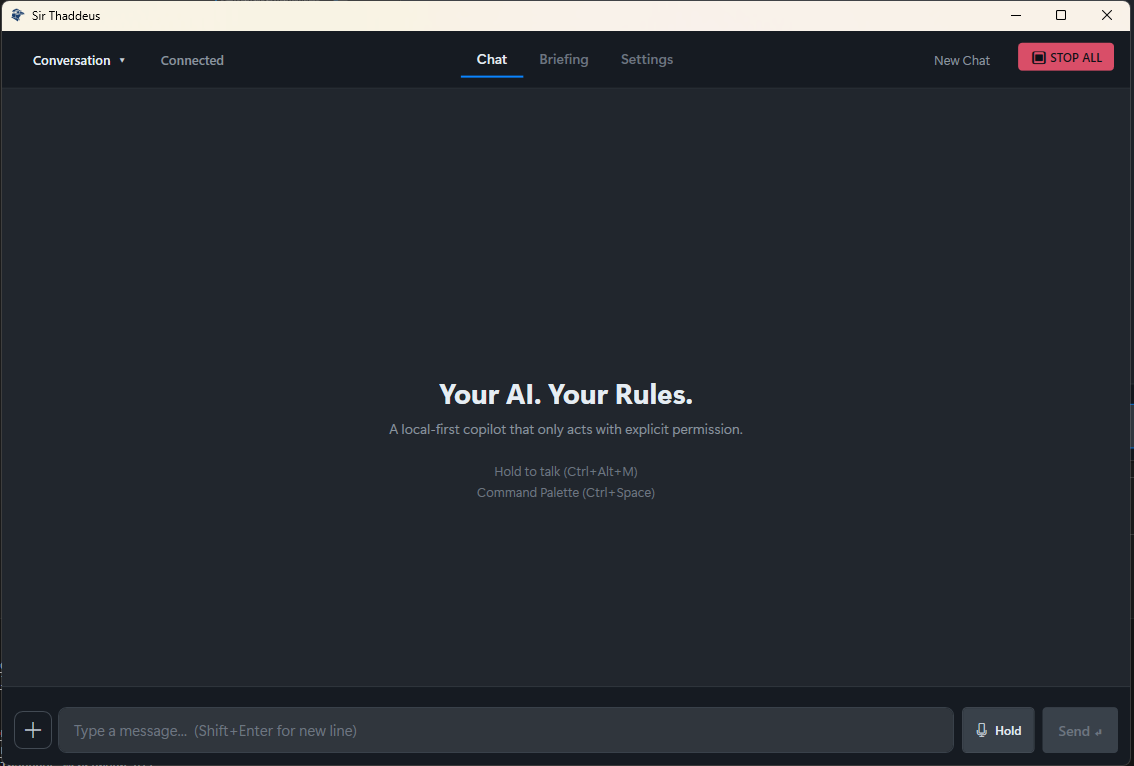
Features
Voice and Interface
- Push-to-talk voice input with release-to-send behavior
- Command palette for keyboard-first workflows
- Global STOP kill switch to halt active execution
- Tray-first Windows experience with local desktop controls
Local AI Runtime
- Local LLM integration through LM Studio and OpenAI-compatible endpoints
- Reasoning pipeline for breaking down logic questions step by step
- Small-model support with routing assistance for better tool use
- Supported document formats: PDF, DOCX, XLSX, CSV, RTF, Markdown, and plain text
- In-memory result caching with configurable TTLs for web search, weather, and location data
- Conversation-scoped memory retrieval for better continuity across multi-turn chats
- Automatic history persistence for chat and briefing context in memory-backed flows
Permissioned Tooling via MCP
- Web search and browser actions
- Screen reading and active-window context
- Read-only file listing and reading with limits
- Clipboard read/write for seamless copy/paste integration
- Allowlisted system actions
- Built-in utilities for math, conversions, and structured lookups
Trust and Safety
- Explicit permission prompts before tool execution
- Time-boxed permission tokens
- Local audit logging
- Fail-closed behavior when something goes sideways
- Tool budgets to prevent runaway loops and token burn
Optional Connected Services
- Background watchers for website changes
- Local notifications for monitored events
Quick Start
No cloud account required.
- Go to the Releases page
- Download the latest release ZIP
- Unzip the archive
- Run
SirThaddeus.exe
Windows SmartScreen may appear. If so, choose More Info -> Run Anyway - Start your local model runner
Tested primarily with LM Studio - Complete first-run setup inside the app
That is it.
Headless Runtime (MVP)
A terminal entry point now exists for chat-first runs:
dotnet run --project apps/headless-runtime/SirThaddeus.HeadlessRuntime
Convenience launch scripts are available:
# Windows PowerShell
./dev/terminal.ps1
# Linux/macOS shell
./dev/terminal.sh
# (or: bash ./dev/terminal.sh)
Commands:
/help/reset/tools/whoami/quickstart/exit
Tooling in headless mode is optional:
dotnet run --project apps/headless-runtime/SirThaddeus.HeadlessRuntime -- --tools
MCP now has a split tool model:
- Core tools run cross-platform (
net10.0) - Windows-only tools (screen capture / OCR) load only on Windows
Runtime API composition has also been modularized into focused endpoint groups
(core, memory, runs, profiles, personalities) to reduce regression risk
and improve production maintainability.
Changelog
See CHANGELOG.md for release notes and recent updates.
Core Principles
1. You are in control
Sir Thaddeus proposes actions. You approve them.
2. Nothing runs silently
If it acts, you can see it.
3. STOP always works
The kill switch revokes permissions and halts execution immediately.
Sir Thaddeus is not designed to replace your judgment. It is designed to extend your capability without taking away your agency.
Architecture
Sir Thaddeus uses a five-layer architecture that separates loop control, interface, model access, tools, and voice runtime.
Execution loop: propose -> validate -> execute -> observe -> verify -> repair -> repeat
flowchart LR
  subgraph loop [Layer 1: Loop - packages/agent]
    Loop[Bounded Agent Loop]
    Context[Run Context and History]
    Router[Intent Router]
    Gate[Policy Gate]
    Validate[Action and Completion Validation]
    Repair[Targeted Repair]
  end

  subgraph frontend [Layer 2: Interface - apps/ui-avalonia + apps/headless-runtime]
    Tray[System Tray]
    Overlay[Avalonia UI]
    PTT[Audio Input]
    Playback[Audio Playback]
    Palette[Command Palette]
  end

  subgraph model [Layer 3: Model - packages/llm-client]
    LmStudio[LM Studio / OpenAI-compatible]
  end

  subgraph tools [Layer 4: Tools - apps/mcp-server + packages/memory + memory-sqlite]
    Server[MCP Server - stdio]
    Toolset[Browser / File / System / Screen / WebSearch / Weather / Utilities]
    Memory[SQLite Memory and Retrieval]
  end

  subgraph voice [Layer 5: Voice - apps/voice-host + voice-backend]
    VoiceHost[VoiceHost Proxy]
    VoiceBackend[Voice Backend - Python]
    VoiceBackend --> VoiceHost
  end

  PTT -->|audio buffer| VoiceHost
  VoiceHost -->|transcribed text| Loop
  Palette -->|typed request| Loop

  Loop --> Router --> Gate
  Gate -->|allowed tools + budgets| Loop

  Loop -->|model prompt| LmStudio
  LmStudio -->|tool_calls / next action| Loop

  Loop --> Validate
  Validate -->|blocked/ok| Loop
  Validate -->|complete/partial/missing| Repair
  Repair -->|targeted follow-up| Loop

  Loop -->|tools/call| Server
  Server --> Toolset
  Server --> Memory
  Server -->|tool result| Loop

  Loop -->|final text| VoiceHost
  VoiceHost -->|audio stream| Playback

  Loop -->|events| Overlay
  Tray --> Overlay
Layer Responsibilities
| Layer | Project(s) | Responsibility | Talks to |
|---|---|---|---|
| Layer 1: Loop | packages/agent |
Route, gate, validate, repair, complete | Interface, Model, Tools, Voice |
| Layer 2: Interface | apps/ui-avalonia, apps/headless-runtime |
Avalonia UI + terminal runtime entry points | Loop, Voice |
| Layer 3: Model | packages/llm-client |
OpenAI-style model calls and embeddings | LM Studio, Loop |
| Layer 4: Tools | apps/mcp-server, packages/memory, packages/memory-sqlite |
MCP tools plus local memory retrieval/storage | Loop |
| Layer 5: Voice | apps/voice-host, apps/voice-backend |
Local ASR and TTS transport/runtime | Interface, Loop |
Project Structure
sir-thaddeus/
|-- apps/
|   |-- ui-avalonia/
|   |-- headless-runtime/
|   |-- voice-host/
|   |-- voice-backend/
|   `-- mcp-server/
|-- assets/
|-- packages/
|-- tests/
|-- tools/
|-- Microsoft/
`-- project-notes/
Development
Prerequisites
- .NET 10.0 SDK
- (Optional) LM Studio or any OpenAI-compatible local model server
- (Optional) SearXNG for local web search (bundled setup available)
Build
dotnet build SirThaddeus.sln
Test
dotnet test SirThaddeus.sln
Run (headless)
dotnet run --project apps/headless-runtime/SirThaddeus.HeadlessRuntime
Run (Avalonia UI)
dotnet run --project apps/ui-avalonia/SirThaddeus.UI.Avalonia
Technical Notes
- Tested primarily with LM Studio and smaller local models
- Other local runtimes may work, but support may vary
- Smaller reasoning models can take longer to respond, especially in deeper thinking modes
- The runtime is designed around permissioned execution, local visibility, and practical reliability
Who This Is For
Sir Thaddeus is for:
- Developers exploring local AI tooling
- Privacy-conscious users who want AI on Windows without telemetry
- Builders interested in MCP architecture, tool routing, and permissioned agents
- Anyone who wants an AI copilot they can actually control
It is not intended to be an unbounded autonomous agent that runs freely on your machine.
License
Licensed under Apache 2.0. See LICENSE for details.
Reviews (0)
Sign in to leave a review.
Leave a reviewNo results found