shotluma
Health Pass
- License — License: MIT
- Description — Repository has a description
- Active repo — Last push 0 days ago
- Community trust — 23 GitHub stars
Code Fail
- Hardcoded secret — Potential hardcoded credential in scripts/client-provider-environment.test.ts
Permissions Pass
- Permissions — No dangerous permissions requested
No AI report is available for this listing yet.
Open-source, local-first AI App Store screenshot editor.
Shotluma
An AI-first, local-first canvas editor for creating complete iOS App Store screenshot sets in the browser. The AI agent builds real, editable designs instead of flattening your ideas into generated images.
Visit the website · Open the editor




Describe your app, upload raw screenshots, and an AI agent designs the full set — not as opaque bitmaps, but by driving the same editor operations you'd use by hand. Every text layer, gradient, shape, and device mockup it places stays a real canvas element: select it, restyle it, move it, or redo it manually. Then export every artboard at exact store resolutions.
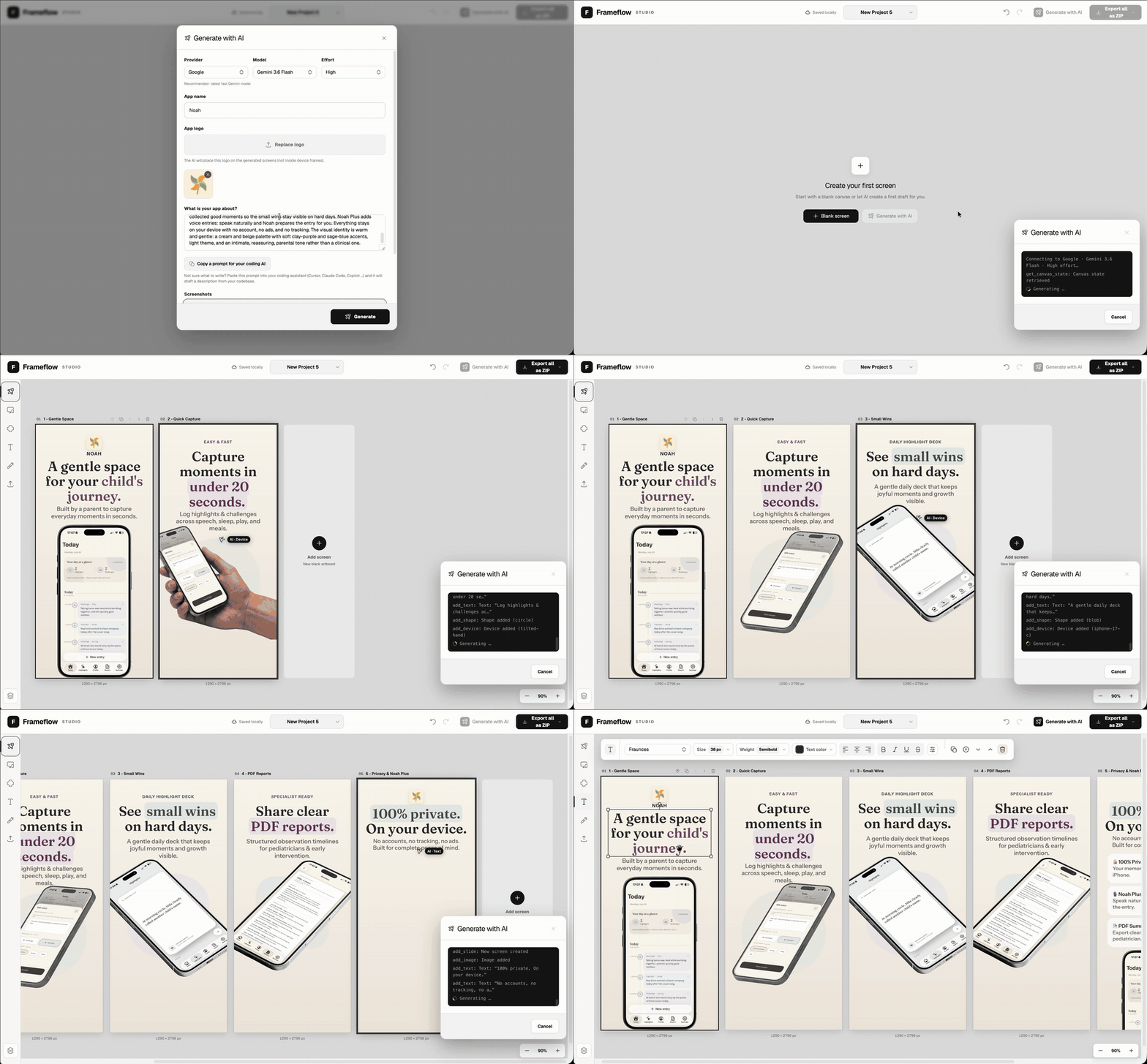
Projects live entirely in your browser — no account, no backend. The editor itself works without any API key; bring your own key only for AI generation.
Features
- AI that designs, not renders — the agent works through editor tool calls, so its output is a normal project: every element it creates is selectable and editable, and you can revise a single screen with the magic-cursor action instead of regenerating everything.
- Bring your own model — works with Moonshot, Google, Qwen, OpenAI, and Anthropic; pick provider and model per run.
- Full screenshot sets — design a multi-screen story on portrait artboards, not one image at a time.
- Direct manipulation — typography, gradients, shapes, images, mockups, alignment, stacking, and spacing are all hand-editable, with or without AI.
- Perspective device mockups — drop a raw screenshot into a device frame with correct 3D geometry.
- Local-first — projects and uploads are stored in IndexedDB in your browser.
- Store-ready export — download the whole set as
1290 × 2796or1242 × 2688PNGs in one ZIP.
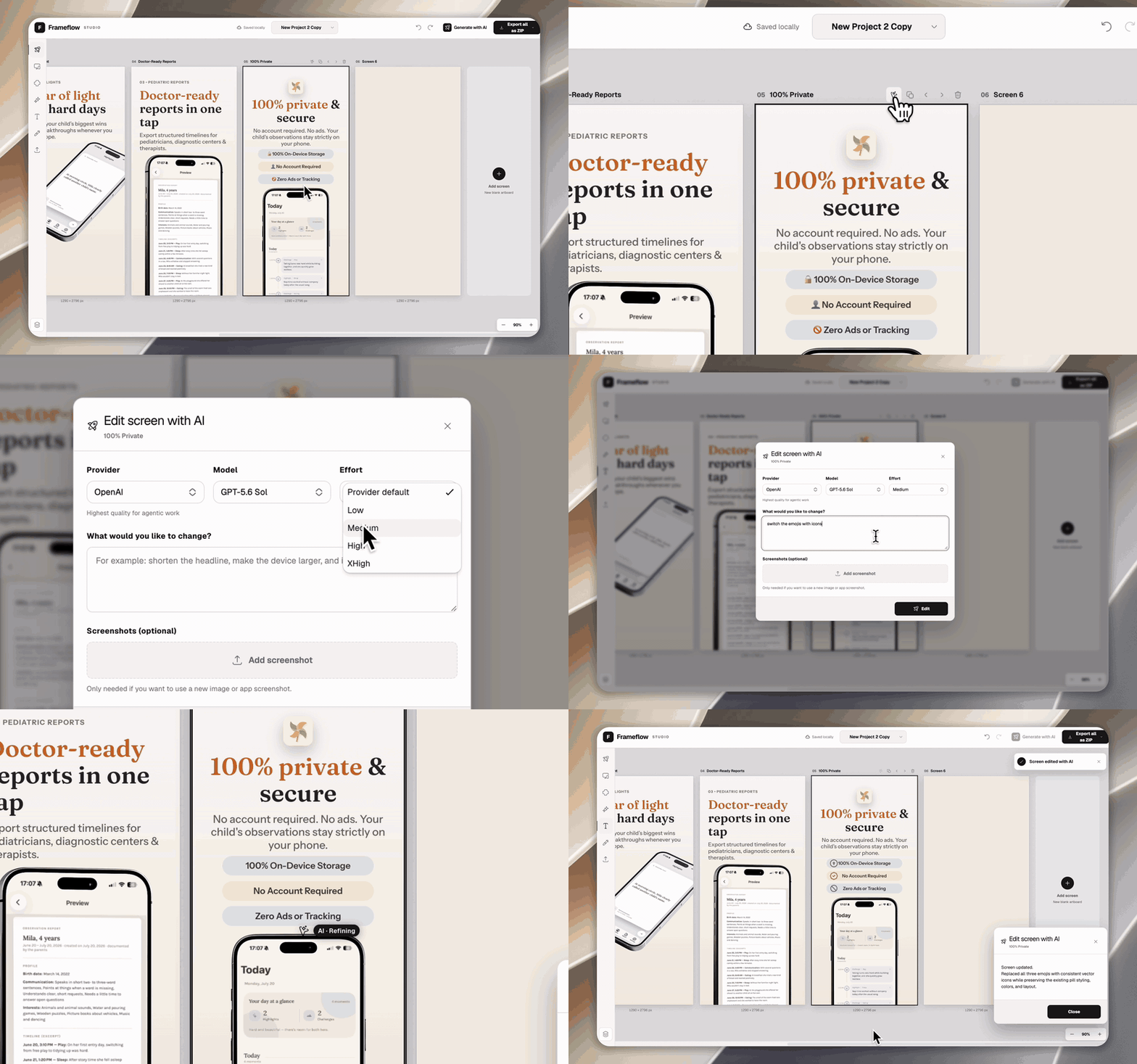
Refine one screen with AI
Select any artboard, describe the change, and let the AI agent revise just that screen. The result uses the same editor operations as the full-set generator and stays fully editable.
Quick start
Requires Bun 1.3+ and a current desktop browser.
bun install
bun run dev
Open http://127.0.0.1:4173 and start editing.
Using the editor
- Start from a template or an empty screen.
- Add text, device mockups, shapes, backgrounds, or uploads from the left sidebar.
- Select an element to edit it; drag the handles to move, resize, or rotate.
- Drop an uploaded PNG, JPG, or WebP anywhere on the canvas — or into a selected device frame.
- Optionally use Generate with AI to create a set, or the magic-cursor action on a single screen to revise just that screen.
- Export all as ZIP and pick a format.
Projects save automatically to the current browser profile. Clearing site data deletes them, so export anything important before wiping browser storage.
Set up AI generation
AI generation needs an API key for at least one provider — everything else in the editor works without one. Enter keys in the generation dialog (API keys / Enter API key); they are stored unencrypted in this browser's localStorage. Use dedicated provider keys with restrictive quotas, and remove them before sharing the browser profile or device.
For local development you can still use .env.local as a fallback:
cp .env.example .env.local
VITE_MOONSHOT_API_KEY=
VITE_GOOGLE_GENERATIVE_AI_API_KEY=
VITE_ALIBABA_API_KEY=
VITE_OPENAI_API_KEY=
VITE_ANTHROPIC_API_KEY=
VITE_XAI_API_KEY=
Restart the dev server after changing .env.local keys. Pick the provider and model in the generation dialog — models with configurable reasoning also expose their effort levels there. If a selected provider has no key, the dialog offers Enter API key and disables generation until one is saved.
How it works, and what to know:
- Google, Qwen, OpenAI, Anthropic, and xAI are called directly from the browser via the AI SDK. Moonshot works only on localhost through the local
/api/moonshotCORS proxy. - When you start a run, your description and selected screenshots are sent to that provider. Normal editing, persistence, and export never call any AI service. Provider charges may apply.
- Browser-stored keys are visible to same-origin JavaScript by design. Optional
VITE_*keys are exposed only by the local dev server; production builds replace every provider env key with an empty value. Never commit.env.local(see Self-hosting). - Prompts can be written in any language; generated canvas copy and summaries are in English.
For debugging, set SHOTLUMA_AI_LOGGING=true in .env.local to write one JSON file per run to the git-ignored ai-logs/ directory. Logs record provider, model, timing, visible model output, tool activity, and token usage — never prompt text, screenshots, or API keys.
Commands
| Command | Purpose |
|---|---|
bun run dev |
Start the editor on port 4173 |
bun run typecheck |
Strict TypeScript checks |
bun run lint |
Typed ESLint, complexity, and dependency rules |
bun run structure |
Enforce stylesheet module boundaries |
bun run test |
Run the Vitest suite once |
bun run test:coverage |
Tests with coverage thresholds |
bun run build |
Type-check and build the production bundle |
bun run preview |
Serve the production bundle locally, including the Moonshot proxy |
bun run audit |
Check dependencies for known vulnerabilities |
bun run check |
All required local and CI quality gates |
Changes to rendering, export, or AI behavior also need manual verification in the browser — the automated suite doesn't cover pixels.
Self-hosting
bun run build produces a static app in dist/. Provider env values are stripped from this bundle, so it can be hosted as a static site while users supply their own direct-provider keys in the browser.
The official editor is deployed at https://app.shotluma.com. The marketing
site at https://shotluma.com is maintained and deployed separately; its source
and production configuration are not part of this repository.
Google, Qwen, OpenAI, Anthropic, and xAI work with browser-entered keys. Moonshot
remains local-only; offering it on a hosted deployment requires an authenticated
proxy. A hosted workflow with shared credentials likewise needs a backend or
short-lived credential exchange.
Architecture
Shotluma is a single-package React 19 + TypeScript + Vite + Tailwind CSS app.
src/App.tsx              Application composition
src/app/                 Project lifecycle, app shell, and export
src/editor/              History, editor actions, keyboard, pure calculations
src/components/          Canvas, toolbars, sidebar, modal, and shadcn UI
src/ai/                  AI runner, tool groups, prompt, measurement, previews
src/mockups/             Device definitions and perspective geometry
src/persistence.ts       IndexedDB project storage
src/types.ts             Shared editor models
src/styles/              Base styles and shadcn theme layer
docs/ARCHITECTURE.md covers data flow, the export pipeline, AI safety boundaries, and extension points. Adding a device asset? Read the mockup specification first. Working with a coding agent? AGENTS.md has the rules it should follow.
Contributing
The project is early, so there's plenty of room. If something is broken, fix it. If something is missing and you think others would want it too, add it. No need to ask first — a pull request is a fine way to start the conversation.
Bug reports, design improvements, docs fixes, and new device mockups count just as much as code. CONTRIBUTING.md has the setup and the conventions; the good first issue label is a good place to look if you'd like something already scoped. By participating you agree to the Code of Conduct.
- Questions and help: SUPPORT.md
- Security issues (privately, please): SECURITY.md
- Project roles and decisions: GOVERNANCE.md
License and trademarks
MIT — see LICENSE. Asset-specific terms are in ASSET_LICENSES.md. The "private": true flag in package.json only prevents accidental npm publication; it doesn't restrict the license.
Apple, App Store, and iPhone are trademarks of Apple Inc. Shotluma is an independent project, not affiliated with or endorsed by Apple. You remain responsible for following platform and trademark guidelines when using device mockups.
Reviews (0)
Sign in to leave a review.
Leave a reviewNo results found