dadaki
Health Warn
- License — License: MIT
- Description — Repository has a description
- Active repo — Last push 0 days ago
- Low visibility — Only 7 GitHub stars
Code Pass
- Code scan — Scanned 12 files during light audit, no dangerous patterns found
Permissions Pass
- Permissions — No dangerous permissions requested
No AI report is available for this listing yet.
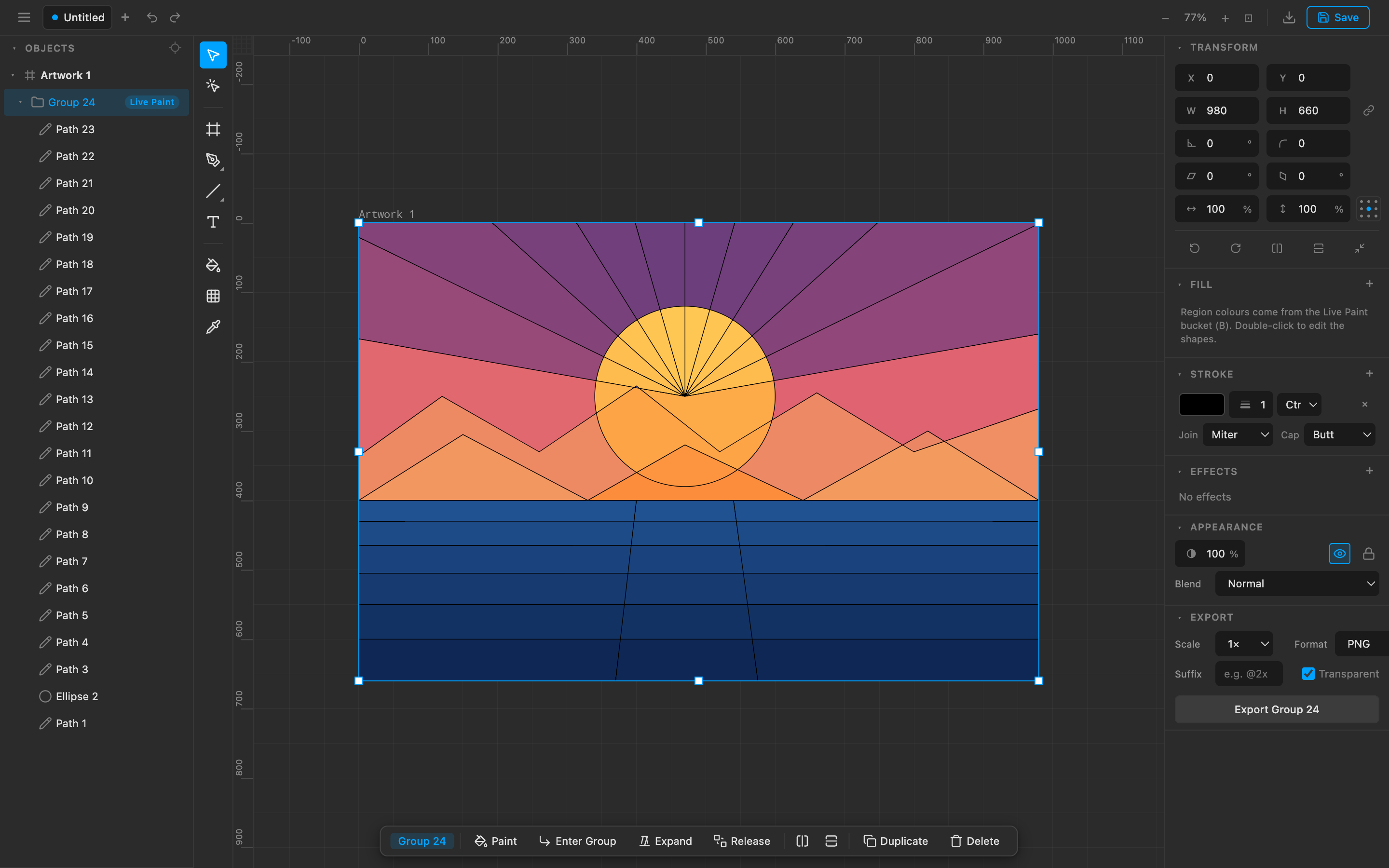
In-browser vector editor with a Rust/WASM + CanvasKit core and a TypeScript UI — embeddable as a library, and drivable by an AI agent over MCP as real vector geometry rather than a generated image.
Dadaki Vector Editor
dadaki.com — a high-performance, in-browser vector
graphics editor: Rust/WASM + CanvasKit core, TypeScript UI. This repository is
the open-source editor.
It is a pnpm workspace with three packages:
| Package | What it is |
|---|---|
@dadaki/editor |
The reusable, embeddable editor library (createEditor). |
@dadaki/app |
A deployable demo shell — local-only, no backend required. |
@dadaki/mcp |
An MCP server that lets an agent draw in a tab you have open. |
The hosted product (accounts, teams, cloud sync) lives in a separate repo
(dadaki-cloud) and consumes @dadaki/editor as a dependency. This repo has no
dependency on it, and no dependency on any specific backend.
Quick start
pnpm install

# Run the editor standalone — local-only, NO backend or cloud
pnpm dev
# → http://localhost:5199
That's the whole open-source editor: no account, no server, files stay in your
browser. pnpm build produces a static bundle; pnpm preview serves it.
Scripts
| Command | What it runs |
|---|---|
pnpm dev |
Standalone editor (no cloud) — http://localhost:5199 |
pnpm build |
Production build of the standalone editor |
pnpm preview |
Serve the production build locally |
pnpm test |
Unit tests (vitest) |
pnpm check |
Typecheck |
pnpm lint / pnpm format |
Biome lint / format |
pnpm dev:cloud |
The hosted app if you have the separate cloud/ repo checked out locally (backend + frontend via Rebase). Not part of this repo. |
pnpm version: the repo pins pnpm 11.9.0 exactly, via the standard
packageManagerfield — corepack fetches that version for you, so any recent
pnpm (or plaincorepack pnpm install) works. The pin has to be an exact
version rather than a range: corepack rejects a range withInvalid package manager specification ... expected a semver version.It is deliberately not
devEngines.packageManager. npm enforces that
field on every command, sonpm login,npm publishand evennpm --version
died withEBADDEVENGINESanywhere in the repo — including inpackages/,
where the packages are published from.
Drawing with an agent (MCP)
@dadaki/mcp is an MCP server that hands an agent the editor's
own API, so what it produces is real vector geometry — paths, gradients,
live text — rather than a generated raster image. The tools are verbs at the
level of intent (create_rect, align, boolean), paired withdescribe_scene and render_png_image so the agent can look at its own work
and correct it.
It drives a tab you have open, through the same engine, history and export
paths a human's edits take: one agent call is one undo step, so you can work in
the same window, undo its changes, or take over mid-drawing. It launches no
browser of its own and downloads none.
claude mcp add dadaki -- npx -y @dadaki/mcp@latest --mode relay --url https://dadaki.com/
Then open a document, click Connect agent, and give the agent the
8-character code. Add --mode bridge to drive an editor running locally againstpnpm dev instead. See packages/mcp/README.md for
the transports, the full tool list, and the security rules on the bridge.
Develop
./node_modules/.bin/tsc --noEmit -p packages/editor/tsconfig.json   # typecheck lib
./node_modules/.bin/tsc --noEmit -p packages/app/tsconfig.json      # typecheck app
./node_modules/.bin/tsc --noEmit -p packages/mcp/tsconfig.json      # typecheck MCP server
./node_modules/.bin/vitest run                                      # unit tests
./node_modules/.bin/biome check --write                             # lint + format
./node_modules/.bin/vite build packages/app                         # production build
SVG conformance suite
tests/svg-suite/harness.mjs renders ~1679 SVG fixtures through the app and
pixel-diffs against tests/svg-suite/baseline.json (a resvg reference).
It drives the editor in headless Chrome. The workspace turns off Puppeteer's
install script (allowBuilds in pnpm-workspace.yaml), so pnpm install does
not fetch a ~150 MB browser a clone may never use. Install one once per
machine, only if you want to run this suite:
./node_modules/.bin/puppeteer browsers install chrome
Then run the suite:
node tests/svg-suite/harness.mjs
The engine (Rust/WASM)
packages/editor/engine/ is the Rust crate; packages/editor/engine/pkg/ is the
wasm-bindgen output, imported by the editor via a relative path
(../engine/pkg/engine). That output is committed, so a fresh clone runs,
typechecks and tests without the Rust toolchain — day-to-day editor work does
not need a rebuild.
If you change the Rust, rebuild it:
cd packages/editor/engine && wasm-pack build --target web --release
Then commit the regenerated pkg/ along with your src/lib.rs change, and
re-run the JS tests — they import the built wasm, so without a rebuild they test
the old engine. The browser caches it too; hard-reload after rebuilding.
wasm-packwrites a.gitignorecontaining*intopkg/on every build.
That file is itself ignored (see the root.gitignore) so it cannot re-hide
the committed output.
Embedding
See packages/editor/README.md for thecreateEditor(container, options) API and the host contract.
Contributing
See CONTRIBUTING.md for the setup, the gate ./test-all.sh
runs, and the one rule that bites everybody: an engine change must be committed
together with its rebuilt pkg/.
Found a security problem? Please report it privately — see
SECURITY.md.
License
MIT © Dadaki — see LICENSE.
Reviews (0)
Sign in to leave a review.
Leave a reviewNo results found