claude-smart
Health Warn
- License — License: Apache-2.0
- Description — Repository has a description
- Active repo — Last push 0 days ago
- Low visibility — Only 5 GitHub stars
Code Fail
- rm -rf — Recursive force deletion command in benchmarks/memory_comparison/run.py
Permissions Pass
- Permissions — No dangerous permissions requested
This tool is a Claude Code plugin that helps the AI learn from your corrections and successful workflows across sessions. It generates actionable playbooks so the assistant adapts to your preferences over time rather than just recording raw chat history.
Security Assessment
The repository is licensed under Apache-2.0 and does not request broadly dangerous permissions. However, the automated code scan flagged a recursive force deletion command (`rm -rf`) inside a benchmarking script (`benchmarks/memory_comparison/run.py`). While this appears confined to a test utility rather than core production code, it remains a potential footgun if executed carelessly. The plugin interacts directly with Claude Code, meaning it inherently processes your development prompts, code snippets, and terminal interactions. As a newly launched, low-visibility project, its network behavior and data handling have not been widely vetted by the community. Overall risk is rated as Medium due to the destructive command flag and the sensitive nature of the data passing through the agent.
Quality Assessment
The project is very new and currently has only 5 GitHub stars, indicating low community adoption and minimal external review. On the positive side, the repository was updated very recently, suggesting active development. It includes clear documentation, compatibility badges, and a defined license. Trust level is currently low, which is typical for early-stage tools but warrants caution until more developers validate the codebase.
Verdict
Use with caution — the concept is promising and actively maintained, but the low community visibility and the flagged destructive shell command in the codebase mean you should thoroughly review the source before integrating it into critical workflows.
A Claude Code plugin that makes Claude Code self-improve — learning from your corrections, not just remembering them

claude-smart
The Claude Code plugin that makes Claude Code self-improve as you use it — so Claude Code stops repeating mistakes and gets better every session.





Quick Start • How It Works • Slash Commands • Dashboard • Configuration • Troubleshooting • License
It learns both corrections and successful execution patterns—so Claude Code avoids repeating mistakes and reuses what works. Claude Code steadily adapts to how you like to work—across projects, codebases, and sessions.
Head-to-head vs claude-mem. Evaluated across 12 scripted scenarios.
~2.7× higher overall quality · Right user correction learnt every time vs none · See EXPERIMENT.md for details.
Why Learning, Not Memory
Most memory solutions are still mostly informative—Claude remembers what happened, without necessarily changing what it does next.
claude-smart focuses on learning instead.
Four ways this changes what Claude Code can do for you:
💡 Stop repeating the same mistakes: Produces actionable playbooks Claude can follow next time; memory only records what happened.
Example: you tell Claude to stop running
npm testwithout--runbecause watch mode hangs.
Memory: “user was annoyed about npm test hanging”
Learning: “always pass--runtonpm testin this repo — default watch mode blocks CI”🚀 Start from the optimized path: Preserves and optimizes execution paths so Claude can reuse what already works.
Example: Claude spends several iterations trying to start the local dev environment before discovering that this repo requires
pnpm dev:allinstead of the usualnpm run dev.
Memory: “user mentioned thatnpm run devdid not work”
Learning: “for this repo, always usepnpm dev:allto start the full local stack —npm run devonly starts the frontend and causes missing service errors”Instead of re-exploring, Claude starts from the proven path—reducing planning steps, latency, and token usage.
🌐 Project-wide, not session-siloed: Session memory disappears with the conversation. The project playbook persists and improves across every session in that repo.
🪶 Better context without prompt bloat: Distilled, deduplicated playbooks stay in dozens of tokens—not thousands—even as the project grows.
Quick Start
npx claude-smart install # or: uvx claude-smart install
Or run the equivalent marketplace commands directly via the Claude Code CLI:
claude plugin marketplace add ReflexioAI/claude-smart
claude plugin install claude-smart@reflexioai
Then restart Claude Code.
To uninstall:
npx claude-smart uninstall # or: uvx claude-smart uninstall
Or run the equivalent command directly via the Claude Code CLI:
claude plugin uninstall claude-smart@reflexioai
Local data under ~/.reflexio/ and ~/.claude-smart/ is left in place — remove manually if desired.
Developing the plugin itself? See DEVELOPER.md.
Key Features
- 🧠 Learn, don't just remember — Corrections become structured, deduplicated rules, not transcript replays.
- ⚡ Fully automatic learning — Every user turn, tool call, and assistant response is captured via lifecycle hooks and extracted into rules without you running anything.
- 📈 Updates with every session — Playbooks auto-merge, supersede, and archive as your project evolves — the playbook sharpens with use instead of bloating.
e.g. you correct the same
npm test --rungotcha twice → claude-smart consolidates them into one stronger rule. Later you switch the policy topnpm test→ the old rule is archived and the new one supersedes it, no manual cleanup. - 🔌 No external API call — semantic search runs on an in-process ONNX embedder (all-MiniLM-L6-v2), and all data (profiles, playbooks, interaction buffers) is stored locally on your machine (
~/.reflexio/and~/.claude-smart/). - 🔎 Hybrid search — Playbooks and profiles are indexed with vector + BM25 search for fast, robust retrieval.
- 🧪 Offline resilience — If the reflexio backend is down, hooks buffer to disk; the next successful publish drains them.
- 🧰 Manual correction tag —
/claude-smart:tagflags the last turn as a correction so the extractor weights it heavily.
Dashboard
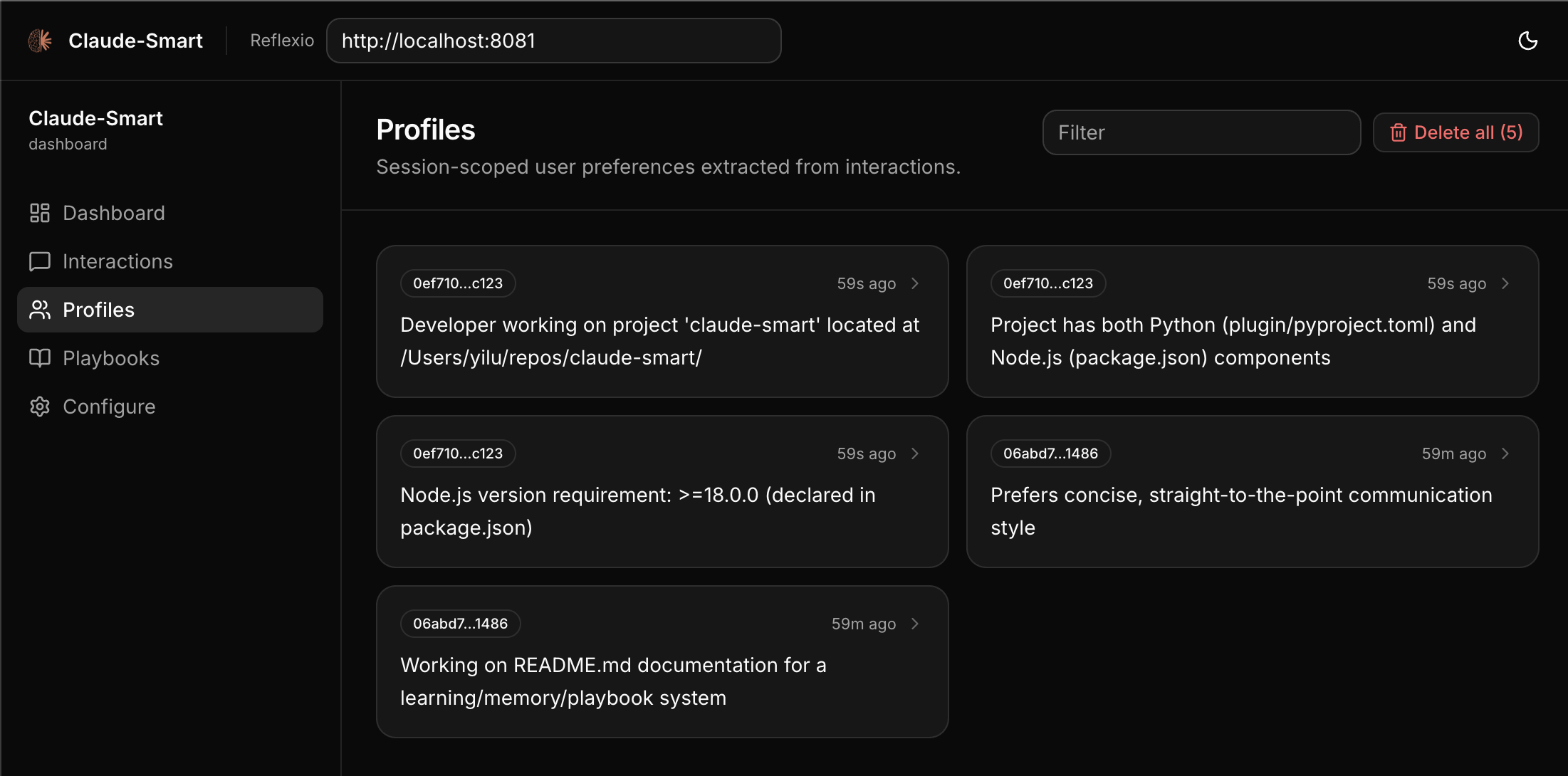
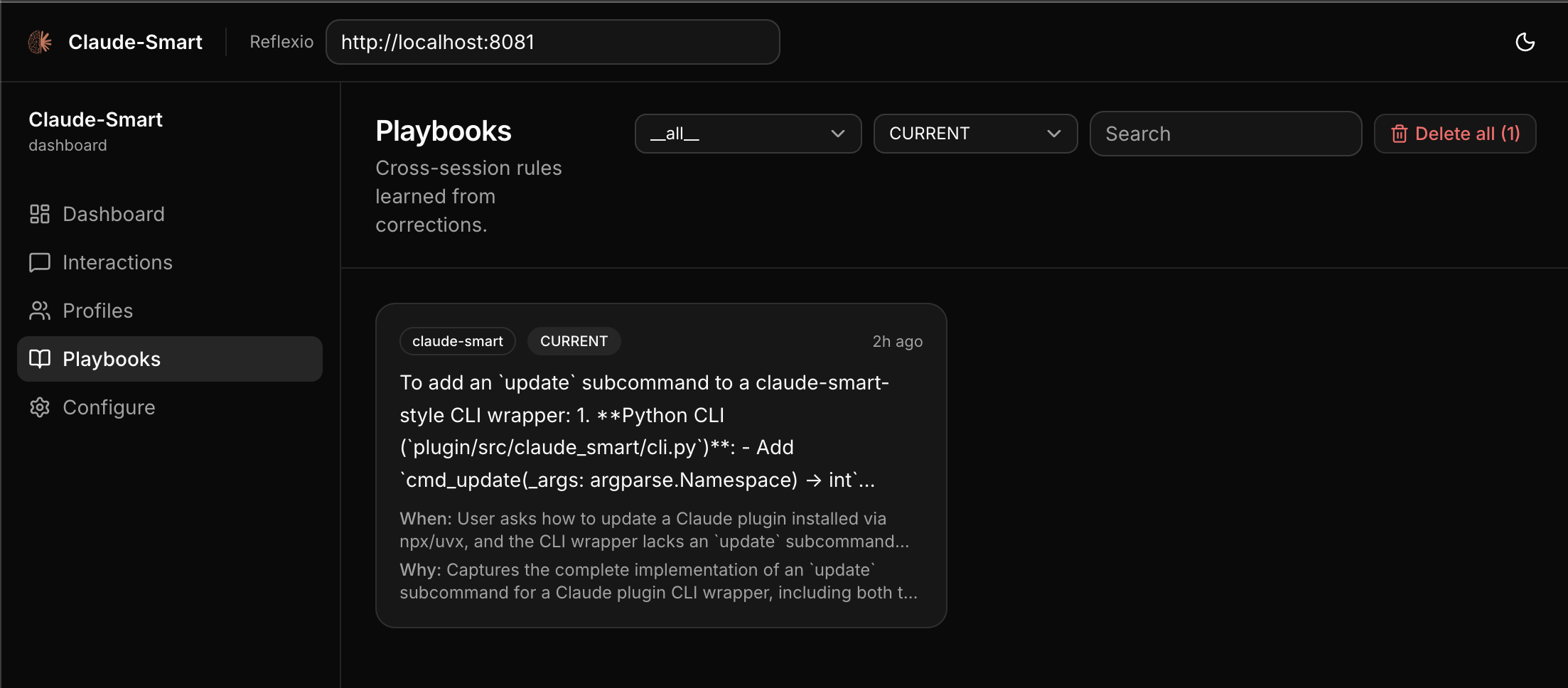
A web UI for browsing session histories, inspecting user profiles, and editing project playbooks. The dashboard auto-starts alongside the backend, so you can open http://localhost:3001 directly. Or run /claude-smart:dashboard in Claude Code to launch dashboard in browser.
How It Works
claude-smart builds two artifacts as you work and injects them into Claude at the start of every new session:
- User profile — session-scoped preferences (stack, role, small quirks). e.g. "uses pnpm, not npm"; "prefers terse answers"; "backend engineer — explain frontend with backend analogues."
- Project playbook — durable, generalized rules accumulated across every session in the repo. Each says when it applies and why. e.g. "always pass
--runtonpm test— watch mode hangs CI"; "use real Postgres for integration tests — mocks once hid a broken migration."
Playbooks clean themselves up: correct the same thing twice and they merge; change your mind and the old one is archived.
Under the hood: hooks watch your turns, tool calls, and Claude's replies, auto-flagging corrections (or anything you /tag). At session end (or on /learn), reflexio — the self-improving engine that powers claude-smart — extracts profile entries and playbook rules. Next session, both get injected into the system prompt — run /show to see what Claude is being told. Everything runs on your machine.
See ARCHITECTURE.md for hooks, data flow, and reflexio details.
Slash Commands
| Command | What it does |
|---|---|
/dashboard |
Open the dashboard in your browser, auto-starting the reflexio backend and dashboard services if they aren't already running. |
/show |
Print the current project playbook plus the current session's user profiles (same markdown that SessionStart injects). Use it to audit what playbooks and preferences Claude is being told to follow. |
/learn |
Force reflexio to run extraction now on the current session's unpublished interactions. Without this, extraction runs at the end of the session or on reflexio's batch interval. |
/tag [note] |
Tag the most recent turn as a correction, for cases the automatic heuristic missed. The note becomes the correction description the extractor sees. |
/restart |
Restart the reflexio backend and dashboard to pick up new changes (e.g. after upgrading the plugin or editing local reflexio code). |
/clear-all |
Destructive. Delete all reflexio interactions, profiles, and user playbooks. Use when you want to wipe learned state and start fresh. |
Configuration
Advanced users can tune claude-smart via environment variables — see DEVELOPER.md for the full list.
Where data lives
| Path | What |
|---|---|
~/.reflexio/data/reflexio.db |
Source of truth — profiles, user_playbooks, interactions, FTS5 indexes, and vec0 embedding tables (plus .db-shm / .db-wal WAL sidecars). Inspect with sqlite3. |
~/.reflexio/.env |
Provider config — CLAUDE_SMART_USE_LOCAL_CLI, CLAUDE_SMART_USE_LOCAL_EMBEDDING, any optional API keys. |
~/.claude-smart/sessions/{session_id}.jsonl |
Per-session buffer. User turns, assistant turns, tool invocations, {"published_up_to": N} watermarks. Safe to inspect and safe to delete — everything past the latest watermark has already been written to reflexio's DB. |
~/.cache/chroma/onnx_models/all-MiniLM-L6-v2/ |
Cached ONNX weights (~86 MB, downloaded once). Delete to force a re-download. |
For troubleshooting, see TROUBLESHOOTING.md.
License
This project is licensed under the Apache License 2.0. The bundled reflexio/ submodule is also Apache 2.0. Claude Code is Anthropic's and not covered by this license.
See the LICENSE file for details.
Support
- Issues: open one on GitHub describing the symptom and include the reflexio backend log (
~/.claude-smart/backend.log) and the relevant lines of~/.claude-smart/sessions/{session_id}.jsonl.
Built on reflexio · Runs on Claude Code · Written in Python 3.12+
Reviews (0)
Sign in to leave a review.
Leave a reviewNo results found