chat
Health Pass
- License — License: NOASSERTION
- Description — Repository has a description
- Active repo — Last push 0 days ago
- Community trust — 27 GitHub stars
Code Warn
- process.env — Environment variable access in next.config.ts
- process.env — Environment variable access in playwright.config.ts
Permissions Pass
- Permissions — No dangerous permissions requested
No AI report is available for this listing yet.
Chat Client for Your Service's MCP Server
Chat
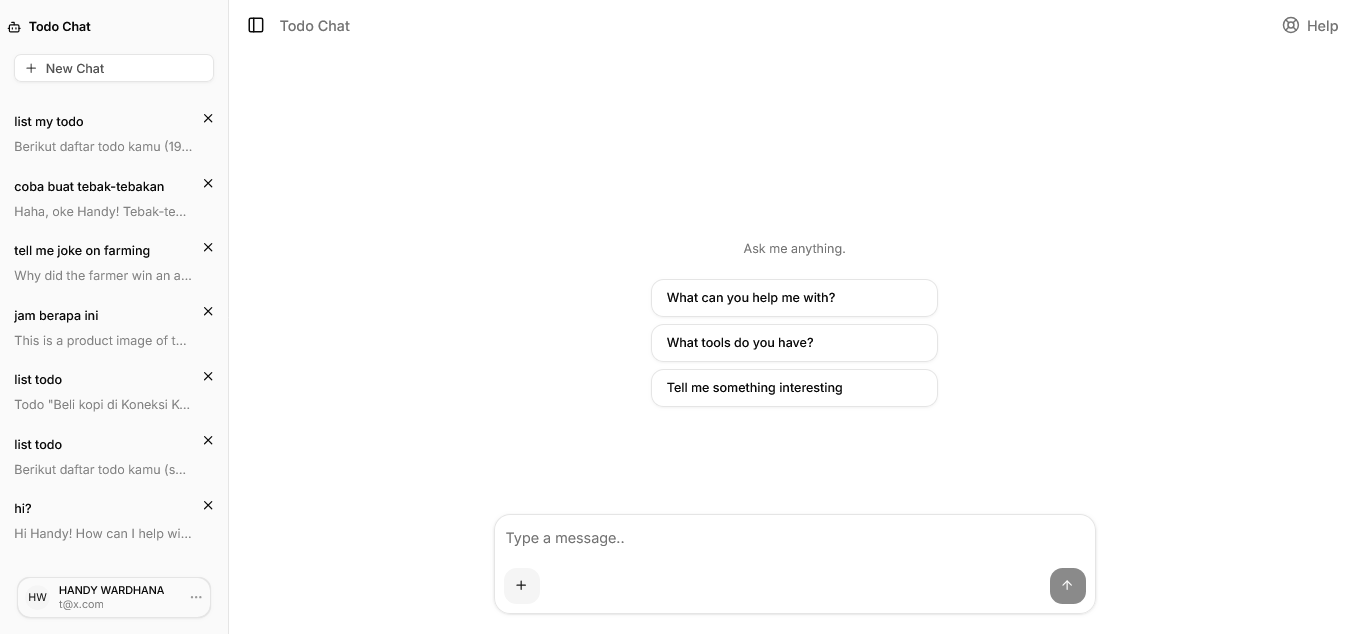
Screenshots: click here
A general-purpose AI chat interface powered by MCP. Connect any MCP server — delivery service, handyman booking, task management, or any domain — and interact with it through a natural language conversation. Built with Next.js App Router, AI SDK v6, and Prisma v7.
Features
- MCP tool integration — connects to one external MCP server via Streamable HTTP; choose either
MCP_URL(any backend) orMCP_APPS_URL(TypeScript + embedded UI) — setting both is rejected at runtime - Deployment customization — app name, AI persona context, and locale strings are all configurable; one codebase, multiple deployments
- Streaming AI responses — real-time LLM output with typing indicators; assistant messages rendered as Markdown (tables, lists, code blocks, links)
- Image attachments — attach images to messages with a mandatory crop-before-send dialog; image is compressed and uploaded to R2 only at send time — no premature upload, no heartbeat needed
- LLM image output — the assistant can embed images in responses using standard Markdown syntax (
); images are rendered as square cards with skeleton lazy-loading and open full-size on click - Location sharing — v1: browser geolocation; v2: Google Places search + commute calculator with interactive map
- Conversation history — persistent chat history with cursor-based pagination and infinite scroll
- Authentication — email/password with email verification, password reset, email change, and Google OAuth
- Locale detection — auto-detect user language from IP geolocation (IPinfo Lite) with Accept-Language fallback; user-overridable in Settings
- i18n system — lightweight custom locale system covering both UI strings and AI system prompts (EN, ID, KR, JP, ES, ZH, DE, NL, FR, IT); no third-party i18n library required
- Link detection — URLs in chat messages are automatically rendered as clickable links
- Weekly message limit — optional per-user quota (
WEEKLY_MESSAGE_LIMIT); amber warning banner appears when ≤ 10 messages remain; 429 blocks sending when exhausted - Background jobs — automatic cleanup of orphaned images and old conversations via Trigger.dev
- Multi-platform bots — connect Telegram, WhatsApp, Slack, Teams, Google Chat, Discord, GitHub, and Linear via Chat SDK; each platform activates only when its ENV tokens are present; full LLM + MCP tool support on every platform (see docs/chat-sdk.md)
Tech Stack
| Layer | Library / Tool |
|---|---|
| Framework | Next.js 16 (App Router) |
| UI | React 19, Tailwind CSS v4, shadcn/ui |
| AI | Vercel AI SDK v6 (ai, @ai-sdk/react) |
| LLM Provider | 9 providers via Vercel AI SDK — OpenAI, Anthropic, Azure OpenAI, Azure AI Foundry, AWS Bedrock, Google Vertex AI, Fireworks AI, xAI Grok, OpenRouter |
| Tool Protocol | MCP via @ai-sdk/mcp (optional) |
| Auth | Better Auth v1.5 |
| ORM | Prisma v7 |
| Database | SQLite (dev) / PostgreSQL / MariaDB (prod) |
| Object Storage | Cloudflare R2 (S3-compatible) |
| Background Jobs | Trigger.dev v3 |
| Resend (optional) | |
| Locale / i18n | Custom (TypeScript static files + IPinfo Lite geo) |
| Link Detection | linkify-react |
| Maps | Leaflet + Google Places API (optional, v2 location mode) |
| Error Tracking | Sentry (optional) |
| Linter / Formatter | Biome |
| Unit Tests | Vitest |
| E2E Tests | Playwright |
Prerequisites
- Node.js >= 20
- npm >= 10 (or pnpm / yarn)
- Git
For production:
- Docker + Docker Compose v2, or
- Dokku >= 0.34
Environment Variables
Create a .env.local file at the project root. Variables marked * are required.
# ── App / Branding ──────────────────────────────────────────────
NEXT_PUBLIC_APP_URL=http://localhost:3000          # * required
NEXT_PUBLIC_APP_NAME="Chat"                        # app name (title bar, sidebar, manifest)
NEXT_PUBLIC_APP_SHORT_NAME="Chat"                  # short name for PWA home screen
NEXT_PUBLIC_APP_DESCRIPTION="Your personal AI assistant"
NEXT_PUBLIC_APP_THEME_COLOR="#ffffff"              # browser toolbar color on mobile
NEXT_PUBLIC_APP_BG_COLOR="#ffffff"                 # PWA splash screen background

# ── AI Persona / Chat UI ─────────────────────────────────────────
# Brief domain description injected into the system prompt.
# Leave empty for a generic assistant.
# APP_PERSONA_CONTEXT="online food delivery service"
# APP_PERSONA_CONTEXT="handyman booking platform"

# Chat hint and suggestion buttons are locale-only — edit src/locales/<lang>.ts
# (ui.emptyHint and ui.suggestions). No env var overrides exist for these.
# Help button in chat header (optional)
# NEXT_PUBLIC_APP_HELP_URL=https://help.yourdomain.com

# ── Icons & OG (optional — falls back to public/ files if not set) ──
# All values accept absolute URLs or relative paths (e.g. /icon.png)
# APP_ICON_SVG_URL also drives the in-app logo (sidebar header, auth pages)
APP_FAVICON_URL=/favicon.ico
APP_ICON_SVG_URL=/icon.svg                         # also used as in-app logo
APP_ICON_192_URL=/icon-192.png
APP_ICON_512_URL=/icon-512.png
APP_APPLE_TOUCH_ICON_URL=/apple-touch-icon.png     # 180×180 PNG
APP_OG_IMAGE_URL=/og.png                           # 1200×630 PNG
APP_TWITTER_CARD=summary_large_image               # summary | summary_large_image
APP_TWITTER_SITE=@yourhandle                       # optional Twitter/X handle

# ── Location Sharing ─────────────────────────────────────────────
NEXT_PUBLIC_LOCATION_MODE=v1                       # v1 (browser geolocation) | v2 (Google Maps search)
NEXT_PUBLIC_GOOGLE_MAPS_API_KEY=AIza...            # required for v2 — restrict to HTTP referrer + Places API
GOOGLE_MAPS_API_KEY=AIza...                        # required for v2 — server-side Distance Matrix proxy (restrict to IP/server)
NEXT_PUBLIC_GOOGLE_MAPS_REGION=                    # optional ISO 3166-1 alpha-2 (e.g. ID, JP, KR)

# ── Database ─────────────────────────────────────────────────
DATABASE_PROVIDER=sqlite                           # sqlite | postgresql | mysql
DATABASE_URL=file:./dev.db                         # SQLite default

# PostgreSQL (local or managed: AWS RDS, Aurora, Neon, Supabase, etc.)
# DATABASE_URL=postgresql://user:password@host:5432/dbname
# DATABASE_PROVIDER=postgresql

# MySQL / MariaDB (local or managed: PlanetScale, Aurora MySQL, RDS, etc.)
# DATABASE_URL=mysql://user:password@host:3306/dbname
# DATABASE_PROVIDER=mysql

# ── Auth ─────────────────────────────────────────────────────
BETTER_AUTH_SECRET=                                # * openssl rand -hex 32
# Must match NEXT_PUBLIC_APP_URL — used to build email verification/reset links
BETTER_AUTH_URL=http://localhost:3000

# Google OAuth (optional)
# GOOGLE_CLIENT_ID=
# GOOGLE_CLIENT_SECRET=

# ── AI — pick ONE provider ───────────────────────────────────
# Set LLM_PROVIDER to one of:
#   azure-openai | azure-foundry | openai | anthropic | bedrock | vertex | fireworks | xai | openrouter
# If LLM_PROVIDER is not set, the first provider whose key is present wins
# (priority: azure-openai → anthropic → openai → bedrock → vertex → fireworks → xai → azure-foundry → openrouter)

# LLM_PROVIDER=openrouter                          # explicit selection (optional)
# LLM_MAX_OUTPUT_TOKENS=2048                       # max tokens per response (default: 2048)
# LLM_CONTEXT_WINDOW=30                            # max messages sent to LLM per turn (default: 30)
# LLM_MAX_STEPS=5                                  # max agentic tool-call steps per turn (default: 5; increase for polling workflows e.g. Replicate)
# MAX_TOOL_RESULT_CHARS=3000                        # truncate tool result strings above this length (default: 3000)

# Azure OpenAI
# AZURE_OPENAI_API_KEY=...
# AZURE_OPENAI_RESOURCE_NAME=my-resource           # part before .openai.azure.com
# AZURE_OPENAI_DEPLOYMENT=gpt-4o-mini              # deployment name in Azure portal

# Azure AI Foundry (non-OpenAI models: DeepSeek, Llama, Cohere, etc.)
# AZURE_FOUNDRY_ENDPOINT=https://<resource>.services.ai.azure.com/models
# AZURE_FOUNDRY_API_KEY=...
# AZURE_FOUNDRY_MODEL=gpt-4o-mini                  # deployment name

# OpenAI
# OPENAI_API_KEY=sk-...
# OPENAI_MODEL=gpt-4o-mini                         # optional

# Anthropic
# ANTHROPIC_API_KEY=sk-ant-...
# ANTHROPIC_MODEL=claude-haiku-4-5-20251001        # optional

# AWS Bedrock
# AWS_ACCESS_KEY_ID=...
# AWS_SECRET_ACCESS_KEY=...
# AWS_REGION=us-east-1                             # optional, default: us-east-1
# BEDROCK_MODEL=anthropic.claude-3-5-haiku-20241022-v1:0  # optional

# Google Vertex AI (uses Application Default Credentials or GOOGLE_APPLICATION_CREDENTIALS)
# GOOGLE_VERTEX_PROJECT=my-gcp-project
# GOOGLE_VERTEX_LOCATION=us-central1               # optional, default: us-central1
# VERTEX_MODEL=gemini-2.0-flash                    # optional

# Fireworks AI
# FIREWORKS_API_KEY=...
# FIREWORKS_MODEL=accounts/fireworks/models/llama-v3p3-70b-instruct  # optional

# xAI Grok
# XAI_API_KEY=...
# XAI_MODEL=grok-3-mini                            # optional

# OpenRouter (100+ models, BYOK supported)
OPENROUTER_API_KEY=sk-or-...                       # * if using OpenRouter
OPENROUTER_MODEL=google/gemini-2.0-flash-exp:free  # optional

# ── Image Storage / Cloudflare R2 ────────────────────────────
R2_ACCOUNT_ID=abc123                               # * required
R2_ACCESS_KEY_ID=...                               # * required
R2_SECRET_ACCESS_KEY=...                           # * required
R2_BUCKET_NAME=my-chat-app                         # * required
R2_PUBLIC_URL=https://assets.yourdomain.com        # * required — custom domain on R2

# ── Locale / i18n ────────────────────────────────────────────
APP_LOCALE=en                                      # en | id | kr | jp | es | zh | de | nl | fr | it — server-wide default
                                                   # Per-user locale overrides this via DB

# ── Background Jobs / Trigger.dev ────────────────────────────
TRIGGER_SECRET_KEY=tr_dev_...                      # * required

# ── MCP Tools (optional) ─────────────────────────────────────
# Choose ONE option — setting both MCP_URL and MCP_APPS_URL is rejected at runtime.
# Leave both empty to run chat without tools.
#
# Option A — any MCP server (Rails, Laravel, Spring, etc.) — tool call only
# MCP_URL=https://your-backend.com/mcp
# MCP_TOKEN=your-bearer-token
#
# Option B — TypeScript MCP server — tool call + embedded UI (MCP Apps)
# MCP_APPS_URL=https://your-ts-mcp-server.com/mcp
# MCP_APPS_TOKEN=your-bearer-token
#
# MCP_JWT_SECRET=     # openssl rand -hex 32 — shared secret for JWT user identity

# ── Email / Resend (optional) ────────────────────────────────
# RESEND_API_KEY=re_...
# [email protected]

# ── Dev Tunnel / Preview Origins (optional) ──────────────────
# ALLOWED_DEV_ORIGINS=https://xxxx.ngrok-free.app

# ── Sentry (optional) ────────────────────────────────────────
# NEXT_PUBLIC_SENTRY_DSN=https://[email protected]/...
# SENTRY_ORG=your-org
# SENTRY_PROJECT=your-project

# ── Redis (optional) ─────────────────────────────────────────
# Enables shared sliding-window rate limiting across multiple app replicas.
# Leave unset for single-instance deployments — falls back to in-memory.
# Supports self-hosted Redis, AWS ElastiCache, Upstash, Redis Cloud, etc.
# REDIS_URL=redis://localhost:6379
# REDIS_URL=rediss://user:token@hostname:6380   # Upstash / TLS

# ── Usage Limits (optional) ──────────────────────────────────────
# Per-user weekly message quota — 7-day rolling window.
# Recommended: 100 for general-purpose deployments (~14 msg/day, blocks abuse).
# Set lower (e.g. 50) for cost-sensitive free tiers. 0 or unset = unlimited.
# WEEKLY_MESSAGE_LIMIT=100

# ── Bot Platforms / Chat SDK (optional) ──────────────────────────
# Each platform only activates when its required token(s) are present.
# Full setup guide: docs/chat-sdk.md
#
# BOT_NAME=assistant                                  # bot display name
# BOT_CONTEXT_WINDOW=15                               # messages loaded per turn (default: 15)
# BOT_GROUP_CONVERSATION=per-user                     # per-user (default) | shared
#
# TELEGRAM_BOT_TOKEN=                                 # from @BotFather
# TELEGRAM_BOT_USERNAME=                              # bot username without @ (optional, auto-detected via getMe)
# TELEGRAM_GROUPS_ENABLED=true                        # allow @mentions in groups (optional)
#
# WHATSAPP_PHONE_NUMBER_ID=
# WHATSAPP_APP_SECRET=                                # from Meta App Settings → Basic
# WHATSAPP_ACCESS_TOKEN=
# WHATSAPP_WEBHOOK_VERIFY_TOKEN=
# WHATSAPP_WABA_ID=                                   # WhatsApp Business Account ID (required for messages to reach webhook)
# WHATSAPP_NUMBER=                                    # business phone number shown to users in Settings (e.g. +1234567890)
#
# SLACK_BOT_TOKEN=xoxb-...
# SLACK_SIGNING_SECRET=
#
# TEAMS_APP_ID=
# TEAMS_APP_PASSWORD=
#
# GCHAT_SERVICE_ACCOUNT_KEY={"type":"service_account",...}
#
# DISCORD_BOT_TOKEN=
# DISCORD_PUBLIC_KEY=
# DISCORD_APPLICATION_ID=
#
# GITHUB_APP_ID=
# GITHUB_PRIVATE_KEY=-----BEGIN RSA PRIVATE KEY-----...
# GITHUB_WEBHOOK_SECRET=
#
# LINEAR_API_KEY=lin_api_...
# LINEAR_WEBHOOK_SECRET=
Provider selection: Set
LLM_PROVIDERexplicitly to choose a provider. If unset, the app auto-detects based on which API key is present. OpenRouter is the final fallback.
Vertex AI auth: Vertex uses Application Default Credentials. On a VM/GKE this is automatic. On a VPS, set
GOOGLE_APPLICATION_CREDENTIALS=/path/to/service-account.json.
OpenRouter free models: Models with
:freesuffix require the data policy to be enabled at openrouter.ai/settings/privacy.
Quick Start
Local development
# 1. Clone
git clone https://github.com/repaera/chat.git
cd chat

# 2. Install dependencies
npm install

# 3. Create .env.local
cp .env.example .env.local
# Edit .env.local with your values

# 4. Generate Prisma client and create the database
npm run db:generate
npm run db:push

# 5. Start the dev server
npm run dev
Open http://localhost:3000, register a new account, and start chatting.
VPS / VM — one-command install
Spin up a fresh Ubuntu or Debian server, point your domain's DNS A record at it, then run:
curl -fsSL https://raw.githubusercontent.com/repaera/chat/main/install.sh | sudo bash
The script will:
- Install Docker and Docker Compose if not already present
- Prompt for your domain, database choice (local PostgreSQL, local MySQL/MariaDB, or external/managed), LLM provider, R2 credentials, and other settings
- Pull the pre-built Docker image from GHCR (or build from source if preferred)
- Start the database (if local), run migrations, start the app and Nginx
- Obtain a Let's Encrypt SSL certificate automatically (or configure Cloudflare proxy mode)
- Set up a cron job for certificate renewal
Pass --verbose to stream the Docker build output in real time.
Non-interactive (CI / scripted deploys):
export DOMAIN=chat.yourdomain.com
export [email protected]
export LLM_PROVIDER=openrouter
export LLM_API_KEY=sk-or-...
export R2_ACCOUNT_ID=... R2_ACCESS_KEY_ID=... R2_SECRET_ACCESS_KEY=...
export R2_BUCKET_NAME=my-chat R2_PUBLIC_URL=https://assets.yourdomain.com
export TRIGGER_SECRET_KEY=tr_live_...

curl -fsSL https://raw.githubusercontent.com/repaera/chat/main/install.sh \
  | sudo bash -s -- --non-interactive
Run bash install.sh --help for the full list of supported environment variables.
Development
Scripts
npm run dev             # Start dev server with hot reload
npm run build           # Production build
npm run start           # Run the production build

npm run check           # Biome: lint + format
npm run lint            # Biome: lint only
npm run format          # Biome: format only

npm run test            # Vitest in watch mode
npm run test:run        # Vitest single run
npm run test:coverage   # Vitest with coverage report
npm run test:e2e        # Playwright e2e tests
npm run test:e2e:ui     # Playwright with UI mode

npm run db:generate     # Generate Prisma client from schema
npm run db:push         # Sync schema to DB without migration file (dev only)
npm run db:migrate      # Create and apply a migration file
npm run db:studio       # Open Prisma Studio in the browser

npx trigger.dev@latest dev      # Run Trigger.dev dev worker
npx trigger.dev@latest deploy   # Deploy Trigger.dev tasks to production
Project Structure
src/
├── app/
│   ├── api/
│   │   ├── auth/[...all]/            # Better Auth catch-all handler
│   │   ├── chat/                     # POST — stream LLM response
│   │   ├── distance/                 # POST — Google Maps distance proxy (v2 location)
│   │   ├── messages/                 # GET — cursor-paginated message history
│   │   ├── upload/                   # POST — upload image to R2
│   │   │   └── heartbeat/            # PATCH — refresh pending image TTL
│   │   ├── user/locale/              # PATCH — save user locale preference
│   │   └── conversations/
│   │       ├── route.ts              # GET, POST
│   │       └── [id]/route.ts         # DELETE
│   ├── chat/[id]/                    # Conversation page
│   ├── login/
│   ├── register/
│   ├── settings/
│   ├── forgot-password/
│   ├── reset-password/
│   └── verify-email/
├── components/
│   ├── chat/
│   │   ├── ChatClient.tsx            # Coordinator: useChat, pagination, submit logic
│   │   ├── ChatInput.tsx             # Textarea, attach menu, image/location previews
│   │   ├── MessageList.tsx           # Scroll container, messages, skeleton, empty state
│   │   ├── ImageUploadButton.tsx     # Standalone button or menu item (asMenuItem prop)
│   │   ├── LocationBubble.tsx        # Map preview bubble for location/commute parts
│   │   ├── LocationDialog.tsx        # Place search + commute calculator dialog
│   │   ├── PlaceSearchField.tsx      # Autocomplete input for Google Places
│   │   ├── LeafletMapInner.tsx       # Leaflet map (dynamic import, SSR disabled)
│   │   └── location-types.ts        # LocationPart, CommutePart, LocationPlace types
│   ├── layout/
│   │   └── ChatLayout.tsx            # Sidebar + conversation state management
│   ├── providers/
│   │   ├── LocaleProvider.tsx        # Context provider — wraps app, exposes useLocale()
│   │   └── gtm.tsx                   # Google Tag Manager script injection
│   ├── settings/
│   │   └── SettingsClient.tsx        # Profile, email change, password, delete account
│   └── ui/                           # shadcn/ui primitives (alert-dialog, button, etc.)
├── hooks/
│   ├── use-image-heartbeat.ts        # Pings heartbeat every 15 min while image is pending
│   ├── use-mobile.ts                 # Detects touch-screen devices
│   └── use-place-autocomplete.ts     # Google Places autocomplete with debounce
├── lib/
│   ├── app-config.ts                 # Single source of truth for branding + feature flags
│   ├── auth-client.ts                # Better Auth client
│   ├── auth.ts                       # Better Auth server config
│   ├── compress-image.ts             # Client-side image compression before upload
│   ├── db.ts                         # Prisma singleton
│   ├── id.ts                         # UUID v7 generator
│   ├── llm.ts                        # LLM provider resolver — resolveModel() with 9 providers
│   ├── locale.ts                     # Geo detection (IPinfo Lite) + resolveUserLocale()
│   ├── rate-limit.ts                 # In-memory rate limiter
│   ├── schemas.ts                    # Zod validation schemas
│   ├── storage.ts                    # R2 / S3 client
│   └── utils.ts                      # cn() and shared utilities
├── locales/
│   ├── index.ts                      # Loader — exports Locale, UILocale types + locales map
│   ├── en.ts                         # English — system prompts + all UI strings
│   ├── id.ts                         # Bahasa Indonesia
│   ├── kr.ts                         # 한국어
│   └── jp.ts                         # 日本語
├── trigger/
│   ├── cleanup-orphan-images.ts      # Hourly: delete orphaned images > 1 hour old
│   ├── cleanup-old-conversations.ts  # Daily: delete conversations > 30 days old
│   └── index.ts
└── tests/
    ├── setup.ts
    ├── __mocks__/
    │   └── server-only.ts            # No-op mock — bypasses server-only guard in Vitest
    ├── unit/
    │   ├── id.test.ts
    │   ├── locale.test.ts
    │   ├── rate-limit.test.ts
    │   └── schemas.test.ts
    └── e2e/
        ├── auth.spec.ts
        └── chat.spec.ts
Database Migrations
| Rails | Prisma |
|---|---|
Edit app/models/ |
Edit prisma/schema.prisma |
rails generate migration AddFoo |
npm run db:migrate |
rails db:migrate |
npm run db:migrate |
rails db:migrate (production) |
npx prisma migrate deploy |
rails db:schema:load |
npm run db:push (dev only) |
rails db:rollback |
Write a new migration that reverses the change |
# Add a new column or table
# 1. Edit prisma/schema.prisma
# 2. Create and apply migration
npm run db:migrate
# 3. Apply in production
npx prisma migrate deploy
Image Uploads (Cloudflare R2)
Images are uploaded server-side through POST /api/upload. When the LLM needs to analyse an image, the Next.js server fetches it from R2 and sends it as binary (Uint8Array) to the LLM provider — this avoids timeout issues that occur when the provider tries to fetch the R2 URL directly from its own network.
R2 bucket setup:
- Create a bucket in the Cloudflare dashboard
- Connect a custom domain: R2 → bucket → Settings → Custom Domains
- Create an API token with Object Read & Write permissions
- Fill in the five
R2_*environment variables
CORS configuration (Cloudflare dashboard → R2 → bucket → Settings → CORS):
[
  {
    "AllowedOrigins": ["https://yourdomain.com"],
    "AllowedMethods": ["GET"],
    "AllowedHeaders": ["*"],
    "MaxAgeSeconds": 3600
  }
]
Orphan image lifecycle:
- User selects image → mandatory crop dialog → compress → held in memory only (no upload yet)
- On submit, the image is uploaded to R2 fresh —
Imagerecord created withmessageId: null - Chat route validates the URL exists as an orphan, then
onFinishsetsmessageId— permanently attached - No heartbeat needed during input — upload happens at the last possible moment
- Hourly cleanup deletes any orphans older than 1 hour (handles edge cases: upload succeeded but tab closed before send)
MCP servers storing image URLs: If an external MCP server saves R2 image URLs from this app into its own database, those links will break when the conversation is deleted (manually or by the daily cleanup job). Set PRESERVE_IMAGES=true to skip R2 object deletion — DB records are still removed but the R2 objects remain accessible. Note: storage grows indefinitely with this flag; use an R2 bucket lifecycle rule to expire objects if needed.
Background Jobs (Trigger.dev)
Jobs live in src/trigger/ and run on Trigger.dev's infrastructure. All tasks use concurrencyLimit: 1 to stay within the free tier (5 concurrent runs).
| Task | Schedule | Action |
|---|---|---|
cleanup-orphan-images |
Every hour | Delete Image rows with messageId IS NULL and lastSeenAt > 1h; remove R2 objects |
cleanup-old-conversations |
Daily 00:00 UTC | Delete conversations updatedAt > 30d, including messages and R2 images (skips R2 deletion if PRESERVE_IMAGES=true) |
First-time setup
# 1. Install Trigger.dev packages
npm install @trigger.dev/sdk @trigger.dev/build

# 2. Initialise — links this repo to your Trigger.dev project
npx trigger.dev@latest init
# When prompted, select your project and point tasks dir to: src/trigger

# 3. Set your project ref in trigger.config.ts
#    Find it at: Dashboard → your project → Settings → Project ref
// trigger.config.ts
export default defineConfig({
  project: "proj_your_project_ref",  // <-- replace this
  dirs: ["./src/trigger"],
  // ...
});
# 4. Add secret key to .env.local
# Get from: Dashboard → your project → API keys
TRIGGER_SECRET_KEY=tr_dev_...
Local development
# Run in a separate terminal alongside npm run dev
npx trigger.dev@latest dev
This opens a tunnel so the worker can receive jobs locally. To trigger a task manually: Dashboard → Tasks → select task → Test.
Deploy to production
npx trigger.dev@latest deploy
Trigger.dev manages worker infrastructure — no server-side worker process is needed. Run this from your local machine or CI pipeline whenever task code changes.
Data retention: Conversations inactive for more than 30 days are permanently deleted. A notice is shown on the Settings page.
CI/CD (GitHub Actions)
Three workflows live in .github/workflows/:
| Workflow | Trigger | Action |
|---|---|---|
test.yml |
Called by other workflows | Biome lint, tsc --noEmit, Vitest unit tests |
ci.yml |
Push to any non-main branch, PRs | Calls test.yml — validates before merge |
publish.yml |
Push to main, semver tag push |
Calls test.yml, then builds multi-arch Docker image → pushes to GHCR |
Image tags produced by publish.yml:
# Every push to main
ghcr.io/repaera/chat:latest
ghcr.io/repaera/chat:a1b2c3d        # 7-char commit SHA

# Semver tag push (git tag 0.1.0 && git push origin 0.1.0)
ghcr.io/repaera/chat:latest
ghcr.io/repaera/chat:a1b2c3d
ghcr.io/repaera/chat:0.1.0
Tagging a release:
git add .
git commit -m "feat: my changes"
git push origin main           # triggers CI + publish → :latest + :<sha>

git tag 0.1.0
git push origin 0.1.0          # triggers publish → adds :0.1.0 tag to the same image
One-time setup: Repo → Settings → Actions → General → Workflow permissions → Read and write. After the first image is published, go to GitHub → Packages → the image → Package settings → Change visibility → Public if you want Render/Fly to pull it without auth.
Locale & i18n
The app ships with a lightweight custom locale system covering both AI system prompts and all UI strings (buttons, errors, labels, toasts). No third-party i18n library is needed — locale files are plain TypeScript objects with full type safety.
Supported languages: English (en), Bahasa Indonesia (id), 한국어 (kr), 日本語 (jp), Español (es), 中文 (zh), Deutsch (de), Nederlands (nl), Français (fr), Italiano (it).
How it works
User locale is resolved in this priority order:
user.localein DB — set automatically on register, overridable in SettingsAPP_LOCALEenv — server-wide default set by sysadmin"en"— hard fallback
resolveUserLocale() returns { t, ui, locale }:
t— fullLocaleobject (used inroute.tsfor AI system prompts viat.system.*)ui—UILocaleshorthand (used in Server Components for UI strings viaui.meta,ui.verifyEmail, etc.)
Client Components use the useLocale() hook which returns { t: UILocale, locale } — t here is already the ui subtree, so access is direct: t.settings, t.chatLayout, etc.
On register, the server detects locale via:
- IP geolocation —
ipinfo.io/{ip}/country(IPinfo Lite: free, no API key, IPv4 + IPv6) - Accept-Language header — browser language as fallback if geo fails or IP is local
- APP_LOCALE env — final fallback
Adding a new locale
- Create
src/locales/xx.tsfollowing the structure ofen.ts:
// src/locales/xx.ts
export default {
  system: {
    persona: (name: string) => `You are a helpful personal AI assistant for ${name}.`,
    helpWithTools: "Help the user by using the available tools when relevant.",
    tone: "Always respond in [language], in a friendly and concise manner.",
    proactiveTools:
      "When the user requests an action or data that a tool can handle, call the tool immediately without asking for confirmation.",
    imageUrlTag: "...",
    imageUrlUsage: "...",
    imageUrlToolHint: "...",
    analyseImage: "...",
    imageOutput: "...",
    currentTime: (dt: string) => `The current time is ${dt}.`,
    timezone: (tz: string) => `The user's timezone is ${tz}.`,
  },
  ui: {
    // ... (copy en.ts ui object and translate all strings)
  },
} as const;
- Register in
src/locales/index.ts:
import xx from "./xx";
const locales: Record<string, Locale> = { en, id, kr, jp, es, zh, de, nl, fr, it, xx };
- Add the country → locale mapping in
src/lib/locale.ts:
const COUNTRY_TO_LOCALE: Record<string, string> = {
  ID: "id",
  KR: "kr",
  JP: "jp",
  XX: "xx",  // ← add this
};
- Add the Accept-Language mapping in the same file:
const langToLocale: Record<string, string> = {
  id: "id",
  ko: "kr",
  ja: "jp",
  xx: "xx",  // ← add this
};
- Add the display name to
localeOptionsin all existing locale files (en.ts,id.ts,kr.ts,jp.ts,es.ts,zh.ts,de.ts,nl.ts,fr.ts,it.ts):
localeOptions: {
  en: "English",
  id: "Bahasa Indonesia",
  kr: "한국어 (Korean)",
  jp: "日本語 (Japanese)",
  es: "Español (Spanish)",
  zh: "中文 (Mandarin)",
  de: "Deutsch (German)",
  nl: "Nederlands (Dutch)",
  fr: "Français (French)",
  it: "Italiano (Italian)",
  xx: "New Language",  // ← add here in all files
},
The Settings dropdown renders dynamically from localeOptions — no component changes needed.
TypeScript enforces the Locale type contract — if a key is missing in a new locale file, the compiler will error.
Custom locale vs i18next
| This system | i18next | |
|---|---|---|
| Purpose | AI system prompts + all UI strings | Full UI i18n with plurals, date formatting, namespaces |
| Bundle size | Zero — plain TS imports | ~30KB + plugins |
| Type safety | ✅ Full — Locale type contract |
⚠️ Partial — requires i18next-typescript plugin |
| Interpolation | Native TypeScript functions (name: string) => \...`` |
t("key", { name }) string-based |
| Plurals / dates | ❌ Not needed for this use case | ✅ Built-in |
| Per-user locale | ✅ DB column + geo detection | Requires manual integration |
| Adding a locale | 1 TS file + 3 map entries | 1 JSON file, no registration needed |
| Hot reload | ❌ Requires redeploy | ✅ Can reload at runtime |
When to stay with this system: All user-facing text — buttons, errors, form labels, toasts — is already covered by the locale files. The LLM generates responses in the detected language, and the system prompt is also localised.
When to migrate to i18next: If you need plural rules, date/number formatting, or runtime locale switching without a full server re-render.
Connecting an MCP Server
Choose one option — setting both is a misconfiguration and will be rejected at runtime with a 500 error. Leave both unset to run chat without tools.
# Option A — agnostic MCP server (Rails, Laravel, Spring, etc.) — tool call only
MCP_URL=https://your-backend.com/mcp
MCP_TOKEN=your-bearer-token         # optional Bearer token

# Option B — TypeScript MCP server — tool call + embedded UI (MCP Apps)
MCP_APPS_URL=https://your-ts-mcp-server.com/mcp
MCP_APPS_TOKEN=your-bearer-token    # optional Bearer token

# Shared JWT secret — used to sign short-lived user identity tokens (30s)
# Required if MCP server needs to identify the current user
MCP_JWT_SECRET=                     # openssl rand -hex 32
If neither is set, chat works normally without tools.
Transport: The MCP server must support Streamable HTTP (MCP spec 2025-03-26).
route.tsusestype: "http".
Bot Platforms (Chat SDK)
The app supports multi-platform bots via the Chat SDK (chat npm package). Bots on Telegram, WhatsApp, Slack, Teams, Google Chat, Discord, GitHub, and Linear all share the same LLM pipeline, MCP tools, rate limits, and conversation history as the web UI.
Each platform adapter is registered only when its ENV tokens are present — unused platforms add zero overhead.
Webhook URL
All platforms share a single dynamic route:
https://your-domain.com/api/webhooks/{platform}
Where {platform} is one of: telegram, whatsapp, slack, teams, gchat, discord, github, linear.
Platform setup
| Platform | Required ENV vars | Status |
|---|---|---|
| Telegram | TELEGRAM_BOT_TOKEN |
Tested |
WHATSAPP_PHONE_NUMBER_ID, WHATSAPP_APP_SECRET, WHATSAPP_ACCESS_TOKEN, WHATSAPP_WEBHOOK_VERIFY_TOKEN |
Tested | |
| Slack | SLACK_BOT_TOKEN, SLACK_SIGNING_SECRET |
Untested |
| Teams | TEAMS_APP_ID, TEAMS_APP_PASSWORD |
Untested |
| Google Chat | GCHAT_SERVICE_ACCOUNT_KEY (full JSON as single-line string) |
Untested |
| Discord | DISCORD_BOT_TOKEN, DISCORD_PUBLIC_KEY, DISCORD_APPLICATION_ID |
Untested |
| GitHub | GITHUB_APP_ID, GITHUB_PRIVATE_KEY, GITHUB_WEBHOOK_SECRET |
Untested |
| Linear | LINEAR_API_KEY, LINEAR_WEBHOOK_SECRET |
Untested |
Webhook setup scripts
The scripts/ directory contains helper scripts to register webhooks and verify your setup.
Telegram — registers the webhook with Telegram's API and verifies the response:
# Required in .env.local:
#   TELEGRAM_BOT_TOKEN=<from @BotFather>
#   TELEGRAM_WEBHOOK_URL=https://your-domain.com/api/webhooks/telegram
#
# Optional:
#   TELEGRAM_BOT_USERNAME=<bot username without @>  # auto-detected via getMe if omitted

bash scripts/setup-telegram-webhook.sh
What the script does:
- Loads
.env.local/.envfrom the project root - Calls
setWebhookwithallowed_updates: ["message"] - Fetches
getWebhookInfoand prints the response
For full setup details including group privacy mode configuration, see docs/telegram-setup.md.
WhatsApp — validates your environment, tests the verification endpoint, and subscribes your app to the WABA:
# Required in .env.local:
#   WHATSAPP_ACCESS_TOKEN=<from Meta Developer Console>
#   WHATSAPP_PHONE_NUMBER_ID=<from Meta Developer Console>
#   WHATSAPP_WEBHOOK_VERIFY_TOKEN=<your chosen token>
#   WHATSAPP_WABA_ID=<WhatsApp Business Account ID>  # required for messages to reach your webhook

bash scripts/setup-whatsapp-webhook.sh
What the script does:
- Validates required env vars
- Calls
POST /v21.0/{WABA_ID}/subscribed_appsto subscribe your app to the WABA - Prints the remaining manual steps required in the Meta Developer Portal
Note: The webhook callback URL must be registered manually in the Meta Developer Portal (WhatsApp → Configuration → Webhooks). The script handles the WABA subscription (the undocumented API step), but the portal registration cannot be automated.
Optional bot configuration
BOT_NAME=assistant                 # bot display name (default: assistant)
BOT_CONTEXT_WINDOW=15              # messages loaded from DB per turn (default: 15)
BOT_GROUP_CONVERSATION=per-user    # per-user (default) | shared — group conversation mode
TELEGRAM_GROUPS_ENABLED=true       # allow @mentions in Telegram groups (optional)

# Per-platform persona injected into the system prompt
TELEGRAM_PERSONA_CONTEXT=food delivery service
SLACK_PERSONA_CONTEXT=internal support agent for Acme Corp
# Pattern: {PLATFORM_UPPERCASE}_PERSONA_CONTEXT
Account linking
Users can link their bot account to their web account so conversations sync across both:
- Go to Settings → Links in the web app
- Click Generate code next to the desired platform
- Send
/link CODEto the bot (code expires in 15 min) - Prior bot-only conversations are reassigned to the web account automatically
The Links tab is only visible in Settings when at least one bot adapter is configured.
What bots support
- Full LLM streaming with the same model configured for the web app
- MCP tool calling (same
MCP_URL/MCP_APPS_URL) - Image uploads — platform images downloaded and re-hosted on R2 for LLM access (requires R2 configured)
- Location messages — Telegram location pins and WhatsApp location messages forwarded to LLM
- Per-platform markdown formatting hints in the system prompt
- Locale detection from platform signals (Telegram
language_code, WhatsApp phone prefix) - Same rate limits and weekly quota as the web UI
Deployment
Docker Compose + Nginx + Let's Encrypt
Suitable for a VPS. This setup runs the app, a local database (PostgreSQL or MySQL/MariaDB), Nginx as a reverse proxy, and Certbot for automatic SSL. You can also point it at an external managed database (RDS, Aurora, Neon, Supabase, PlanetScale, etc.) and skip the local DB container entirely.
Directory layout on the server
/opt/chat/
├── docker-compose.yml
├── .env
├── nginx/
│   └── conf.d/
│       └── app.conf
└── certbot/
    ├── conf/       # Let's Encrypt certificates (persisted volume)
    └── www/        # ACME challenge webroot
docker-compose.yml
services:
  app:
    build: .
    restart: unless-stopped
    expose:
      - "3000"
    env_file: .env
    environment:
      NODE_ENV: production
    depends_on:
      db:
        condition: service_healthy

  db:
    image: postgres:16-alpine
    restart: unless-stopped
    environment:
      POSTGRES_USER: app
      POSTGRES_PASSWORD: ${POSTGRES_PASSWORD}
      POSTGRES_DB: app_db
    volumes:
      - postgres_data:/var/lib/postgresql/data
    healthcheck:
      test: ["CMD-SHELL", "pg_isready -U app -d app_db"]
      interval: 5s
      timeout: 5s
      retries: 5

  nginx:
    image: nginx:alpine
    restart: unless-stopped
    ports:
      - "80:80"
      - "443:443"
    volumes:
      - ./nginx/conf.d:/etc/nginx/conf.d:ro
      - ./certbot/conf:/etc/letsencrypt:ro
      - ./certbot/www:/var/www/certbot:ro
    depends_on:
      - app

  certbot:
    image: certbot/certbot
    volumes:
      - ./certbot/conf:/etc/letsencrypt
      - ./certbot/www:/var/www/certbot
    # Run manually — see SSL setup below

volumes:
  postgres_data:
nginx/conf.d/app.conf
# HTTP — ACME challenge + redirect to HTTPS
server {
    listen 80;
    server_name yourdomain.com;

    location /.well-known/acme-challenge/ {
        root /var/www/certbot;
    }

    location / {
        return 301 https://$host$request_uri;
    }
}

# HTTPS
server {
    listen 443 ssl;
    server_name yourdomain.com;

    ssl_certificate     /etc/letsencrypt/live/yourdomain.com/fullchain.pem;
    ssl_certificate_key /etc/letsencrypt/live/yourdomain.com/privkey.pem;
    include             /etc/letsencrypt/options-ssl-nginx.conf;
    ssl_dhparam         /etc/letsencrypt/ssl-dhparams.pem;

    location / {
        proxy_pass         http://app:3000;
        proxy_http_version 1.1;
        proxy_set_header   Upgrade $http_upgrade;
        proxy_set_header   Connection 'upgrade';
        proxy_set_header   Host $host;
        proxy_set_header   X-Real-IP $remote_addr;
        proxy_set_header   X-Forwarded-For $proxy_add_x_forwarded_for;
        proxy_set_header   X-Forwarded-Proto $scheme;
        proxy_cache_bypass $http_upgrade;

        # Required for LLM SSE streaming
        proxy_buffering    off;
        proxy_read_timeout 300s;
    }
}
.env (server only — never commit)
# App
NEXT_PUBLIC_APP_URL=https://yourdomain.com
NEXT_PUBLIC_APP_NAME="Your App Name"
BETTER_AUTH_SECRET=           # openssl rand -hex 32
BETTER_AUTH_URL=https://yourdomain.com

# Database — local PostgreSQL (adjust for MySQL or external DB)
DATABASE_PROVIDER=postgresql
DATABASE_URL=postgresql://app:${POSTGRES_PASSWORD}@db:5432/app_db
POSTGRES_PASSWORD=            # strong random password

# AI persona (optional)
APP_PERSONA_CONTEXT=your service domain here

# AI — set the key for your chosen provider; LLM_PROVIDER is optional (auto-detected)
# See .env.example for all provider options
OPENROUTER_API_KEY=
OPENROUTER_MODEL=openai/gpt-4o-mini

# Storage
R2_ACCOUNT_ID=
R2_ACCESS_KEY_ID=
R2_SECRET_ACCESS_KEY=
R2_BUCKET_NAME=
R2_PUBLIC_URL=

# Jobs
TRIGGER_SECRET_KEY=

# Email (optional)
RESEND_API_KEY=
RESEND_FROM=
First deploy
# 1. SSH to server and clone
git clone https://github.com/repaera/chat.git /opt/chat
cd /opt/chat

# 2. Fill in .env
cp .env.example .env
nano .env

# 3. Create certbot directories
mkdir -p certbot/conf certbot/www nginx/conf.d

# 4. Add nginx config (see above), then start services
docker compose up -d app db nginx

# 5. Obtain SSL certificate
docker compose run --rm certbot certonly \
  --webroot --webroot-path /var/www/certbot \
  --email [email protected] \
  --agree-tos --no-eff-email \
  -d yourdomain.com

# 6. Download Nginx SSL recommended params (run once)
docker compose exec nginx sh -c "
  curl -s https://raw.githubusercontent.com/certbot/certbot/master/certbot-nginx/certbot_nginx/_internal/tls_configs/options-ssl-nginx.conf \
    > /etc/letsencrypt/options-ssl-nginx.conf &&
  openssl dhparam -out /etc/letsencrypt/ssl-dhparams.pem 2048"

# 7. Reload Nginx to activate HTTPS
docker compose exec nginx nginx -s reload

# 8. Run database migrations
docker compose exec app npx prisma migrate deploy
Certificate renewal
# Add to crontab (renew on 1st and 15th of each month at 3am)
crontab -e
0 3 1,15 * * cd /opt/chat && docker compose run --rm certbot renew && docker compose exec nginx nginx -s reload
Updating the app
cd /opt/chat
git pull
docker compose up -d --build app
docker compose exec app npx prisma migrate deploy   # only if new migrations
Dockerfile
Dockerfile and .dockerignore are included in the repo. next.config.ts already sets output: "standalone". No additional setup is needed for Docker builds.
FROM node:20-alpine AS base

FROM base AS deps
WORKDIR /app
COPY package*.json ./
RUN npm ci

FROM base AS builder
WORKDIR /app
COPY --from=deps /app/node_modules ./node_modules
COPY . .
RUN npm run db:generate
RUN npm run build

FROM base AS runner
WORKDIR /app
ENV NODE_ENV=production

RUN addgroup --system --gid 1001 nodejs
RUN adduser --system --uid 1001 nextjs

COPY --from=builder /app/public ./public
COPY --from=builder --chown=nextjs:nodejs /app/.next/standalone ./
COPY --from=builder --chown=nextjs:nodejs /app/.next/static ./.next/static
COPY --from=builder /app/prisma ./prisma
COPY --from=builder /app/node_modules/.prisma ./node_modules/.prisma
COPY --from=builder /app/src/generated ./src/generated

USER nextjs
EXPOSE 3000
ENV PORT=3000
ENV HOSTNAME="0.0.0.0"

CMD ["node", "server.js"]
// next.config.ts
const nextConfig: NextConfig = {
  output: "standalone",
};
Render.com
render.yaml is included in the repo — connect it once and Render manages the rest.
First deploy
- Push the repo to GitHub
- Render dashboard → New → Blueprint → connect the repo
- Render detects
render.yamland creates the web service + PostgreSQL database - Set all env vars marked
sync: falsein the dashboard (LLM key, R2 credentials, Trigger.dev key, Resend, Sentry) - Click Apply — Render builds the Docker image, runs
npx prisma migrate deploy, and starts the service
Custom domain
Render dashboard → your service → Settings → Custom Domains → add domain → update DNS.
Updating
Push to main. Render auto-deploys on every push. Migrations run automatically via preDeployCommand.
Using the pre-built GHCR image
Instead of building from source on Render, you can pull the pre-built image from GHCR. In render.yaml, replace runtime: docker + dockerfilePath with:
services:
  - type: web
    name: chat
    image:
      url: ghcr.io/repaera/chat:latest
To pin a specific release: ghcr.io/repaera/chat:0.1.0
Fly.io
fly.toml is included in the repo.
First deploy
# Install flyctl
curl -L https://fly.io/install.sh | sh

# Authenticate
fly auth login

# Create the app (updates app name in fly.toml)
fly launch --no-deploy

# Create and attach a managed Postgres cluster
fly postgres create --name chat-db
fly postgres attach chat-db   # sets DATABASE_URL secret automatically

# Set remaining secrets
fly secrets set \
  BETTER_AUTH_SECRET=$(openssl rand -hex 32) \
  BETTER_AUTH_URL=https://your-app.fly.dev \
  NEXT_PUBLIC_APP_URL=https://your-app.fly.dev \
  LLM_PROVIDER=openrouter \
  OPENROUTER_API_KEY=sk-or-... \
  R2_ACCOUNT_ID=... \
  R2_ACCESS_KEY_ID=... \
  R2_SECRET_ACCESS_KEY=... \
  R2_BUCKET_NAME=... \
  R2_PUBLIC_URL=https://assets.yourdomain.com \
  TRIGGER_SECRET_KEY=tr_live_... \
  RESEND_API_KEY=re_... \
  [email protected] \
  NEXT_PUBLIC_SENTRY_DSN=https://[email protected]/... \
  SENTRY_ORG=your-org \
  SENTRY_PROJECT=your-project

# Deploy — runs `npx prisma migrate deploy` before going live (see fly.toml [deploy])
fly deploy
Custom domain
fly certs add chat.yourdomain.com
# Follow DNS instructions printed by the command
Updating
fly deploy
Migrations run automatically via [deploy] release_command in fly.toml.
Using the pre-built GHCR image
Instead of building from source on Fly, you can pull the pre-built image. In fly.toml, replace [build] dockerfile with:
[build]
  image = "ghcr.io/repaera/chat:latest"
To pin a specific release: ghcr.io/repaera/chat:0.1.0
Dokku
Suitable for a self-hosted PaaS on a single VPS. Dokku handles builds, deploys, process management, and SSL automatically.
1. Server setup
# Create the app
dokku apps:create chat

# PostgreSQL
sudo dokku plugin:install https://github.com/dokku/dokku-postgres.git
dokku postgres:create chat-db
dokku postgres:link chat-db chat

# Environment variables
dokku config:set chat \
  NODE_ENV=production \
  NEXT_PUBLIC_APP_URL=https://chat.yourdomain.com \
  DATABASE_PROVIDER=postgresql \
  BETTER_AUTH_SECRET=$(openssl rand -hex 32) \
  BETTER_AUTH_URL=https://chat.yourdomain.com \
  TRIGGER_SECRET_KEY=tr_live_... \
  R2_ACCOUNT_ID=... \
  R2_ACCESS_KEY_ID=... \
  R2_SECRET_ACCESS_KEY=... \
  R2_BUCKET_NAME=my-chat-app \
  R2_PUBLIC_URL=https://assets.yourdomain.com

# AI persona (optional)
dokku config:set chat APP_PERSONA_CONTEXT="your service domain here"

# Azure (recommended)
dokku config:set chat \
  AZURE_OPENAI_API_KEY=... \
  AZURE_OPENAI_RESOURCE_NAME=my-resource \
  AZURE_OPENAI_DEPLOYMENT=gpt-5-mini

# Or OpenRouter
dokku config:set chat \
  OPENROUTER_API_KEY=sk-or-... \
  OPENROUTER_MODEL=openai/gpt-4o-mini

# Domain and SSL
dokku domains:set chat chat.yourdomain.com
sudo dokku plugin:install https://github.com/dokku/dokku-letsencrypt.git
dokku letsencrypt:set chat email [email protected]
dokku letsencrypt:enable chat
dokku letsencrypt:cron-job --add   # auto-renew
2. Deploy from local machine
git remote add dokku [email protected]:chat
git push dokku main
Dokku detects Next.js, runs npm run build, then npm run start.
3. Run migrations
dokku run chat npx prisma migrate deploy
4. Updates
git push dokku main
dokku run chat npx prisma migrate deploy   # only if new migrations
Buildpack (if not auto-detected)
dokku buildpacks:set chat https://github.com/heroku/heroku-buildpack-nodejs
Production Notes
- SQLite is not recommended for production with multiple app instances — use PostgreSQL or MySQL/MariaDB.
- Rate limiting — defaults to in-memory (not shared across replicas). Set
REDIS_URLto enable a Redis-backed sliding-window limiter shared across all instances. Any Redis-compatible host works: self-hosted, AWS ElastiCache, Upstash, Redis Cloud. - MCP connections are per-request — each chat request opens and closes a connection. Ensure your MCP server handles concurrent connections.
- Nginx
proxy_buffering offis required — without it, SSE streaming is buffered and users see no output until the full response completes. - Nginx
proxy_read_timeout 300sis required — reasoning models can take up to a minute. The default 60s timeout will cut connections prematurely. - Trigger.dev tasks run on Trigger.dev infrastructure — no worker process on your server. Re-deploy tasks with
npx trigger.dev@latest deployafter changing task code, separately from the Next.js app deploy. - Image uploads require all five
R2_*env vars. If any are missing, the upload endpoint returns503and the attach button is hidden. - Sentry, Resend, and MCP are all optional — the app runs without any of them.
Reviews (0)
Sign in to leave a review.
Leave a reviewNo results found