Tisty
Health Warn
- License — License: AGPL-3.0
- Description — Repository has a description
- Active repo — Last push 0 days ago
- Low visibility — Only 5 GitHub stars
Code Pass
- Code scan — Scanned 12 files during light audit, no dangerous patterns found
Permissions Pass
- Permissions — No dangerous permissions requested
No AI report is available for this listing yet.
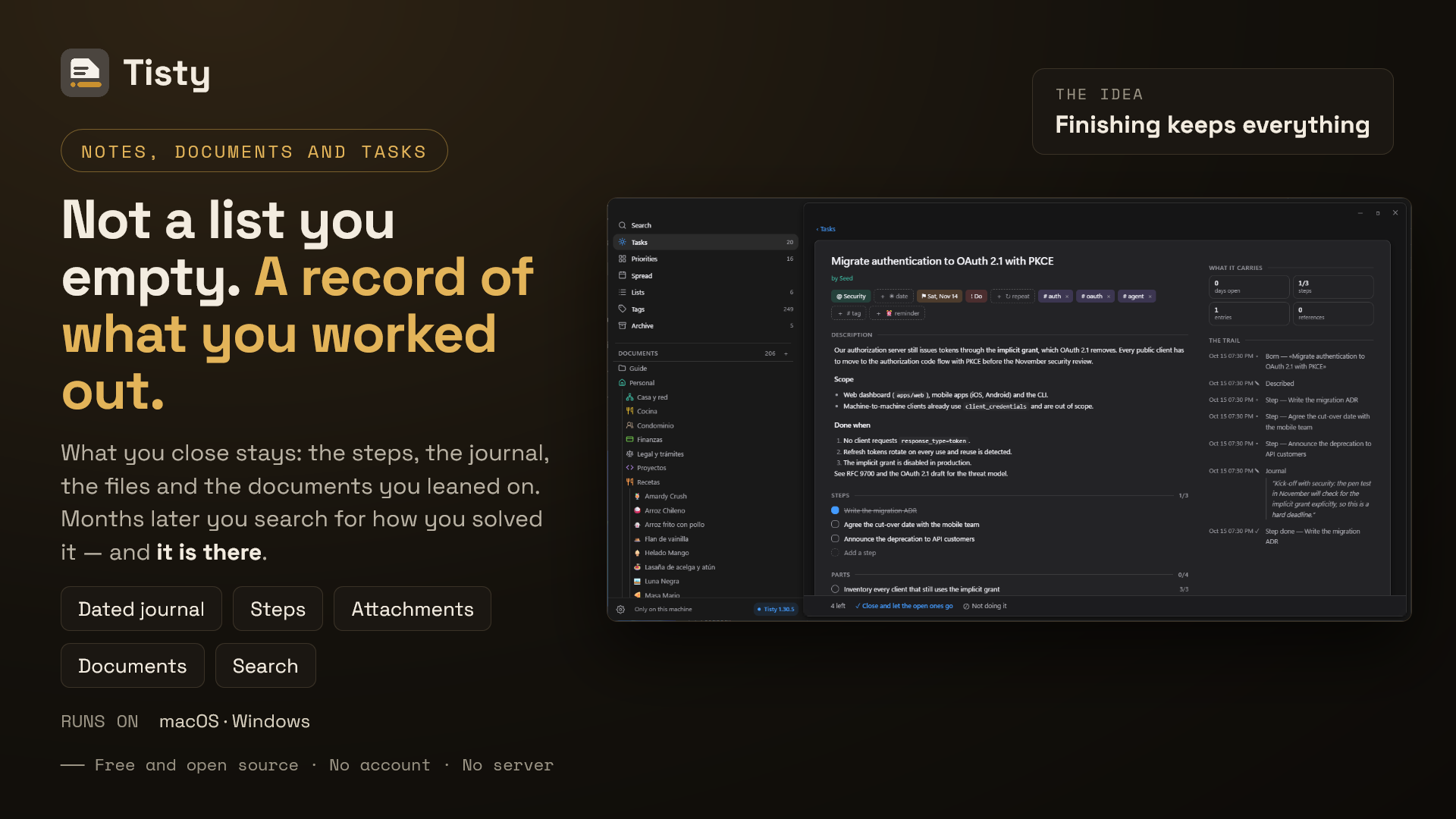
Free, open source task manager and Markdown notes for Windows and macOS. An archive that keeps what each task taught you: plain files, no account, no server, MCP for your assistant.
Tisty — Free Open Source Notes, Documents and Tasks
Notes, documents and tasks that stay yours: plain Markdown on your
own disk, for Windows and macOS.
Documents that grow into books, with
diagrams, formulas, code, widgets and their own PDF — and tasks that become the
record of what you worked out, searchable years later, with an MCP door for
your assistant.
No accounts. No subscriptions. No telemetry. No
server.
English · Español






Download Tisty


Prefer a direct download? GitHub Releases carries the signed installers — Windows (.exe) · macOS (.dmg, one per chip)
Site and docs: www.tisty.app
Tisty is open source: read it, build it, run it, or take one of the signed
releases already out there. Nothing is hidden and all of it can be audited.
It is a place to write. Documents are Markdown files on your own disk
that hold far more than text: a book in pages, diagrams drawn from a few lines,
formulas, code named after its file, small widgets, pictures and PDFs that
travel with them, and a PDF of their own when you print. Search reads them with
the tasks, and an assistant can read and write them too.
It is not a to-do app as you know it. A list gets emptied and forgotten. Here
what you close stays: what you did, when, and what you worked out on the way.
Months later you search for how you solved something and it is there — the
description, the journal, the steps, the documents you leaned on.
I am not a company. I am a developer who kept solving the same problem twice, so
I built the notes, documents and task manager I wanted and gave it away. It
is meant to stay small and useful, not to grow a thousand features nobody uses.
No ads, no telemetry, no accounts, no subscriptions — a local-first
productivity tool that lives on your machine and nowhere else.
Why people choose Tisty over other task managers:
- 100% local — your tasks, your journal and your documents live on your
computer and go only where you send them. No server of ours, no account. If
you sync two machines, you can ask Tisty to leave the largest attachments in
that shared folder instead of carrying them onto every disk; it never does
that unless you choose it. - Documents that do more than text — books in pages, diagrams, formulas,
code, widgets and attachments, all of it plain Markdown any other editor
still opens. - Truly free — no premium tier, no feature gates, no trial. AGPL v3.
- Your data outlives the app — plain text and Markdown on your own disk,
readable withcatand searchable withgrep. - Finishing keeps everything — completing a task moves it to the archive
with its steps, its notes and its attachments intact, documents included. - Fast and native — a Rust core inside a Tauri window: it starts quickly,
stays small, and looks like it belongs on both systems.
I use Tisty every day on macOS and Windows. If something feels off,
open an issue — this project
keeps improving because of real-world use.It is for one person, by design. No assignees, no permissions, no boards.
If you need to run a team, Tisty will not carry that.
Table of Contents
- Why I Built This
- What It Is / What It Isn't
- What Makes It Different
- Documents
- Who Is This For?
- The Idea It Is Built On
- Getting Started
- What It Does
- Your Data and Privacy
- Two Machines, If You Have Two
- An Assistant, If You Use One
- What It Will Never Do
- FAQ
- Alternatives
- Localization
- Other Tools by the Same Author
- Support the Project
- Standing On
- Contributing
- Licence
- Project health
Why I Built This
Organising your day is harder than a list makes it look. There are more moving
parts than fit in your head, plans shift under you, and something you thought
was small turns out not to be. Which is why finishing it feels good.
But look at what the task gathered on the way. The steps it actually took. The
notes you wrote while working it out. What you looked up, what it turned out to
connect to, the documents you leaned on. That is where the effort went.
Mine looked like "fix the intermittent timeouts on save". By the time it was
done it had collected the ticket, the commit, and two paragraphs explaining that
the real cause was a missing index on a table nobody was looking at.
Eight months later the same thing happened somewhere else. I remembered solving
it. I could not remember how — and the note that held the answer had gone with
the tick.
That is the whole reason Tisty exists. A task is not a line you cross out.
It is a tree: the steps, the journal, the files and the documents that grew
around it while you worked. Finishing it should not prune it.
I wanted it to stay mine, too. On my disk, in files I can open without asking
anyone. So I built the thing I wanted, used it until it stopped annoying me, and
put it here in case it is the thing you wanted too.
What It Is / What It Isn't
It is a personal task manager where finishing something is the beginning of
its useful life. Tasks carry a description, a journal, steps and attachments;
when you complete one it moves to the archive, and search reaches all of it,
documents included.
It is a place to write, too. Documents are not a notes field bolted onto the
tasks: they are Markdown files that grow into books, with diagrams, formulas,
code and their own PDF.
A task or a document? A task is something to do: it ends, often soon, and
then it stays, so that months later you can look up how you solved it. A
document is something to keep and read again — a manual, a recipe, the notes on
a client — that grows and lasts for years. Something you will do is a task;
something you will come back to is a document. A spike is the clearest case: a
task whose page gathers what you found out — notes, recordings, code analysis —
split into parts that each get done, then completed and archived — and a year
later a search still brings back how it was solved, every step of it. That is
why a task has a page: it is also a document, one with an end.
flowchart TD
  A[Something comes up] --> B{Will you do it,<br/>or come back to read it?}
  B -->|Do it| T[A task]
  B -->|Read it again| D[A document]
  T --> P[Its page: notes, steps,<br/>files, recordings]
  P --> S{Too big for one go?}
  S -->|Yes| K[Split it into parts]
  K --> C
  S -->|No| C[Complete it]
  C --> R[The archive:<br/>search finds how you solved it]
  P -.->|You learned something<br/>you will need again| D
  D --> G[Read, correct and add to it<br/>for years]
It is for one person. No assignees, no permissions, no boards. If you need
to run a team, Tisty will not carry that, and you deserve to know before you
install it rather than after.
It is not something I sell. Nothing is locked, nothing expires, and there is
no version of this with more in it. It is a program I wrote for myself and gave
away.
Your data is files. Plain text on your own disk, readable with cat and
searchable with grep. If Tisty disappeared tomorrow, everything you wrote
would still be there and still make sense.
What Makes It Different
If you are looking for a free, open-source, offline place for your documents
and tasks, with no account, no subscription and no AI, this is what Tisty is:
| Your tasks live | in plain files on your own disk |
| Account | none, ever |
| Subscription | none. There is no paid tier and no upgrade |
| Offline | always. There is no server to be away from |
| AI inside | none, and none is coming |
| Your own assistant | yes, over MCP, if you choose to open the door |
| Priorities | the Eisenhower matrix, by its name |
| Sorting | lists, tags, steps and a journal on every task |
| Documents | Markdown files with pages, diagrams, formulas, code, widgets and their own PDF |
| A document with pages | a book, with its chapters in the order the text names them and an index |
| Diagrams and formulas | drawn from a few lines of text, light or dark with the window |
| Widgets | small pages of HTML in Tisty's colours, sealed off from the network |
| its own: A4, Letter or Tabloid, with its pictures inside | |
Any .md file |
opens to read in a window of its own, without coming into your store |
| Attachments | kept with the task, as themselves |
| Finished work | an archive that keeps what each task taught you |
| Two machines | through a folder you already sync. No server of ours |
| Natural language | dates, deadlines and repeats, parsed on your machine |
| When to do it | a spread of days you deal work onto, and a month for looking |
| Reminders | an hour you choose, that rings on this machine and nowhere else |
| Source | open, auditable, yours to fork |
Documents that grow into books. Most task managers give you a notes field.
Here a document is a file of its own, written on a lit page, that holds pages
like chapters, draws the diagram you describe, sets the formula, colours the code
and makes its own PDF — and it stays Markdown that GitHub, any editor or cat
read the same. A task can point at it, and search finds both.
The Eisenhower matrix, not numbered priorities. A task is urgent, important,
both or neither — do, decide, delegate, drop. That names the decision
instead of hiding it behind a number, and it is the difference between a list
that sorts and a list that helps you choose. Around it: lists for where work
belongs, tags for what cuts across, steps for the parts, and a journal for what
you learn on the way.
Finishing is where it starts. Most task managers treat a completed task as
rubbish to hide. Here it moves to an archive read in three layers: the ones that
taught something come with their whole trail — what changed, when, and what you
wrote — the routines come with their tallies and their streaks, and the rest is
the trace. Search reaches all of it, documents included. A year in, that archive
is the part you would miss.
Your assistant, not one of ours. Tisty has no AI in it. The natural language
that turns "call the bank at 3" into a task is rules running on your machine, no
model and no cloud. But it speaks MCP, so an
assistant you already use can file work into it — with its steps, its date and
the list it belongs in, on this machine, with no account and nothing over the
network. You open that door, and you can close it.
Two machines, no middleman. If you already sync a folder, Tisty travels
through it. There is no server of ours in between, nothing to sign up for, and
nothing that stops working the day a company changes its mind.
Free is not a tier here. There is no upgrade, no seat count, no feature held
back for later. The reason is not generosity: a program that keeps your work on
your disk and never phones home has almost nothing to charge for, and asking
would make it worse.
Documents
The other half of Tisty, and for many people the larger one. A document is a
Markdown file on your own disk — the same file any other editor opens — and in
Tisty it holds a good deal more than text:
- A book in pages. A year of minutes, a manual by chapters, a dog's life told
year by year: one document holding its pages, in the order the text names
them, with an index at the end and arrows from one to the next. - Diagrams from a few lines. A block that says
mermaiddraws flowcharts,
sequences, pies, timelines, mind maps, Gantt charts and more, light or dark
with the window. - Formulas set from a
mathblock, code coloured by its language and
named after its file, and tables that keep how their columns lean and how
wide you drew them. - Widgets: a small page of HTML, styles and a little script, drawn in
Tisty's colours and sealed off from the network. - Callouts, highlights and icons — the callouts GitHub reads, pens in
several colours, an icon looked up by what it draws — and boxes you tick. - Attachments that travel with it: pictures, PDFs, sound and film, kept
inside Tisty rather than linked to a folder that moves. - A PDF of its own, A4, Letter or Tabloid, with its pictures inside,
shown to you before you export it.
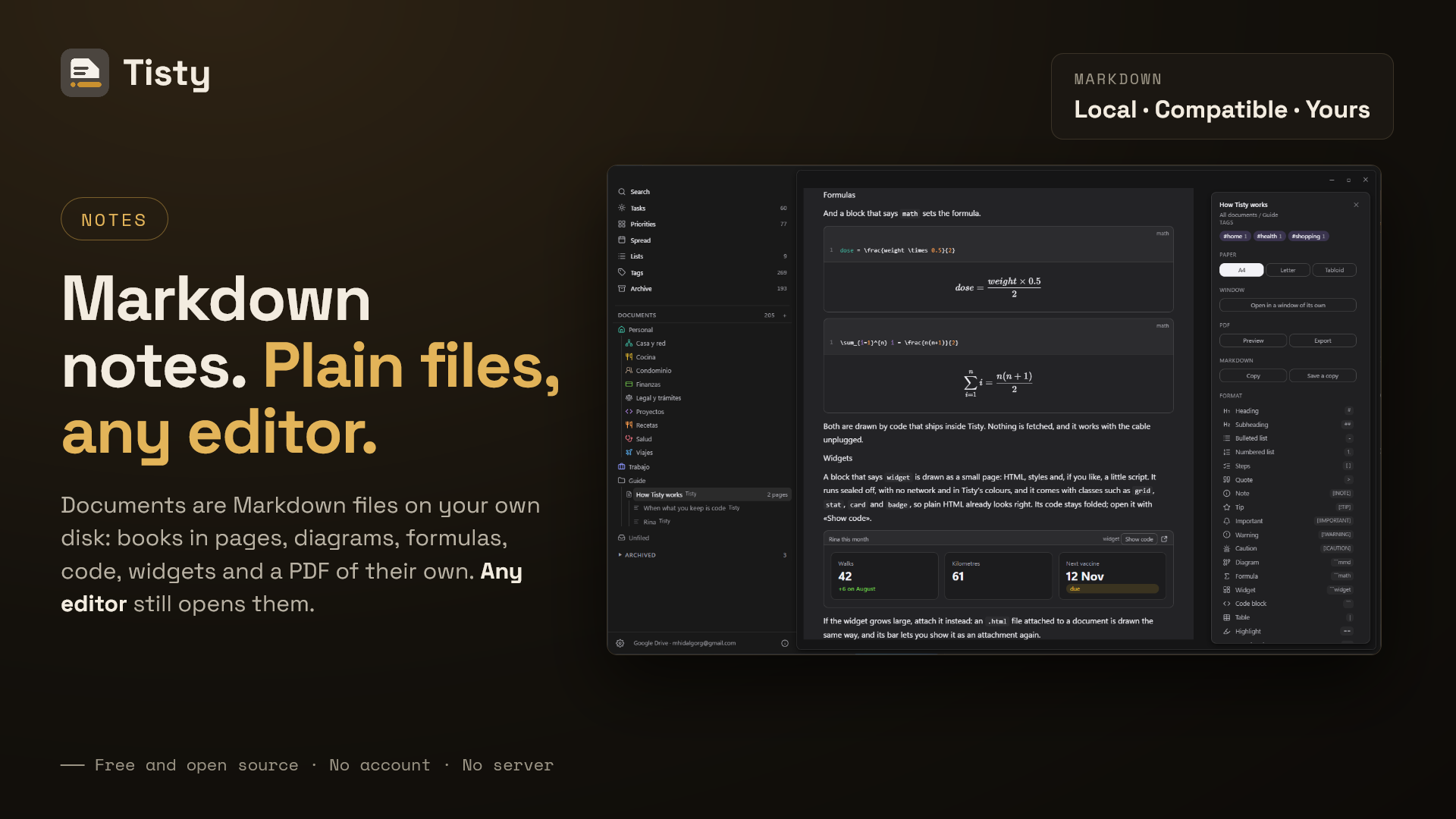
The guide Tisty writes the first time it opens carries a page with one of each,
so you can see all of it before you write a line.
Documents live beside the tasks, for reference material that has no date and
never gets ticked. They are Markdown files you edit as documents — tables,
checklists, code, images — and search reads them too. A task can point at a
document; a document never creates tasks.
The tree opens quiet and closes whole. Every folder starts folded, so a store
with hundreds of documents is a handful of rows until you go looking. When work
is over you archive the folder itself, not its documents one by one: it drops to
the shelf at the foot of the tree with its icon, its subfolders and its pages
exactly as you left them, closed to writing and to anything new coming in. Bring
it back and it returns the same — including whichever documents you had archived
by hand in there, which stay archived because nobody said otherwise.
A page is put away on its own without leaving its document. A long thing in
parts — a year of minutes, a book by chapters — is one document holding pages,
and a chapter that no longer applies goes to the archive where it lives: dimmed,
with the icon of the archive, read but not written. Put the whole document away
and every page goes with it; bring it back and each one returns as it was, the
one you had set apart still apart.
A document takes tags the way a task does — you write #contract in the
middle of a sentence and the document is filed under it. The tag lives in the
sentence rather than in a hidden header, so carrying the file to another editor
carries the tag with it. Tags is where they meet: one screen, the tasks under a
tag and the documents beneath them, and pressing a tag inside a document opens
exactly that. Accents come off and case is folded, so #camion and #camión
are one word however you typed them that day. A bare number is not a tag —#1234 is the ticket somebody wrote down, not a subject — and neither is a
single letter: two characters, one of them a letter.
Text can be highlighted in a few colours and set apart as an aside — a plain
quote, or a callout GitHub reads too, written as > [!WARNING]. Tables keep how
their columns lean and how wide you drew them, and a code block says what
language it is and is coloured for it, with its lines numbered beside the text
rather than in it, so copying takes the code and nothing else. A block can carry
a name; one whose language is mermaid draws the diagram it describes
underneath — redrawn when you turn the light on or off — and one that saysmath sets the formula it holds. One that says widget is drawn as a small
page — HTML, styles and a little script if you like — sealed off from the
network and from the window, and an .html file attached to a document is drawn
the same way.
A web link on a line of its own is drawn as a card, made from the address
itself — the site's name and the words you wrote. Nothing is fetched to draw it.
Press Bring the preview and Tisty asks that page once for its title, its
description and the picture it offers, keeps the answer here so it never asks
again, and reads no more of it than it needs: a page cannot decide how much of
your machine it takes.
It stays Markdown, and that is the point rather than a detail: everything
above is syntax another reader already understands, so the file survives without
Tisty — a block's name is what Markdown keeps after the language, and a column's
width rides in how long its rule is drawn, which every other reader ignores and
draws the same. Where Markdown has no word for a thing, Tisty adds a few short
ones of its own, never HTML: ==words== is a highlight and ==words=={green}
one in another colour, ++words++ is underlined, ::star:: is an icon, and an
attachment is named by its own name, . The editor
shows the file exactly as it is written, a block at a time, so what you see while
writing is what is on disk. Copy as Markdown and taking a document out say
those few words the way any other reader understands them, and an older file, an
import or an assistant writing in plain Markdown is turned into them on the way
in.
The writing sits on a lit page, and the first line with words in it is both the
name of the document and its title — reading past a fence or an alert's marker to
find it. When the window is wide enough a column opens beside it
with what the document is, the formatting the / menu used to hide, and its
outline. Tisty makes its own PDF — A4, Letter or Tabloid, with its
own margins and its pictures carried inside — and shows it to you before you
export it.
A Markdown file from anywhere opens to read. Pick Tisty under Open with
for a .md file, or follow a tisty://open?path=… link, and it opens
read-only in a window of its own without coming into your store: its contents
at the side, what the file is, the width of the page, and the PDF it would make,
with ← Back to the document. Edit in Tisty brings it in as a document
and leaves the original where it was. A document of yours opens the same way
from its panel, Open in a window of its own, and its PDF there is signed
unless you untick Signed. A widget opens apart too, at phone, tablet or
desktop width. More in the wiki.
And they leave whole. A document copies as standard Markdown, the way
GitHub and CommonMark read it, writes out into a folder with its pages and
attachments beside it, leaves as one web page or a Word file with its pictures
inside (Markdown to HTML, Markdown to Word), or is exported for Tisty into a.tistyx file that also carries what Markdown cannot say: folders with their order,
icon and colour, which document each page hangs from, what is archived, and the
alias it was signed with. It carries a README.txt as well, so whoever you hand
it to can read the documents without Tisty and knows where to find it if they
want the rest. Exporting all of them asks who they
are for: open, to hand to somebody, or locked with six digits for another
machine of your own — which is what makes them arrive there as yours rather
than as a stranger's. Either way, not one line of the history travels inside.
Write an alias — optional, and yours to choose — and every document is signed
with it, while whatever arrives from somebody else keeps theirs.
Who Is This For?
Someone who works alone, or mostly alone, and whose tasks leave a trail worth
keeping. Developers, sysadmins, freelancers, researchers, students — anyone who
has ever solved the same problem twice and known it the second time.
And anyone who writes things that last: a manual, the minutes of a year, notes
for a course, the documentation of a system, a book in chapters — and wants it
in files of their own rather than in somebody else's database.
If what you want is a list to cross out and never open again, Tisty will feel
like more than you asked for. That is a fair reason to walk away.
The Idea It Is Built On
A completed task is not finished. It is archived.
It stops being a reminder of what to do and becomes the record of how something
got solved. Three things follow from that, and they shaped everything else:
- Search is the main way into the archive, not a side feature.
- Deleting is the exception. The normal ending is completing, which keeps
it. Erasing something for good is only for what is closed and reads as a
trace; a story is only hidden, and converting it to a trace is the deliberate
step that lets it go. - Capture has to stay instant, because most tasks are not like that at all.
The call you have to make tomorrow is born and dies within a day and leaves
nothing worth keeping — and writing it down must not cost more than one line.
A document is a file you keep, not a row in somebody's database. Whatever
Tisty draws on top of it — pages, diagrams, widgets, a PDF — the file underneath
stays Markdown another reader opens the same, so leaving Tisty never means
leaving your writing behind.
Getting Started
Windows — from the
Microsoft Store, which keeps
it updated for you. About asks the Store for one on the spot when you would
rather not wait. Or with the Windows Package Manager, which takes the signed
installer from the releases page and then stands aside, because Tisty keeps
itself up to date:
> winget install rgdevment.Tisty
macOS — with Homebrew. The tap is added once and never
again. After that Tisty keeps itself up to date, so Homebrew stands aside:
$ brew tap rgdevment/tap
$ brew install --cask tisty
Or take the disk image and the installer straight from
Releases, on either system.
On macOS there are two images: aarch64 for Apple Silicon and x86_64 for
Intel — Apple menu › About This Mac says which one yours is. Homebrew picks
by itself.
What It Does
The first time it opens, Tisty asks two things — which language, and where
your copies should go — and then writes you a guide and opens it, unless the
place you chose already holds your Tisty: then it brings that instead. Everything
else it decides for you and lets you change later: it starts with the computer
and waits out of the way, because those were questions with an obvious answer.
The guide is a document in your own store, in a folder of its own: yours to
read, edit, or throw away like anything else you wrote.
Settings answers four questions rather than wearing five labels. General
is how Tisty behaves towards you — language, start-up, the quick capture,
notices, updates, and the one thing that happens outside the window: the
welcome. Your data is everything that touches your files, with
syncing as a block of its own because it has a state, a warning that depends on
who keeps your folder, and four actions. Assistants and Maintenance are what
they say.
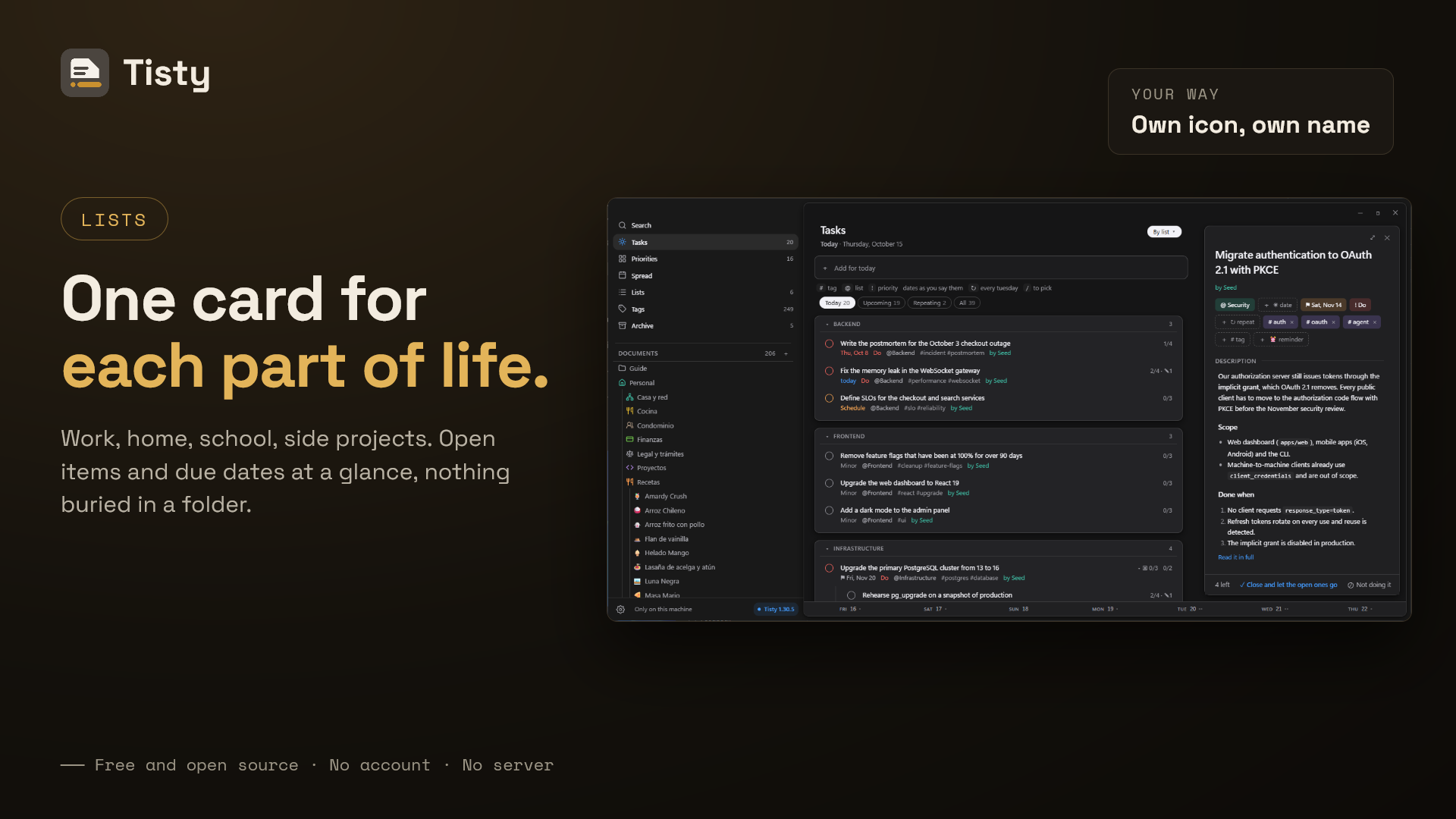
Three columns at most: what you are looking at, the list, and the task you
opened. Nothing else on screen.
The list stands where it stands. It does not drift to the middle of whatever
room is left, so opening a task moves nothing. Where the window is wide enough,
the space that opens up is not left blank: a column tells you the day — what is
overdue, what is for today, what is ahead, the four quadrants with their counts,
the lists holding something and the tags in use. All of it counts your whole
store rather than the slice on screen, and every figure is a way in. Narrow the
window and it steps aside; a task always wins the room over it.
It reads what you write. You type a sentence and Tisty takes the date out of
it, leaves the sentence readable, and shows you what it understood before
anything is saved — as chips you can correct with one click.
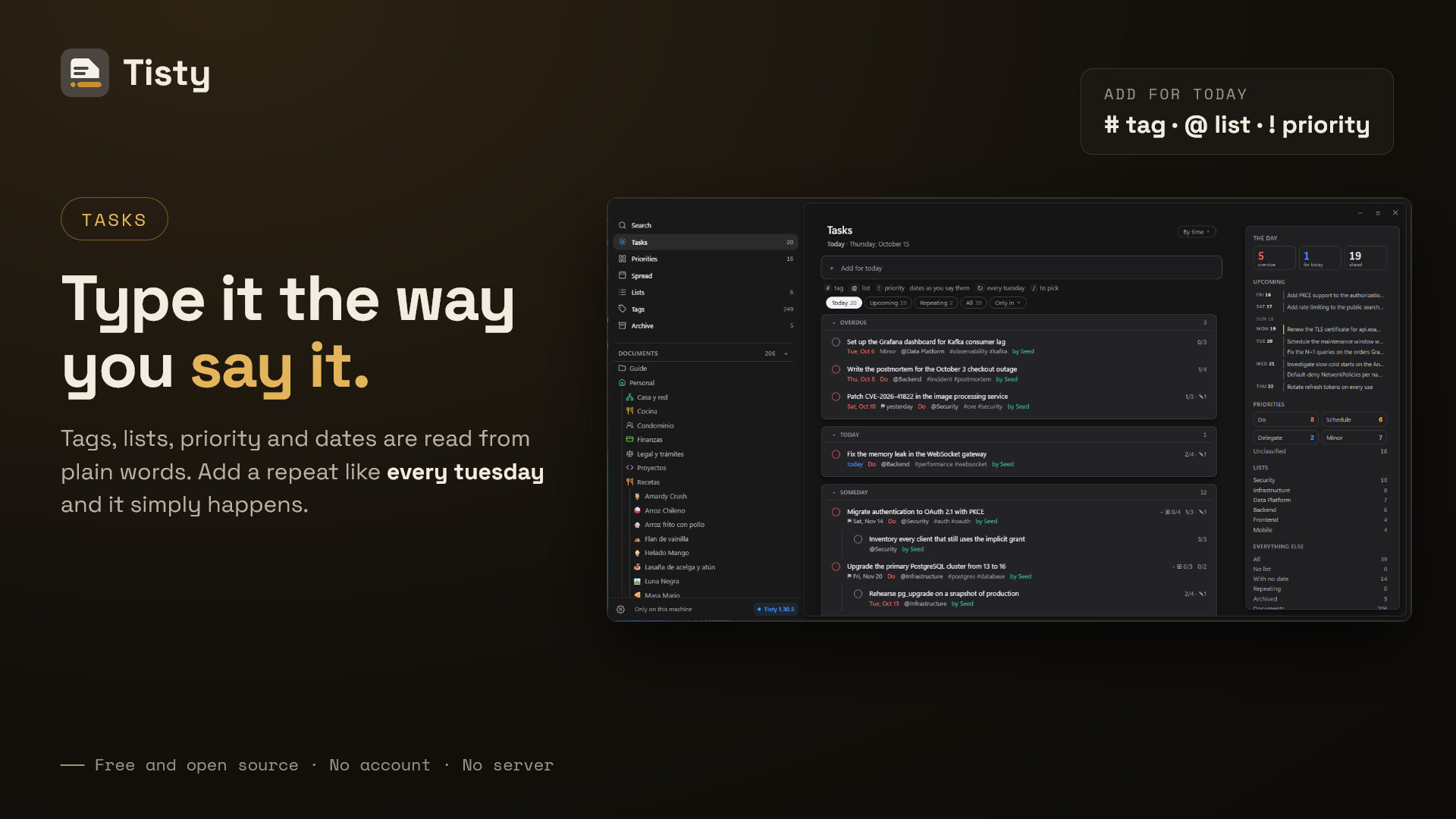
"ship the release tomorrow at 10"   →  tomorrow 10:00
"file the report before friday"     →  due fri
"book the flights @travel #urgent"  →  @travel · #urgent
A day, a time, or both. Names, distances, plain dates. What it cannot read it
leaves alone rather than guess. A deadline is a different thing from a plan, and
three words open one: before, due, until.
A task opens beside the list, not on top of it: dates, list, tags and
priority above, and below them its own page, a Markdown document like any other,
with sections to fill in and a grey hint in each. Every box on that page is one
of its steps; press ↗ on one and it becomes a part of the task, its card left
where the step was. Completing it puts its page away with it, readable and
untouched, and reopening brings it back. Opened to the whole page it gains a
column of its own trail — how long it has been open, how much of it is done, and
every change it has been through.
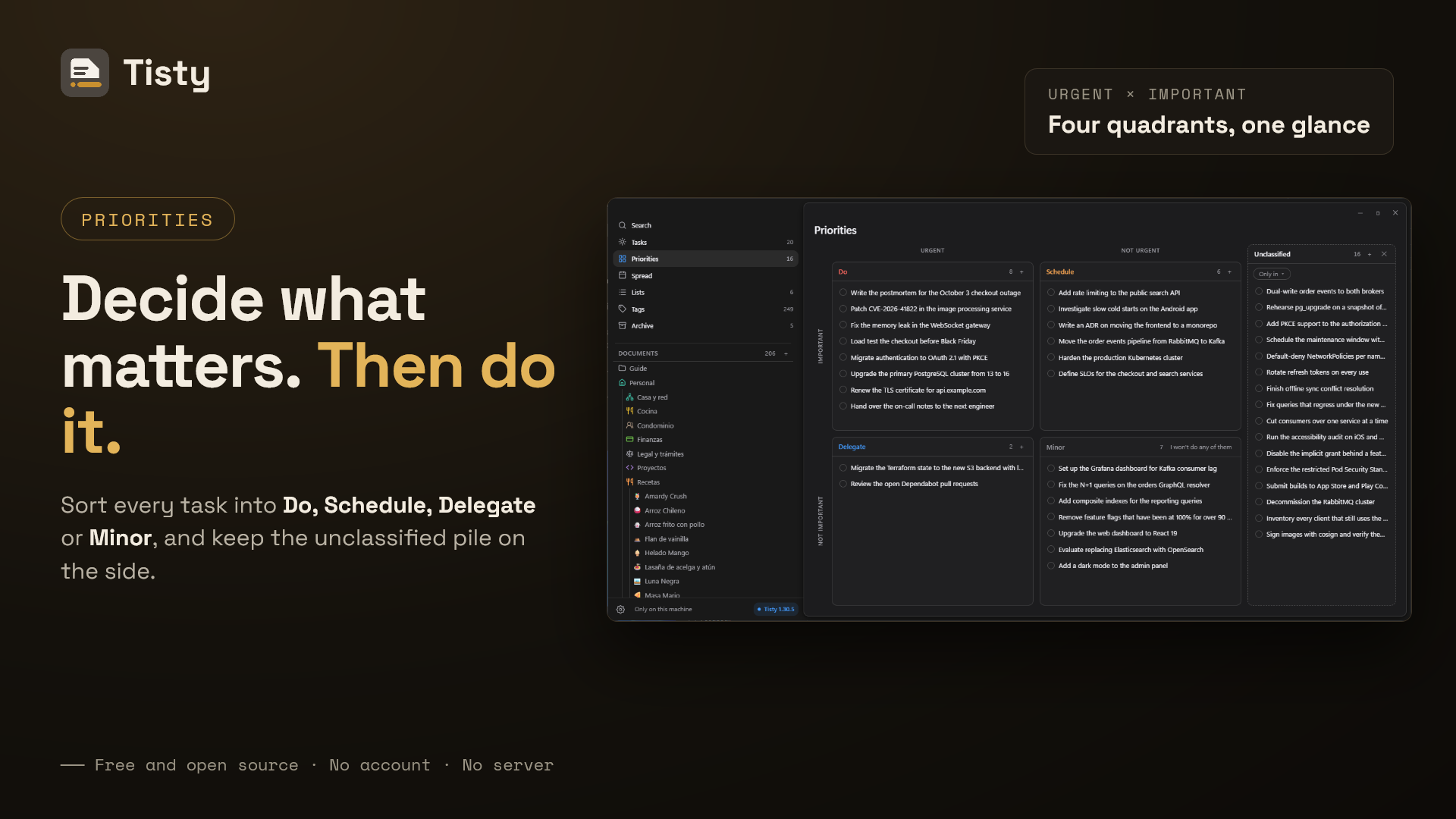
Priorities are a matrix, not a ladder. Tisty borrows the four quadrants
of the Eisenhower matrix — the method President Dwight D. Eisenhower is
credited with, popularised by Stephen Covey in The 7 Habits of Highly
Effective People: sort what you have by urgent against important, and each
quadrant tells you what to do with it. Do what is urgent and important,
Schedule what matters and is not urgent, Delegate what is urgent and is
not yours, and leave in Minor whatever you could live without — when you are
sure, one button drops the lot.
Drag a task into its quadrant, or type it: !do, !schedule, !delegate.!decide still works, because it is what the quadrant used to be called. Each
quadrant has a + that opens the quick capture with that quadrant already
set, and whatever nobody has placed waits in a tray that opens the way you
left it.
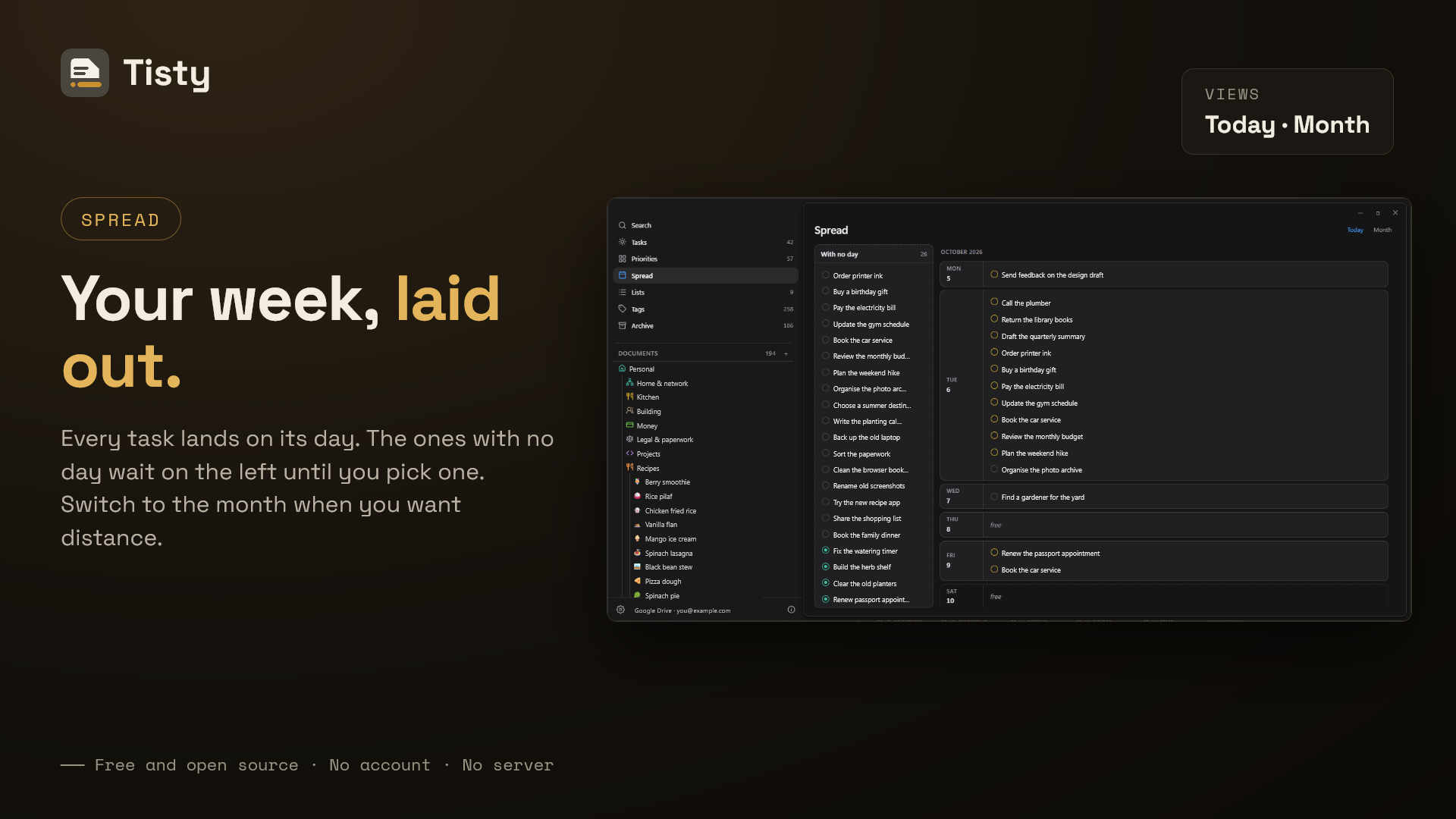
The spread deals your days, one row at a time. Priorities sort what matters;
the spread decides when. It runs as a river of days you scroll through rather
than a week you page: every day is a row, and the row grows with what it carries,
so a heavy Friday is tall and a free Tuesday is a line. What you wrote with no
day waits in a tray on the left, and you drag it onto a day — or drag it back to
take the day away again. Drop one onto a day that already carries three and
Tisty says so, and offers the next day that is free; it never insists.
A month button is there for looking, not for dealing: press it and the same
days lay out as a grid, press a day and you land on it in the river. Nothing is
dropped there on purpose. Tisty cannot see the calendar you keep somewhere else,
so a square with nothing written on it is only a square with nothing written on
it — never a promise that the day is yours.
Tisto keeps you company. Tisty's beaver peeks over the bar while you write a
task and gives you a thumbs up when you finish one. It never covers anything,
and Settings turns it off.
A global shortcut opens a small field over whatever you are doing, so a task
that occurs to you mid-something does not cost you the something.
A calendar comes in as tasks. Drop an .ics on the window, or open one with
Tisty: it shows each event and to-do with when, where, how it repeats and its
reminder, and makes the ones you pick into tasks — time zones, Outlook's
included, and simple repeats kept, and a file opened twice brings nothing twice.
Repeating tasks come back one occurrence at a time, so the archive shows you
did it twelve times — and it counts what was owed rather than only what you
closed, so a routine reads 26 of 30 with four dates that have no record. Marking
one days late offers those dates back instead of calling them forgotten: tick the
ones you did and the gap closes. Reminders arrive as a system notification and
a short sound you can turn off. The whole window works from the keyboard.
The archive is read in three layers. The ones that taught something — a task
you came back to and added to more than three times — come with their whole
trail: what changed, when, and what you wrote along the way. The
routines come with their tallies, their streaks and the hour you usually keep
them. The rest is the trace: what left little or nothing written, listed dense
and out of the way, because it still happened and search still reaches it. You
decide which layer each one reads in: a story that was only noise goes to the
trace, and a trace worth keeping is kept as a story. The trace is the only layer
that can be erased, and both erasing and hiding are one task at a time; a story
is only ever hidden.
Your Data and Privacy
Everything lives in one folder on your disk: an append-only log of what
happened, your documents as .md files, and your attachments as themselves.
Nothing is obfuscated and nothing is in a format only Tisty can read.
Nothing is encrypted at rest, and that is a decision rather than an
oversight — your operating system's permissions are the protection, and the
files stay readable with tools you already have. It is written out in
PRIVACY.md and SECURITY.md, including the parts
that are not reassuring.
Tisty makes one network request unasked — when it opens, and once a day
after that: it checks whether a newer version exists. It sends nothing. If one
does exist and you press the button that offers it, two more follow — the file
naming the release, and the installer — and Tisty refuses to install anything
not signed with a key compiled into the copy you already have.
Two Machines, If You Have Two
Tell Tisty where to leave the copies, in Settings › Syncing. There are two
ways, and the rest it does on its own.
Your Google Drive, directly. Choose Your cloud service and Connect:
your browser opens, you sign in to Google, and Google asks whether Tisty may
keep its copies there. They live in a hidden space of your Drive that only
Tisty opens — it sees nothing else in your Drive, and they do not show up among
your files — and you do not need Google's desktop program installed or running.
Disconnecting keeps them there, in Tisty and in Drive alike; to take them out,
move to a folder from Tisty. In Google Drive › Settings › Manage apps, only
Delete hidden app data deletes them. The first
time, everything you already have goes up — or, if your Drive already holds
your Tisty, it comes down instead; after that only
what is new travels, and a dropped connection carries on where it left off.
Attachments stay on the computer they were added on and come down on another
one when you open them there; Free space lets go of the ones you have not
opened in a while. Each computer has a daily allowance, so no single copy can
spend the quota Google grants the project: when it runs out, what you write
stays safe here and syncing carries on the next day. Connecting happens only in
the window.
Your OneDrive, directly. The same, with Microsoft: you sign in on
Microsoft's page and Tisty keeps its copies in Apps › Tisty in your OneDrive.
That folder is one you can see there; leave it to Tisty, since what you change
by hand reads as a change from another computer. Dropbox may come later;
nothing is promised.
Before you sign in, and before a move to the cloud, Tisty checks that the
provider answers, with one request that carries nothing of yours. If a proxy, a
filter at work or an antivirus stands in the way, it says so in plain words —
there, and on the card once syncing keeps failing: a second round in a row, or
two minutes after the first. A single failed round, or a connection cut halfway,
is only tried again. It never goes around what stands in the way: what you write
stays here and goes up once the way is clear. A round that runs long says for
how long, so it never looks frozen.
A folder. Google Drive, OneDrive, iCloud and Dropbox's own folders —
whichever it finds installed, folder already worked out — or any other folder
both computers reach, a NAS, a drive you plug in on Fridays.
There is nothing of mine in the middle: no account, no server, no daemon. Who
runs that folder or that Drive is your business, not Tisty's. If you sync
nothing, it never opens a connection for it at all. Changing your mind later is
a move, not a switch: Move to another place… takes your copies between this
machine, a folder and your cloud in two steps — first it brings home what
lived only in the place you leave, then it takes everything to the new one —
counting the files left, says so when the provider asks for a pause, lets you hide
it and keep working, and tells your other machines where you went so each one
follows.
A new computer joins on its own. If it holds nothing of yours yet, it
takes what the folder or your Drive already holds, after keeping a backup —
connecting Drive there says Your Google Drive already holds your Tisty and
offers Sync instead of a first upload. It brings it with a moving bar and
counts as things arrive, and Keep working while it arrives lets you into
the app while the round goes on; the foot of the sidebar keeps counting and
says if it could not finish. One that does hold your work asks first, naming
the place: merge the two, keep this machine, or take what the place has.
Two machines can genuinely write the same document at once, and there Tisty
merges them block by block — you edit the introduction on one, someone edits
the closing paragraph on the other, and both land with nothing to answer. Only a
real overlap becomes a question.
Each machine signs what it writes, and one nobody here has answered for
waits at the door: its card in Settings › Maintenance shows the key it signs
with, you compare it with the one that machine shows on its own card, and
confirm it. Until then nothing it writes comes in; from then on, whatever does
not answer to that key is turned away, and Tisty says so.
And back up by hand, shared folder or not. One zip with your whole history,
kept wherever you like, and restored from the same place in Your data.
Where the big ones live is yours to say. By default every machine carries
every attachment, which is why any of them can open anything with the network
off. For anything above 25 MB, Settings offers two other ways: keep only what
this machine attached and fetch the rest when you open it, or leave them in the
shared folder and nowhere else. That last one trades the copy on your disk for the
space it took: the file is there when your provider or your NAS is, and Tisty
says so plainly when it is not. A copy is only ever let go of after the one in
the shared folder is found to hash the same.
And because what uploads a folder is your provider's program and not Tisty, if
you ever change something on one machine and it does not turn up on the other,
the wiki
lists the causes worth checking, in order — and what each message about Google
Drive means, from Reconnect to a full Drive or
something blocking the way.
An Assistant, If You Use One
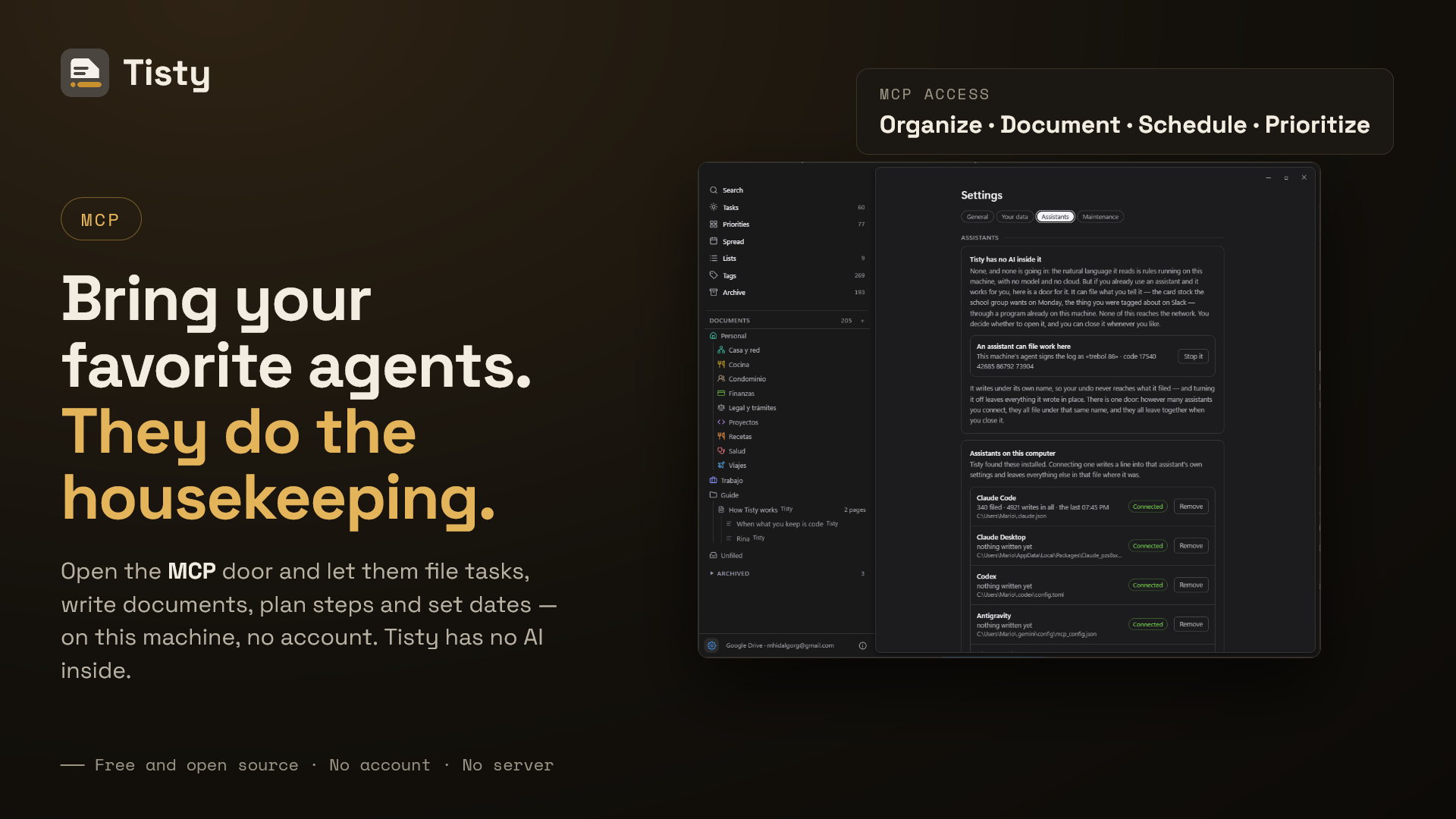
Tisty is not AI and has none inside. The natural language that turns "call
the bank at 3" into a task is rules running on your machine: no model, no
request, no cloud. That is not going to change.
But if you already use an assistant, you are probably telling it things worth
keeping — the school group says card stock on Monday, the invoice is due on the
30th. So Tisty leaves a door, and you decide whether to use it.
Your agents' work, in the open. Through Tisty, an agent plans in
documents and works in tasks: it writes the plan, what it found and what it
decided as Markdown, breaks the work into tasks with steps and ticks them off as
it goes. Nothing stays buried in a chat: every stage lands in Tisty, on your
computer, where you can follow it as it happens and audit it later. When it says
a task is done, you are the one who closes it.
Settings › Assistants lists the assistants already installed on this computer and
connects the one you pick: it writes a single line into that assistant's own
settings, leaves the rest of that file where it was, and keeps a copy of it as
it was before. For one it does not know, a line does it, and the tab shows it
with where the tisty that came with the app sits on this computer:
$ <your-assistant> mcp add tisty -- <path-to-tisty> mcp
Where <your-assistant> is whatever yours is called. That tisty is not a
command line any more: it opens only the assistant's door. It speaks
MCP on the same machine: no
account, no token, nothing over the network. You are the one who opens it.
The assistant appears in Settings › Assistants as a device you have to let in, and
it stays a device you can throw out; until you do let it in, everything it
tries is refused.
While assistants have a voice, a stable Tisty also answers to the name tisty
on your PATH — the Store and Homebrew put it there, and the installer's copy
adds its own folder — so a plugin can start it by name. Taking the voice away
takes that folder off the PATH again. Restart an assistant that was already
open so it sees the change.
What it may do is deliberately small: file a task with its steps and its date,
set an hour for it to ring at, move the day of a task it filed itself, say that
a task it filed is done — which marks it for you to confirm and closes nothing —
add to the journal, write a document, add to one that is already there — at the
end or under a heading — correct a passage of one, write one again whole, file
documents into folders, make one document a page of another and say the order
its pages are read in, which writes and moves the lines naming them in your
document's text and nothing else, keep a copy of a file you point it at — on a
task or
inside a document, which takes the larger file of the two — and read what is
already there. What it may not do: close a task or delete one, say a task you
wrote is done, move a day you set, delete a document, rename or empty a folder,
reach a task you folded away, take files from anywhere but Downloads,
Documents, Pictures, the desktop and the temporary folder, or file the same
thing twice. A task you closed is history to
it: it comes with a notice saying so, reads as it ended, takes no note, no new
day, no bell and no file, and if the same work comes back the assistant
proposes a new one that says how the last one ended.
A task you wrote stays yours unless you say otherwise. Open one to agents from
its detail — «Allow agents» — and an assistant may say it is done, or that it
should not be done, for you to confirm; describe it, where there is no
description yet; plan its steps; and tick them off as it goes, which is the one
thing it does without asking — taking back a tick it gave by mistake included,
never one you gave. Its day, its title, its list and its closing stay yours all
the same. «No agents» shuts the door again and keeps what was filled in. What an
assistant writes is signed with the name of the program it spoke through — «by
Claude Code», «by Codex» — in the row, the detail and the journal, and Settings
› Assistants counts what each one wrote.
It also reads sparingly, which is your business as much as its own. Tisty keeps
a small card for each document — its headings, how long it is, what it leans
on — worked out from the text itself, on this machine, and never sent anywhere.
An
assistant reads that to pick which document it needs, then asks for the part it
wants, or changes that part without having read the rest. A long document is not
poured into somebody's model because an assistant wanted one paragraph of it.
Having read one, it can leave a summary for the next one — kept on this machine,
never synced, and not part of what you wrote.
To correct a passage it has to name it exactly as you wrote it, and if that text
is not there or is there twice, nothing is written at all. To write a whole body
again it has to send back the print the document read at when it last looked: if
you have written in it since, the write is refused and it has to read again, so
what you typed while it was thinking cannot be lost. A document you archived it
can still read, and it is told that you archived it.
Whatever it reads travels wherever that assistant travels. That is between you
and it — which is precisely why this is a door you open, and not one that was
already open.
What It Will Never Do
As important as the list above. Permanently out of scope: real-time
collaboration, kanban boards, Gantt charts, time tracking, productivity metrics,
databases with typed properties and formulas, and AI anywhere in the critical
path.
The natural language stays deterministic and local, and Tisty never sends
anything to a model — not a task, not a word. If you open the door in the
section above, whatever your assistant reads travels wherever that assistant
travels: Tisty still sends nothing, the assistant is the one carrying, and you
are the one who let it in.
FAQ
Is Tisty free?
Yes, and it stays free. AGPL-3.0, no paid tier, no feature held back for a
later version, no trial that runs out.
Does it need an account or a connection?
Neither. There is nothing to sign up for and no server to be away from. Tisty
makes one network request you did not ask for — when it opens, and once a day
after that — to see whether a newer version exists, and it sends nothing in
order to ask. Take the machine off the network and everything else works the
same.
Where is my data kept?
In one folder on your own disk: an append-only log of what happened, your
documents as .md files, and your attachments as themselves. Settings › Your
data prints the path and Show the store opens it. Nothing is obfuscated and
nothing is in a format only Tisty can read.
What happens to my notes if Tisty disappears?
They stay where they are. Markdown and plain text, readable with cat,
searchable with grep, openable in any editor you already have. That is what
the format is for.
Does Tisty use AI?
No, and none is coming. The natural language that turns "call the bank at 3"
into a task is rules running on your machine: no model, no request, no cloud.
If you already use an assistant of your own, Tisty leaves an
MCP door — you open it, you can close it
again, and until you do everything it tries is refused.
Can I use it on two computers?
Yes, two ways. Connect your own Google Drive or OneDrive in the window, and
Tisty talks to it directly, keeping its copies in a space of its own there and
seeing nothing else. Or use a folder you
already sync: Google Drive, OneDrive, iCloud, Dropbox, a NAS, a drive you plug
in on Fridays. Either way there is no server of mine in between, no account of
mine, and you can move from one to the other whenever you like.
Is there a mobile app?
No. Tisty is a desktop program for Windows and macOS. Your documents are
Markdown in a folder, so a phone that reaches that folder reads and edits them
with whatever app you like — but the window, the spread and the archive are the
desktop's.
Does it run on Linux?
There is no Linux build today. The core is Rust and the window is Tauri, so
nothing in the design stands in the way; what is missing is the packaging and
somebody to keep it working on the distributions people actually run.
Is my data encrypted?
No, and that is a decision rather than an oversight: your operating system's
permissions are the protection, and the files stay readable with tools you
already have. PRIVACY.md writes it out, including the parts that
are not reassuring.
Can I use it with my team?
No. Tisty is for one person by design — no assignees, no permissions, no
boards — and you deserve to know that before you install it rather than after.
Can I bring my notes over from another app?
Documents, yes: Import a document in the tree takes a .md, .markdown,.txt, .html or Word .docx file and brings it in one at a time as
Markdown — Word to Markdown, HTML to Markdown, Obsidian to Markdown — and pasting
from Word, Google Docs or a web page converts the same way. A .tistyx from
another Tisty machine unpacks whole. Tasks have to be typed. There is no importer
for another program's task list, and one that guessed would cost you more than
the typing.
Are the downloads signed?
Yes. The macOS disk images are signed and notarised by Apple, and the Windows
installer is signed too — a copy from the Microsoft Store or from Homebrew
carries that already. Tisty also refuses to install an update that is not
signed with a key compiled into the copy you are running.
Does it work with a screen reader?
Not as far as anybody knows, and that is worth saying plainly: the whole window
works from the keyboard and that path is tested, but nothing has ever been
tried with a real screen reader. If you use one, an issue saying where it falls
apart would be the most useful thing anyone could send.
How is it different from Obsidian, Notion or Todoist?
Tisty keeps tasks and documents in one store and one search, and finishing a
task keeps everything it gathered instead of hiding it. The table below says
where each of those is stronger.
Alternatives
Other places to keep notes and tasks, so you can pick the one that fits.
Platform, storage and licence checked against each project in September 2026;
everything else changes, so go and look.
| Project | Platform | Where your data lives | Licence |
|---|---|---|---|
| Tisty | Windows, macOS | Your disk, no account | AGPL-3.0 |
| Obsidian | Windows, macOS, Linux, iOS, Android | Your disk; syncing is a paid extra | Closed source, free for personal use |
| Logseq | Windows, macOS, Linux, iOS | Your disk | AGPL-3.0 |
| Joplin | Windows, macOS, Linux, Android, iOS | Your disk; syncing through a service you pick | AGPL-3.0 |
| AppFlowy | Windows, macOS, Linux, Android, iOS | Your disk, or a server you pick | AGPL-3.0 |
| Anytype | Windows, macOS, Linux | Your disk, synced encrypted | Any Source Available 1.0 |
| SilverBullet | Self-hosted, in a browser | A server you run | MIT |
| Super Productivity | Windows, macOS, Linux, mobile | Your disk; syncing through a service you pick | MIT |
| Taskwarrior | Command line | Your disk | MIT |
| Things 3 | macOS, iOS | Your device; their cloud to sync | Paid, closed source |
| Craft | macOS, iOS, Windows, Android, web | Their cloud; a local folder gives up sharing | Freemium, closed source |
| Todoist | Everywhere | Their servers, and an account | Freemium, closed source |
| Notion | Everywhere | Their servers, and an account | Freemium, closed source |
What Tisty does that most of these do not: tasks and documents in one store and
one search, an archive that keeps a finished task whole instead of hiding it,
the Eisenhower matrix by its name rather than a number from one to four, and a
door for the assistant you already use with no AI inside the program itself.
Each of them is better than Tisty at something. Obsidian and Logseq are
notebooks with a decade of plugins, and tasks are one of those plugins' job.
Craft makes the handsomest document of the lot, and asks you to keep it in its
cloud for the sharing to work. Notion models anything you can describe, once
you and your data have an account there. Todoist and Things are quicker at
catching a task than anything here — and when that task is done, what you
worked out on the way has nowhere to stay. Joplin and AppFlowy are the closest
in spirit to this one, and either is worth your time if a phone matters to you
more than an archive.
Localization
The window, the guide, the welcome and the natural language all speak the
language you chose the first time Tisty opened, and Settings changes it
whenever you like.
| Language | Tag | Status |
|---|---|---|
| English | en | Complete |
| Spanish | es | Complete |
Want yours in there? Open an issue
and say so — the window's strings live in one file, app/src/locales.ts, and
the rest follows from it.
Other Tools by the Same Author
Same idea, same terms: free, open source, no ads, no telemetry, everything
local.

|
CoPanda, formerly CopyPaste — a local-first clipboard manager that keeps a searchable history and ignores what comes from a password manager. Windows and macOS. |

|
LinkUnbound — a browser selector that asks which browser should open a link instead of assuming. If it is installed, the web links you open from Tisty go through it. Windows and macOS. |
Support the Project
Tisty is free and will stay free: no ads, no premium tier, no paywall. If it
saves you time and you would like it to keep being maintained:


And if you would rather not pay for anything, that is entirely fine. Star the
repository so somebody else finds it, tell one person it exists, or open an
issue when something is wrong. That is worth as much.
Standing On
Tisty is small because other people's work does the heavy lifting.
The core, in Rust — Tauri puts a native window around
it without shipping a browser; serde reads and writes every
line of the log; jiff does the dates and
the time zones, which is the part nobody should write twice;
SQLite, through
rusqlite, holds the read cache;
ULID gives every task an identifier that
sorts by time and needs no coordination.
The window — React draws it and
Tailwind CSS styles it;
CodeMirror is where a document is written, a block at
a time, while pulldown-cmark
reads the Markdown in the core and ammonia
keeps any HTML in it harmless;
Mermaid draws the diagrams a code block describes and
KaTeX sets its formulas;
lowlight and
highlight.js colour the code;
webview2-com reaches the engine that
lays the PDF out on Windows; Vite builds it and
Vitest tests it.
The full list, with versions and licences, is in
THIRD-PARTY-BUNDLED.md, and the licence texts the
crates carry are in THIRD-PARTY-LICENSES.md; the
About screen shows both.
Contributing
How the store, the merge and the sync actually work is written down in
ARCHITECTURE.md — a reference for the behaviour,
not a tour of the code.
Read CONTRIBUTING.md. Open an issue before writing code for
anything beyond a fix: Tisty is deliberately minimal, and a well-written feature
can still be declined — usually because it would make the tool something other
than what it is.
Everyone taking part — in issues, pull requests, discussions or the wiki —
follows the Code of Conduct.
Licence
AGPL-3.0. Using Tisty is covered by short terms of use
that take nothing away from it.
Other terms
Commercial terms exist for organisations that cannot
comply with the AGPL.
The signed builds in the app stores carry their own terms, because the stores'
do not accept the AGPL — DISTRIBUTION.md says which
applies to what you have, and why. Nothing is withheld from the source either way.
Project health





Reviews (0)
Sign in to leave a review.
Leave a reviewNo results found