Jailed-Claude
Health Warn
- License — License: MIT
- Description — Repository has a description
- Active repo — Last push 0 days ago
- Low visibility — Only 6 GitHub stars
Code Fail
- rm -rf — Recursive force deletion command in install.sh
Permissions Pass
- Permissions — No dangerous permissions requested
No AI report is available for this listing yet.
jailed-claude is a thin wrapper around the official Claude Code CLI for sandboxing and network security
jailed-claude
Run Claude Code inside an isolated Docker sandbox — switch LLM-provider profiles with a single keystroke, keep your history intact, and optionally cut the network off. Result: a process isolated at the filesystem and/or network level, along with a convenient profile manager for LLM connections.



🚀 Quick Start
Just run the following commands:
# 1. Download only the installer and execute it
curl -fsSL https://raw.githubusercontent.com/RiccardoNocita/Jailed-Claude/master/install.sh | bash

# 2. Run (Wait only first time for image build)
jailed-claude
Scenario
Take a look at the scenario examples.
IDE Integration
Jailed Claude ready in your IDE
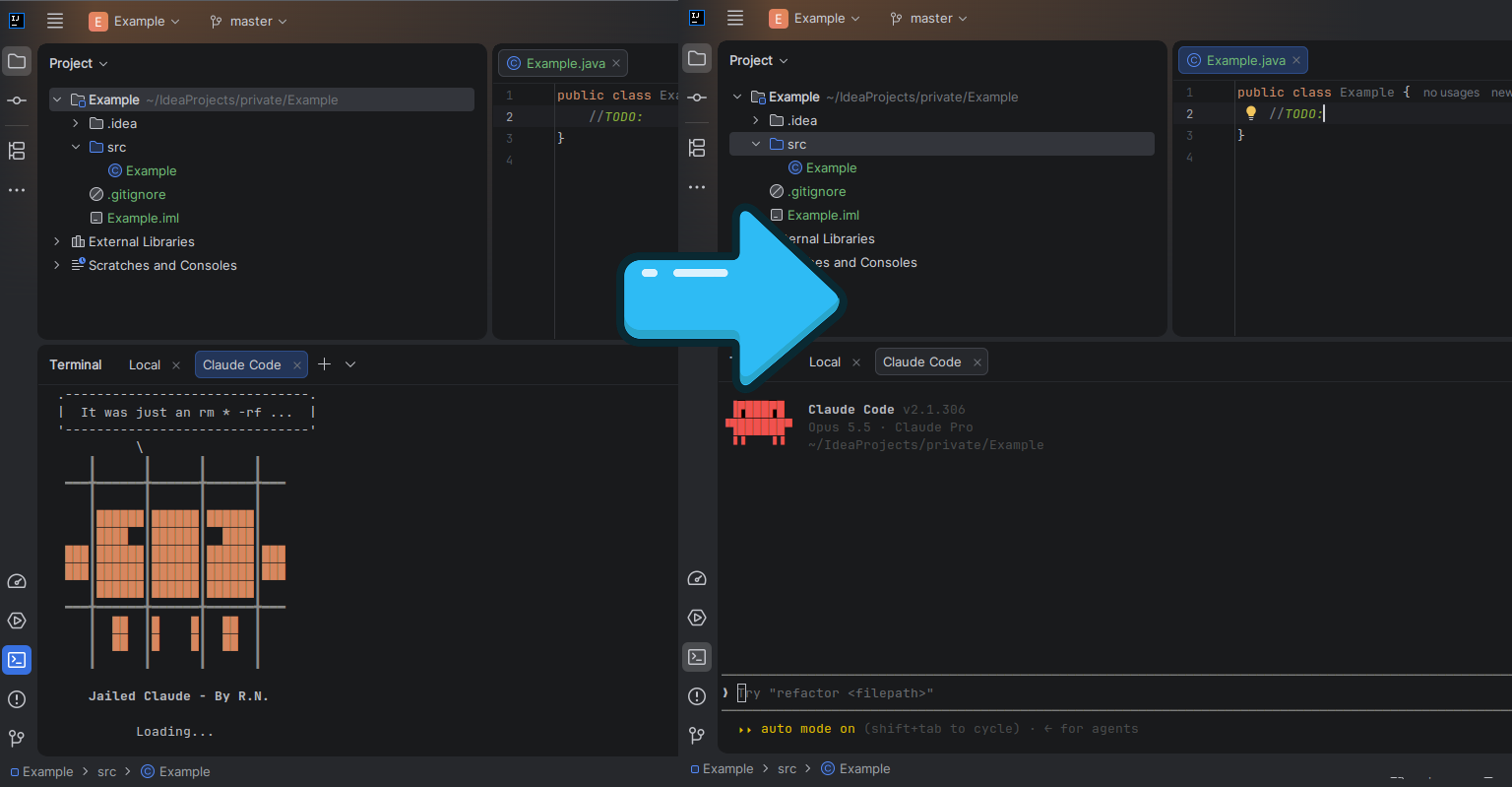
Official support:
- IDE jetbrains - All IDEs in the suite are supported.
- Updating List ...
What it is (and isn't)
jailed-claude is a thin wrapper around the official Claude Code CLI. It does not modify, patch, rebrand, or change how Claude Code thinks or behaves — the agent stays 100% stock. What it adds is a layer of control and isolation around it:
- Sandboxing — every session runs in a throwaway Docker container that can only see the folder you're working in (plus your Claude history).
- Provider profiles — you decide which LLM provider / endpoint / model Claude talks to, using small
conf/*.conffiles. Swap providers without touching anything else. - Optional network lockdown — with
--isolated, all traffic to the upstream provider (Anthropic) is blocked, so your code never reaches the cloud and nothing can phone home or auto-update.
In short: same Claude Code, different cage. You pick who it talks to — and whether it's allowed to talk at all.
Features
- 🐳 Isolated
docker runon demand (no long-lived containers). Can't access files outside the trusted dir by mistake (Finally...) - 🔌 Pluggable LLM-provider profiles via
conf/*.conf(endpoint + auth + models) - 🧠 History & config preserved: only
~/.claude/and~/.claude.jsonare bind-mounted - 🎯 Interactive model picker (fuzzy with fzf, numeric fallback) —
defaultlets Claude decide - 🔒 Isolated mode that blackholes the upstream domains (privacy / no telemetry / no auto-updates)
- 🎛️ Strict mode (
--strict) that pins all egress to the singleANTHROPIC_BASE_URLendpoint via an L3 nftables firewall — everything else is dropped, even raw IPs - 🛡️ Hardened container: drops all capabilities,
no-new-privileges, runs as your UID/GID - ⌨️ Ctrl+C aborts any prompt; non-interactive friendly via env overrides
- 📦 One-line remote install
How the sandbox works
| Aspect | Behavior |
|---|---|
| Working dir | Your current folder is bind-mounted at the same path inside the container |
| Home | Only ~/.claude/ and ~/.claude.json are mounted — nothing else in $HOME is exposed |
| User | Runs as your host UID:GID (no root, no stray files) |
| Capabilities | --cap-drop=ALL, --security-opt=no-new-privileges, --init |
| Host reachability | host.docker.internal mapped to the host by default (for local gateways) — disable with JAILED_ALLOW_INTERNAL=0; forced off in strict mode |
| Egress (strict mode) | With --strict, all traffic is dropped at L3 except TCP to the ANTHROPIC_BASE_URL host:port (nftables in a shared netns — see Strict mode) |
| Image | Built on first run from Dockerfile.jailed-claude (node:24-slim + Claude Code + git/ripgrep/bash) |
Installation
  .-------------------------------.
  |  It was just an rm * -rf ...  |
  '-------------------------------'
            \
      ┃      ┃      ┃      ┃
   ━━━╋━━━━━━╋━━━━━━╋━━━━━━╋━━━
      ┃      ┃      ┃      ┃
      ┃██████┃██████┃██████┃
      ┃████  ┃██████┃  ████┃
   ███┃██████┃██████┃██████┃███
   ███┃██████┃██████┃██████┃███
      ┃██████┃██████┃██████┃
   ━━━╋━━━━━━╋━━━━━━╋━━━━━━╋━━━
      ┃  ██  ┃█    █┃  ██  ┃
      ┃  ██  ┃█    █┃  ██  ┃
      ┃      ┃      ┃      ┃
Requirements
- Docker Engine ≥ 20.10 (or Docker Desktop)
bash, andcurlorwget- (optional)
fzffor the fuzzy picker (installed automatically by the installer, see below)
One-liner
curl -fsSL https://raw.githubusercontent.com/RiccardoNocita/Jailed-Claude/master/install.sh | bash
The installer downloads the needed files from this repo into ~/.local/share/jailed-claude and symlinks the command onto your PATH.
If fzf is missing, it also tries to install it with the system package manager (brew, apt-get, dnf, yum, pacman, zypper, apk — may ask for sudo). To skip that step:
curl -fsSL https://raw.githubusercontent.com/RiccardoNocita/Jailed-Claude/master/install.sh | INSTALL_FZF=0 bash
Usage
Basic
jailed-claude                          # pick a profile + model, then you're in Claude Code
jailed-claude -p "summarize this repo" # any Claude Code flag is passed through
On launch it asks, in order:
- Isolate from the upstream provider? (default: yes)
- Which config profile? (
conf/*.conf) - Which model? (
default= let Claude decide)
Provider profiles
Default location:
$HOME/.local/share/jailed-claude/conf
Each conf/*.conf is a named identity for an LLM provider — the endpoint, credentials and models to use:
Example: conf/local.conf
JAILED_MODELS=unsloth/Qwen3.8-27B-GGUF,unsloth/Qwen3.6-35B-A3B-GGUF
ANTHROPIC_BASE_URL=http://host.docker.internal:11434
# ANTHROPIC_AUTH_TOKEN=sk-...
# API_FORCE_IDLE_TIMEOUT=0
# API_TIMEOUT_MS="3600000"
conf/default.conf ships with no environment variables, so Claude Code runs exactly as it would natively. This is how you "manage provider identities": one file per provider, chosen at launch.
Isolated mode (network lockdown)
By default the wrapper asks whether to isolate; press Enter (yes) and it rewrites /etc/hosts inside the container to point every host in the blocklist at 127.0.0.1. Result: no traffic to those upstreams — only your local endpoint works. Useful for:
- Privacy — source code never leaves the machine
- Integrity — nothing remote can alter behaviour or push unwanted changes
- No auto-updates / telemetry — the upstream is simply unreachable
Force it from the CLI with --isolated (skips the prompt).
Custom blocklist (JAILED_CLAUDE_BLOCK_HOSTS)
The list of blackholed hosts defaults to the Anthropic domains and can be fully replaced via the JAILED_CLAUDE_BLOCK_HOSTS environment variable (space-separated hostnames):
# Block Anthropic plus any other host you want unreachable
export JAILED_CLAUDE_BLOCK_HOSTS="api.anthropic.com statsig.anthropic.com sentry.io"
jailed_claude --isolated
Malformed entries are skipped with a warning; if no valid host remains, the wrapper refuses to start in isolated mode (an empty list would silently disable isolation). The active list is printed on launch.
Limitations — read this. The lockdown works at the name-resolution layer only:
- hosts not in the list resolve and connect normally — this is not an air gap;
- direct IP connections, DNS-over-HTTPS or hardcoded endpoints bypass it;
host.docker.internalis mapped by default for local gateways — you can cut it withJAILED_ALLOW_INTERNAL=0.For a hard guarantee that works at L3 — not just name resolution — use
--strict(Strict mode below): it drops everything except the pinned endpoint.
Strict mode (egress pinning)
--isolated blackholes a list of hosts at the name-resolution layer. --strict is the opposite and much stronger: the container may talk to exactly one endpoint — the host:port of ANTHROPIC_BASE_URL from your selected profile (or your environment, if the profile doesn't set it) — and nothing else.
jailed-claude --strict # with a profile whose ANTHROPIC_BASE_URL is your only allowed endpoint
How it works:
- the wrapper resolves the target to its IPv4 address(es) on the host (fail-closed if unresolvable), pins
hostname → IPsin/etc/hosts, and points DNS at a dead nameserver so any other name fails fast; - a sidecar container (with
NET_ADMIN, alive for the whole session) applies an nftables ruleset in its own network namespace: only loopback, established/related traffic and new TCP to the pinned IP(s) on the target port are accepted — every other packet (other IPs, UDP, ICMP, all IPv6) is dropped by policy, and Docker's embedded DNS on127.0.0.11is explicitly blocked (it would otherwise forward queries upstream); - the main container joins that network namespace via
--network container:withoutNET_ADMIN, so code inside the jail cannot flush or rewrite the ruleset; ANTHROPIC_BASE_URLis forwarded to the container (also when it comes from your environment) andCLAUDE_CODE_DISABLE_NONESSENTIAL_TRAFFIC=1is forced, so Claude Code does not attempt telemetry, auto-updates or error reporting;host.docker.internalis forced off and the--isolatedblocklist is not applied (--strictsupersedes it).
Requirements: http(s) scheme, host resolvable to at least one IPv4 address (IP literals like 10.10.10.10 work too; IPv6-only targets are rejected). The sidecar and its network are removed automatically on exit (orphan recovery after a hard kill: docker ps -a --filter name=jailed_strict).
Limitations. TCP only on the target port (no UDP/HTTP3); IPs are pinned at launch — re-run if the endpoint's addresses change; a same-host gateway must be addressed by its concrete IP (
host.docker.internaldoes not resolve on Linux hosts).What "one endpoint" really means. The pin is enforced at L3/L4 (IP + TCP port), not at L7 (hostname/HTTP):
- if the target hostname sits behind a CDN, load balancer or shared hosting (Cloudflare, AWS ALB, …), the pinned IP:port also serves other domains — code in the jail can reach them by setting a different TLS SNI / HTTP
Hostheader (domain fronting). For a real guarantee, pointANTHROPIC_BASE_URLat an endpoint whose IP is dedicated to it (e.g. a private gateway such as10.10.10.10:8888);- the allowed endpoint is, by definition, an egress channel: everything the model sees reaches it. If it is a proxy/gateway that can forward requests elsewhere (other providers, web-search tools, generic reverse proxy), data can leave through it.
--strictlimits where traffic goes, not what the endpoint does with it.
Configuration reference
Keys inside a conf/*.conf file
| Key | Meaning |
|---|---|
JAILED_MODELS |
Comma-separated model IDs offered in the picker (default is always added) |
any other KEY=VALUE |
Passed to the container as an environment variable (e.g. ANTHROPIC_BASE_URL, ANTHROPIC_API_KEY) |
Values are read verbatim to the end of the line: there is no inline-comment support, so put
#comments on their own line. Surrounding single/double quotes are stripped and an optionalexportprefix is tolerated.
Environment overrides (for automation / non-interactive use)
| Variable | Purpose |
|---|---|
JAILED_CLAUDE_IMAGE |
Docker image tag (default jailed-claude:latest) |
JAILED_CONF |
Skip the profile picker and use this conf file directly |
JAILED_CLAUDE_BLOCK_HOSTS |
Space-separated hostnames to blackhole in isolated mode (default: Anthropic domains — see Custom blocklist) |
JAILED_STRICT_READY_TIMEOUT |
Seconds to wait for the strict sidecar to apply its ruleset (default 15) |
ANTHROPIC_BASE_URL |
In a conf file (or your environment, as fallback): besides being passed to Claude Code, it becomes the only allowed endpoint in --strict mode — see Strict mode |
JAILED_ALLOW_INTERNAL |
Map host.docker.internal to the host gateway. Default: enabled; set 0/false/no/off to drop the mapping (gateway profiles that use that hostname will then fail) |
Project layout
jailed-claude/
├── jailed-claude              # wrapper / entrypoint
├── Dockerfile.jailed-claude   # sandbox image definition
├── strict-init.sh             # --strict sidecar init (nftables egress pinning)
├── install.sh                 # remote installer (curl | bash)
├── conf/
│   ├── default.conf           # stock Claude Code (no env vars)
│   └── local.conf             # example local-gateway profile
├── examples/                  # scenario walkthroughs
└── docs/                      # screenshots referenced in the README
Security notes
- The container only ever sees your CWD +
~/.claude{,.json}; the rest of your filesystem is invisible to it. - All Linux capabilities are dropped and privilege escalation is disabled.
- In isolated mode, egress to the listed upstreams is cut at the name-resolution layer (see Limitations in the Isolated mode section).
- In strict mode, egress is enforced at L3 by nftables in a shared network namespace: only the pinned
ANTHROPIC_BASE_URLhost:port (TCP) is reachable — including against raw-IP connections — and the jailed container has no capability to modify the ruleset. - For a stricter sandbox you can add
--read-only --tmpfs /tmpto the run (see source).
Uninstall
rm -f ~/.local/bin/jailed-claude            # or wherever the symlink lives
rm -rf ~/.local/share/jailed-claude
docker rmi jailed-claude:latest             # optional
Disclaimer
Independent project. Not affiliated with, endorsed by, or maintained by Anthropic. "Claude Code" and related marks are the property of their respective owners.
License
Released under the MIT License — use it, modify it, and ship it however you like.
Reviews (0)
Sign in to leave a review.
Leave a reviewNo results found