cerno
Health Pass
- License — License: MIT
- Description — Repository has a description
- Active repo — Last push 0 days ago
- Community trust — 70 GitHub stars
Code Pass
- Code scan — Scanned 12 files during light audit, no dangerous patterns found
Permissions Pass
- Permissions — No dangerous permissions requested
No AI report is available for this listing yet.
TUI for triaging Nessus findings: import .nessus into SQLite, launch nmap/NetExec against affected hosts, track review progress across scans, and drive it all from an MCP client.
Cerno
A TUI tool for reviewing Nessus scan findings and orchestrating security tools (nmap, NetExec, custom commands). Import .nessus files into a SQLite database for organized, persistent vulnerability verification and exploitation.
Key capabilities:
- 🔍 Interactive TUI for browsing/reviewing vulnerability findings — triage hundreds of findings fast
- 💾 SQLite-backed persistence — never lose review progress; track risk across scans
- ⚡ One-command tool launches (nmap NSE scripts, NetExec, custom workflows) — no retyping targets
- 📊 CVE extraction, Metasploit module search, host comparison — go from finding to exploit path
- 🔗 NetExec database integration — see where your credentials already work
- 🤖 Claude Assistant — on-demand AI second opinion without leaving the TUI
- 🔀 Proxychains4 integration — route every tool through your pivot with one toggle
- 🔌 MCP server — drive an engagement from any MCP client (Claude CLI, etc.)
📺 Watch the demo:
Table of Contents
- Quick Start
- How It Works
- Installation
- Configuration
- Features
- Commands
- MCP Server (BETA)
- Keyboard Shortcuts
- Custom Workflows
- Troubleshooting
- Documentation
- Releases
- Contributing
- About the Name
- License
Quick Start
# Install with pipx (recommended)
pipx install git+https://github.com/ridgebackinfosec/cerno.git

# Import a Nessus scan
cerno import nessus scan.nessus

# Review findings interactively
cerno review
That's it! See Commands for more.
No Nessus file handy? Use the synthetic demo scan included in this repo:
cerno demo
cerno review
The demo fixture uses documentation-only IP ranges and .example hostnames.
See docs/demo for details.
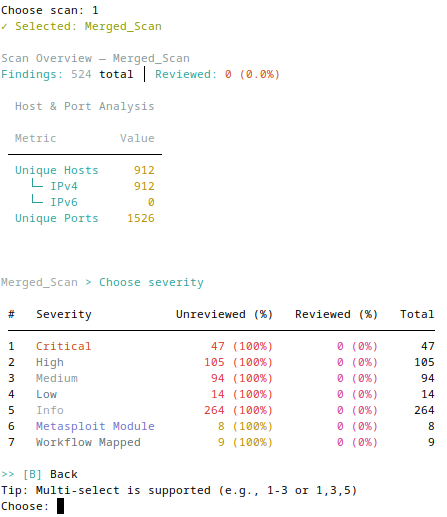
Start your review with an overview of findings by severity level
How It Works
Cerno turns a raw Nessus export into a tracked, actionable verification workflow:
- Import — parse one or more
.nessusfiles into a local SQLite database (~/.cerno/cerno.db). - Review — browse findings in an interactive TUI: filter by severity, host, and exploitability; inspect plugin detail, CVEs, and affected
host:ports. - Act — launch nmap / NetExec / Metasploit / custom commands against the exact hosts and ports of a finding, with execution and artifacts logged automatically.
- Track — review state, sessions, and tool history persist in the database, so progress survives restarts and you can compare a host's risk across scans.
The same database and tooling are also exposed over the Model Context Protocol, so an MCP client (e.g. Claude CLI) can query findings and generate commands programmatically.
Installation
Requirements:
- Python 3.11+ on Linux, macOS, or Windows (Linux recommended)
- Optional tools (only if you use them):
nmap,nxc/netexec,msfconsole,claude - Clipboard support on Linux:
xclip,xsel, orwl-copy
Recommended (pipx):
pipx install git+https://github.com/ridgebackinfosec/cerno.git
cerno --help
Alternative (pip):
pip install git+https://github.com/ridgebackinfosec/cerno.git
Development:
git clone https://github.com/ridgebackinfosec/cerno.git
cd cerno
pip install -e ".[dev]"
Shell completion:
cerno --install-completion # Enable tab completion for your shell
Configuration
Configuration file (~/.cerno/config.yaml):
Auto-created with defaults on first run. All settings managed via config file.
cerno config show                    # View all settings with current values
cerno config get <key>               # Get a single config value
cerno config set <key> <value>       # Change a setting
cerno config reset                   # Reset to defaults (creates backup)
Proxychains4 proxy settings:
cerno config set proxychains_enabled true        # Enable proxy routing (default: false)
cerno config set proxychains_host 127.0.0.1      # SOCKS5 proxy host
cerno config set proxychains_port 9000           # SOCKS5 proxy port (matches ssh -D default)
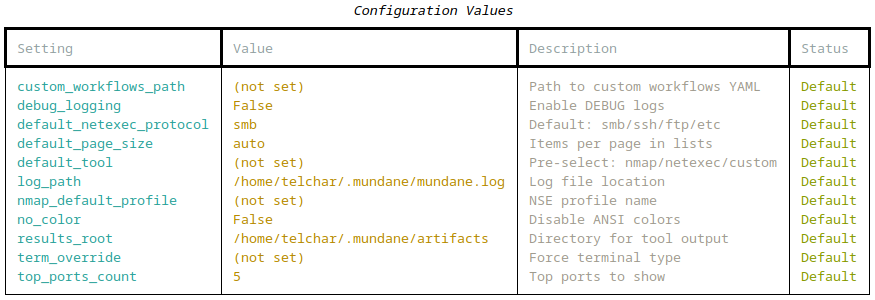
Show all configuration values using "cerno config show"
Features
🔍 Interactive TUI for browsing/reviewing vulnerability findings
Triage hundreds of findings fast — see what matters without scrolling through raw Nessus exports.
Rich tables with paged views, keyboard-driven navigation, and real-time filtering.
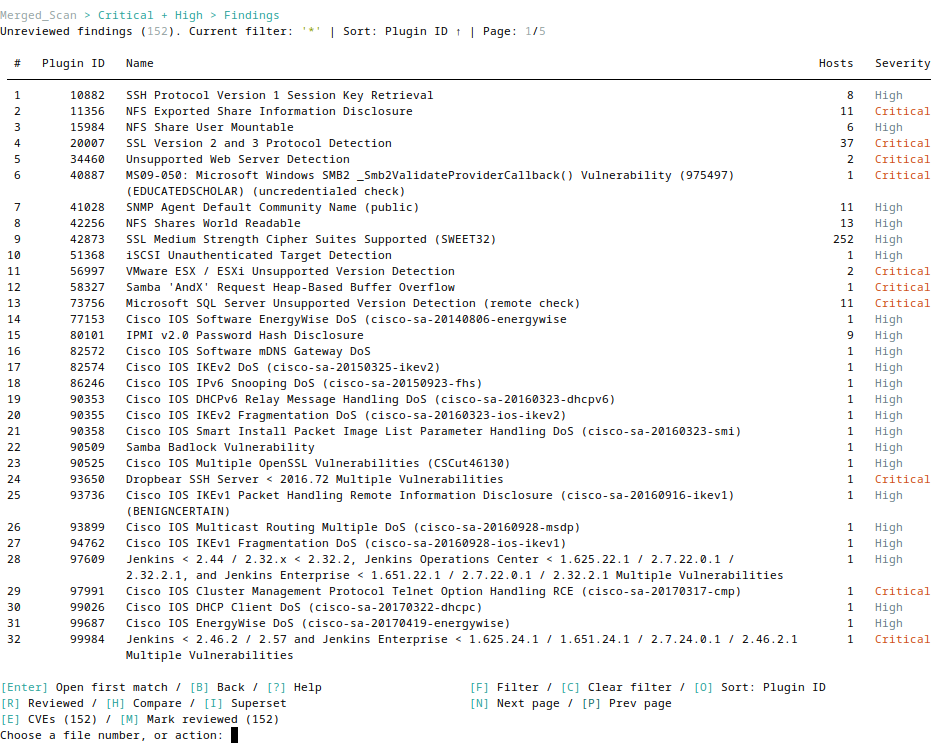
Browse findings with paged tables and comprehensive keyboard shortcuts
Key capabilities:
- Browse by severity, preview plugin details, clipboard copy
- Grouped view (
host:port,port) or raw file view - Multi-select operations, reversible review states
📊 Intelligence & Research
Go from a finding to an exploitation path without context-switching — CVEs, Metasploit modules, and host overlap in one place.
Extract CVEs, search Metasploit modules, and compare findings across hosts.
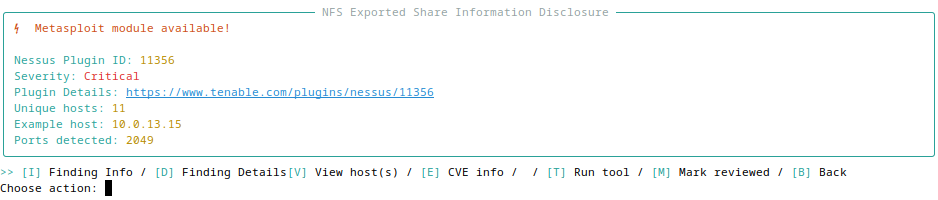
View plugin details with Metasploit module availability and metadata
Features:
- CVE extraction - CVEs imported from .nessus file (press
[E]) - Metasploit search - Find relevant modules by CVE/description
- Workflow mappings - Plugin-specific verification/exploitation steps (press
[W]) - Host comparison - Compare findings across hosts to find identical combinations and superset relationships
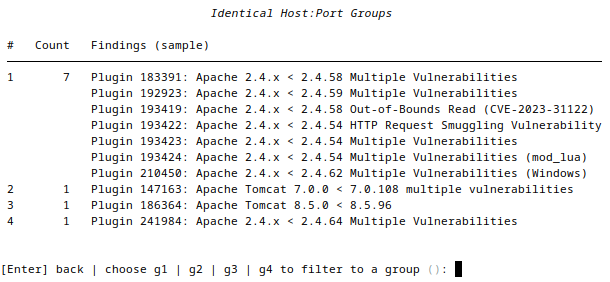
Compare findings to identify identical host:port combinations across plugins
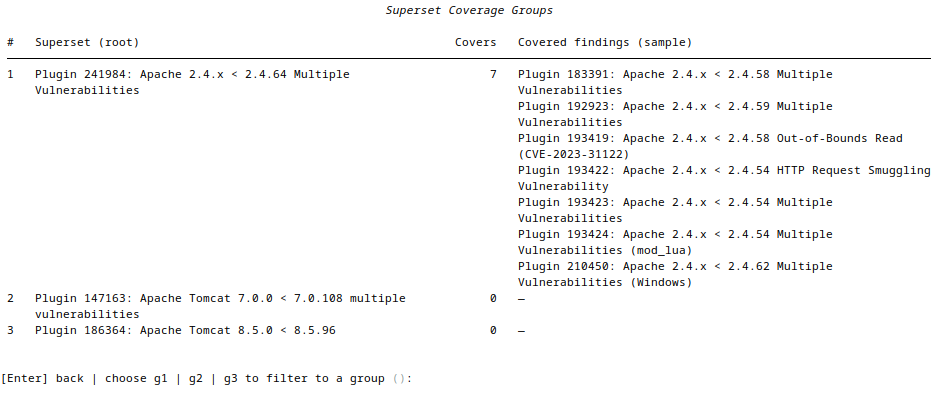
Analyze superset relationships to find which findings cover others
🤖 Claude Assistant
Get a second opinion on exploitability without leaving your review or copying scan data elsewhere.
Ask Claude questions about findings without leaving the TUI. Powered by the claude CLI (claude -p) — no API key required, no data sent to external services beyond what claude itself handles.
Three scopes:
- Finding level — press
[A]inside a finding detail view to discuss that specific plugin: CVEs, CVSS context, exploitability, verification steps - Severity menu — press
[A]at the severity selection screen to discuss all findings across the selected scan(s) - Findings list — press
[A]in the findings list footer to discuss the current set of findings (respects any active severity, name, or group filter)
Conversation persistence: History is saved per-scope in SQLite and resumed automatically on re-entry. Press C inside the chat to clear history for the current scope.
Setup:
# Install Claude Code CLI (required)
npm install -g @anthropic-ai/claude-code   # or follow https://claude.ai/code

# Disable if not wanted
cerno config set claude_assistant_enabled false
Tool availability: [A] is hidden when claude is not on PATH or claude_assistant_enabled is false. It appears in the tool availability table on review startup alongside nmap/netexec/msfconsole.
Note: Responses may be inaccurate — always verify before acting on suggestions.
🔗 NetExec Database Integration
Instantly see where your credentials already work, so you prioritize provable risk over theoretical findings.
Automatically enrich finding displays with data from your NetExec databases—see which credentials work on affected hosts, share access, and security misconfigurations.
Features:
- Credential correlation - Shows which NetExec-discovered credentials have access to affected hosts
- Share access - Displays SMB share read/write permissions across hosts
- Security flags - Highlights SMB signing disabled, Zerologon, PetitPotam vulnerabilities
- Per-host breakdown - Press
[N]in finding view for detailed per-host NetExec context
Configuration:
# NetExec workspace auto-detected at ~/.nxc/workspaces/default/
cerno config set nxc_workspace_path ~/.nxc/workspaces/client_a  # Custom workspace
cerno config set nxc_enrichment_enabled false                    # Disable feature
Supported protocols: SMB, SSH, LDAP, MSSQL, RDP, WinRM, FTP, NFS, VNC, WMI
Note: NetExec databases are read in read-only mode; Cerno never modifies them.
⚡ One-command tool launches
Skip retyping targets — launch the right tool against the exact hosts and ports of a finding.
Launch nmap NSE scripts, NetExec, Metasploit, or custom commands with placeholder substitution.
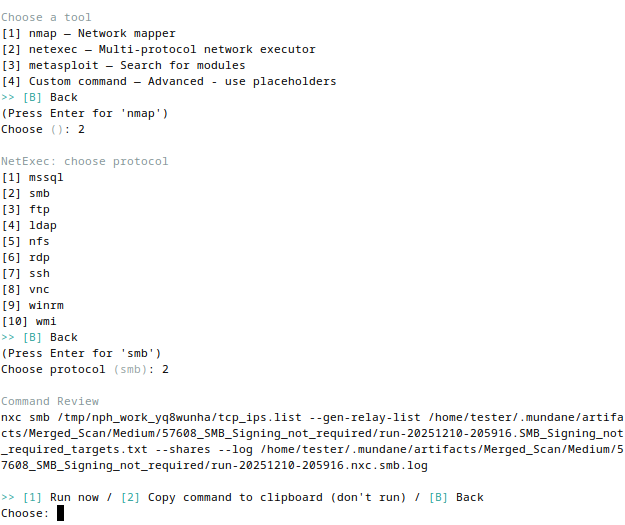
Select tools and review generated commands before execution
Features:
- Launch nmap (NSE profiles, UDP), NetExec, or custom commands
- Placeholder substitution for flexible templating
- Execution logging & artifact tracking
💾 SQLite-backed persistence
Never lose review progress, and see how a host's risk profile changes over time.
Session Management:
- Auto-save/resume interrupted reviews
- Finding status: Unreviewed → In Progress → Done, moved with
[M]; the Done list's[M]moves findings back to Unreviewed - Session statistics (duration, per-severity breakdown)
Database: SQLite-backed persistence at ~/.cerno/cerno.db tracks scans, findings, sessions, tool executions, and artifacts. Cross-scan tracking enables host history queries. See docs/DATABASE.md for schema details.
🔀 Proxychains4 Integration
Run every tool through your pivot with a single toggle — no per-command proxy fiddling.
Route all tool executions (nmap, NetExec, Metasploit, custom commands) through a SOCKS5 proxy via proxychains4. Designed for use with an SSH -D tunnel.
Enable in config (persists across sessions):
cerno config set proxychains_enabled true
cerno config set proxychains_host 127.0.0.1
cerno config set proxychains_port 9000           # Matches: ssh -D 9000 user@host
Or override per session:
cerno review --proxy      # Force-enable for this session
cerno review --no-proxy   # Force-disable for this session
Behavior when active:
[PROXY]badge (magenta) shown in the review session status line- proxychains4 row appears in the startup tool availability table
- Tools run as
proxychains4 -q(quiet) so per-connection chatter doesn't clutter the terminal; a magenta[PROXY] proxychains4 → SOCKS5 host:portline and aRunning via proxychains4spinner confirm routing - Set
cerno config set debug_logging trueto see full proxychains4 output when troubleshooting a tunnel - nmap automatically adds
-Pnand dropssudowhen proxied (ICMP and raw sockets don't traverse SOCKS) - Cerno manages its own
~/.cerno/proxychains4.conf— system config is not touched
Requires:
proxychains4installed and available on PATH.
🔌 MCP server (BETA)
Drive an engagement from an AI client — query findings, build target lists, and generate commands programmatically.
cerno mcp exposes the same scan database and tooling over the Model Context Protocol, so any MCP client (Claude CLI, Claude Desktop, etc.) can work with your findings. Read-only by default; execution and mutation are opt-in. See MCP Server (BETA) below for setup and the full capability reference.
Commands
# Import and review
cerno import nessus <scan.nessus>              # Import a single .nessus file
cerno import nessus <directory>                # Recursively import all .nessus files in a directory
cerno review [--custom-workflows PATH]         # Start interactive review
cerno review --proxy                           # Force-enable proxychains4 routing for this session
cerno review --no-proxy                        # Force-disable proxychains4 routing for this session
cerno review --check                           # Check tool availability and exit

# Manage scans
cerno scan list
cerno scan delete <scan_name>
cerno scan compare <scan1> <scan2>             # Compare findings between two scans
cerno scan history <host_ip>                   # View vulnerability timeline for a host

# View workflows
cerno workflow list [--custom-workflows PATH]

# Configuration
cerno config show                              # Display all settings with current values
cerno config get <key>                         # Get a single config value
cerno config set <key> <value>                 # Set a config value
cerno config reset                             # Reset to defaults (creates backup)

# MCP server (BETA)
cerno mcp                                      # Serve scan data/tooling over MCP (stdio)

# Maintenance
cerno reset                                    # Purge ~/.cerno and return to fresh state
MCP Server (BETA)
cerno mcp exposes your scan database and tooling over the Model Context Protocol,
so any MCP client (Claude CLI, Claude Desktop, etc.) can query findings, build target lists, generate
tool commands, and — when explicitly enabled — execute tools and update review state. It speaks over
stdio, so it is launched by the client rather than run directly in a terminal.
Add it to Claude CLI:
# pipx install (cerno is on PATH)
claude mcp add cerno -- cerno mcp

# development / editable install (point at your checkout's venv binary)
claude mcp add cerno -- /abs/path/to/cerno/.venv/bin/cerno mcp
Then claude mcp list to verify, or /mcp inside a session to see the tools,
resources, and prompts.
The server is read-only by default — execution and mutation tools stay
hidden until you enable them:
cerno config set mcp_allow_execution true   # permit execute_command
cerno config set mcp_allow_mutations true   # permit set_review_state / import_nessus
Gating flags are read once at startup; reconnect (remove + re-add, or restart the client) to apply a change.
See docs/MCP.md for the full tool/resource/prompt reference,
scopes, and management commands.
Keyboard Shortcuts
In the findings list view:
[S]- Cycle sort modes (severity, plugin ID, name, host count)[F]- Filter findings by text (plugin name, description, etc.)[V]- Filter findings by severity level[C]- Clear active text/severity filter[H]- Compare: group findings by identical host:port combinations[O]- Overlapping: find findings whose affected hosts are a superset of another's[X]- Clear group filter (when a comparison/overlap group is active)[D]- View full group details in pager (when a group filter is active)[E]- Extract CVEs for all findings matching current filter[M]- Move to next status: every filtered finding moves one step (Unreviewed → In Progress, In Progress → Done)[D]- Done list; inside it,[M]moves selected findings back to Unreviewed- Status column:
○Unreviewed,◐In Progress [A]- Ask Claude — chat about the current filtered findings set[W]- View workflow verification steps (when available for selected finding)[N]/[P]- Next / previous page[B]- Back to severity menu[?]- Show help menu with all available actions
In the finding detail view:
[I]- Finding Info (plugin metadata, CVSS, CVEs)[D]- Finding Details (host list, port distribution, plugin output)[N]- NetExec Data (per-host credential and access breakdown)[T]- Run Tool (launch nmap, NetExec, Metasploit, or custom workflow)[A]- Ask Claude — chat about this specific finding[W]- View workflow verification steps[M]- Move to In Progress / Move to Done (label follows the finding's status)[B]- Back to findings list
Custom Workflows
Add plugin-specific verification workflows with --custom-workflows (merges & supplements with defaults) or --custom-workflows-only (replaces defaults):
cerno review --custom-workflows my_workflows.yaml
Example workflow YAML:
version: "1.0"
workflows:
  - plugin_id: "57608"
    workflow_name: "SMB Signing Not Required"
    steps:
      - title: "Verify SMB signing"
        commands: ["netexec smb <target> -u <user> -p <pass>"]
Custom command placeholders: {TCP_IPS}, {UDP_IPS}, {TCP_HOST_PORTS}, {PORTS}, {WORKDIR}, {RESULTS_DIR}, {OABASE}
For comprehensive documentation, see Custom Workflows Guide covering:
- Complete YAML schema reference
- Multi-plugin workflows
- Placeholder system details
- Configuration integration
- Best practices and troubleshooting
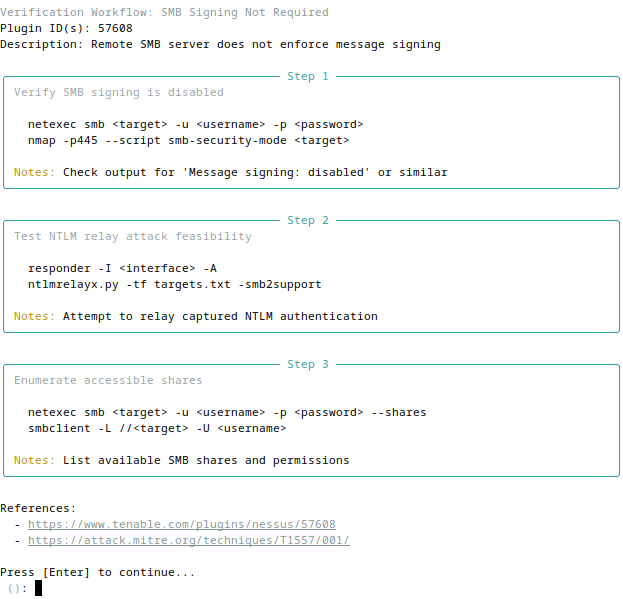
View plugin-specific verification workflows with commands and references
Troubleshooting
Database issues:
# Reset database (re-import required)
rm ~/.cerno/cerno.db
cerno import nessus scan.nessus
Config file issues:
# Reset config to defaults (creates backup)
cerno config reset
Full environment reset:
# Purge ~/.cerno entirely and return to a fresh installation state
cerno reset   # Prompts for typed confirmation before deleting
Import failures:
- Ensure the
.nessusfile is valid XML (not corrupted or truncated) - Check file permissions and path
- Try importing with
--verbosefor detailed output
Tool execution issues:
- Verify tools (nmap, netexec) are installed and on PATH
- Check
~/.cerno/cerno.logfor detailed error messages
Documentation
Releases
Cerno uses automated releases triggered by version changes in pyproject.toml.
How it works:
- When
pyproject.tomlversion is updated and merged tomain, GitHub Actions automatically:- Creates a git tag (e.g.,
v1.0.1) - Generates a GitHub Release marked as "latest"
- Extracts release notes from CHANGELOG.md
- Attaches built wheel and source distribution
- Creates a git tag (e.g.,
View releases: github.com/ridgebackinfosec/cerno/releases
For contributors: To create a new release, update the version in pyproject.toml and add an entry to CHANGELOG.md following Keep a Changelog format. The release workflow runs automatically when changes are merged to main.
Contributing
Found a bug or have a feature request? Please open an issue at:
github.com/ridgebackinfosec/cerno/issues
Pull requests are welcome. For major changes, please open an issue first to discuss.
Target the
developbranch — all contributor PRs should be opened againstdevelop, notmain. Releases flow fromdeveloptomain.
See CONTRIBUTING.md for dev setup, the test workflow, and the TUI ↔ MCP shared-core contract that keeps both interfaces working.
About the Name
Cerno comes from the Latin verb cernō, meaning:
- To discern, distinguish, perceive
- To separate, sift through
- To decide, determine, resolve
The name reflects this tool's core purpose: to help security professionals discern what matters in large vulnerability scans. Just as cernō means to sift through and distinguish the important from the noise, Cerno helps you:
- Discern which findings require immediate action vs. can be deferred
- Separate findings by severity, host, and exploitability
- Perceive patterns across hosts and identify verification paths
- Determine the most efficient approach to vulnerability validation
- Resolve findings through organized, tracked remediation workflows
In penetration testing and vulnerability management, clarity through careful examination is essential—that's Cerno.
Pronunciation: In Classical Latin, cerno is pronounced KEHR-noh (IPA: [ˈkɛr.noː])—the 'c' as a hard 'k' sound, the 'e' as in 'bed', and the 'o' as in 'no' (long). Audio sample
License
This tool orchestrates local utilities and includes Nessus XML parsing functionality adapted from
DefensiveOrigins/NessusPluginHosts.
Respect all dependencies' licenses and your organization's policies.
Reviews (0)
Sign in to leave a review.
Leave a reviewNo results found