opencode-simulator
Health Pass
- License — License: MIT
- Description — Repository has a description
- Active repo — Last push 0 days ago
- Community trust — 14 GitHub stars
Code Fail
- exec() — Shell command execution in src/gui/hub-args.ts
- process.env — Environment variable access in src/gui/hub.ts
Permissions Pass
- Permissions — No dangerous permissions requested
No AI report is available for this listing yet.
An OpenCode Desktop plugin that embeds a live iOS Simulator and gives agents tools to drive it.
opencode-simulator
A live iOS Simulator inside OpenCode Desktop, with tools your agent can drive.

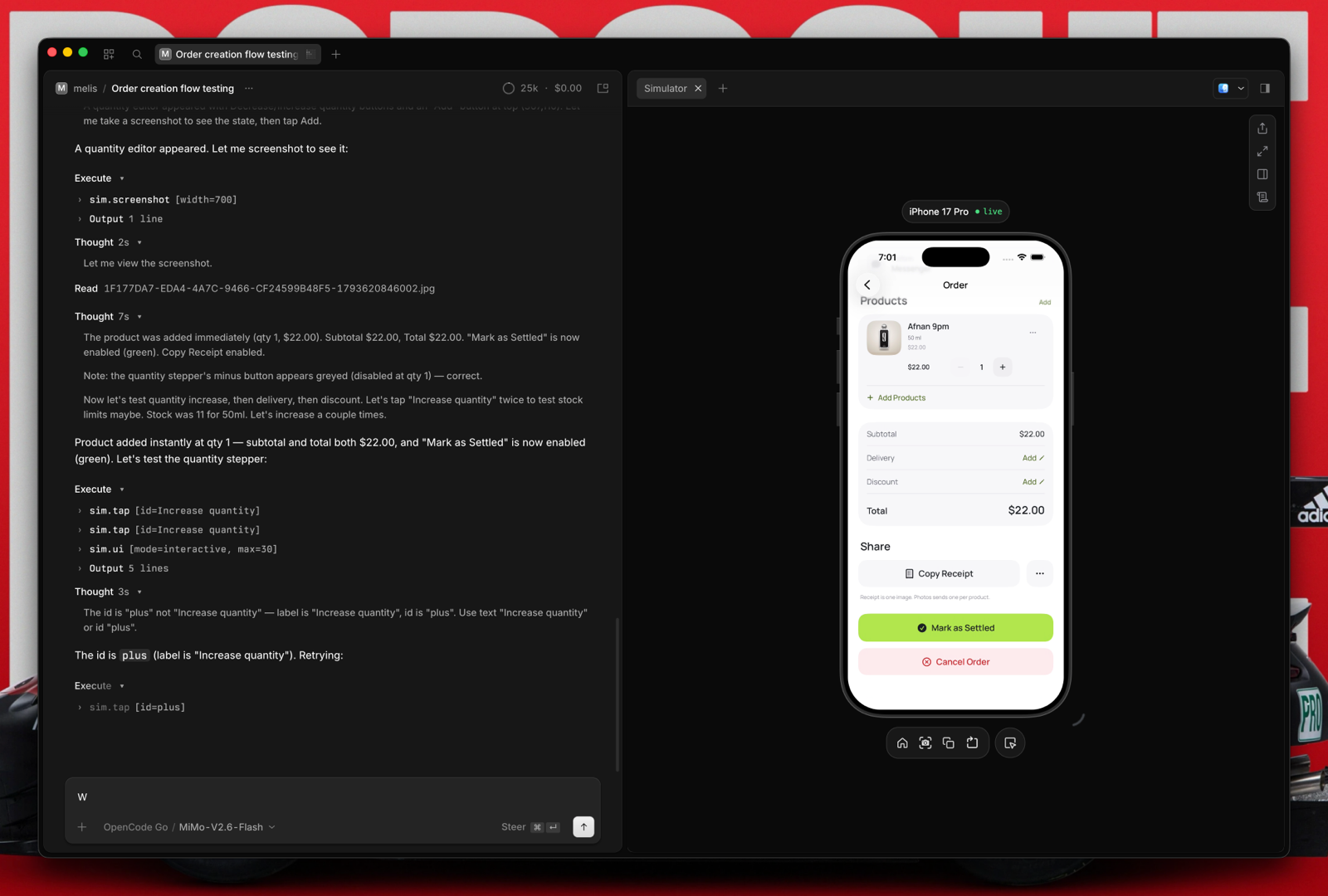
The iOS Simulator streams into a side tab in OpenCode Desktop. You can tap, type,
and rotate it by hand, and your agent can drive it with sim_* tools.
- Live panel. WebRTC H.264 stream, with an HTTP fallback. Follows OpenCode's light and dark scheme.
- Agent tools. Device lifecycle, apps, accessibility reads, input, settings, screenshots.
- Per session. Each session gets its own simulator, and the panel opens in the session that called the tool.
- Managed pool. The plugin creates and reuses its own simulators. Yours are never touched unless you name them.
- Bundled skill. Teaches the agent to use
sim_*instead ofsimctl,axe, or scripts. - Local only. The stream binds to
127.0.0.1. No telemetry.
Install
Requires macOS with Xcode and an iOS runtime, OpenCode Desktop 2.2+, and Node 22+
on PATH.
opencode plugin add opencode-simulator
Or add it to ~/.config/opencode/opencode.jsonc:
{
  "$schema": "https://opencode.ai/config.json",
  "plugins": ["opencode-simulator"]
}
bun install
bun run build
Then add the checkout's absolute path to plugins.
AXe 1.8+ is recommended for accessibility reads and input. Without it, the plugin
falls back to serve-sim.
Use
Start a simulator and open its panel:
sim_start({ app: "com.example.app" })
Install a build you already made, then drive it:
sim_install({ path: "/path/to/MyApp.app" })
sim_launch({ bundleId: "com.example.app" })
sim_ui({ mode: "interactive" })
sim_tap({ text: "Products" })
sim_wait({ text: "Products" })
Two sessions get two simulators, so they never share a screen. A device stays with
a session while its panel is open or its turn is running. To keep one across
turns, pass hold or holdMinutes; sim_idle ends it.
sim_start({ app: "com.example.app", holdMinutes: 30 })
sim_idle()
from: "iPhone 17 Pro"picks the model and gives you a managed device of it.udiduses one exact device, including your own.share: truedrives a device another session owns.
Stream options
Set these under options on the plugin entry:
{
  "plugins": [{ "package": "opencode-simulator", "options": { "streamFps": 30 } }]
}
| Option | Default | Range | Notes |
|---|---|---|---|
streamTransport |
"webrtc" |
"webrtc", "http" |
WebRTC falls back to HTTP |
streamBitrate |
16000000 |
100000–16000000 | WebRTC only, a ceiling |
streamFps |
60 |
1–140 | WebRTC only |
streamMaxDimension |
0 |
0–4096 | 0 is native resolution |
Tools
| Tools | What they do |
|---|---|
sim_devices sim_boot sim_start sim_create sim_delete sim_idle |
Device lifecycle and pool ownership |
sim_install sim_apps sim_uninstall sim_erase sim_launch |
App lifecycle |
sim_status sim_ui sim_wait sim_screenshot |
Inspect the screen |
sim_tap sim_scroll sim_type sim_button sim_rotate |
Input and gestures |
sim_settings sim_keyboard sim_statusbar |
UI settings |
sim_logs sim_crash sim_open_url sim_permissions |
Debug and setup: logs, crash reports, deep links, privacy permissions |
Notes
- serve-sim must run under system Node, not Electron. If the stream says
Stream unavailable, setOPENCODE_SIMULATOR_NODEto a Node 22+ path. - A device's first boot can take a couple of minutes. The panel waits for it and keeps the WebRTC stream. Slow startup phases are in the plugin log.
- Leaving the panel (another tab or session) keeps its stream running, hidden, for up to 10 minutes, so coming back does not reload it. At most four panels are kept this way.
- External simulators are never auto-claimed, auto-refreshed, or auto-shut down.
- Managed devices are named
<model> N · in usewhile an agent works on them and<model> N · idlewhile a session only keeps them. A session keeps its managed device after its turn ends or its panel closes, so you can keep testing. An unused device shuts down after about 30 minutes, keeps its data, and wakes when the panel reopens. Another session that needs a simulator takes an idle one over (a running turn, an open panel, or a hold protects it) before a new one is created.
Nothing is deleted automatically; usesim_delete. - The pool keeps up to five managed devices per model and runtime.
License
MIT
Reviews (0)
Sign in to leave a review.
Leave a reviewNo results found