tarn
Health Warn
- License — License: MIT
- Description — Repository has a description
- Active repo — Last push 0 days ago
- Low visibility — Only 5 GitHub stars
Code Pass
- Code scan — Scanned 12 files during light audit, no dangerous patterns found
Permissions Pass
- Permissions — No dangerous permissions requested
No AI report is available for this listing yet.
A private AI that lives on your Mac. Native SwiftUI app running open models locally with llama.cpp: memory, web search, images, files, MCP connectors and skills. No account, no cloud.

Tarn
A private AI that lives on your Mac.
No account, no subscription, nothing sent to the cloud.
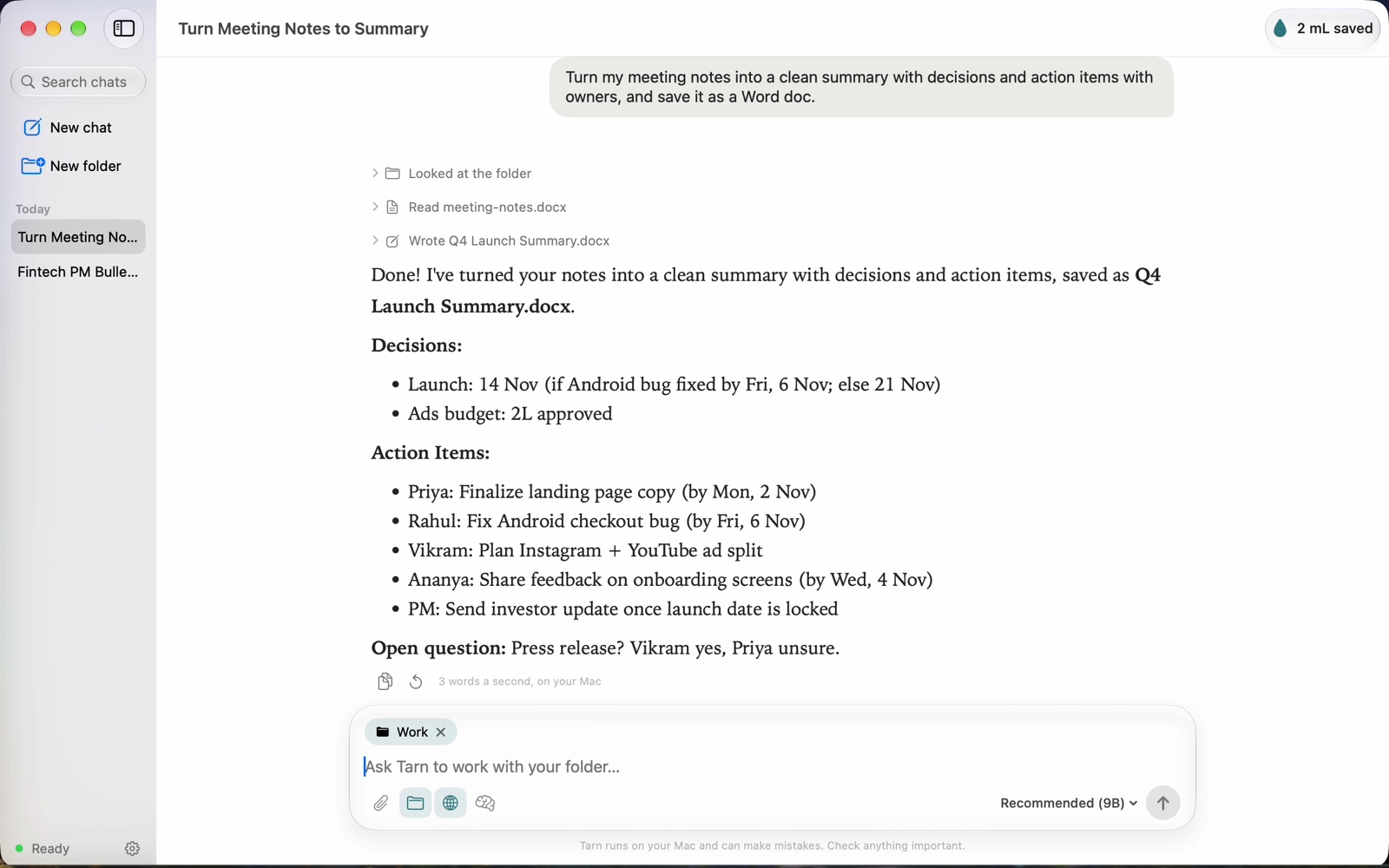
Tarn is a native macOS app that makes local AI simple for anyone. When you first open it, it looks at your Mac and downloads the open model that fits. Then it works like the chat apps you know: memory, web search, images, files, connectors and skills, all running on your computer.
What it does
- Picks the right AI for your Mac. It reads your chip and memory and installs the most capable model that still leaves half your RAM free. You choose between Recommended and Lighter, never a model name. See docs/MODELS.md.
- Remembers you across chats. It saves facts you share, like your name or preferences, and can search earlier conversations. Everything stays in a local file you can view and edit in Settings.
- Sees images. Paste, drop or attach screenshots and photos. The vision add-on loads only when a chat has images, so text-only chats use less memory.
- Looks things up. Searches the web through DuckDuckGo when it needs current information, and links its sources.
- Works in your folders. Share a folder and it can read, search, write and run commands there. It asks before every change.
- Connectors (MCP) and skills. It talks to local and remote MCP servers, and can import them from Claude Desktop. Skills use the same
SKILL.mdformat as Claude. - Respects your Mac. It warns you when memory runs low, unloads the model when idle, and keeps its prompt cache capped.
- Moves with you. It backs up chats, memories, skills and connectors to one zip file and restores them on a new Mac.
- Updates itself. Sparkle updates (optional), plus an update check on each launch for the model files.
- Counts the water you save. About 1.1 mL per answer not served from a data center. The method is in docs/WATER.md.
Requirements
- A Mac with Apple silicon (M1 or later)
- macOS 26 or later
- 8 GB of memory or more
Install
Download Tarn from tarn-ai.vercel.app or the latest release, or build it yourself (below). Releases are signed with a Developer ID and notarized by Apple, so Tarn opens like any other app, and it updates itself: it checks for a new version each time it opens and installs it when you quit.
Build from source
brew install xcodegen
python3 scripts/fetch_llama.py        # llama.cpp engine, pinned and SHA-256 checked
xcodegen generate
xcodebuild -scheme Tarn -configuration Release -derivedDataPath build/DerivedData build
xcodebuild -scheme Tarn -derivedDataPath build/DerivedData test
To keep your real profile untouched while developing, point the app at scratch folders:
TARN_DATA_DIR: a scratch data folder instead of~/Library/Application Support/TarnTARN_MODELS_DIR: a shared models folderTARN_LLAMA_SERVER: a different engine binary
In Debug builds, scripts/dev/ has test drivers:
tour.shwalks every screen and takes screenshots.run_script.shplays scripted chats end to end.autosend.shsends one message.
How it's built
| Part | Where |
|---|---|
| SwiftUI app, Liquid Glass UI | Tarn/Views, Tarn/App |
| Agent loop, memory, tools | Tarn/App/AppModel.swift, Tarn/Services |
| Model catalog and per-Mac fit rule | Tarn/Model/Catalog.swift, scripts/catalog.source.json |
| Engine | llama.cpp llama-server, bound to 127.0.0.1 with a random key and stopped by a watchdog if the app exits |
| MCP client (stdio and Streamable HTTP) | Tarn/Services/MCP.swift |
Privacy
Tarn sends no analytics and has no account. Only these leave your Mac:
- the one-time model download from Hugging Face
- web searches, if you turn them on
- update checks
- whatever you approve for connectors you add
Your chats never leave your Mac. Details are in website/privacy.html.
License
MIT, see LICENSE. Bundled and downloaded components keep their own licenses; see THIRD_PARTY_NOTICES.md.
Reviews (0)
Sign in to leave a review.
Leave a reviewNo results found