feed-the-fam-tracker
Health Pass
- License — License: NOASSERTION
- Description — Repository has a description
- Active repo — Last push 0 days ago
- Community trust — 16 GitHub stars
Code Warn
- process.env — Environment variable access in tools/tests/run.mjs
- network request — Outbound network request in tools/tests/run.mjs
Permissions Pass
- Permissions — No dangerous permissions requested
No AI report is available for this listing yet.
A free job-search tracker for designers. Not for sale. Make it yours.
Feed the Fam Tracker
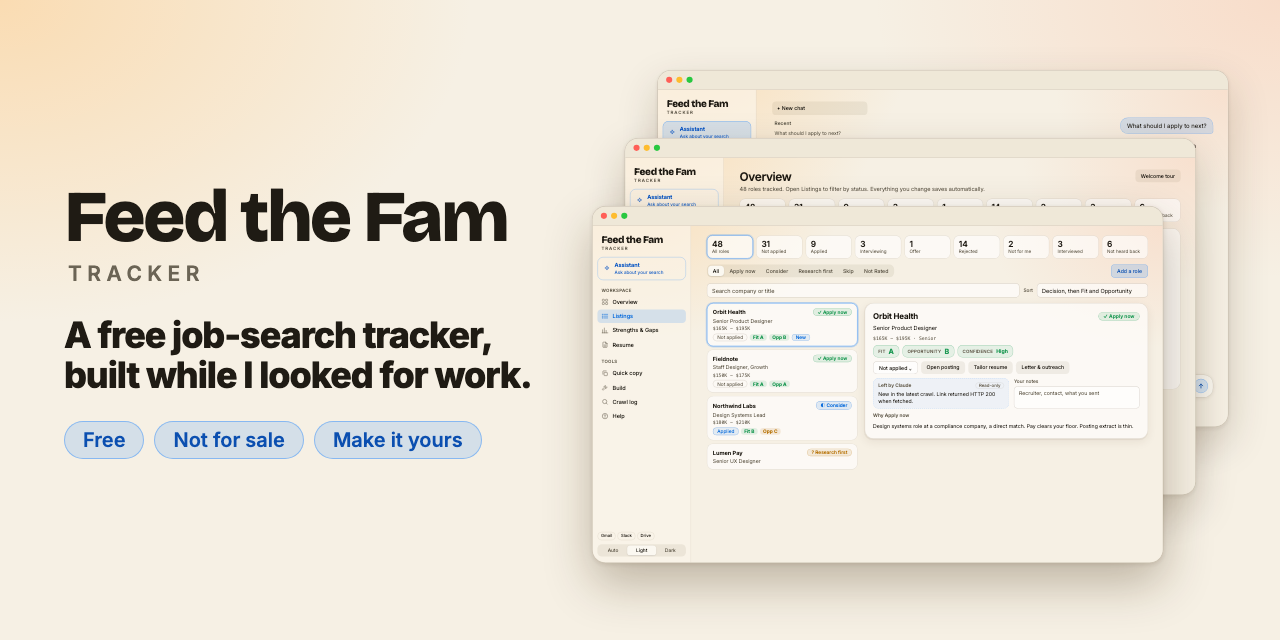
A free job-search tracker I built while I was looking for work. It keeps every role in one place, grades each one honestly, and helps with the next step. It is not for sale, and it never will be. Take it, change it, make it fit your role.
I got laid off. My neighbors and my community are going through the same thing, and the not-knowing is its own kind of stress. I'm not going to charge anyone for help.
— David Rivas
What it does
- Keeps your search in one place. Add a role by pasting a link, pasting a job description, or typing it in. See every status at a glance, with a timeline of applications, rejections, interviews and "not heard back."
- Finds new roles with one button. The Crawl button in the top bar opens a short dialog: pick job boards, Gmail, Slack or other sources and a time window, and it writes a read-only prompt for you to paste into Claude Code. The page never runs the crawl itself, and it shows when you last crawled.
- Grades each role honestly. Pass-or-fail gates (pay, remote, employment type, and more), then Fit (can you win it?) and Opportunity (is it worth having?) from A to F, with the reasons. A strengths-and-gaps web shows where you are strong and where you are not.
- Helps with the next step. Tailor your résumé to a posting using only facts from your own résumé, draft cover letters and outreach (nothing is sent for you), prepare for interviews, and ask an assistant what to apply to next.
- Turns gaps into projects. Generate or write Build ideas, and track each one from Idea to Shipped.
- Looks after you too. An hourly pep talk from future you, because the search is a mental game.
How it works
Two parts do different jobs:
| In the page | In Claude Code |
|---|---|
| Grade and explain roles | Search job boards for new roles |
| Tailor your résumé | Grade lots of roles at once |
| Letters, outreach, interview prep | Evaluate roles you add by link or paste |
| The Assistant | Read Gmail for status updates (optional) |
| Runs on your own Claude account | Runs on your computer |
It does not fill out or submit applications for you. You still apply yourself. The tracker helps you decide where to spend your energy and gets your materials ready. Your data stays in your Claude account and your browser, and this repository contains none of anyone's personal data.
What you need
- A Claude account (the AI parts of the page run on your own subscription).
- Claude Code for searching and bulk grading. It needs a paid Claude plan (or a Claude Console account). It is optional for tracking, and the page has a built-in "New to Claude Code?" guide.
- Python 3 and Git (both are standard on a Mac).
- To run the tests you also need Node.js 22 or newer and Google Chrome (
python3 tools/tests/run_tests.py).
The tracker itself is free. The AI runs on your Claude account, so that part has whatever cost your plan has.
Quick start
- Get the code into a folder called
job-searchin your home folder (the page's built-in prompts use that name, so keeping it avoids confusion; another name works too):git clone https://github.com/rivasme/feed-the-fam-tracker.git ~/job-search cd ~/job-search - Open Claude Code in that folder:
claude - Ask it: "Build the tracker page with
python3 tracker-app/build.pyand publish it as an Artifact. Give me the link."
If your Claude Code can't publish Artifacts, build a local copy withpython3 tracker-app/build.py tracker.htmland open it in your browser. A local copy is good for tracking, but it loses the in-page AI features (grading, tailoring, the Assistant), because those need the page to run inside Claude. - Open the page. A short welcome tour asks for your name, your résumé (upload a PDF, Word or text file, or paste it), and what you want. It then gives you copy-ready prompts for Claude Code.
- Add your first role and let the grading do its thing.
- When you want new roles, click Crawl at the top, choose your sources, copy the prompt and paste it into Claude Code.
Updating
Your tracker is a copy of this repository, so it does not update by itself.
- In the project folder, run
git pull(or ask Claude Code to). - Rebuild and republish the page:
python3 tracker-app/build.py tracker-app/dist/index.html, then publish it (the Rebuild task in Help has the prompt). - Read
CHANGELOG.mdfor what changed and any step for your existing roles.
How you find out there is an update
- Every prompt you paste into Claude Code starts with an update check: Claude runs
python3 tools/check_update.py, which compares yourVERSIONwith the repository and tells you in one line whether an update is available. It never pulls or changes anything else without your yes. - When there is an update, the check writes
logs/update-notice.json(what is new, copied fromCHANGELOG.md). The next time the page is rebuilt, an Update available button appears under the version at the bottom of the side nav. Click it to read what is new, then Copy update prompt and paste it into Claude Code. That prompt pulls the new version, explains what changed, and rebuilds the page. build.pyalso prints a notice when you are behind.- On GitHub, choose Watch, then Custom, then Releases to get an email for each release.
The page only knows your update status as of its last build. Your roles, grades, profile and logs are not tracked by git, so an update never overwrites them.
Make it yours
Built for designers first, but it is meant to be reverse engineered:
- Swap the gates. Your pay floor, remote rules and what you will never do. See
grading/rubric-v2.mdandgrading/profile.template.md. The tour's Claude Code prompt fills in your owngrading/profile.md, which stays on your computer. - Rewrite the rubric. Decide what a strong match means in your field.
- Change the Build ideas. Portfolio projects that fit the role you want.
- Make the pep talks yours. Edit the messages in
tracker-app/template.html. - Change anything else. You do not have to write code by hand. Open Claude Code in this folder and tell it what you want to change.
Engineers, product managers, data people, writers, designers: please make a version that fits your role and tell me about it.
Tell me how it went (this is the review)
GitHub has no star ratings for projects, so here is what works:
- Start a Discussion in Show and tell: what you changed, what role you made it for, and what you learned.
- Open an issue with the How it went form: what worked and what broke.
- Star the repo so other people searching can find it.
- Send a pull request if you fixed or improved something. Code review is welcome.
Please never include your résumé, contact details or real application data in an issue, discussion or pull request. See CONTRIBUTING.md.
License
This project uses the PolyForm Noncommercial License 1.0.0 (see LICENSE). In plain English:
- You can use it, copy it, change it and share it for any noncommercial purpose, including your own job search and helping people in theirs. Charities, schools and public-interest groups can use it too.
- You can't sell it, charge for it, or build a paid product or service out of it. Don't take this and make money on it. That's a low.
- If your intended use is unclear, open a Discussion and ask.
This summary is not legal advice. The LICENSE file is what counts.
Credits
Built by David Rivas with Claude Code. David is a designer who does not write code by hand: he directs Claude Code and reviews what it makes.
Reviews (0)
Sign in to leave a review.
Leave a reviewNo results found