feed-curator
Health Warn
- License — License: MIT
- Description — Repository has a description
- Active repo — Last push 0 days ago
- Low visibility — Only 9 GitHub stars
Code Fail
- spawnSync — Synchronous process spawning in scripts/build-binary.ts
- fs.rmSync — Destructive file system operation in scripts/build-binary.ts
Permissions Pass
- Permissions — No dangerous permissions requested
This is a personalized RSS feed reader and curator that leverages Claude Code (Anthropic's CLI) to summarize articles, score relevance, and generate daily briefings based on your reading history.
Security Assessment
The overall risk is Medium. It does not request explicitly dangerous system permissions and contains no hardcoded secrets. However, it does make network requests to fetch RSS feeds and relies heavily on Anthropic's services. Two notable code issues were flagged: synchronous process spawning (`spawnSync`) and destructive file operations (`fs.rmSync`). Both are isolated within the build script (`scripts/build-binary.ts`). While these are standard practices for compiling a binary, the tool's core functionality inherently involves sending your RSS reading habits and fetched article data to an external AI service.
Quality Assessment
The project is highly active, having received updates as recently as today. It includes a clear MIT license and comprehensive documentation. The tool is well-structured, offering a straightforward CLI and a local Web UI. The main drawback is low community visibility. With only 9 GitHub stars, it is a very new or niche project, meaning it has not yet undergone widespread peer review or testing.
Verdict
Use with caution — the application is active and actively maintained, but its low community adoption and inherent reliance on sending local data to external AI services warrant a careful review before regular use.
Personalized RSS briefings for developers, powered by Claude Code. No API keys needed.
Feed Curator
Personalized RSS briefings for developers, powered by Claude Code. No separate API keys.
Your reading history trains the curation — the more you read and dismiss, the sharper your daily briefing becomes.
日本語版は下にあります / Japanese version below
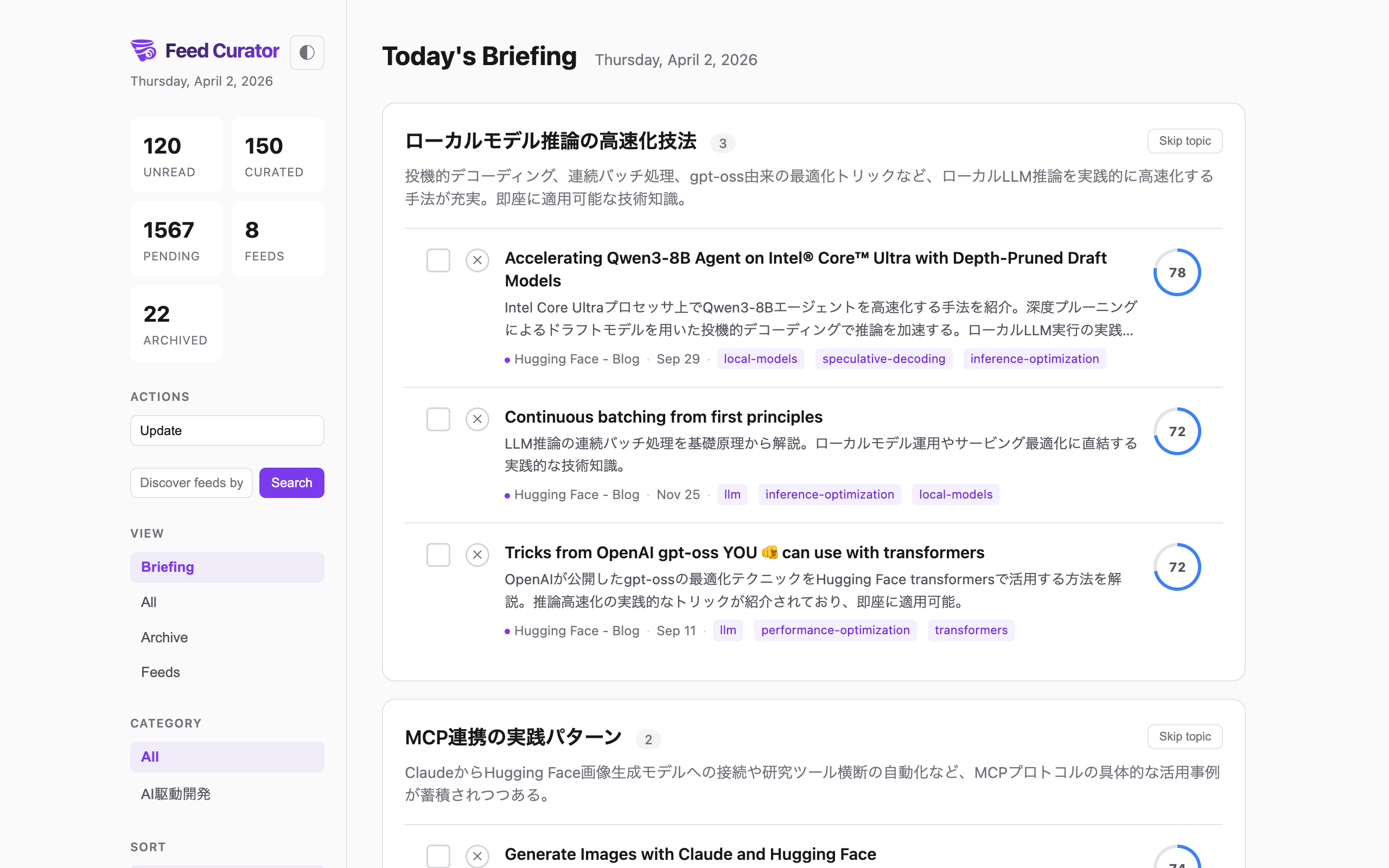
Daily Briefing — AI clusters articles by topic and summarizes each group
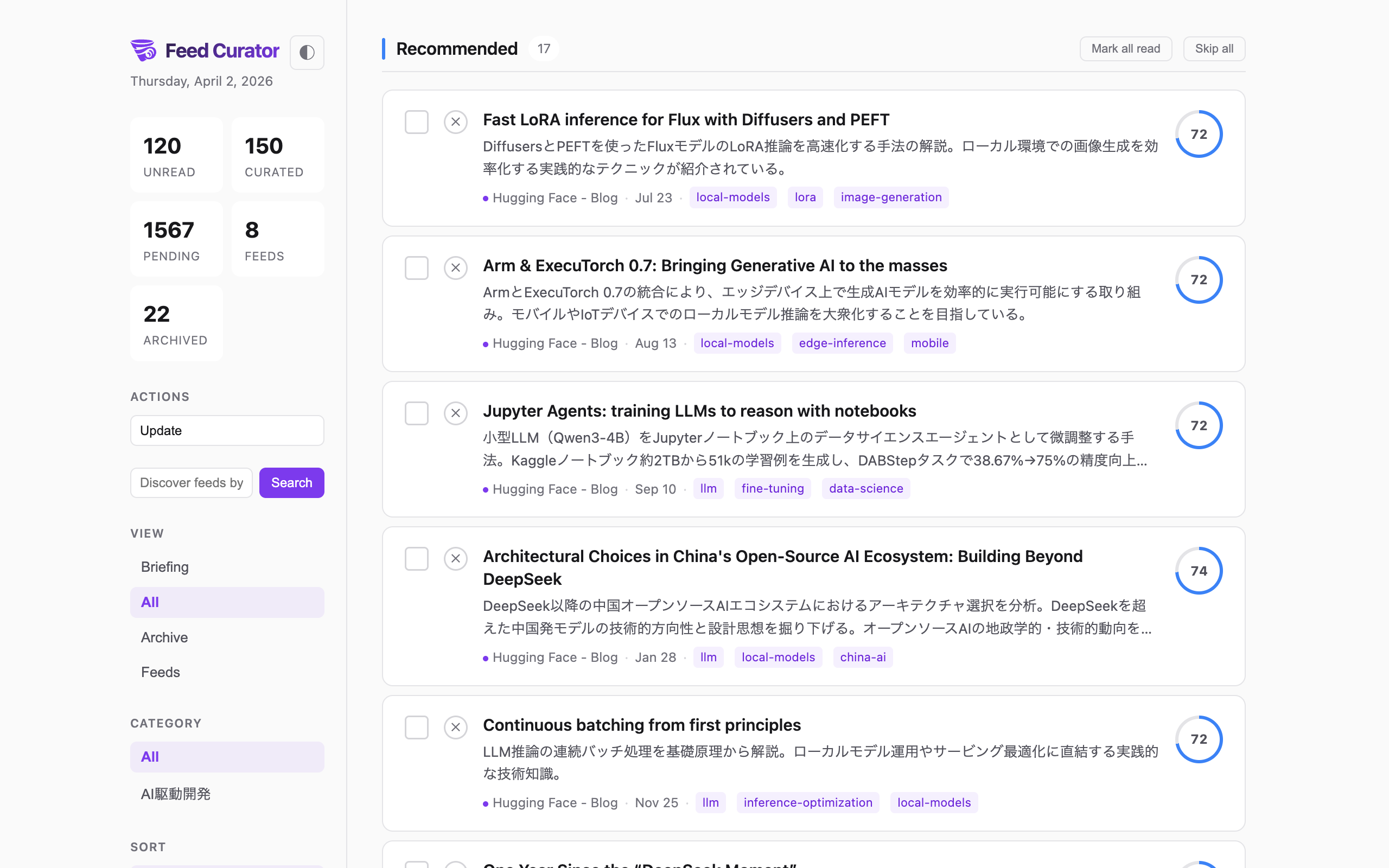
More screenshots| All Articles | Feed Management |
|---|---|
 |
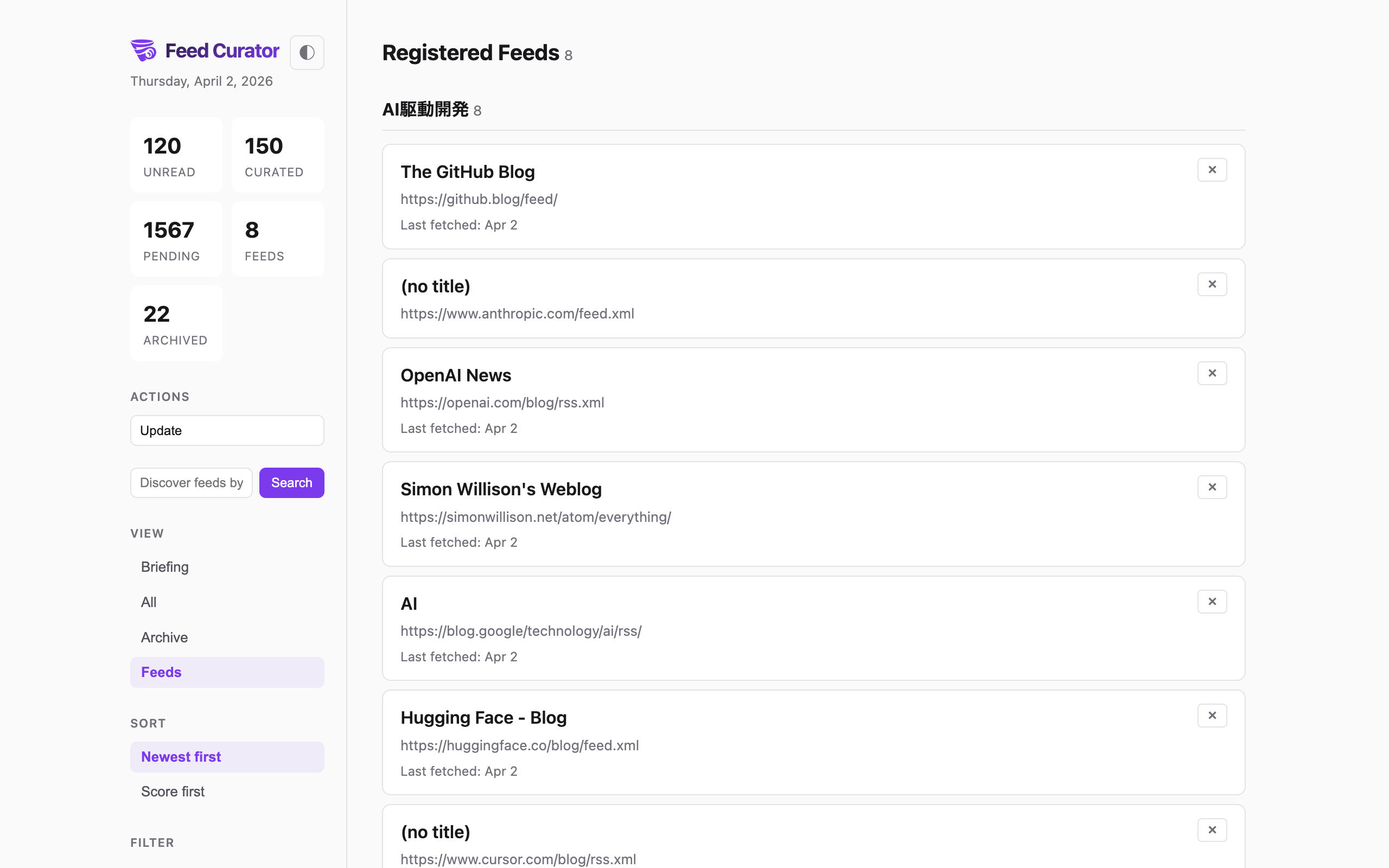 |
| Score-ranked articles with tier grouping | Manage feeds by category |
Features
- No API Keys — Claude Code itself is the AI curator; no separate API key setup required
- Personalized Scoring — Learns from your reading history (reads, dismisses) to boost what you care about
- AI Curation — Scores relevance (0.0-1.0), writes summaries, assigns topic tags — all in your language
- Daily Briefing — AI clusters today's articles by topic with summaries
- Feed Collection — Register RSS/Atom feeds by URL or discover them by topic via AI
- Web UI — Two-column layout with tier grouping, filters, read/unread tracking, dark/light theme
- Multi-language — Summaries and briefings written in your preferred language
Requirements
- Node.js (v20+)
- Claude Code CLI
Quick Start
# Install and start
npx feed-curator serve
# Open http://localhost:3000
Or install globally:
npm install -g feed-curator
feed-curator serve
- Choose your language when prompted on first visit
- Add feeds — discover by topic in the search box, or load a starter pack:
npx feed-curator init --starter # Adds 12 popular dev/AI/security feeds - Click "Update" to fetch articles + AI curate + generate briefing
That's it — the Web UI handles everything. For advanced use, see the CLI commands below.
CLI Commands
feed-curator init --starter            # Load starter feed pack
feed-curator add <url> [-c category]   # Register RSS feed
feed-curator list                      # List registered feeds
feed-curator fetch                     # Fetch articles from all feeds
feed-curator add-article <url>         # Add single article URL
feed-curator articles [--uncurated] [--unread] [--json]
feed-curator update <id> --score <n> --summary "..." [--tags "a,b"]
feed-curator tag <id> <tags>           # Set tags on an article
feed-curator read <id...>              # Mark articles as read
feed-curator unread <id...>            # Mark articles as unread
feed-curator categorize <id> <cat>     # Set feed category
feed-curator profile [--prompt]        # Show reading profile
feed-curator serve [--port 3000]       # Start web UI server
feed-curator config <key> [value]      # Get/set config
All commands also work with npx feed-curator <command>.
Web UI
Start with feed-curator serve and open http://localhost:3000.
Views
- Briefing — AI-generated daily briefing with topic clusters
- All — All articles (curated and uncurated) grouped by tier
- Archive — Dismissed and archived articles
- Feeds — Manage registered feeds by category
Features
- Tier grouping — Must Read (85-100) / Recommended (70-85) / Worth a Look (50-70) / Low Priority (0-50)
- Score ring — Visual score indicator per article
- One-click actions — Update (fetch + curate + briefing), or run each step individually
- Feed discovery — Enter a topic in the sidebar to discover and add feeds via AI
- Filters — Category, read status, tags (combinable, persisted in URL)
- Read tracking — Click to read, checkbox toggle, mark-all-read per section, skip/dismiss
- Dark/Light/Auto theme — Follows OS by default, or manually toggle (saved to localStorage)
- Multi-language — Select your language on first visit; summaries and briefings use it
How Curation Works
- Fetch — pulls new articles from all registered RSS feeds
- Curate — AI reads uncurated articles and for each one:
- Scores relevance (0.0-1.0) based on novelty, depth, utility
- Adjusts scores using your reading profile (preferred/ignored tags)
- Writes a 2-3 sentence summary in your configured language
- Assigns 1-3 topic tags
- Briefing — AI clusters today's curated articles by topic with summaries
- Results appear in the Web UI and a Markdown digest is generated
In the Web UI, the Update button runs all three steps in sequence.
Architecture
CLI (Node.js + TypeScript + SQLite)     Web UI (SSE-based)
  Data management                         Update / Fetch / Curate / Briefing
  Feed fetching & parsing                 Feed discovery
  Web UI server (http)                    Read/dismiss/filter management
No API keys needed — Claude Code itself is the AI.
Data
- SQLite database:
data/feed-curator.db(auto-created, gitignored) - Digest output:
output/digest-YYYY-MM-DD.md(gitignored)
Roadmap
Next
- Cross-feed duplicate detection — Deduplicate overlapping articles
- Two-stage curation (fast pass + precision re-rank) — Speed up large feed sets
- Full-text re-curation for promising articles — Deeper analysis for top candidates
Planned
- Multi-day storyline tracking — Follow topics across days
- Manual preference hints (two-layer preference memo) — Tell the AI what you care about explicitly
- Facet-based similar article recommendations — Discover related reads
Exploring
- MCP server support — Use from Claude Desktop / Claude Code directly
- Standalone binary distribution — Single binary via Bun compile
- Homebrew tap —
brew install feed-curator
Feed Curator
Claude Codeで動く、APIキー不要の、開発者向けパーソナル技術朝刊。
読んだ記事・スキップした記事から嗜好を学習し、毎日のブリーフィングを最適化します。
日次ブリーフィング — AIが記事をトピック別にクラスタリングして要約
その他のスクリーンショット| 記事一覧 | フィード管理 |
|---|---|
|
|
| スコア順・ティア別の記事表示 | カテゴリー別のフィード管理 |
特徴
- APIキー不要 — Claude Code自身がAIキュレーター。別途APIキーの設定は不要
- パーソナライズ — 既読・スキップ履歴から学習し、興味のあるトピックのスコアを自動調整
- AIキュレーション — 関連度スコア(0.0-1.0)、要約、トピックタグを設定言語で生成
- 日次ブリーフィング — AIが今日の記事をトピック別にクラスタリングして要約
- フィード収集 — URLでRSS/Atomフィードを登録、またはトピックでAIが自動検索
- Web UI — 2カラムレイアウト、ティア別グループ、フィルター、既読管理、ダーク/ライトテーマ
- 多言語対応 — 要約とブリーフィングを設定した言語で出力
必要なもの
- Node.js (v20+)
- Claude Code CLI
クイックスタート
# インストールして起動
npx feed-curator serve
# http://localhost:3000 を開く
またはグローバルインストール:
npm install -g feed-curator
feed-curator serve
- 初回アクセス時に言語を選択
- フィードを追加 — 検索ボックスでトピック検索、またはスターターパックを読み込み:
npx feed-curator init --starter # 開発/AI/セキュリティの人気フィード12件を追加 - 「Update」ボタンで記事取得 → AIキュレーション → ブリーフィング生成を一括実行
Web UIですべて完結します。高度な使い方はCLIコマンドを参照してください。
CLIコマンド
feed-curator init --starter             # スターターフィードパックを読み込み
feed-curator add <url> [-c カテゴリー]  # RSSフィード登録
feed-curator list                       # 登録フィード一覧
feed-curator fetch                      # 全フィードから記事取得
feed-curator add-article <url>          # 単独記事URL追加
feed-curator articles [--uncurated] [--unread] [--json]
feed-curator update <id> --score <n> --summary "..." [--tags "a,b"]
feed-curator tag <id> <tags>            # 記事にタグ設定
feed-curator read <id...>               # 既読にする
feed-curator unread <id...>             # 未読に戻す
feed-curator categorize <id> <cat>      # フィードのカテゴリー設定
feed-curator profile [--prompt]         # 読書プロファイル表示
feed-curator serve [--port 3000]        # Web UIサーバー起動
feed-curator config <key> [value]       # 設定の取得/変更
npx feed-curator <コマンド> でも同様に使えます。
キュレーションの仕組み
- Fetch — 全フィードから新着記事を取得
- Curate — AIが未キュレーション記事を処理:
- 新規性、技術的深さ、実用性に基づきスコアリング (0.0-1.0)
- 既読履歴のプロファイルに基づきスコアを調整
- 設定言語で2-3文の要約を生成
- 1-3個のトピックタグを付与
- Briefing — AIが今日のキュレート記事をトピック別にクラスタリングして要約
- Web UIとMarkdownダイジェストに結果が反映
Web UIのUpdateボタンで3ステップを一括実行できます。
ロードマップ
次のリリース
- クロスフィード重複検出 — 重複記事の自動検出
- 2段階キュレーション — 高速パス+精密リランクで大量フィードに対応
- 有望記事のフルテキスト再キュレーション — 上位候補をより深く分析
計画中
- マルチデイ・ストーリーライン — 日をまたぐトピック追跡
- 手動嗜好ヒント — AIに明示的に興味を伝える2層プリファレンスメモ
- 類似記事レコメンデーション — ファセットベースの関連記事発見
検討中
- MCPサーバー対応 — Claude Desktop / Claude Codeから直接利用
- スタンドアロンバイナリ — Bun compileによる単一バイナリ配布
- Homebrew tap —
brew install feed-curator
ライセンス
MIT
Reviews (0)
Sign in to leave a review.
Leave a reviewNo results found