brix
Health Warn
- License — License: MIT
- Description — Repository has a description
- Active repo — Last push 0 days ago
- Low visibility — Only 5 GitHub stars
Code Pass
- Code scan — Scanned 12 files during light audit, no dangerous patterns found
Permissions Pass
- Permissions — No dangerous permissions requested
No AI report is available for this listing yet.
Pick a stack and copy one command. Brix installs the skills. Add your own prompt, and your agent uses those skills to build the repo.
Brix
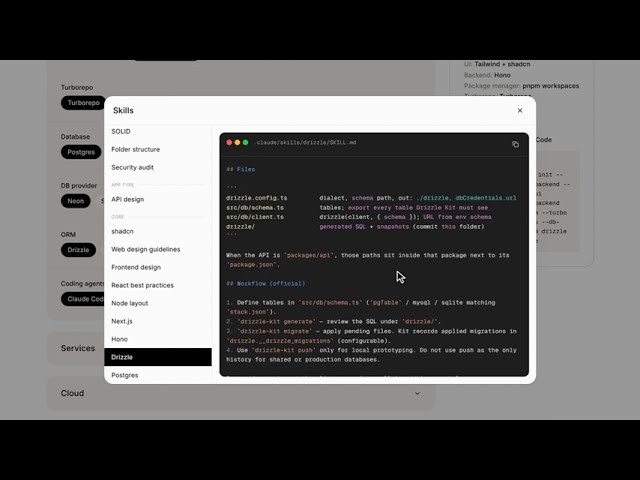
You pick the stack. The command installs the skills into an empty folder and rejects pairs that cannot sit together. It does not generate the app. You add a prompt with your app details. Claude Code, Codex, or Cursor uses the skills to build the repo.
What you do
- Open
/stackon the site, or write the flags yourself. - Pick an app type, then answer only the questions you care about. A partial stack is valid.
- Copy the command. None and unanswered questions stay off it.
- Run it in an empty directory. Review the skill list, or pass
--yesto skip the prompt. - Add a prompt with your app details in Claude Code, Codex, or Cursor. The agent reads the installed skills and builds the repo.
npx usebrix@latest init --app-type frontend-backend --frontend nextjs --backend fastapi --agent cursor --code-index codegraph
npx usebrix installs the same release as npx usebrix@latest. After npm install -g usebrix the command is brix. Node.js 20 or newer is required.
What the command writes
| File | Role |
|---|---|
stack.json |
The choices, agents, notes, and registry version |
AGENTS.md |
Build instructions for the agent |
CLAUDE.md |
Pointer at AGENTS.md |
PROMPT.md |
Starter for the agent. Your own prompt carries the app details. |
.agents/skills/ |
Skills for Cursor and Codex |
.claude/skills/ |
Skills for Claude Code |
With no --agent flag, no agent folder is written. Repeat --agent once per agent to install for more than one.
Each skill runs three phases from the registry: preinstall (a tool binary, when one is required), install (a local SKILL.md, an upstream skill via npx skills add --copy, or project wiring), and postinstall (for example codegraph init). A failed step is recorded and the next skill still runs. The command exits non-zero if any required step failed. If uv is missing, Graphify is skipped.
These skills are always installed: architect, security, verify, solid, api-design, and the upstream security audit. architect tells the agent to scaffold with official CLIs, ship a thin slice, and stop only after verify passes. solid splits routes, services, and data access. api-design covers REST, problem+json errors, pagination, and stateless auth.
Commands
brix init [--yes] [--app-type <id>] [--frontend <id>] [--agent <id>] ...
brix init --config stack.json
brix add
brix doctor
init reads the flags, or --config <stack.json>. With neither, it reads ./stack.json in the current directory if that file exists. Do not pass section flags and --config together. --yes skips the confirm prompt.
add and doctor are reserved. They print that they are not implemented yet. To change a stack, run init again.
Questions and options
Flag names are the section ids in kebab case. --agent is the one exception, and it can be repeated. --turbo is the other: it takes no value. A missing answer and none both omit the flag. An unknown id, or a pair the rules reject, exits before any file is written.
App type sits above the other groups. Core has no None. Every other question does.
App type
| Flag | Values |
|---|---|
--app-type |
frontend-backend, backend-only, frontend-only |
Frontend + Backend is a browser app and a separate API. Backend Only turns off the frontend and UI. Frontend Only turns off the backend, database, cache, storage, and email.
Core
| Flag | Values |
|---|---|
--frontend |
nextjs, vite-react, sveltekit, react |
--ui |
tailwind-shadcn, tailwind, mui, mantine, plain |
--backend |
hono, express, fastify, fastapi, flask, django |
--frontend-runtime |
node, bun |
--backend-runtime |
node, bun |
--package |
npm, pnpm, bun, uv |
--turbo |
no value. Present means Turborepo. Workspaces only omits the flag. |
--database |
postgres, mysql, sqlite, mongo |
--db-provider |
neon, supabase, railway, render, rds, postgres-docker |
--orm |
drizzle, prisma, sqlalchemy, django, mongoose |
--agent |
claude-code, codex, cursor |
DB provider and ORM apply after a real database is chosen. Frontend and backend runtimes come before the package manager. A FastAPI, Flask, or Django backend omits --backend-runtime. A Frontend + Backend app keeps a JavaScript package manager beside a Python API. uv is only for a Python-only backend. --turbo is a bare flag.
Services
| Flag | Values |
|---|---|
--auth |
better-auth, clerk, firebase, authjs |
--payments |
stripe, razorpay |
--cache |
redis-bullmq, upstash, pgboss |
--storage |
s3 (AWS S3), r2 (Cloudflare R2), supabase-storage |
--email |
resend, sendgrid |
--workflows |
temporal, prefect, trigger |
--ai-framework |
baml (Boundary ML), mastra, langchain, langgraph, crewai, ai-sdk (Vercel AI SDK), pydantic-ai |
--testing |
vitest-playwright, jest-cypress, pytest, minimal |
minimal checks only the health route. pgboss needs Postgres. Supabase Storage needs --db-provider supabase and --database postgres. MUI and Mantine apply to React frontends. Mastra and the Vercel AI SDK stay off a Python-only stack. CrewAI and PydanticAI stay off a JavaScript stack. Boundary ML, LangChain, and LangGraph work on either side. The stack form hides cache and monitoring; the CLI still accepts both flags.
Cloud
| Flag | Values |
|---|---|
--monitoring |
sentry, sentry-posthog, otel |
--cicd |
github-actions, gitlab, jenkins |
--deploy |
railway, render, aws, azure, cloudflare |
--containers |
docker, kubernetes |
Containers are recorded on the selection. They do not install a skill. kubernetes means Kubernetes plus Helm. Docker is for local database, cache, files, and email when those options are selected.
Tools
| Flag | Values |
|---|---|
--code-index |
codegraph, graphify, gitnexus |
--reply-style |
caveman |
--implementation |
ponytail |
--memory |
supermemory, mem0, mempalace |
--skill-pack |
mattpocock, superpowers |
CodeGraph is a live code graph over MCP. Graphify indexes code plus docs and other project files. GitNexus is a deeper graph with a noncommercial license. Caveman shortens what the agent says. Ponytail shrinks what it builds. Mem0 is recorded only and does not install a skill. The other memory options and both skill packs install when selected.
Combinations the checker rejects
- A Python-only API (
fastapi,flask, ordjangowith Backend Only) cannot take a JavaScript package manager, Turborepo, Node, Bun, Vitest, Jest, or Trigger.dev. - A JavaScript stack cannot take pytest, Prefect, or uv.
- Frontend + Backend cannot take uv.
- Frontend Only cannot take uv or Python.
- Clerk cannot be used on Backend Only.
- Better Auth and Auth.js cannot be used on Frontend Only, because they need a database.
Develop this repo
Requires Node.js 20 or newer and pnpm 10.12.1.
pnpm install
pnpm dev
pnpm brix init --help
pnpm dev starts the site at http://localhost:3000. Open /stack to build a command. pnpm brix builds the CLI and runs the local brix bin.
Pull requests run typecheck, the CLI bundle, and the Next.js production build. A separate check enforces Conventional Commits on the PR title and the single commit on the branch.
Contributing
Pull request title
The title must look like:
type: subject
Allowed types: feat, fix, refactor, chore, docs, test, style.
The subject must:
- start with a lowercase letter
- stay within 72 characters
- not end with a period
- be an imperative summary (
add,fix,update, notAddedorFixes)
Examples:
chore: add MIT license
feat: nest frontend and backend runtimes
fix: keep stack summary on one line
docs: document contributing rules
Bad titles (these fail CI): License ci, Add MIT license., chore: Add MIT license.
Commit message
Use the same shape as the PR title. When the PR has a single commit, that commit message must match the PR title. Prefer one focused commit per PR.
git commit -m "chore: add MIT license"
Before you open a PR
- Run
pnpm install. - Run
pnpm exec tsc --noEmit,pnpm --filter usebrix build, andpnpm buildlocally when you can. - Set the PR title to
type: subjectbefore or right after opening the PR so the semantic check passes.
Publish usebrix
usebrix is on npm. npm is the source of truth for the published version. Each publish must be a new version. npm will not replace an existing one.
- Create a granular npm access token that can publish
usebrix. - In this GitHub repo, add it as the Actions secret
NPM_TOKEN. - Open Actions → Publish usebrix → Run workflow.
- Enter the version (for example
0.1.5). The branch picker does not matter; the workflow always starts frommain.
That run:
- Publishes
usebrix@<version>to npm with thelatesttag. - Only if publish succeeds, opens a PR that bumps
packages/cli/package.json:- branch
release/usebrix-<version> - title and commit
chore: release usebrix <version>
- branch
- Opens GitHub Release
v<version>.
Merge the PR to sync main. No second publish runs on merge.
The run stops before publish if the version is already on npm, if tag v<version> exists, if packages/cli/package.json on main already has that version, or if the release branch already exists.
npx usebrix and npx usebrix@latest both follow latest. Run the button only for a version you intend to ship. Enable Allow GitHub Actions to create and approve pull requests under Settings → Actions → General so the PR step can run after publish.
Reviews (0)
Sign in to leave a review.
Leave a reviewNo results found