ClaudeUsageBar
Health Warn
- License — License: MIT
- Description — Repository has a description
- Active repo — Last push 0 days ago
- Low visibility — Only 6 GitHub stars
Code Fail
- network request — Outbound network request in Extension/background.js
- network request — Outbound network request in Extension/content.js
- rm -rf — Recursive force deletion command in assets/make-icns.sh
- rm -rf — Recursive force deletion command in build.sh
- rm -rf — Recursive force deletion command in package.sh
Permissions Pass
- Permissions — No dangerous permissions requested
No AI report is available for this listing yet.
See your Claude AI usage limits (5-hour + weekly) live in the macOS menu bar. Native Swift app + browser extension. Color warnings, notifications, 100% local.

ClaudeUsageBar
See your Claude AI usage limits live in the macOS menu bar
Track your Claude 5-hour limit and weekly limit at a glance — no more opening settings, refreshing the page, or getting surprised by a "you've reached your usage limit" message mid-prompt.





TL;DR — A tiny native macOS menu bar app + a browser extension. The extension reads your usage straight from your own logged-in Claude.ai session and shows it in your menu bar like
Claude 35%. It turns orange at 75% and red at 90%, and pings you before you hit the wall.
Why?
If you use Claude, Claude Code, or the Claude Max / Pro plans, you live with two invisible meters: a rolling 5-hour session limit and a weekly limit. Anthropic only shows them buried in Settings → Usage. ClaudeUsageBar surfaces them where you'll actually see them — your menu bar — so you can pace your work and never get blindsided by a rate limit again.
Features
- 📊 5-hour + weekly usage — both Claude limits, live in the menu bar (
Claude 35%). - 🎨 Color warnings — title goes orange at 75%, red at 90%. Glanceable.
- 🔔 Threshold notifications — a macOS alert when any limit crosses 90%, so you can wrap up before you're cut off.
- ⏰ Reset countdown + alarm — see exactly when your 5-hour window resets, with an optional alarm at reset time.
- 🔕 Pick your sound — choose any macOS system sound for alerts (hover to preview).
- 🧩 Reads the real numbers — pulls from Claude.ai's own usage API in your logged-in session. Accurate, not guessed.
- 🪶 Native & tiny — pure Swift
NSStatusItem, no Dock icon, no Electron, negligible resources. - 🔒 100% local & private — your usage never leaves your machine. Talks only to
127.0.0.1. - ⚙️ Customizable title — show 5-hour, weekly, or both; hide the word "Claude" for a minimal
35%. - 🚀 Start at login — set it once and forget it.
Install
1. The menu bar app
Option A — download the prebuilt disk image (easiest):
Grab ClaudeUsageBar.dmg from the latest release and open it.
Option B — build the disk image yourself:
./package.sh
open build/ClaudeUsageBar.dmg
The disk image bundles everything — the app, the browser Extension folder, and an INSTALL.txt — on a single drag-to-install screen. Drag ClaudeUsageBar.app into Applications and launch it from there.
Option C — build and run directly (no disk image):
./build.sh
open build/ClaudeUsageBar.app
The build is ad-hoc code signed (required for start-at-login and notifications). The app appears in the menu bar with no Dock icon. It shows Claude -- until the extension sends data.
💡 Launch the app from /Applications, not
build/—./build.shwipesbuild/on every run, which would break the start-at-login registration.
2. Load the browser extension
Works in any Chromium browser — Chrome, Edge, Brave, Arc.
- Copy the Extension folder somewhere permanent (e.g.
~/Documents). An unpacked extension must stay on disk — loading it from the disk image breaks once the image ejects. - Open
chrome://extensions. - Turn on Developer mode (top-right).
- Click Load unpacked and select that Extension folder.
- Open or reload a logged-in claude.ai tab.
That's it. The menu bar starts updating within a minute.
Usage
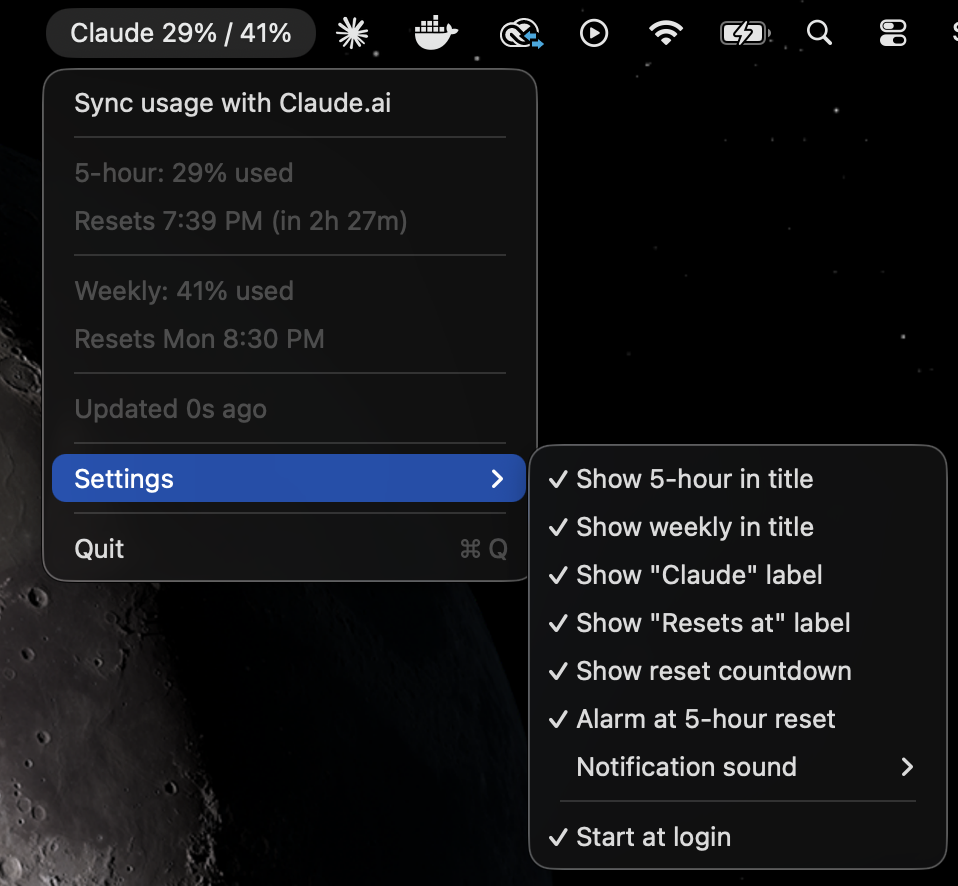
Click the menu bar item for the full breakdown:
Sync usage with Claude.ai
───────────────
5-hour:  35% used
Resets 2:43 PM (in 3h 28m)
───────────────
Weekly:  32% used
Resets Mon 8:30 PM
───────────────
Updated 12s ago
───────────────
Settings ▸
  Show 5-hour in title
  Show weekly in title
  Show "Claude" label
  Show "Resets at" label
  Show reset countdown
  Alarm at 5-hour reset
  Notification sound ▸
  ─────────────
  Start at login
───────────────
Quit
- Color coding — orange ≥ 75%, red ≥ 90%, based on the highest figure shown.
- At 100% the 5-hour title flips to the reset time, e.g.
Claude Resets at 2:40 PM. - Minimal mode — turn off Show "Claude" label for a bare
35%, or show both figures for35% / 32%.
You only need a logged-in claude.ai tab open somewhere — the Settings/Usage page does not have to be open. The extension polls about once a minute and keeps the menu bar fresh on its own.
How it works
claude.ai usage API  →  content.js  →  background.js  →  127.0.0.1:8787  →  Swift app
  (/api/.../usage)       (poll+map)     (relay POST)       (loopback)        (menu bar)
content.jspolls Claude.ai's own usage API (/api/organizations/:id/usage) from your logged-in tab.background.jsrelays the result as JSON to the local app.- The Swift app runs a minimal HTTP server bound to
127.0.0.1:8787only and renders the figures.
Privacy & security
ClaudeUsageBar is fully local and client-side:
- Reads your own usage from your own logged-in session — no credentials stored, no login, no account.
- Sends data only to
http://127.0.0.1:8787on your machine. Nothing is uploaded anywhere. - The local server binds to loopback only, locks CORS to
https://claude.ai, rejects mismatchedHostheaders (DNS-rebinding guard), caps request size, and sanitizes every field before it reaches the menu bar.
FAQ
How do I see how much Claude usage I have left?
Install ClaudeUsageBar — it shows your remaining 5-hour and weekly Claude usage as a live percentage in the macOS menu bar.
Does this work with Claude Code and the Claude Max / Pro plans?
Yes. It reads whatever limits your account has (5-hour session + weekly), so it works across Claude.ai chat, Claude Code, Max, and Pro.
Is it safe / does it have my Claude password?
No password, no login, no data leaves your Mac. It only reads usage numbers from your already-logged-in browser session and shows them locally.
Why a browser extension instead of an API key?
Anthropic doesn't expose usage limits via the public API. The extension reads them from your own session — the same numbers you'd see on the Usage page.
It stopped updating — what do I do?
Anthropic may have changed their internal API. See When it stops working to point it at the new fields in a couple of lines.
Does it support Safari?
Not out of the box — Safari needs Xcode's safari-web-extension-converter. Chromium browsers are plug-and-play.
When it stops working
The extension reads Claude.ai's usage API, so UI/wording changes don't affect it — but the API shape could change. poll() in Extension/content.js:
GET /api/organizations→ finds your organization idGET /api/organizations/:id/usage→ readsfive_hour.utilization/five_hour.resets_atandseven_day.utilization/seven_day.resets_at
If the menu bar stops updating:
- Open a logged-in claude.ai tab + DevTools. Confirm the console shows
[ClaudeUsageBar] content script active (API mode). - Run
await (await fetch("/api/organizations")).json(), then fetch/api/organizations/<id>/usageto see the current field names. - Update the field references in
poll(), then reload the extension atchrome://extensions.
Contributing
Issues and PRs welcome. The whole thing is ~600 lines of Swift + ~150 lines of JavaScript, no build system beyond swiftc.
Disclaimer
Unofficial project. Not affiliated with, endorsed by, or supported by Anthropic. It reads your own usage figures from your own logged-in Claude.ai session, entirely client-side. The figures come from an undocumented Claude.ai endpoint that Anthropic may change at any time. You are responsible for reviewing Anthropic's terms before use.
License
MIT © ClaudeUsageBar contributors
Keywords: Claude usage menu bar, Claude AI usage tracker for Mac, Claude Code usage monitor, Claude 5-hour limit, Claude weekly limit tracker, Claude Max / Pro usage, macOS menu bar Claude rate limit, see how much Claude usage is left.
Reviews (0)
Sign in to leave a review.
Leave a reviewNo results found