letitbrew
Health Warn
- License — License: MIT
- Description — Repository has a description
- Active repo — Last push 0 days ago
- Low visibility — Only 8 GitHub stars
Code Pass
- Code scan — Scanned 12 files during light audit, no dangerous patterns found
Permissions Pass
- Permissions — No dangerous permissions requested
No AI report is available for this listing yet.
Keeps your Mac awake while Claude Code and Codex are actually working — and lets it sleep the moment they stop. A macOS menu-bar app that follows real agent sessions, not timers.

Let It Brew
Your Mac sleeps. Your agent dies. Let It Brew fixes that.
A macOS menu-bar app that holds your Mac awake while a local Claude Code or
Codex session is actually working — and lets it sleep the moment the work stops.


letitbrew.app ·
Download ·
Comparison
The problem
You give an agent a twenty-minute task and walk away. It runs without touching
your keyboard or trackpad, so macOS decides you're idle and puts the Mac to
sleep. You come back to a task that died halfway through.
The usual fixes are blunt. caffeinate and Caffeine keep the Mac awake until
you remember to turn them off. Amphetamine runs on timers and triggers. None of
them know whether your agent is actually doing anything.
Let It Brew watches each agent's real lifecycle and holds the Mac awake for
exactly as long as work is happening. Not a timer. Not a global override.
Nothing to remember to switch off.
Why not just use Caffeine or Amphetamine?
| Let It Brew | Caffeine | Amphetamine | |
|---|---|---|---|
| Best for | Claude Code and Codex work that should keep your Mac awake automatically | A simple manual keep-awake switch | Timers, schedules, and triggers |
| Understands active agent work | ✅ Yes — Claude Code and Codex | ❌ No | ❌ No |
| Releases when agent work stops | ✅ Yes — automatically | ❌ No — manual switch or timer | ❌ No — ends with its session or trigger |
| Closed lid — with charger | ✅ Yes | ❌ No | ✅ Yes |
| Closed lid — without charger | ✅ Yes | ❌ No | ❌ No |
| Agent-specific integration | ✅ Claude Code and Codex | ❌ None | ❌ None |
Full breakdown at
letitbrew.app/compare.
If you want a general-purpose keep-awake utility, those apps are good at that.
Let It Brew does one thing instead: it follows agent sessions.
What it does
- Follows real work, not a clock. Holds the Mac awake only while a local
agent session is genuinely running. - Releases the moment work stops — including when an agent stops to ask you
a question. No idle grace period. - Survives a closed lid. Active agent work keeps running after you shut the
MacBook. - Menu-bar only. No Dock icon, no main window, no notifications.
- Local by design. No account, no cloud, no telemetry. Nothing about your
sessions leaves the Mac. - Knows when to give up. Releases on a low battery floor, on thermal
pressure, and whenever you pause it.
Install
Download the latest notarized DMG from
Releases, verify it
against the SHA-256 published on that release, and drag Let It Brew.app into/Applications.
The signed DMG is the only install channel — no Homebrew cask, no App Store
listing. After installation, Let It Brew can fetch and install later releases
itself.
Let It Brew must sit directly at /Applications/Let It Brew.app — not inside a
subfolder, and not run from the disk image or Downloads. It refuses to manage
its privileged closed-lid service from any other location.
Requires macOS 14 or later. Universal binary, Apple silicon and Intel.
On first launch Let It Brew connects Claude Code and Codex automatically. Codex
needs one extra step from you — see Agent connections.
What you see
| State | Meaning |
|---|---|
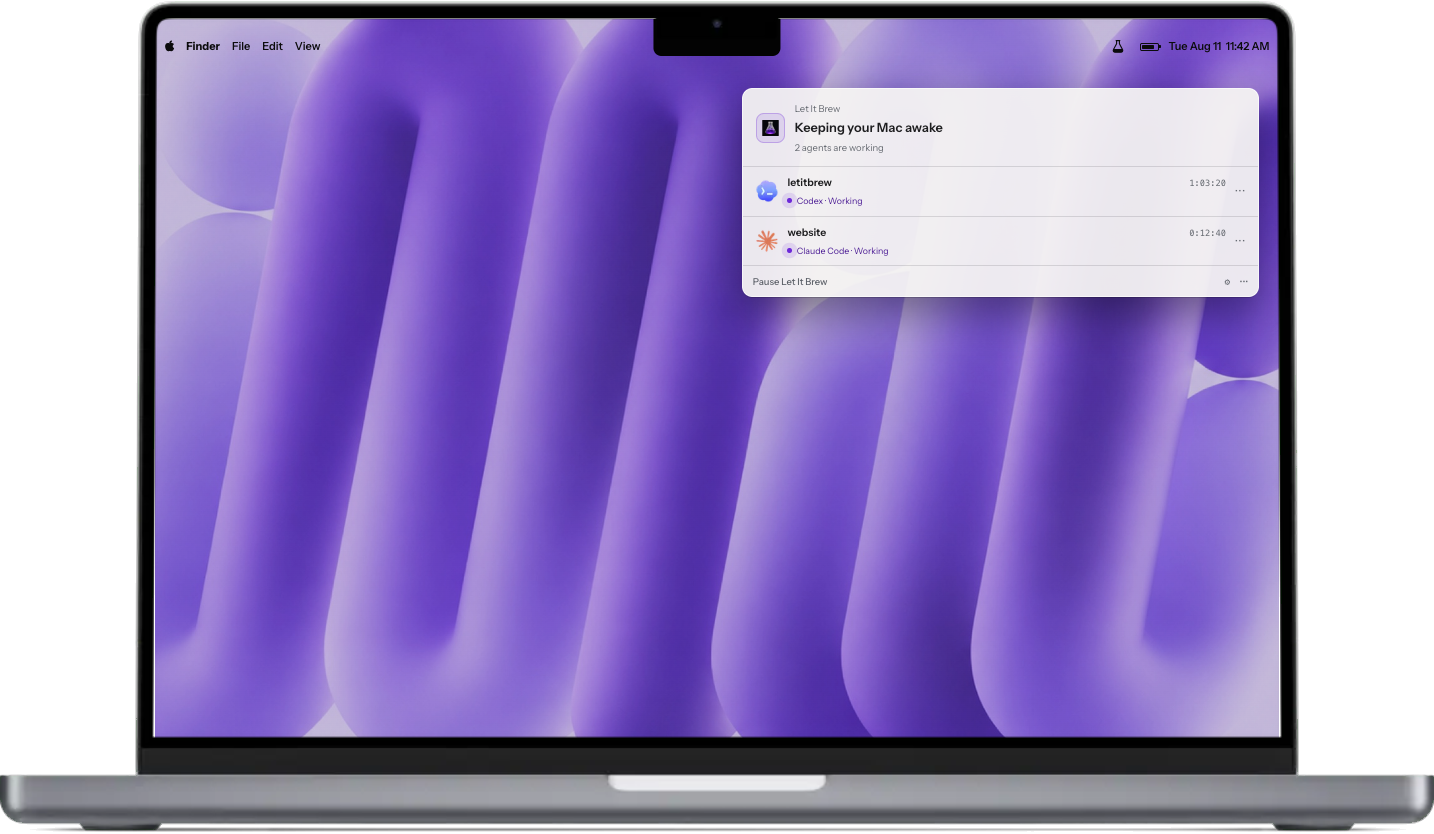
| Keeping your Mac awake | At least one local agent is Working, subject to safety gates. |
| Your Mac can sleep | No observed local agent is Working; Idle sessions are hidden. |
| Let It Brew is paused | Sessions are still observed, but Let It Brew owns no hold. |
Each session row shows the Claude or Codex mark, the project folder, how long
that session has spent actively Working, and its current state. Working rows
are visible and may keep the Mac awake, subject to pause, battery, thermal, and
other safety gates. Idle rows are hidden immediately and stop contributing
to the hold on the next one-second poll. Paused is an app and hold presentation
state, not a third agent session state.
One Working session in a folder appears as a flat row. Two or more Working
sessions with the same full folder path form a disclosure group; folders with
the same name at different full paths remain separate. On the first real
snapshot, the newest eligible multi-session folder expands initially. Manual
expansion remains stable while that group is valid, and only one group can be
expanded at a time. Grouped children use collision-safe short session IDs and
the same logo, text, and timer alignment as flat rows, without indentation.
The visible activity area is capped at one 54-point group header plus four
60-point session rows and uses one outer vertical scroll.
Lifecycle events define the two states. UserPromptSubmit, PreToolUse, andPostToolUse set Working. Stop and idle notifications set Idle, so the
row disappears on the next poll; SessionEnd removes the active record.PermissionRequest and permission-prompt notifications preserve the prior
state. They are not separate permission, approval, or input session states.
Supported agents
Let It Brew observes local sessions only: Claude Code in the terminal, code
sessions started from the Claude desktop app, Codex in the terminal, and
sessions in the Codex app.
Remote, cloud, and SSH sessions are not observed. Let It Brew cannot keep a Mac
awake for work it cannot see.
Safety
Let It Brew releases its holds when:
- no observed local session is working;
- a working session asks a question;
- you choose Pause Let It Brew;
- the configured battery floor is reached while on battery; or
- macOS reports serious or critical thermal pressure.
Closed-lid support uses a privileged background service, because the system
setting it changes must be restored safely after a crash or reboot. The app
manages that service only when installed directly at/Applications/Let It Brew.app. Declining the background item leaves ordinary
open-lid behavior working and disables closed-lid holds only.
docs/ARCHITECTURE.md explains what that service is, why
it needs privilege, and how the app proves it is talking to the right one.
Let It Brew never requests notification permission and posts no banners, alerts,
sounds, or badges.
Settings
- General — Launch at Login and the closed-lid option.
- Agents — Claude and Codex connection state, Check Again, Connect,
and per-agent Disconnect. - Safety — battery, thermal, and closed-lid explanations and controls.
- About — version, Check for Updates…, and Uninstall Let It Brew….
There are deliberately no power modes, idle-grace timers, activity-display
tuning, or developer diagnostics in the ordinary interface.
Launch at Login is off until you turn it on; Let It Brew observes sessions only
while it is running. Closed-lid support is on by default for new installs, and
upgrades preserve whatever you already chose.
Agent connections
Let It Brew connects Claude Code and Codex automatically: missing Let It Brew hook
entries are added, drift in Let It Brew-owned entries is repaired, unrelated
hooks and settings are preserved untouched, and malformed or unreadable
configuration is left alone and reported as Action needed.
Codex needs one manual step. If its Let It Brew hooks are not trusted, run/hooks in Codex and trust them, then return to Settings → Agents and
choose Check Again. Let It Brew cannot approve Codex hooks for you.
Sessions already open when hooks changed may need restarting. Let It Brew says so
when it applies; new sessions connect on their own.
To stop using one integration, open that agent's … menu in
Settings → Agents and choose Disconnect. That removes only Let It Brew's
own entries and persists across relaunches.
Updating
Open Settings → About → Check for Updates…. If a newer release exists,
Let It Brew asks once, downloads and verifies its signed DMG and published
SHA-256, briefly quits, safely transitions the background service if it exists,
installs the staged app, and relaunches. Settings and session records stay in
place. You never need to download, quit, or replace the app manually.
The transaction never copies over a running executable. If verification or the
service transition cannot be proven safe, it leaves the installed app in place;
a later failure rolls back when possible and preserves recovery evidence.
Privacy and local data
Session detection and state never leave the Mac. Per-session records hold only
structural metadata such as the session ID, agent, Working/Idle state, project
path, process ID when known, semantic activity token, lifecycle event, and
timestamps. notification_type is structural metadata. Notification prose,
prompts, responses, reasoning, tool inputs and outputs, other tool details, and
final assistant text are not decoded or recorded; only tool_name is reduced to
the semantic activity token. Nothing from session records is uploaded. A check
you explicitly start contacts GitHub for release metadata and, after
confirmation, downloads the release DMG and checksum.
| Location | Contents |
|---|---|
~/Library/Application Support/LetItBrew/sessions/ |
Records for observed local sessions. |
~/Library/Application Support/LetItBrew/ |
Lease and recovery state used to release holds safely. |
/Library/Application Support/LetItBrew/ |
Background-service recovery state for the system-wide sleep setting. |
| macOS user defaults | Preferences: pause, safety thresholds, closed-lid, Launch at Login. |
~/.claude/settings.json, ~/.codex/hooks.json |
Let It Brew's own hook entries, alongside your existing configuration. |
Uninstalling
Open Settings → About and choose Uninstall Let It Brew….
Let It Brew disconnects Claude Code and Codex, turns off Launch at Login, stops
and unregisters its privileged background service, deletes its settings and
session records, and moves itself to the Trash. It restores the exactSleepDisabled value that existed before its hold — never a forced 0, because
your Mac may have intentionally started with another value.
Restoring your Mac's sleep settings and stopping the background service must
both succeed before anything else happens — if either can't be done safely,
Let It Brew stops there and removes nothing. After that point, if a later step
fails (for example, an agent's hook entries or moving the app to the Trash),
Let It Brew keeps going and reports what's left over instead of stopping.
If the app will not launch, follow the manual procedure in
docs/UNINSTALL.md. Order matters there.
FAQ
Safety and trust
Does Let It Brew need admin rights?
Not for ordinary use. Closed-lid support installs one privileged background
service, approved once in System Settings → General → Login Items &
Extensions → App Background Activity; that approval survives reboots and app
updates. Declining it still leaves ordinary open-lid holding working.
Uninstalling also needs no admin password — see Uninstalling.
What does the privileged background service do, and why does closed-lid
support need one? An ordinary hold only prevents idle sleep; it does nothing
once the lid is shut. Keeping a closed-lid Mac awake means changing a
system-wide setting that only a privileged process can change, and that setting
has to be put back correctly even if the app crashes or the Mac reboots
mid-hold. That reliability requirement is why closed-lid support runs as a
separate background service — see
docs/ARCHITECTURE.md.
Does anything leave the Mac? Let It Brew has no account, cloud service, or
telemetry, and it never uploads agent sessions or project data. A manual update
check contacts GitHub for release metadata; confirming an update downloads its
DMG and checksum from GitHub. See Privacy and local data
for exactly what Let It Brew stores and where.
What happens if Let It Brew crashes while it's holding the Mac awake? For an
ordinary open-lid hold, Let It Brew uses a standard macOS power assertion tied
to its own process; macOS releases that automatically when the process dies,
the same as for any app holding one. For closed-lid support, the privileged
background service is a separate process built to restore your Mac's originalSleepDisabled value safely after a crash or reboot rather than leave it stuck.
Troubleshooting
A working agent session isn't showing up. Open Settings → Agents and
check that agent's connection state, confirm the session is local (remote,
cloud, and SSH sessions aren't observed), and restart any session that was
already open when hooks last changed.
Codex is asking me to run /hooks — what's that? Codex requires an
explicit trust step for the hooks Let It Brew installs. Run /hooks inside
Codex, trust the Let It Brew entries, then go back to Settings → Agents and
choose Check Again.
My Mac sleeps even though an agent looks like it's running. Confirm the
session appears as Working in Let It Brew, then check that Let It Brew is not
paused and that no battery, thermal, or power-status safety gate is releasing
the hold. Idle sessions are intentionally hidden.
Closed-lid support isn't available. The background service may not be
approved or running; check System Settings → General → Login Items &
Extensions → App Background Activity, and confirm Let It Brew is running from/Applications — it manages the service only from that exact location.
Can Let It Brew see a session over SSH or in the cloud? No. It only
observes local sessions running on the same Mac.
Install, update, uninstall
Why does Let It Brew have to live in /Applications? The privileged
closed-lid service is tied to the exact signed copy at/Applications/Let It Brew.app. Running it from a subfolder, the mounted disk
image, or Downloads disables closed-lid management as a safety measure.
Do my settings survive an update? Yes. Updating replaces only the app
bundle; your preferences and session data live outside it and are untouched.
Is Let It Brew on Homebrew or the App Store? No. The signed, notarized DMG
on GitHub Releases is the only channel.
Scope
Which agents does it support? Claude Code and Codex, each in the terminal
and in their respective desktop apps. See Supported agents.
Does it work with Cursor or other editor-embedded agents? No. Let It Brew
watches Claude Code and Codex sessions only.
What do I need to run it? macOS 14 or later, on Apple silicon or Intel —
Let It Brew ships as a universal binary.
Contributing
Bug fixes and documentation improvements are welcome. Feature work should start
as an issue so we can agree on scope first — see
CONTRIBUTING.md.
- docs/ARCHITECTURE.md — how the app, core modules, and
privileged service fit together. - SIGNING.md — release signing, notarization, and stapling.
- docs/ATTENDED-UAT.md — maintainer checklists for the
update and uninstall paths that cannot be automated.
A locally built app is not notarized and cannot manage the privileged closed-lid
service unless it is signed with the project's Team ID and installed at/Applications/Let It Brew.app.
Support
Report bugs through
GitHub Issues. Include your
Let It Brew version and build, macOS version, Mac model, and reproduction steps.
Do not include private project contents or unrelated Claude or Codex
configuration.
Release history and known limitations live in
RELEASE-NOTES.md. Security policy is in
SECURITY.md.
Let It Brew is an independent project, not affiliated with or endorsed by
Anthropic, OpenAI, or Apple. Claude, Claude Code, Codex, and macOS are
trademarks of their respective owners.
License
MIT © Ruban
Reviews (0)
Sign in to leave a review.
Leave a reviewNo results found