TeamCraft
Health Warn
- License — License: MPL-2.0
- Description — Repository has a description
- Active repo — Last push 0 days ago
- Low visibility — Only 5 GitHub stars
Code Fail
- rm -rf — Recursive force deletion command in .claude/settings.local.json
- rm -rf — Recursive force deletion command in .github/workflows/ci.yml
Permissions Pass
- Permissions — No dangerous permissions requested
No AI report is available for this listing yet.
Open-source PDM/PLM in pure Rust: check-out/check-in vault, revisions and lifecycle, multi-level BOMs, change requests and change orders, 3D preview of STEP and meshes, simulation management, REST API, MCP server and a desktop client. One binary on PostgreSQL.

TeamCraft
Free, open-source product lifecycle management, built in pure Rust.
For early-stage startups and large student teams that have outgrown shared folders.
Check your CAD data out and in, keep every version, release with reviews,
follow changes through assemblies and see STEP, NX, mesh and point-cloud models
in 3D – in the browser, in the desktop app or through the REST API.
Work in progress: an open-source alternative to Siemens Teamcenter.





Download TeamCraft
for Windows, macOS and Linux.
To try it, pick the desktop app with local server: app, server and
database in one installer, nothing to set up (which file?).





Documentation · Download · Quick start · Features · Enterprise management · Feature tour · File formats · REST API · Rust API · Contributing
[!WARNING]
Work in progress: there is no official release yet. TeamCraft is under
active development (version 0.x). Features, the REST API, the configuration
and the database schema can still change at any time. You are welcome to
try it out and test it, and please
report what you find.
Don't use it for production data yet, and keep backups of the database and
the vault.TeamCraft is provided "as is", without warranty of any kind. There is no
guarantee that it works as described or is fit for any particular purpose,
and no liability for any damage or data loss. See sections 6 and 7 of the
MPL-2.0.
Download
Every download is on the
Releases page – 0.x
versions are pre-releases (see the warning above). Which one you need:
- Just try TeamCraft on your laptop – the desktop app with local
server (TeamCraft-with-local-server_…): one installer with the app, the
server and its PostgreSQL database. Start TeamCraft and click Try
TeamCraft on this computer; your browser opens to create the
administrator account, and you are signed in. No Docker, no database
set-up, no configuration. The data stays in your user folder – this is for
trying TeamCraft out, not for a team's real data. - Connect to your team's server – the desktop app.
- Run a server for your team – the Docker install (one
command on Linux) or the server archive.
| Linux x86_64 | Linux ARM64 | macOS (Apple silicon) | Windows x64 | Windows ARM64 | |
|---|---|---|---|---|---|
| Desktop app with local server (try it) | .AppImage |
– | .dmg |
_x64-setup.exe |
– |
| Desktop app | .AppImage, .deb, .rpm, .flatpak |
.deb, .rpm, .flatpak |
.dmg, .app.zip |
.msi, _x64-setup.exe, _x64_portable.zip |
.msi, _arm64-setup.exe, _arm64_portable.zip |
Server (teamcraft) |
.tar.gz |
.tar.gz |
– | .zip |
– |
- With local server: the same app plus the server (
teamcraft-server)
and PostgreSQL's programs. It installs over the plain desktop app and can
still connect to any other server. The local server listens only on this
computer and stops with the app; see
Try it on your computer. - Server: runs on Linux in production, or as the
Docker image on any platform. On macOS, build it
from source (platforms/macos.md). With PostgreSQL
installed,teamcraft localstarts a test installation with its own
database in one command. - Flatpak:
flatpak install --user TeamCraft_*.flatpak; the GNOME runtime
comes from Flathub. Packages for Arch (AUR) and snap:
packaging/. - Windows portable: the
_portable.zipholdsTeamCraft.exewithout an
installer; it needs the WebView2 runtime, which Windows 10 and 11 include. - Checksums:
sha256sum -c --ignore-missing SHA256SUMS.txt. - Not code-signed yet: macOS asks to confirm the first start
(right-click → Open); Windows SmartScreen shows More info → Run anyway. - Newest
mainbuild: built every night; attached as artifacts to the latest run of the
Release workflow
(kept 14 days, for signed-in GitHub users).
Who it is for
TeamCraft is free of charge and open source (MPL-2.0): no licence fees, no
seat counts, no vendor lock-in, and the data stays in your own PostgreSQL
database and file vault. It is made for teams that need to professionalise
their PLM / PDM before they can afford, or justify, a commercial system:
- Early-stage hardware startups – the first customer, auditor or investor
asks which revision was delivered, who approved it and what changed since.
TeamCraft gives you released revisions, change orders with reviews, BOMs and
an audit trail from day one, on one server you run yourself. - Large student organisations – racing, rocketry, satellite, robotics and
similar teams with dozens to hundreds of members, a new generation every
year and real engineering hand-overs. Knowledge stays in the system instead
of in the inbox of last year's lead: what was built, from which revision,
with which simulation results and which deviations.
In both cases, "professionalise" means the same things: check-out instead of
overwriting each other's files, revisions and releases instead offinal_v3_really_final.step, reviewed change orders, traceable BOMs, and
onboarding where new members sign in with the accounts they already have.
Quick start
Try it on your laptop – install the desktop app with local server from
the Releases page, start it
and click Try TeamCraft on this computer (Download). With
PostgreSQL already installed, the server alone does the same on the command
line – a private database and the server on http://127.0.0.1:8080:
teamcraft local
Install on Linux with Docker – TeamCraft and PostgreSQL in containers,
data in Docker volumes, nothing to build:
curl -fsSL https://raw.githubusercontent.com/rudalabs/TeamCraft/main/deploy/install.sh | bash
The script installs into /opt/teamcraft (--user: ~/teamcraft), generates
the database password, starts everything on http://localhost:8080 and offers
to create the first administrator. Run it again to upgrade; --dry-run shows
every step first. Details, backups and TLS:
Install with Docker.
From source (development, macOS, Windows):
git clone https://github.com/rudalabs/TeamCraft.git && cd TeamCraft
docker compose up -d db     # PostgreSQL on 127.0.0.1, no password needed
cargo run --release         # applies the migrations, serves http://localhost:8080
Open http://localhost:8080 and create the administrator on the login page
(offered once, while the server listens on localhost). Then Projects → New
project group, Items → New item with a STEP file, and open it in 3D.
No configuration is needed for a local test. Step-by-step guides, including
native PostgreSQL and the desktop app:
Linux · macOS · Windows.
Features
Everything below works end to end today and is covered by unit tests and
end-to-end tests against a real PostgreSQL.
Files and versions
- Check-out / check-in – exclusive locks per revision; a check-in based on
an outdated version is refused instead of overwriting it. - Versions and rollback – every upload is a new version; download or
restore any of them, history is never rewritten. - Vault explorer – project groups as folders with lock owners, files and
one-click check-out / check-in. - Large uploads – chunked, resumable uploads in the web UI; identical files
are stored once (SHA-256). - 160+ file formats – native CAD, BIM and DCC files plus STEP, IGES, JT,
IFC, glTF, USD, E57, LAS and more are recognised.
Previews and search
- 3D preview – in the browser, converted on the server, no plug-ins:
STEP, NX, SOLIDWORKS and Inventor parts and assemblies (put together from
their part files, hidden components left out), CATIA V5 parts and products
(products from their parts, found by document), Creo parts
(tessellated from their exact B-rep) and assemblies (from their parts),
Rhino models (.3dm, SubD included),
SketchUp models (.skp, SketchUp 3 to today), JT files with their whole
assembly, Fusion designs (.f3d), STL, OBJ, PLY, 3MF, glTF, point clouds
and more. - CAD thumbnails – the preview images stored in Inventor drawings and Solid
Edge files; NX, SOLIDWORKS, Inventor, CATIA, Creo, Rhino, SketchUp, JT and
Fusion files get a sharper thumbnail rendered from their 3D preview. - FEA/CFD results – VTK, VTU/VTP and CalculiX results coloured by a result
field, with legend. - Search – ranked full-text search over numbers, names, materials, file
names and file contents. - Similar parts – on every revision with a STEP or mesh file, existing
parts of similar 3D shape and size, with the reason for each hit.
Structure
- Multi-level BOM – mass and cost roll-up, revision rules, comparison of
two revisions, CSV/Excel export. - Mass properties – mass, centre of gravity and inertia tensor of a whole
assembly or vehicle from the exported meshes of its parts, a material
library of densities and measured masses of bought parts; CSV/JSON export. - Where-used – every assembly a part is used in, over all levels.
- Alternates and supersession – alternate parts, superseded parts and
Replace in assemblies with a preview. - BOM import – items and BOMs from CAD BOM tables (CSV, Excel, ODS) or a
STEP assembly; preview first, one transaction. - Pack and Go – a ZIP of a whole assembly with all its files.
Change and release
- Lifecycle – WIP → In Review → Released → Obsolete with revision letters
after ASME Y14.35; released data never changes. - Change requests (ECR) – anybody reports a problem with screenshots;
editors accept, defer or reject. - Change orders – reviewers, four-eyes approval, impact analysis and an
atomic release of all revisions. - Change propagation – references inside CAD files are tracked; a release
flags every dependent for a check. - Release readiness – a check of a BOM for missing, unreleased or outdated
parts before release.
Simulation and manufacturing
- Simulation management – FEA/CFD items linked to the exact revisions they
analysed, flagged out of date when the design changes. - Result values – key values with limits and pass/fail, CSV/Excel import
and comparison between revisions. - As-built records – one item per physical unit: the design revision it
was built to, serial number, as-built BOM and deviations with a disposition
(use as is, rework, repair, scrap).
Teams and administration
- Roles and read permissions – viewer, editor and admin roles; restricted
project groups visible only to their members. - Single sign-on – any OpenID Connect provider, with group
synchronisation and back-channel logout. - Offboarding – for teams that change every season: everything a leaver
still holds in one report, Offboard and deactivate in one step (hand-over
of work and manager roles, token revocation, release of check-outs),
Season handover of a whole project group, groups left without an active
manager, and SSO users who stopped signing in. - Numbering schemes – generated item numbers per project group from
{PROJECT},{TYPE},{YYYY}and{SEQ:n}. - Custom attributes – vendor, supplier part number, RoHS … as text,
number, yes/no or choice list per item type, versioned with each revision;
search by attribute value. - Notifications – in-app, e-mail and Mattermost; watch items, changes and
change requests. - Event webhooks – signed JSON for releases, changes and simulation
results, retried with backoff. - Audit log – every modification and every sign-in (password, SSO, failed
attempts) with user, time and details; repeated failed sign-ins are slowed
down. - Branding – your own wide and square logo and header name under
Admin → Branding, also in the desktop app; footer, About and licence
notices stay TeamCraft. - Monitoring –
/healthz,/readyzand Prometheus metrics at/metrics
(requests, database pool, outbox backlogs, preview queue), enabled with a
token. - Backup and restore – one command for database and vault
(below).
Clients and integrations
- Web UI – light and dark design that follows the operating system, plus
distribution skins; responsive down to phone width. - Desktop app – Linux, macOS and Windows client with a local working
folder, Get of whole assemblies, an import wizard, a Files view of each
project group, a navigable Graph of every revision (BOM children,
references and where-used, coloured by state, with quantities and preview
images), Park of work in progress, an Agent view, crash reports the user
decides about and an update notice (never installs anything itself). The
download with local server also runs a private test server with its own
database on the laptop (Try TeamCraft on this computer). - REST API – everything the UI does, with personal access tokens.
- MCP server – AI assistants such as Claude Code search, explain BOMs and
draft changes with your rights, never approving anything. - Ask TeamCraft (optional) – an AI sidebar on every page that knows which
page you are on and works with your rights, read-only by default. It runs on
your own key for Anthropic, OpenAI, Azure OpenAI or any OpenAI-compatible
service, or a local model (Ollama, vLLM). In the desktop app it is the
Agent view's company AI. - SolidCraft and FieldCraft – SolidCraft
designs (.sc, checked by content) and
FieldCraft models
(.fieldcraft) are recognised and their STEP and 3MF exports previewed –
design, export and analysis in one revision
(more).
Enterprise management
The features an IT department or a team lead asks about before rolling a
system out to an organisation. All of them are part of the free release –
there is no separate enterprise edition.
- Identity and access
- Single sign-on with any OpenID Connect provider (Keycloak, Entra ID,
Google, Authentik …); IdP groups mapped to roles and project groups. - Viewer / editor / admin roles, and
restricted project groups
that stay invisible to outsiders – even inside BOMs, search,
notifications and the AI assistant. - Per group, administrators can be limited to audited, time-limited access
with a written reason, or to managing without reading. - Need-to-know groups:
membership conditions (IdP claims, networks, maximum sign-in age), a
read and download log, and periodic access reviews with an evidence
report. - Personal access tokens can be scoped: full, write without approving,
read-only or MCP-only; SSO users' tokens can expire after a number of
idle days. - Offboarding
for high-turnover teams: a holdings report per user, Offboard and
deactivate, season handover per group, groups without an active
manager, OpenID Connect back-channel logout and a report of SSO users
who stopped signing in.
- Single sign-on with any OpenID Connect provider (Keycloak, Entra ID,
- Traceability
- An audit log
of every change and every sign-in, failed attempts included, exportable
as CSV or JSON. - Four-eyes change orders: nobody who wrote, prepared or changed the data
can approve it. Review policies per project group, review rounds,
optional sign-off with the password or a fresh SSO sign-in, and the
approvers named in every Pack and Go manifest. - Released data never changes; as-built records per serial number.
- An audit log
- Company AI instead of shadow AI
- Ask TeamCraft runs on the AI service the organisation chooses; the key
stays on the server and never reaches a browser or the desktop app. - The assistant works with each user's rights, read-only by default, and
every question is audited (without its content). TEAMCRAFT_LOCAL_AGENTS=offswitches off local AI agents: the desktop
app's Agent then runs on the company AI only. Admin → AI shows the
setup.
- Ask TeamCraft runs on the AI service the organisation chooses; the key
- Operations
- Docker install
with one script. - Evaluations without a server: the desktop download with local server,
orteamcraft local– a private PostgreSQL and the server, both only on
127.0.0.1 (details). - Backup and restore
of database and vault in one command. /healthzand/readyzprobes and
Prometheus metrics.- Documented upgrades
and a support policy.
- Docker install
- Integration – REST API, an MCP server for AI tools, signed
event webhooks,
e-mail and Mattermost notifications. - Your look – your own logos and header name under Admin → Branding, in
the web UI and the desktop app. - Configuration – everything through environment variables, each also as
*_FILEfor Docker or Kubernetes secrets; see the
configuration reference.
Planned – what is left of the issues above (all their steps are built):
- Need-to-know projects (#151)
– optional: a watermark on downloads, claims for local accounts. - Ownership and approval rules (#152)
– substitutes per user, the review policy shown on the change page. - Offboarding for high-turnover teams (#173)
– a timed stale-lock rule, the access review page for groups that are not
need-to-know; automatic deprovisioning through SCIM is not planned for now
(research).
TeamCraft is a community project without commercial support or a service
level agreement.
Screenshots
Demo data from the openly licensed NIST CAD test files,
captured automatically by scripts/screenshots.sh –
the web UI with headless Chrome, TeamCraft Desktop on a virtual X display.
 Vault explorer – project groups, lock owners, one-click check-out |
 Revision files – formats, versions, CAD previews and similar existing parts |
 NX in 3D – parts from their JT data, assemblies put together from their parts |
 Multi-level BOM – revision rules, mass and cost roll-up |
 Change order – affected revisions and impact analysis |
 As-built records – serial number, as-built BOM and deviations |
 FEA/CFD results in 3D – VTK and CalculiX results coloured by field |
 Simulation results – linked to the analysed revision, with limits and pass/fail |
 Ask TeamCraft – knows the page you are on, works with your rights |
 Read permissions – restricted groups stay hidden, even inside BOMs |
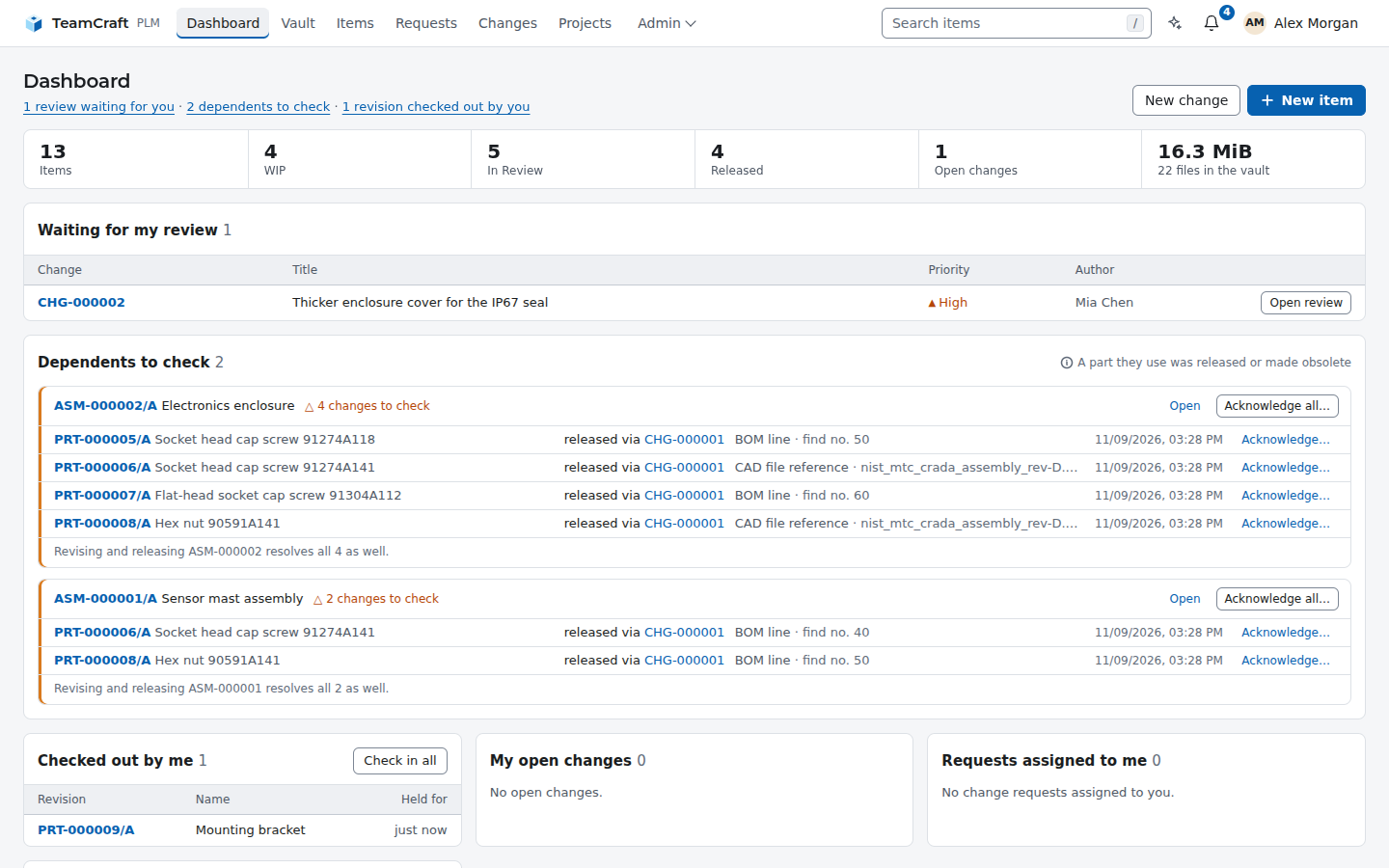
 Desktop app – navigator, statistics and what needs attention |
 Desktop revision tab – check-out to a local workspace, check-in |
 Desktop review – four-eyes approval without leaving the app |
 Desktop agent – a local AI agent next to your PDM data |
 Dark – follows the system appearance, or pick Light or Dark |
 On the phone – the same pages, responsive |
How it fits together
| Layer | |
|---|---|
teamcraft binary |
web interface, REST API (/api/v1) and CLI in one process; templates, migrations and assets are embedded |
domain, services |
the rules and the business logic – permissions, row locks, lifecycle checks and the audit entry in one transaction |
vault |
content-addressed file storage on disk, plus the cached 3D previews |
mesh, preview |
pure-Rust readers for meshes, point clouds, STEP and (simmesh) VTK/VTU/FRD simulation results |
| PostgreSQL 16+ | the only external service |
Everything is built by cargo – no Node.js, no downloaded browser engines,
no C++ CAD kernel. Details:
Architecture.
Command line and API
The REST API, with a token from Account → API tokens:
API=http://localhost:8080/api/v1; H="Authorization: Bearer $TOKEN"
curl -s -X POST -H "$H" $API/items/PRT-000001/revisions/A/checkout
curl -s -X POST -H "$H" -F [email protected] -F comment="wall 2 → 2.5 mm" \
     $API/items/PRT-000001/revisions/A/checkin
curl -s -H "$H" "$API/items?q=hub&system=solidworks"
Backup and restore of database and vault:
teamcraft backup /srv/backups/2026-11-04     # db.dump + vault/objects + manifest.json
teamcraft restore /srv/backups/2026-11-04    # verifies every hash, then restores
Both commands need the PostgreSQL client tools (pg_dump, pg_restore). The
backup directory must not exist or must be empty. A restore refuses a database
that already contains tables unless you pass --force, and the server should
be stopped while it runs. Configuration and secrets are not part of a backup;
see Operations.
Documentation
Published at https://rudalabs.github.io/TeamCraft/, built fromdocs/src with mdBook, plus the
rustdoc API reference:
- User guide – a feature tour
and every workflow. - Administration – configuration, SSO, permissions, operations.
- Reference – file formats,
REST API,
architecture.
A running server lists its API at GET /api/v1 and its formats at /formats.
Contributing
Contributions are welcome: bug reports, tests with real files from your CAD
programs, documentation and code. Please read
CONTRIBUTING.md first – it covers the development
setup, the checks CI runs, the code conventions and the licence of
contributions. Report security problems privately, as described in
SECURITY.md. Open work and known gaps are listed in
docs/OPEN_WORK.md.
Licence
TeamCraft is licensed under the Mozilla Public License 2.0
(MPL-2.0). Modified TeamCraft files stay open, and TeamCraft can be
combined with code under other licences in larger works.
No warranty. TeamCraft is distributed in the hope that it will be useful,
but it is provided "as is", without warranty of any kind, express or implied.
That includes any warranty that it is free of defects, merchantable, fit for
a particular purpose or non-infringing. The whole risk of using it is yours.
The contributors are not liable for any damages, including data loss. See
sections 6 (Disclaimer of Warranty) and 7 (Limitation of Liability) of
the licence.
Third-party components (complete list with versions in Cargo.lock anddesktop/Cargo.lock):
| Component | Used for | Licence |
|---|---|---|
| axum, tower, hyper, tokio | web server, async runtime | MIT |
| sqlx | PostgreSQL access, migrations | MIT / Apache-2.0 |
| MiniJinja | HTML templates | Apache-2.0 |
| truck (truck-stepio, truck-meshalgo) | STEP reading and tessellation | Apache-2.0 |
| gltf, quick-xml, zip | glTF, 3MF/AMF, Pack and Go | MIT / Apache-2.0 |
| csv, calamine, encoding_rs | BOM import: CSV, Excel/ODS, Windows-1252 | MIT-Unlicense / MIT / MIT-Apache + BSD-3 |
| cfb, crc32fast | previews stored in CAD files | MIT / MIT-Apache |
| lzma-rs, ruzstd | JT 10 scene graphs, Zstandard segments of Inventor files | MIT |
| pdf_oxide | text of PDF reports for the search | MIT / Apache-2.0 |
OpenSKP (Rust port, vendored in vendor/openskp, © 2024–2026 Ahsan Mehmood) |
SketchUp 3–2020 files in the 3D preview | MIT |
earcut algorithm (© 2016 Mapbox, ported in src/mesh/earcut.rs) |
triangulating SketchUp faces | ISC |
| rust_xlsxwriter | Excel export of BOMs and comparisons | MIT / Apache-2.0 |
| qrcode | QR codes on item labels (SVG) | MIT / Apache-2.0 |
| chacha20poly1305 (RustCrypto) | encrypted backups | MIT / Apache-2.0 |
| reqwest, rustls, lettre | HTTP client, TLS, e-mail | MIT / Apache-2.0 |
| argon2, sha2 | password hashing, content hashes | MIT / Apache-2.0 |
| ring | signatures of OIDC back-channel logout tokens | Apache-2.0 AND ISC |
| Tauri 2 | desktop app | MIT / Apache-2.0 |
| PostgreSQL (builds of theseus-rs/postgresql-binaries) | database of the desktop downloads with local server only, with its COPYRIGHT.txt |
PostgreSQL Licence |
| futures-core | desktop app: cancellable streamed uploads | MIT / Apache-2.0 |
| Montserrat, Oswald | fonts | SIL OFL 1.1 |
| libfuzzer-sys (libFuzzer) | fuzz targets in fuzz/ only, never shipped |
MIT / Apache-2.0 (libFuzzer: Apache-2.0 with LLVM exception) |
SolidWorks, NX, Creo, CATIA, Inventor, Fusion,
Revit and the other product names are trademarks of their respective
owners; TeamCraft is not affiliated with them.
Reviews (0)
Sign in to leave a review.
Leave a reviewNo results found