Clira
Health Pass
- License — License: MIT
- Description — Repository has a description
- Active repo — Last push 0 days ago
- Community trust — 13 GitHub stars
Code Pass
- Code scan — Scanned 12 files during light audit, no dangerous patterns found
Permissions Pass
- Permissions — No dangerous permissions requested
This tool is an open-source AI chief of staff that manages your email, calendar, reminders, and messaging across platforms like WhatsApp and Telegram. It acts as an executive assistant that prepares drafts and actions, but strictly requires explicit human approval before executing anything.
Security Assessment
The tool inherently interacts with highly sensitive data, including email inboxes, calendars, and personal messaging platforms. However, it is explicitly designed with a "draft-first" architecture where the AI cannot introduce facts or send messages without your direct say. The automated code scan of 12 files found no dangerous patterns, hardcoded secrets, or dangerous permission requests. The tool supports self-hosting via Docker, ensuring your runtime and data remain entirely under your control. Overall risk rating: Low.
Quality Assessment
The project appears to be in active development with its most recent push happening today. It uses the highly permissive MIT license, making it freely available for modification and use. The codebase has a small but growing community footprint with 13 GitHub stars. The repository is well-documented, offering clear setup instructions, architecture diagrams, and CI/CD pipeline integration.
Verdict
Safe to use: an actively maintained, self-hostable AI assistant that properly isolates sensitive actions behind required human approval.
Open-source AI chief of staff — manages email, calendar, reminders, and tools with human approval on every action.

Clira — Your open-source AI chief of staff.
An AI assistant that can read, search, draft, plan, and act across your email, calendar, files, and connected tools. Nothing executes without your say. Open source and self-hostable.
Website · Self-Host · Contributor Setup · Architecture · Issues





Clira is an AI executive agent that handles your email, calendar, and messaging across WhatsApp and Telegram. It prepares actions and drafts, but nothing executes without your approval. Self-hosted, open source, and architecturally designed so the AI cannot hallucinate facts into your outbox.
Highlights
- Multi-channel agent across WhatsApp, Telegram, SMS, and web chat
- Nothing sends without explicit approval
- Planner/style architecture where the style layer cannot introduce facts
- Extensible through MCP server connections and user-authored skills
- Self-hosted with Docker Compose so your runtime and data stay under your control
- Gmail ingestion in push and pull modes with deterministic pre-filtering
Architecture At A Glance
Clira is easiest to understand as two tightly connected systems: a multi-channel executive agent runtime that works across inbox, calendar, memory, and messaging context without bypassing approvals, and a draft-first reply pipeline that handles email as one capability inside that broader product.
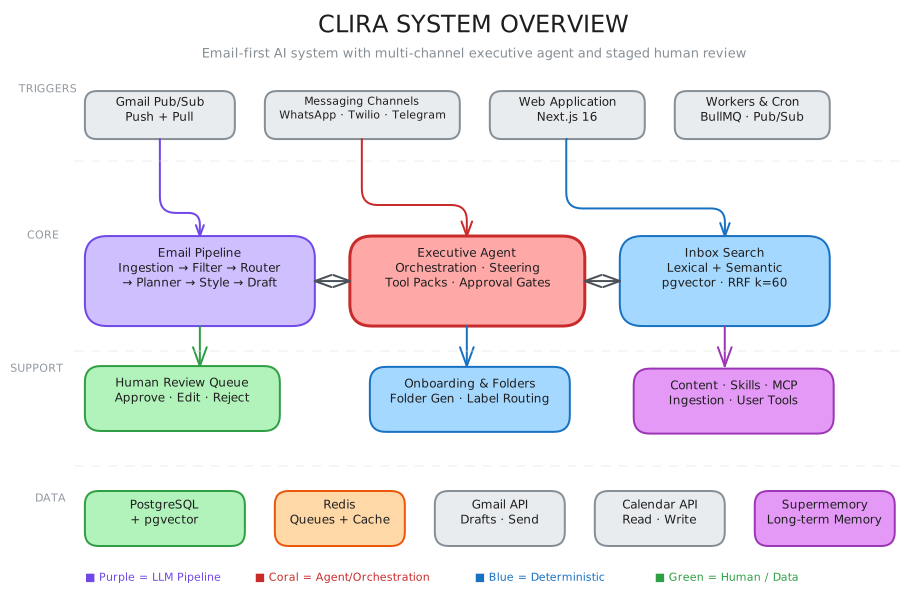
High-level system map showing how the executive agent, reply pipeline, shared context, and approval layers fit together.
Executive Agent Runtime
The executive agent is not just "chat with tools." It runs inside a deterministic policy envelope that decides what tools can exist, when the agent must pause for approval, and when a rerun is allowed with broader capabilities.
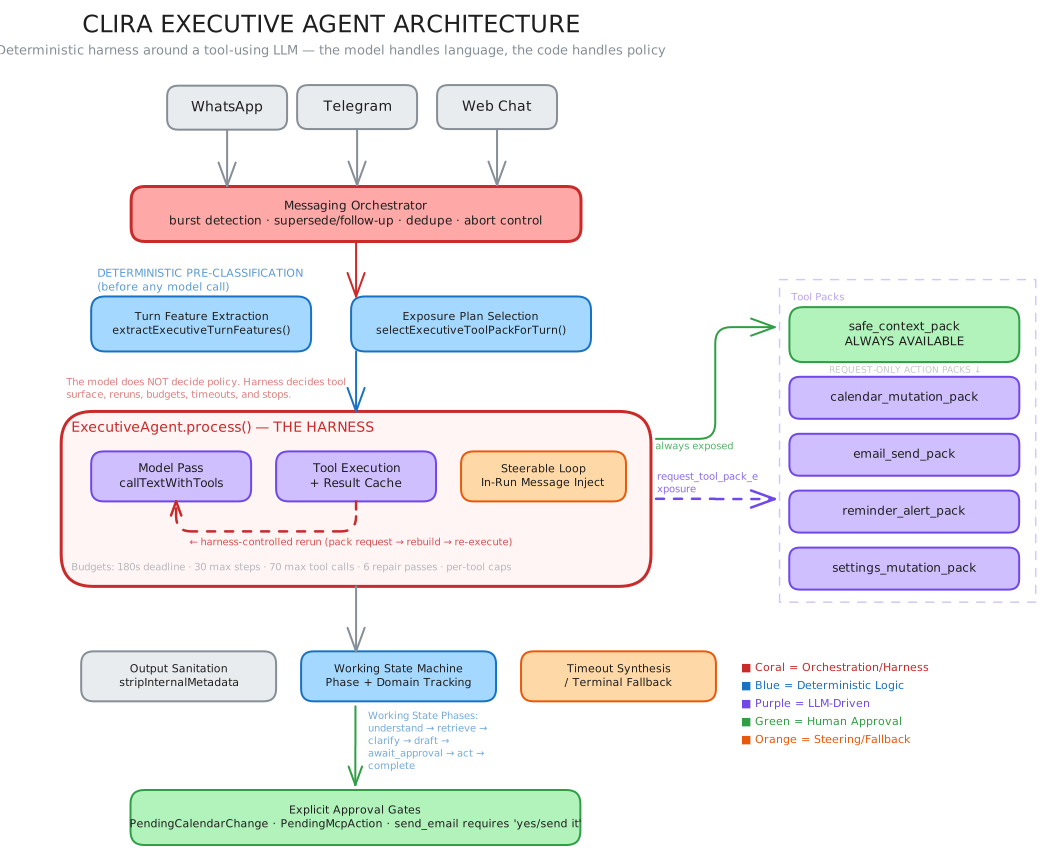
Messaging channels feed a policy-bounded executive agent runtime with controlled tool access, explicit approval checkpoints, and rerun logic for broader capabilities.
Reply Pipeline
This path is intentionally strict: deterministic filtering first, then a schema-validated LLM gate, then a planner/style split where the style stage is not allowed to add facts.
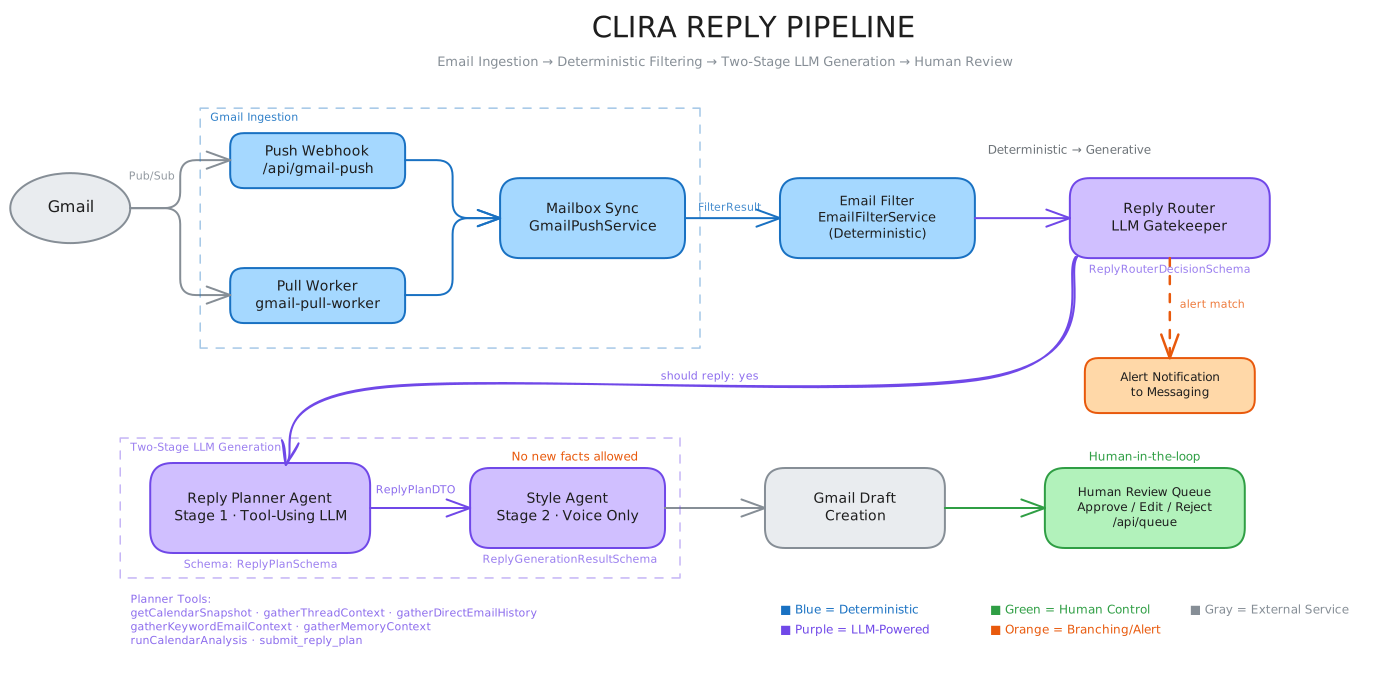
Incoming Gmail events move through deterministic filtering, reply routing, planner and style stages, then into a human-reviewed draft queue before send.
For the code-level component map and file references behind these diagrams, see docs/architecture.md.
Product Views
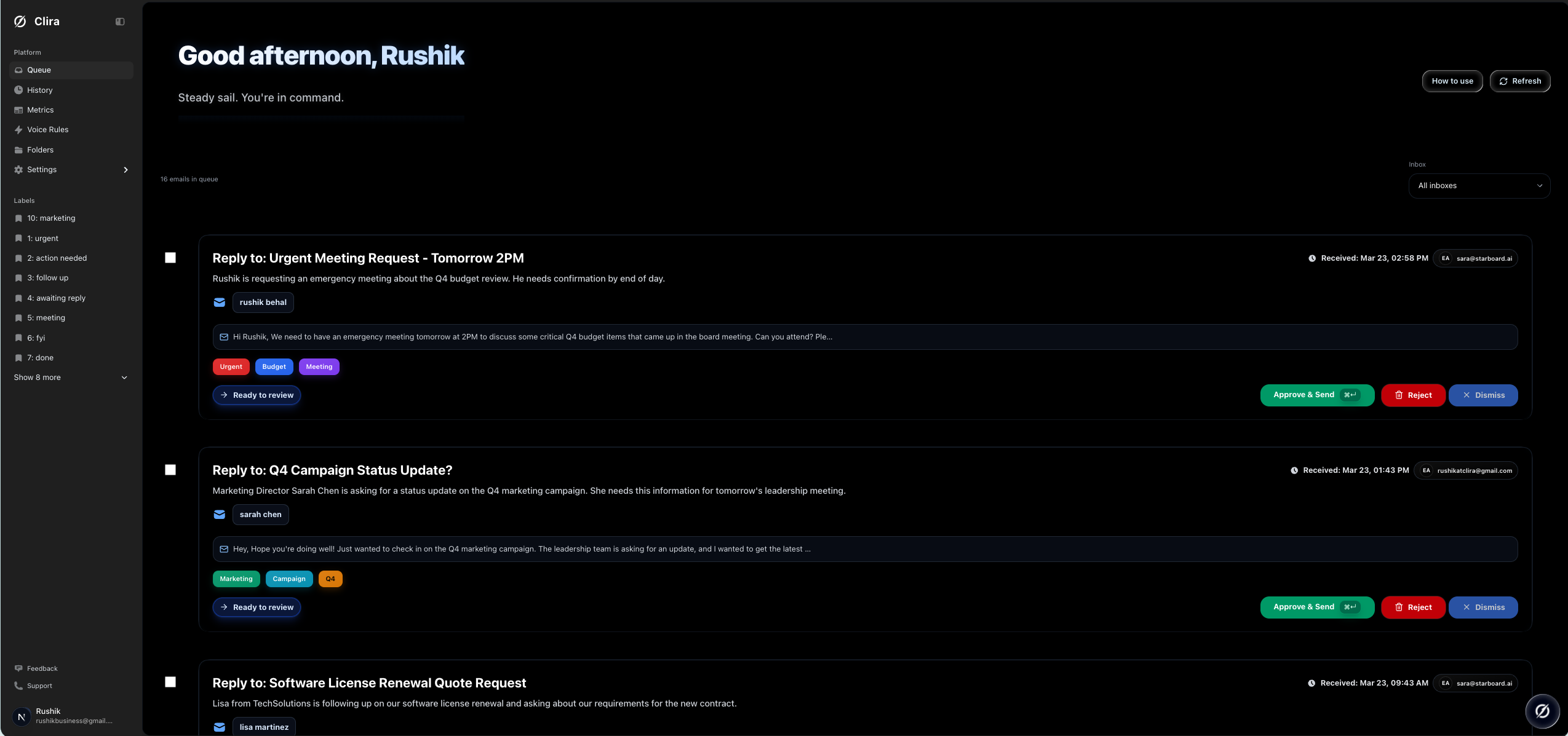
Queue view with actionable drafts
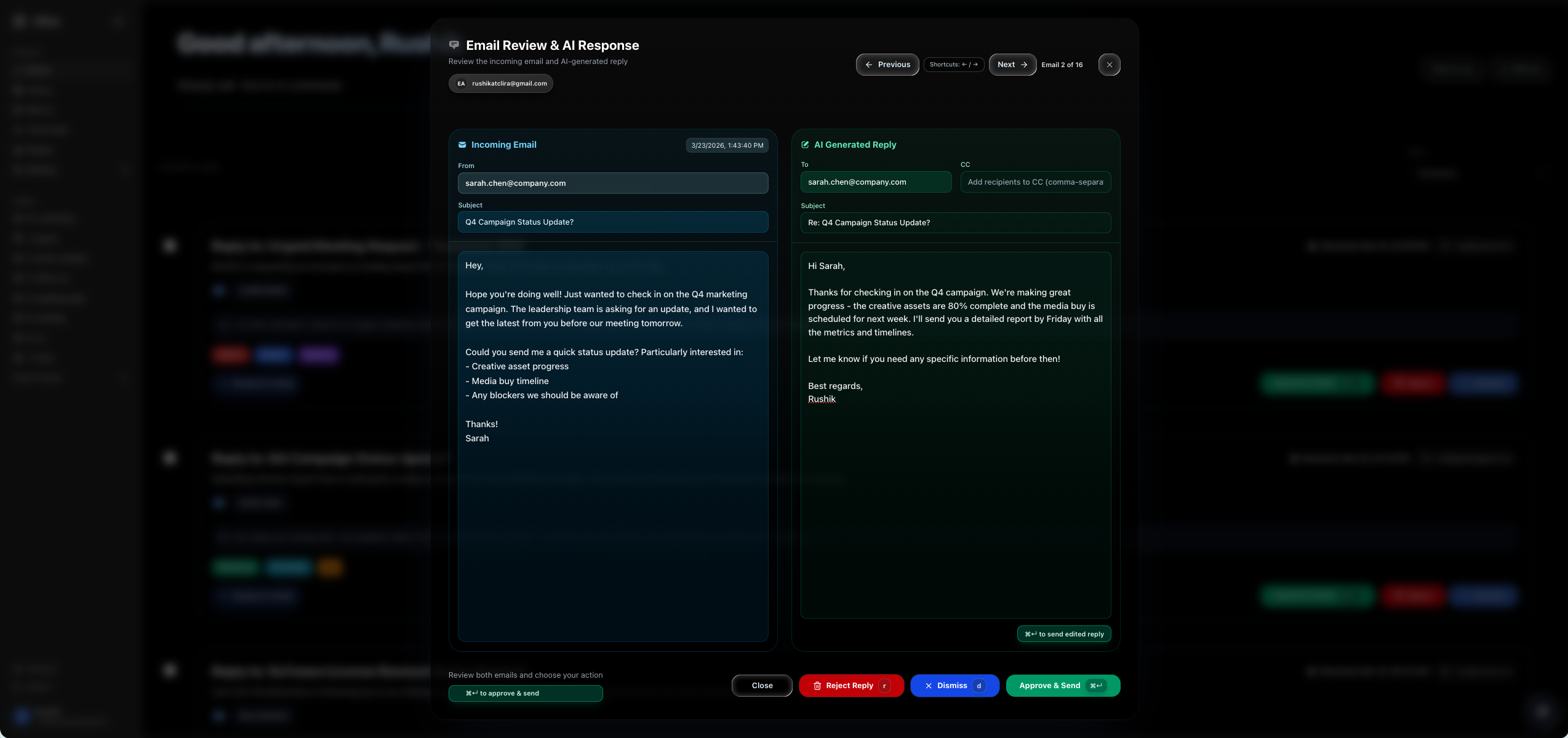
Reply review modal before approval
Fast Self-Host
This is the default launch path. It assumes Docker and Docker Compose are installed.
- Clone the repo and copy the environment template.
cp .env.example .env
- Initialize local runtime state and generated secrets.
npm run selfhost:init
If you do not want to use npm, run bash scripts/selfhost-init.sh directly.
- Configure Gmail Pub/Sub and write the generated values back into
.env.
npm run setup:google -- --project-id YOUR_PROJECT_ID --mode pull --write-env
- Fill in the remaining required values in
.env.
GOOGLE_CLIENT_IDGOOGLE_CLIENT_SECRET- your AI provider key
- Pull and start the default launch stack.
npm run selfhost:up
- Open Clira.
- App: http://localhost:13000
- Liveness: http://localhost:13000/api/health
- Deep readiness: http://localhost:13000/api/health?deep=1
Image Tags
Clira publishes two kinds of image tags:
mainandsha-<commit>for continuous builds from themainbranchvX.Y.Z,vX.Y, andlatestfor release tags such asv0.1.0
For evaluation and internal testing, the default CLIRA_IMAGE=ghcr.io/rushik-b/clira:main is fine.
For production or any install you want to keep stable, pin CLIRA_IMAGE to an exact release tag in .env.
What Starts By Default
npm run selfhost:up starts the core profile:
appworkergmail-pull-workercrondbredis
backfill-worker is intentionally not part of the default launch profile. Add it only when you want inbox search backfill:
npm run selfhost:up:full
Required Environment Values
Minimum first-run values live at the top of .env.example. The important ones are:
APP_PUBLIC_URLNEXTAUTH_SECRETCRON_SECRETEMAIL_ENCRYPT_SECRETEMAIL_ENCRYPT_SALTGOOGLE_CLIENT_IDGOOGLE_CLIENT_SECRETGMAIL_PUBSUB_TOPICGMAIL_PUBSUB_PULL_SUBSCRIPTIONGOOGLE_APPLICATION_CREDENTIALSAI_PROVIDER- provider auth for the selected model backend
Clira stores local runtime secrets under .clira-runtime/. The default Gmail service-account file path is ./.clira-runtime/google-service-account.json.
Self-Host Commands
| Command | What it does |
|---|---|
npm run selfhost:init |
Creates .env if missing, generates secrets, creates .clira-runtime, and runs diagnostics |
npm run selfhost:doctor |
Read-only diagnostics for env, Docker, ports, Gmail credentials, and AI provider config |
npm run selfhost:up |
Pulls and starts the default core self-host profile |
npm run selfhost:up:full |
Pulls and starts core plus backfill-worker |
npm run selfhost:down |
Stops the self-host stack |
npm run selfhost:logs |
Tails the main self-host services |
npm run setup:google |
Provisions Gmail Pub/Sub resources and optional .env updates |
Contributor Workflow
If you are developing Clira rather than just hosting it, use docs/setup.md. That doc covers:
- local
npm run dev - worker processes in separate terminals
- local builds with
docker-compose.dev.yml - contributor-oriented verification
AI Provider Notes
Google remains the default provider. The OpenRouter env names are still used for compatibility, but OPENROUTER_BASE_URL can point at any OpenAI-compatible endpoint. That includes OpenRouter, LM Studio, vLLM, and similar gateways. Details live in docs/ai-providers.md.
Documentation
- Self-host guide:
docs/self-host.md - Contributor setup:
docs/setup.md - Architecture:
docs/architecture.md - Gmail Pub/Sub:
docs/gmail-pubsub.md - AI providers:
docs/ai-providers.md - Troubleshooting:
docs/troubleshooting.md - Operations:
docs/operations.md - Full docs index:
docs/README.md
Reviews (0)
Sign in to leave a review.
Leave a reviewNo results found