openclaw-guide
Health Warn
- No license — Repository has no license file
- Description — Repository has a description
- Active repo — Last push 0 days ago
- Community trust — 17 GitHub stars
Code Warn
- Code scan incomplete — No supported source files were scanned during light audit
Permissions Pass
- Permissions — No dangerous permissions requested
This repository is a documentation guide and field manual providing setup instructions for deploying a self-hosted AI agent using the OpenClaw framework. It includes PDF manuals covering identity, channels, memory, and safety constraints.
Security Assessment
Overall Risk: Low. The project itself is a collection of documentation files (PDFs) and does not contain executable application code. The automated code scan found no supported source files to analyze, and no dangerous permissions were requested. However, the content guides users on configuring an AI agent with access to shell execution, files, and messaging channels. While the guide is safe, the actual OpenClaw software it instructs you to install will require high-level system permissions, so the agent itself must be configured carefully.
Quality Assessment
The project is highly active, with its last repository push occurring today. It has decent community engagement for a niche technical guide, evidenced by 17 GitHub stars. A notable drawback is the complete absence of a license file, meaning the legal terms for using, modifying, or distributing these guides are technically undefined.
Verdict
Safe to use as a reference guide, but remember that the underlying self-hosted AI infrastructure it recommends will require strict security oversight on your machine.
The field manual for running a real self-hosted AI agent with OpenClaw.
OpenClaw Guide
The field manual for running a real self-hosted AI agent on your own hardware.
Built and battle-tested by @irushi running agents Ares and Sam on Apple Silicon since 2025.
OpenClaw Bible (19 pages) • OpenClaw Full Stack (5 pages) • OpenClaw Docs • ClawHub
What this repo is
This repo is not a theory deck.
It is the exact guide and package stack I would hand to someone who wants to go from zero to a functioning, self-hosted OpenClaw agent with:
- a real identity layer
- real channels
- real tooling
- real memory
- real safety constraints
- real operating cost awareness
If you want the shortest path to a serious personal AI system, start here.
What’s inside
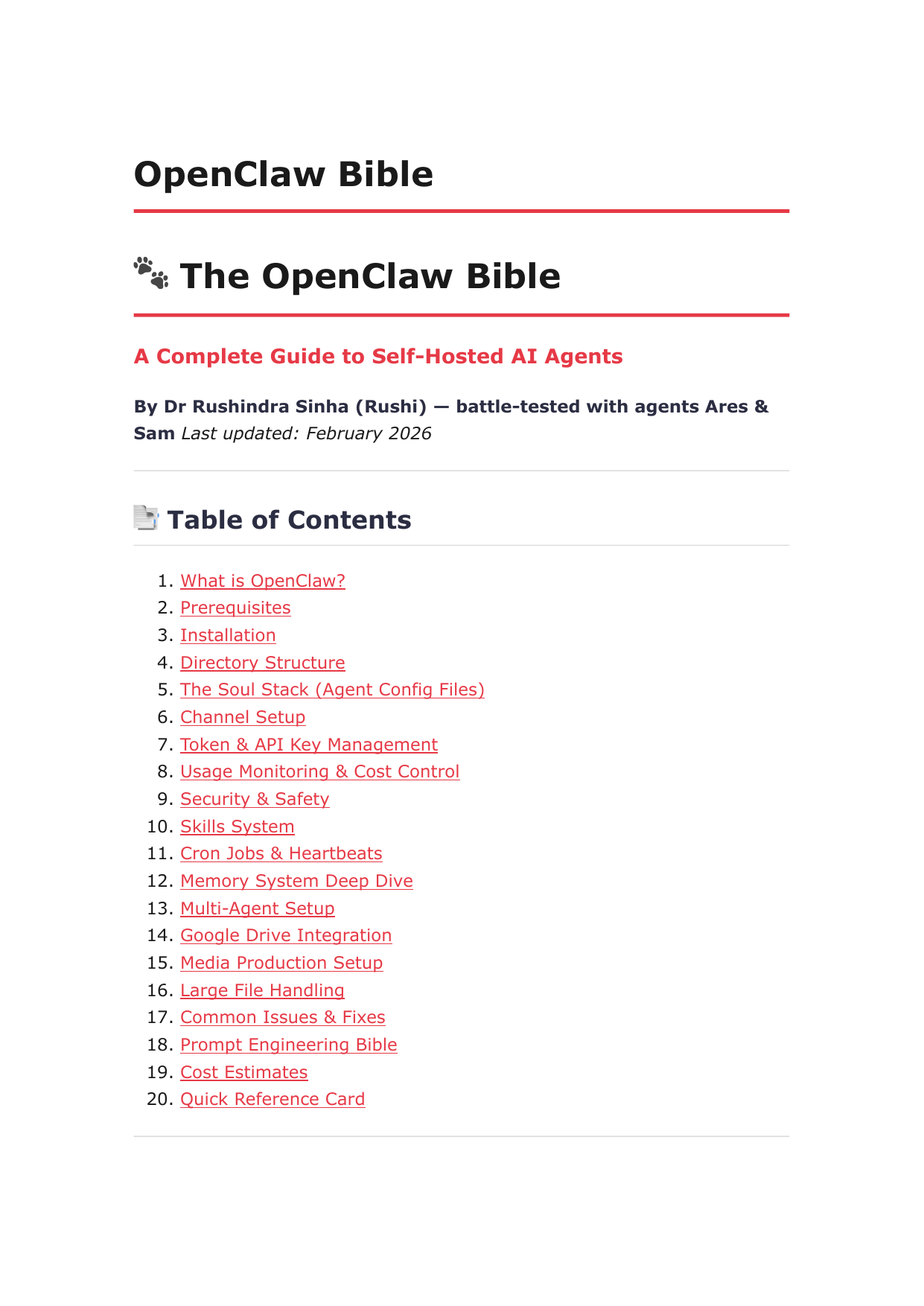
1) OpenClaw Bible
A 19-page setup manual covering the full operating model:
- what OpenClaw actually is
- installation and directory structure
- the Soul Stack (
SOUL.md,AGENTS.md,MEMORY.md,HEARTBEAT.md) - channel setup
- token and API key management
- usage monitoring and cost control
- safety and security
- skills, cron jobs, and heartbeats
- memory architecture
- multi-agent setup
- prompt engineering
- common issues and fixes
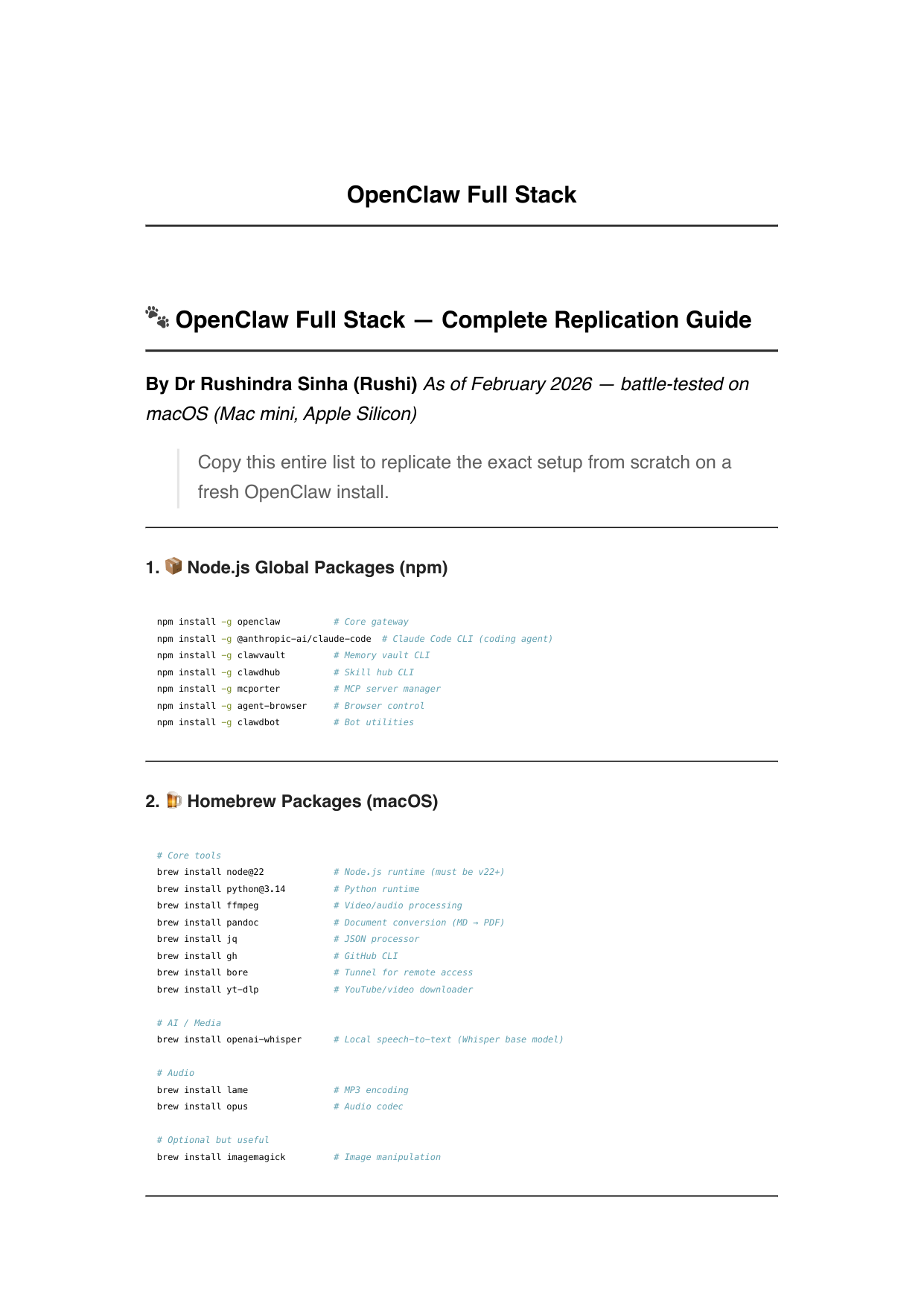
2) OpenClaw Full Stack
A 5-page replication checklist for the exact software stack:
- global npm packages
- Homebrew packages
- Python environment and dependencies
- OpenClaw skills to install
- media, browser, GitHub, and Google Workspace tooling
The 5 ideas that matter most
1. The Soul Stack is the core system
The most important part of an agent is not its tools — it is the identity and operating layer defined by files like SOUL.md, AGENTS.md, MEMORY.md, and HEARTBEAT.md.
2. OpenClaw is self-hosted infrastructure, not a chat toy
You run it on your own machine, wire it to your own models, and give it access to real execution surfaces like shell, browser, files, and messaging channels.
3. One agent can span multiple channels and workflows
The same agent can operate across WhatsApp, Telegram, Discord, iMessage, and more while keeping a coherent operating model.
4. Safety is not optional
If your agent has access to shell, files, and messaging, you need explicit identity, permissions, cost limits, and behavioral rules.
5. Memory and heartbeat behavior determine whether the system feels alive
A useful agent is not just responsive — it remembers, tracks context, and proactively does work when the moment calls for it.
Quick start
curl -fsSL https://openclaw.ai/install.sh | bash
openclaw onboard --install-daemon
openclaw gateway status
openclaw dashboard
Then:
- read the Bible first
- write your
SOUL.md - use the Full Stack doc to replicate the surrounding toolchain
- connect one channel
- test one real workflow end-to-end
Who this is for
This repo is for:
- founders building a personal AI operating system
- operators who want a real self-hosted agent instead of a SaaS wrapper
- creators who want agents inside messaging and media workflows
- developers who want to understand how a production OpenClaw stack is actually assembled
This repo is not for someone looking for a one-click toy demo.
Cost and hardware expectations
- recommended model starting point: Claude Sonnet
- expected operating cost for a serious dual-agent setup: ~$30–80/month
- recommended hardware: Apple Silicon Mac mini / MacBook, though Linux and VPS setups are also viable
Why this repo exists
Most AI agent content online is either:
- too abstract
- too beginner-fluffy
- or too fragmented to reproduce
This repo exists to close that gap.
It gives you the documents I wish I had when wiring a real self-hosted agent stack from scratch.
Related links
Usage
These docs are public so builders can learn from and adapt the setup. If you build something from this, tag me — I want to see what you make.
Reviews (0)
Sign in to leave a review.
Leave a reviewNo results found