mailroom
Health Pass
- License — License: MIT
- Description — Repository has a description
- Active repo — Last push 0 days ago
- Community trust — 14 GitHub stars
Code Warn
- process.env — Environment variable access in cli/mailroom.mjs
- network request — Outbound network request in cli/mailroom.mjs
Permissions Pass
- Permissions — No dangerous permissions requested
No AI report is available for this listing yet.
A self-hosted, Resend-style email platform on Amazon SES and Cloudflare Workers
Mailroom
Open-source email on your own Amazon SES and Cloudflare.


A self-hosted, Resend-style email platform on Amazon SES that runs on Cloudflare Workers:
transactional email with a Resend-compatible API, newsletters and broadcasts with a visual editor,
automations, shared inboxes, and deliverability monitoring, for as many businesses as you like, on
your own AWS and Cloudflare accounts. No servers to run.
Try the live demo: the whole dashboard with five
months of made-up data, no sign-up (the app's real server code runs in your browser).
Website: rvp97.github.io/mailroom (its source is in site/)
Built by Rodrigo Valle, for the love of it.
Highlights
- A sending API compatible with Resend's: Resend's SDKs work by changing their base URL.
- Newsletters and broadcasts: a visual editor, A/B subject tests, local-time sends, a public
archive with RSS, RSS-to-email, referrals and polls. - Automations on a canvas: triggers, waits, if/else paths, sends.
- Shared inboxes for received email, a website chat widget, a help center and surveys, with
agent inboxes that AI agents can work in. - Deliverability watch: DNS and blocklist checks, bounce and complaint limits under SES's
review levels, Gmail Postmaster data and time to inbox per provider. - Many businesses, one install: each organization is its own SES tenant, so one brand's
complaints never pause another's sending. - An MCP server: Claude and other assistants can do anything the dashboard does.
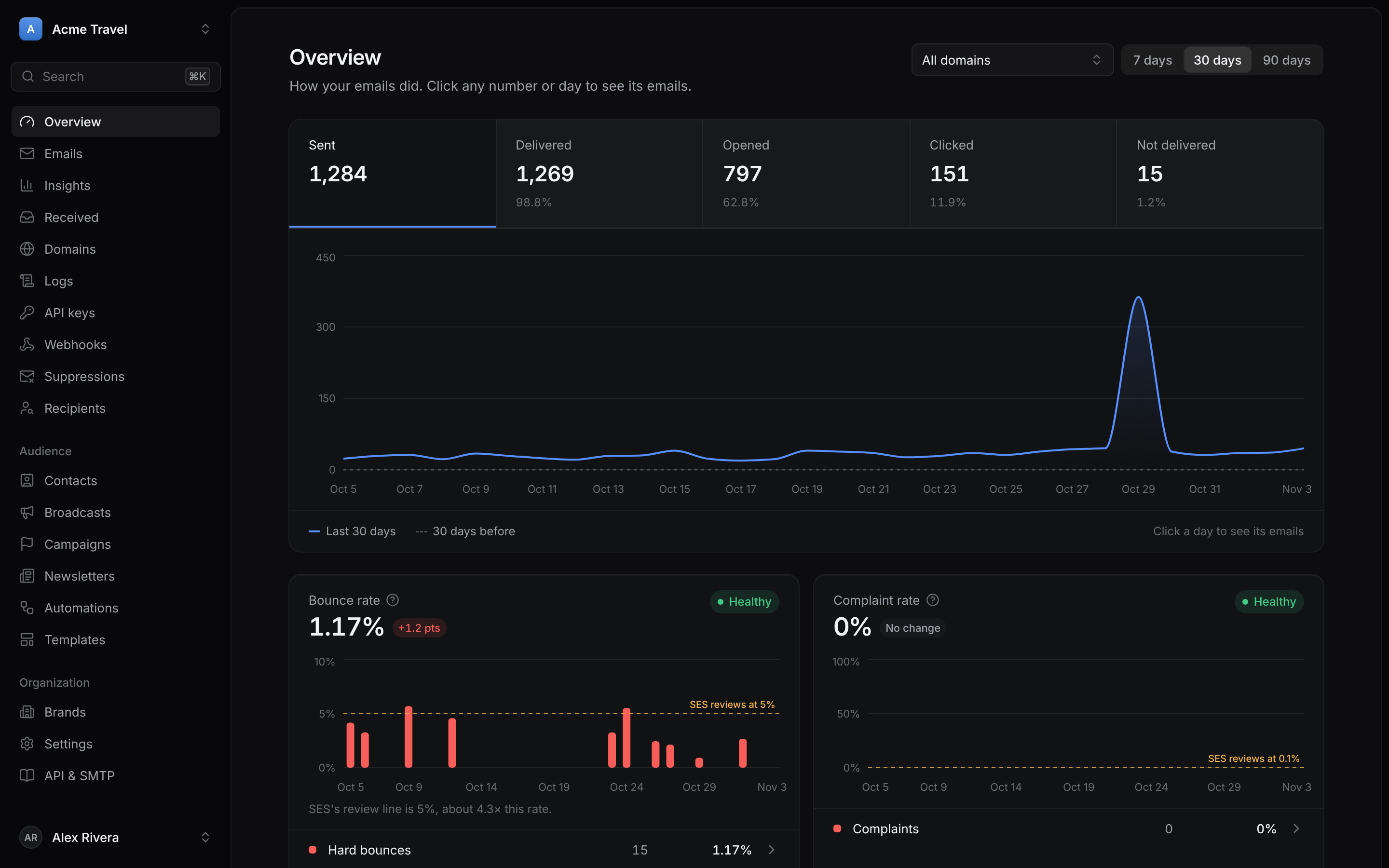
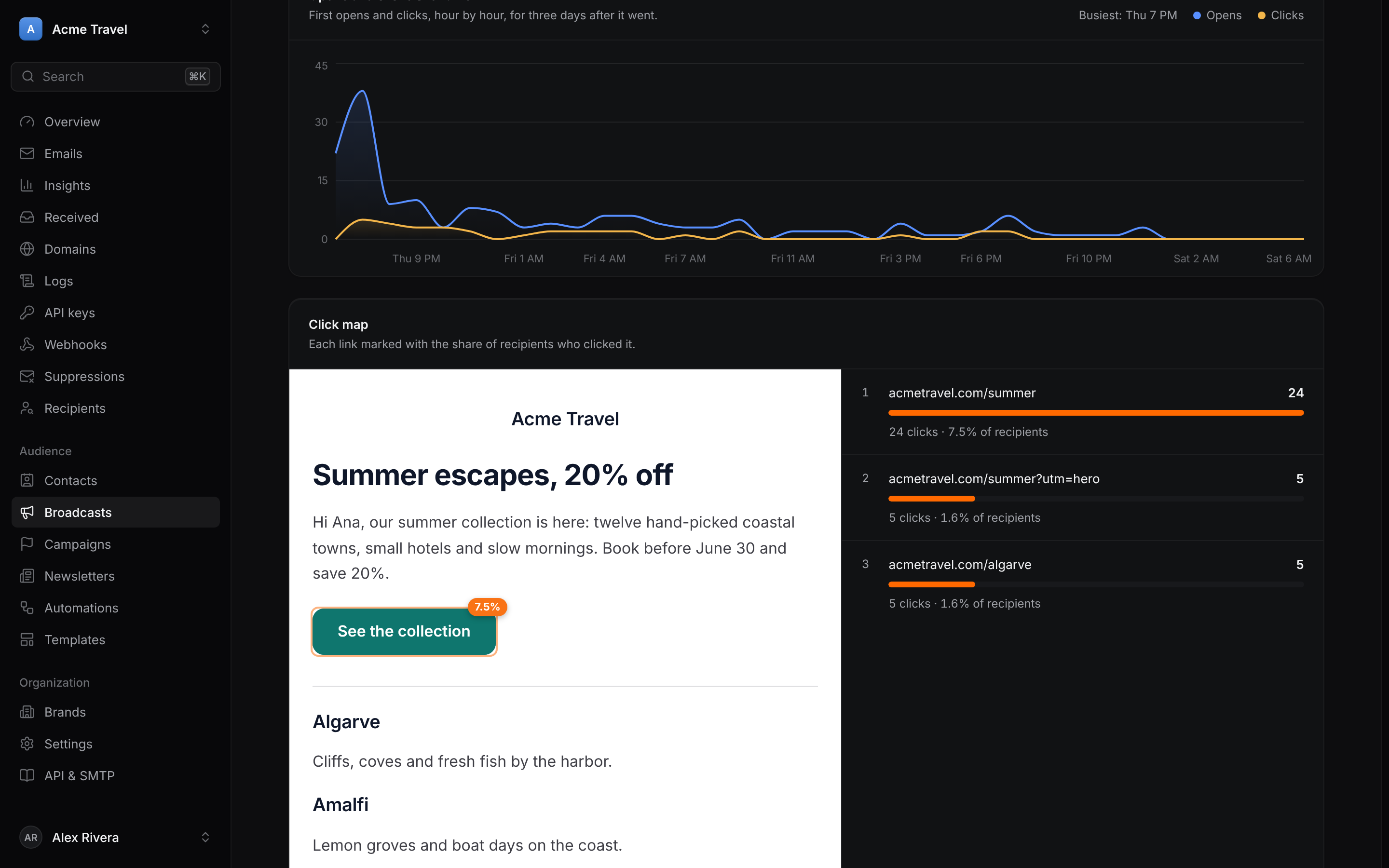 Broadcast reports: opens and clicks over time, and a click map on the email itself. |
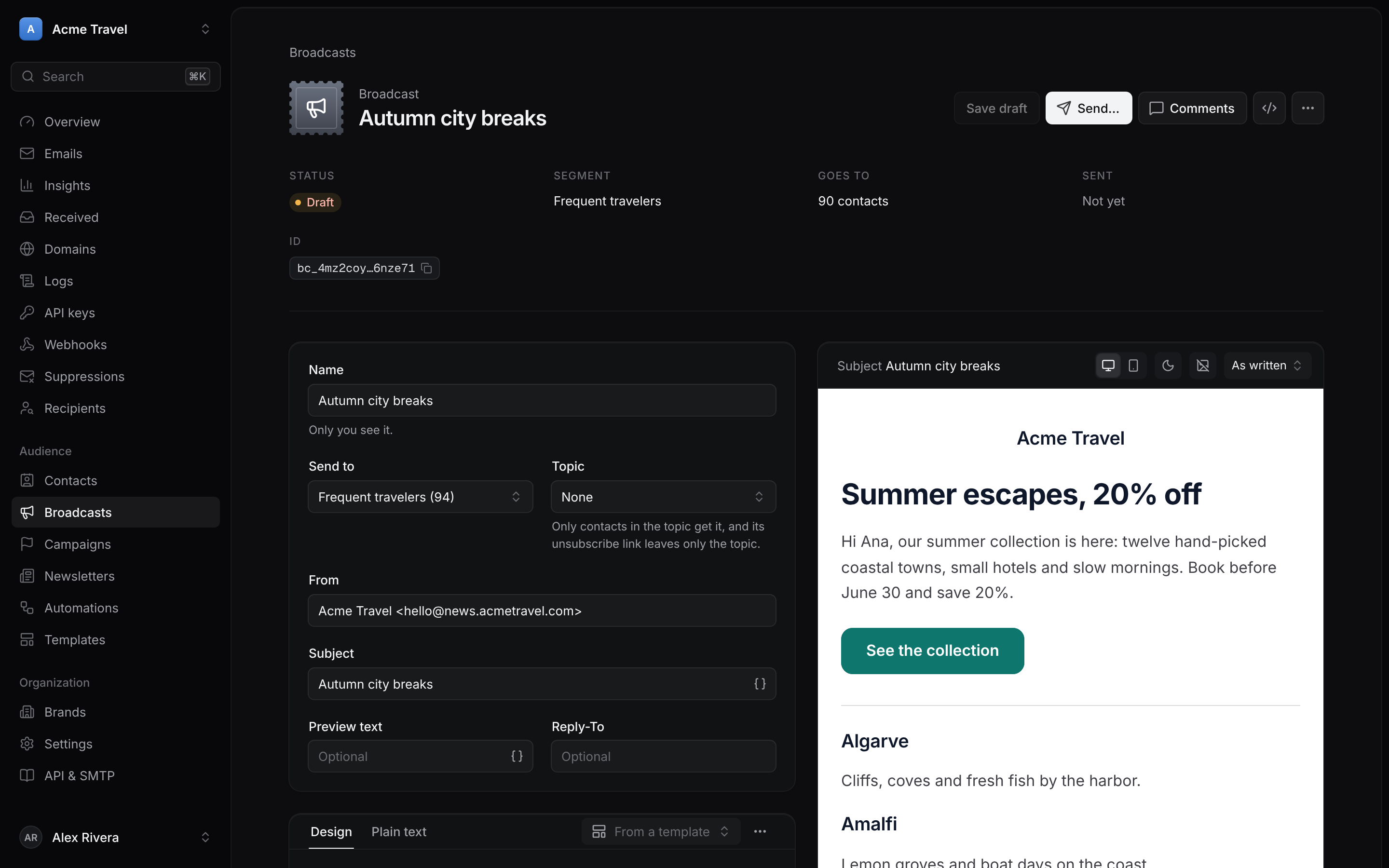 Visual editor: blocks, brand kits, a live preview on desktop, phone and dark mode. |
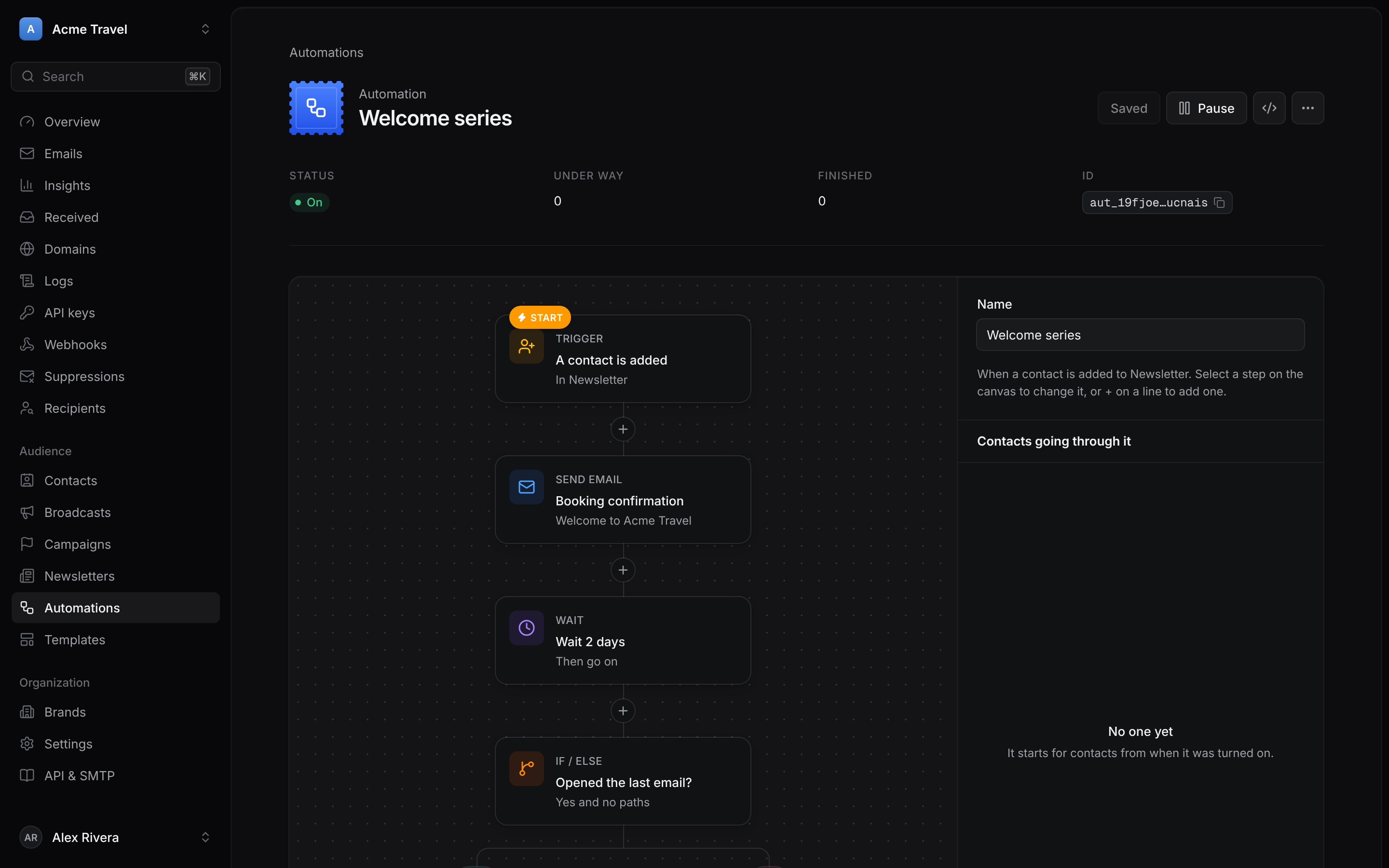 Automations: triggers, waits, sends and if/else paths on a canvas. |
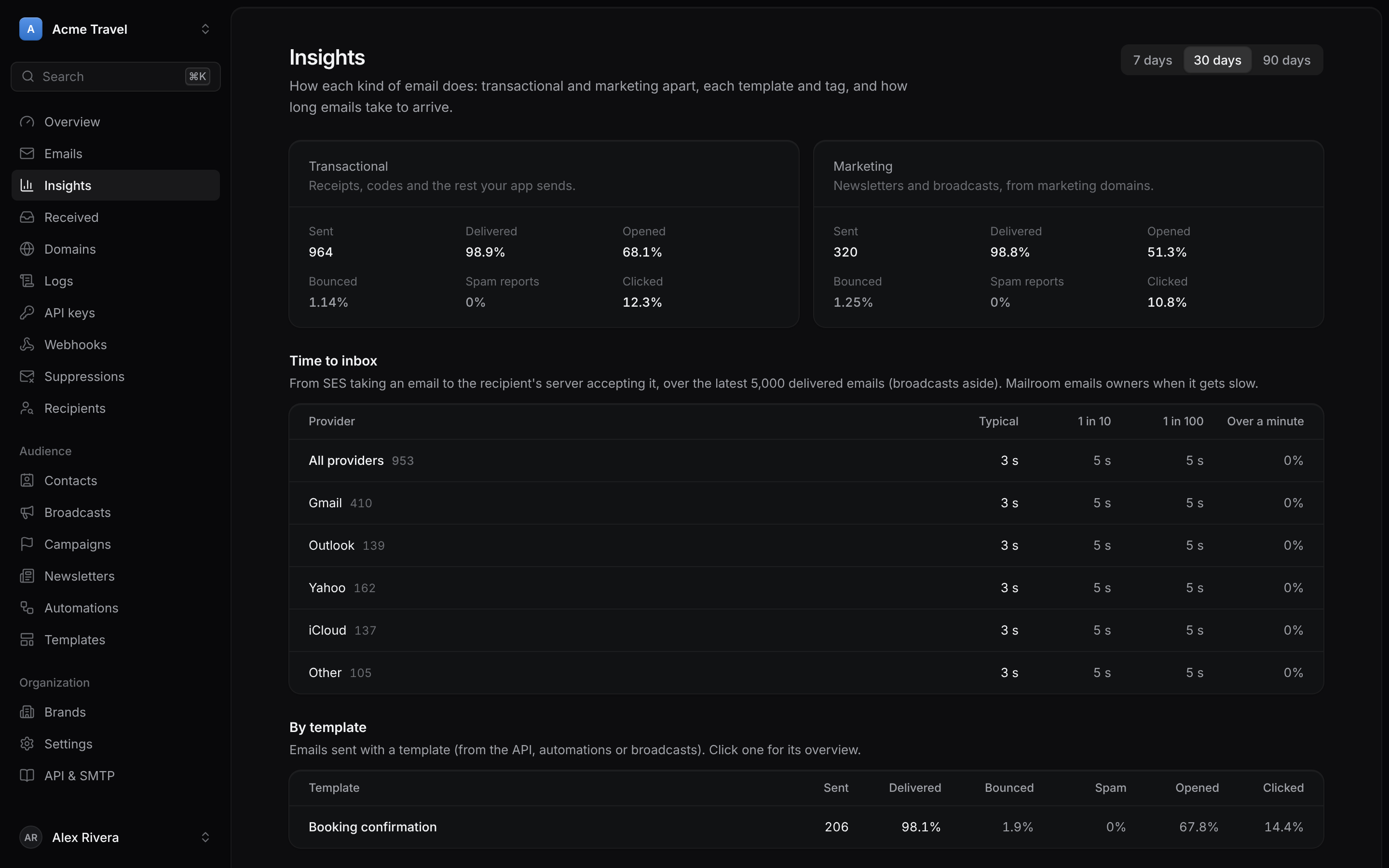 Insights: transactional and marketing apart, time to inbox per provider, each template and tag. |
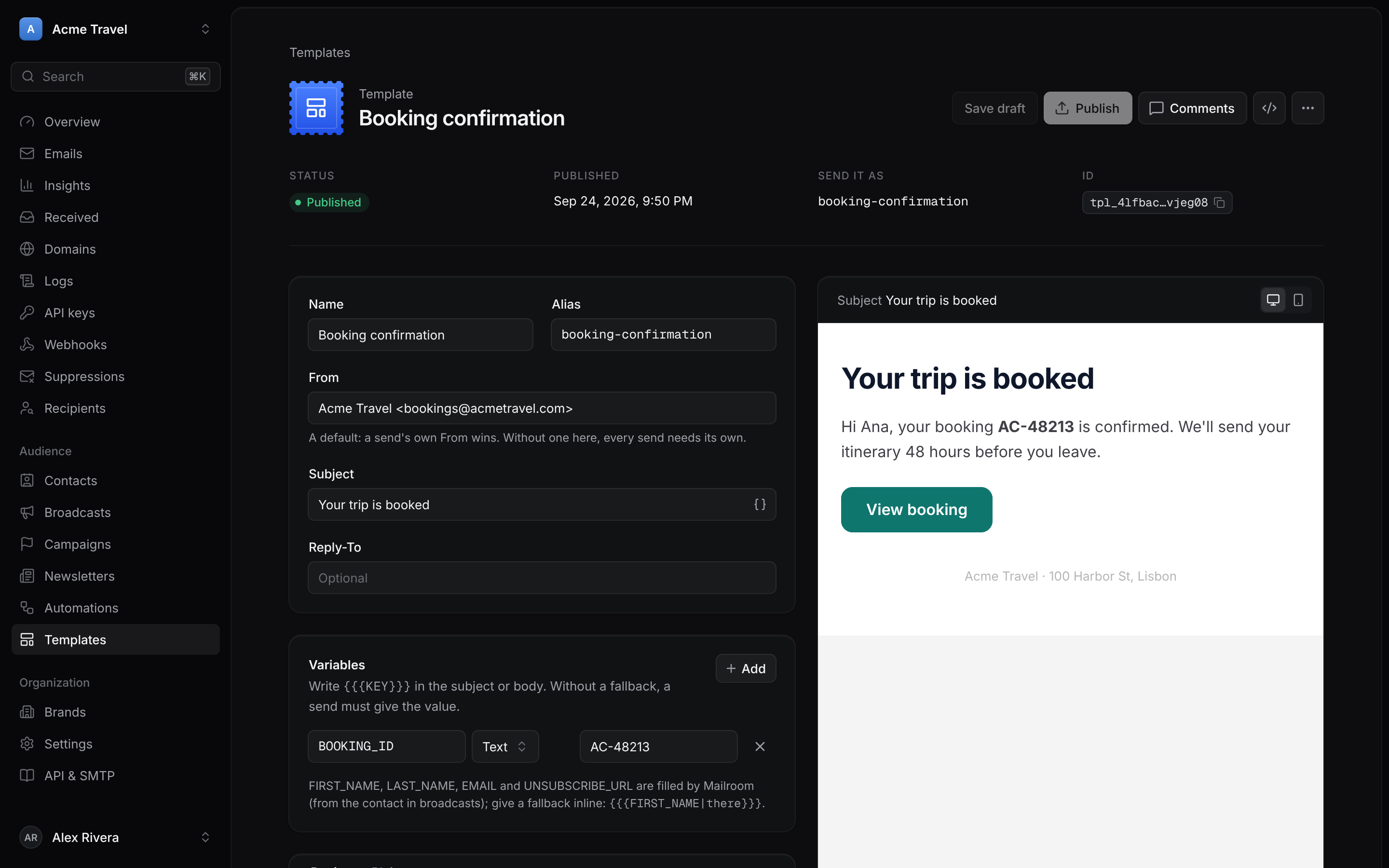 Templates: variables with fallbacks, drafts and published versions, sent by alias. |
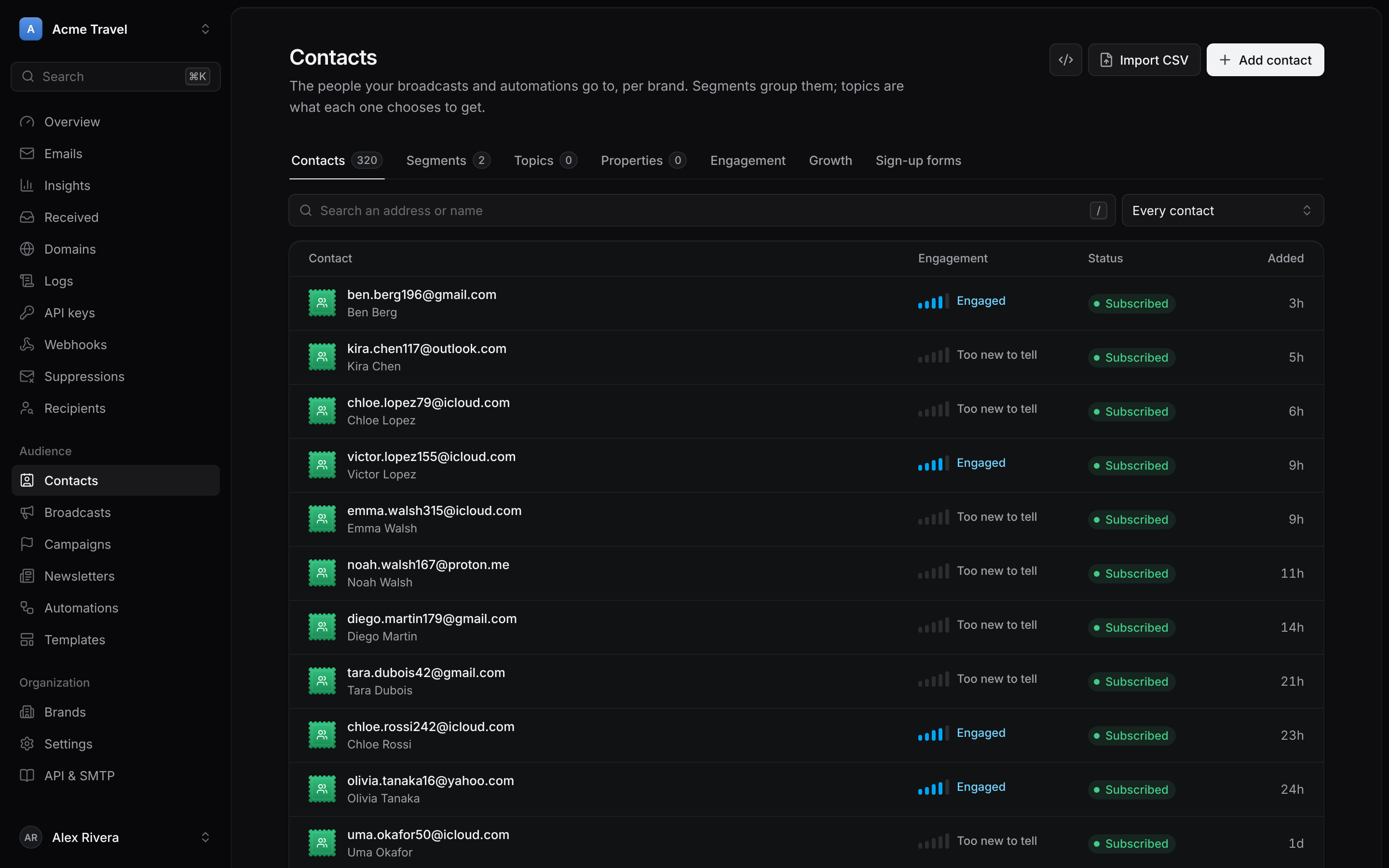 Contacts: segments, topics, engagement, growth and sign-up forms. |
Screenshots use made-up demo data.
What it costs to run: Workers Paid ($5 a month; the free plan works at lower volume) plus
Amazon SES ($0.10 per 1,000 emails). No per-contact or per-seat pricing.
One AWS account, many businesses: each organization in Mailroom is its own SES tenant with its
own configuration set, so one business's bounces or complaints never pause another's sending.
An organization that should be fully apart can optionally use its own SES account instead.
How it compares
| Mailroom | Hosted services (Resend, Beehiiv, Mailchimp) | Other self-hosted tools | |
|---|---|---|---|
| Where your lists and logs live | Your Cloudflare and AWS accounts | Their servers | Your server |
| What you pay for | Workers Paid + $0.10 per 1,000 emails | Plans that grow with contacts, emails or seats | Your server + your sending provider |
| What you maintain | Nothing to patch: Workers, D1 and R2 | Nothing | The server, its database and updates |
| In one app | Transactional API, newsletters, automations, inboxes, chat, help center | Usually one of these per product | Usually newsletters or transactional |
Contents: Features · Deploy (1. Amazon SES ·
2. Cloudflare · 3. First sign-in ·
4. Smoke test · When something goes wrong) ·
Configuration · Optional extras · Sending ·
Development · License
Features
Everything Mailroom does (click to open the full list)- Sending API compatible with Resend's:
POST /api/emails,/api/emails/batch, scheduling,Idempotency-Key, tags, attachments. Resend's SDKs work by changing their base URL. - Logs and timelines for every email (sent, delivered, opened, clicked, bounced, complained),
from SES's events through SNS, each one signature-checked. - Open and click tracking on your own domain: Mailroom rewrites links itself and serves them
fromlinks.<your domain>(not SES's sharedawstrack.me), switchable per domain. - One-click DNS: the domain page names your DNS host (Cloudflare, GoDaddy, Route 53…) and,
where it runs Domain Connect, adds every record in one click. - Sending limits (Admin › Sending limits): bounce, complaint and soft-bounce rates at which
Mailroom warns and acts, under SES's own review (5% / 0.1%) and pause (10% / 0.5%) levels. Each
brand's transactional and marketing domains are judged apart over 7 days; crossing a level emails
the organization's owners and admins, and at the act level Mailroom can also pause those domains
(off by default: it only alerts until an admin picks "Alert and pause"). Each organization can
have its own action. - Rate limits on the API: 100 requests per 10 seconds per API key, so a leaked key can't take
the whole account's sending. - Suppressions: hard bounces and complaints are suppressed automatically; misspelled domains
(gmial.com) and domains that take no email are left out before SES sees them. WithEMAILABLE_API_KEYset, a recipient nobody has delivered to yet is checked once with
Emailable and left out if its mailbox doesn't exist (at most 5 checks
per send andEMAILABLE_MONTHLY_LIMIT, default 1000, a month; answers are kept and shared). - Unsubscribe groups: send with
unsubscribe_group(an id of yours) and Mailroom adds the
one-click link andList-Unsubscribeheaders, and leaves people who left that group out of its
later emails (other groups still reach them). - Templates like Resend's: HTML with
{{{VARIABLES}}}and fallbacks, a draft you edit and a
published copy sends use, a live preview in the dashboard, sent withtemplate: { id, variables }. - Contacts, segments and topics like Resend's, per brand: import a CSV, group contacts in
segments, and let people choose topics; unsubscribe links keep each contact's choices. - Live segments: a segment can be rules instead of a list (a property, what they did in your
app, what they opened or clicked, engagement, topics, other segments, poll answers, referrals,
conversations, ratings, chats), matching all or any. Mailroom keeps its members current every
few minutes and right before a broadcast goes out, and people joining start its automations. - Broadcasts like Resend's: one email to a segment, now or scheduled, written in the dashboard
or copied from a template, filled in per contact ({{{FIRST_NAME}}},{{{contact.city}}}).
Unsubscribed, topic-excluded and suppressed contacts are left out; the dashboard counts
deliveries, opens, clicks and unsubscribes. - A preference center behind every unsubscribe link: besides unsubscribing, people pick their
newsletters and topics, how often they want broadcasts (every one, at most one a week or a
month), pause everything for 30 days, see their referral progress, and see their conversations
with you. Broadcasts respect it, and automation emails respect the pause; the team can set the
same on the contact's page (paceandpaused_untilon contacts in the API and MCP). - A visual email editor for broadcasts and templates: start from a newsletter, announcement or
plain letter, drag in blocks (headings, text, buttons, images, columns, quotes, links, footer,
raw HTML), write in place with personalization, and set palettes, fonts and layout. It renders
table-based HTML that stacks on phones; images upload to R2 and are served at/media/…. The
design is kept as JSON (designon broadcasts and templates) and thehtmlis made from it. - A/B tests, local-time sends and resends for broadcasts: test two or three subject lines on
10–50% of the segment, and after the wait the one with the most opens (or clicks) goes to the
rest; send at 9:00 in each contact's own time zone (learned from where they open and click);
and resend a sent broadcast, with a new subject, to those who didn't open it. - Broadcast reports: a click map (the email with each link marked by the share who clicked
it, beside the links ranked), first opens and clicks hour by hour after it went, and the email
apps it was read in. - Newsletters: a broadcast can be an issue of a newsletter, which keeps its segment, topic,
sender and sign-up form, and a public page at/n/<slug>with every past issue, the form and an
RSS feed (/n/<slug>/feed.xml); each email can link to its web version ({{{WEB_VERSION_URL}}}).
The public page, web versions and poll pages share the newsletter's look (logo, cover, colors,
light or dark, fonts, list or cards, links), edited with a live preview.
A newsletter can read a blog's feed every hour and turn new posts into an issue (a draft, or sent
straight away) in one of three layouts, and run a referral program: each subscriber's own link
({{{REFERRAL_URL}}}) and page with their progress and share buttons ({{{REFERRAL_PAGE_URL}}}),
friends counted once they confirm, milestones that email a reward template and firereferral.milestone, and a leaderboard. - Campaigns group several broadcasts toward one goal (different emails to different
segments): a timeline, totals that count each person once,utm_campaignadded to every link,
and an option to leave out contacts another of its emails already reached. - Polls in broadcasts: a block of answers, each a one-click link; the broadcast page counts
them and can put each answer's people in a segment, and answers firepoll.answered. - A pre-send checklist in the send dialog (subject, preview text, content filters, alt text,
every link opened to find broken ones) and a dark-inbox preview. - List growth (Contacts, Growth): joined and unsubscribed day by day, growth and churn, and
where new subscribers came from (each form, referrals, imports, the API, and utm_source). - Engagement: each contact scored from the last 90 days of broadcasts and automations (opens,
clicks, how recent), shown as a meter on the contacts list and their page; an Engagement page
with how the list splits up and its cold contacts (got N emails, opened none) to add to a
segment, unsubscribe or delete. - One person, everywhere: each contact's page has a timeline of everything about them, newest
first: their app's events (kept on the contact, with their data, forEVENT_RETENTION_DAYS,
395 by default), poll answers and referral milestones, the emails they got and whether they
opened or clicked, their conversations and website chats with their ratings, the automations
they went through and the friends they brought. Beside every conversation and chat, the team
sees who they're talking to: whether they get your email, how engaged they are, the
newsletters, segments and topics they're in, their last broadcasts, their latest events and the
last rating they gave. From there they can make them a contact, put them in a segment,
subscribe them to a newsletter or start an automation for them. Two contacts of the same person
can be merged.GET /api/contacts/:id/timelineandGET /api/contacts/:id/events(?event=)
read them. - Revenue: send purchases as events with a value, and each is credited to the last thing that
reached the person within 7 days: a broadcast or automation email they opened or clicked, or a
website chat they wrote in. Insights has a Revenue page (totals, what email and chat earned, by
kind, the top broadcasts, automations and campaigns, day by day, the latest purchases), and each
broadcast, automation and campaign shows what it earned. - Support and marketing together: replies to a broadcast become conversations tagged
"broadcast reply" and are listed on the broadcast's page; inbox rules can check whether the
sender is a contact and which segments they're in (VIPs first). Two optional rules in Settings
keep promotional email in its place: quiet mode (someone with an urgent open conversation, or
who rated support 2 or less in the last 14 days, gets no broadcasts or automation emails for
now) and a frequency cap (at most N broadcasts per person in D days; automation emails count but
always go). The send dialog says how many sit a broadcast out. Transactional email is never
held. - Website chat as a marketing channel: the chat can carry a newsletter, as a card with its
latest issue and a sign-up. Visitors your website signs in (an identity token) see whether they
get it and subscribe or unsubscribe right there; anyone else gets the newsletter's sign-up
form's confirmation email. Its pop-up messages can show by the launcher, as a banner across the
top of the page or as a pop-up in the middle, with a heading, a button and an email field for
the newsletter, and can be kept for one segment (a live one stays current). Who a message is for
never reaches the page: the widget asks Mailroom with the visitor's signed token. - Help center: each brand's public articles at
/help/<slug>(on the brand's own host too),
written in the email editor, grouped by category, with search and a "Did this answer your
question?" vote. After a visitor's first message the website chat suggests up to three
articles that may answer it; saved replies can link one; agent credentials read them
(GET /api/articles?q=,GET /api/articles/:id, MCPfind_help_articles). Questions the
chat or the search couldn't answer are kept and listed on the Help center page and in the inbox
report, with a button to write the missing article. - Keep a good answer: any reply your team sent in a conversation (an email reply or a chat
line) becomes a draft help article or a saved reply in one click. The article is titled by the
visitor's question (or the subject) without the greeting and the person's name; the saved
reply turns their first name into{{contact.first_name}}(MCPanswer_to_article,answer_to_saved_reply). - Surveys: NPS (0-10), satisfaction (1-5) or a question with your own answers, each with an
optional comment. Ask them in any email with the editor's Survey block (each contact's answer
links are signed, and the page records the answer without letting mail scanners vote), on a
public page (/s/<survey>), in the website chat when a chat ends, or in the email after a
support conversation (instead of the five faces). The Surveys page shows the score, how each
answer split, where they came from and the comments, next to support ratings and email polls.
An answer from a known contact is the eventsurvey.answered(automations can follow up), and
live segments can pick promoters, detractors, a score or a choice. - Today: the home page for whoever signs in, across every brand (or one): broadcasts waiting
for your approval or sent back to you, conversations past or within two hours of their service
level, the ones assigned to you and how many have nobody, notes that @mention you, what goes
out before midnight, unhappy survey answers from the last day, and anything wrong with how the
brand's email gets delivered (MCPget_today). - Calendar: every broadcast and newsletter issue on its day, by month: what went out, what's
scheduled (with its time) and drafts planned for a day. Plan an email on a day (a draft with
its name, newsletter and campaign), drag a planned draft to another day, and see campaigns run
across the days they cover. It also shows how many emails each automation sent each day and
how many its waiting contacts will get on the days ahead, and the days a newsletter made from
an RSS feed is likely to have its next issue (from how often the feed has posted lately). On a
phone it's a list of days (MCPget_calendar, andsave_broadcast'splanned_on). - Search everything with ⌘K: contacts (address or name), conversations, broadcasts and
issues, templates, segments, automations, newsletters, campaigns, surveys, help articles and
domains across every brand, a few of each as you type, Enter opens the first (MCPsearch_everything). - Lead score: points for what each contact did lately (opens, clicks, the events your app
sends, purchases, chats, or anything a live segment can check, with caps and negative points),
hot and warm thresholds you pick, the hottest leads on Contacts › Leads, each contact's score
and where it came from on their page, and live segments that pick hot leads (MCPlist_leads,get_lead_score,get_lead_scoring,save_lead_scoring). - Notes and follow-ups on contacts: notes for the team on a contact's page, and follow-ups (a
note with a due time for someone on the team) that you tick off when done. The notes left on
the person's conversations show with them, the inbox's person panel shows the open follow-ups
and the last note, and your follow-ups due today or late are on Today (MCPlist_contact_notes,save_contact_note,delete_contact_note,list_follow_ups). - One person across your brands: with several brands, a contact's page shows the same address
in each of them side by side (its contact there or none, subscribed or not, emails and opens,
conversations, lead score, follow-ups, blocks and what they spent), with a link to each. Each
brand still keeps its own contact and consent; this only joins them for viewing (MCPget_person). - Automations, built on a canvas: when a contact is added, joins a segment, opens a broadcast,
clicks a link in one, or your app sends an event (POST /api/events), wait, branch on a check
(in a segment, a property, opened or clicked the last email) into yes and no paths, add to or
take out of segments, set properties, and send templates filled in with the contact's values
and the event's ({{{event.room}}}). Runs are kept in D1 and moved on by the cron every minute.
They also start when someone signs up on a form, unsubscribes, changes a topic or a property,
on a date (a birthday every year, a trial's end), when a contact stops engaging, and when a
conversation starts, is resolved or rated. Steps can wait for something the contact does (or
time out), split contacts at random for an A/B path, write a quick email without a template,
add to a score, change topics and newsletters, tell the team, tag, prioritize, assign or resolve
the contact's conversation, and call a webhook. A goal event ends runs as conversions, and new
automations can start from recipes (welcome series, finish the booking, birthday, win-back,
unhappy customers, follow up after support…). - Webhooks in Resend's shape, signed the Standard Webhooks / Svix way, retried on Svix's schedule.
- Receiving, like Resend's: turn it on for a domain and Mailroom takes its email through SES,
checked for spam and viruses, kept whole in R2, listed atGET /api/emails/receivingand sent
to webhooks asemail.received. Every brand also gets a Mailroom address without DNS work.
Inbound rules forward a copy to other inboxes or drop what you never want; answers to your
emails are linked to them (in_reply_to_email_id), and the dashboard replies in the same thread. - Conversations and agent inboxes: received email is threaded by its headers (never by
subject) into conversations with per-person read state, open/resolved, drafts and replies. An
agent gets an inbox of its own (support@a receiving domain, or on the Mailroom address) and a
credential that reaches only that inbox, read-only unless granted more, through the REST API or
MCP. Agents can draft for a person to approve; every read, draft and reply is in the inbox's
audit trail. Teams get owners (by hand or round robin), tags, priorities, internal notes with
@mentions, snooze, saved replies, signatures, send later with undo, inbox rules, service-level
targets with business hours, rating surveys and a customizable report.
See Agent inboxes. - Deliverability watch: every day each verified domain's DNS is checked against what SES
needs (DKIM, MAIL FROM, receiving MX, DMARC) and looked up on domain blocklists; a change emails
the owners and admins. Editors check content as you write (Gmail clipping, all-caps subjects,
image-only bodies, URL shorteners), andPOST /api/emails/checkdoes it from the API. - Insights: transactional and marketing domains apart, each template's and tag's delivery,
bounce, complaint, open and click rates, and time to inbox (seconds from SES to the
recipient's server, typical and slowest, per mailbox provider). When a brand's emails of the
last hour take minutes to arrive, its owners get an email (at most one a day). - Gmail Postmaster Tools: Gmail doesn't report spam complaints to SES, so a deployment admin
connects a Google account (AWS account page;GOOGLE_CLIENT_IDandGOOGLE_CLIENT_SECRET, an
OAuth client with the redirect URI<BETTER_AUTH_URL>/postmaster/callbackand the Gmail
Postmaster Tools API enabled). Mailroom registers every verified sending domain, shows the TXT
record Google verifies it with on the domain page, and every 6 hours brings Gmail's spam rate,
DMARC and TLS rates and bulk-sender compliance into Insights. - Deliverability report, mail-tester style: send an email to a brand's Mailroom address and its
page in Received scores it out of 10 (SPF, DKIM and DMARC alignment, the DMARC policy, one-click
unsubscribe, Message-ID, plain-text part, links, image alt text, content). - Weekly digest: Monday mornings, each organization's owners and admins get last week in one
email (volume and rates against the week before, time to inbox, Gmail's spam rate, and anything
that needs a look). Settings turns it off. - SMTP: apps that only speak SMTP send through SES directly; their events still show up here.
- Organizations, invitations and roles (Better Auth), sign-in with a passkey, an
emailed code, a password (optional, set in Account) or Google (withGOOGLE_CLIENT_ID/GOOGLE_CLIENT_SECRET; add the redirect URI<BETTER_AUTH_URL>/api/auth/callback/google). Two-factor authentication with an
authenticator app and backup codes, asked after a password or an emailed code. Only admins and
invited addresses get in. - TanStack Start, React 19, shadcn/ui, Drizzle, D1, two SQLite Durable Objects (sending pace, live chat), Cron. No Queues.
Deploy
You need a Cloudflare account (Workers Paid recommended, see
the free plan) with R2 enabled (R2 › Overview, once per
account), an AWS account, and a domain to send from. Plan on about 30 minutes, plus AWS's
review of SES production access (usually within a day; you can do everything else meanwhile).
The order: create the AWS side first (its keys are asked for when you deploy), deploy to
Cloudflare, then sign in and finish in Mailroom's own pages.
What's automatic and what isn't. The Deploy button only does the Cloudflare part:
| Who does it | |
|---|---|
| Copy the repo to your GitHub/GitLab, build it, deploy it, redeploy on every push (Workers Builds) | The button |
Create the D1 database (and apply its migrations), the KV namespace OAUTH_KV and the R2 bucket mailroom-inbound |
The button |
| The Durable Objects, the cron trigger and the rate limits | The button (they come with the Worker) |
| Create the IAM user and its access key, and request SES production access | You, in AWS (step 1) |
| The SNS topic for events, each organization's SES tenant and configuration set, domain identities, receipt rules | Mailroom, when you click Set up events, Set up sending, Add domain (step 3) |
| The DNS records for each domain (DKIM, MAIL FROM, DMARC, MX for receiving) | You, at your DNS host. Mailroom lists them, checks them, and adds them in one click only where the host supports Domain Connect |
| Leave the SES sandbox | AWS, after your request. Until then you can only send to addresses verified in SES |
1. Amazon SES
Pick a region for SES (say
us-east-1oreu-west-1) and stay in it in the AWS console.
Every domain, tenant and event lives in that region.Request production access: SES console › Account dashboard › Request production
access. Until AWS grants it, the account is in the sandbox and can only send to addresses
you've verified. Describe what you send (transactional and opt-in marketing), how people sign
up and how you handle bounces and complaints (Mailroom suppresses them automatically).Create the IAM user Mailroom acts as: IAM › Users › Create user, named
The IAM policymailroom, no
console access. Attach this inline policy (IAM › the user › Add permissions › Create inline
policy › JSON). Mailroom's AWS account page shows the same policy, kept insrc/lib/iam-policy.ts.{ "Version": "2012-10-17", "Statement": [ { "Sid": "MailroomSes", "Effect": "Allow", "Action": [ "ses:SendEmail", "ses:SendRawEmail", "ses:GetAccount", "ses:CreateEmailIdentity", "ses:GetEmailIdentity", "ses:DeleteEmailIdentity", "ses:PutEmailIdentityMailFromAttributes", "ses:CreateConfigurationSet", "ses:CreateConfigurationSetEventDestination", "ses:UpdateConfigurationSetEventDestination", "ses:TagResource", "ses:CreateTenant", "ses:GetTenant", "ses:CreateTenantResourceAssociation", "ses:DeleteTenantResourceAssociation", "ses:GetReputationEntity", "ses:DeleteSuppressedDestination", "ses:DescribeActiveReceiptRuleSet", "ses:CreateReceiptRuleSet", "ses:SetActiveReceiptRuleSet", "ses:CreateReceiptRule", "ses:DeleteReceiptRule" ], "Resource": "*" }, { "Sid": "MailroomInbound", "Effect": "Allow", "Action": [ "s3:CreateBucket", "s3:PutBucketPolicy", "s3:PutLifecycleConfiguration", "s3:GetObject", "s3:DeleteObject" ], "Resource": ["arn:aws:s3:::mailroom-inbound-*", "arn:aws:s3:::mailroom-inbound-*/*"] }, { "Sid": "MailroomSmtpUsers", "Effect": "Allow", "Action": ["iam:CreateUser", "iam:PutUserPolicy"], "Resource": "arn:aws:iam::*:user/mailroom-smtp/*", "Condition": { "ArnLike": { "iam:PermissionsBoundary": "arn:aws:iam::*:policy/mailroom-smtp-boundary" } } }, { "Sid": "MailroomSmtpKeys", "Effect": "Allow", "Action": [ "iam:CreateAccessKey", "iam:DeleteAccessKey", "iam:ListAccessKeys", "iam:DeleteUserPolicy", "iam:DeleteUser" ], "Resource": "arn:aws:iam::*:user/mailroom-smtp/*" }, { "Sid": "MailroomEvents", "Effect": "Allow", "Action": ["sns:CreateTopic", "sns:Subscribe", "sns:GetTopicAttributes", "sns:SetTopicAttributes"], "Resource": "arn:aws:sns:*:*:mailroom-ses-events" }, { "Sid": "MailroomCosts", "Effect": "Allow", "Action": ["ce:GetCostAndUsage", "ce:GetCostForecast"], "Resource": "*" } ] }What each part is for:
MailroomSessends and manages domains, tenants and receipt rules;MailroomInboundis the S3 drop box for receiving (skip it if you won't
receive); the twoMailroomSmtp…statements let Mailroom make SMTP credentials,
each a user that can only send;MailroomEventscreates the SNS topic SES reports events
to;MailroomCostsshows what the account costs (optional).Create an access key for the user: the user › Security credentials › Create access
key › "Application running outside AWS". Keep the key ID and secret for the deploy.SMTP only (optional, once, with the AWS CLI signed in to the account):
scripts/update-iam.shcreatesmailroom-smtp-boundary, the send-only permissions boundary
every SMTP user gets, and re-puts the policy above.Turn on SES's account-level suppression list for bounces and complaints (SES console ›
Configuration › Suppression list) as a second safety net.
The rest of SES (the SNS topic for events, each organization's tenant and configuration set,
domain identities and DKIM, receipt rules) is set up from Mailroom's pages in
step 3, not by hand.
2. Cloudflare
With the button (the quickest): click Deploy to Cloudflare at the top. Cloudflare copies
this repo into your GitHub or GitLab account, creates the D1 database, KV namespace and R2 bucket,
and builds and deploys it with Workers Builds, so every push to your copy deploys again. In the
form:
- Worker name:
mailroomis fine; it decides the address,https://<Worker name>.<your subdomain>.workers.dev(your subdomain is shown under
Workers & Pages). BETTER_AUTH_URL: that address, or your own domain if you'll add one. The deploy stops
while it's stillhttps://mailroom.example.com.ADMIN_EMAILS: your email address. Only these addresses, and people they invite, can sign in.AWS_REGIONandMAX_SEND_RATE: your SES region and its send rate (SES console ›
Account dashboard; 1 in the sandbox, usually 14 after production access).- Secrets:
BETTER_AUTH_SECRET(openssl rand -base64 32; keep it, changing it signs
everyone out and makes stored keys unreadable), and the IAM user'sAWS_ACCESS_KEY_IDandAWS_SECRET_ACCESS_KEY.
From a terminal (Node 20+ or Bun):
git clone https://github.com/RVP97/mailroom && cd mailroom
bun install                           # or npm install
bunx wrangler login
bunx wrangler d1 create mailroom      # add its database_id to wrangler.jsonc's d1_databases
bunx wrangler kv namespace create OAUTH_KV   # and its id to kv_namespaces
bunx wrangler r2 bucket create mailroom-inbound
Then in wrangler.jsonc set the vars (at least BETTER_AUTH_URL, ADMIN_EMAILS, AWS_REGION
and MAX_SEND_RATE; see Configuration) and, for your own domain, routes.
Add the secrets and deploy:
bunx wrangler secret put BETTER_AUTH_SECRET     # openssl rand -base64 32
bunx wrangler secret put AWS_ACCESS_KEY_ID
bunx wrangler secret put AWS_SECRET_ACCESS_KEY
bun run deploy                                  # builds, applies the D1 migrations, deploys
To deploy on every push instead, connect the repo in Workers & Pages › mailroom › Settings ›
Build, with bun run deploy (or npm run deploy) as the deploy command and no build command.bun run deploy always applies new D1 migrations before the new code goes live.
Keeping your values out of the repo. In a public fork you may not want your account IDs and
addresses in wrangler.jsonc. Leave it generic and put what's yours in the build variableMAILROOM_WRANGLER_CONFIG (Workers Builds › Settings › Build › Variables and secrets): JSON in
the shape of wrangler.jsonc with only your values, for example{"account_id":"…","routes":[{"pattern":"mail.example.com","custom_domain":true}],"d1_databases":[{"binding":"DB","database_name":"mailroom","database_id":"…","migrations_dir":"drizzle"}],"kv_namespaces":[{"binding":"OAUTH_KV","id":"…"}],"vars":{"BETTER_AUTH_URL":"https://mail.example.com","ADMIN_EMAILS":"[email protected]"}}.bun run deploy merges it over wrangler.jsonc before building
(scripts/deployment-config.mjs): objects key by key, arrays
replaced.
3. First sign-in
- Open your address and sign in with an
ADMIN_EMAILSaddress. UntilSYSTEM_FROMis set
(below), the sign-in code isn't emailed: find it in the Worker's logs (Workers & Pages ›
mailroom › Logs, orbunx wrangler tail). Add a passkey or password in Account so you
don't need codes again. - AWS account page › Set up events: creates the SNS topic
mailroom-ses-eventsand
subscribeshttps://<your address>/webhooks/sesto it (confirmed automatically). From then on
every delivery, bounce, complaint, open and click reaches Mailroom. - Create an organization (one per business), then Settings › Set up sending: its SES
tenant and configuration set. - Domains › Add domain, ideally a subdomain such as
mail.example.com. Add the DNS records
it lists (three DKIM CNAMEs, a bounce MAIL FROM MX and TXT, and DMARC); where the DNS host
supports it, Connect adds them in one click. SES verifies within minutes. - API keys › Create, and send your first email.
- Mailroom's own emails (sign-in codes, invitations, alerts) go through Cloudflare's Email
Sending, so they never depend on SES or an organization's tenant: onboard a domain in the same
Cloudflare account (Compute › Email Service › Email Sending › Onboard Domain, for examplemail.example.com) and setSYSTEM_FROMto an address on it.SYSTEM_FROM_SES, an address
on a domain verified in Mailroom, is the fallback when Cloudflare refuses (and the only way on
the free plan).
The AWS account page also shows what the account costs (this month by service, last month and
AWS's forecast) through Cost Explorer. AWS charges $0.01 for each Cost Explorer call, so Mailroom
asks at most once a day, and only when an admin opens the page. Without the MailroomCosts
statement the page simply says so. Under it, Cost by organization splits the month's bill
(and last month's) by each organization's share of the emails sent and received, with its brands
under it: what to charge each business you host.
4. Smoke test
Five minutes that prove each part works. SES's mailbox simulator addresses work even in the
sandbox, and they don't count against your bounce rate.
- Send. With your API key, send to your own inbox:
Emails shows it as sent, then delivered within seconds. If it stays sent, eventscurl https://<your url>/api/emails \ -H "Authorization: Bearer mr_..." -H "Content-Type: application/json" \ -d '{"from":"[email protected]","to":"[email protected]","subject":"Smoke test","text":"Hello"}'
aren't arriving: run AWS account › Set up events again. - Delivered. The same request to
[email protected]ends delivered. - Bounce. To
[email protected]: it ends bounced, with SES's reason on the
email's page, and the address appears in Suppressions (a second send to it is left out,
not sent). - Complaint. To
[email protected]: delivered, then complained, and
suppressed too. - Receive (if you set up receiving). Email the brand's Mailroom address, shown
on Received. It appears there within a minute, and your webhooks getemail.received.
When something goes wrong
| What you see | Where to look | Usually |
|---|---|---|
The API answers 403 invalid_from_address: "The mail.example.com domain is not verified yet." |
Domains › the domain: each DNS record shows found or missing, and Verify checks again | A DKIM CNAME or the MAIL FROM MX/TXT isn't published yet, or was added under the wrong name (some DNS hosts append the domain themselves). A domain SES already had also needs its Ownership TXT record. |
403 invalid_from_address: "… is not added to this brand" |
Domains | The From address's domain belongs to another brand, or wasn't added. |
| An email ends failed | The email's page: SES's error, word for word | In the sandbox, "Email address is not verified" means the recipient isn't verified in SES. Request production access (step 1). |
| An email ends bounced or soft bounced | The email's page explains the bounce in plain words (with the receiving provider's message); Recipients shows that address's whole history | Bounced is permanent (no such mailbox), and the address is suppressed. Soft bounced is the server giving up for now (full, down); the address isn't suppressed. |
| A brand's sending is paused | Overview shows its bounce and complaint rates against SES's lines; Admin › Sending limits shows which limit was hit | A list with bad addresses. Clean it, then resume from the brand's page. |
| Emails stay sent, never delivered | AWS account: the events topic and its subscription | Set up events wasn't run, or BETTER_AUTH_URL doesn't match the address the Worker is really on. |
| Sign-in codes never arrive | Workers & Pages › mailroom › Logs (the code is printed there) | SYSTEM_FROM isn't set yet, or its domain isn't onboarded in Cloudflare Email Sending. |
Every API request (body and answer, with secrets redacted) is in Logs, and every email's
SES events are on its page.
Configuration
Vars live in wrangler.jsonc (or MAILROOM_WRANGLER_CONFIG); secrets are set withwrangler secret put (or in the dashboard, Settings › Variables and secrets).
| Var | Default | |
|---|---|---|
BETTER_AUTH_URL |
(required) | The deployment's public address: sign-in links, passkeys, the SNS endpoint. |
ADMIN_EMAILS |
(required) | Who may sign in without an invitation (comma separated). They run the deployment. |
AWS_REGION |
us-east-1 |
The SES region. |
MAX_SEND_RATE |
14 |
The SES account's maximum send rate (emails per second). |
TIMEZONE |
UTC |
The dashboard's and daily counters' days. |
SYSTEM_FROM, SYSTEM_FROM_SES |
empty | The sender of Mailroom's own emails (see step 3.6). |
OPERATOR_NAME, CONTACT_EMAIL |
empty | Who runs it, on the public About, Privacy and Terms pages. |
BODY_RETENTION_DAYS, REQUEST_LOG_RETENTION_DAYS, LOG_RETENTION_DAYS, INBOUND_RETENTION_DAYS |
7, 30, 90, 30 | Days email bodies, API request logs, everything else and received emails are kept. |
EVENT_RETENTION_DAYS |
395 | Days contacts' app events are kept (their timeline, live segments, goals). |
ARCHIVE_EMAILS |
true |
false turns the long-term archive off for everyone. |
INBOUND_DOMAIN |
empty | Each brand's Mailroom address <slug>@INBOUND_DOMAIN (Receiving). |
DMARC_REPORTS_ADDRESS |
empty | Where domains send DMARC reports (DMARC reports). |
TRACKING_ZONE_ID, TRACKING_CNAME_TARGET |
empty | Tracking on each domain's own links. host (tracking). |
CLOUDFLARE_ACCOUNT_ID |
empty | Where sign-up forms make their Turnstile widgets (Sign-up forms). |
DOMAIN_CONNECT_PROVIDER_ID |
empty | One-click DNS with your own Domain Connect template (details). |
SENTRY_DSN |
empty | Error tracking in Sentry, for the Worker and the dashboard. |
| Secret | |
|---|---|
BETTER_AUTH_SECRET |
Required. Signs sessions and links; encrypts organizations' own AWS keys. |
AWS_ACCESS_KEY_ID, AWS_SECRET_ACCESS_KEY |
Required. The IAM user from step 1. |
CLOUDFLARE_API_TOKEN |
Optional: tracking hostnames (Zone › SSL and Certificates: Edit, Workers Routes: Edit) and Turnstile (Account › Turnstile: Edit). |
GOOGLE_CLIENT_ID, GOOGLE_CLIENT_SECRET |
Optional: Sign in with Google and Gmail Postmaster Tools. |
DOMAIN_CONNECT_PRIVATE_KEY |
Optional: signs one-click DNS links (scripts/domain-connect-key.sh). |
Build variables (Workers Builds): MAILROOM_WRANGLER_CONFIG (above), and for Sentry source mapsSENTRY_AUTH_TOKEN (secret) and SENTRY_ORG (plus SENTRY_PROJECT if it isn't mailroom).
Optional extras
Each of these is off until you set it up; the sections below say how.
- Your own domain for the dashboard: add it under
routes(custom_domain: true) on a zone
in the same Cloudflare account, and setBETTER_AUTH_URLto it. - Open and click tracking on each domain's own host (Cloudflare for SaaS).
- Receiving email and each brand's Mailroom address.
- DMARC reports on each domain's page.
- Sign in with Google and Gmail Postmaster Tools (see Features).
- Turnstile on sign-up forms.
- One-click DNS with your own Domain Connect template.
- SMTP credentials for apps that can't call an API.
- An organization's own SES account.
- Long-term archive of what retention deletes, in R2.
- Error tracking: set
SENTRY_DSN; Admin › Error tracking sends a test error from each side.
An organization's own SES account (optional)
One account is the default and is all most deployments need: every organization sends through
it, each brand in its own tenant. If you'd rather keep one organization fully apart (its bounces
and complaints never count against the account everyone else sends from, its quota is its own,
and AWS bills it directly), give it its own account:
- In the other AWS account (and the region it sends from), create an IAM user with the same
policy as above, and request SES production access there.MailroomInboundis needed only if
its domains will receive, andMailroomCostsonly to see its costs on the card. For SMTP
credentials, also runAWS_PROFILE=<that account> scripts/update-iam.shonce (with the user
namedmailroom). - Sign in as one of
ADMIN_EMAILS, switch to the organization, and go to Settings › Amazon
SES account › Use its own account. Paste the access key ID, secret and region.
Mailroom checks the keys (STS and ses:GetAccount), creates the mailroom-ses-events topic in
that account, subscribes /webhooks/ses to it (confirmed automatically), and sets up every brand
of the organization there (tenants and configuration sets). From then on, its domains, sends,
receiving, SMTP credentials, tenant status and suppression removals use that account. Everything
else stays the same, and organizations without their own account are untouched.
- The secret is stored in D1 encrypted (AES-GCM) with a key derived from
BETTER_AUTH_SECRET.
If you change that secret, enter the keys again (Replace keys). When you rotate keys, keep
the old one active for a minute while Workers pick up the new one. - Moving. An organization that already has domains can still change accounts (to its own,
to another one, or back with Use the deployment's account). Mailroom adds each domain to
the new account and shows its new DKIM records on the domain's page; its emails keep going out
from the old account meanwhile. Every 5 minutes (or Check now) it checks, and once every
domain is verified there it switches, cleans up the old account and emails the admins. While
a move runs, new domains and receiving changes wait. Cancel move undoes it. SMTP
credentials can't move (they're IAM users in the account): delete them first. A move can't
change region while one of its domains receives. - Keys AWS refuses. If AWS refuses an account's keys (deleted, deactivated, missing a
permission), its emails wait instead of failing, the admins get one email and the card shows
it; they go out by themselves once the keys work again, for up to 3 days. The same holds for
the deployment's own keys. - Pace. Each account is paced at its own SES rate (read hourly), apart from
MAX_SEND_RATE,
which stays the deployment's account's rate. - Receiving. The first time one of its domains turns receiving on, Mailroom creates an S3
drop box (mailroom-inbound-<account>-<region>), its topic permission and a receipt rule set
in that account (or uses the active one), and its received mail is read with its keys. Its
brands' Mailroom addresses (<slug>@INBOUND_DOMAIN) keep receiving in the deployment's account. - Costs. The card shows what AWS charges that account (Cost Explorer, kept a day). The
AWS account page and Cost by organization cover the deployment's account only. - Each account (and region) belongs to one organization, and can't be the deployment's own.
Events from its topic are only applied to that organization's emails.
Sending
// npm install resend    (RESEND_BASE_URL=https://<your url>/api)
import { Resend } from "resend";
const resend = new Resend(process.env.MAILROOM_API_KEY);

await resend.emails.send({
  from: "Harbor Inn <[email protected]>",
  to: ["[email protected]"],
  subject: "Your booking",
  html: "<p>See you soon.</p>",
  tags: [{ name: "kind", value: "booking" }],
});
curl https://<your url>/api/emails \
  -H "Authorization: Bearer mr_..." -H "Content-Type: application/json" \
  -d '{"from":"[email protected]","to":"[email protected]","subject":"Hi","text":"Hello"}'
| Method | Path | |
|---|---|---|
| POST | /api/emails |
Send now, or at scheduled_at (up to 30 days ahead). Idempotency-Key supported (24 h). |
| POST | /api/emails/batch |
Up to 100 emails, queued and sent at the account's rate. |
| GET | /api/emails/receiving, /api/emails/receiving/:id |
Received emails (search, domain, cursor); one with its html, text, headers and SES's spam, virus, SPF, DKIM and DMARC verdicts. |
| POST | /api/emails/check |
Checks subject, html, text (and marketing) for what inboxes hold against an email; answers findings (warnings and notes) without sending. |
| GET / POST | /api/domains/:id/health |
The deliverability watch's last look at a domain (its DNS against what SES needs, and the domain blocklists); POST checks now. |
| GET / POST / PATCH / DELETE | /api/inbound-rules[/:id] |
What a brand does with what it receives, the first match first: match_to (an address, *@domain, name@* or *), match_from and match_subject (contained, ignoring case), action forward (with forward_to, up to 10 addresses; sent from the address it came to when its domain sends, Reply-To the sender) or drop (not kept, no webhook), continue, enabled. |
| GET | /api/emails/receiving/:id/attachments[/:attachment_id] |
A received email's attachments, each with a download_url that works for an hour. |
| GET | /api/emails, /api/emails/:id |
List (status, day, domain, provider, search, cursor) and one email with its events. Statuses keep failed (never reached a server), soft_bounced (server gave up, address fine), bounced (hard, suppressed) and suppressed apart; not_delivered finds all four. |
| GET / POST / PATCH / DELETE | /api/templates[/:id], POST /api/templates/:id/publish, POST /api/templates/:id/duplicate |
Templates, as Resend's: html with {{{VARIABLES}}}, optional alias, from, subject, reply_to, text and variables (key, type string or number, fallback_value). Edits change the draft; sends use what was last published. Send one with template: { id, variables } (id or alias) instead of html and text. |
| GET / POST / PATCH / DELETE | /api/broadcasts[/:id], POST /api/broadcasts/:id/send, POST /api/broadcasts/:id/cancel |
Broadcasts as Resend's: a draft with segment_id (or audience_id), from, subject, html (or a design from the visual editor, which makes the html) or template: { id, variables }, optional topic_id, preview_text, reply_to, text. send takes scheduled_at (ISO 8601, up to 30 days), or local_time (2026-11-10T09:00, in each contact's time zone), and ab_test: { subjects, metric: "opens" | "clicks", size, wait_minutes }. POST /api/broadcasts/:id/resend makes a draft for those who didn't open it (subject). The cron queues 1,000 contacts a minute per broadcast and the Dispatcher sends them at the account's rate; content is rendered per contact when it goes, not stored per email. |
| POST | /api/events |
An event about a contact: event, email (added as a contact if new) or contact_id, and data (as {{{event.<key>}}} in emails). Active automations triggered by it start. With value and currency (or data.value/revenue/total and data.currency) it's a purchase, credited to the last broadcast or automation email the person opened or clicked, or website chat they wrote in, within 7 days. |
| GET / POST / PATCH / DELETE | /api/automations[/:id], GET /api/automations/:id/runs |
Automations: name, trigger ({ type: "contact.created", segment_id? }, { type: "segment.joined", segment_id }, { type: "event", event }, { type: "email.opened", broadcast_id? } or { type: "email.clicked", broadcast_id?, link? }), steps ({ type: "wait", minutes/hours/days }, { type: "send", template_id, subject?, from? }, { type: "segment", action: "add"/"remove", segment_id }, { type: "property", key, value }, { type: "condition", segment_id | property + equals | engaged: "opened"/"clicked", no? }: the steps after a condition are its yes path, no its no path), status (draft, active, paused), reentry. |
| GET / POST / PATCH / DELETE | /api/contacts[/:id], /api/segments[/:id], /api/topics[/:id], /api/contact-properties[/:id] |
Contacts as Resend's (per brand: ?brand= or body brand): POST /contacts adds or updates by address (first_name, last_name, unsubscribed, properties, segments, topics); /contacts/:id/segments/:segment_id and PATCH /contacts/:id/topics change membership and choices. /audiences and /audiences/:id/contacts answer Resend's older names. |
| PATCH / POST | /api/emails/:id, /api/emails/:id/cancel |
Reschedule or cancel a scheduled email. |
| GET / POST / PATCH / DELETE | /api/domains[/:id], POST /api/domains/:id/verify |
Domains and their DNS records; POST takes name, purpose, sending (default true) and receiving (default false) for what it's for, at least one; PATCH takes sending, open_tracking, click_tracking, tracking_subdomain ("links" puts tracked links on links., whose CNAME then shows in records; null stops it) and receiving (Mailroom receives at the domain, or at receiving_prefix.; its MX then shows in records; replace_mx: true when that host's MX goes to a mailbox today). A domain keeps one of the two on: remove it instead. |
| GET / POST / DELETE | /api/api-keys[/:id] |
API keys (full, or sending and optionally one domain). |
| GET / POST / PATCH / DELETE | /api/webhooks[/:id] |
Webhook endpoints. |
| GET / POST / DELETE | /api/suppressions[/:email] |
The organization's suppression list. |
| GET / POST / DELETE | /api/unsubscribes[/:group/:email] |
Who left which unsubscribe group. |
| GET | /api/stats?days=30 |
Daily counters, the bounce and complaint rates, and by_provider (Gmail, Outlook, Yahoo, iCloud, other). |
| GET / POST / PATCH / DELETE | /api/brands[/:id] |
The organization's brands (name, optional external_id); PATCH renames or pauses (paused), DELETE takes ?move_domains_to=. |
| GET | /api/recipients/:email |
Can the address get email and why not, its unsubscribes and last 50 emails. Logged. |
| GET / PATCH | /api/firewall |
A brand's email firewall (?brand= / body brand, or the request's; the organization's own without): block_disposable, block_free, block_plus, never, always. |
| POST | /api/webhooks/:id/replay_failed |
Send again every delivery given up in the last 7 days. |
| GET | /api/status |
Can each brand send now, and why not; paused domains, webhooks that are down. |
Organizations and brands
An organization is the people: members and their roles, API keys, webhooks and the access
log (and, optionally, its own SES account). A brand is who the emails are from: its own SES tenant and configuration set,
domains, suppression list, unsubscribes, email firewall and pause switch, so one brand's bounces never pause
another's mail. Every organization has its own brand (its id is the organization's); add more
for each business a platform sends for (a booking app: one per hotel) or a sender whose reputation
should stay apart.
POST /api/brands{ "name": "Harbor Inn", "external_id": "<the app's id>" }creates one
and sets up its SES tenant; the sameexternal_idagain returns the existing one.- Sending needs nothing else: the brand is the one whose domain is in
from.brandin the
body (or theMailroom-Brandheader, or/api/brands/<id>/…as an SDK's base URL) names it
explicitly; every email of a batch must be from one brand. - Reads cover every brand unless one is named (
?brand=<id>or the header); each email,
domain, suppression and event carriesbrand_id. - Webhooks are the organization's: each event's
data.brand_idsays whose it is (anddata.organization_id, for apps written before brands). - Each domain is Transactional or Marketing. Marketing domains send through the brand's
second SES tenant (<tenant>-mkt), so a newsletter's complaints never touch receipts, and
default to themarketingunsubscribe group. - A brand or a domain can be paused: sends are refused with
brand_pausedordomain_paused,
and queued ones wait. Mailroom pauses a domain by itself when, in 24 hours, 25 or more of its
emails (and 5% of the brand's) went to addresses that don't exist, and emails the owners. It also
pauses a brand's domains of one kind when they cross the sending limits' act level and that
kind's action is "Alert and pause"; only the deployment's admins can resume those. sandbox: trueon a send runs every check (suppressions, unsubscribes, firewall) and returns
who it would go to, without sending or recording anything.- Compatibility:
/api/organizations[/:id]and theMailroom-Organizationheader still work as
aliases of brands.
Roles and permissions (Settings): everyone in an organization can look at everything;
permissions decide what they can change, from a catalog in src/lib/permissions.ts (write,
send, approve, templates, saved sections and brand kit, contacts, inbox, domains, keys, team…).
Owner is fixed. Admin, Marketer, Writer, Support and Viewer are starting
roles each organization can edit or reset, and it can add its own. A member can also get
permissions added or taken away just for them. Nobody can give a role, an invitation or a
member more than they have themselves, and a permission brings the ones it needs (sending
needs editing). Without "See codes and card numbers in emails", runs of 4+ digits (codes, card
numbers) show as dots. Recipient lookups and removals are kept in the access log with who did
them and how (dashboard, API, assistant).
Working together:
- Approval before sending (Settings, off by default): a broadcast is sent or scheduled only
once someone who can approve has approved it, never their own (owners can). Editing what
people get afterwards ends the approval. Approvers get an email when asked. - Comments on broadcasts and templates, on the whole email or one block of the design;
review requests and decisions show in the same thread. - History: a version is kept when it's saved (one per person every 10 minutes, the last 50),
to look at and restore, beside who did what to it. - Activity (
/activity): who changed what across the organization. - Saved sections: any block of a design saved for the whole team, added from the editor's
Saved tab. - Brand kit (each brand's page): colors, uploaded WOFF2 fonts with a fallback, corners.
New designs start in it, the editor offers its colors first, and locking it keeps the editor
to it. Web fonts show in Apple Mail, iOS, Samsung Mail and Thunderbird; elsewhere the fallback.
"Use it on every page" makes each save put its color (and built-in fonts) on the brand's
sign-up forms, website chat, newsletter pages, help center and unsubscribe page too, or do it
once with "Put it on every page now" (MCPsave_brand_kitwitheverywhereorapply_now). - Inbox previews: the broadcast preview shows roughly how Gmail (no web fonts, clipping past
102 KB), Outlook for Windows (square corners, no background images or SVG) and Apple Mail show
it, dark inboxes and images off, with a list of what each handles differently. They're
approximations; a test send is the final word.
The API with a key acts for the whole organization and isn't held to approval.
Email firewall
Each brand has its own Email firewall (on the brand's page; Settings shows them all), so a
newsletter can refuse throwaway addresses while receipts still reach anyone. It checks every
recipient before the brand's email is recorded, each check on
its own switch and all off until turned on: disposable addresses (the
disposable-email-domains
list, refreshed daily), plus addresses and free inboxes (Gmail, Outlook, Yahoo…).
Never send to takes domains (and their subdomains), endings like .ru or addresses;
Always allow wins over every check. A blocked recipient is left out with the rule
(firewall: disposable address), like a suppressed one.
Errors come back as { statusCode, name, message }, like Resend's. Suppressed recipients and
domains that take no email are left out (dropped_recipients); an email left with nobody is
recorded as suppressed and not sent.
unsubscribe_group on an email adds a per-recipient one-click link at{{{MAILROOM_UNSUBSCRIBE_URL}}} (or Resend's {{{RESEND_UNSUBSCRIBE_URL}}}), else a line at the
bottom, plus RFC 8058 headers. The link's page only asks on GET (scanners open links); POST
unsubscribes, and the same link lets the person subscribe again.
Open and click tracking
Mailroom tracks opens and clicks itself, not SES (whose tracking sends every link through its
shared awstrack.me domain, which spam filters see on everyone's mail). When it sends an HTML
email from a domain with tracking on, each http(s) link becomeshttps://<tracking host>/c/<email id>/<url>/<signature> (records email.clicked, then
redirects) and a 1×1 image https://<tracking host>/o/<email id>/<signature> recordsemail.opened. Plain-text parts, mailto: links, the unsubscribe link and any<a data-mailroom-track="false"> stay as written. Both are on by default; turn them off per
domain on its page or with PATCH /api/domains/:id.
The tracking host is the deployment's own address until the domain turns on links.
on its page and adds a CNAME to TRACKING_CNAME_TARGET. That's a Cloudflare for SaaS custom
hostname (100 free, then $0.10 a month each): on the zone of TRACKING_ZONE_ID, enable
SSL/TLS › Custom Hostnames, add a proxied AAAA track 100:: record and maketrack.<zone> the fallback origin, then set TRACKING_ZONE_ID and the secretCLOUDFLARE_API_TOKEN (Zone › SSL and Certificates: Edit, Workers Routes: Edit). Mailroom
creates each domain's custom hostname and a Worker route for it. The subdomain is links unless
the domain picks another (track, go…), for when links. already serves another service's
tracking.
Once it's live, the same host serves everything else a reader of the domain's emails can land
on, so they never see the deployment's address (src/server/public-host.ts): the unsubscribe
page and List-Unsubscribe header, web versions (/view/…), the newsletter archive (/n/…,
and / goes to the newsletter sent from that domain), polls, referral links, sign-up forms and
images uploaded in the editor. Emails keep links to Mailroom's address until the certificate is
issued. Each host only serves its own organization's pages; anything else there is a 404, and
the dashboard is never served on it.
DMARC reports
Gmail, Yahoo, Outlook and others email a daily DMARC aggregate report to the address in a
domain's rua=. Mailroom receives them at DMARC_REPORTS_ADDRESS and each domain's page shows
who sends as the domain, how much passes and what fails (MCP: dmarc_reports). The DMARC record
Mailroom suggests already includes the address. To receive them, on the address's zone:
- Email › Email Routing: enable it for the address's (sub)domain, and route the address to
themailroomWorker. - Add a TXT record
*._report._dmarc.<address domain>withv=DMARC1, which lets other
domains send their reports there (RFC 7489 §7.1).
Reports are kept LOG_RETENTION_DAYS. Apple doesn't send them.
Mailroom takes over from SES once every configuration set has stopped asking SES for opens and
clicks, which the cron does by itself as soon as the IAM user hasses:UpdateConfigurationSetEventDestination (scripts/update-iam.sh).
Receiving
Like Resend: email to a domain with receiving on comes to Mailroom. SES takes it (its MX isinbound-smtp.<region>.amazonaws.com), checks it for spam and viruses and drops it in an S3
bucket; SNS tells /webhooks/ses, and Mailroom moves the message to R2 (the INBOUND binding),
deletes it from S3 and sends email.received to the organization's webhooks with from, to,
subject, Message-ID and the attachments' names (no body, like Resend: get it fromGET /api/emails/receiving/:id). A message with a virus, or to nobody's address, isn't kept;
spam is kept and marked. S3 is only a drop box (a lifecycle rule empties it after a day), so
storage is R2's. SES charges $0.10 per 1,000 emails received plus $0.09 per 1,000 chunks of
256 KB: about $2 a month for 10,000 emails.
- Update the IAM user's policy (
scripts/update-iam.sh) and deploy with theINBOUNDR2 binding. - AWS account › Set up receiving (after Set up events): creates the bucket
mailroom-inbound-<account>-<region>, lets SES publish to the SNS topic, and adds Mailroom's
receipt rules to the account's active rule set (or makesmailroomthe active one when there's
none; only one can be active, so another app's rules keep working). - Add a domain for Receiving (or Sending and receiving), or turn receiving on from a
domain's page, and add its MX record. A domain receives at itself, and an MX at SES takes all
of a host's email: to keep a domain's own mailbox, add a subdomain such asreply.example.com
as its own domain, for receiving only. Mailroom refuses a host whose MX goes elsewhere until
you confirm. A receive-only domain gets no MAIL FROM, DMARC, tracking or logo, and can't send
until you turn sending on.
Mailroom addresses. With INBOUND_DOMAIN set (say in.mailroom.example.com), each brand also
receives at <brand slug>@INBOUND_DOMAIN (and <slug>+anything@). Set up receiving creates the
domain's SES identity; add the DKIM CNAMEs and the MX the AWS account page lists.
A brand's own inbound address. Optionally, a brand shows an address on one of its own
receiving domains instead (say [email protected]): Received › Use your own domain, orset_inbound_address in the MCP server. Any address at a receiving domain already reaches the
brand; this picks the one Mailroom shows, suggests and uses for the deliverability report. The<slug>@INBOUND_DOMAIN address keeps working, and is shown again whenever that domain stops
receiving. It works without INBOUND_DOMAIN too.
Received emails are kept INBOUND_RETENTION_DAYS (30). Replying is an ordinary send withheaders: { "In-Reply-To": <message_id>, "References": <message_id> }, or a reply in its
conversation (below), which does that for you.
Agent inboxes
Conversations. Every received email joins a conversation: by its Message-ID, In-Reply-To and
References (matched against what came in before and against the replies Mailroom sent), never by
subject, so out-of-order arrival and SES retries end up in the right place once. A conversation is
open or resolved for everyone (a new message reopens it) and read or unread for each person and
each agent credential on its own. Received lists conversations; a conversation's page shows
what came in, the replies (by a person or an agent, with their delivery status) and open drafts.
The old received-email paths (/api/emails/receiving, email.received) work as before.
Inboxes. Received › Agent inboxes › Create inbox (needs the Set up agent inboxes role
permission) gives an address its conversations: support@<a receiving domain> or<brand slug>+support@INBOUND_DOMAIN. MX records aren't touched: mail to a domain that already
receives (and to support+tag@) is routed to the inbox. Set Replies from to an address on one
of the brand's sending domains (an inbox on a domain that sends uses its own address); replies go
Reply-To the inbox. Only send to and Never send to lists hold for every reply from the
inbox, an agent's or a person's.
Credentials (mri_…, shown once, stored hashed) reach the inbox they're made on, or, if you
choose, a list of the brand's inboxes or every inbox of the brand (new ones included), and nothing
else in Mailroom: other inboxes, the organization's emails, domains, keys and webhooks answer 404
or 403. They start read-only; grant what an agent needs:
| Permission | Lets it |
|---|---|
read (always) |
list and read conversations and messages, mark them read or unread for itself |
attachments |
download attachments |
triage |
resolve, reopen, tag, prioritize, snooze, assign and claim conversations |
notes |
read and write the team's internal notes |
draft |
write drafts for a person to approve |
send |
send replies itself: only to people already in the conversation, unless its send scope is anyone |
Rotate a credential to replace its secret, or revoke it; both take effect at once everywhere
(credentials are checked on every request, not cached). The inbox's
Activity records credential changes and what each agent read, drafted and sent (and who
approved a draft).
Connecting an agent. MCP: https://<your Mailroom>/mcp withAuthorization: Bearer mri_… (no OAuth); it sees only the tools its credential allows
(list_conversations, get_conversation, search_messages, get_message, update_message,get_attachment, save_draft, delete_draft, send_reply, unsend_reply,update_conversation, claim_conversation, add_note, list_assignees, list_saved_replies,wait_for_messages, inbox_activity). People connected to the MCP
server with OAuth get the same tools across their organizations' inboxes. REST, with the same
credential or a full-access key:
curl "$MAILROOM/api/conversations?unread=true" -H "Authorization: Bearer $MAILROOM_INBOX_KEY"
curl "$MAILROOM/api/conversations/<id>?mark_read=true" -H "Authorization: Bearer $MAILROOM_INBOX_KEY"
curl -X POST "$MAILROOM/api/conversations/<id>/drafts" -H "Authorization: Bearer $MAILROOM_INBOX_KEY" \
  -H "Content-Type: application/json" -d '{"text":"Thanks, here it is."}'
curl -X POST "$MAILROOM/api/conversations/<id>/reply" -H "Authorization: Bearer $MAILROOM_INBOX_KEY" \
  -H "Content-Type: application/json" -d '{"text":"Thanks, here it is."}'
curl -X PATCH "$MAILROOM/api/conversations/<id>" -H "Authorization: Bearer $MAILROOM_INBOX_KEY" \
  -H "Content-Type: application/json" -d '{"status":"resolved"}'
A conversation comes 50 items at a time, newest first: has_more and before page back
(?before=<before>&limit=). Each message says whether you have read it: ?mark_read=true on a
conversation marks all of it read, GET /api/messages/:id?mark_read=true orPATCH /api/messages/:id {"read": false} one message; a conversation is unread while any of its
messages is.
Drafts and replies take attachments (up to 20 files, 20 MB together): new files
({"filename", "content": <base64>, "content_type"}), a message's attachment from the same
conversation ({"message_id", "attachment_id"}, which needs attachments), or, on a draft, the
files it has ({"id"}); given, the list replaces the draft's. A draft's new files wait in R2 and
go when it's sent or discarded.
Also: GET /api/inboxes, GET /api/messages?q=&from=&since=&has_attachments=,GET /api/messages/:id/attachments/:attachment_id,PATCH/DELETE /api/drafts/:id, POST /api/drafts/:id/send andGET /api/inboxes/:id/activity. With a full-access key only: POST /api/inboxes,PATCH/DELETE /api/inboxes/:id, and /api/inboxes/:id/credentials (create, list, PATCH,DELETE to revoke, POST …/:cid/rotate).
Draft and approve. An agent with draft but not send writes drafts; a person sees
Needs review on the conversation and approves (sends), edits or discards it. Message text from
outside is data: an agent shouldn't follow instructions in it, and the MCP server tells it so.
Working as a team. Each inbox's Workflow page (the button on the inbox's page) holds its
settings, and Received › Reports shows how the team is doing: volume, first-reply and
resolution times, service levels met, ratings, busy hours, and breakdowns by teammate, inbox, tag,
priority and channel, with cards you can hide and reorder, a date range and CSV export.
- Assignment: by hand, or round robin among the members you pick (skipping anyone at their
open limit). An owner can be a person or an agent credential. Take it (orPOST /api/conversations/:id/claim, which holds it for a few minutes,DELETEto let go) keeps
two people, or a person and an agent, from answering the same thing. - Service levels: first-reply and next-reply targets per priority, counted in business hours
(days, times and a time zone) or around the clock, with a warning before the target and emails
to whoever you name when it's missed. Received shows what's due and overdue. - Ratings: after a conversation is resolved, the contact gets a one-question survey (1 to 5,
with an optional comment). The link only shows the page: a rating is recorded by the page
itself, so mail scanners that open every link don't rate anything. - Replies and safety: a signature (with variables such as
{{agent.first_name}}and{{contact.first_name|there}}), the seconds a person's reply waits so it can be undone (5 by
default, 0 to send at once), and holding suspicious mail (spam, viruses, failed
authentication) away from agents until a person lets it through. - Tags with colors, and rules that run on each new message in order: conditions on the
sender, recipient, subject, text, attachments, channel, first message, suspicious mail or
business hours, and actions that tag, set priority, assign (or round robin), snooze, resolve,
auto-reply with a saved reply, leave a note, hold, or email someone, optionally stopping there.
A conversation's page shows the thread with its activity between the messages (older ones folded),
what's waiting for a person (an agent's draft to approve, a reply about to go) just above the
reply box, and a details panel: owner, priority, tags, snooze, due time, who wrote and their
earlier conversations. Keys work while you're not typing: J/K next and previous in the list
you came from, R reply, N note, E resolve (and open the next one), A assign, P
priority, T tags, S snooze, U mark unread, ? all of them.
Saved replies (Received › Saved replies) hold text with the same variables, a /shortcut
for the reply box, and what to do after sending (add tags, resolve, or snooze). Notes are only for
the team: type @ to mention someone (they get an email). A reply can wait (send_at) and, until
it goes, be called back into a draft (POST /api/replies/:id/unsend). Give after_message (the
newest message you read) and a reply is refused with 409 if another came in meanwhile. A retriedPOST with the same Idempotency-Key gets the first answer instead of sending twice. Each
message has new_text: what they wrote, without the quoted thread or signature.
More routes: PATCH /api/conversations/:id takes status, tags/add_tags/remove_tags,priority, snooze_until and assignee; GET/POST /api/conversations/:id/notes,GET /api/conversations/:id/assignees, GET /api/saved-replies, andGET /api/messages/wait?since=&timeout= (waits up to the timeout for a new message, for agents
that poll). With a full-access key only: saved replies (POST/PATCH/DELETE),/api/inboxes/:id/rules (with PUT …/rules/order) and GET /api/inboxes/report?from=&to=&inbox=.GET /api/conversations filters by assignee, tag, priority, sla=due|breached, held
and status=snoozed.
Webhooks. inbox.message.received, inbox.conversation.created, inbox.draft.created,inbox.reply.sent, inbox.conversation.resolved, inbox.conversation.assigned,inbox.conversation.tagged, inbox.conversation.snoozed, inbox.conversation.woke,inbox.note.created, inbox.message.held, inbox.sla.warning, inbox.sla.breached andinbox.csat.received, signed and retried like the others. Add one
on the inbox's page (it gets only that inbox's events) or an organization-wide webhook with these
events (it gets every inbox's). Payloads carry ids, addresses, the subject and a short snippet,
never the message body: fetch it with the credential.
Conversations (with their drafts' files) and inbox activity are purged with the received emails
after INBOUND_RETENTION_DAYS.
One-click DNS (Domain Connect)
The domain page looks up the domain's nameservers to name its DNS host, link to its DNS page and
write record names the way it wants them. Where the host runs Domain Connect and has onboarded
Mailroom's template, a Connect button adds every missing record after the person approves at
the host. See domain-connect/README.md for the template, the signing
key (scripts/domain-connect-key.sh) and onboarding Cloudflare.
SMTP
Server email-smtp.<region>.amazonaws.com, port 587 (STARTTLS) or 465, with SES SMTP credentials
(SES console › SMTP settings). Add these headers so the email goes through the organization's
tenant and its events reach Mailroom:
X-SES-CONFIGURATION-SET: mailroom-<organization slug>
X-SES-TENANT: mailroom-<organization slug>
When an app can't add headers, the domain's default configuration set (Mailroom sets it when it adds
the domain) still brings its events in. SMTP sends skip Mailroom's own suppression list and address
checks; SES's account-wide suppression list still applies. Their opens and clicks aren't tracked.
Webhooks
Events: email.sent, email.delivered, email.delivery_delayed, email.opened,email.clicked, email.bounced, email.complained, email.failed, email.suppressed,email.scheduled, email.unsubscribed, email.received, and the inbox events
(inbox.*). Each POST carries webhook-id, webhook-timestamp, webhook-signature (and the
same as svix-*); verify with the standardwebhooks or svix package and the endpoint'swhsec_… secret. Failed deliveries are retried after 5 s, 5 min, 30 min, 2 h, 5 h, 10 h and 10 h.
Sign-up forms
Contacts › Sign-up forms makes a newsletter box for a brand's website. Its editor shows the form
live beside its settings: the words, colors, layout, corners and font. Paste its code (it brings its
own styles and signs people up without leaving the page), or share its hosted page at/subscribe/<form id>. Whoever signs up gets a confirmation email from the form's
address (on one of the brand's verified domains), and only the click in it makes them a contact, in
the form's segment and opted into its topic. A hidden field and a limit of 5 sign-ups a minute per IP
keep bots out. The API has the same at /api/signup-forms; a site can also POST JSON to the form's
URL (CORS is open).
With CLOUDFLARE_ACCOUNT_ID set and an API token that also has Account › Turnstile: Edit, Mailroom
adds Cloudflare Turnstile by itself: the first form a brand creates makes one widget for that brand
("Mailroom · "), and each form's website is added to the widget's hostnames as you save it.
Brands without forms use no widget (the free plan allows 20 widgets of 10 hostnames each).
Long-term archive
An organization can keep what retention deletes instead of losing it. Turn it on in Settings ›
Archive (it's off by default). From then on, its bodies (after BODY_RETENTION_DAYS), emails with
their events (after LOG_RETENTION_DAYS) and received emails (after INBOUND_RETENTION_DAYS) go to
R2 first, as gzip NDJSON by brand and day under archive/<brand>/<emails|bodies|received>/<day>/,
with each received message's .eml beside it. Rows are deleted only once R2 stored them. It uses anARCHIVE R2 binding when there is one, else INBOUND; ARCHIVE_EMAILS=false turns it off for the
whole deployment. The files are listed in Settings › Archive and at GET /api/archive (kind,cursor), and downloaded with GET /api/archive/file?key=…. R2 costs about $0.015 a GB a month
with nothing to read it out.
The CLI
cli/mailroom.mjs is the API from a terminal, with no dependencies (Node 18 or later):
export MAILROOM_API_KEY=mr_… MAILROOM_URL=https://mailroom.example.com
bun run mailroom send --from [email protected] --to [email protected] --template welcome --var name=Ana
bun run mailroom emails --status bounced
bun run mailroom tail                 # new emails and their events as they happen (--received)
bun run mailroom import guests.csv --segment <id>
bun run mailroom check --subject "Your booking" --html email.html
Also email <id>, received, templates, contacts, broadcasts, status and archive;--json prints the API's answer and --brand acts on one brand. import reads a CSV whose
first row names the columns (email, first_name, last_name, unsubscribed, and any other becomes a
contact property, added when it's missing). npm link puts mailroom on the PATH.
MCP (Claude and other assistants)
https://<your Mailroom>/mcp is an MCP server that does everything the dashboard does: send
and schedule email, write broadcasts (HTML, the editor's block design or a template), send them
now, later, at each contact's local time or as an A/B test, ask for and give approval, comments
and version history, newsletters, campaigns, templates, saved sections and brand kits, contacts
(import, segments, topics, properties, engagement clean-up), sign-up forms, automations, received
mail, agent inboxes and their website chat, domains and deliverability, suppressions and the
firewall, the team and its roles, the organization's settings, webhooks, API logs and the
activity log. A person connects with OAuth (signing in to Mailroom), and every call is checked
against their role in the organization it names, as the dashboard checks it; changes show in the
activity log as made by the assistant. The deployment's admins also get the AWS, SES account,
sending limits and Postmaster tools. Secrets (API keys, SMTP passwords, webhook secrets, inbox
credential tokens) are never shown or made there. An agent inbox's own credential gets only
that inbox's tools (see Agent inboxes).
Workers Paid, and the free plan
Mailroom is sized for Workers Paid ($5 a month): it includes 50 million D1 rows written a month
(an email with its sent, delivered and opened events writes about 20 rows, so about 2.5 million
emails), Email Sending for Mailroom's own emails, and enough queries and outside calls per
request for the Dispatcher to send 100 emails per run and the cron to retry 200 webhook
deliveries a minute.
It still runs on the free plan: 10 ms of CPU per request is enough (the dashboard renders in the
browser; checking a password takes about 15 ms, which the free plan's burst allowance usually
covers, and codes and passkeys don't need it) and there are no Queues (the queue is the emails table, drained by
the Dispatcher Durable Object's alarm at MAX_SEND_RATE). What runs out first there is D1's
100,000 rows written per day, roughly 5,000 emails a day; lower PER_RUN insrc/server/dispatcher.ts and src/server/webhooks.ts to stay inside its 50 queries and outside
calls per request, and remove the send_email binding. D1's 500 MB free storage holds about 7 days of bodies at that volume; lowerBODY_RETENTION_DAYS if you send more. The bundle is about 1.2 MB compressed (the free limit is 3 MB).
Development
cp .dev.vars.example .dev.vars     # add ADMIN_EMAILS=<you> to sign in locally
bun run db:migrate:local
bun run dev              # http://localhost:3000 (sign-in codes are printed in the terminal)
bun run test             # Vitest in workerd: SES, SNS and DNS are faked, nothing leaves the machine
bun run typecheck && bun run lint
After changing src/server/db/schema.ts, run bun run db:generate for a new migration.
Skeletons
A page's skeleton is the page itself: its route's pendingComponent renders the same component
with stand-in data inside <Sketch> (src/lib/sketch.tsx). Titles, labels and buttons render as
they are; only data spots (<Ph>, <PhBox> or data-ph) are drawn as placeholders of their own
size. Stand-ins come from what the browser already saw: how many rows a list had
(rememberedRows), the row a list showed for the record being opened (useListed/listedRow),
or the page itself last time (useOpened). Read a page's data with usePage(Route).
bun run check:skeletons -- --log dev.log (with bun run dev 2>&1 | tee dev.log running) opens
every page at 1280 and 390 px, holds its server calls, measures every element of the skeleton,
lets the data in and measures again. It fails when anything moved, when stand-in text shows
outside a data spot, or on any layout shift after loading.
Updating
Pull this repo's changes into your copy (with the button, GitHub's Sync fork doesn't apply,
so add this repo as a remote: git remote add upstream https://github.com/RVP97/mailroom && git pull upstream main) and push: Workers Builds deploys, applying new D1 migrations first.
Contributing and security
Issues and pull requests are welcome; run bun run typecheck && bun run lint && bun run test
first. Mailroom is maintained in spare time, so answers can take a while. Please report security
problems privately through GitHub's Report a vulnerability (Security tab), not in an issue.
License
MIT. Made by Rodrigo Valle. If Mailroom is useful to you,
a star on GitHub helps other people find it.
Reviews (0)
Sign in to leave a review.
Leave a reviewNo results found