five9-mcp
Health Pass
- License — License: MIT
- Description — Repository has a description
- Active repo — Last push 0 days ago
- Community trust — 14 GitHub stars
Code Fail
- exec() — Shell command execution in src/five9.js
- network request — Outbound network request in src/five9.js
- exec() — Shell command execution in src/five9rest.js
- network request — Outbound network request in src/five9rest.js
- network request — Outbound network request in src/index.js
- exec() — Shell command execution in src/ivr.js
- network request — Outbound network request in src/tts.js
- network request — Outbound network request in src/ui.js
Permissions Pass
- Permissions — No dangerous permissions requested
No AI report is available for this listing yet.
Zero-dependency MCP server that puts your Five9 domain in your AI's hands. 73 tools for campaigns, users, skills, lists, dispositions, and IVRs. Works with Claude and ChatGPT, one-click deploy to Cloudflare Workers.
☎️ five9-mcp
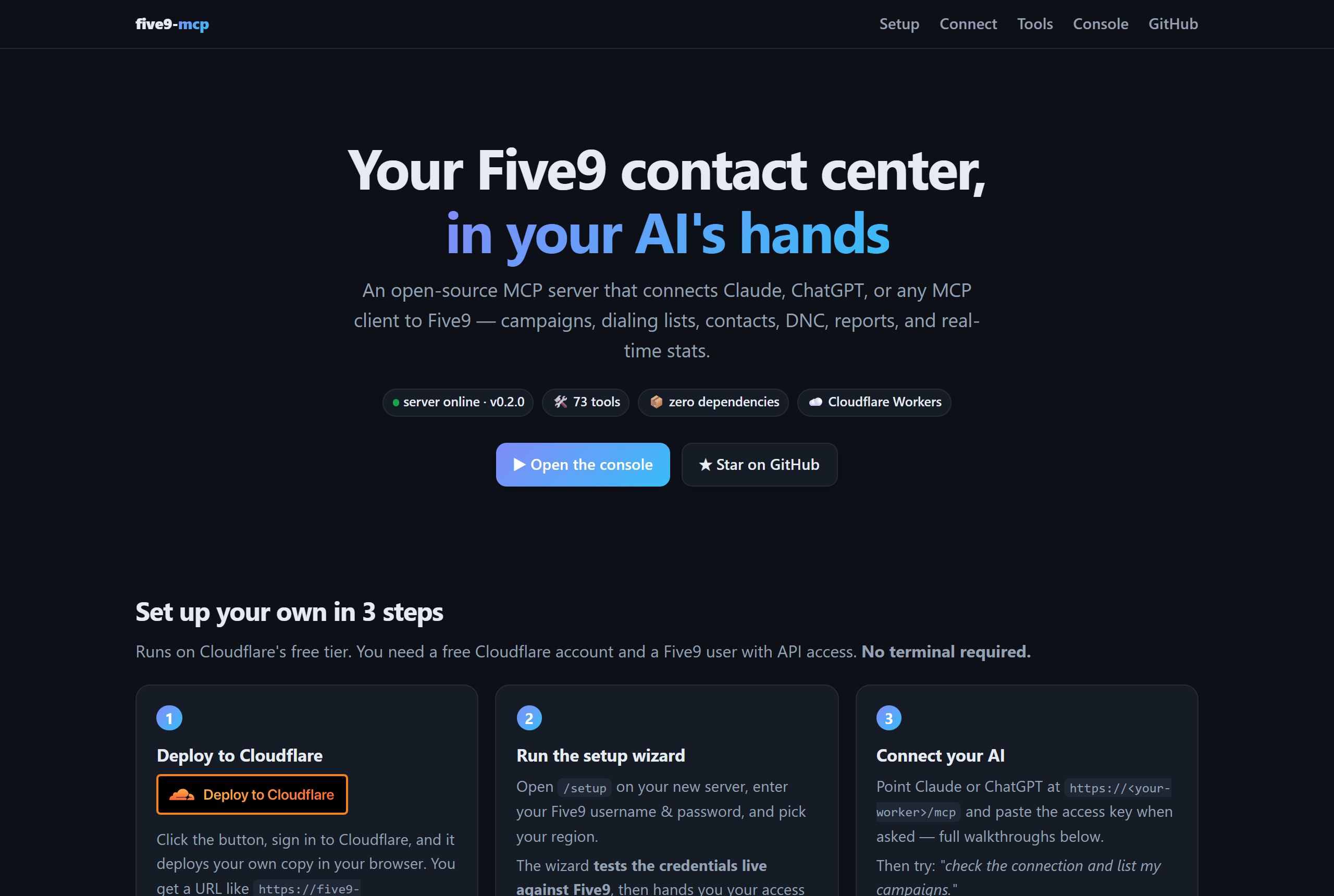
Your Five9 contact center, in your AI's hands.
An open-source MCP server that connects Claude, ChatGPT, or any MCP client to the Five9 cloud contact center — running on Cloudflare Workers with zero dependencies.





Quick start · Connect Claude · Connect ChatGPT · Tools · Architecture
Ask your AI things like:
"Who's on a call right now, and how deep is the sales queue?" 📊
"Create a preview campaign for the win-back list, attach the sales skill, and start it." 🛠️
"Stop the OUTBOUND_AGED campaign and add these 3 leads to the callback list." 📞
"Onboard the new agent: create the user, assign the billing skill at level 2." 🧑💼
"Is 555-867-5309 on our DNC? Check before anyone dials it." 🚫
"Pull yesterday's Call Log report and summarize abandon rates." 📈
"Build me a complete IVR: option 1 scheduling, option 2 billing, after hours goes to voicemail." 🧩
Under the hood, this server speaks Five9's Configuration (admin) and Statistics (supervisor) SOAP Web Services — the APIs that still run Five9's admin surface — and exposes them as clean JSON tools over MCP streamable HTTP. Hand-rolled envelopes, a ~60-line XML parser, no npm packages. Every tool has been exercised against a live Five9 domain.
✨ Built-in web UI
Deploy it and your Worker serves more than an API:
| Page | What you get |
|---|---|
/ |
A polished landing page: live server status, this setup guide, click-by-click AI connection walkthroughs, and the full tool catalog |
/setup |
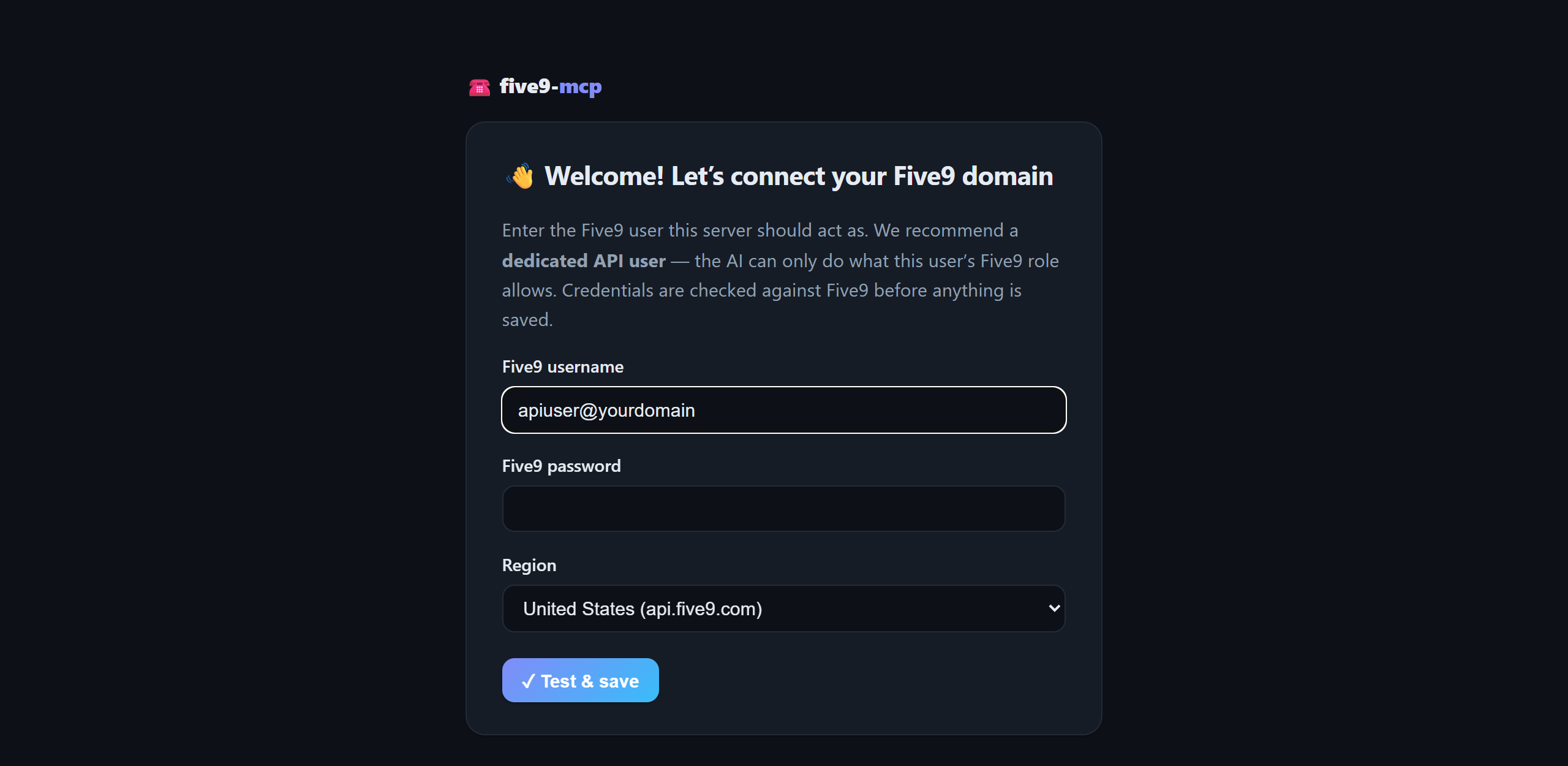
The setup wizard — enter Five9 credentials in your browser, get them verified live, receive your access key. No terminal, no secrets commands |
/console |
An interactive console — paste your access key, pick any of the 77 grouped tools, fill a form generated from its schema, and run it against your live Five9 domain right from the browser |
/mcp |
The MCP endpoint itself (streamable HTTP, stateless) |
/health |
JSON healthcheck |
The console is the fastest way to sanity-check credentials, explore what each tool returns, or debug a campaign — no AI required.
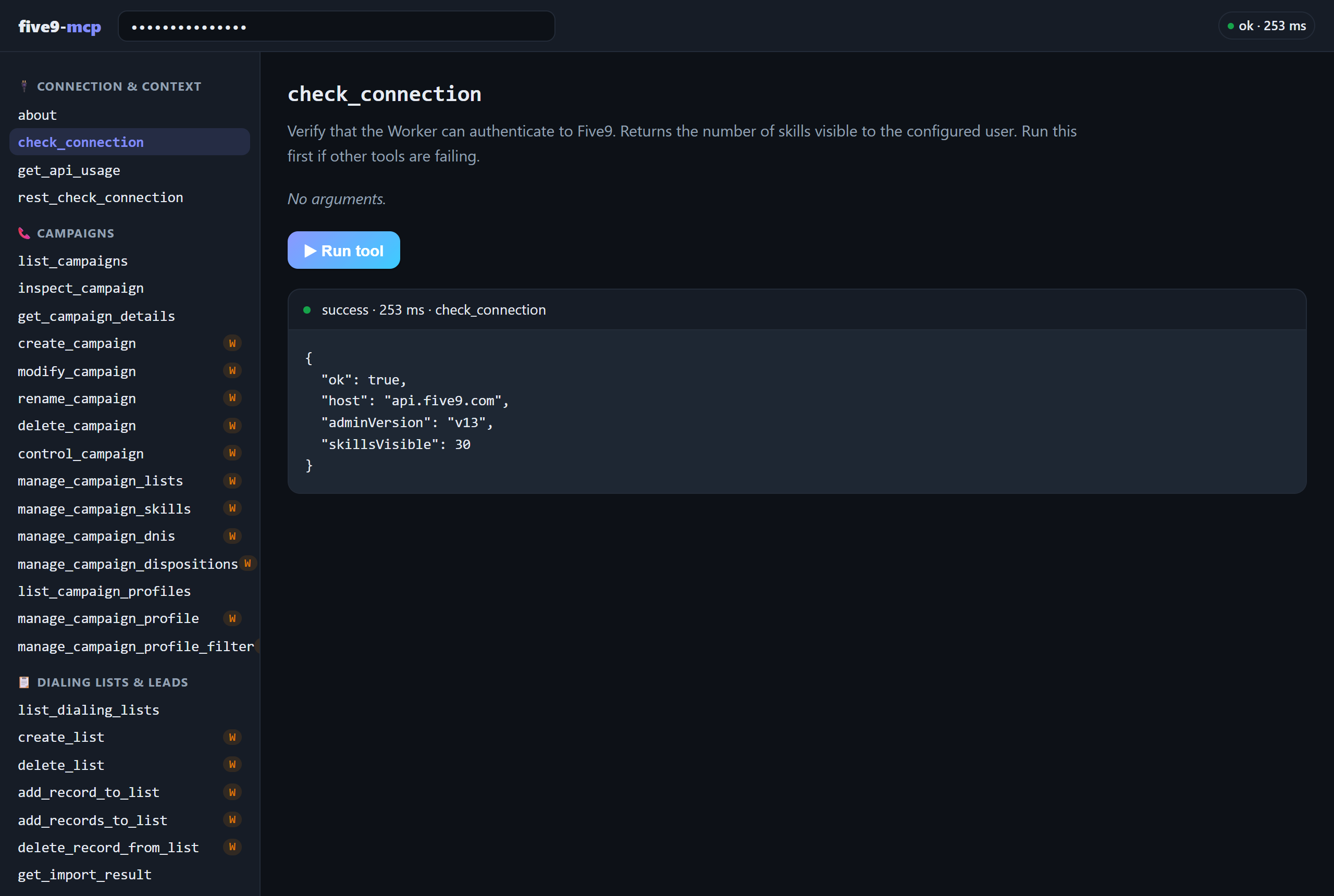
The console running
check_connection against a live Five9 domain
🚀 Quick start — no terminal needed
You need a free Cloudflare account and a Five9 user with API access — create a dedicated Five9 API user scoped to what you want an AI to do, don't reuse a personal admin login.
1 — Deploy to Cloudflare (one click, in your browser)
Sign in to Cloudflare and click through — it creates your own copy of this Worker (plus the KV namespace it needs) and gives you a URL like https://five9-mcp.you.workers.dev.
2 — Run the setup wizard (in your browser)
Open /setup on your new server. Enter your Five9 username, password, and region — the wizard verifies them live against Five9 before saving, then hands you your access key (shown once — store it in a password manager).
3 — Connect your AI (walkthroughs below), then ask it to "check the connection and list my campaigns." 🎉
⌨️ Prefer the CLI?git clone https://github.com/outboundani/five9-mcp
cd five9-mcp
npx wrangler deploy # provisions the CONFIG KV namespace on first deploy
Then either use the /setup wizard, or skip it and manage credentials as Wrangler secrets (secrets override the wizard):
npx wrangler secret put FIVE9_USERNAME   # e.g. apiuser@yourdomain
npx wrangler secret put FIVE9_PASSWORD
npx wrangler secret put MCP_AUTH_TOKEN   # a long random string — this is the key to your server
Defaults live in wrangler.toml and work for US domains:
| Var | Default | Notes |
|---|---|---|
FIVE9_API_HOST |
api.five9.com |
EU: api.eu.five9.com · Canada: api.ca.five9.com |
FIVE9_ADMIN_VERSION |
v13 |
Config Web Services WSDL version |
FIVE9_SUPERVISOR_VERSION |
v13 |
Statistics Web Services WSDL version |
🔌 Connect your AI
Connect Claude (web & desktop)
Custom connectors are available on Free (one connector), Pro, Max, Team, and Enterprise plans.
- In claude.ai or the Claude desktop app, open Settings → Connectors.
- Click Add custom connector.
- Name it Five9 and paste your server URL including the
/mcppath:https://<your-worker>.workers.dev/mcp - Click Add, then Connect. Claude auto-discovers this server's built-in OAuth and opens its authorization page.
- On the 🔐 five9-mcp screen, paste your
MCP_AUTH_TOKENas the access key and click Authorize. - In any chat, open the search & tools (+) menu and make sure the Five9 connector is toggled on.
Team/Enterprise: an Owner first adds the connector under Organization settings → Connectors; members then click Connect in their own settings to authorize.
Connect ChatGPT
Custom MCP connectors require Developer mode (Plus/Pro; on Business/Enterprise an admin must allow custom connectors).
- In ChatGPT on the web, open Settings → Apps & Connectors (sometimes labeled just Connectors).
- Under Advanced settings, toggle Developer mode on.
- Back on the Connectors page, click Create.
- Name it Five9, set the MCP server URL to
https://<your-worker>.workers.dev/mcp, and choose OAuth authentication. - Acknowledge the trust prompt and save. ChatGPT opens this server's authorization page — paste your
MCP_AUTH_TOKENand click Authorize. - In a new chat, open the + / tools menu and enable the Five9 connector (Developer mode connectors are enabled per-conversation). ChatGPT asks you to confirm each tool call — sensible for anything that can start a dialer. 😄
Connect Claude Code
claude mcp add --transport http five9 https://<your-worker>.workers.dev/mcp \
  --header "Authorization: Bearer <your MCP_AUTH_TOKEN>"
The raw access key works directly as a bearer token — no OAuth dance. Run /mcp inside Claude Code to verify.
Any other MCP client
Anything that speaks MCP streamable HTTP works — complete the OAuth flow or send the access key as a bearer token:
curl -X POST https://<your-worker>.workers.dev/mcp \
  -H "Authorization: Bearer <MCP_AUTH_TOKEN>" \
  -H "Content-Type: application/json" \
  -d '{"jsonrpc":"2.0","id":1,"method":"tools/call","params":{"name":"check_connection","arguments":{}}}'
src/oauth.js implements a minimal OAuth 2.1 authorization server (metadata discovery, dynamic client registration, PKCE S256, refresh tokens) designed for a single-operator deployment:
- The "login" on the consent screen is the server's access key (
MCP_AUTH_TOKEN). - Everything is stateless — client IDs, auth codes, and tokens are HMAC-SHA256-signed blobs keyed by
MCP_AUTH_TOKEN. No KV, no Durable Objects. - Both auth paths work simultaneously: OAuth-minted tokens and the raw key as a bearer credential.
- Revoke everything at once by rotating the secret:
npx wrangler secret put MCP_AUTH_TOKEN.
🧰 The toolbox
77 tools. 🟢 = read (always safe) · ✏️ = write (changes your domain — the server tells AIs to confirm with you first)
🧩 IVR builder — whole call flows from plain English69 SOAP tools (username/password) + 8 OAuth New Platform REST tools (Consumer Key/Secret — see OAuth New Platform APIs).
The headline trick: describe a call flow in a paragraph and the AI designs it, shows you a Mermaid diagram in chat, and deploys a working IVR script. The model never freestyles Five9's IVR XML: it fills a constrained JSON flow spec (play / menu / business-hours / skill transfer / voicemail / hangup), a graph validator checks every branch and reference, and deterministic code emits designer-shaped XML (module wiring, prompt encoding, and field order all derived from real exported scripts).
| Tool | What it does | |
|---|---|---|
| 🟢 | validate_ivr_flow |
Graph-check a flow spec + verify referenced skills/prompts exist on the domain |
| 🟢 | render_ivr_flow |
Render a flow spec or an existing IVR script as a Mermaid flowchart |
| ✏️ | build_ivr_script |
Compose the full script XML and create it on the domain (dry_run to inspect first) |
| ✏️ | generate_prompt_audio |
Voice a prompt with a modern AI voice and upload it as a Five9-ready G.711 u-law WAV. No API key needed: powered by Workers AI (Deepgram Aura, ~40 voices) built into your Worker |
Recommended flow: validate → render (show the human!) → generate prompts → build → attach to an inbound campaign. generate_prompt_audio runs on Cloudflare Workers AI out of the box: no external TTS account, no API key, fractions of a cent per prompt billed to the Cloudflare account you already deployed to. ElevenLabs/OpenAI work too if you set their key secrets, and {tts} prompts (Five9's built-in robot voice) need nothing at all.
| Tool | What it does | |
|---|---|---|
| 🟢 | about |
Operator context for the AI — who runs this server and the ground rules |
| 🟢 | check_connection |
Verify Five9 credentials work; returns visible skill count |
| 🟢 | get_api_usage |
Current Five9 API usage counters vs rate limits |
| Tool | What it does | |
|---|---|---|
| 🟢 | list_campaigns |
List campaigns (name, type, state, mode) |
| 🟢 | inspect_campaign |
State + attached lists + DNIS in one call |
| 🟢 | get_campaign_details |
FULL campaign config (dialing mode, ratios, recording, wrap-up…) |
| ✏️ | create_campaign |
Create outbound or inbound campaigns, BASIC or ADVANCED |
| ✏️ | modify_campaign |
Edit any campaign setting — read-modify-write, pass only the changes |
| ✏️ | rename_campaign |
Rename a campaign |
| ✏️ | delete_campaign |
Delete a campaign |
| ✏️ | control_campaign |
start / stop / force_stop / reset / reset_list_positions |
| ✏️ | manage_campaign_lists |
Attach/detach dialing lists with priority |
| ✏️ | manage_campaign_skills |
Add/remove routing skills on a campaign |
| ✏️ | manage_campaign_dnis |
Attach/detach inbound numbers |
| ✏️ | manage_campaign_dispositions |
Add/remove agent dispositions on a campaign |
| 🟢 | list_campaign_profiles |
List campaign profiles (ANI, attempts, timeouts) |
| ✏️ | manage_campaign_profile |
Create / modify / delete campaign profiles |
| ✏️ | manage_campaign_profile_filter |
Read / edit a profile's CRM record-selection criteria and dialing order |
| Tool | What it does | |
|---|---|---|
| 🟢 | list_dialing_lists |
List dialing lists + record counts |
| ✏️ | create_list / delete_list |
Create or delete a dialing list |
| ✏️ | add_record_to_list |
Push a lead into a list (async import) |
| ✏️ | add_records_to_list |
Bulk-add many leads in one async import (configurable CRM/list modes) |
| ✏️ | delete_record_from_list |
Remove matching records from a list |
| 🟢 | get_import_result |
Outcome of an async list/CRM import |
| Tool | What it does | |
|---|---|---|
| 🟢 | search_contacts |
Look up contacts by exact field values |
| ✏️ | update_contact |
Update a contact (sole-match safety by default) |
| ✏️ | bulk_update_contacts |
Update many CRM contacts in one async import (poll with type "crm") |
| ✏️ | delete_contact |
Delete a contact (only when exactly one matches) |
| 🟢 | list_contact_fields |
The domain's contact field schema |
| ✏️ | manage_contact_field |
Create / modify / delete custom CRM fields |
| Tool | What it does | |
|---|---|---|
| ✏️ | manage_dnc |
Check / add / remove numbers on the domain DNC list |
| 🟢 | get_dialing_rules |
Domain dialing rules (time/state restrictions) |
| Tool | What it does | |
|---|---|---|
| 🟢 | list_users |
List users with general info |
| 🟢 | get_user_details |
One user's full record: roles, skills, groups |
| ✏️ | create_user |
Create a user with roles, skills, and groups |
| ✏️ | modify_user |
Edit a user's info — pass only the changes |
| ✏️ | delete_user |
Delete a user |
| 🟢 | list_user_profiles |
Role/permission templates |
| 🟢 | list_skills / get_skill_details |
Skills, with or without assigned users |
| ✏️ | manage_skill |
Create / modify / delete skills |
| ✏️ | manage_user_skills |
Assign skills to users, set levels |
| ✏️ | set_user_roles |
Grant / revoke roles (agent, admin, supervisor, reporting, crmManager) with permission tabs |
| 🟢 | list_agent_groups |
Agent groups + members |
| ✏️ | manage_agent_group |
Create / delete groups, add/remove agents |
| ✏️ | manage_reason_code |
Not Ready / Logout reason codes |
| Tool | What it does | |
|---|---|---|
| 🟢 | list_dispositions |
Call dispositions and their settings |
| ✏️ | manage_disposition |
Create / modify / rename / delete dispositions (incl. redial timers) |
| 🟢 | list_ivr_scripts / get_ivr_script |
IVR scripts — metadata, or one script's full XML |
| ✏️ | manage_ivr_script |
Create / modify / delete IVR scripts (push a full xmlDefinition) |
| 🟢 | list_prompts |
Voice prompts on the domain |
| ✏️ | manage_tts_prompt |
Create / modify / delete text-to-speech prompts |
| ✏️ | manage_wav_prompt |
Create / modify / delete pre-recorded WAV prompts (base64; G.711 µ-law 8kHz mono) |
| 🟢 | list_dnis |
Provisioned inbound numbers (optionally unassigned only) |
| 🟢 | list_call_variables |
Call variables and variable groups |
| ✏️ | manage_call_variable |
Create / delete custom call variables |
| 🟢 | list_web_connectors |
Web connector integrations |
| ✏️ | manage_web_connector |
Create / delete web connectors (URL pops agents trigger) |
| ✏️ | manage_speed_dial |
List / create / delete speed-dial codes |
| 🟢 | get_vcc_configuration |
Domain-level VCC settings |
| Tool | What it does | |
|---|---|---|
| 🟢 | run_report |
Kick off any report by folder + name, optional time range |
| 🟢 | get_report_result |
Poll for the report's CSV output |
| 🟢 | get_realtime_stats |
AgentState, ACDStatus, CampaignState, campaign statistics (incl. dialer-manager & autodial views) |
These tools speak Five9's modern OAuth 2.0 "New Platform" REST APIs, not the SOAP APIs the tools above use. They require an API Access Control credential (Consumer Key/Secret), not the SOAP username/password — see OAuth New Platform APIs.
| Tool | What it does | |
|---|---|---|
| 🟢 | rest_check_connection |
Verify the OAuth credential — acquires a bearer token (no domain data) |
| 🟢✏️ | rest_call |
Generic authenticated call to any New Platform endpoint (method + path + body), with rate-limit/backoff and ETag support |
| 🟢✏️ | manage_circle |
Circles — list / get / create / delete (no SOAP equivalent) |
| 🟢 | list_np_prompts |
Voice prompts via the New Platform prompts API (paginated) |
| 🟢 | list_interaction_dispositions |
Dispositions via the interactions API (richer than the SOAP list; read-only) |
| 🟢 | get_domain_info |
Domain metadata (id, name, tenant, service endpoints) |
| 🟢 | list_data_tables |
Data Tables (structured lookup tables; no SOAP equivalent) — uses a separate data-tables credential |
| 🟢 | get_data_table_rows |
Rows of a Data Table by id (paginated) |
🔐 OAuth New Platform APIs
Alongside the SOAP tools, the server can call Five9's newer OAuth 2.0 New Platform REST APIs (e.g. Circles, interactions, prompts, domain metadata). These use a different credential from the SOAP username/password:
- An API Access Control Consumer Key and Consumer Secret, generated in the Five9 Admin Console → API Access Control (a Controlled-Availability feature). Generating one needs the
security → applications → Create applicationspermission, and the account must be migrated to Five9 Identity Service (users with legacy API/Agent/Supervisor roles are excluded from migration until those roles are removed). - Configure them as env/secret vars (all separate from the SOAP creds):
FIVE9_CONSUMER_KEY=...           # "All APIs access" family credential (default)
FIVE9_CONSUMER_SECRET=...
FIVE9_DOMAIN_ID=131109           # your Admin Console domain id
FIVE9_REST_REGION=US             # US | US-ALPHA | CA | EU | IN | UK
# or pin the base URL directly: FIVE9_REST_BASE_URL=https://api.prod.us.five9.net

# Optional second credential for the "Data Tables access" family (its own key):
FIVE9_DT_CONSUMER_KEY=...
FIVE9_DT_CONSUMER_SECRET=...
Then run rest_check_connection to confirm the token flow. What each credential can reach is governed by its API family + scopes — all-apis-access does not literally grant every service, and write access is per-service.
Multiple credentials / families. Each API Access Control credential belongs to one family (mapped to an Apigee API Product), and that family decides which services the key may call. The server supports named credentials: default (from FIVE9_CONSUMER_KEY/SECRET) plus data-tables (from FIVE9_DT_CONSUMER_KEY/SECRET). The Data Tables tools use the data-tables credential automatically; rest_call and rest_check_connection accept a credential argument to pick one.
Note: Five9's getting-started doc lists the token endpoint as
/v1/auth/token, but the live endpoint is/oauth2/v1/token(what this client uses).
🎨 Customizing the operator context
src/about.js holds the text served to connected AIs via the MCP instructions field and the about tool: who operates the server, why it exists, and how the AI should behave (e.g. "confirm before write actions"). Edit it to describe your own deployment — it ships with the original operator's context as an example.
🏗️ Architecture
No build step, no dependencies — plain JS modules in src/:
src/
├── index.js   # router, CORS, MCP JSON-RPC handler, /setup endpoint
├── five9.js   # SOAP client: envelope builder, ~60-line XML parser, one method per Five9 op
├── tools.js   # MCP tool definitions (JSON Schema) + dispatch
├── oauth.js   # stateless OAuth 2.1 server (single-operator model)
├── config.js  # config resolution: Wrangler secrets > KV (setup wizard)
├── ui.js      # landing page, setup wizard, interactive console
└── about.js   # operator context — edit this for your deployment
Requests are stateless: every MCP call opens a fresh Five9 SOAP exchange with HTTP Basic auth. The Statistics API additionally requires a setSessionParameters call, which get_realtime_stats performs per invocation.
- Five9's endpoints are generated by JAXB and validate child-element order against the WSDL sequence. If you extend this server, pull the WSDL (
https://api.five9.com/wsadmin/v13/AdminWebService?wsdl, HTTP Basic auth) and match the<xs:sequence>order exactly — including base types likebasicImportSettings, whose elements come before the extension's. addToListCsvrequirescleanListBeforeUpdate,crmAddMode,crmUpdateMode, andlistAddModeeven though the WSDL marks most of themminOccurs="0".- List/CRM imports are asynchronous: the call returns an import identifier immediately; poll
get_import_resultfor the outcome. - Contact record values come back wrapped (
<values><data>…</data></values>); several responses return a single object where you'd expect a one-element array.toArray()infive9.jsnormalizes this. - Report time criteria order is
<end>before<start>(JAXB alphabetical ordering). - IVR
xmlDefinitionis the visual designer's persisted format: modules are wired by GUID (ascendants/singleDescendant/branches), inline TTS text is stored as gzip+base64speakElementdocuments, and business-hours checks compare the__DAY__(SUN=1..SAT=7) and__TIME__(minutes since midnight) system variables.ivr.jsencapsulates all of it. getPromptsreturns no prompt ids (name + type only). File-prompt references inside IVR XML are accepted withid 0+ the prompt name and normalized server-side; the pushed script round-trips with the server-stampeddomainIdadded.
🛡️ Security
- Five9 credentials live in your Cloudflare account only — as Worker secrets, or (wizard path) in a Workers KV namespace, encrypted at rest. No tool ever returns them, and Wrangler secrets always override KV.
- The setup wizard is open only on a fresh, unconfigured server — run it right after deploying. Once configured, any change requires the current access key, and env-managed servers refuse wizard changes entirely.
- Always complete setup (or set
MCP_AUTH_TOKEN). An unconfigured server with no access key runs open — anyone who finds the URL can drive your contact center. - Write tools (✏️ above) change your domain. Scope the Five9 API user's role to what you actually want an AI to do — Five9 permissions are the real security boundary.
manage_dnc removeanddelete_listdeserve extra caution; theaboutinstructions tell AIs to confirm before using them.- The console stores your access key in your browser's localStorage only, and calls go same-origin to your own Worker.
💻 Development
npm run dev      # wrangler dev on http://localhost:8787
npm run deploy   # wrangler deploy
Put local secrets in .dev.vars (gitignored):
FIVE9_USERNAME=apiuser@yourdomain
FIVE9_PASSWORD=...
MCP_AUTH_TOKEN=dev-local-token

# Optional — external AI voice providers for generate_prompt_audio.
# The default (Workers AI / Deepgram Aura) needs no key at all.
ELEVENLABS_API_KEY=...
OPENAI_API_KEY=...

# Optional — OAuth New Platform REST tools (separate credential; see below)
FIVE9_CONSUMER_KEY=...
FIVE9_CONSUMER_SECRET=...
FIVE9_DOMAIN_ID=131109
FIVE9_REST_REGION=US
FIVE9_DT_CONSUMER_KEY=...        # optional: "Data Tables access" family
FIVE9_DT_CONSUMER_SECRET=...
Then open http://localhost:8787/console, paste dev-local-token, and run tools against your domain — or smoke-test from the CLI with the curl snippet above.
🤝 Contributing
PRs welcome! The Five9 Config API has ~180 operations and this server wraps 69 of the most useful — the pattern in five9.js + tools.js is easy to extend (read the SOAP notes first and save yourself a fight with the WSDL). Please keep the zero-dependency constraint.
📄 License
MIT · built by Ryan Shatzkamer
Reviews (0)
Sign in to leave a review.
Leave a reviewNo results found