meridian
Health Warn
- No license — Repository has no license file
- Description — Repository has a description
- Active repo — Last push 0 days ago
- Community trust — 2030 GitHub stars
Code Pass
- Code scan — Scanned 12 files during light audit, no dangerous patterns found
Permissions Pass
- Permissions — No dangerous permissions requested
No AI report is available for this listing yet.
Use Claude and Antigravity with Pi, OpenCode and other coding clients. Local API bridge, usage dashboard and Mac app. Antigravity preview: PR #1074.
Your tools. Your sessions. One place to see what’s happening.
Releases · Get started · Connect your agent · Discord




Meridian connects Anthropic- and OpenAI-compatible clients to Claude through the
Claude Agent SDK. Keep the editor or terminal you like, with streaming, persistent
sessions, account routing and visibility into usage and prompt caching.
Now with an optional Mac app. Manage Meridian versions, install plugins, find
failed requests and see your usage limits without keeping a terminal open.
Headless Meridian remains fully supported—npm, Docker, Nix and your existing
service manager all remain valid ways to run it.
Meet Meridian Desktop
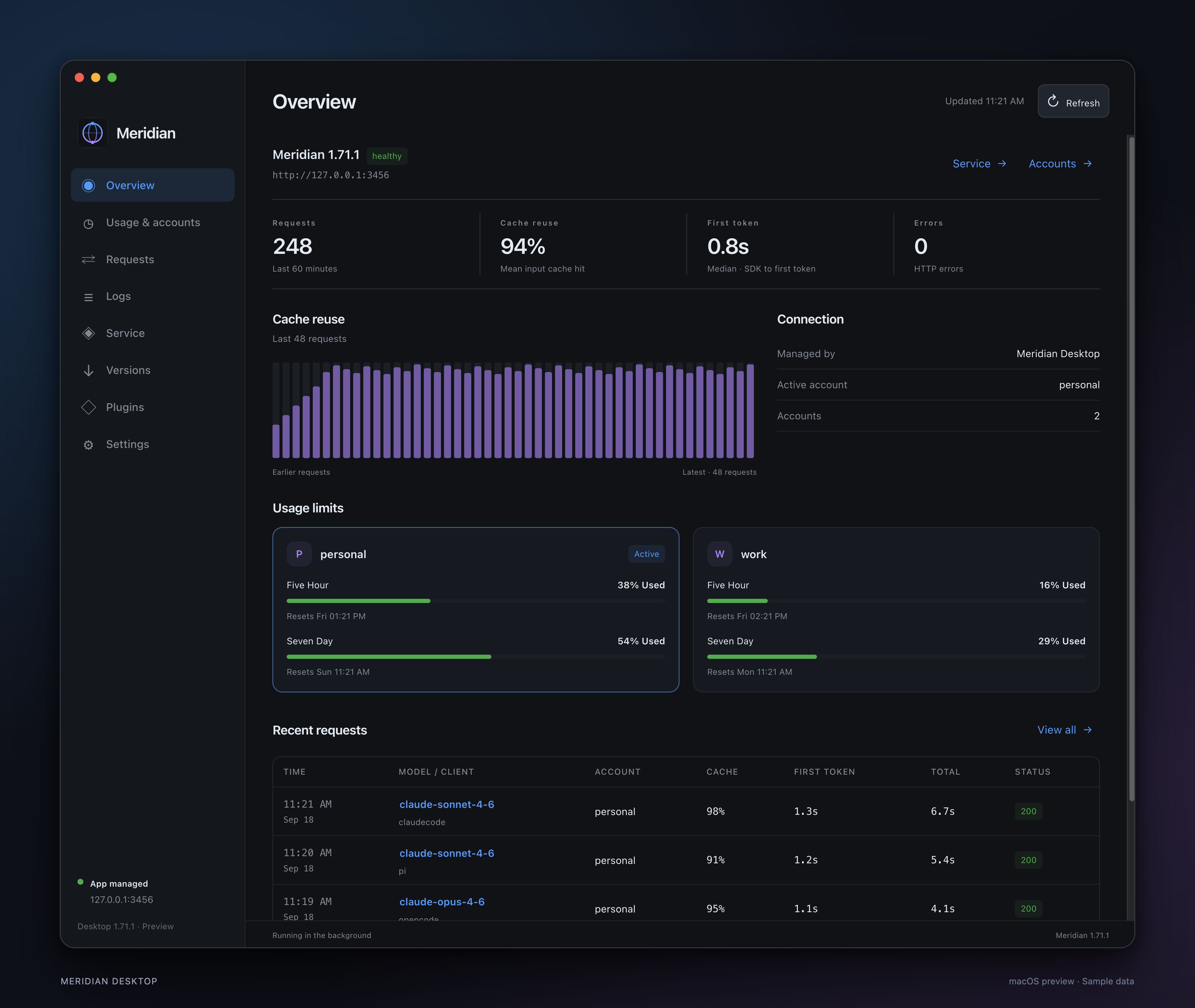
macOS dashboard preview · Sample data
| See what matters | Keep it under control |
|---|---|
| Usage & limits — account quota windows, reset times and token activity. | Versions — install published Meridian releases, switch versions and roll back. |
| Requests & cache — timing, failures, cache history and request details. | Service — start, stop, restart and recover an app-managed installation. |
| Logs & alerts — searchable diagnostics and opt-in failure, cache and quota notifications. | Plugins — install and update the Pi, OpenCode, Hermes and OpenClaw scrub plugins. |
Native macOS chrome, menu bar controls and Liquid Glass on supported Macs through
electron-liquid-glass.
The desktop preview targets macOS on Apple Silicon. Linux and Windows desktop
apps are planned; their runtime support is not ready yet.
Get started
With the Mac app
The first downloadable desktop release is being prepared. Until it is published,
use the desktop preview instructions.
Signed, notarized .dmg and .zip downloads will appear under
GitHub Releases.
- Connect to an existing local Meridian service, or install Meridian from Versions.
- For a new installation, choose app management in Service and start it.
- Sign in to a Claude account, then follow your agent’s setup guide.
The app can monitor Docker or Nix installations through a published local HTTP
port. Their package manager retains control of updates and lifecycle. Supported
macOS LaunchAgents can be handed to the app and returned to headless operation.
How service ownership works →
Headless, as always
Requires Node.js 22 or newer and a Claude account configured for the SDK.
npm install -g @rynfar/meridian
claude login
meridian
Meridian listens at http://127.0.0.1:3456. For OpenCode V1, runmeridian setup once and restart OpenCode. Other clients—including OpenCode V2—have
specific setup instructions.
# Example for a POSIX shell, with Meridian API-key protection disabled:
ANTHROPIC_API_KEY=x ANTHROPIC_BASE_URL=http://127.0.0.1:3456 opencode
x is a client-required placeholder. If you configure Meridian’s API-key
protection, use that key instead. Claude authentication comes from the configured
Claude account. See configuration for authentication,
ports and Windows setup, or deployment for Docker and Nix.
No desktop dependency. Installing the headless package does not install
Electron. You can run Meridian entirely without the app, including its browser
telemetry dashboard.
Built for ongoing work
- Keep conversations going. Sessions resume across requests and proxy restarts,
with handling for client compaction, undo and branching. - Use the protocol your client speaks. Anthropic Messages, OpenAI Chat
Completions and Responses endpoints, including streaming and tool forwarding. - Keep accounts organized. Multiple Claude profiles, explicit account selection
and opt-in sticky session routing. - Understand cache behavior. Request history, prompt-cache metrics, diagnostic
events and optional persistent telemetry. API-equivalent cost estimates are
estimates, not your subscription bill. - Keep your deployment. CLI, containers, declarative Nix services or the
optional desktop manager share the same Meridian server.
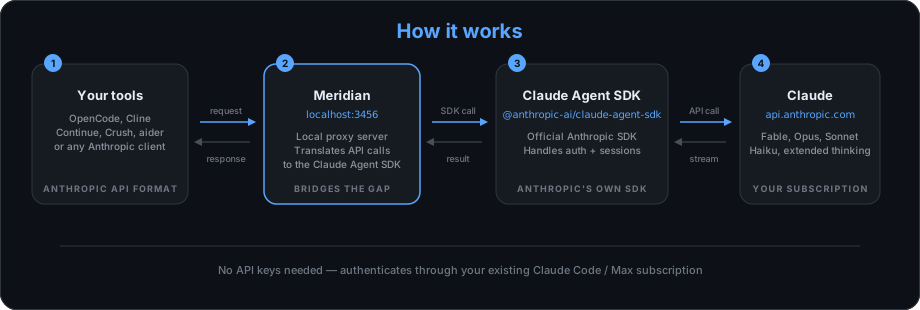
Meridian uses the SDK’s authentication and request execution. Account access,
model availability and usage limits still depend on your provider account.
Bring your agent
Setup guides cover OpenCode, Pi, Claude Code, Codex CLI, Cline, Aider, Crush,
ForgeCode, Droid, Open WebUI, Cherry Studio, Polytoken, Jcode and Prime Agent.
Compatibility varies by client and version; see the
tested-agent matrix for evidence and
limitations. Prime Agent concurrent subagents remain unsuitable for unattended
or usage-sensitive work. Continue is unverified.
The desktop Plugins page installs the four official scrub plugins. Client
connection setup is still separate; installing a scrub plugin does not configure
its corresponding client. Plugin guide →
Documentation
| Start here | What you’ll find |
|---|---|
| Desktop guide | Setup, service ownership, updates, plugins and platform status |
| Agent setup | Client configuration and compatibility notes |
| Configuration | CLI, environment variables, endpoints and API-key protection |
| Accounts & profiles | Sign-in, multiple accounts and session routing |
| Deployment | Docker, Nix and headless services |
| Plugins | Official packages and plugin configuration |
| Monitoring | Usage, request diagnostics and prompt caching |
| Development | Build, test and programmatic API |
| Desktop releases | Signing, notarization and download publication |
Contribute
Report a bug or suggest a feature,
open a PR, or join Discord.
Read AGENTS.md, ARCHITECTURE.md and
E2E.md before changing behavior. Meridian is MIT licensed.
Reviews (0)
Sign in to leave a review.
Leave a reviewNo results found