agent-os
Health Pass
- License — License: MIT
- Description — Repository has a description
- Active repo — Last push 0 days ago
- Community trust — 123 GitHub stars
Code Warn
- process.env — Environment variable access in app/api/code-search/route.ts
- process.env — Environment variable access in app/api/dev-servers/detect/route.ts
- process.env — Environment variable access in app/api/exec/route.ts
- process.env — Environment variable access in app/api/files/content/route.ts
- process.env — Environment variable access in app/api/files/route.ts
Permissions Pass
- Permissions — No dangerous permissions requested
This tool provides a self-hosted, mobile-first web interface for managing and orchestrating multiple AI coding agents. It features multi-pane terminals, code search, and voice-to-text capabilities to control sessions from a browser.
Security Assessment
Overall Risk: Medium. The application acts as a web-based wrapper that explicitly executes shell commands and interacts with your local file system to manage underlying AI agents. Several API routes (exec, files, code-search) access environment variables, which is a standard practice for reading configuration and local secrets, but developers should ensure their `.env` files are properly secured. No hardcoded secrets or dangerous OAuth permissions were detected. Users must be aware that leveraging the tool's "auto-approve" modes for supported agents inherently lowers the safety guardrails of those AI tools.
Quality Assessment
The project demonstrates strong health and active maintenance, with repository updates as recent as today. It is fully open-source under the standard MIT license. Community trust is currently moderate but growing, reflected by its 123 GitHub stars. The codebase is written in TypeScript, which provides good type safety and readability for anyone wishing to inspect the source code before running it.
Verdict
Use with caution: the tool is actively maintained and safe to run locally, provided you understand it acts as a powerful execution layer for multiple AI agents on your system.
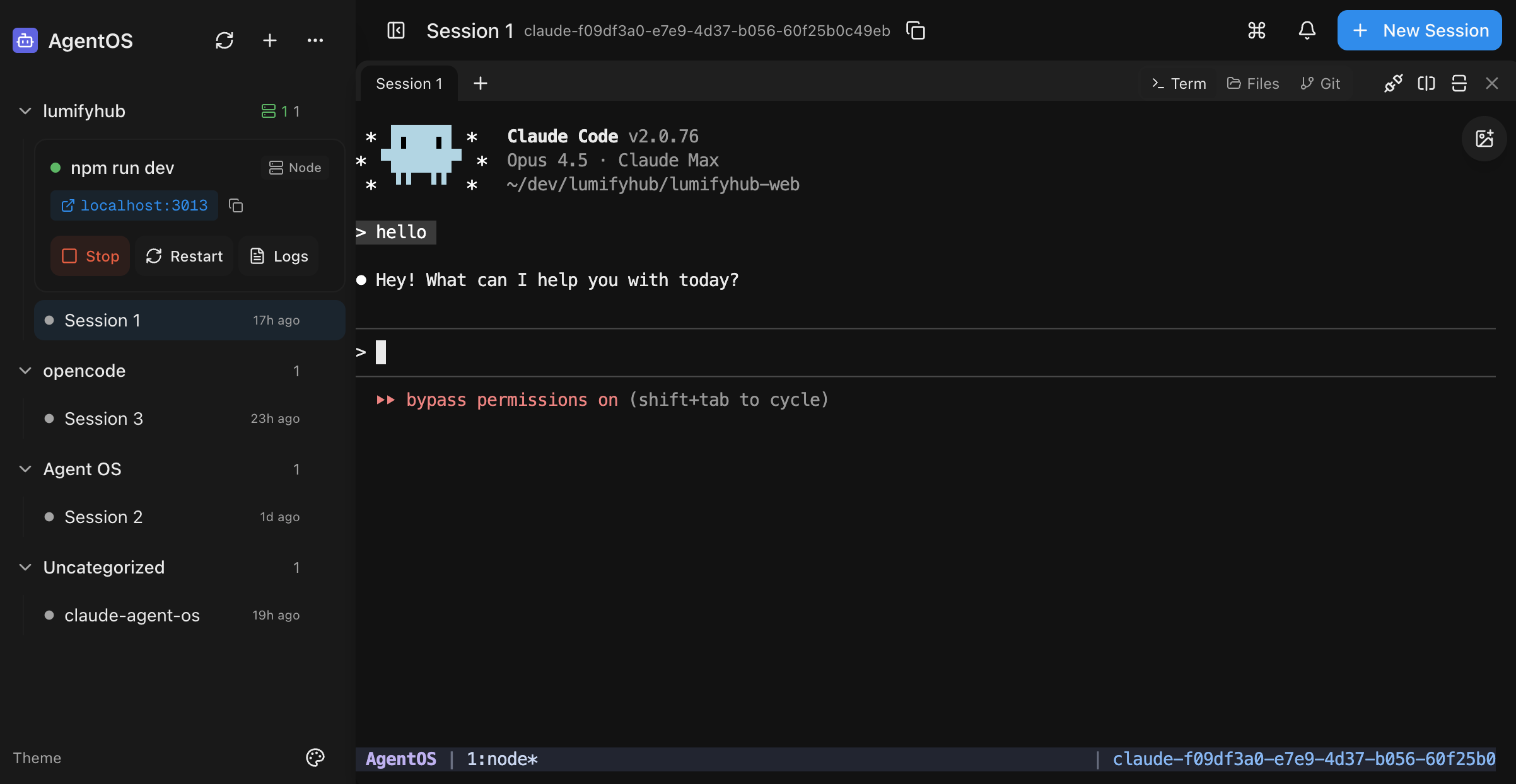
Mobile-first web UI for managing AI coding sessions (Claude Code, Codex, Aider, Gemini CLI, Amp, Pi). Self-hosted with multi-pane terminals, git integration, and session orchestration.
AgentOS
A mobile-first web UI for managing AI coding sessions.

https://github.com/user-attachments/assets/0e2e66f7-037e-4739-99ec-608d1840df0a
Installation
Via npm (Recommended)
If you already have Node.js 20+ installed:
# Install globally
npm install -g @saadnvd1/agent-os

# Run setup (checks/installs tmux, ripgrep, builds app)
agent-os install

# Start the server
agent-os start
Via curl (Installs everything)
For fresh installs without Node.js:
curl -fsSL https://raw.githubusercontent.com/saadnvd1/agent-os/main/scripts/install.sh | bash
agent-os start
Desktop App
Download native desktop apps from Releases:
- macOS (Apple Silicon):
.dmg - Linux:
.debor.AppImage
Note: The desktop app is a native wrapper around the web UI. You still need to install and run AgentOS (via the installer script above) for the backend server. The desktop app just provides a convenient native window instead of using your browser.
Don't want to self-host? Try AgentOS Cloud - pre-configured cloud VMs for AI coding.
Manual Install
git clone https://github.com/saadnvd1/agent-os
cd agent-os
npm install
npm run dev  # http://localhost:3011
Prerequisites
- Node.js 20+
- tmux
- ripgrep (for code search - auto-installed by installer script, or run
agent-os update) - At least one AI CLI: Claude Code, Codex, OpenCode, Gemini CLI, Aider, or Cursor CLI
Supported Agents
| Agent | Resume | Fork | Auto-Approve |
|---|---|---|---|
| Claude Code | ✅ | ✅ | --dangerously-skip-permissions |
| Codex | ❌ | ❌ | --approval-mode full-auto |
| OpenCode | ❌ | ❌ | Config file |
| Gemini CLI | ❌ | ❌ | --yolomode |
| Aider | ❌ | ❌ | --yes |
| Cursor CLI | ❌ | ❌ | N/A |
| Amp | ❌ | ❌ | --dangerously-allow-all |
| Pi | ❌ | ❌ | N/A |
| Oh My Pi | ❌ | ❌ | N/A |
Features
- Mobile-first - Full functionality from your phone, not a dumbed-down responsive view
- Voice-to-text - Dictate prompts to your coding sessions hands-free
- Multi-pane layout - Run up to 4 sessions side-by-side
- Code search - Fast codebase search with syntax-highlighted results (Cmd+K)
- File picker - Browse and attach files to sessions, with direct upload from mobile
- Clone from GitHub - Clone repos directly from the UI when creating projects
- Git integration - Status, diffs, commits, PRs from the UI
- Git worktrees - Isolated branches with auto-setup
- Dev servers - Start/stop Node.js and Docker servers
- Session orchestration - Conductor/worker model via MCP
CLI Commands
agent-os run       # Start and open browser
agent-os start     # Start in background
agent-os stop      # Stop server
agent-os status    # Show URLs
agent-os logs      # Tail logs
agent-os update    # Update to latest
Mobile Access
Use Tailscale for secure access from your phone:
- Install Tailscale on your dev machine and phone
- Sign in with the same account
- Access
http://100.x.x.x:3011from your phone
Documentation
For configuration and advanced usage, see the docs.
Related Projects
- aTerm - A Tauri-based desktop terminal workspace for AI-assisted coding. While AgentOS is a mobile-first web UI, aTerm is a native desktop app with multi-pane layouts optimized for running AI coding agents (Claude Code, Aider, OpenCode) alongside shells, dev servers, and a built-in git panel. Choose AgentOS for mobile access and browser-based workflows, or aTerm for a native desktop terminal experience.
- LumifyHub - Team collaboration platform with real-time chat and structured documentation. Useful alongside AgentOS for coordinating multi-agent work across a team — share session context, document architectural decisions from coding sessions, and track progress across parallel agent workflows.
License
MIT License - Free and open source.
See LICENSE for full terms.
Reviews (0)
Sign in to leave a review.
Leave a reviewNo results found