afls-for-claude
Health Warn
- License — License: Apache-2.0
- Description — Repository has a description
- Active repo — Last push 0 days ago
- Low visibility — Only 5 GitHub stars
Code Pass
- Code scan — Scanned 12 files during light audit, no dangerous patterns found
Permissions Pass
- Permissions — No dangerous permissions requested
No AI report is available for this listing yet.
A Claude Code plugin bringing AFLS (Agentforce for Life Sciences) implementation expertise into your terminal — skills, specialized agents, and MCP tools to configure, validate, audit, and troubleshoot AFLS Customer Engagement orgs.
Claude for AFLS


A Claude Code plugin that brings expert AFLS knowledge, Salesforce org tools, and implementation guidance directly into your terminal.
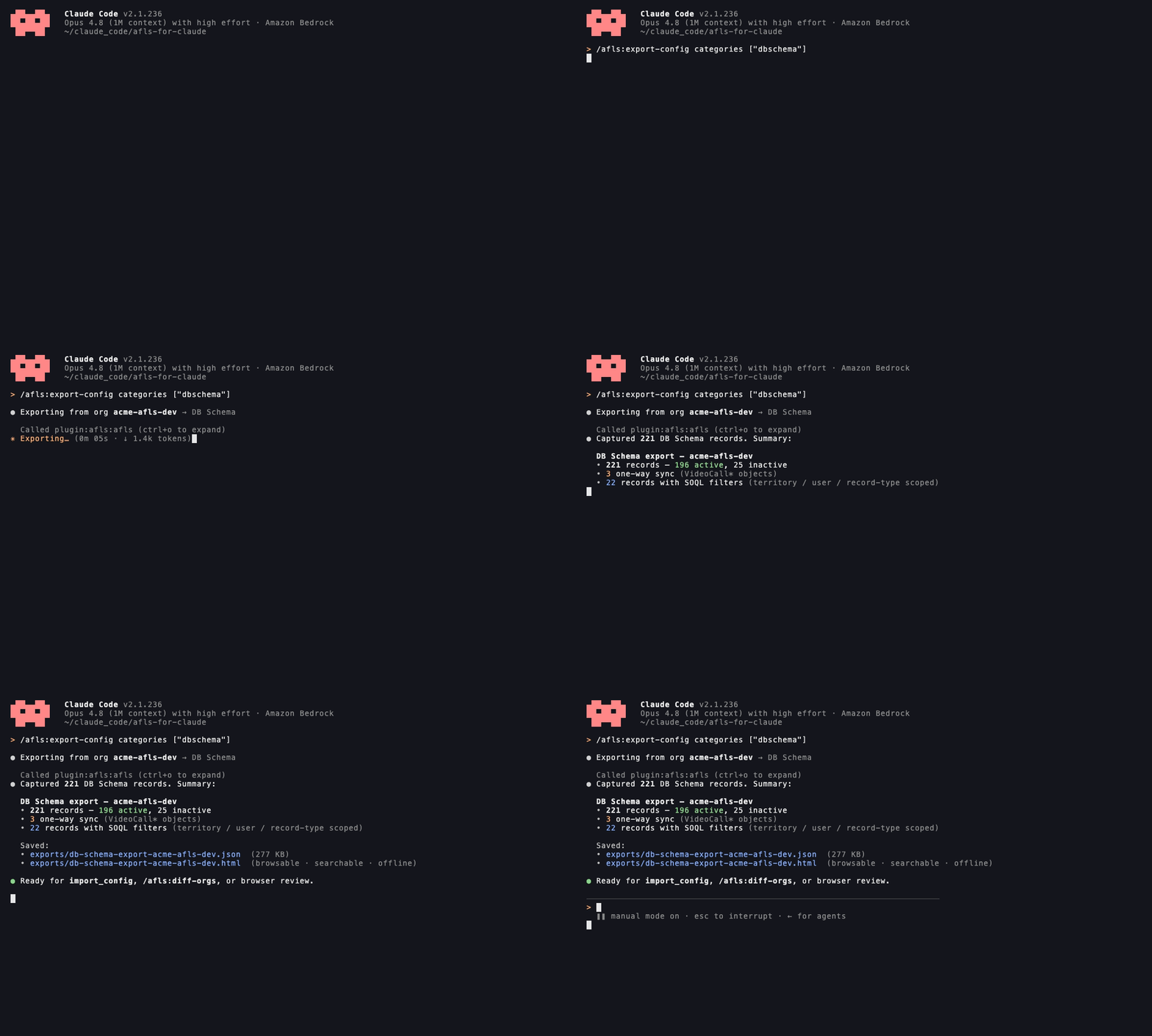
/afls:export-config — snapshot org configuration and generate a browsable HTML report in one step
What It Does
This plugin gives Claude deep expertise in Salesforce AFLS for Customer Engagement (AFLS4CE), enabling it to:
- Guide implementations across 29 AFLS modules with best practices, correct object names, and source citations
- Run interactive configuration wizards for visits, samples, accounts, activity plans, territory alignment, users, home page, and quick actions
- Inspect and manage your Salesforce AFLS org directly — SOQL, CRUD, Tooling API, metadata deploy/retrieve, anonymous Apex
- Configure Admin Console settings programmatically — Application Settings, DB Schema, trigger handlers, Quick/Custom Actions, navigation tabs, and more
- Audit configurations with 151 validation rules across 19 rule files to catch misconfigurations before they cause issues
- Troubleshoot issues using AFLS-specific knowledge and automated diagnostics
- Validate mobile configurations before deployment — metadata cache, sync settings, DB Schema records
- Generate mobile metadata cache programmatically via the Connect API
- Explain AFLS concepts like ARC, Sample Limits, NBC/NBA/NBM, DCR, Agentforce, and more — with source citations linking to documentation files and Salesforce help URLs
- Compare orgs side-by-side to identify configuration drift between environments
- Export/import configurations as JSON for org-to-org migration
- Manage users — permission sets, PSLs, profiles, role hierarchy, and license capacity
Quick Start
Prerequisites
- Claude Code 1.0.33+
- Node.js 18+
- A Salesforce org with AFLS (optional, for org tools)
Installation
Option 1: Plugin Marketplace (Recommended)
In Claude Code, run:
/plugin marketplace add SalesforceLabs/AFLS-for-Claude
/plugin install afls@afls
This installs the plugin directly — no npm install or build step needed. The bundled MCP server ships in mcp-server/index.mjs.
Option 2: Local Development (Recommended)
git clone https://github.com/SalesforceLabs/AFLS-for-Claude.git
cd AFLS-for-Claude
npm install
npm run build
claude --plugin-dir ./AFLS-for-Claude
First-Time Setup
Run /afls:setup-plugin to check your environment and connect to a Salesforce org:
/afls:setup-plugin
The plugin will guide you through:
- Installing Salesforce CLI (if needed)
- Authenticating to your AFLS org
- Selecting a target org for queries
Bundled MCP Servers
The plugin ships two MCP servers, both declared in .mcp.json:
| Server | Transport | Purpose |
|---|---|---|
afls |
local (node dist/index.js) |
The plugin's own 60+ tools — knowledge base, org/Tooling operations, config import/export |
salesforce-docs |
remote (HTTP) | Live official Salesforce Help documentation search, used by the afls-docs-researcher agent |
Enabling the remote docs server: Because salesforce-docs is declared in a project-scoped .mcp.json, Claude Code asks you to approve it the first time you open the project. If you dismissed that prompt (or started the session before the entry existed), the server stays disabled and the afls-docs-researcher agent will fail to spawn with a "zero tools" error.
To check status or enable it, run:
/mcp
Select salesforce-docs and enable/reconnect it, then restart the session if needed. The server requires no API keys or authentication — if it still won't connect, confirm you're on Claude Code 1.0.33+ (remote MCP support) and that https://salesforce-docs-76258744c9d7.herokuapp.com/api/mcp is reachable from your network.
Desktop App (AFLS Assistant)
The plugin ships an optional AFLS Assistant desktop app — a standalone chat UI (Electron + React) backed by the same knowledge base, skills, and Salesforce org tools as the plugin. Use it when you want a dedicated window with conversation history, a saved-answer library, and inline Mermaid/PDF rendering, outside of Claude Code.
Launch it
From inside Claude Code:
/afls:launch-app
This builds the app from source on first run (installs dependencies, compiles the MCP server + Electron bundles, rebuilds native modules) and then opens the window. It's idempotent — subsequent runs just relaunch. Prerequisites: Node.js 18+ and npm. No downloads or code signing are involved.
You can also run it directly:
bash scripts/launch-electron-app.sh
# or, for development with hot reload:
npm run electron:dev
Prebuilt downloads (macOS)
CI also packages the app as a .dmg/.zip — download the installers from a
tagged Release, or from the Build Desktop App workflow run (Actions tab →
run → Artifacts) for any commit.
These builds are currently unsigned and not notarized, so macOS Gatekeeper
blocks them on first open. To open an unsigned build:
- Right-click the app → Open, then confirm (only needed the first time), or
- strip the download-quarantine flag:
xattr -dr com.apple.quarantine "/Applications/AFLS Assistant.app"
The quarantine flag is only applied to files downloaded via a browser — an app
built locally with /afls:launch-app isn't affected. Once a Developer ID
certificate is configured in the repo's CI secrets, Release builds are signed
and notarized and open with no prompt.
First-run onboarding
The first time the app opens, it asks how to connect to Claude:
- Anthropic API key — paste an
sk-ant-…key from console.anthropic.com. Stored locally; only sent to Anthropic. - Bedrock / custom gateway — a base URL for any Anthropic-compatible endpoint (e.g. an Amazon Bedrock proxy or internal LLM gateway) plus an API key/token (sent as
x-api-key).
If you already have ANTHROPIC_API_KEY, or ANTHROPIC_AUTH_TOKEN + ANTHROPIC_BEDROCK_BASE_URL, set in your environment, the app auto-detects them and connects without prompting. You can switch providers or Salesforce orgs later from Settings.
Troubleshooting
- Window never appears / native module error: the build log is at
$TMPDIR/afls-assistant.log. The usual fix is rebuilding the SQLite native module for Electron:npx @electron/rebuild -f -w better-sqlite3. - Rebuild everything:
AFLS_FORCE_BUILD=1 bash scripts/launch-electron-app.sh.
Commands
| Command | Description |
|---|---|
/afls:setup-plugin |
Check plugin status and connect to Salesforce |
/afls:soql-query <soql> |
Run a SOQL query against your org |
/afls:describe <object> |
Describe a Salesforce object's fields |
/afls:help <topic> |
Search the AFLS knowledge base by topic |
/afls:docs |
Browse and navigate AFLS documentation by category |
/afls:audit [group] |
Audit configuration against validation rules |
/afls:validate-mobile |
Validate mobile app configuration |
/afls:generate-metadata-cache |
Generate mobile metadata cache |
/afls:configure-home-page |
Configure and validate home page |
/afls:configure-quick-actions |
Configure quick and custom actions |
/afls:configure-visits |
Configure and validate visit management |
/afls:configure-samples |
Configure and validate sample management |
/afls:configure-accounts |
Configure and validate account management |
/afls:configure-activity-plan |
Configure and validate activity plans |
/afls:configure-territory |
Configure and validate territory alignment |
/afls:configure-users |
Configure and validate user management |
/afls:open-org |
Open the Salesforce org in the browser |
/afls:diff-orgs |
Compare configuration between two Salesforce orgs |
/afls:health-check |
Run a comprehensive AFLS org health check |
/afls:release-notes |
View AFLS release notes by Salesforce release |
/afls:export-config |
Export AFLS org configuration as JSON |
/afls:import-config |
Import AFLS configuration from JSON export |
/afls:status |
Dashboard view of the connected AFLS org |
/afls:getting-started |
Interactive onboarding and capability discovery |
/afls:launch-app |
Build and launch the AFLS Assistant desktop app |
Skills (Auto-Invoked)
Claude automatically activates the right skill based on what you're asking about. Skills are thin routing layers (60–200 lines) that direct Claude to call MCP tools for sourced documentation — they don't embed knowledge inline. There are 36 skills covering every major AFLS module:
| Skill | Description |
|---|---|
afls-implementation |
Guides module implementations with best practices |
afls-implementation-review |
Reviews a design against field-observed anti-patterns and flags known-bad decisions before go-live |
afls-troubleshoot |
Diagnoses and resolves AFLS issues |
afls-mobile-validation |
Validates mobile app configuration (DB Schema, sync settings) |
afls-mobile-app-settings |
Manages mobile Application Settings (browser, password, search, notifications) |
afls-home-page-configuration |
Home page setup including Agentforce Welcome Center utterances |
afls-quick-actions-configuration |
Quick actions and custom actions for web and mobile |
afls-visit-management |
Visit management configuration for web and mobile |
afls-sample-management |
Sample inventory and sample limits configuration |
afls-account-management |
Account management (addresses, affiliations, licenses, DCR, search) |
afls-activity-plan |
Activity plan configuration (goals, weighted plans, measures) |
afls-territory-alignment |
Territory alignment (explicit assignments, geo/affiliation rules) |
afls-key-account-management |
KAM account plans, objectives, action plans, stakeholders |
afls-lists-filters |
Account lists, dynamic filters, static lists, bulk actions |
afls-field-email |
Field email setup — templates, jobs, queue, consent integration |
afls-intelligent-content |
CLM/presentation management — upload, distribution, tracking |
afls-calendar-tot-routine |
Calendar, Time Off Territory, routines, Planner Administration |
afls-surveys |
Survey configuration, sharing, launch points, response tracking |
afls-product-management |
Product hierarchy, territory alignment, messages/objectives |
afls-app-alerts |
App alerts and notifications — creation, targeting, deep links |
afls-next-best |
NBC/NBA/NBM configuration — data model, widgets, Einstein Studio |
afls-consent-management |
Consent capture, communication subscriptions, compliance snapshots |
afls-agentforce |
Agentforce for AFLS (Winter '26) — Field Sales Agent, topics, actions |
afls-db-schema |
DB Schema records (mobile object sync, SOQL filters, enable/disable) |
afls-user-management |
User provisioning, permission sets, PSLs, profiles, role hierarchy, licenses |
afls-data-model |
Expert knowledge of the AFLS data model |
afls-health-check |
Guides org health assessment and configuration verification |
afls-data-migration |
Guides data loading and migration (Veeva CRM, account hierarchies) |
afls-integration-patterns |
Guides integration patterns (MDM, ERP, IQVIA, email/video providers) |
afls-reporting-analytics |
Guides CRM Analytics, reports, dashboards, and KPI configuration |
salesforce-query |
Helps construct and execute SOQL queries |
Example Usage
First-time setup
/afls:setup-plugin
Checking Salesforce CLI... ✓ sf v2.42.6
Checking authenticated orgs... 2 orgs found

Which org would you like to use?
1. my-afls-sandbox (sandbox) — last used 2 days ago
2. afls-uat (sandbox)

> 1

Target org set to: my-afls-sandbox
You're ready to use all AFLS tools.
Implementation guidance
Ask about any module in plain English — Claude activates the right skill automatically:
How do I set up Visit Management with product detailing and mobile signature capture?
Here's how to configure Visit Management end-to-end:

## 1. Record Types
Create matching record types on both Visit and ProviderVisit:
- Visit: "Detail Visit", "Remote Visit"  ← Setup > Object Manager > Visit > Record Types
- ProviderVisit: same names            ← Setup > Object Manager > ProviderVisit > Record Types

⚠️  Record type names MUST match between Visit and ProviderVisit — mismatches
    prevent the detailing summary from saving.

## 2. Product Detailing
In Admin Console > Visit Settings > Product Detailing:
- Enable: Product Detailing Enabled = true
- Set: Default Detailing Mode = "Standard"

## 3. Signature Capture
Create a ComplianceStatementDef record:
  Module:        Visit
  StatementType: Pre-Call
  IsActive:      true
  Body:          "I confirm this interaction complies with company policy."

## 4. Mobile Metadata Cache
After all settings are saved, regenerate the cache for affected profiles:
  /afls:generate-metadata-cache
Run a configuration wizard
/afls:configure-visits
## Visit Management Configuration Report

### Overall Status: NEEDS ATTENTION

### Visit Record Types
- Visit record types: 2 (Detail Visit, Remote Visit)
- ProviderVisit record types: 1 (Detail Visit)
- Alignment: ⚠️  MISMATCHED — "Remote Visit" missing from ProviderVisit

### Product Detailing
- ProviderVisitProdDetailing records: 847
- ProviderVisitProdDiscussion records: 312
- Status: ✓ Configured

### Signature Configuration
- ComplianceStatementDefs: 0 (Visit module)
- Status: ⚠️  NOT CONFIGURED — signature page requires at least one active statement

### Mobile Metadata Cache
- Status: ✓ Active
- Last Updated: 2026-02-10 (12 days ago)
- ⚠️  Cache is stale — recommend regeneration

### Issues Found
1. ProviderVisit missing "Remote Visit" record type
2. No compliance statements defined for the Visit module
3. Metadata cache is 12 days old

### Recommendations
1. Create "Remote Visit" record type in ProviderVisit to match Visit
2. Create at least one ComplianceStatementDef with ModuleType = 'Visit'
3. Regenerate mobile metadata cache after fixing above items

Want me to fix any of these now? [Yes / No / Show details]
Audit a specific module
/afls:audit visit-config-check
## AFLS Audit: visit-config-check
Org: my-afls-sandbox | 14 checks

SUMMARY
  Passed:   10
  Warnings:  2
  Failed:    2

─────────────────────────────────────────
FAILED
─────────────────────────────────────────
✗  ProviderVisit record types match Visit
   Expected: Detail Visit, Remote Visit
   Actual:   Detail Visit only
   Fix: Create "Remote Visit" record type in ProviderVisit

✗  ComplianceStatementDef exists for Visit module
   Expected: ≥1 active record
   Actual: 0 records
   Fix: Create a ComplianceStatementDef with ModuleType='Visit'

─────────────────────────────────────────
WARNINGS
─────────────────────────────────────────
⚠  Mobile metadata cache age
   Last generated: 2026-02-10 (12 days ago)
   Recommendation: Regenerate cache after config changes

⚠  Visit trigger handler status
   VisitTriggerHandler: INACTIVE
   Recommendation: Enable in Admin Console > Trigger Handlers
   Want me to enable it now? [Yes / No]

─────────────────────────────────────────
PASSED (10)  ✓ Visit record types exist  ✓ ProviderAcctTerritoryInfo populated ...
Run a SOQL query
/afls:soql-query SELECT Id, Name, AccountId, RecordType.Name, Status FROM Visit
WHERE Status = 'Planned' AND CreatedDate = THIS_WEEK LIMIT 20
Returned 20 records.

ID                  | NAME             | ACCOUNT         | RECORD TYPE   | STATUS
--------------------|------------------|-----------------|---------------|--------
0OC5g000004xyzAB   | Visit 2026-02-22 | Mercy Hospital  | Detail Visit  | Planned
0OC5g000004xyzAC   | Visit 2026-02-21 | St. Luke's      | Remote Visit  | Planned
...
Describe an object
/afls:describe ProviderVisit
## ProviderVisit — Field Reference

TYPE       FIELD NAME                    LABEL                        NOTES
─────────────────────────────────────────────────────────────────────────────
Id         Id                            Record ID
Lookup     VisitId                       Visit                        → Visit
Lookup     AccountId                     Account
Lookup     OwnerId                       Owner
Picklist   Status                        Status                       Planned, In Progress, Complete
Date       ActualStartTime               Actual Start Time
Date       ActualEndTime                 Actual End Time
Text       DetailingNotes                Detailing Notes
Lookup     RecordTypeId                  Record Type
...

34 total fields. Use `/afls:describe ProviderVisit --all` to include system fields.
Manage Admin Console settings
Show me all mobile Application Settings
## Admin Console — Mobile Application Settings (12 settings)

SETTING                              VALUE          LAST MODIFIED
─────────────────────────────────────────────────────────────────
Default Browser                      In-App         2025-11-14
Password Policy                      6 char min     2025-11-14
Dynamic Actions Enabled              true           2026-01-03
Offline Data Retention (days)        30             2025-11-14
Search Results Limit                 50             2025-11-14
Push Notifications Enabled           true           2026-01-03
Notification Badge Count             true           2026-01-03
...

Which setting would you like to update?
Set Dynamic Actions Enabled to false
Updated Admin Console setting:
  Category: Mobile > Application Settings
  Field:    Dynamic Actions Enabled
  Old:      true
  New:      false

⚠️  Regenerate the mobile metadata cache for this change to take effect.
    Run: /afls:generate-metadata-cache
Configure DB Schema records
Add Product2 to mobile sync. Only sync active products.
Creating DB Schema record for Product2...

✓  Created: DB Schema — Product2
   Type:         OBJECT
   SObject:      Product2
   WhereSoql:    IsActive = true
   OneWaySync:   true (web → mobile)
   IsActive:     true

Assigned to profiles:
  ✓ Medical Sales Representative
  ✓ Key Account Manager

⚠️  Regenerate the mobile metadata cache for Product2 to appear on iPad.
    Run: /afls:generate-metadata-cache
Manage Quick Actions
Create a "Log Call" quick action on the home page for the Field Sales Representative profile
Creating Quick Action: Log Call...

✓  Created Quick Action
   Name:     LogCall
   Label:    Log Call
   Type:     LogCall
   Page:     Home
   Order:    5
   Profile:  Field Sales Representative
   Active:   true

The action will appear in the iPad quick actions bar after cache regeneration.
Run: /afls:generate-metadata-cache
Upload and distribute a presentation
Upload the file /Users/me/Q1_CardioPresentation.pptx and distribute it to the Northeast territory
Step 1/3 — Uploading presentation...
  Converting PPTX via LibreOffice... done
  Uploading to AFLS Intelligent Content (Bulk Presentation API)...
  ✓  Created: ContentDocument 069Bg000003xyzAB
              Presentation: "Q1 Cardio Presentation" (14 slides)

Step 2/3 — Looking up Northeast territory...
  ✓  Found: Territory2 — Northeast (ID: 0MWBg000003xyzCD)

Step 3/3 — Distributing to territory...
  ✓  Created PresentationShare record
     Territory: Northeast (TerritoryAndSubordinates — cascades to sub-territories)

Done. The presentation is now available to all reps in the Northeast territory and below.
Generate mobile metadata cache
/afls:generate-metadata-cache Medical Sales Representative
Generating mobile metadata cache for: Medical Sales Representative
  Creating cache parent record...    ✓
  Triggering Connect API generation... ✓
  Polling status...
    [00:10] Processing...
    [00:30] Processing...
    [01:15] Processing...
    [02:00] Complete ✓

✓  Cache generated successfully
   Profile:        Medical Sales Representative
   Generated at:   2026-02-22 14:37:02 UTC
   Duration:       ~2 minutes

Next steps:
  1. Force close the AFLS Mobile app
  2. Reopen and perform a full sync
  3. Verify new objects and settings appear
Troubleshoot an error
My reps are seeing "Device sync transaction record was not found" when they try to sync
That error indicates the mobile sync session record is missing or was deleted
before sync completed. Common causes:

1. Stale metadata cache
   The cache may reference objects or fields that no longer exist in the org.
   Fix: Regenerate the metadata cache → /afls:generate-metadata-cache

2. Trigger handler inactive
   The SyncSessionTriggerHandler may be disabled.
   Checking now...

   ✓  SyncSessionTriggerHandler: ACTIVE — not the cause

3. Concurrent sync sessions
   If a rep force-closes mid-sync, the session record can be orphaned.
   Fix: Have the rep wait 10 minutes and retry a full sync.

4. DB Schema misconfiguration
   A DB Schema record may have an invalid SOQL filter.
   Run: /afls:audit sync-troubleshooting

Which of these should I investigate further?
Explore AFLS concepts
Explain how Sample Limits work with ARC in AFLS
## Sample Limits + ARC in AFLS

### What is ARC?
ARC (Allocation, Requests, Compliance) is AFLS's three-tier model for managing
sample distribution:

  Allocation → Request → Compliance check → Disbursement

### How Sample Limits Fit In
ProviderSampleLimit records define how many units of a product a rep can
disburse to a specific provider within a time period:

  ProviderSampleLimit
  ├── AccountId         (the HCP)
  ├── Product2Id        (the marketable product)
  ├── MaxQuantity       (cap per period)
  ├── QuantityDisbursed (running total)
  └── TimePeriodId      (e.g., Q1 2026)

When a rep submits a ProductDisbursement, AFLS checks:
  QuantityDisbursed + requested qty ≤ MaxQuantity

If exceeded, the request is blocked on both web and mobile.

### Admin Setup
1. Enable Sample Limits in Admin Console > Sample Settings
2. Create TimePeriod records for each enforcement window
3. Run the Sample Limits batch job to generate ProviderSampleLimit records
4. Assign limits to territories or individual reps

Run /afls:configure-samples to check your current setup.
Configuration Audit
One of the biggest challenges with AFLS is misconfiguration — the setup is complex and easy to get wrong. The plugin includes an automated audit system with 151 validation rules across 19 rule files.
Run an Audit
/afls:audit
This produces a report showing:
- What's configured correctly
- What needs to be fixed (with step-by-step resolution)
- Warnings about potential issues
Validation Groups
Target specific modules or scenarios:
| Group | When to Use |
|---|---|
/afls:audit mobile-login-check |
Users can't log into the mobile app |
/afls:audit pre-deployment |
Before rolling out mobile to users |
/afls:audit sync-troubleshooting |
Mobile sync not working |
/afls:audit full-mobile-audit |
Comprehensive mobile health check |
/afls:audit visit-config-check |
Visit management issues |
/afls:audit sample-config-check |
Sample management issues |
/afls:audit account-config-check |
Account management issues |
/afls:audit activity-plan-config-check |
Activity plan issues |
/afls:audit territory-config-check |
Territory alignment issues |
/afls:audit kam-config-check |
KAM account plan issues |
/afls:audit field-email-config-check |
Field email issues |
/afls:audit intelligent-content-config-check |
Intelligent content / CLM issues |
/afls:audit next-best-config-check |
NBC/NBA/NBM issues |
/afls:audit consent-config-check |
Consent management issues |
/afls:audit home-page-check |
Home page configuration issues |
/afls:audit quick-actions-config-check |
Quick and custom action issues |
/afls:audit surveys-config-check |
Survey configuration issues |
/afls:audit app-alerts-config-check |
App alerts / notification issues |
/afls:audit agentforce-config-check |
Agentforce configuration issues |
Run /afls:audit with no arguments to see all available groups.
Diagnose Specific Errors
If a user reports a specific error message, Claude can find matching issues:
My users are seeing "Device sync transaction record was not found" - what's wrong?
Claude will identify the likely causes and run targeted checks.
MCP Server Tools
The plugin exposes 60+ tools via its MCP server, organized into these categories:
Knowledge & Documentation (10 tools)
Search and retrieve AFLS documentation, module guides, help docs, troubleshooting, and exercises. All responses include source citations with file paths and URLs.
Salesforce Org (12 tools)
Connect to orgs, run SOQL, describe objects, CRUD operations, deploy/retrieve metadata, generate mobile metadata cache.
Admin Console & Trigger Handlers (5 tools)
List, update, and create Admin Console settings by category. List and toggle trigger handlers.
AFLS Actions (6 tools)
List, create, update, and delete Quick Actions and Custom Actions via the Tooling API. Check mobile metadata cache status.
DB Schema (5 tools)
List, get details, create, update, and toggle DB Schema records for mobile object sync configuration.
Navigation Tabs (2 tools)
List and add mobile navigation tabs configured in Admin Console > Mobile > UI Settings.
Configuration Checks (6 tools)
Check visit, sample, account, activity plan, territory, and user management configuration.
User Management (4 tools)
List users, list permission sets with capacity, assign and unassign permission sets.
Presentations / Intelligent Content (3 tools)
Upload presentations (PPTX, PDF, HTML ZIP), distribute to territories, assign topics and products.
Health Check & Status (5 tools)
Comprehensive org health check, org status dashboard, export/import configuration as JSON, release notes.
Developer & Integrator (5 tools)
Execute anonymous Apex, bulk create/update records, deploy/retrieve metadata.
Validation & Audit (3 tools)
Run automated audits against 151 validation rules, list validation groups, diagnose specific error messages.
Diff (1 tool)
Compare AFLS configuration between two orgs to identify configuration drift.
Covered Modules
The plugin includes skills, documentation, and validation rules for all major AFLS4CE modules:
| Module | Key Topics |
|---|---|
| Account Management | Provider Card, Addresses, Affiliations, Ratings, Search/SBC, DCR, Business Licenses |
| Visit Management | Page Layout, Admin Console, Compliance, Web & Mobile |
| Sample Management | Inventory, Sample Limits, Locations, Batches |
| Activity Plan | Account Goals, Weighted Plans, Product-based Plans, Shared Territory Goals |
| Territory Alignment | Territory Models, Geo/Affiliation Rules, Territory Info |
| Key Account Management | KAM Account Plans, Objectives, Action Plans, Stakeholders |
| Next Best (NBC/NBA/NBM) | Next Best Customer, Action, Message scoring |
| Field Email | Templates, Consent, iPad & Web, Fragments |
| Intelligent Content | Presentations, Dynamic Content, Territory Distribution |
| Calendar/TOT/Routine | Calendar, Time Off Territory, Routines, My Team |
| Consent Management | Subscriptions, Channel Types, Digital Signatures |
| Surveys | Survey configuration, questions, invitations |
| Product Management | Products, Marketable Products, Guidance, Hierarchy |
| App Alerts/Notifications | Admin & End User notification setup |
| Lists & Filters | List views, filters, saved lists |
| Agentforce for AFLS | Winter '26 AI agent — Field Sales Agent, topics, actions |
| Home Page | Widget configuration, Agentforce Welcome Center utterances |
| Quick Actions | Quick and custom action setup for web and mobile |
| Mobile App Settings | Application Settings — browser, password, search, notifications |
| User Management | Permission sets, PSLs, profiles, role hierarchy, license capacity |
| Mobile Metadata Cache | DB Schema, sync, programmatic cache generation |
| Data Migration | Account hierarchies, territory assignments, Veeva CRM migration |
| Integration Patterns | MDM, ERP, IQVIA, email/video provider integrations |
| Reporting & Analytics | CRM Analytics, reports, dashboards, KPIs |
| Segmentation | Admin configuration |
| Data Cloud / Singularity | TabNext Metrics, NBC Predictive Model |
| AFLS Apps | App configuration |
Architecture
flowchart TB
    subgraph CC["Claude Code"]
        subgraph Plugin["AFLS-for-Claude (Plugin)"]
            direction LR
            Skills["<b>36 Skills (routing)</b><br/>• Thin tool delegation<br/>• Object name guardrails<br/>• Config mode workflows"]
            Commands["<b>24 Commands (/afls:*)</b><br/>• /afls:setup-plugin<br/>• /afls:soql-query<br/>• /afls:audit<br/>• /afls:configure-*"]
            Agents["<b>3 Agents (Subagents)</b><br/>• afls-consultant<br/>• afls-admin<br/>• afls-developer"]
            MCP["<b>MCP Server (60+ Tools)</b><br/>• Knowledge + citations<br/>• SOQL / CRUD / Tooling<br/>• Admin Console settings<br/>• Config check tools<br/>• Validation (151 rules)"]
            KB["<b>Knowledge Base</b><br/>• 29 modules (86 files)<br/>• live help via MCP<br/>• 2 guides, 2 exercises"]
            Cite["<b>Citation System</b><br/>• 106 citation entries<br/>• File paths + URLs<br/>• Blockquote format"]
        end
    end

    Plugin --> CLI["Salesforce CLI (sf)"]
    CLI --> Org["Your AFLS Salesforce Org"]
Citation System
All knowledge tool responses include source citations with links:
> 📖 **Source:** PM Enablement — Visit Management
> 🔗 **Link:** https://help.salesforce.com/s/articleView?id=sf.ls_engagement_execution.htm
> 📂 **File:** /path/to/knowledge/modules/visit-management/admin-console-transcript.md
- 106 citation entries covering 86 PM Enablement files, 2 guides, 2 exercises, 1 troubleshooting doc
- Official Salesforce help documentation is served live via the
salesforce-docsMCP server (not bundled locally) - All citations include local file paths for quick access
- Citations are returned in blockquote format by MCP tools
- Skills delegate to tools (rather than embedding knowledge inline) to ensure citations always flow through
Use /afls:help <topic> to search the knowledge base and see citations in action.
Specialized Agents
For complex tasks, the plugin provides specialized agents:
- afls-consultant — Senior implementation consultant for complex projects
- afls-admin — Administrator for day-to-day configuration, troubleshooting, and maintenance
- afls-developer — Developer for OmniStudio components, Apex, integrations, and custom development
Project Structure
AFLS-for-Claude/
├── .claude-plugin/           # Plugin manifest
│   └── plugin.json
├── skills/                   # 30 thin routing skills (60-200 lines each)
│   ├── afls-visit-management/ # Example: routes to check_visit_config, get_afls_module_docs
│   ├── afls-account-management/
│   ├── ... (28 more)
│   └── salesforce-query/
├── commands/                 # 24 user-invocable slash commands
│   ├── setup-plugin.md
│   ├── help.md
│   ├── configure-visits.md
│   ├── ... (21 more)
│   └── getting-started.md
├── agents/                   # 3 specialized subagents
│   ├── afls-consultant.md
│   ├── afls-admin.md
│   └── afls-developer.md
├── src/                      # MCP server source (TypeScript)
│   ├── index.ts              # Server entry point
│   ├── knowledge-loader.ts   # Knowledge base loader, search, citation formatting
│   ├── citation-map.ts       # 106 citation entries with URLs and file paths
│   ├── cache.ts              # Caching layer
│   ├── presentation-converter.ts
│   ├── salesforce/            # SF CLI wrapper & org auth
│   ├── tools/                 # 18 tool modules (60+ tools)
│   └── validation/            # YAML rule engine (151 rules)
├── knowledge/                # Processed knowledge base (markdown)
│   ├── modules/              # 29 module directories (86 files)
│   ├── help/                 # (official help served live via salesforce-docs MCP)
│   ├── guides/               # Dev guide, mobile setup guide
│   ├── exercises/            # Hands-on training (2 files)
│   ├── troubleshooting/      # Common issues (4 files)
│   └── validation-rules/     # 19 YAML rule files (151 rules)
├── test/                     # Vitest test suite (595 tests)
│   ├── unit/                 # Unit tests (citations, knowledge-loader, CLI, validation)
│   └── integration/          # Integration tests (real filesystem, skill checks)
├── documentation/            # Source documentation (.docx, .pdf)
├── dist/                     # Compiled JavaScript
├── CLAUDE.md                 # Claude Code instructions (tool guardrails)
├── README.md                 # This file
├── package.json
├── tsconfig.json
└── vitest.config.ts
Development
npm install          # Install dependencies
npm run build        # Compile TypeScript
npm run dev          # Watch mode
npm test             # Run tests (595 passing)
npm run lint         # Lint source
Test Suite
The project has comprehensive test coverage across citations, knowledge loading, skills, validation rules, and tool schemas:
 Test Files  17 passed | 1 skipped (18)
      Tests  595 passed | 20 skipped (615)
Key test files:
| Test | What It Validates |
|---|---|
unit/citations.test.ts |
Citation map entries, getCitation dispatch, formatCitation output with file paths |
integration/skill-citations.test.ts |
Every skill follows thin routing pattern with tool delegation |
integration/citations.integration.test.ts |
Real tool responses contain citation blocks |
integration/knowledge-integrity.test.ts |
Knowledge base structure and content integrity |
unit/validation/rules-consistency.test.ts |
All 151 validation rules are well-formed |
integration/claude-md-consistency.test.ts |
CLAUDE.md matches actual tools, skills, and commands |
Adding a New Module
- Add markdown files to
knowledge/modules/<module-slug>/ - Add citation entries to
src/citation-map.ts(bothmoduleCitationMapfor the module slug and each file slug) - Create a thin skill at
skills/<skill-name>/SKILL.mdfollowing the routing pattern — referenceget_afls_module_docsandsearch_afls_knowledge, not inline knowledge - Run
npm testto verify citation coverage and skill structure
Resources
- Salesforce AFLS Documentation
- OmniStudio Documentation
- Claude Code Plugin Documentation
- MCP Specification
Acknowledgments
This project was originally created by Joe Ferraro, GM of Agentforce for Life Sciences. It exists thanks to his vision for bringing AFLS implementation expertise directly into the hands of consultants, developers, and administrators. The community is grateful for that foundation and continues to build on it.
License
MIT — see LICENSE.txt.
Reviews (0)
Sign in to leave a review.
Leave a reviewNo results found