agent-console
Health Warn
- License — License: MIT
- Description — Repository has a description
- Active repo — Last push 0 days ago
- Low visibility — Only 7 GitHub stars
Code Pass
- Code scan — Scanned 12 files during light audit, no dangerous patterns found
Permissions Pass
- Permissions — No dangerous permissions requested
No AI report is available for this listing yet.
Local observability for Claude Code and Codex. Sessions, subagents, tokens, model costs, and delivery evidence in one console.

Agent Console


Fleet accounting for Claude Code and Codex.
Every session's tokens, cache reads and writes, models and list-price cost,
on this computer and on every computer you connect, in one local console.
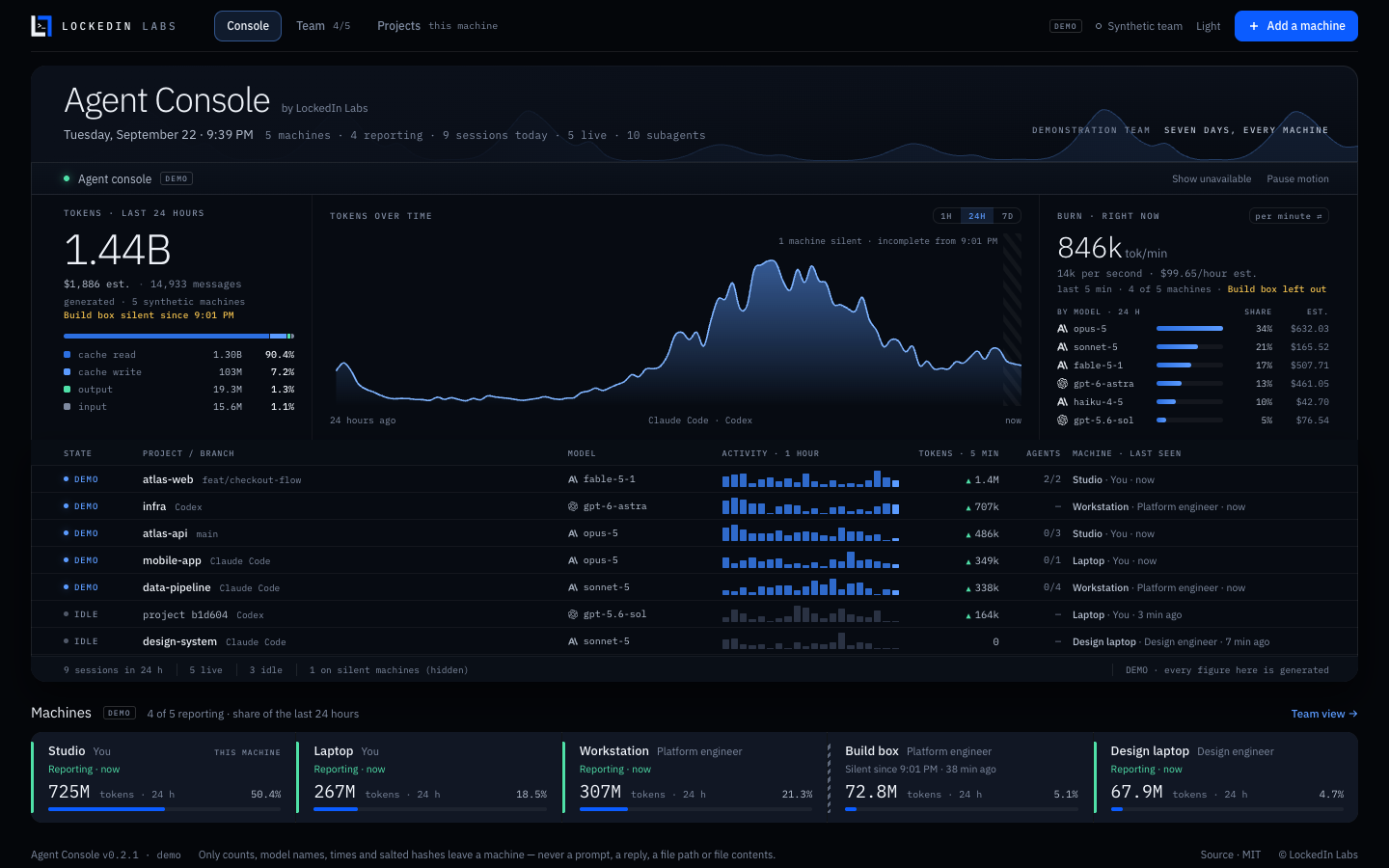
Captured from --demo. Every figure in it is generated and stamped DEMO.
The same screen in the light theme.
npx --yes https://github.com/SamSnead85/agent-console/releases/download/v0.2.2/lockedinlabs-agent-console-0.2.2.tgz --open
You need Node.js 22 or newer. There is no account to create, nothing else to
install and no build step. The command fetches the packaged console from this
project's GitHub release, reads the Claude Code and Codex history already on
this computer, and opens the console in your browser, signed in, normally athttp://127.0.0.1:6787. To look around first without reading anything of
yours, add --demo before --open.
In the first thirty seconds you see: the last 24 hours of tokens, split
into cache read, cache write, output and input; their list-price estimate;
burn right now, in tokens per minute and dollars per hour; one lane per
session with its model, its subagents and its last hour of activity; and every
machine and person reporting, each with a share of the total.
Nothing leaves a machine but counts. Only model ids, minute timestamps,
token counts and salted hashes, and never a prompt, a reply, a file path or a
file's contents. A test pushes transcripts full of planted canaries through
the real reporter and the real hub and checks every byte that crosses the wire.
The console itself sends nothing anywhere: no telemetry, no update check, no
account. (One opt-in, --share-project-names, also sends each project
folder's name, never its path. It is off unless you pass it.)
Start here
You need a Mac, a Linux machine or a Windows PC, and about two minutes.
Install Node.js 22 or newer. Get the LTS version from
nodejs.org. To check, open a terminal (Terminal on a
Mac, PowerShell on Windows) and typenode --version— it should sayv22or higher.Start it. Paste this into the terminal and press Return:
npx --yes https://github.com/SamSnead85/agent-console/releases/download/v0.2.2/lockedinlabs-agent-console-0.2.2.tgz --openThat fetches Agent Console from this project's GitHub release (nothing to
download by hand) and opens it in your browser, signed in, normally athttp://127.0.0.1:6787. If that port is taken, the terminal prints the
address it used instead. Leave the terminal window open; closing it (or
pressing Ctrl+C) stops the console. The same command starts it again.The first start reads the Claude Code and Codex history already on this
computer. With months of it that can take a minute; the terminal counts the
files as it goes, and so does the console.
Or download it. On the GitHub page,
press the green Code button, then Download ZIP, and unzip it. You get a
folder called agent-console-main. In a terminal, go into that folder and
start the console:
cd ~/Downloads/agent-console-main
node bin/agent-console.mjs --open
On Windows (PowerShell) the first line is cd $HOME\Downloads\agent-console-main.
If node then says it cannot find bin/agent-console.mjs, Windows unzipped
the folder inside another one of the same name: run cd agent-console-main
once more. (If you use git: git clone https://github.com/SamSnead85/agent-console.git,
then cd agent-console.)
The .tgz on the release page. The releases page
lists a file named lockedinlabs-agent-console-<version>.tgz. It is the
packaged console that the one-line command above fetches for you. You don't
need to download or open it. Source code (zip) on the same page is that
release's code, used the same way as Download ZIP (its folder is namedagent-console-<version>).
The rest of this page writes commands as node bin/agent-console.mjs. If you
used the one-line command, put npx --yes <that release link> in its place.
Nothing to install beyond Node, no account, no build step, no dependencies.
To look around before it reads anything of yours:node bin/agent-console.mjs --demo --open shows a synthetic team of five
machines. Everything on that screen is stamped DEMO.
Add another computer
A teammate's laptop, your second machine, a second user account on this one:
each reports to the same console and they all add up.
Start the console so other computers on your network can reach it:
node bin/agent-console.mjs --listen 0.0.0.0 --openOther computers reach it on the next port (normally
6788); the console
itself stays on this computer only (see
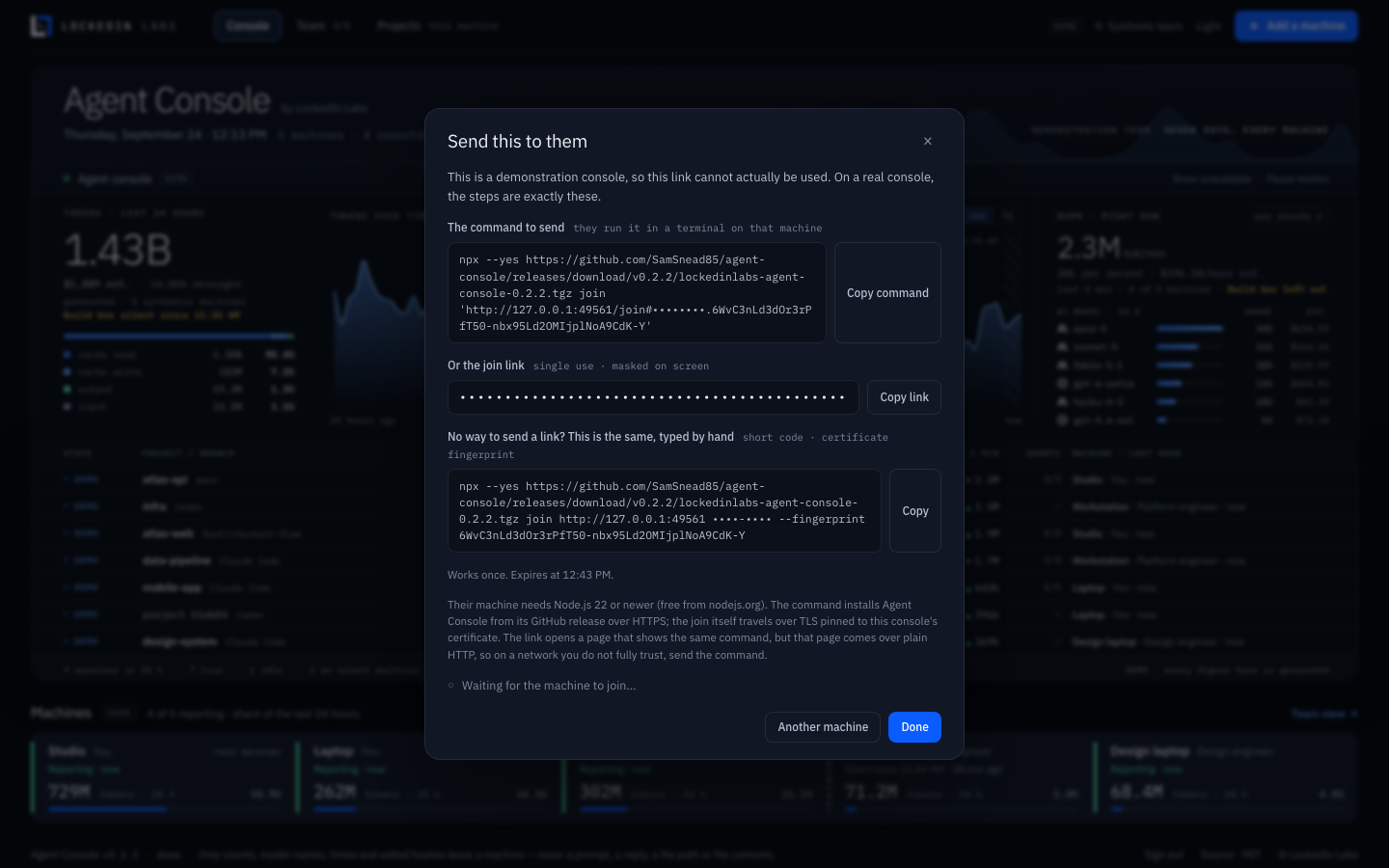
How the machines connect).In the console, press Add a machine. Say whose machine it is and what to
call it, press Create join link, then Copy command and send it to them.
(Copy link is there too: the link opens a page with the same command.)On the other computer, they paste that command into a terminal. It needs
Node.js 22 or newer and nothing else. The command installs Agent Console from
its GitHub release, never from your computer, and the join itself travels
encrypted, checked against your console's certificate.
The machine appears on your console within seconds, and the console shows who
joined and when. A join link works once, for at most an hour. On the
screen the link and its code stay masked; Copy puts them on the clipboard.
Signing in
The console only shows its figures to a browser that has signed in. --open
opens it signed in. Otherwise the terminal prints a sign-in link when the
console starts; it works once. To sign in again later, for example in another
browser, run the start command again with --open: it sees the console is
already running and opens it signed in. Each browser gets its own session,
which lasts 30 days; Sign out, at the foot of the console, ends it.
What works where
| macOS | Linux | Windows | |
|---|---|---|---|
| The console, reading this computer | Yes | Yes | Yes |
| Joining and reporting to another computer's console | Yes | Yes | Yes |
| Projects view (Git evidence) | Yes, with git |
Yes, with git |
Yes, with git |
CI runs the whole test suite, including the multi-process privacy test, and the
package smoke test on macOS, Linux and Windows, with Node 22 and 24.
Windows: use PowerShell, and when Windows asks whether Node.js may accept
connections on the machine running the console, allow it on private networks.
What you see
Tokens · last 24 hours: the total across every machine, the list-price
estimate, the number of messages (API responses, not transcript lines), and the
split into cache read, cache write, output and input, each with
its share of all tokens. (Cache read as a share of input tokens only, the
other common reading, is in the cache-read tooltip, labelled as such.)
Tokens over time: the last hour, day or week. Where a machine has stopped
reporting, the chart says from when it is incomplete.
Burn · right now: tokens per minute (or per second) over the last five
minutes, the dollars per hour it implies, and each model's share and spend over
the day, with real Anthropic and OpenAI marks.
Lanes: one row per session: whether it is live, the project and branch, the
model, its last hour of activity, tokens in the last five minutes, how many
subagents it is running, and which machine it is on.
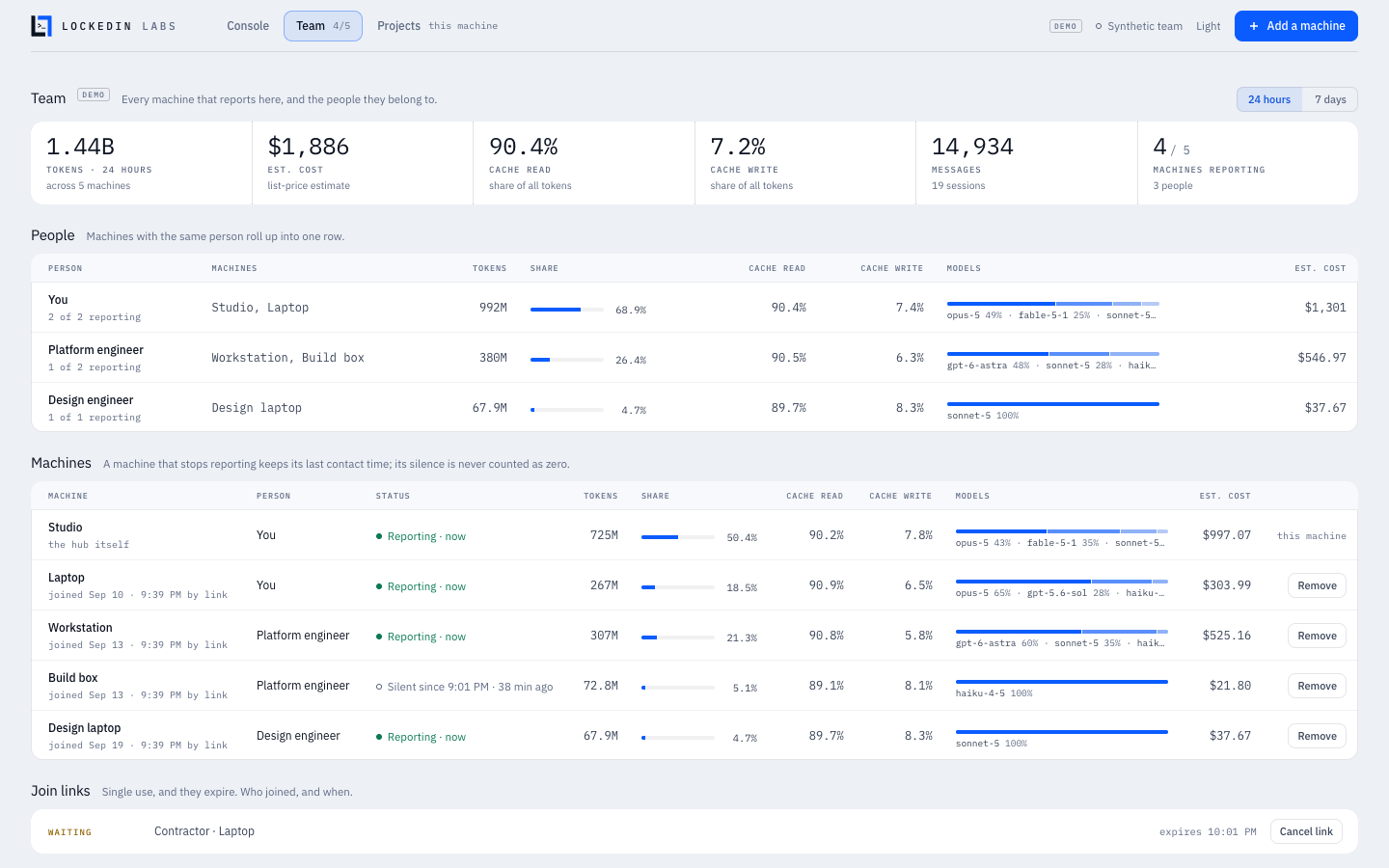
Machines and Team: every machine and every person: tokens, share of the
total, cache read and write shares, model split and cost, for 24 hours or
7 days; every join link, who used it and when. Two machines with the same
person roll up into one row.
Projects: this computer only: tokens per project, and what Git recorded in
the same period (commits, lines changed, pull requests merged). It is read on
this computer and never sent anywhere.
What the numbers promise
- A machine that stops reporting is not zero. It shows when it was last
heard from, its sessions show an unknown five-minute figure, and it is left out
of "right now" by name. - A machine still sending its history is not complete. A computer that
joins with months of transcripts shows "catching up · N of M records" until
everything has arrived, and is left out of "right now" until then. If its
upload is interrupted it carries on from where it stopped. - Unknown is not zero. A record that did not report a token class makes the
total a floor, and the screen says so. A model with no verified list price is
left out of the dollar figure, never priced at $0, and the screen says how
many tokens that leaves out. If everything in the burn window is unpriced,
the burn shows "—/hour · unpriced" rather than a dollar rate. - Copied transcripts count once. Record ids come from the transcript itself,
not from where the file sits, so the same session read on two machines is one
set of events. - Dollars are estimates at standard API list prices from a dated, offline
table (lib/collector/prices.json). They are not an invoice and not a
subscription charge. Tokens measure usage, not productivity. - Demo is never mixed with measured data. A console started with
--demo
reads nothing, accepts no machine, and stamps DEMO on every view.
The full definitions are in docs/MEASUREMENTS.md. The
accounting rules for people, teams, models and sessions, and the conformance
suite that checks them to the token, are in docs/accounting.md.
How the machines connect
One computer runs the console: the hub. Every other computer runs a small
reporter that reads its own Claude Code and Codex transcripts and sends the
hub metadata every ten seconds.
  laptop ── reporter ──┐   TLS, pinned            ┌── the console: 127.0.0.1:6787, signed in
                       ├── reporting port 6788 ──> hub
  workstation ─ reporter ┘  (device token)         └── reads its own transcripts too
Two ports. The console, its data and every button on it (making links,
removing machines) are on 127.0.0.1:6787: this computer only, whatever--listen says, and only for a signed-in browser. Other computers talk to the
reporting port, 6788, which serves only the join page, the join exchange and
reporting. By default it listens on this computer only; --listen 0.0.0.0 (or
a specific address) opens it to your network. It accepts callers on private
networks only (home and office ranges, Tailscale, IPv6 unique-local) unless you
pass --allow-public. To look at the console from elsewhere, tunnel to it:ssh -L 6787:127.0.0.1:6787 you@hub-computer, then open http://127.0.0.1:6787.
Encrypted and pinned. The console makes its own TLS certificate the first
time it starts, and every join link carries that certificate's fingerprint.
Joining and reporting go over TLS, and the reporter accepts only that
certificate, so nobody on the network can read the reports or pose as your
console. The join page itself opens as plain HTTP so a browser shows no
warning, which is why the command is what you send: see
SECURITY.md.
Credentials. A join link carries a single-use code that expires within the
hour (--invite-minutes, at most 60). The reporter spends it once and receives
its own device token, which it keeps in a private file (mode 600) under~/.agent-console/reporter/. The token is never printed, never put in a URL and
never shown on a screen; the hub stores only a SHA-256 verifier of it. Remove
on the Team view revokes a machine at once (its reporter stops and says why),
and what it already reported stays, marked as removed.
Storage. The hub keeps 8 days of usage (--retention-days) in~/.agent-console/hub/ (--state-dir), one file of metadata records per day.
Nothing leaves that directory.
The reporter
Add a machine gives the exact command, and so does the join page. Written
out, with the release link:
npx --yes https://github.com/SamSnead85/agent-console/releases/download/v0.2.2/lockedinlabs-agent-console-0.2.2.tgz join '<join link>'
npx --yes https://github.com/SamSnead85/agent-console/releases/download/v0.2.2/lockedinlabs-agent-console-0.2.2.tgz report
npx --yes https://github.com/SamSnead85/agent-console/releases/download/v0.2.2/lockedinlabs-agent-console-0.2.2.tgz leave
join enrols this computer, then keeps reporting. report keeps reporting after
a restart, with no new link. leave stops, and deletes everything the enrolment
left on this computer. From a download, use node bin/agent-console.mjs in place
of npx --yes <release link>. Always use the full command: the short name on
its own would fetch a different, unrelated package from the public registry.
Options: --name (what to call this computer), --interval <seconds>, --once,--state-dir, --home, --claude-root, --codex-root,--share-project-names, --json.
The reporter keeps going only while its window is open. To start it at login,
add the report command to your system's startup items (launchd, systemd or
Task Scheduler); this release does not install a background service for you.
Privacy, precisely
What leaves a reporting computer, per usage event: the tool (claude-code orcodex), the model id, the minute it happened, the four token counts, whether
it was a subagent and whether it continues a message already counted, and
HMAC-SHA256 hashes of the session, its parent and the project folder. Session
hashes are keyed by a salt the hub shares only with the machines that join it,
so a copied transcript is recognised; project hashes are keyed by a secret that
never leaves the reporting computer. The machine's name is whatever the
person who made the link typed (or --name when joining). With--share-project-names on that run, also the last part of each project
folder's name, reduced to letters, digits and dashes; run without it and names
stop at once.
What never leaves: prompts, replies, thinking, tool input and output, file
paths, file names, file contents, git branches, command lines, credentials.
On the hub's own computer the console also shows local project names and
branches, read from its own disk, shown only to the signed-in console, never
stored with the records and never sent anywhere.
The proof is test/hub-e2e.test.js: synthetic transcripts in the tools' real
formats, with canaries in every private field, go through a real reporter
process and a real hub process; a relay holding the hub's certificate records
every request in plain text, and the test checks the wire, the hub's files, the
reporter's files and the console's own payload for every canary. The
field-by-field contract is docs/COLLECTOR-CONTRACT.md.
Troubleshooting
The console opened on a port other than 6787. Another program had 6787,
so the console took the next free port and printed the address it used. If
Agent Console itself is already running there, a second start says so and
opens that one instead, once that console has proved it is yours (it never sends
it the console's key). A port you choose with --port is never changed: if
it is busy you are told to pick another.
The console says "Sign in to this console". Use the sign-in link the
terminal printed when the console started, or run the start command again with--open.
The reporter says "the hub is pacing uploads" or "catching up". A computer
joining with a lot of history sends it in batches, and the hub paces them. Leave
the window open: every batch that arrived is kept, and the console shows the
machine as "catching up · N of M records" until it is done.
The other computer cannot reach the console. Check, in order: the console
was started with --listen 0.0.0.0; both computers are on the same network
(not a guest network); the address in the link is still this computer's address
(it can change when you change networks, so make a new link); and the firewall
allows Node.js to accept connections on the reporting port. macOS asks the
first time (choose Allow; or System Settings → Network → Firewall → Options),
Windows asks the same (allow Private networks), and on Linux with ufw:sudo ufw allow 6788/tcp.
"The machine at … is not the console that made this link." The certificate
at that address is not the one named in the link: the link is for another
console, or another machine is answering at that address. Nothing was sent. Ask
for a new link.
"This join code is not valid" or "has expired." Each link works once, for at
most an hour. Press Add a machine again and send the new link.
A machine shows "Silent since …". Its reporter stopped: the window was
closed, the computer slept, or it changed networks. On that computer run thereport command (the join page shows it), with no new link. If it says the hub
no longer accepts it, it was removed: send it a new link.
A machine shows "Joined — waiting for its first report." It has joined but
its reporter has not delivered yet; if it stays that way, the reporter window
was closed right after joining.
The numbers look low. The console keeps 8 days, and the first start reads
only transcripts written in that window. Claude Code and Codex must be writing
their usual logs (~/.claude/projects, ~/.codex/sessions); if yours live
elsewhere, pass --claude-root / --codex-root.
npx or node is "not found". Node.js is not installed, or the terminal
was opened before it was. Install it from nodejs.org and open a new terminal.
Options
node bin/agent-console.mjs --help          # the console
node bin/agent-console.mjs join --help     # the reporter
| Console option | Default / purpose |
|---|---|
--open |
open the console in the browser, signed in |
--port <n> |
6787: the console, on this computer only |
--report-port <n> |
the port above it (6788): where other computers join and report |
--listen <address> |
127.0.0.1; 0.0.0.0 lets other computers reach the reporting port |
--allow-public |
accept reports from outside private networks |
--demo |
a synthetic team; reads nothing, accepts no machine |
--name <text>, --person <text> |
this computer's name, and whose it is, on the console (This machine, You) |
--no-local |
do not read this computer (a hub on a server) |
--state-dir <path> |
~/.agent-console/hub |
--retention-days <n> |
8 (1–90) |
--invite-minutes <n> |
30 (at most 60) |
--claude-root, --codex-root |
where this computer's transcripts are |
--json |
print launch details as JSON and keep running |
Environment equivalents use the AGENT_CONSOLE_ prefix.
Checking a download
From 0.2.1 on, each release's package is built by CI from the release's tag.
The release page lists its SHA-256 in SHA256SUMS, and GitHub keeps a signed
build provenance attestation for it. To check a file you downloaded:
shasum -a 256 lockedinlabs-agent-console-0.2.2.tgz              # macOS, Linux
Get-FileHash lockedinlabs-agent-console-0.2.2.tgz               # Windows PowerShell
gh attestation verify lockedinlabs-agent-console-0.2.2.tgz -R SamSnead85/agent-console
Development
npm test               # the whole suite, including the multi-machine end-to-end tests
npm run smoke:pack     # pack, install into a scratch prefix, start it in demo mode
No dependencies to install. CI runs both on macOS, Linux and Windows, Node 22
and 24. See CONTRIBUTING.md (including the privacy rule
every change keeps) and CHANGELOG.md. Report security problems
privately, as SECURITY.md describes. Everyone taking part agrees
to the Code of Conduct.
License
MIT © 2026 LockedIn Labs (LICENSE, PROVENANCE.md).
IBM Plex is included under the SIL Open Font License 1.1
(public/fonts/LICENSE-OFL.txt). Every bundled third-party asset is listed in
THIRD_PARTY_NOTICES.md.
Trademarks
The MIT licence covers the code. It does not grant rights to the LockedIn Labs
name or marks: you may say that your work uses or is based on Agent Console,
but a modified version must not be presented as a LockedIn Labs product or use
its marks as its own. The Anthropic and OpenAI marks belong to their owners and
appear only to identify their models.
About LockedIn Labs
Agent Console is built and maintained by LockedIn Labs.
Reviews (0)
Sign in to leave a review.
Leave a reviewNo results found