tmux-pane-tree
Health Pass
- License — License: MIT
- Description — Repository has a description
- Active repo — Last push 0 days ago
- Community trust — 20 GitHub stars
Code Pass
- Code scan — Scanned 12 files during light audit, no dangerous patterns found
Permissions Pass
- Permissions — No dangerous permissions requested
No AI report is available for this listing yet.
┣nteractive tmux pane tree with live agent badges and Vim-style navigation.
tmux-pane-tree

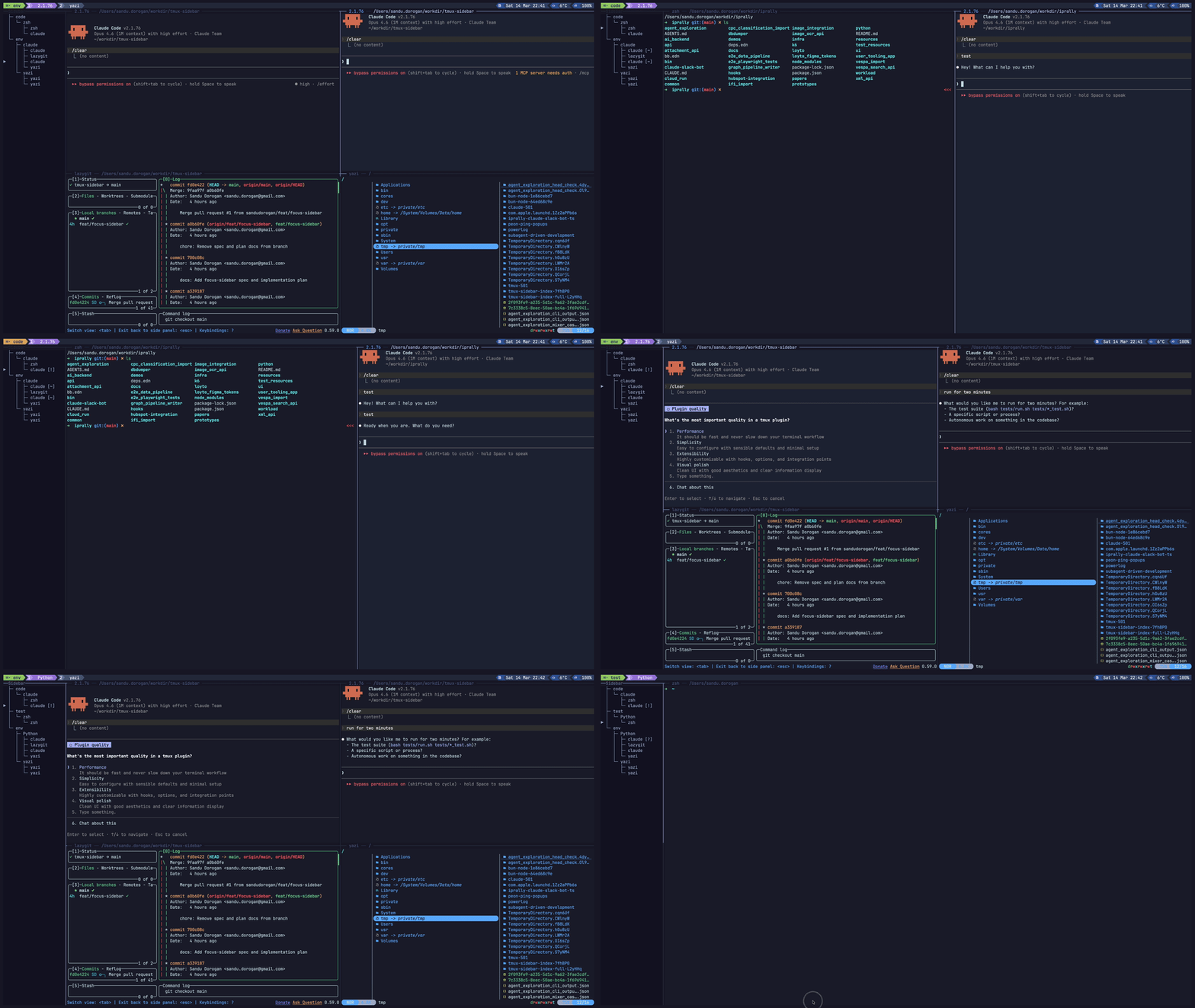
A tmux plugin that keeps a persistent, interactive session tree on the left
side of every window, with live badges for claude, codex, cursor, and opencode.
  ┌─ Sidebar ────────────┬────────────────────────────────┐
  │                      │                                │
  │   ├─ work            │  $ claude                      │
  │   │  └─ zsh          │                                │
  │   │     ├─ claude    │  Working on your request...    │
  │   │     └─ zsh       │                                │
  │   └─ env             │                                │
  │      ├─ claude       │                                │
  │      │  ├─ claude    │                                │
  │      │  ├─ lazygit   │                                │
  │ ▶    │  ├─ claude ⏳│                                │
  │      │  └─ yazi      │                                │
  │      └─ yazi         │                                │
  │         ├─ yazi      │                                │
  │         └─ yazi      │                                │
  │                      │                                │
  └──────────────────────┴────────────────────────────────┘
Features
Interactive tree — browse sessions, windows, and panes as a Unicode tree.
Press Enter to jump to the selected pane.
Pane icons and agent badges — per-pane app icons and live status updates in real time:
| Badge | Status | Meaning |
|---|---|---|
⏳ |
running | Agent is working |
❓ |
needs-input | Waiting for permission / input |
✅ |
done | Finished |
❌ |
error | Something went wrong |
done and needs-input clear when you focus the pane.
Auto-mirroring — open the sidebar once and it follows you across windows.
Session management — add windows and sessions, rename them, and close panes
without leaving the sidebar.
Install
tmux-sidebar paths and @tmux_sidebar_* options still work during the
transition. New installs should use tmux-pane-tree names.
With TPM
set -g @plugin 'sandudorogan/tmux-pane-tree'
set -g @tmux_pane_tree_install_agent_hooks 1   # optional
Reload tmux and press prefix + I.
Manual
git clone https://github.com/sandudorogan/tmux-pane-tree \
  ~/.config/tmux/plugins/tmux-pane-tree
Source it in your tmux config:
source-file ~/.config/tmux/plugins/tmux-pane-tree/tmux-pane-tree.tmux
Then tmux source-file ~/.tmux.conf (or your main config path).
To patch Claude Code, Codex, Cursor, and OpenCode hook config after a manual install:
bash ~/.config/tmux/plugins/tmux-pane-tree/scripts/features/hooks/install-agent-hooks.sh
Rollout
- This release publishes the new
tmux-pane-treename. - Legacy
tmux-sidebarconfig and entrypoints remain supported for one compatibility window. - The next release keeps compatibility but docs stop mentioning the old names except in migration notes.
- A later breaking release may rename the implicit default state directory and remove legacy names after users have had one full cycle to migrate.
Usage
Toggle
<prefix> t opens or closes the sidebar.
Focus
<prefix> T switches focus between the sidebar and your main pane:
- In sidebar — returns to the previous main pane
- Sidebar open — moves focus into the sidebar
- Sidebar closed — opens the sidebar and focuses it
Navigation (inside the sidebar)
| Key | Action |
|---|---|
j / Down |
Move selection down |
k / Up |
Move selection up |
gg |
Jump to the top of the list |
G |
Jump to the bottom of the list |
Ctrl+o |
Jump backward in the jump list |
Ctrl+i |
Jump forward in the jump list |
Enter |
Jump to the selected pane |
aw |
Add a window (prompts for name) |
as |
Add a session (prompts for name) |
rw |
Rename the selected window |
rs |
Rename the selected session |
f |
Toggle pane filter mode |
x |
Close the selected pane |
p |
Toggle hide-panes mode |
q |
Close the sidebar |
Ctrl+l |
Return focus to the main pane |
New windows and sessions are inserted relative to the selected row. Closing the
last pane removes its window; removing the last window removes the session.
The jump list starts from the pane you used to enter the sidebar. gg and G
add sidebar-row targets, Ctrl+o moves backward, and Ctrl+i moves forward.
The final backward jump returns focus to the original tmux pane. The list is
cleared when the sidebar loses focus.
Configuration
Set options with set -g in your tmux config.
Sidebar width
set -g @tmux_pane_tree_width 30 # default: 25
Focus on open
By default, toggling the sidebar focuses it. Disable that behavior to keep
focus in the main pane:
set -g @tmux_pane_tree_focus_on_open 0 # default: 1
Session order
Control session order in the tree:
set -g @tmux_pane_tree_session_order "work,ops,scratch"
Sessions not listed appear afterward in their default order. Adding or renaming
sessions from the sidebar updates this list automatically.
Pane filter
Show only panes matching a comma-separated list of process or agent tokens:
set -g @tmux_pane_tree_filter "opencode,codex,claude,cursor"
Matching is case-insensitive and checks pane command, pane title, and stored
agent metadata.
Press f in the sidebar to toggle filtering without changing the list. Runtime
state is stored in @tmux_pane_tree_filter_enabled and defaults to on.
Custom shortcuts
Override the default sidebar shortcuts:
set -g @tmux_pane_tree_add_window_shortcut  zw   # default: aw
set -g @tmux_pane_tree_add_session_shortcut zs   # default: as
set -g @tmux_pane_tree_go_top_shortcut      tt   # default: gg
set -g @tmux_pane_tree_go_bottom_shortcut   B    # default: G
set -g @tmux_pane_tree_jump_back_shortcut   C-p  # default: C-o
set -g @tmux_pane_tree_jump_forward_shortcut C-n # default: C-i
set -g @tmux_pane_tree_rename_window_shortcut rw # default: rw
set -g @tmux_pane_tree_rename_session_shortcut rs # default: rs
set -g @tmux_pane_tree_toggle_filter_shortcut ff # default: f
set -g @tmux_pane_tree_close_pane_shortcut  dd   # default: x
Control-key shortcuts use C-x notation.
If any shortcut is empty, duplicated, a prefix of another shortcut, or contains
the reserved q key, all ten revert to defaults.
Scroll offset
Control how much context stays visible above and below the cursor:
set -g @tmux_pane_tree_scrolloff 8 # default: 8
Set 0 for edge-only scrolling.
Hide panes
Show only sessions and windows. Panes with an active agent badge still appear.
set -g @tmux_pane_tree_hide_panes on # default: off
Badge icons
Badges follow the active icon theme. The default ascii and unicode paths
use ⏳, ❓, ✅, and ❌. When the active icon theme resolves tonerdfont, badges switch to nf-fa-hourglass_2, nf-fa-circle_question,nf-fa-circle_check, and nf-oct-stop.
You can still override any status badge explicitly:
set -g @tmux_pane_tree_badge_running      "⏳"   # default: ⏳
set -g @tmux_pane_tree_badge_needs_input  "❓"   # default: ❓
set -g @tmux_pane_tree_badge_done         "✅"   # default: ✅
set -g @tmux_pane_tree_badge_error        "❌"   # default: ❌
Pane icons
Pane icons default to auto, which checks whether the tmux host has a Nerd
Font installed in a standard font directory. If it finds one, the sidebar uses
the Nerd Font icon theme. Otherwise it falls back to the ASCII-safe theme so it
still renders cleanly on most systems and fits in the sidebar's narrow default
width.
Use the @tmux_pane_tree_icon_* option prefix for icon config. Legacy@tmux_sidebar_icon_* aliases still work during the compatibility window.
set -g @tmux_pane_tree_icon_theme "auto"     # default: auto
set -g @tmux_pane_tree_icon_theme "ascii"    # force ASCII-safe icons
set -g @tmux_pane_tree_icon_theme "unicode"  # optional richer built-in theme
set -g @tmux_pane_tree_icon_theme "nerdfont" # force Nerd Font glyphs
Known panes such as shells, coding agents, node, lazygit, yazi,ranger, bb, clojure, java, vim, ssh, pagers, and tmux get
built-in icons. Unknown commands fall back to a placeholder icon.
The built-in Nerd Font theme uses glyphs such as nf-md-face_agent for coding
agents, nf-md-code_greater_than for shells, nf-dev-less for less,nf-md-cat for cat, nf-md-dock_top for top-style monitors, andnf-md-git for lazygit.
You can override any individual app icon:
set -g @tmux_pane_tree_icon_claude "A"
set -g @tmux_pane_tree_icon_shell  ">"
set -g @tmux_pane_tree_icon_unknown "?"
Available override keys match the canonical app ids:claude, codex, opencode, cursor, shell, node, python, git,lazygit, yazi, ranger, bb, cat, clojure, java, less, vim,ssh, pager, top, tmux, and unknown.
Installed Nerd Fonts are only a hint. If your terminal is not actually using a
Nerd Font, the Nerd Font glyphs will not render correctly. In that case, either
switch your terminal font to a Nerd Font or set @tmux_pane_tree_icon_theme toascii or unicode explicitly.
If auto-detection picks the wrong theme, set @tmux_pane_tree_icon_theme
explicitly. Remote tmux sessions are especially likely to need an explicit
setting because auto checks fonts installed on the tmux host, not the font
configured by the terminal client displaying that session.
To override the font directories checked by auto, setTMUX_PANE_TREE_FONT_DIRS to a path-separated list. LegacyTMUX_SIDEBAR_FONT_DIRS still works as a fallback.
Colors
Override tree colors:
set -g @tmux_pane_tree_color_session "#1a2f4e"
set -g @tmux_pane_tree_color_window  "#4a5568"
set -g @tmux_pane_tree_color_pane    "#a0aec0"
Values are hex colors. When unset, tmux-pane-tree derives them from your tmux
theme.
Key overrides
Override the tmux keybindings used to toggle and focus the sidebar:
set -g @tmux_pane_tree_toggle_key  b    # default: t
set -g @tmux_pane_tree_focus_key   B    # default: T
Agent hook install
Enable automatic hook setup when the plugin loads:
set -g @tmux_pane_tree_install_agent_hooks 1 # default: 0
Quick reference
| Option | Default | Description |
|---|---|---|
@tmux_pane_tree_width |
25 |
Sidebar column width |
@tmux_pane_tree_focus_on_open |
1 |
Focus sidebar when toggled open |
@tmux_pane_tree_session_order |
— | Comma-separated session ordering |
@tmux_pane_tree_filter |
— | Comma-separated pane filter |
@tmux_pane_tree_add_window_shortcut |
aw |
Shortcut to add a window |
@tmux_pane_tree_add_session_shortcut |
as |
Shortcut to add a session |
@tmux_pane_tree_go_top_shortcut |
gg |
Shortcut to jump to the top |
@tmux_pane_tree_go_bottom_shortcut |
G |
Shortcut to jump to the bottom |
@tmux_pane_tree_jump_back_shortcut |
C-o |
Shortcut to jump backward |
@tmux_pane_tree_jump_forward_shortcut |
C-i |
Shortcut to jump forward |
@tmux_pane_tree_rename_window_shortcut |
rw |
Shortcut to rename a window |
@tmux_pane_tree_rename_session_shortcut |
rs |
Shortcut to rename a session |
@tmux_pane_tree_toggle_filter_shortcut |
f |
Shortcut to toggle filter mode |
@tmux_pane_tree_close_pane_shortcut |
x |
Shortcut to close selected pane |
@tmux_pane_tree_hide_panes |
off |
Show only sessions and windows |
@tmux_pane_tree_scrolloff |
8 |
Cursor scroll margin |
@tmux_pane_tree_badge_running |
⏳ |
Badge for running status |
@tmux_pane_tree_badge_needs_input |
❓ |
Badge for needs-input status |
@tmux_pane_tree_badge_done |
✅ |
Badge for done status |
@tmux_pane_tree_badge_error |
❌ |
Badge for error status |
@tmux_pane_tree_icon_theme |
auto |
Pane icon theme / auto-detect |
@tmux_pane_tree_color_session |
— | Session name color (hex) |
@tmux_pane_tree_color_window |
— | Window name color (hex) |
@tmux_pane_tree_color_pane |
— | Pane name color (hex) |
@tmux_pane_tree_toggle_key |
t |
Tmux key to toggle sidebar |
@tmux_pane_tree_focus_key |
T |
Tmux key to focus sidebar |
@tmux_pane_tree_install_agent_hooks |
0 |
Install Claude/Codex/Cursor/OpenCode hooks on load |
| Environment variable | Description |
|---|---|
TMUX_PANE_TREE_STATE_DIR |
State file directory (default $XDG_STATE_HOME/tmux-sidebar or ~/.local/state/tmux-sidebar during the compatibility window) |
TMUX_PANE_TREE_PLUGIN_DIR |
Override the plugin root used by examples and hook helpers (falls back to TMUX_SIDEBAR_PLUGIN_DIR) |
Hook Integration
Agent badges are written throughscripts/features/state/update-pane-state.sh.
Custom integrations should report the current pane, usually via--pane "$TMUX_PANE".
Quick setup
Choose one setup path:
- TPM: set
@tmux_pane_tree_install_agent_hooks 1before installing or reloading
the plugin. - Manual install: run
bash ~/.config/tmux/plugins/tmux-pane-tree/scripts/features/hooks/install-agent-hooks.sh
The installer updates:
~/.claude/settings.json~/.codex/config.toml~/.cursor/hooks.json~/.config/opencode/plugins/tmux-pane-tree.js
It also creates timestamped backups before changing existing files.
Manual wiring
If you prefer to edit configs yourself, point each tool at the installed hook
wrappers under scripts/features/hooks/:
- Claude Code:
hook-claude.sh - Codex:
hook-codex.sh - Cursor:
hook-cursor.sh - OpenCode:
hook-opencode.sh
Ready-to-copy examples live in examples/ (set TMUX_PANE_TREE_PLUGIN_DIR if
the plugin is not under the default path).
Cursor uses native hooks in ~/.cursor/hooks.json. The sidebar binds Cursor
events to panes by preferring TMUX_PANE when Cursor was launched from that
tmux pane, then falling back to the first workspace_roots entry that matches
a tmux pane working directory. Cursor does not emit Claude-style permission
events, so the needs-input badge is inferred from postToolUseFailure events
with failure_type=permission_denied.
Requirements
- tmux 3.0+
- Python 3
- bash 4.0+
Development
Internal layout
Runtime entrypoints stay small; most shared logic lives in focused helpers:
scripts/
  core/
    lib.sh                 <- shared bash utilities
  ui/
    sidebar-ui.py          <- interactive loop entrypoint
    sidebar_ui_lib/
      core.py              <- tmux/config helpers, prompts, pane actions
      status.py            <- live agent detection, badge selection
      tree.py              <- tree loading, selection, search helpers
      render.py            <- curses colors, drawing, row-map/context-menu IPC
  features/
    sidebar/               <- pane lifecycle, focus, rendering, reload helpers
    state/                 <- pane-state file writers/cleanup
    context-menu/          <- right-click menu integration
    sessions/              <- prompted window/session creation helpers
scripts/ui/sidebar-ui.py is the test import surface; implementation details
live under scripts/ui/sidebar_ui_lib/.
Tests
bash tests/run.sh
Tests use a fake tmux binary, so no live session is required.
Live reload
After editing scripts or the UI, push the working tree into the running plugin
directory and reload open sidebar panes:
bash scripts/install-live.sh
This copies the working tree into ~/.config/tmux/plugins/tmux-pane-tree,
re-sources the tmux config, and respawns open sidebar panes.
If you only changed scripts/ui/sidebar-ui.py, you can reload the panes
directly:
bash scripts/features/sidebar/reload-sidebar-panes.sh
License
MIT
Reviews (0)
Sign in to leave a review.
Leave a reviewNo results found