memi
Health Gecti
- License — License: MIT
- Description — Repository has a description
- Active repo — Last push 0 days ago
- Community trust — 28 GitHub stars
Code Gecti
- Code scan — Scanned 12 files during light audit, no dangerous patterns found
Permissions Gecti
- Permissions — No dangerous permissions requested
This tool acts as a continuous integration utility for Tailwind applications. It analyzes your existing codebase to extract design tokens and export them into a shadcn-compatible registry, allowing seamless integration with AI editors and npm.
Security Assessment
Overall Risk: Low. The automated code scan reviewed 12 files and found no dangerous patterns, malicious code, or hardcoded secrets. It requests no sensitive system permissions. Because the utility needs to extract code from your project and potentially serve it locally or publish it to npm, it does inherently read local files and make network requests during publishing. However, this is expected behavior for its intended CI and packaging purpose.
Quality Assessment
The project is actively maintained, with its most recent code push occurring today. It uses the standard, permissive MIT license. The primary drawback is its extremely low community visibility; it currently has only 5 GitHub stars. This means it has not been widely battle-tested or peer-reviewed by the broader open-source community. Despite the low visibility, the repository is well-documented and clearly explains its straightforward CLI workflow.
Verdict
Safe to use.
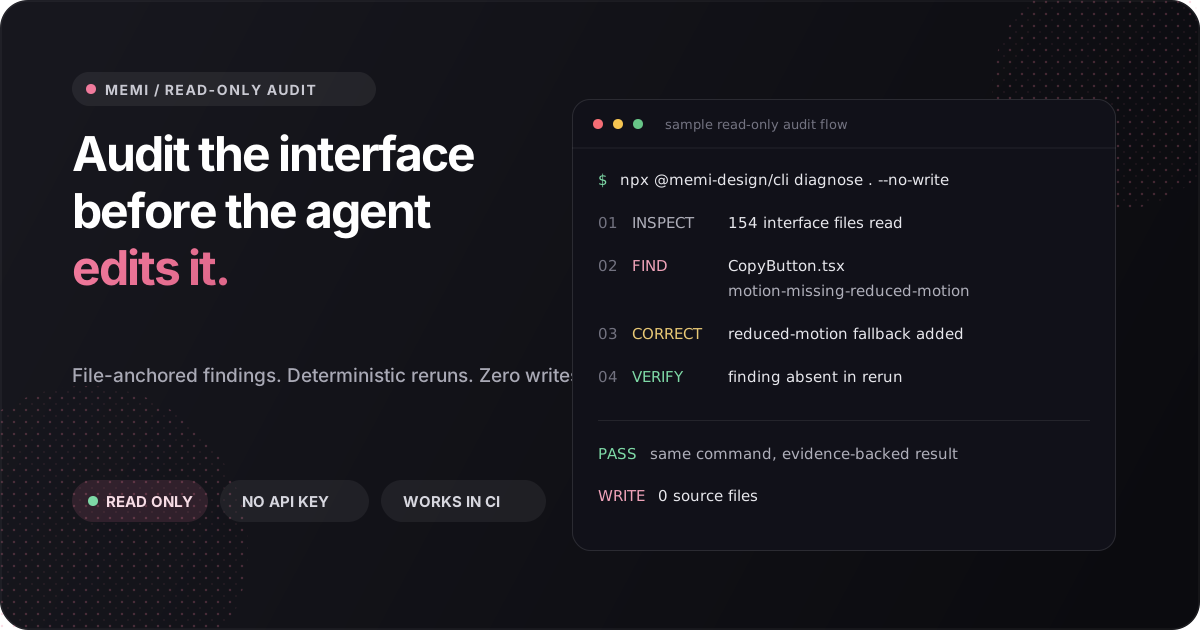
Memi is the read-only design engineering audit and skill layer for coding agents.


memi
Read-only design engineering for coding agents.
Memi is the read-only design engineering audit and skill layer for coding agents. It gives Codex, Claude Code, Cursor, Grok Build, and MCP clients file-anchored interface evidence before they edit UI.
Memi reads the product you already have, identifies accessibility, hierarchy, state, responsive, motion, and token risks, then reruns the same deterministic check after a fix. Your code remains the source of truth.
Supported today: Node 20, 22, and 24 on macOS, Linux, and Windows. Figma and Studio are optional companions.
Links: npm · memoire.cv · current versions · MCP Registry · Agent Skills
Quickstart
Run one audit in any frontend repository:
npx -y @memi-design/[email protected] diagnose . --json --no-write --fail-on none
You get a score, normalized finding IDs, confidence, provenance, and file:line evidence. No account, API key, Figma file, global install, or daemon is required.
Keep the workflow available to your coding agent:
npx skills add sarveshsea/memi --skill audit-frontend-design
Then ask:
Audit this frontend before editing it. Prioritize the five fixes that will matter most to users.
| Focused skill | Use it when |
|---|---|
audit-frontend-design |
Find interface risks before changing UI |
remember-design-system |
Load compact product-system context |
enforce-design-ci |
Gate pull requests with deterministic evidence |
build-swiftui-interface |
Build and verify native Apple interfaces |
Compatible with the shadcn registry and v0 design systems.
If Memi catches a real interface issue in your project, star the repository and share the finding. That is the most useful signal for deciding what to improve next.
What Memi catches
| Signal | Example evidence |
|---|---|
| Accessibility | Missing labels, reduced-motion fallbacks, focus and contrast risks |
| Interface craft | Weak hierarchy, spacing drift, brittle responsive behavior |
| Product states | Missing loading, empty, error, success, and permission states |
| Design systems | Token drift, raw values, inconsistent component usage |
| Routes and components | App graph, duplicated patterns, risky change surfaces |
| Pull requests | New debt only, SARIF annotations, step summary, HTML report |
The first command is deliberately read-only. Write-capable scaffolds and Figma operations are separate, explicit workflows.
How it works
- Inspect - build an evidence graph from source, routes, styles, and local design-system files.
- Find - report normalized issues with severity, confidence, provenance, and
file:line. - Correct - let a human or coding agent make a scoped change.
- Verify - rerun the same command and compare the evidence.
No LLM is used in the deterministic CI enforcement path.
Choose your integration
| Surface | Start here | Best for |
|---|---|---|
| One-time CLI audit | npx -y @memi-design/[email protected] diagnose . --no-write |
Trying Memi without installing |
| Global CLI | npm i -g @memi-design/cli |
Daily local use |
| Agent Skill | npx skills add sarveshsea/memi --skill audit-frontend-design |
Codex, Claude, Cursor, and compatible agents |
| GitHub Action | uses: sarveshsea/memi@0f89cbf1b9972c779dbf14cc09f6c91485a1182b |
Pull-request design CI |
| MCP server | memi mcp start --no-figma |
Any MCP client |
| Studio | brew install --cask sarveshsea/memi/memi-studio |
Supervised macOS workflows |
The CLI and focused skills are primary. Studio, Figma, research, scaffolding, registries, and the larger tool router are deeper paths.
Design CI
Pin the release commit so every pull request runs the same code:
name: design
on: [pull_request]

permissions:
  contents: read

jobs:
  memi:
    runs-on: ubuntu-latest
    permissions:
      contents: read
      security-events: write
    steps:
      - uses: actions/checkout@3d3c42e5aac5ba805825da76410c181273ba90b1 # v7.0.1
        with:
          fetch-depth: 0
      - uses: sarveshsea/memi@0f89cbf1b9972c779dbf14cc09f6c91485a1182b # v2.6.3
        with:
          version: "2.6.3"
          report: true
          upload-sarif: true
The Action adds code-scanning annotations, a step summary, and a memi-design-health artifact. Existing debt can be baselined while new debt fails the gate.
GitHub Action guide · CI recipes · team rollout
Agent and MCP setup
Install a complete project kit:
memi agent install codex --project .
memi agent install claude-code --project .
memi agent install cursor --project .
memi agent install grok-build --project .
Start the local MCP server without Figma:
memi mcp start --no-figma
{
  "mcpServers": {
    "memoire": {
      "command": "memi",
      "args": ["mcp", "start", "--no-figma"]
    }
  }
}
Codex plugin marketplace:
codex plugin marketplace add sarveshsea/memi --ref main --sparse .agents/plugins --sparse plugins/memoire
Agent stack guide · copy-paste recipes · full skill router
Proof you can inspect
- design-sandbox - runnable Next.js, Tailwind, shadcn, MCP, and Agent Skills integration.
- Release gates - package, provenance, clean install, MCP, plugin, binary, and public-surface checks.
- Current release truth - one source for npm, GitHub, Action, Studio, and website versions.
- Audit reports - timestamped findings, evidence gaps, score caps, and owners.
llms.txt- compact machine-readable product map.
Trust defaults
- Read-only audit by default
- No npm install-time lifecycle scripts
- No account or API key for the first audit
- No source upload or covert telemetry
- Figma installation and connection are explicit
- Agent kit writes support
--dry-run --json - Immutable Action pins and release provenance
- MIT core with third-party boundaries documented in NOTICE
Community
Useful contributions include reproducible audit fixtures, framework adapters, skill improvements, accessible UI cases, shader and motion checks, and real before/after reports.
More commands
CLI reference| Command | What it does |
|---|---|
memi diagnose [target] |
App-quality graph and file-anchored findings |
memi ux audit [target] |
UX tenets and product-state risks |
memi craft audit [target] |
Hierarchy, rhythm, convention, and responsive critique |
memi tokens --from <path> |
Extract tokens, aliases, modes, and drift |
memi agent brief . --json |
Compact evidence contract before UI work |
memi scaffold component <Name> --json |
Dry-run Atomic Design scaffold |
memi ios brief --json |
Apple-platform design brief |
memi shadcn export --out public/r |
Export a shadcn-compatible registry |
memi research design --json |
Research-to-design package |
memi ci |
Baseline-aware pull-request gate |
memi mcp start --no-figma |
Local MCP server |
Install without npm
curl -fsSL https://memoire.cv/install.sh | sh
brew install sarveshsea/memi/memoire
docker run --rm -it -v "$PWD:/work" -w /work ghcr.io/sarveshsea/memi --help
License
Studio interface references and adapted components include Hermes WebUI and the MIT Warp UI framework boundary around warpui_core and warpui; Warp AGPL application and client code is not copied into Memi.
MIT. See NOTICE for optional adapters and complete third-party attribution.
Yorumlar (0)
Yorum birakmak icin giris yap.
Yorum birakSonuc bulunamadi