pi-daemon
Health Warn
- License — License: MIT
- Description — Repository has a description
- Active repo — Last push 0 days ago
- Low visibility — Only 5 GitHub stars
Code Fail
- network request — Outbound network request in oauth-relay/src/index.ts
- rm -rf — Recursive force deletion command in package.json
- spawnSync — Synchronous process spawning in src/cli.ts
- process.env — Environment variable access in src/cli.ts
- network request — Outbound network request in src/cli.ts
- process.env — Environment variable access in src/cloudflare-oauth.ts
Permissions Pass
- Permissions — No dangerous permissions requested
No AI report is available for this listing yet.
Run the Pi coding agent in a persistent session with a mobile PWA secured by Cloudflare Tunnel and Access.
Pi Daemon
Pi Daemon runs the Pi coding agent in a persistent server session, serves a focused mobile PWA on loopback, and makes it available through either private Tailscale Serve or a Cloudflare Tunnel protected by an exact-email Access policy.
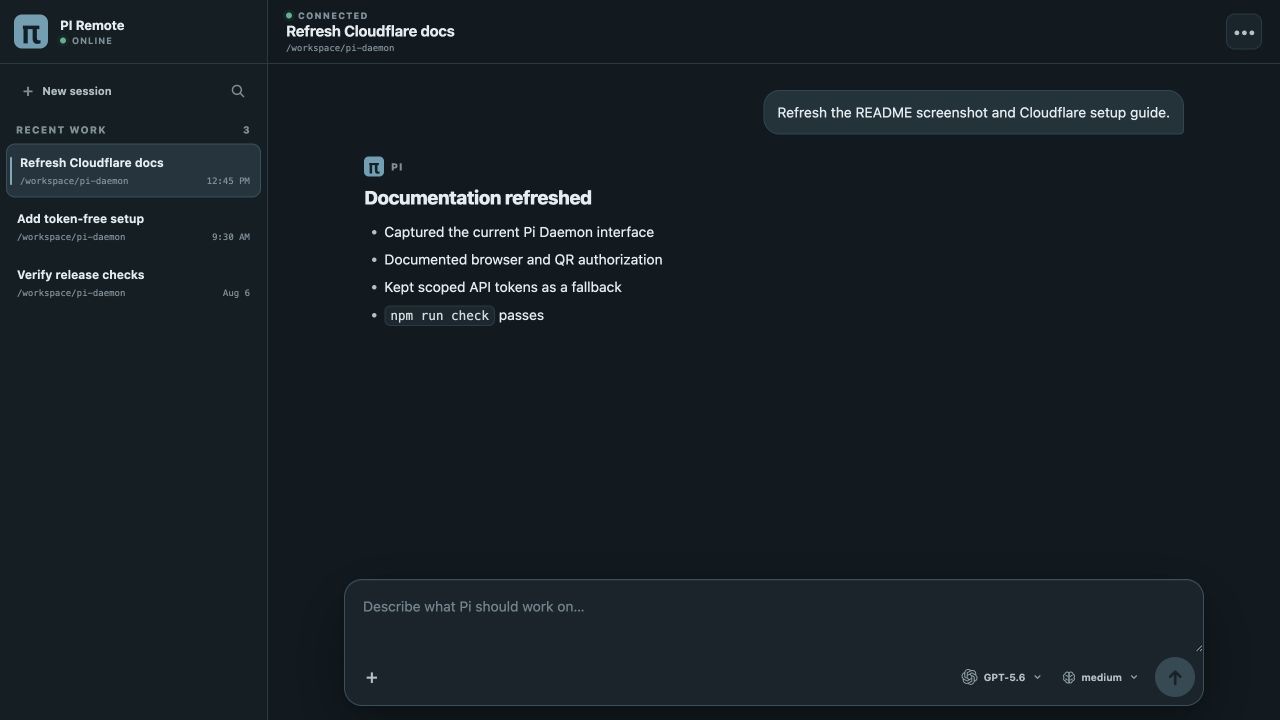
Current desktop layout. On mobile, the same session list is available from a drawer.
Security: An authenticated mobile user can invoke Pi's coding tools, execute commands, and modify files without per-action confirmation. Limit access to the intended Tailscale login or Cloudflare email, protect that identity, and do not run the service on a machine you are unwilling to control remotely.
One-line installation
curl -fsSL https://github.com/SASUKE40/pi-daemon/releases/latest/download/install.sh | sh
Prerequisites:
curlandtar(the installer provides its own Node.js 24.19.0 LTS/npm runtime without root)- macOS 13+ on arm64/x64, or glibc Linux arm64/x64
- For the simplest private setup: Tailscale installed and signed in on the host and mobile device
- Or, for a public hostname: a Cloudflare account with a managed DNS zone and access to the inbox for the allowed email address
The wizard installs the checksummed Pi Daemon web package from the GitHub release, Node.js 24.19.0 LTS, Pi 0.84.1, and cloudflared 2026.7.3. Before installing, it checks for compatible Node.js/npm, Pi, and Pi Daemon commands and reuses each one it finds instead of reinstalling it; when Node.js is missing or too old, it provides a managed runtime without root.
The setup wizard offers two relay choices, with Cloudflare Tunnel first and selected by default for a new setup. Tailscale Serve remains available for private tailnet access and needs no API token. Cloudflare setup opens a browser consent link and displays a QR code, so a headless board can be authorized from another device without creating or pasting an API token. The CLI uses Authorization Code with PKCE, provisions the resources locally, and revokes the temporary access token when setup finishes. Saved reinstall choices contain resource IDs and user selections, not the OAuth authorization. The tunnel connector token is saved separately in a mode-0600 file and passed to cloudflared with --token-file, never on the process command line.
Architecture
Mobile PWA ── Tailscale Serve ───────────┐
                                        ├── 127.0.0.1:8504 web gateway
Mobile PWA ── Cloudflare Access/Tunnel ─┘             │ mode-0600 Unix socket
                                                      ▼
                                            long-lived Pi session daemon
                                                      │
                                            ~/.pi/agent sessions/auth
Closing the browser or restarting the web gateway does not stop a Pi run. Restarting the session daemon or rebooting necessarily terminates in-flight model/tool calls, but each append-only session remains resumable. Multiple sessions can run in parallel; each individual session still accepts only one active run at a time.
Type / at the start of the web composer to discover every command loaded for the current Pi session. The menu includes extension commands, reusable prompt templates, and enabled /skill:* commands, supports keyboard filtering and selection, and invokes commands through Pi's normal command expansion path. Terminal-only interactive commands are not shown because they require Pi's local TUI rather than the agent session API.
On macOS the components run as LaunchAgents; on Linux they run as systemd user services. The release is web-only and does not ship Electron or desktop-control tooling.
Commands
pi-daemon setup
pi-daemon status
pi-daemon doctor
pi-daemon logs [sessiond|web|tunnel|all]
pi-daemon restart [sessiond|web|tunnel|all]
pi-daemon update
pi-daemon uninstall
pi-daemon uninstall --delete-cloudflare
The default uninstall removes Pi Daemon services and runtime configuration, and disables the Pi Daemon Tailscale Serve listener when it is active. It preserves ~/.pi/agent authentication and sessions and leaves Cloudflare resources intact. If reinstall choices were saved, uninstall asks whether to preserve or forget them. Deleting Cloudflare resources requires the explicit flag, confirmation, and a fresh browser authorization.
Cloudflare Tunnel (default)
Choose Cloudflare when Pi Daemon needs a public hostname without opening an inbound port. You need a Cloudflare account with an active DNS zone, permission to manage that account and zone, and access to the inbox for the one email address that will be allowed through Access.
Setup
- Run the installer, or rerun
pi-daemon setup, and choose Cloudflare Tunnel. - Open the displayed authorization link in any browser or scan its QR code from another device. Sign in to Cloudflare, review the requested permissions, and authorize Pi Daemon. This works even when setup is running on a headless board.
- Select the Cloudflare account and DNS zone when more than one is available.
- Accept the default
pi.<zone>hostname or enter another unused hostname in that zone, then enter the one exact email address allowed to use Pi Daemon. - Choose whether to remember the non-secret setup choices for a future reinstall. The wizard then provisions the Cloudflare resources and installs a dedicated user-level
cloudflaredconnector. - Open the displayed mobile URL, enter the allowed email address, and use the One-time PIN sent by Cloudflare.
The wizard creates or validates:
- A Zero Trust organization, if the account does not already have one
- A One-time PIN identity provider, if one is not already configured
- One remotely managed tunnel with ingress to
http://127.0.0.1:8504 - One proxied CNAME for the selected hostname
- One self-hosted Access application with a 24-hour session
- One Allow policy that includes only the exact email and requires the One-time PIN login method
New Zero Trust organizations may use Cloudflare's own identity provider by default; Pi Daemon still creates or reuses One-time PIN and makes it the only login method for this application. The origin remains loopback-only, and cloudflared makes an outbound connection to Cloudflare, so no router port forwarding is required.
The CLI uses Authorization Code with PKCE. The callback relay holds only the short-lived authorization code, while the PKCE verifier and polling secret stay on the Pi Daemon host. The temporary Cloudflare access token is revoked when setup finishes. Reinstall metadata stores resource IDs and user selections but no OAuth authorization. The long-lived tunnel connector token is written to a mode-0600 file and supplied to cloudflared with --token-file, rather than appearing on the process command line.
Matching resources recorded by an earlier setup can be reused. When rerun with a saved v0.1.20 installation, setup migrates its exclusive GitHub organization policy to the chosen exact-email OTP policy before switching the application's login method. Pi Daemon refuses to overwrite conflicting DNS records or Access applications. A same-named, remotely managed tunnel left by an older uninstall or interrupted setup can be adopted only after an explicit default-No confirmation, and its DNS and exact-email Access policy must still match.
Verify and troubleshoot
pi-daemon status
pi-daemon doctor
pi-daemon logs tunnel
pi-daemon restart tunnel
If the Access login email does not arrive, confirm that the address exactly matches setup and allowlist [email protected] in any mail-security service. Cloudflare One-time PINs expire after 10 minutes, are single-use, and a newly requested PIN invalidates the previous one. See Cloudflare's One-time PIN login guide for current login behavior.
The normal uninstall leaves the Cloudflare tunnel, CNAME, and Access application in place. Use pi-daemon uninstall --delete-cloudflare to remove the exact managed resources after a fresh browser authorization and confirmation. If the connector token is ever exposed, rotate it in Cloudflare before starting the connector again.
Manual API token fallback
Browser OAuth is the default. Manual token entry remains available when the release has no OAuth client configured, the callback service is unavailable, or an account administrator has disabled public OAuth applications. If a Cloudflare API token has been exposed, immediately revoke the exposed token under Cloudflare > My Profile > API Tokens. Do not reuse or retry an exposed token.
Release maintainers can deploy and register the small headless callback service by following oauth-relay/README.md.
Choose Create Custom Token, scope it to one account and one DNS zone, and add:
- Account > Account Settings > Read
- Account > Cloudflare Tunnel > Edit/Write
- Account > Access: Organizations, Identity Providers, and Groups > Edit/Write
- Zone > Zone > Read
- Zone > DNS > Edit/Write
- Zone > Access: Apps and Policies > Edit/Write
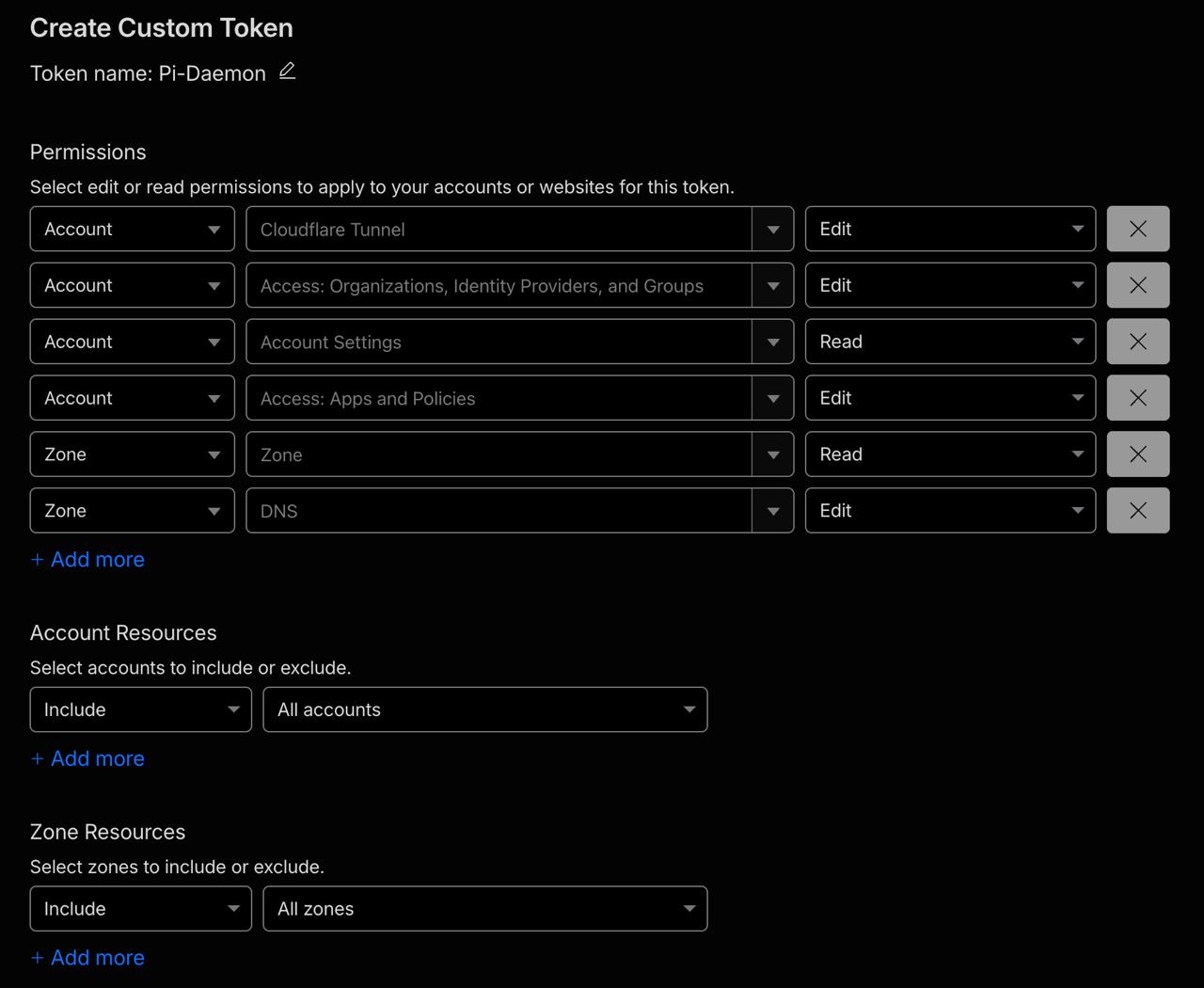
Permission-row example. For least privilege, do not leave All accounts or All zones selected; use the specific resource scopes below.
Set the token's resource scopes explicitly:
- Account Resources > Include > the account owning the domain
- Zone Resources > Include > the intended DNS zone
This scoped token is only a fallback because cloudflared's own browser login cannot configure the Access application and exact-email policy. Pi Daemon does not add newly entered manual tokens to the reinstall memo. Older memos containing a saved token remain readable for migration and lose the token the next time choices are saved.
Tailscale Serve (recommended for private access)
Install Tailscale separately and sign in on both the Pi Daemon host and the device that will open the PWA. During pi-daemon setup, choose Tailscale Serve and confirm the exact Tailscale login allowed to use Pi Daemon. The wizard detects the host's MagicDNS name and configures a persistent HTTPS listener on port 443 forwarding to http://127.0.0.1:8504.
Tailscale keeps this URL private to the tailnet. Pi Daemon verifies the exact MagicDNS host and Tailscale-User-Login identity header. Tailscale Serve removes spoofed copies of its identity headers before forwarding, while Pi Daemon's backend remains loopback-only. MagicDNS and Tailscale HTTPS must be enabled for the tailnet. If HTTPS consent is required, the Tailscale CLI will guide setup through it.
Pi Daemon will show existing Serve configuration and require confirmation before replacing the root HTTPS port 443 route. pi-daemon logs tunnel displays the current Serve status, pi-daemon restart tunnel reapplies the route, and uninstall disables that listener. Other Tailscale services and tailnet configuration are not modified.
Completion notifications
Pi Daemon can send an opt-in Web Push notification when a session completes or fails, even when the PWA is closed. Open Add to Home Screen from the session header for browser-specific installation steps and notification settings, then enable alerts separately on each device. Disabling alerts removes only that device's subscription.
On iPhone and iPad, first add Pi Daemon to the Home Screen, open the installed app, and then enable notifications from the in-app control, as required by WebKit's Web Push support. Android and desktop browsers can enable notifications directly when their Push API support is available. The Pi Daemon host needs outbound HTTPS access to the browser vendor's push service; no additional inbound port or Cloudflare resource is required.
Completion notifications include up to 160 characters from the final assistant response, and failure notifications include the error message. This preview may be visible on the device lock screen. Web Push subscriptions and the private VAPID key are stored under Pi Daemon's mode-0700 data directory in mode-0600 files and are removed with the normal Pi Daemon data uninstall.
Development
npm install
npm run check
For local testing, create ~/.config/pi-daemon/config.json or run the setup wizard, start npm run dev:sessiond, then run the built web server. The server always binds to 127.0.0.1; loopback requests are allowed directly, while relay requests must carry the configured Cloudflare Access assertion or Tailscale Serve identity.
Tagged releases build the web package on Ubuntu, attach it directly to the GitHub release, mirror the pinned Node.js and cloudflared assets, and publish SHA-256 checksums plus the installer. No Apple or npm publishing credentials are required.
Operational notes
- Prevent system sleep separately if the machine must remain reachable; Pi Daemon does not change power-management settings.
- Tailscale Serve clients must be connected to the same tailnet and authorized by its ACL or grants policy.
- If a tunnel token is exposed, rotate it in Cloudflare before starting the connector.
- Existing system/root cloudflared services are not modified; Pi Daemon installs a separate user connector.
- If outbound traffic is restricted, allow the push-service endpoints returned by subscribed browsers (including
*.push.apple.comfor Apple devices).
Reviews (0)
Sign in to leave a review.
Leave a reviewNo results found