mcp-okn
Health Warn
- License — License: BSD-3-Clause
- Description — Repository has a description
- Active repo — Last push 0 days ago
- Low visibility — Only 5 GitHub stars
Code Pass
- Code scan — Scanned 12 files during light audit, no dangerous patterns found
Permissions Pass
- Permissions — No dangerous permissions requested
No AI report is available for this listing yet.
Next Generation MCP service to query the NSF Open Knowledge Network Knowledge Graphs
mcp-okn



An MCP server for querying the federated SPARQL endpoint
(https://apps.okn.us/federation/sparql) over the
Proto-OKN knowledge graphs.
It lets an LLM discover which knowledge graphs are relevant (from the
okn-registry descriptions), then run
SPARQL queries scoped to one or more named graphs of the formhttps://purl.org/okn/frink/kg/{shortname}.
About Proto-OKN
Proto-OKN — the Prototype Open Knowledge
Network — is a National Science Foundation initiative (with NASA, NIH, the
National Institute of Justice, NOAA, and the U.S. Geological Survey) that funds
research teams to build a publicly accessible, interconnected set of data
repositories and knowledge graphs. The graphs span domains such as health, the
environment, criminal justice, space exploration, and supply-chain security, and
are served together over the OKN federated SPARQL endpoint that this server
queries. The okn-registry catalogs
the participating knowledge graphs.
Components of mcp-okn
This repository ships one MCP server, two Agent Skills, and relies on two external
literature MCPs — each with a distinct role:
| Component | Role |
|---|---|
 mcp-okn |
Federated OKN query service: discovers the relevant Proto-OKN graphs, writes SPARQL scoped to named graphs, aligns across KGs via crosswalks, and returns grounded rows with provenance and transcripts. |
 okn-report-style |
Report & reproducibility skill: turns an OKN analysis into a polished, reproducible deliverable (Markdown / HTML / Excel / figures / maps), tracking sources, versions, queries, and caveats. |
 okn-bioanalysis |
Biomedical workflow skill: cross-KG analysis of genes, diseases, chemicals, and drugs — enrichment, ortholog projection, mechanistic maps — ranking hypotheses by evidence and calling the literature MCPs to validate. |
 PubMed & Paperclip |
Literature evidence validation: search PubMed and full-text collections, corroborate OKN-derived claims against sources, add citations, and flag conflicts and uncertainty. |
Complementary by design: the skills augment mcp-okn, which queries the OKN;okn-bioanalysis can call PubMed & Paperclip for literature evidence validation, andokn-report-style turns the results into reproducible deliverables.
Examples
Example prompts
Once the server is configured in your MCP client (see
Connecting your client), just ask in natural language — the assistant
picks the graphs, writes the SPARQL, and combines the results for you. Some
prompts to try:
- "List all Proto-OKN knowledge graphs as a table of shortname and description." — Result
- "List all verified crosswalks, grouped by domain, with an example of what each answers." — Result
- "For each crosswalk, list the join key and the SPARQL skeleton." — Result
- "Give a high-level overview of the spoke-genelab knowledge graph — its main classes and relationships — and draw the schema diagram." — Result
- "Which genes does rdkg associate with autism spectrum disorder?" — Result
- "What is the maximum PFAS measurement in each county?" — Result
- "How do I join spoke-okn and prokn? Show the verified recipe and shared identifier." — Result
- "Which knowledge graphs supply GO, pathway, or trait annotations for a gene I can join on Entrez?" — uses
find_context_sourcesto list every supplier with its join key and size - "What version of prokn is loaded, and when was it last updated?" — reads the
okn-voidprovenance viaget_kg_version - "Create a chat transcript of this analysis." — create a transcript in a downloadable Markdown file
- "Create a chat transcript of this analysis in PDF format." — the server returns Markdown and the client converts the
.mdto a.pdffile (Claude Desktop / claude.ai)
Crosswalk queries & transcripts
A crosswalk is a verified way to join two (or three) Proto-OKN knowledge
graphs on a shared identifier — for example linking a disease in one graph to the
genes another graph associates with it via a common MONDO or DOID id. Because the
graphs are built by different teams on different ontologies, the value of the
federation is in these connections: a crosswalk is an integration opportunity
where a question one graph can't answer alone becomes answerable by combining two.
This section catalogs the verified crosswalks and shows the queries that exercise
them.
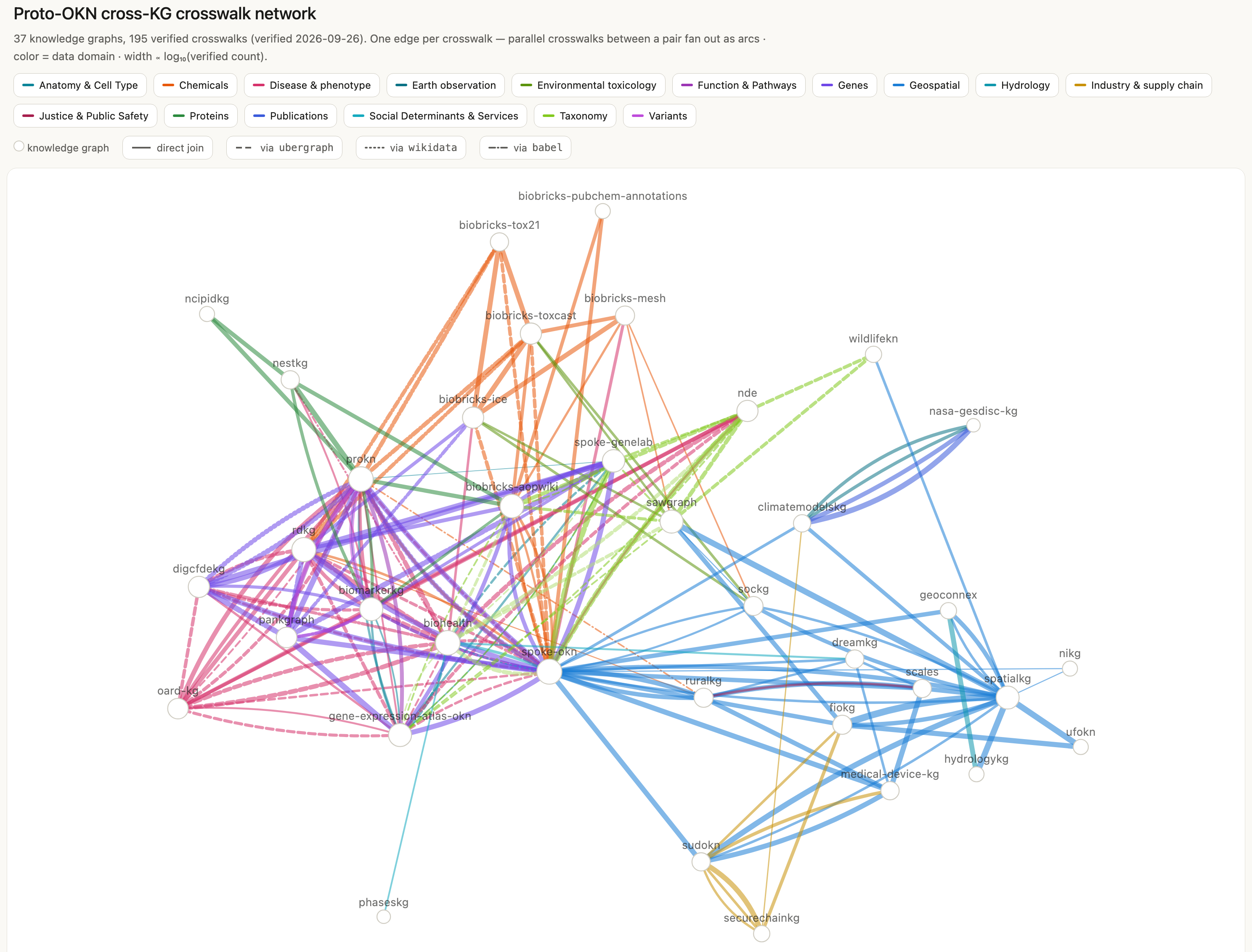
A visual map of the whole network — all 195 crosswalks across 37 graphs, drawn as
direct KG-to-KG edges (edge width ∝ log of the verified join count). Each crosswalk is
its own edge, so multiple crosswalks between the same pair of graphs fan out as parallel
arcs. Identifier-bridged joins (e.g. DOID↔MONDO via ubergraph, HGNC→Entrez viawikidata) are shown as direct edges with the bridge noted in the label and the line
styled (dashed for an ubergraph bridge, dotted for wikidata, solid for a direct join).
▶ Click the image to open the interactive, zoomable network.
Two resources, each backed by live federated SPARQL joins verified to actually
answer the question (biomedical claims checked against PubMed / Paperclip;
geospatial and industrial joins against their authoritative shared standard):
- Proto-OKN Crosswalk Inventory
— a single-page map of the verified crosswalks: the joined KGs, shared
key, row count, and a one-line note on what each answers. Start here to see which
graphs connect and on what identifier. - Cross-KG crosswalk catalog —
394 example questions worked end-to-end, each with a full transcript (the live
SPARQL and its results), across 16 domains (Anatomy & Cell Type, Chemicals, Disease &
Phenotype, Earth Observation, Environmental Toxicology, Function & Pathways, Genes,
Geospatial, Hydrology, Industry & Supply Chain, Justice & Public Safety, Proteins,
Publications, Social Determinants & Services, Taxonomy, Variants). Every crosswalk is now worked
twice — the inventory carries
390 questions — two for every one of the 195 crosswalks — and the catalog has a
transcript behind each one, plus four questions on two extra stems (a second example on
the spoke-genelab×spoke-okn Entrez axis, and the three-way gene dossier whose clique row
was retired). All 19 crosswalks added in the 2026-09-01 upstream-metadata pass are
worked: the five nestkg joins (P05–P08, D39), the five medical-device-kg ZIP joins
(GEO35–GEO39), BiomarkerKG's four Entrez joins (G22–G25) and its UBERON join (AN09),
the medical-device-kg×SUDOKN company-name join (I06), and the new Variants domain
(V01–V03). The contributed securechainkg×SUDOKN product-identity join (I07) is worked too.
Every catalog row links to a standalone, replayable transcript — the prompt, the
answer, and every verbatim SPARQL query with its result.
These transcripts are produced by create_chat_transcript and can be re-run
against the endpoint with scripts/replay_transcript.py.
scripts/verify_transcripts.py audits the whole corpus for rot: it extracts every```sparql block from every transcript, re-runs it, and compares the row count
against the _N row(s)_ marker the builder recorded. A transcript is a historical
record, but its queries are also a standing claim that the analysis reproduces —
and a KG redeploy or a repaired crosswalk recipe can invalidate that claim
*silently*, since the file keeps rendering and keeps being linked. Because every
query in the corpus is a SELECT that returned rows when written, a query that now
returns **zero rows** is broken by construction; that (and a query error) fails the
run, while a changed row count is reported as drift, since KGs grow between
releases. Filter by filename (verify_transcripts.py proteins02), use --problems
for failures only, and --summary to re-read the last results without re-querying.
It is not part of CI — it needs the live endpoint and a full pass runs ~450 queries
— so run it after any recipe repair or KG redeploy.
The catalog was generated by driving the model with the
crosswalk generation prompt — list everylist_crosswalks recipe, write two research questions per crosswalk, run and
verify each as live SPARQL, and validate the findings against the literature.
Case studies
Sixteen end-to-end analyses, over fourteen distinct questions, that federate many
Proto-OKN graphs into a single evidence-backed map — five of a disease's biology
(genes, variants, pathways/gene sets, drugs, altered-activity signatures, and
clinical/biomarker features), one a reproduction of a published spaceflight
experiment (whether the 2019 finding of lipid dysregulation in flown-mouse liver
re-emerges from the federation's stored differential-expression results),
four of environmental exposure and justice (PFAS source
attribution, the bisphenol chemical exposome, cumulative environmental-justice
burden across U.S. counties, and flood-mobilised contamination routed downstream
through the stream network), one of urban scaling (how disease, mortality
and crime scale with settlement size), one of wildlife sentinel surveillance
(whether Florida's wild-animal record and its contaminant record overlap at all),
one of supply-chain fragility (physical manufacturing capacity, regulated
industrial burden, software dependency risk and community vulnerability in one
frame), and one of research-infrastructure criticality (which Earth-observation
instruments the climate-modelling record actually leans on, and what modelling
would stop being able to check if one went dark) — each finding tagged with its
source(s) and evidence kind, then ranked by cross-source agreement. Every case study ships an
interactive HTML report, a reproducibility record preserving every verbatim
SPARQL query, and an Excel workbook.
Two of the questions are answered twice, each pair from the same prompt, so the
runs can be read side by side: the spaceflight-liver reproduction byclaude-opus-5 and GPT-6-Astra, which reached for different augmenting graphs
(seven against five), and instrument criticality by claude-opus-5 andgpt-5.6-sol, against the same two graphs.
Prerequisites for re-running a case study:
- The two Skills —
okn-bioanalysis(analysis) andokn-report-style(report format). - The PubMed and Paperclip MCP connectors — for the literature-comparison step only.
| Case study | Model | Report | Literature Comparison | Data | Reproducibility | Folder |
|---|---|---|---|---|---|---|
| Type 2 diabetes — 16 KGs | claude-opus-4-8 |
HTML | md | xlsx | md | files |
| Alzheimer's disease — 8 KGs | claude-opus-4-8 |
HTML | md | xlsx | md | files |
| Multiple sclerosis — 14 KGs | claude-opus-4-8 |
HTML | md | xlsx | md | files |
| Spaceflight-induced bone loss — 8 KGs | claude-opus-4-8 |
HTML | md | xlsx | md | files |
| Spaceflight-associated neuro-ocular syndrome (SANS) — 6 KGs | claude-opus-4-8 |
HTML | md | xlsx | md | files |
| Spaceflight-liver lipid dysregulation — 7 KGs | claude-opus-5 |
HTML | md | xlsx | md | files |
| Spaceflight-liver lipid dysregulation — 5 KGs | GPT-6-Astra |
HTML | md | xlsx | md | files |
| PFAS source prioritization — 5 KGs | claude-opus-4-8 |
HTML | md | xlsx | md | files |
| Bisphenol chemical exposome — 7 KGs | claude-opus-4-8 |
HTML | md | xlsx | md | files |
| Cumulative environmental-justice burden — 8 KGs | claude-opus-4-8 |
HTML | md | xlsx | md | files |
| Urban scaling of disease, mortality & crime — 3 KGs | claude-opus-5 |
HTML | md | xlsx | md | files |
| Flood-mobilised contamination cascade — 6 KGs | claude-opus-5 |
HTML | md | xlsx | md | files |
| Wildlife sentinel surveillance gap (Florida) — 12 KGs | claude-opus-5 |
HTML | md | xlsx | md | files |
| Supply-chain fragility — 6 KGs | claude-opus-5 |
HTML | md | xlsx | md | files |
| Earth-observation instrument criticality — 2 KGs | claude-opus-5 |
HTML | md | xlsx | md | files |
| Earth-observation instrument criticality — 2 KGs | gpt-5.6-sol |
HTML | md | xlsx | md | files |
Each case study is a self-contained folder under docs/examples/{Name}/ — the
report and its deliverables sit alongside the figures/, scripts/, and data/
that produced them, so every analysis is inspectable and re-runnable:
docs/examples/MS/
├── MS_report.html / .md         # interactive report + Markdown source
├── MS_literature_comparison.md  # per-finding PubMed / Paperclip check
├── MS_reproducibility.md        # every verbatim SPARQL query
├── MS_results.xlsx              # multi-sheet data workbook
├── figures/                     # publication figures (PNG)
├── scripts/                     # figure / report / analysis build code
└── data/                        # intermediate result tables (CSV)
Connecting your client
The server is hosted at https://apps.okn.us/okn-mcp-dev/mcp — point any MCP
client at that URL, no local install required. (For a local install instead, see
Local installation; to check whether the hosted server is
current, see Identifying a deployment.)
Claude Desktop
- Open Settings → Connectors → Add custom connector.
- Name it
mcp-okn-devand enter the URLhttps://apps.okn.us/okn-mcp-dev/mcp. - Click Configure and set the tool permissions to Always allow.
- In a new chat, click the
+icon and enable themcp-okn-devtoggle.
A Claude Pro or Max subscription is required for MCP connectors in Claude Desktop.
Claude Code
Register it from the CLI:
claude mcp add --transport http mcp-okn-dev https://apps.okn.us/okn-mcp-dev/mcp
Or add it to .mcp.json in your project root (or ~/.claude/settings.json for
universal access):
{
  "mcpServers": {
    "mcp-okn-dev": {
      "type": "url",
      "url": "https://apps.okn.us/okn-mcp-dev/mcp"
    }
  }
}
Verify with /mcp — you should see mcp-okn-dev listed as connected.
ChatGPT
Supported in the ChatGPT web app at https://chatgpt.com.
- Sign in to https://chatgpt.com.
- Click your profile name/avatar.
- Open Settings.
- Go to Apps.
- Open Advanced settings.
- Turn on Developer mode (required for custom MCP apps in ChatGPT).
- Return to Apps.
- Click Create app.
- Enter the MCP app details:
- Name:
mcp-okn-dev - URL:
https://apps.okn.us/okn-mcp-dev/mcp
- Name:
- Save or create the app.
- Start a new chat.
- Click the + button in the message box.
- Select mcp-okn-dev from the list of available apps/tools.
- Turn Web search off before testing, so ChatGPT uses the MCP app rather than web search.
- Run the verification prompt. If ChatGPT returns a graph list, the MCP app is working.
A subscription is required for MCP connectors in ChatGPT.
VS Code + GitHub Copilot
Use MCP in Agent mode with the GitHub Copilot extension, with the same URL:https://apps.okn.us/okn-mcp-dev/mcp.
Literature-comparison connectors (PubMed + Paperclip)
The case studies' Comparison with prior work step checks each finding against
the primary literature, which needs two additional MCP connectors beyond the
mcp-okn server:
- PubMed —
https://pubmed.mcp.claude.com/mcp - Paperclip —
https://paperclip.gxl.ai/mcp
Add them the same way as the mcp-okn server — in Claude Desktop / claude.ai via
Settings → Connectors → Add custom connector, or from Claude Code:
claude mcp add --transport http pubmed https://pubmed.mcp.claude.com/mcp
claude mcp add --transport http paperclip https://paperclip.gxl.ai/mcp
These are needed only to reproduce that one step; the rest of each case study runs
on the mcp-okn server alone.
Skills
Two optional Agent Skills ship
in the skills/ directory. They teach a client the repeatable
methodology for working with the mcp-okn tools, so you get consistent analyses and
report deliverables without re-explaining conventions each time:
okn-report-style— layout, figure, and style
conventions for turning any OKN case study into a polished, reproducible report
deliverable (interactive HTML + Markdown + multi-sheet Excel + figures + maps).okn-bioanalysis— methodology for biomedical
knowledge-graph analysis and cross-KG hypothesis generation over the OKN
federation's bio graphs (genes, proteins, diseases, phenotypes, pathways,
chemicals, drugs, enrichment, ortholog projection, and linking bio entities to
place-based data via geography).
Each skill is a self-contained folder: a SKILL.md plus references/ andscripts/. A ready-to-upload zip of each is also committed for convenience:
Supported clients
Agent Skills work in these clients:
| Client | Install method | Notes |
|---|---|---|
| Claude Desktop (macOS / Windows) | Upload the zip under Settings → Capabilities → Skills | Pro, Max, Team, or Enterprise |
| claude.ai (web) | Upload the zip under Settings → Capabilities → Skills | Pro, Max, Team, or Enterprise |
| ChatGPT Desktop | Type the prompt: Install skill from GitHub: https://raw.githubusercontent.com/sbl-sdsc/mcp-okn/main/skills/{skill}.zip |
Replace {skill} with okn-report-style or okn-bioanalysis |
| Claude Code (CLI + IDE extensions) | Copy the folder into .claude/skills/ or ~/.claude/skills/ (see below) |
Free tier and up |
| Claude Agent SDK | Point the SDK at the skill folder | For building custom agents |
| Claude Developer Platform (API) | Load via the code-execution / Skills API | For programmatic use |
Claude Code
Download the skills straight from this repo into your personal skills directory
(available in every project on this machine) — no clone required. Run the block
for whichever skills you want:
mkdir -p ~/.claude/skills && cd ~/.claude/skills

# okn-report-style
curl -sL "https://raw.githubusercontent.com/sbl-sdsc/mcp-okn/main/skills/okn-report-style.zip" -o okn-report-style.zip
unzip -oq okn-report-style.zip && rm okn-report-style.zip

# okn-bioanalysis
curl -sL "https://raw.githubusercontent.com/sbl-sdsc/mcp-okn/main/skills/okn-bioanalysis.zip" -o okn-bioanalysis.zip
unzip -oq okn-bioanalysis.zip && rm okn-bioanalysis.zip
For a project-scoped install (shared with a repo), swap ~/.claude/skills for.claude/skills in your project root.
Verify with /skills — you should see okn-report-style and okn-bioanalysis
listed. Claude invokes a skill automatically when a task matches its description.
Local installation
To run the server yourself instead of using the hosted service:
Requirements
Install uv (see the
installation guide),
then clone this repo:
git clone https://github.com/sbl-sdsc/mcp-okn.git
Register the server
Working inside this repo? It ships a project-scoped .mcp.json, so
Claude Code offers the local server automatically — no registration needed. Use it
when developing: it serves the crosswalk catalog from your working tree, whereas the
hosted mcp-okn-dev endpoint serves whatever was last deployed and will not reflect
local edits to crosswalks.json until it is redeployed.
For Claude Code, register it from the CLI:
claude mcp add mcp-okn -- uv --directory /path/to/mcp-okn run mcp-okn
Or add it to any MCP client's config (e.g. Claude Desktop claude_desktop_config.json):
{
  "mcpServers": {
    "mcp-okn": {
      "command": "uv",
      "args": ["--directory", "/path/to/mcp-okn", "run", "mcp-okn"]
    }
  }
}
Replace /path/to/mcp-okn with the absolute path to your checkout.
Identifying a deployment
get_server_info() reports the running build, which every reproducibility header
also pins. Running from a checkout, it is the short git HEAD; a deployment should
set MCP_OKN_BUILD (to the commit it was built from) since a container has no git
metadata. Without either it reads unknown, and the header omits the build entirely
rather than claiming one. This is what lets you tell a hosted server that lags the
repo from a local one — and what distinguishes two records that name the sameversion.
Two servers claiming version 0.1.0 can be months apart, soscripts/check_deployment.py answers the question directly: it speaks MCP to a live
endpoint, enumerates what that server actually exposes, and diffs it against this
checkout.
uv run python scripts/check_deployment.py                # the hosted dev endpoint
uv run python scripts/check_deployment.py --url URL      # any MCP endpoint
It exits 0 when everything agrees, 1 on drift, and 2 when the endpoint
can't be reached or doesn't speak MCP — so it can gate a "did the redeploy land?"
check without reading a mid-restart 502 as either answer. Three things are
compared:
- build —
get_server_info().buildagainstgit rev-parse --short HEAD. When the
hosted build is a commit this checkout knows, the report says how far behind it is
(209 commits and 17 days behind HEAD). A deployment old enough to predateget_server_infocan't report a build at all; the script says so and falls back to
the tool set. - tool and resource surface — the names the server lists versus the ones this tree
registers, reported as missing/extra. This is what catches a lagging deployment with
no build id: in July 2026 the hosted server served 19 tools against 23 in the repo
for 17 days, and nothing flagged it until a reproducibility record could not be
generated. - bundled data — the crosswalk table's
countandverified_on, and the KG count.
These ship inside the wheel, so they move only on a redeploy: a stale deployment can
serve an identical tool surface over a months-oldcrosswalks.json.
The serverInfo.version returned by the MCP handshake is the MCP SDK's version,
not this project's (FastMCP is constructed without one), so it is never a build
signal; the script prints it labelled as such precisely so it isn't misread.
Instruction and tool-description drift is reported but not fatal by default — pass--strict to fail on it too, which catches a redeploy that changed guidance without
changing any tool name. --json emits the same report for a polling loop.
The deploy pipeline for the hosted endpoint is operated externally, so a redeploy is a
request rather than a command; this script is how you confirm one landed.
Tools and resources
Tools
The tools follow a typical analysis arc — discover → inspect → plan a join →
query → record. The single table below is grouped in that order.
| Tool | Purpose |
|---|---|
| 1. Discover graphs | |
list_kgs |
List all KGs with shortname, title, description, homepage, named_graph, and a payload list — the curated context types each graph supplies (e.g. digcfdekg → gene, gene_set, trait, disease), so you judge a graph by what it carries, not its name. Served from a bundled snapshot for instant cold start. |
describe_kg(shortname, long_description=False) |
Full registry doc (frontmatter + prose) for one KG, for deeper context. Set long_description=True for the registry's ~150-word prose body — useful for picking among near-overlapping KGs. For spoke-genelab, also appends its spaceflight assay-comparison rules. |
get_kg_version(shortname=None) |
A KG's release version and last_updated (ISO-8601 timestamp) — read live from the okn-void meta-graph's VoID provenance (pav:version, pav:lastUpdatedOn). Omit shortname for every KG that records provenance (40 of 43), sorted by shortname. Use it to check how current a graph is or cite the exact version behind an analysis. |
get_server_info() |
Identify the server answering you: service, version, build (the deployed commit, or unknown), and sparql_endpoint. The package version alone can't separate two deployments — a hosted server can lag the repo — so use this when a tool or argument seems to be missing, or to record which build produced a result. The build is also pinned in every reproducibility header. |
| 2. Inspect a graph's schema and identifiers | |
get_schema(shortname, compact=True) |
Schema for one KG — classes, predicates, edge properties (with reification query templates), and node properties. Uses curated metadata when available, else probes the endpoint for distinct classes/predicates. Call before writing a query. Returns usage_notes (guidance + a reusable SPARQL snippet) for KGs with query-time domain rules, e.g. spoke-genelab. |
visualize_schema(shortname) |
Deterministic Mermaid classDiagram of a KG's schema, built server-side from get_schema — class boxes, labeled edges, and edge-property predicates as intermediary classes with typed fields (node classes light blue, edge classes orange, with a legend). When the curated metadata names predicates but not their endpoints, edges are recovered from the graph's rdfs:domain/rdfs:range scoped to the curated classes. Returns mermaid_block (already wrapped in a ```mermaid fence) — output it verbatim; don't redraw it as SVG/an image. Rendered examples: spoke-genelab, dreamkg, rdkg (details). |
probe_namespaces(shortname, predicate, sample=0) |
Report which identifier/ontology namespaces populate a predicate's objects. get_schema lists a KG's predicates but not which controlled vocabularies fill their values — call this before the main query whenever a predicate's objects are ontology terms (diseases, chemicals, genes, anatomy) to see the actual namespace distribution and pick the best identifier to join on. Exploratory — not logged. |
find_crosswalks(shortname, sample=0) |
Find ontology/database ids in a KG however they are encoded, profiling all three places at once: mapping predicates (rdfs:seeAlso, owl:sameAs, SKOS *Match, oboInOwl:hasDbXref), node IRIs that are the ontology term (role="subject"), and domain-specific predicates carrying an id (role="object"). The latter two are invisible to a mapping-predicate-only scan. Use whenever a KG seems to lack the identifier you need on its obvious predicates. |
| 3. Plan a cross-graph join | |
list_crosswalks(include_examples=True) |
List every verified cross-KG integration point in one call — a global map of which graphs connect and on what shared key. Rows are grouped by domain (Genes, Geospatial, Disease & phenotype, …) and sorted by ontology, ready to render as a table. Each row is a compact summary (domain, connected kgs in join order by official shortname, shared_key, bridge_kg, verified_count, and an example_question by default; set include_examples=False for a terser list). Use get_join_strategy(kg_a, kg_b) for a single pair's full recipe. |
get_join_strategy(kg_a, kg_b=None) |
Look up a precomputed, hand-verified recipe for joining two KGs — predicates, roles, shared identifier, bridge graph, verified count, and a runnable skeleton_query (the example SPARQL to copy and build on; it already encodes the IRI rewrites). Call before writing a federated join. Returns verified / known_non_join / unknown; with kg_b omitted, lists every join touching kg_a. |
find_context_sources(want=None, join_key=None) |
Reverse capability index — the inverse of get_join_strategy. Answers "which KGs supply pathway / GO / trait / disease … for an entity I can join on join_key?" by combining the per-KG payload tags with the verified crosswalk table. Returns, per requested context type, the supplier KGs with predicate + shared key + verified join size, sorted biggest-join-first, plus a payload_only bucket (KGs that carry the type but key it differently, e.g. Ensembl vs Entrez). A requested type that yields an empty list is positive evidence nothing supplies it on that key — so you never conclude a context is "unavailable" without checking. |
taxon_overlap(kg_a, kg_b) |
Compose the NCBITaxon overlap between two hub KGs through ubergraph. Returns two runnable skeletons — exact_id (same taxon id) and clade_membership (kg_b taxa under kg_a's clades via subClassOf*, which can be far larger when one side is coarser-grained) — plus, for a pair with a precomputed non-zero overlap, the materialized counts under materialized_overlap (the same per-pair counts list_crosswalks surfaces in the NCBITaxon hub row). Run a skeleton with sparql_query. |
point_to_s2(lat, lng, level=13) |
Convert a lat/long point to its spatialkg/KWG S2 cell IRI (Level-13 default) — the deterministic primitive behind the spatial bridge. Use when a KG carries POINT coordinates but no S2 key and you need the cell IRI spatialkg stores. |
spatial_bridge(point_query, target_pattern, select_vars="*", extra_prefixes="", limit=500) |
Generic point→S2 bridge for any point-bearing graph that lacks a stored S2 key (sudokn is the first such graph). point_query must SELECT ?site ?lat ?lng; the server computes each cell in Python and injects (?site ?cell) as a VALUES block into a federated query whose target_pattern joins ?cell to spatialkg/fiokg/sawgraph (e.g. county/FIPS). Nothing is persisted — the computed key lives only inside the request. |
| 4. Run queries | |
sparql_query(query, format="json", exploratory=False, compact=False) |
Run a SPARQL query on the federation endpoint. Substantive results are logged for the transcript unless exploratory=True. Pass compact=True for a token-efficient json shape — {"columns", "data", "count"} with positional rows — instead of the default repeated-key {"vars", "rows", "row_count"} (affects only the returned payload, not the transcript). A bracketed <https://schema.org/…> IRI is canonicalized to the http:// form most KGs store (string literals and IRI(CONCAT(…)) are left as written). A few KGs store the https:// form (nikg, ruralkg, ufokn); reach those predicates by binding the predicate as a variable and matching scheme-free, e.g. FILTER(STRENDS(STR(?p),'schema.org/location')). |
expand_ontology_term(term, relation="subClassOf", direction="descendants", include_self=True, limit=1000) |
Expand an ontology term to its full subtree/closure via the ubergraph graph. |
| 5. Record a reproducible transcript | |
reset_query_log() |
Clear the session query log. Call at the start of an analysis to scope a transcript. |
get_query_log() |
Return the queries logged so far this session (only those that returned rows and weren't exploratory). |
create_chat_transcript(model, exchanges, ...) |
Emit a reproducible markdown (or JSON) record of a session — prompts, answers, the verbatim queries + results that produced findings, and any visualize_schema diagrams. Call at the end of an analysis. |
create_reproducibility_record(model, supporting, ...) |
Emit a lean reproducibility record — header + the verbatim supporting queries + row counts + per-query diagrams (gated by size), no conversation prose or result tables. Small enough to return inline so it saves directly; use it for the reproducibility deliverable. supporting optionally curates the log to the queries that underpin the findings. |
Resources
| Resource | Purpose |
|---|---|
transcript://session/latest (text/markdown) |
The most recent record rendered by create_chat_transcript or create_reproducibility_record, so a client can fetch/save the document directly (transport-agnostic; works for remote servers). Cleared by reset_query_log. |
Development
Design
- mcp-okn redesign (also as a slide deck, PDF)
— a side-by-side comparison of the previousmcp-proto-oknserver and thismcp-oknredesign across query model, KG coverage, schema/registry handling,
cross-graph joins, and reproducibility.
Benchmarking
The benchmark harness lives in its own repository,
mcp-okn-benchmark. It measures how
well an agent turns a prose question into a correct SPARQL answer, and how much of that
success comes from the server's tooling — running the same corpus against mcp-okn andmcp-proto-okn, locally over stdio or remotely over HTTP.
It was split out of this repository (benchmark/, removed here) because a harness that
measures two servers cannot live inside one of them.
Module layout
The package is organized by concern. server.py is a thin assembly point: it
imports the tool modules to trigger their @mcp.tool() registration and
re-exports their public symbols (so from mcp_okn.server import ... keeps
working). The shared mcp application instance lives in app.py, separate fromserver.py, so the tool modules can import it without a circular dependency.
src/mcp_okn/
├── app.py            # the shared FastMCP `mcp` instance + INSTRUCTIONS
├── server.py         # assembly point: registers tools, re-exports, main()
├── registry.py       # KG discovery from the okn-registry (+ bundled snapshot)
├── schema.py         # get_schema / visualize_schema logic
├── sparql.py         # federation endpoint client: shared connection, retries, schema.org normalization
├── crosswalks.py     # curated cross-KG join table (data/crosswalks.json)
├── payloads.py       # curated per-KG payload tags (data/kg_payloads.json)
├── void.py           # per-KG version / last-updated from the okn-void graph
├── taxon.py          # NCBITaxon hub: taxon-overlap skeleton composition
├── session.py        # in-memory query/diagram log for transcripts
├── build_info.py     # which BUILD is running (MCP_OKN_BUILD / git HEAD)
├── data/             # bundled snapshots: kgs.json, crosswalks.json, kg_payloads.json
└── tools/            # one module per concern; each registers via @mcp.tool()
    ├── _shared.py        # helpers used by >1 tool module (_to_uri, …)
    ├── discovery.py      # list_kgs, describe_kg, get_kg_version, get_server_info
    ├── schema_tools.py   # get_schema, visualize_schema
    ├── probe.py          # probe_namespaces, find_crosswalks
    ├── joins.py          # get_join_strategy, taxon_overlap, list_crosswalks, find_context_sources
    ├── query.py          # sparql_query, expand_ontology_term
    └── transcript.py     # reset/get_query_log, create_chat_transcript, create_reproducibility_record, resource
uv run python -m pytest       # unit tests (offline)
uv run ruff check .           # lint
uv run ruff format .          # auto-format (use --check in CI)
uv run mypy                   # type-check src/mcp_okn
# live smoke test:
uv run python -c "import asyncio; from mcp_okn.sparql import run_sparql; \
print(asyncio.run(run_sparql('SELECT ?s WHERE { ?s ?p ?o } LIMIT 3')))"
CI (.github/workflows/ci.yml) runs ruff lint, ruff format-check, and mypy on
every push/PR, plus the offline test suite on Python 3.10 and 3.12. A skills
job validates both Agent Skills against the
Agent Skills spec with the officialagentskills validator and asserts each committed .zip is in sync with its
skill folder (so an edited SKILL.md can't ship without a rebuilt zip).
Lint & formatting conventions
ruff is pinned in uv.lock, and CI lints/format-checks the whole tree, so a
ruff version bump can surface new findings across the repo — reconcile them in one
pass when bumping. Scope (see [tool.ruff] in pyproject.toml):
- Excluded (
extend-exclude):docs/reproduction/anddocs/examples/— one-off,
throwaway figure/PDF/reproduction scripts, not maintained tooling. - Docstrings not required (
Dignored viaper-file-ignores):tests/,scripts/,
and the bundledskills/*/scripts/helpers. Everything else — chieflysrc/mcp_okn/— is held to the full rule set.
When committing, stage explicit paths (git add <path> …), not git add -A: the
working tree often carries untracked worked-example artifacts under docs/reproduction/
that should not be swept into an unrelated commit.
Deferred improvements are tracked as
GitHub issues.
Verification notes
Reproducible checks of behaviors that aren't covered by the offline unit tests:
- schema.org http/https normalization
— a bracketed<https://schema.org/…>IRI is canonicalized tohttp, so a query
written with thehttpsform still hitshttp-stored data (dreamkgschema:Rating
→ 3762), while string literals /IRI(CONCAT(…))are left intact (see below). - visualize_schema rendering — the
generated Mermaid renders cleanly as a class diagram viamermaid-cliacross
all three schema paths (curated, class-only, probe fallback), and survives thecreate_chat_transcriptround-trip. - transcript MCP resource — the
transcript://session/latestresource serves the full document via the
resource API, with its embedded diagram still rendering.
schema.org predicates stored under the non-canonical https form
A few graphs store schema.org terms under the https:// form. The canonicalization
hits only bracketed IRIs, so those predicates are unreachable by IRI (the bracketedhttps form is rewritten to http, which the data isn't), but match when the predicate
is bound as a variable or the IRI is rebuilt from a string literal (now preserved).
Verified live against the federation:
| Graph (predicate) | <https://schema.org/X> (bracketed) |
IRI(CONCAT('https://schema.org/','X')) |
STRENDS(STR(?p),'schema.org/X') |
|---|---|---|---|
nikg (location) |
0 | 296,189 | 296,189 |
ruralkg (postalCode) |
0 | 9,037 | 9,037 |
ufokn (value, level-13 sample) |
0 | 5/5 (LIMIT 5) |
5/5 |
In each case the IRI(CONCAT) and STRENDS forms agree (same rows / same decimal S2
ids for ufokn) while the bracketed IRI returns 0 — confirming the literal-preservation
fix and the variable-predicate workaround documented in the ruralkg/ufokn crosswalk
notes.
spoke-genelab spaceflight assay comparisons
spoke-genelab (NASA GeneLab) models each differential measurement as an Assay
with two arms — factor_space_1/factor_space_2 (the condition labels) andfactors_1/factors_2 (lists bundling the condition label plus extra factors
like dose, time, sex, strain). Reading any assay as a "spaceflight effect" is
wrong; two domain rules apply:
- Direction — keep only
factor_space_1 = "Space Flight"andfactor_space_2 = "Ground Control". Drop the reverse and every other pairing.
Verified live: 680 assays are SF→GC vs 664 the reverse (plus SF/SF
1244, GC/GC 424, and Basal/Vivarium pairings). With this orientation group 1 =
Space Flight, solog2fc/methylation_diff/lnfc> 0 means up in spaceflight. - Comparability — two separate
Assayrecords are comparable only if they
share the same materials (prefermaterial_id_1/material_id_2) and the
samefactors_1/factors_2after the experimental-condition labels are
stripped, then test the remaining factors for equality (a shared extra factor
is allowed if present on both sides).
Stripping removes exactly 15 distinct values, verified live: the spelled-out
labels (Space Flight, Ground Control, Basal Control, Vivarium Control,Cell Culture Control; case-insensitive, so Ground control/Vivarium control
match too) and the short group codes via the anchored regex^(GC|FLT|VIV|BSL|CC)(_C[0-9]+)?$ (GC, FLT, VIV_C2, BSL_C1, CC_C1, …).
The anchoring is deliberate: real factors that merely contain a control word —Hardware 1G Ground Control, Ground Control Rerun, HLU_IR
(hindlimb-unloading) — stay in the list as legitimate distinguishing factors.
The rules live once in src/mcp_okn/contrasts.py (guidance prose + a reusable
comparability-signature SPARQL snippet) and are surfaced in the serverINSTRUCTIONS, as usage_notes on get_schema("spoke-genelab"), and appended todescribe_kg("spoke-genelab").
KG snapshot
list_kgs serves a static snapshot bundled at src/mcp_okn/data/kgs.json (~43
KGs), so the first call returns instantly without fetching the individual
registry files. The live registry is only contacted when the snapshot is missing
(or when an internal refresh=True is passed). To refresh the snapshot after the
registry changes:
uv run python scripts/refresh_snapshot.py
KGs that are in the registry but not actually loaded under their expected
federation named graph (currently semopenalex) are filtered
out, so list_kgs only returns graphs that are queryable.
The curated crosswalk table is edited at metadata/crosswalks.json and bundled tosrc/mcp_okn/data/crosswalks.json by the same refresh_snapshot.py run. Two helpers
recompute its live-verified counts against the federation and write them back:scripts/verify_skeletons.py (per-crosswalk skeleton_query counts) andscripts/refresh_taxon_overlaps.py (the NCBITaxon hub's pairwise exact_id + clade
counts — --inject to write, --pair A B for one pair). Run refresh_snapshot.py
afterwards to sync the bundled copy.
Payload tags
Each KG carries curated payload tags — the context types it supplies —
edited at metadata/kg_payloads.json and bundled tosrc/mcp_okn/data/kg_payloads.json by refresh_snapshot.py (which validates that
every tag is a defined vocabulary term and every servable KG is tagged). These tags
are partly derived from each KG's entity schema, which get_schema fetches live
from the upstream *_entities.csv files — so a KG's schema can change under the
tags. scripts/check_payload_drift.py guards against that: it fingerprints each
KG's live class + predicate labels and diffs them against a committed baseline
(metadata/schema_fingerprints.json), flagging KGs whose schema moved so their
tags can be re-reviewed. Run it after an upstream schema update; re-ground any
affected tags, then --update to accept the new baseline.
uv run python scripts/check_payload_drift.py            # report drift; exit 1 if any
uv run python scripts/check_payload_drift.py --update   # accept current schemas as baseline
When the curated schema runs ahead of the served graph. Those CSVs are curated
upstream and can be refreshed before (or without) the graph being redeployed, soget_schema may advertise predicates that have zero triples in the federation — a
query against one returns an empty result that reads as "no data" rather than "not
deployed yet". Where that gap is known and large, the KG carries a usage_notes
entry (see _KG_USAGE_NOTES in src/mcp_okn/schema.py) naming the live surfaces,
the absent ones, and an ASK to test any predicate before building on it. As of
2026-09-01 that applies to two KGs: medical-device-kg (152 of 296 schema
predicates absent — the whole AccessGUDID/UDI, CLIA, GMDN and materials block) andncipidkg (9 of 20, including a whole vocabulary namespace: the deployed graph
publishes edge metadata under http://example.org/okn/, not thehttps://www.ndexbio.org/vocab/ncipid/ form the schema lists). Re-census after a
redeploy and trim the note.
Citation
mcp-okn is the next-generation successor tomcp-proto-okn. If you use this
software, please cite the paper describing that predecessor:
Rose, P. W., Good, B. M., Saravia-Butler, A. M., Nelson, C. A., Balhoff, J. P.,
Kebede, Y., Whetzel, P. L., Bizon, C., Su, A. I., & Baranzini, S. E. (2026).
mcp-proto-okn: Natural-language access to open scientific knowledge graphs
through the Model Context Protocol. arXiv:2605.30283.
https://arxiv.org/abs/2605.30283
@misc{rose2026mcpprotookn,
  title         = {mcp-proto-okn: Natural-language access to open scientific knowledge graphs through the Model Context Protocol},
  author        = {Rose, Peter W. and Good, Benjamin M. and Saravia-Butler, Amanda M. and Nelson, Charlotte A. and Balhoff, James P. and Kebede, Yaphet and Whetzel, Patricia L. and Bizon, Christopher and Su, Andrew I. and Baranzini, Sergio E.},
  year          = {2026},
  eprint        = {2605.30283},
  archivePrefix = {arXiv},
  primaryClass  = {cs.AI},
  url           = {https://arxiv.org/abs/2605.30283}
}
Funding
- National Science Foundation Award #2333819: "Proto-OKN Theme 1: Connecting Biomedical information on Earth and in Space via the SPOKE knowledge graph"
- National Science Foundation Award #2535091: "Proto-OKN Theme 2: OKN-Fabric"
License
This project is licensed under the BSD 3-Clause License.
Reviews (0)
Sign in to leave a review.
Leave a reviewNo results found