npface
Health Pass
- License — License: MIT
- Description — Repository has a description
- Active repo — Last push 0 days ago
- Community trust — 92 GitHub stars
Code Pass
- Code scan — Scanned 12 files during light audit, no dangerous patterns found
Permissions Pass
- Permissions — No dangerous permissions requested
No AI report is available for this listing yet.
会表情的 AI头像 — expressive, zero-dependency helmet avatar for AI agents (MIT)

npface
表情头盔 · 会表情的 AI 员工头像
An expressive, zero-dependency SVG helmet avatar for AI agents.






Live demo → · English · 中文
English
What is it?
npface renders a small helmet-shaped face — a deep-navy rounded square helmet, white visor slot, two neon-green rounded-square eyes (the npcrew brand mark, flat 2D) — and makes it emote. Expressions come entirely from the two eyes, the visor and tiny helmet motions: blinks, squint-smiles, wide eyes, side glances, sleepy half-lids, reading saccades, a radar-like "searching" circle, dizzy X-eyes, z z z, nods, head tilts, breathing.
Give it a semantic state name and it takes care of the rest:
face.set('thinking'); // → idle → thinking → search-docs → search-web → working → proud …
- 13 states:
sleep · wake · idle · blink · happy · proud (complete) · thinking · search-docs · search-web · working · waiting · error (dizzy) · sad (tired)— plus aliases (searching,rag,browsing,tired…;searchDocs/search_docsare normalised too), unknown names fall back toidle, and you can register your own. - 7 face shapes: the npcrew
square(default) plusshield,ghost,cat,circle(with a little moon),dropandcrown. Every expression works in every shape,setShape()morphs between them, and you can register your own from SVG path data. - Zero dependencies, framework-agnostic core (plain SVG/DOM, built-in springs & easing, one shared
requestAnimationFrameloop). ~14 KB gzip. - React bindings (
npface-react):<Npface state="working" />. Vue can follow. - Alive by default: breathing, random glances, auto-blink, per-state rhythm; optional eyes-follow-pointer.
- Considerate: pauses off-screen (IntersectionObserver), honours
prefers-reduced-motion(static poses + minimal transitions),role="img"+aria-label. - Themeable: helmet / visor / eye colours, light & dark palettes, any size.
- Pure data states: every expression is a data file (eye shapes + head pose + rhythm) separate from the renderer.
Install
npm i npface            # core — vanilla / any framework
npm i npface-react      # React bindings (depends on npface)
CDN / no build step:
<script src="https://unpkg.com/npface/dist/npface.min.js"></script>
<script>
  const face = npface.createNpface('#avatar', { state: 'idle', size: 64 });
</script>
Quick start
Vanilla
import { createNpface } from 'npface';

const face = createNpface(document.querySelector('#avatar')!, {
  state: 'idle', // initial state (alias: emotion)
  size: 48, // px, or any CSS length string
  colors: { body: '#0f1d3a', visor: '#fff', eye: '#c7f636' },
  follow: true, // eyes follow the pointer (alias: gaze)
});

face.set('thinking'); // switch with a spring transition
face.pulse('proud'); // play once, then fall back to the previous state
face.pulse('blink'); // a single blink
face.look(0.6, -0.3); // look in a direction (-1..1); face.look(null) releases
face.follow(false);
face.destroy();
React
import { useRef } from 'react';
import { Npface, type NpfaceHandle } from 'npface-react';

export function Employee({ status }: { status: string }) {
  const face = useRef<NpfaceHandle>(null);
  return (
    <button onClick={() => face.current?.pulse('happy')}>
      <Npface ref={face} state={status} size={48} follow />
    </button>
  );
}
npface-react is marked "use client" and works with Next.js App Router. Props map 1:1 to the options below; changing state triggers a transition. The imperative handle (pulse, blink, look, follow, setColors, …) is the core instance.
API
createNpface(target, options?) → Npface
target is an element or CSS selector; the <svg> is appended to it.
| option | type | default | description |
|---|---|---|---|
state / emotion |
string |
'idle' |
initial state (aliases ok, unknown → idle) |
size |
number | string |
48 |
px or CSS length ('100%', '3rem') |
shape |
string | ShapeDef |
'square' |
face shape: square · shield · ghost · cat · circle · drop · crown, a registered name or a ShapeDef (aliases ok, unknown → square) |
colors |
{ body, visor, eye, rim, zzz } |
brand palette | any subset; rim is an optional helmet outline |
theme |
'light' | 'dark' | 'auto' |
'auto' |
picks the default palette (auto = prefers-color-scheme) |
follow / gaze |
boolean |
false |
eyes (and a bit of head) follow the pointer |
reducedMotion |
boolean | 'auto' |
'auto' |
auto honours prefers-reduced-motion: no breathing / blink / gaze, quick critically-damped transitions |
pauseOffscreen |
boolean |
true |
stop animating while out of view |
label |
string |
state name | aria-label |
states |
Record<string, StateDef> |
— | extra / overriding states for this instance |
className |
string |
— | extra classes on the <svg> |
onChange |
(state, prev) => void |
— | after every state change |
Instance
| member | description |
|---|---|
el |
the <svg> (class="npface", data-state="…") |
state |
current state name |
set(name, { immediate? }) |
switch state; immediate snaps |
setShape(shape, { immediate? }) |
change the face shape (morphs; immediate or reduced motion snaps) |
shape |
current face-shape name ('custom' for an inline ShapeDef) |
pulse(name, ms?) |
play once then return (default duration per state, else 1500 ms) |
blink() |
blink now |
follow(on) |
pointer gaze on/off |
look(x, y) / look(null) |
fixed gaze direction |
setColors(partial) · setSize() · setTheme() · setLabel() |
runtime tweaks |
destroy() |
stop & remove |
Also exported: STATES, STATE_NAMES, ALIASES, registerState(name, def), resolveStateName(), SHAPES, SHAPE_NAMES, registerShape(name, def), resolveShape(), BASE_EYE, BASE_HEAD, SPRINGS, PALETTE, LIGHT_COLORS, DARK_COLORS, and the geometry helpers (HELMET_PATH, eyePath, …) for static rendering.
States
| state | look | meaning | notes |
|---|---|---|---|
idle |
 |
resting | breathing, random glances, auto-blink |
blink |
 |
automatic | pulse('blink') / blink() for a manual one |
happy |
 |
pleased | smile arches + a bounce; good as a pulse |
proud |
 |
task complete | alias complete, done, success; chin up + nod; pulse |
thinking |
 |
reasoning | eyes up, head tilt, drifting glances |
search-docs |
 |
retrieving documents (RAG, files, knowledge base) | reading saccades line by line, flick to the next page; alias rag, reading, retrieval, docs |
search-web |
 |
web / internet search | round eyes circling like a radar sweep; alias searching, search, browsing, web |
working |
 |
executing | focused narrow eyes scanning lines; alias busy |
waiting |
 |
needs your input | head cocked, one eye raised; alias ask, question |
error |
 |
failure / dizzy | X eyes, wobble; alias dizzy, fail; pulse |
sad |
 |
tired / down | droopy lids, head low; alias tired |
sleep |
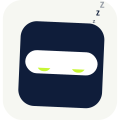 |
offline / paused | closed eyes, slow breath, z z z |
wake |
 |
coming online | eyes pop open, stretch, then auto → idle |
The previews above are animated SVGs recorded from the engine itself (pnpm assets); see everything move in the live demo.
Face shapes
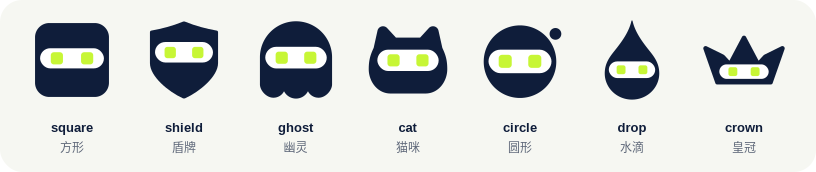

The npcrew rounded square is the default, and six character shapes ship with the library. Every expression works in every shape: the visor, eye placement and size, head pivot and the "z z z" anchor are tuned per shape. Switching morphs the helmet smoothly, with a quick spring and a little squash-and-stretch; under reduced motion it snaps.
| shape | look | feel (suggestion) | aliases |
|---|---|---|---|
square |
rounded square (default) | the npcrew helmet | default, helmet, 方形 |
shield |
heater shield with a soft peak | guardian: security & compliance | badge, 盾牌, 盾形 |
ghost |
round top, scalloped hem | playful: creative & content | boo, 幽灵 |
cat |
rounded ears, full cheeks | approachable: community & customer care | kitty, neko, 猫咪, 猫 |
circle |
round face with a little moon | friendly: companions & assistants | round, planet, 圆形, 星球 |
drop |
water drop | calm: data & operations | water, droplet, 水滴 |
crown |
three-pointed crown | premium: VIP concierge, sales & leadership | king, royal, 皇冠, 王冠 |
const face = createNpface(el, { shape: 'cat', state: 'idle' });
face.setShape('crown'); // morphs
face.setShape('shield', { immediate: true }); // snaps
<Npface shape={employee.role === 'security' ? 'shield' : 'square'} state={status} />
Your own shape: draw it in any vector tool inside a 100×100 box and paste the path data as outline (rounded-polygon vertices [x, y, cornerRadius] or an ellipse { cx, cy, rx, ry } work too). Add the visor slot. Eye positions and size, the pivot and the zzz anchor are derived unless you set them (eyes, eyeScale, pivot, zzz); dots adds detached circles such as the circle's moon.
import { registerShape } from 'npface';

registerShape('blob', {
  outline: 'M50 6C80 6 94 30 94 55S76 94 50 94 6 80 6 55 20 6 50 6Z',
  visor: { x: 14, y: 40, w: 72, h: 24 },
});
createNpface(el, { shape: 'blob' });
// or inline, without registering: createNpface(el, { shape: { outline: '…', visor: {…} } })
Customise
Colours & theme
createNpface(el, { theme: 'dark', colors: { eye: '#5ef2c0', rim: 'rgba(255,255,255,.15)' } });
face.setColors({ body: '#12315c' });
Brand palette: navy #0f1d3a, lime #c7f636, deep lime #4c6606, pale lime #eff8cf, sand #e9ebe4, warm white #f6f7f2 (exported as PALETTE).
Your own states — a state is data. Eyes are parametric rounded squares: size (w, h), roundness (r), offset (x, y), rotation, two lids (lidT, lidB) with tilt and curvature, an X overlay (cross) and fill. Mirrored props are written for the left eye and flipped automatically.
import { registerState } from 'npface';

registerState('wink', { extends: 'happy', eyes: [{ lidT: 0.9 }, {}], pulse: 700 });

registerState('love', {
  eye: { r: 1, w: 16, h: 16, lidB: 0.35, curveB: 0.6 },
  head: { y: -1 },
  spring: 'bouncy',
  motions: [{ type: 'sine', target: 'head.rot', amp: 3, period: 900 }],
  sequence: {
    steps: [
      { at: 0, head: { sy: 0.95 } },
      { at: 150, head: { sy: 1 } },
    ],
  },
});

face.set('love');
Motion primitives: sine, sweep (scan & flick back), wander (random walk), glance (dart & return), keys (stepped values); plus blink: { every, double }, an entry sequence, next (auto-transition), pulse (default one-shot length) and zzz. See packages/core/src/states.ts — it is the whole expression library.
Wiring it to an AI agent
The backend only needs to emit a state name alongside its usual events; no animation logic server-side.
// SSE / WebSocket payload: { agentId: 'nova', status: 'search-docs' }
es.onmessage = (e) => {
  const { status, event } = JSON.parse(e.data);
  if (event === 'done') face.pulse('proud');
  else face.set(status); // thinking | search-docs | search-web | working | waiting | error | idle …
};
Suggested mapping: planning → thinking, retrieval / RAG / file search → search-docs, web search / browsing → search-web, generating / tool_call → working, needs_input → waiting, error → error, finished → pulse('proud'), offline → sleep, online → wake. Unknown names are safe (→ idle), so you can stream raw statuses and refine the mapping later. Names are normalised (searchDocs, search_docs, SEARCH-DOCS all work).
Performance & accessibility
- One shared rAF loop for all instances; each face re-renders eye paths only when something changed and goes dormant between blinks when a state is static.
- Off-screen instances unsubscribe (IntersectionObserver); hidden tabs pause naturally.
prefers-reduced-motion→ static poses, no breathing/blinks/gaze, quick non-bouncy transitions.role="img"with anaria-labelthat tracks the state (or yourlabel).
Repository
packages/core    npface        zero-dep core (TypeScript, tsup, vitest)
packages/react   npface-react  React bindings
apps/demo        gallery / playground (Vite + React + Tailwind) → GitHub Pages / Vercel
pnpm install
pnpm dev          # demo with HMR against package sources
pnpm check        # lint + typecheck + build + test + size budget
pnpm assets       # re-record the README banner + animated state previews from the engine
pnpm release 0.1.0 --dry-run   # bump both packages, run checks, (dry) publish
License
The helmet, eye model, state data and engine are original work, released under the MIT license. The helmet mark belongs to npcrew.
中文
这是什么?
npface 渲染一个小小的头盔脸——深藏青圆角正方形头盔、白色横向护目镜槽、两颗荧光绿圆角方形眼睛(npcrew 的品牌形象,纯 2D 平面),并让它会表情。所有表情只靠两只眼睛、护目镜和头盔的小动作:眨眼、眯眼笑、圆睁、斜眼扫视、困倦半闭、逐行扫读、雷达式"检索"转圈、晕眩 X 眼、zzz、点头、歪头、呼吸起伏。
你只需给它一个语义状态名,其余交给它:
face.set('thinking'); // → idle → thinking → search-docs → search-web → working → proud …
- 13 个状态:
sleep · wake · idle · blink · happy · proud(complete) · thinking · search-docs(文档检索) · search-web(联网检索) · working · waiting · error(晕) · sad(tired),支持别名(searching、rag、browsing、tired…,searchDocs/search_docs也会被归一化),未知状态自动回落idle,也可以注册自定义状态。 - 7 种脸型:npcrew 的
square方形(默认),以及shield盾牌、ghost幽灵、cat猫咪、circle圆形(带小卫星)、drop水滴、crown皇冠。所有表情在每种脸型上都能用,setShape()平滑变形,也可以用 SVG 路径注册自定义脸型。 - 零依赖、框架无关的核心(直接操作 SVG/DOM,内置弹簧与缓动,全页面共用一个
requestAnimationFrame循环),gzip 约 14 KB。 - React 封装(
npface-react):<Npface state="working" />,Vue 可后续补充。 - 默认就是活的:呼吸、随机扫视、自动眨眼、每个状态自带节奏;可选眼睛跟随鼠标。
- 体贴:离屏自动暂停(IntersectionObserver),尊重
prefers-reduced-motion(只保留静态姿态与最小切换),role="img"+aria-label。 - 可定制:头盔 / 护目镜 / 眼睛三色可配,亮暗两套默认配色,任意尺寸。
- 状态即数据:每个表情都是纯数据(眼形 + 头部姿态 + 节奏),与渲染逻辑分离。
安装
npm i npface            # 核心——原生 JS / 任意框架
npm i npface-react      # React 封装(依赖 npface)
CDN 直接用:
<script src="https://unpkg.com/npface/dist/npface.min.js"></script>
<script>
  const face = npface.createNpface('#avatar', { state: 'idle', size: 64 });
</script>
快速开始
原生 JS
import { createNpface } from 'npface';

const face = createNpface(document.querySelector('#avatar')!, {
  state: 'idle', // 初始状态(别名 emotion)
  size: 48, // 像素,或任意 CSS 长度字符串
  colors: { body: '#0f1d3a', visor: '#fff', eye: '#c7f636' },
  follow: true, // 眼睛跟随鼠标(别名 gaze)
});

face.set('thinking'); // 切换状态(弹簧过渡)
face.pulse('proud'); // 一次性表情,播完回落到之前的状态
face.pulse('blink'); // 眨一下
face.look(0.6, -0.3); // 看向某个方向(-1..1);face.look(null) 释放
face.follow(false);
face.destroy();
React
import { useRef } from 'react';
import { Npface, type NpfaceHandle } from 'npface-react';

export function Employee({ status }: { status: string }) {
  const face = useRef<NpfaceHandle>(null);
  return (
    <button onClick={() => face.current?.pulse('happy')}>
      <Npface ref={face} state={status} size={48} follow />
    </button>
  );
}
npface-react 已标记 "use client",可直接用于 Next.js App Router。props 与下面的选项一一对应;state 变化即触发过渡;ref 拿到的就是核心实例(pulse、blink、look、follow、setColors …)。
API
createNpface(target, options?) → Npface
target 是元素或 CSS 选择器,<svg> 会被追加进去。
| 选项 | 类型 | 默认 | 说明 |
|---|---|---|---|
state / emotion |
string |
'idle' |
初始状态(支持别名,未知 → idle) |
size |
number | string |
48 |
像素或 CSS 长度('100%'、'3rem') |
shape |
string | ShapeDef |
'square' |
脸型:square · shield · ghost · cat · circle · drop · crown、已注册的名称或 ShapeDef(支持别名,未知 → square) |
colors |
{ body, visor, eye, rim, zzz } |
品牌配色 | 任意子集;rim 为可选的头盔描边 |
theme |
'light' | 'dark' | 'auto' |
'auto' |
选择默认配色(auto 跟随 prefers-color-scheme) |
follow / gaze |
boolean |
false |
眼睛(带一点头部)跟随鼠标 |
reducedMotion |
boolean | 'auto' |
'auto' |
auto 尊重 prefers-reduced-motion:无呼吸/眨眼/跟随,快速临界阻尼过渡 |
pauseOffscreen |
boolean |
true |
离屏时停止动画 |
label |
string |
状态名 | aria-label |
states |
Record<string, StateDef> |
— | 仅此实例生效的额外/覆盖状态 |
className |
string |
— | 加到 <svg> 上的类名 |
onChange |
(state, prev) => void |
— | 每次状态变化后回调 |
实例方法
| 成员 | 说明 |
|---|---|
el |
<svg>(class="npface",data-state="…") |
state |
当前状态名 |
set(name, { immediate? }) |
切换状态;immediate 直接跳转 |
setShape(shape, { immediate? }) |
切换脸型(平滑变形;immediate 或减少动效时直接切换) |
shape |
当前脸型名(内联 ShapeDef 时为 'custom') |
pulse(name, ms?) |
播一次再回落(时长默认取状态定义,否则 1500 ms) |
blink() |
立即眨眼 |
follow(on) |
开关鼠标跟随 |
look(x, y) / look(null) |
固定视线方向 |
setColors(partial) · setSize() · setTheme() · setLabel() |
运行时调整 |
destroy() |
停止并移除 |
同时导出:STATES、STATE_NAMES、ALIASES、registerState(name, def)、resolveStateName()、SHAPES、SHAPE_NAMES、registerShape(name, def)、resolveShape()、BASE_EYE、BASE_HEAD、SPRINGS、PALETTE、LIGHT_COLORS、DARK_COLORS,以及几何工具(HELMET_PATH、eyePath …)用于静态渲染。
状态表
| 状态 | 样子 | 含义 | 备注 |
|---|---|---|---|
idle |
|
待机 | 呼吸、随机扫视、自动眨眼 |
blink |
|
眨眼(自动) | pulse('blink') / blink() 手动触发 |
happy |
|
开心 | 眯眼笑 + 弹跳;适合 pulse |
proud |
|
完成 / 自豪 | 别名 complete、done、success;抬头 + 点头;pulse |
thinking |
|
思考 | 眼睛上望、歪头、游移 |
search-docs |
|
文档检索(RAG / 文件 / 知识库) | 逐行快速扫读、翻页一闪;别名 rag、reading、retrieval、docs |
search-web |
|
联网检索 | 圆眼像雷达一样转圈;别名 searching、search、browsing、web |
working |
|
执行中 | 眯眼专注、逐行扫读;别名 busy |
waiting |
|
等你答复 | 歪头疑问、一只眼睁大;别名 ask、question |
error |
|
出错 / 晕 | X 眼晃悠;别名 dizzy、fail;pulse |
sad |
|
难过 / 疲惫 | 眼皮下垂、低头;别名 tired |
sleep |
|
离线 / 暂停 | 闭眼慢呼吸、zzz |
wake |
|
上线 | 睁眼、伸展,然后自动 → idle |
上表预览是用引擎本身录制的动态 SVG(pnpm assets);完整效果见在线演示。
脸型
默认是 npcrew 的圆角方形头盔,另外内置六种角色脸型。所有表情在每种脸型上都能用:护目镜、眼睛位置与大小、头部转动支点、zzz 的位置都按脸型单独调过。切换时头盔会平滑变形(快速弹簧,带一点挤压拉伸);开启减少动效时直接切换。
| 脸型 | 造型 | 气质(建议) | 别名 |
|---|---|---|---|
square 方形 |
圆角方形(默认) | npcrew 头盔 | default、helmet、方形 |
shield 盾牌 |
带尖顶的盾牌 | 守护:安全、合规类员工 | badge、盾牌、盾形 |
ghost 幽灵 |
圆顶、波浪下摆 | 俏皮:创意、内容类员工 | boo、幽灵 |
cat 猫咪 |
圆耳朵、饱满脸颊 | 亲切:社群运营、客服类员工 | kitty、neko、猫咪、猫 |
circle 圆形 |
圆脸带一颗小卫星 | 友好:陪伴、助理类员工 | round、planet、圆形、星球 |
drop 水滴 |
水滴 | 清爽:数据、运营类员工 | water、droplet、水滴 |
crown 皇冠 |
三尖皇冠 | 尊贵:VIP 管家、销售、管理类员工 | king、royal、皇冠、王冠 |
const face = createNpface(el, { shape: 'cat', state: 'idle' });
face.setShape('crown'); // 平滑变形
face.setShape('shield', { immediate: true }); // 直接切换
<Npface shape={employee.role === 'security' ? 'shield' : 'square'} state={status} />
自定义脸型:在任意矢量工具里按 100×100 的画布画好轮廓,把路径数据粘贴到 outline(也可以用圆角多边形顶点 [x, y, 圆角半径] 或椭圆 { cx, cy, rx, ry }),再给出护目镜槽。眼睛位置与大小、转动支点、zzz 位置会自动推算,也可以用 eyes、eyeScale、pivot、zzz 手动指定;dots 可以加上独立的小圆点(比如圆形脸型的小卫星)。
import { registerShape } from 'npface';

registerShape('blob', {
  outline: 'M50 6C80 6 94 30 94 55S76 94 50 94 6 80 6 55 20 6 50 6Z',
  visor: { x: 14, y: 40, w: 72, h: 24 },
});
createNpface(el, { shape: 'blob' });
// 也可以不注册、直接内联:createNpface(el, { shape: { outline: '…', visor: {…} } })
自定义
配色与主题
createNpface(el, { theme: 'dark', colors: { eye: '#5ef2c0', rim: 'rgba(255,255,255,.15)' } });
face.setColors({ body: '#12315c' });
品牌色:藏青 #0f1d3a、荧光绿 #c7f636、深绿 #4c6606、浅绿底 #eff8cf、米灰 #e9ebe4、暖白 #f6f7f2(导出为 PALETTE)。
自定义状态——状态就是数据。眼睛是参数化圆角方形:尺寸(w、h)、圆角(r)、偏移(x、y)、旋转、上下眼睑(lidT、lidB,各带倾斜与弧度)、X 叠加(cross)与填充。需要镜像的属性按左眼书写,右眼自动翻转。
import { registerState } from 'npface';

registerState('wink', { extends: 'happy', eyes: [{ lidT: 0.9 }, {}], pulse: 700 });

registerState('love', {
  eye: { r: 1, w: 16, h: 16, lidB: 0.35, curveB: 0.6 },
  head: { y: -1 },
  spring: 'bouncy',
  motions: [{ type: 'sine', target: 'head.rot', amp: 3, period: 900 }],
  sequence: {
    steps: [
      { at: 0, head: { sy: 0.95 } },
      { at: 150, head: { sy: 1 } },
    ],
  },
});

face.set('love');
动作原语:sine(正弦)、sweep(扫读并快速回扫)、wander(随机游走)、glance(扫视并回正)、keys(阶梯取值);再加 blink: { every, double }、进入时的 sequence 编排、next(自动跳转)、pulse(一次性时长)与 zzz。完整表情库就是 packages/core/src/states.ts 这一个文件。
与 AI 代理对接
后端只需要在原有事件里带上一个状态名,不需要任何动画逻辑。
// SSE / WebSocket 载荷:{ agentId: 'nova', status: 'search-docs' }
es.onmessage = (e) => {
  const { status, event } = JSON.parse(e.data);
  if (event === 'done') face.pulse('proud');
  else face.set(status); // thinking | search-docs | search-web | working | waiting | error | idle …
};
建议映射:planning → thinking、检索 / RAG / 文件搜索 → search-docs、联网搜索 / 浏览 → search-web、generating / tool_call → working、needs_input → waiting、error → error、finished → pulse('proud')、offline → sleep、online → wake。未知名称是安全的(→ idle),可以先直接透传原始状态,之后再细化映射。名称会被归一化(searchDocs、search_docs、SEARCH-DOCS 都可以)。
性能与无障碍
- 所有实例共用一个 rAF 循环;只有数值变化时才重算眼睛路径,静态状态在两次眨眼之间休眠。
- 离屏实例自动退订(IntersectionObserver),后台标签页自然暂停。
prefers-reduced-motion→ 静态姿态,无呼吸/眨眼/跟随,快速无回弹的过渡。role="img"+ 跟随状态的aria-label(或自定义label)。
仓库结构
packages/core    npface        零依赖核心(TypeScript、tsup、vitest)
packages/react   npface-react  React 封装
apps/demo        展馆 / 调试台(Vite + React + Tailwind)→ GitHub Pages / Vercel
pnpm install
pnpm dev          # 运行 demo(直接引用包源码,支持 HMR)
pnpm check        # lint + 类型 + 构建 + 测试 + 体积预算
pnpm assets       # 用引擎重新录制 README 横幅与各状态的动态预览(SVG)
pnpm release 0.1.0 --dry-run   # 两个包同步升版本、跑检查、(演练)发布
协议
头盔、眼睛模型、状态数据与引擎均为原创,以 MIT 协议发布。头盔形象归 npcrew 所有。
Reviews (0)
Sign in to leave a review.
Leave a reviewNo results found