GraphCode
Health Warn
- License — License: MIT
- Description — Repository has a description
- Active repo — Last push 0 days ago
- Low visibility — Only 5 GitHub stars
Code Fail
- rm -rf — Recursive force deletion command in Tools/release/install.sh
Permissions Pass
- Permissions — No dangerous permissions requested
No AI report is available for this listing yet.
Your coding agents, wired together: hand-offs, loops, and work that continues without you.

-blue)

Website · Download .dmg · All releases
You can run one Claude Code session in a terminal. GraphCode lets you run ten —
connected, unattended, and still yours to attach to and correct mid-run. Each node in the
graph is a unit of work running inside a real CLI coding-agent session; each edge is a
hand-off, message, or spawn between them. The sessions are real terminals you can attach
to, watch, and steer — not headless jobs that report back when they're done.
Early and moving. Expect rough edges, and see Known limitations.
Graph Engineering, simplified → — the full
article: the mental model, then the machinery underneath it.
How it works
Every loop type is "an agent runs repeatedly" — they differ in what you stop doing:
| Loop type | You hand off | Runs until | For example |
|---|---|---|---|
| Turn-based | the check | you end it — each turn pauses for your review inside the session | a refactor you want to eyeball step by step |
| Goal-based | the stop condition | a goal is met (optionally a shell predicate exits 0) | "fix the build" — done when make test passes |
| Time-based | the trigger | you stop it — cadence lives in the prompt (/loop 1h …) |
hourly issue triage |
| Proactive | the prompt | a composite sub-graph runs it end to end | a pipeline that plans its own steps |
Two design choices explain most of the rest:
- GraphCode schedules nothing. A time-based loop's recurrence lives inside its
session, written into the prompt with the agent's own/loopor/scheduleskill. The
daemon only makes sure the session is alive. That's what keeps a running loop something
you can attach to and correct, rather than a job that already finished somewhere. - Sessions outlive everything. Each loop's terminal is a
zmx
session, so it survives closing the window, quitting the app, and restarting the daemon —
reattaching restores full scrollback.
So a working graph might look like: a time-based loop runs /loop 1h Triage new bug reports, a hand-off edge fires a goal-based fixer loop for anything it finds (done when
the test suite passes), and a second edge hands the fix to a turn-based reviewer loop where
you approve each change yourself. All three are live terminals the whole time — click any
node and you're in that session, scrollback and all.
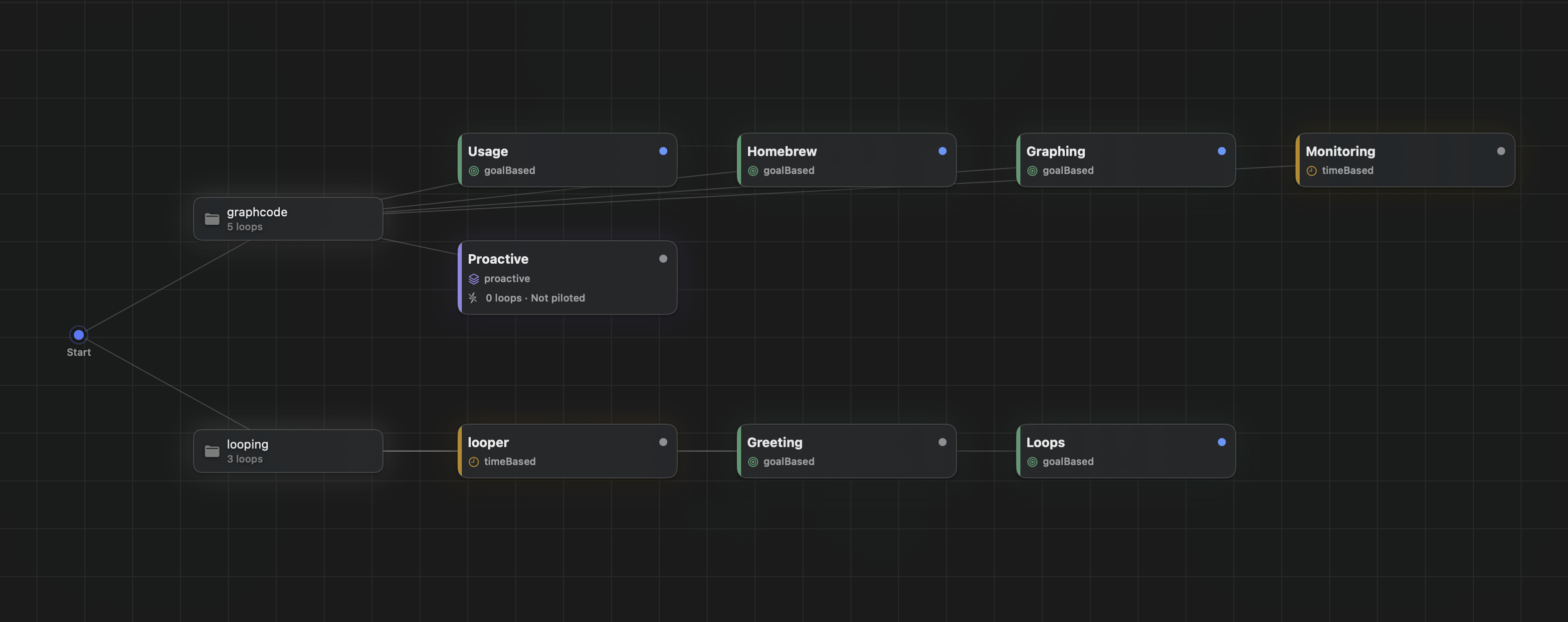
Every project you add hangs off Start, and each carries its own graph — the
screenshot above chains goal-based, turn-based, and time-based loops on one canvas,
each color-coded by kind.
Install
Requires macOS 15+ on Apple Silicon (arm64), with Claude Code on your PATH —
GraphCode launches it, it doesn't bundle it.
brew install --cask scgopi/graphcode/graphcode
That pulls the same signed release, and puts the graphcode CLI on your PATH while it's
there — the long name adds the tap by itself, so brew tap scgopi/graphcode first is
equivalent and makes later commands just graphcode. brew upgrade --cask graphcode from
then on. The tap is
scgopi/homebrew-graphcode — its own
repository, since Homebrew's cask index takes only projects past a notability threshold
GraphCode hasn't reached yet.
Homebrew 6 warns that a third-party tap is untrusted. It's a gate on taps in general, not
a finding about this one; brew trust --tap scgopi/graphcode settles it, and gets ahead of
the release that stops making it optional.
Or download the latestgraphcode-macos-arm64.dmg
(all versions under Releases), open it,
and drag GraphCode to Applications. Releases are Developer ID signed and notarized, so
a browser download opens on a double-click.
Either way the app carries graphcoded, graphcode (the CLI), and zmx inside it, and
puts them in ~/.graphcode/bin on first launch, along with the launchd agent that keeps
the daemon running. If you installed from the DMG, add that directory to your PATH for
the CLI; Homebrew links it for you.
Builds before 0.0.9 were ad-hoc signed and picked up a quarantine flag that made macOS
refuse them with a misleading "graphcode.app is damaged".xattr -dr com.apple.quarantine /Applications/graphcode.app clears it — or just grab the
current release.
Using it
- Add a project — the sidebar's ⊕ menu: open a local folder, clone a repository
from a URL, or add a remote repository over SSH (key auth and zmx on the server
required — loops then run on the server while this Mac steers them). Each becomes a
project with its own graph. Whatever was open is restored next launch; right-click a
project to Close, Remove, or delete its loops. - Create a loop — ⊕ on the canvas. Write the prompt and hit Create: the form opens
on goal-based, and the title is optional — leave it blank and GraphCode asks the loop's
own backend for a name. For a time-based loop put the cadence in the prompt itself:/loop 1h Check for new reports. - Open it — click the node. You get its terminal workspace: tabs (⌘T), splits (⌘D /
⌘⇧D — split as many times as you like), ⌘1–9 to switch tabs, ⌘]/⌘[ to move between a
split's panes, and ⇧⌘]/⇧⌘[ to step between loops. Every loop type opens the same way,
including ones the daemon started on its own — you're attaching to the live session,
not a copy of its output. - Connect loops — drag between nodes. An edge is a hand-off by default (fires when the
source resolves); it can also be a message or a spawn, with a condition and a cycle guard.
A turn-based loop resolves when its session exits — the per-turn review happens inside the
session itself, so there's no separate approve step in the app.
Parts
| Piece | What it is |
|---|---|
graphcode.app |
The UI — project sidebar, graph canvas, and a per-loop terminal workspace with tabs and splits |
graphcoded |
Background daemon (launchd agent). Owns every project's graph, fires hand-off edges, polls goal predicates, and keeps unattended sessions alive whether or not the app is open |
graphcode |
CLI for the same daemon — graphcode status <project>, graphcode node create …, graphcode node send … (type a message into another loop's live session) |
zmx |
Third-party session daemon that keeps each loop's PTY alive (zmx.sh) |
| GhosttyKit | Third-party terminal engine rendering each surface (ghostty.org) |
State lives in ~/.graphcode/ — per-project graphs, recents, terminal layouts, the daemon
socket and logs, and the installed binaries. Nothing is ever written inside a project
folder you open.
Building from source
Needs mise (Xcode, tuist, swiftlint, zig come through it) and the
submodules:
git submodule update --init --recursive
make doctor          # checks every prerequisite and prints the fix for anything missing
make third-party     # builds zmx and GhosttyKit (zig)
make install-zmx install-cli daemon-install
make run-app
make doctor is the fastest way to find a missing piece — it checks the toolchain, the
submodules, the macOS 15 SDK zig needs, and the Metal toolchain GhosttyKit compiles shaders
with.
Development
make test     # unit tests
make check    # swiftlint + swift-format, both strict
make format   # apply formatting
Design docs live in docs/ and are kept local (gitignored) for now.
Known limitations
- Apple Silicon only. GhosttyKit is built for the native architecture; there is no
x86_64 slice, so a universal build won't link. - Claude Code is the most complete backend. Copilot CLI and Codex loops launch, run,
fan out, and receive message edges like Claude ones; what stays Claude-only is
hook-reported presence and usage (the others read as heuristics or "not reported") —
and the picker refuses pairings a backend can't host (time-based needs the session to
re-trigger itself; composites need verified sub-agents). - A new folder stops at Claude's trust prompt. An unattended loop started by the daemon
in a folder Claude hasn't seen waits at "Do you trust this folder?" and shows asrunningwhile doing nothing. Attach once and answer it. - First session start is slow if your shell profile is slow (conda's hook, for
instance) — the queued command runs only after the profile finishes. - Sessions aren't reaped. Long-lived
graphcode-*zmx sessions accumulate; list them
withzmx listand remove dead ones withzmx kill. - Remote repositories are attach-first. Loops on an SSH remote launch and attach
fine, but deleting one doesn't kill its remote session, message edges into remote
loops report undelivered, presence/usage read "not reported", and worktrees and
loop fan-out aren't available there yet. And a sleeping Mac fires no edges — the
daemon stays local by design.
Inspiration & third-party
Inspired by Supacode — same spine of daemon-kept terminal sessions;
its unit is the worktree, GraphCode's is the graph of loops. Built on
Ghostty and zmx, vendored under ThirdParty/.
License
MIT.
Reviews (0)
Sign in to leave a review.
Leave a reviewNo results found