herdr-canvas
Health Warn
- License — License: MIT
- Description — Repository has a description
- Active repo — Last push 0 days ago
- Low visibility — Only 5 GitHub stars
Code Pass
- Code scan — Scanned 3 files during light audit, no dangerous patterns found
Permissions Pass
- Permissions — No dangerous permissions requested
No AI report is available for this listing yet.
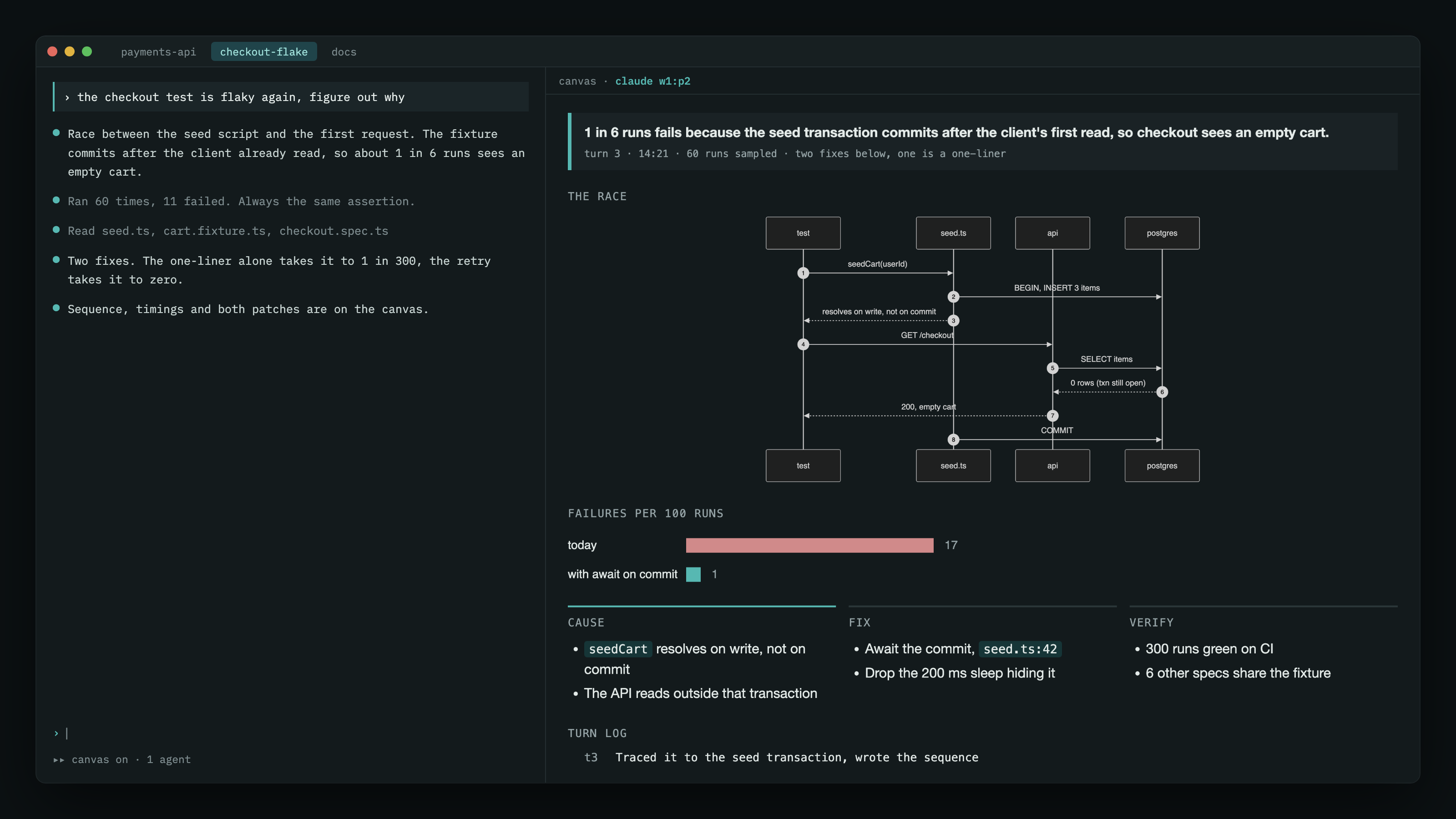
A live visual canvas for AI coding agents, drawn into a Herdr pane beside the agent. No browser.
herdr-canvas
A live visual canvas for AI coding agents, drawn into a Herdr pane beside the agent. No browser.
Each session gets an HTML page the agent rewrites on every reply: status, diagrams, charts,
tables, decisions, a turn log. A small watcher renders it with headless Chrome and places the
image in a Herdr pane next to the agent through Herdr's graphics API. Nothing opens in a
browser, and a Stop hook keeps the agent from ending a turn without updating it.
Requirements
- Herdr 0.7+, with agents running inside it
- A terminal Herdr can draw images in (Ghostty, Kitty, WezTerm, iTerm2)
- Chrome or Chromium, used headless as a renderer
- macOS, for
sipsto cut the render into pages - Python 3.9+, no packages
Install
Clone it and hand the repo to your agent:
git clone https://github.com/sebi75/herdr-canvas ~/src/herdr-canvas
Then, in a Claude Code session: read INSTALL.md in ~/src/herdr-canvas and install it.
The file is written for an agent to follow. It copies the files into ~/.claude/canvas,
links the skill, adds the two hook entries, and checks the Herdr flag. Manual steps are in
the same file if you would rather do it yourself.
Use
/canvas
That splits a pane, starts the watcher, and tells the agent to keep the canvas current for
the rest of the session. /canvas off closes it. /canvas status prints the paths.
Inside the canvas pane:
| key | |
|---|---|
j, space, ↓, PgDn, wheel down |
next page |
k, b, ↑, PgUp, wheel up |
previous page |
g |
first page |
How it works
Three files per session, under sessions/<session-id>/:
turn.html— the agent overwrites this every reply. Nothing from the previous turn
survives unless the agent writes it again, so the canvas cannot drift.log.txt— one appended line per turn. The newest ten are shown.title— the session topic.
The watcher polls those three, assembles them into canvas.html with the template, measures
the page, renders it once at full height, and cuts each screen from that one image. Every
version of turn.html is kept under history/ so the agent can look back.
Configuration
| variable | default |
|---|---|
CANVAS_CHROME |
/Applications/Google Chrome.app/Contents/MacOS/Google Chrome |
CANVAS_ZOOM |
1.5 |
CANVAS_RATIO |
0.45 — pane split |
CANVAS_SESSIONS |
<install dir>/sessions |
Limits
The canvas is an image, so nothing on it is clickable. Content is capped at six screens.
Codex support is not written yet; the scripts read CODEX_THREAD_ID but the hooks are
Claude Code's.
MIT.
Reviews (0)
Sign in to leave a review.
Leave a reviewNo results found