vibe-hud
Health Warn
- License — License: AGPL-3.0
- Description — Repository has a description
- Active repo — Last push 0 days ago
- Low visibility — Only 6 GitHub stars
Code Pass
- Code scan — Scanned 12 files during light audit, no dangerous patterns found
Permissions Pass
- Permissions — No dangerous permissions requested
No AI report is available for this listing yet.
A macOS notch overlay for Claude Code that keeps your sessions, approvals, replies, and updates within reach.
vibe hud
A native macOS notch HUD for Claude Code, Codex, and other AI coding agents. Follow sessions, review supported tool requests, and reply from one place.



Demo
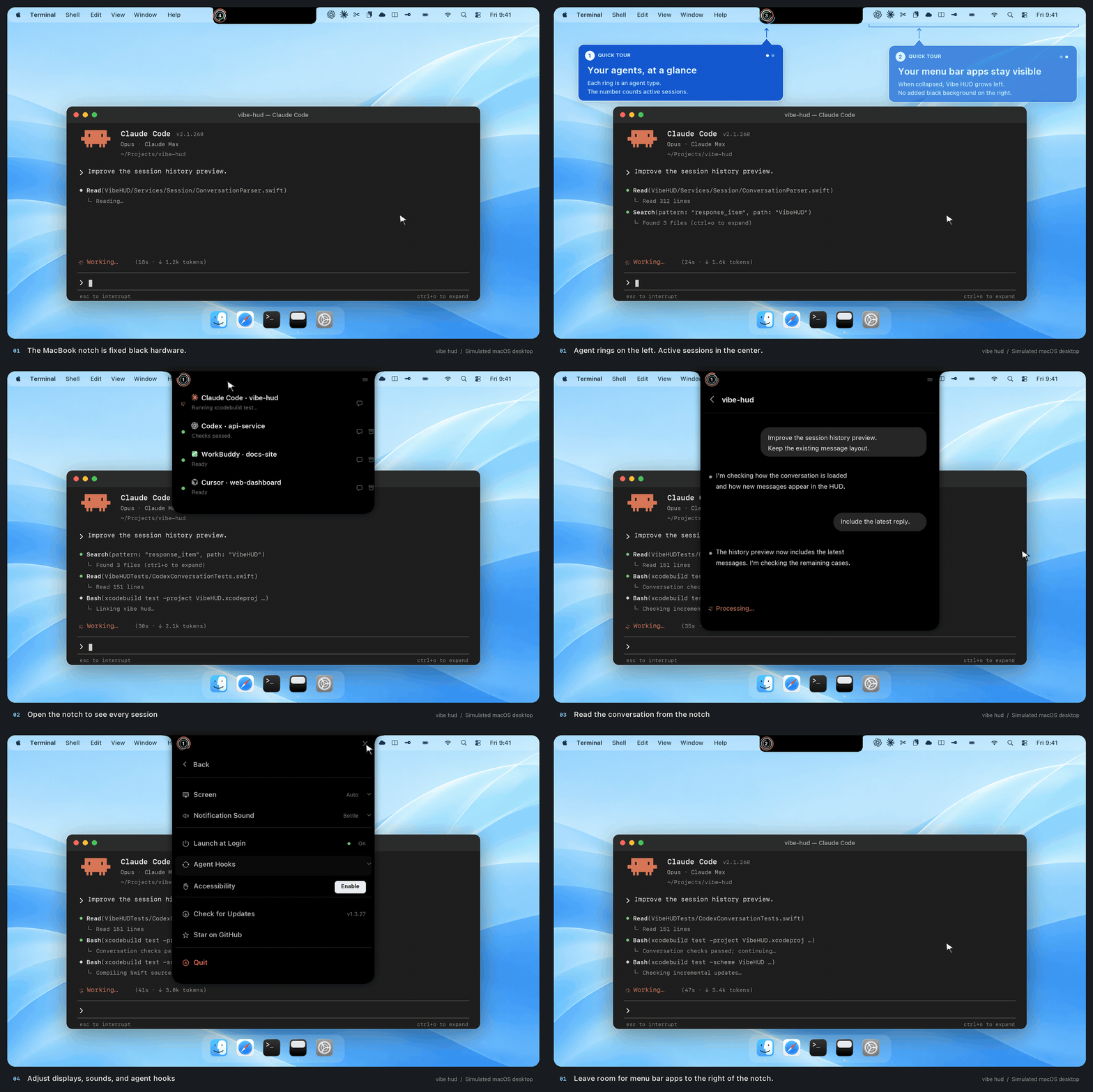
Simulated macOS desktop with sample sessions.
What it does
vibe hud brings local AI coding sessions into your Mac’s notch. Follow Claude Code, Codex, and other supported agents while they continue to work in their own environments. The HUD shows session activity and conversation history, and can handle supported tool requests and replies. Available actions depend on the agent, its events, and the terminal setup.
Website · Download · Setup guides · Compatibility
Product highlights
- Monitor multiple Claude Code, Codex, and other supported agent sessions
- See session activity and open local conversation history in the HUD
- Review supported tool requests and approve or deny them from the notch
- Answer supported Claude
AskUserQuestionprompts and send replies through compatible terminal routes - Enable integrations for Cursor, GitHub Copilot, Pi, OpenCode, WorkBuddy, and Qwen Work from Agent Hooks
- Works with tmux, Terminal.app, iTerm2, and Ghostty
- Choose your display, sound, Claude directory, and startup behavior
- Built-in update checks and installs through Sparkle
Main workflows
Stay on top of active sessions
vibe hud follows supported Claude Code and Codex session events and keeps important state visible: running work, waiting input, tool requests, and recently active sessions.
Handle approvals faster
When Claude needs permission to use a tool, vibe hud brings the approval flow to the notch so you can allow or deny it immediately.
Reply without context switching
When a session needs an answer, you can respond from the HUD instead of manually hunting for the right terminal pane.
Review conversations in one place
You can open a session view to see history, follow progress, and keep track of what Claude has been doing.
Requirements
- macOS 15.6+
- A supported coding agent installed and configured, such as Claude Code or Codex
Install
Download the latest release from the GitHub releases page and move VibeHUD.app into /Applications.
Open the notch menu, expand Agent Hooks, and enable the integration you use. Start a fresh agent session after enabling it. On subsequent launches, vibe hud refreshes hooks that were already enabled; installing the app alone does not enable every integration.
For setup and troubleshooting, see the Claude Code guide and Codex guide.
Release downloads:
Settings
From the notch menu, you can configure:
- preferred screen
- notification sound
- Claude config directory
- launch at login
- hooks on or off
- update checks and installs
Compatibility
vibe hud supports several local agent integrations and can route replies through the environments it detects, including:
- bridge mode
- tmux
- Terminal.app
- iTerm2
- Ghostty
- accessibility fallback when needed
Available requests, replies, and focusing features depend on the agent, emitted events, and your environment. Terminal focusing can benefit from tmux and optional window-management tooling. See the agent and terminal compatibility guide for the current scope.
Claude directory support
vibe hud works with the current Claude config layout and can resolve the config directory from:
CLAUDE_CONFIG_DIR- the directory you pick in vibe hud
~/.config/claude~/.claude
Updates
vibe hud uses Sparkle for in-app updates, so installed builds can check for new versions and install them from the app.
GitHub tag releases require the SPARKLE_PRIVATE_KEY Actions secret matching SUPublicEDKey in VibeHUD/Info.plist. The workflow signs each DMG and verifies its signature against the built app's public key before publishing. Keep this key pair across releases.
Older builds without an update public key may need a one-time manual reinstall to establish trust in signed updates. Their in-app updater cannot accept a release that changes both the app signing identity and the update signing key.
Privacy
The app reads local session events and conversation history to display the HUD. It also uses Mixpanel for app launches and session starts, with an app-generated identifier and metadata such as app, build, macOS, and Claude Code versions. The analytics events in the current source do not attach conversation text. See the privacy page for details.
Build from source
For a release-style local build:
./scripts/build.sh
To package a notarized release DMG:
./scripts/create-release.sh
Tests
Run the native Swift test suite with Xcode:
xcodebuild test -project VibeHUD.xcodeproj -scheme VibeHUD -destination 'platform=macOS' CODE_SIGNING_ALLOWED=NO
The Python hook adapter, OpenCode JavaScript plugin, and release packaging contract retain focused runtime tests because those components execute outside the Swift process.
Run bash tests/test_update_signature.sh to verify acceptance of signed archives and rejection of modified archives, missing or mismatched keys, and incorrect release metadata.
License
Apache 2.0
Reviews (0)
Sign in to leave a review.
Leave a reviewNo results found