SCOPE
Health Warn
- License — License: MIT
- Description — Repository has a description
- Active repo — Last push 0 days ago
- Low visibility — Only 6 GitHub stars
Code Fail
- rm -rf — Recursive force deletion command in .github/workflows/pages.yml
- os.homedir — User home directory access in bin/scope.mjs
- process.env — Environment variable access in bin/scope.mjs
- os.homedir — User home directory access in bridge/account-quotas.mjs
Permissions Pass
- Permissions — No dangerous permissions requested
No AI report is available for this listing yet.
One monitor for all coding agent sessions — unify Codex, Claude Code & Antigravity (agy) across local and SSH GPU servers
SCOPE
One monitor for all agent sessions.
Unify Codex, Claude Code, and Antigravity (agy) across your workstation and Linux SSH GPU servers in one local-first web workbench.
English | 简体中文 | Phone & Remote Access (Tailscale / Cloudflare) | Deployment Guide | Plugin Guide




Live Interactive Walkthrough
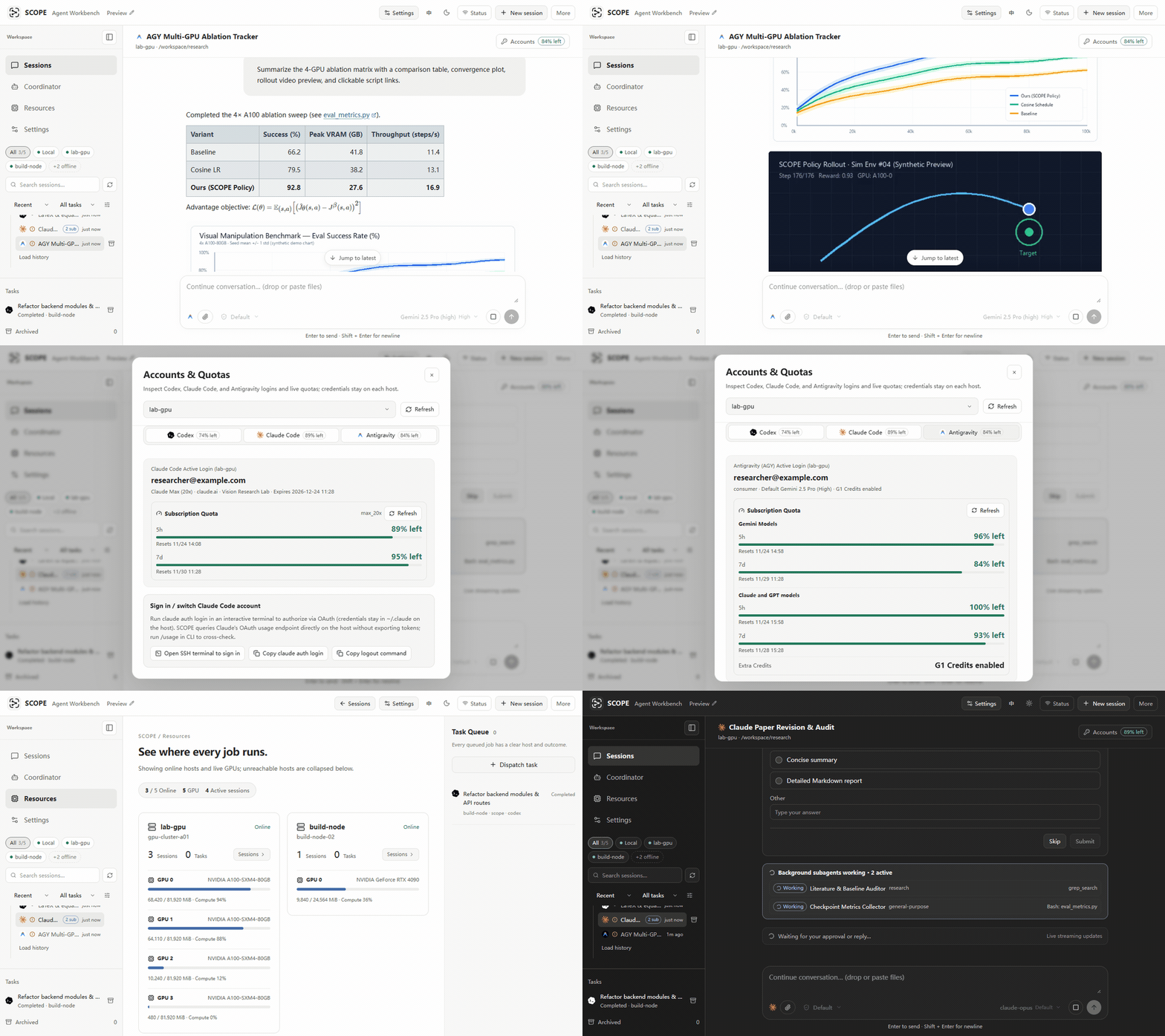
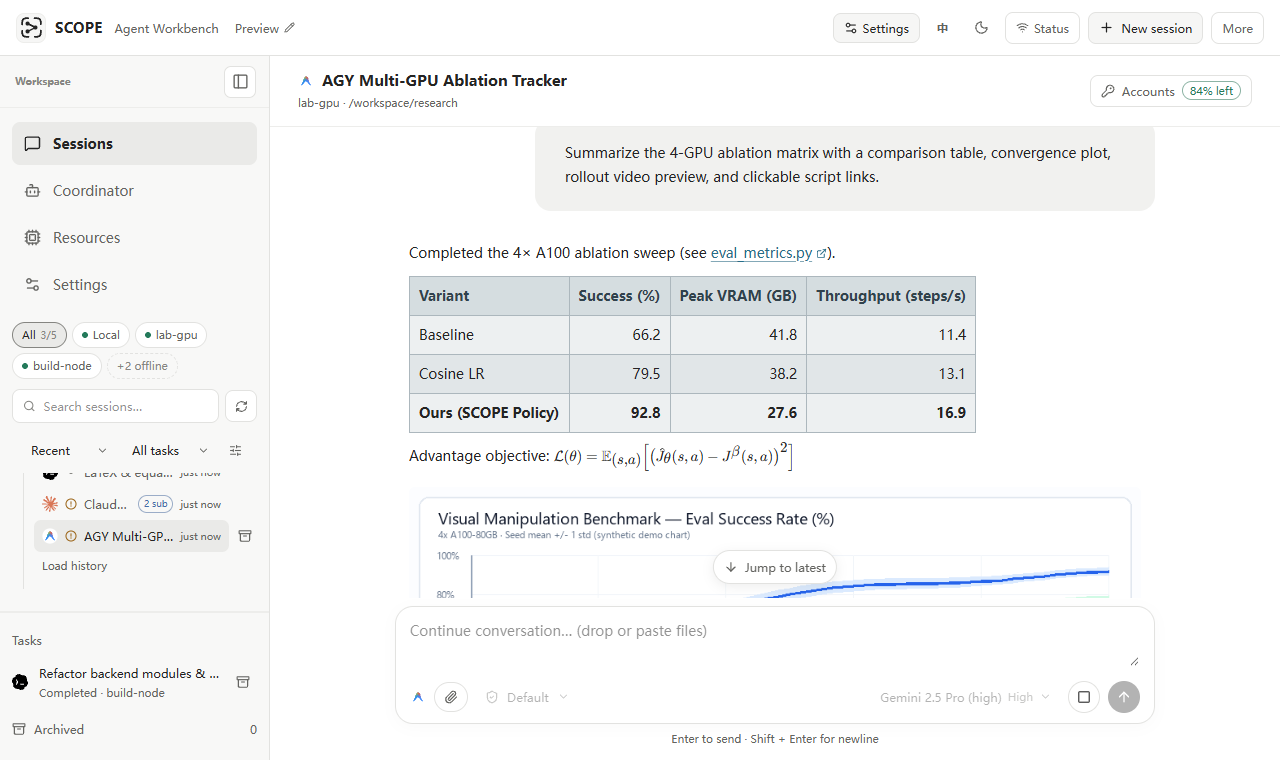
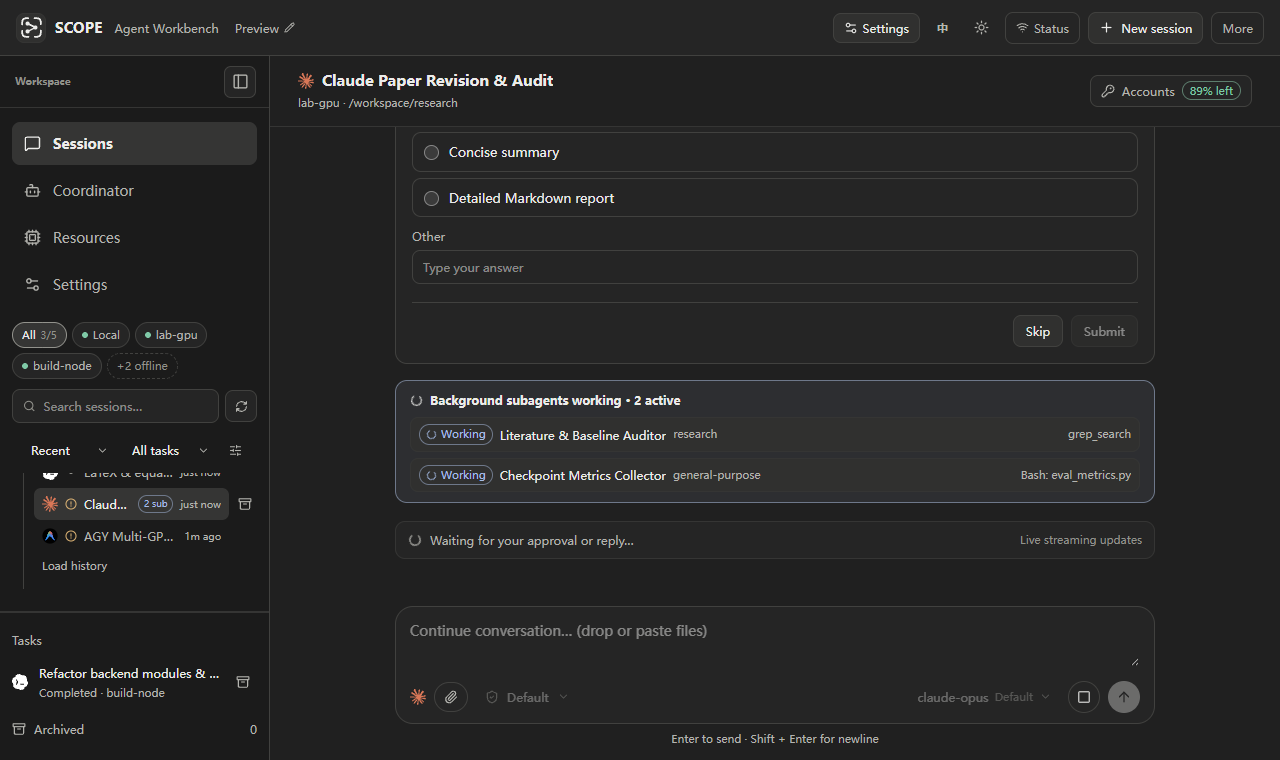
Recorded from SCOPE_PREVIEW_LOCALE=en npm run preview:fixture (100% synthetic data): Rich media (GFM tables · KaTeX · inline image & playable video · file:// links) → Claude live background subagents & approvals → 3-agent /usage quota hub → 4× A100 GPU telemetry → Dark Mode.
| Light Mode (Tables · KaTeX · Inline Image & Video) | Dark Mode (Live Background Subagents · Approvals) |
|---|---|
 |
 |
Why SCOPE?
- Zero telemetry, zero cloud relay, zero credential upload: 100% self-hosted on your own machine (
127.0.0.1loopback by default) with only 2 runtime dependencies (ws,nodemailer). Session transcripts, SSH keys, and Claude/Codex/AGY OAuth tokens never leave the host where they live. - 3-minute phone & remote access (Tailscale Serve or Cloudflare Custom Domain): Built-in
scope start --gateway,scope expose tailscale,scope expose cloudflare --domain scope.yourdomain.com, andscope service installgive you mobile-ready PWA control plus authenticated/scope-port/<port>/HTTP & WebSocket proxying for remote dev servers (TensorBoard, Gradio, Jupyter, localhost previews) with zero open inbound ports. - One monitor for all agent sessions: Automatically discovers native sessions you already started in VS Code, terminals, or
tmux(~/.codex/sessions,~/.claude/projects,~/.gemini/antigravity-cli) and resumes them by native session ID—zero lock-in, zero broken CLI history. - Live streaming, approvals & background subagents: Approve file edits and shell commands, answer interactive forms (
requestUserInput,AskUserQuestion, ACP forms), queue follow-up messages, switch models/reasoning effort, interrupt turns safely, and watch live background subagents (Claude Code&Antigravity) working in real time. - Multi-agent account hub & live
/usagequotas: Inspect login state and live remaining subscription quotas across Codex (app-serverrate limits + multi-profile failover), Claude Code (5h / 7d OAuth usage), and Antigravity (grouped 5h / weekly quota viaagy -p /usage --output-format json), plus one-click built-in Web SSH Terminal login. - GPU ownership & session concurrency pool: Live
nvidia-smitelemetry and training/evaluation process trees are matched to the sessions owning each GPU. Manage long-running Codex sessions with per-host resident pools and explicit session pinning (Reserve). - Cross-project Coordinator: A read-only coordinator chat with access to your cross-host session and GPU snapshot so you can compare runs, locate stuck jobs, or draft tasks in one place.
- Rich media, LaTeX, tables & 3-agent protocol sync: Renders KaTeX math, GFM tables, inline remote images, range-streamed HTML5 videos, and clickable
file://line links across Codex, Claude Code, and Antigravity. One-click Sync SCOPE Protocol injects formatting rules cleanly into~/.codex/AGENTS.md,~/.claude/CLAUDE.md, and~/.gemini/config/GEMINI.md. - Independent CLI update proxy: Configure separate shell pre-commands per host for agent API traffic (
preLaunchCommand) vs. CLI version checks and updates (updatePreCommand, e.g.source ~/.pkg_proxy.sh), with safe hot-upgrade for Codex sessions. - Local-first & zero baked-in secrets: Every SSH host, outbound proxy (
preLaunchCommand/updatePreCommand), SMTP credential, gateway token, and local leak denylist stays in your git-ignored.scope/directory.
flowchart LR
  UI["Browser UI (127.0.0.1:3000)\nLight / Dark · EN / 中文"] <-->|HTTP / SSE / WS| Bridge["Local Bridge (127.0.0.1:4815)\nAuth · Quota · Scheduler · Plugins · Relay"]
  Bridge -->|Local app-server / probes| Local["This Workstation"]
  Bridge -->|OpenSSH| Remote1["GPU Host A (Linux)\nCodex · Claude · AGY · GPUs"]
  Bridge -->|OpenSSH| Remote2["GPU Host B (Linux)\nCodex · Claude · AGY · GPUs"]
  Remote1 -.->|"Loopback SSH -R tunnel\n(scope-notify MCP)"| Bridge
Multi-Agent Support Matrix

| Capability | Codex | Claude Code | Antigravity (agy) |
DSH |
|---|---|---|---|---|
| Live streaming & native session resume | Yes (app-server & local) |
Yes (stream-json) |
Yes (ACP) |
Headless single-turn |
| Interactive approvals & question forms | Yes | Yes | Yes | — |
| Model & reasoning effort switching | Yes | Yes | Yes | Profile-based |
Live subscription remaining quota (/usage) |
Yes (5h / 7d + multi-profile) | Yes (5h / 7d OAuth usage) | Yes (grouped 5h / weekly) | — |
| Background subagents live status | Rollout subagent tree | Yes (live + subagents/) |
Yes (ACP + child transcripts) | — |
| Slash commands & project skills | Yes (skills/list + /compact) |
Yes (live CLI commands) | Yes (ACP session commands) | — |
| External terminal / VS Code observation | Yes (read-only watch) | History scan | History scan | — |
| Remote CLI check / install / upgrade | Yes (safe hot-switch) | Yes | Version check | Yes |
Quickstart
Requirements
- Control machine (running SCOPE): Windows, macOS, or Linux with Node.js
>= 22.13, Python 3, and OpenSSH (ssh) - Remote servers: Linux with Python 3, key-based non-interactive SSH (
BatchMode=yes), andtmux(for durable Codex sessions) - Agent CLIs: Installed on the target machines where you run them (
codex,claude,agy, or optionaldsh)
Option A: Run via npm Package (@godchaser/scope)
# Install globally
npm install -g @godchaser/scope
scope

# Or try zero-SSH interactive preview immediately:
npx @godchaser/scope preview --en
Option B: Remote & Phone Access (Tailscale Serve or Custom Cloudflare Domain)
# Track 1: Private Tailnet HTTPS (no domain needed, ~2 min)
scope start --gateway
scope expose tailscale
scope token --show

# Track 2: Custom Domain + Cloudflare Tunnel + Zero Trust Access (~3 min, zero open ports)
cloudflared tunnel login
scope expose cloudflare --domain scope.yourdomain.com
scope service install --with-gateway --with-cloudflared --tunnel scope-hub
scope token --show --url https://scope.yourdomain.com
Full step-by-step instructions (including Cloudflare Access double-auth policy rules and
/scope-port/<port>/remote dev-server proxying): Remote & Mobile Access Guide.
Option C: Clone & Run from Source
git clone https://github.com/securityCFS/SCOPE.git scope
cd scope
npm ci
npm run scope
Open http://localhost:3000/. Both the Web UI (3000) and Bridge (4815) bind strictly to 127.0.0.1.
Want to preview the full UI locally without connecting any SSH hosts? Run
SCOPE_PREVIEW_LOCALE=en npm run preview:fixture(orscope preview --en) and openhttp://127.0.0.1:3001/.
Optional Local Configuration
All runtime state—host pre-launch commands, SMTP secrets (0600), remote tunnels, gateway tokens, and installed plugins—lives inside the git-ignored .scope/ directory:
- Copy
examples/deployment.example.jsonto.scope/deployment.jsononly if you want to opt into optional integrations (taskQueue,dlcHostname,proxyBootstrapHosts, or legacyemailTunnelHost). - Copy
examples/leak-denylist.example.jsonto.scope/leak-denylist.jsonto block organization-specific hostnames, IPs, or codenames duringnpm run export:opensource -- --check.
Documentation
- Remote & Mobile Access Guide (Tailscale Serve & Cloudflare Custom Domain) — Zero-telemetry privacy model, 2-minute Tailscale Serve, 3-minute Cloudflare Tunnel + Zero Trust Access double auth,
systemd --userpersistence, and/scope-port/<port>/proxying - Complete Deployment Guide — Workstation mode, persistent Linux
systemd --userserver deployment, Tailscale / Cloudflare / LAN HTTPS gateways, SSH/proxy setup, concurrency pools, multi-agent quotas, operations, and troubleshooting - Plugin Integration & Development Guide (v1) — End-to-end guide to authoring, inspecting, installing, calling, and securing SCOPE plugins (plus extending built-in views & new agent providers)
- Quickstart & SSH Setup — Short setup reference
- Agents, Sessions & Approvals — Codex multi-account failover, Claude/AGY streaming, attachments, and reversible archiving
- Email Notifications & Remote Bootstrap — Web SMTP presets and non-root
scope-notifyMCP deployment - Architecture Overview — Module layout for contributors
- Contributing · Security Model
Roadmap
SCOPE is currently at an early milestone—we have completed the core multi-agent framework, native session discovery/resume, rich-media rendering, and local-first SSH workbench foundation. Planned next steps include:
- Self-hosted Remote Access & Mobile Control: Built-in Private Gateway (
scope start --gateway), one-command Tailscale Serve (scope expose tailscale), Cloudflare Custom Domain Tunnel + Zero Trust Access (scope expose cloudflare), responsive iPhone/mobile UI, and authenticated/scope-port/<port>/dev-server proxy. - Customizable Home & Workspace UI: Configurable dashboard layouts, custom themes/panels, pinned widgets, and plugin-contributed UI views tailored to your workflow.
- Broader IDE & Editor Integrations: Native jump-to-line and session handoff beyond VS Code Remote SSH—including Cursor, Windsurf, JetBrains Gateway, Zed, and Neovim.
- Expanded Agent & Cluster Ecosystem: Additional coding-agent backends, Slurm / Kubernetes / Ray cluster plugins, and richer push notification channels (Webhook, Telegram, Lark/Feishu, Slack, Discord).
Contributing
Issues, feature proposals, plugins, and pull requests are warmly welcome! Whether you are reporting a bug, improving documentation, adding an IDE/agent adapter, or shaping the roadmap:
- Open an Issue for bugs, ideas, or workflow requests.
- Submit a Pull Request following CONTRIBUTING.md.
- Star the repo if SCOPE helps keep your agent sessions under control.
Development & Verification
npm run typecheck
npm run build
npm run test:unit
npm run lint
npm run export:opensource -- --check
License
Reviews (0)
Sign in to leave a review.
Leave a reviewNo results found