promptfilm
Health Pass
- License — License: MIT
- Description — Repository has a description
- Active repo — Last push 0 days ago
- Community trust — 19 GitHub stars
Code Fail
- exec() — Shell command execution in skills/promptfilm/engine/build.mjs
- process.env — Environment variable access in skills/promptfilm/engine/build.mjs
- rm -rf — Recursive force deletion command in skills/promptfilm/engine/build_demo.sh
Permissions Pass
- Permissions — No dangerous permissions requested
No AI report is available for this listing yet.
One sentence in, a researched 3D motion graphic out — a Claude Code skill that makes looping real-time HTML films (Three.js) and frame-exact MP4s
Promptfilm
One sentence in. A researched 3D motion graphic out.
A Claude Code skill that turns a request into a real-time 3D film —
one self-contained HTML file that loops seamlessly and exports to a frame-exact MP4.



English · 한국어

"Zoom from a Blackwell graphics card down to single atoms" — one full loop of a reference film, played at about 2.5×
Quick start
In Claude Code:
/plugin marketplace add Seokwoooo/promptfilm
/plugin install promptfilm@promptfilm
Restart Claude Code (or run /reload-plugins). The only thing to install yourself is Node.js 20 or newer: the
first run checks for everything else and installs what's missing (see Requirements).
Then type /promptfilm and what you want. One line is enough:
A journey through scale
/promptfilm Zoom out from Earth to the edge of the observable universe
How something works
/promptfilm Show how a mechanical watch works, from the mainspring to the hands
A product ad
/promptfilm An ad-style film for AirPods Pro 3
What you get
- A real film, not a slideshow — real-time Three.js in one HTML file: studio light, physically based materials, one continuous
camera, a seamless loop. - Researched, not guessed — facts, photos and footage from the web. Every number on screen has a source, and anything that
isn't public is marked as illustrative. - Paced to be watched — the camera stops at everything a caption names, holds while you read, then moves on gently.
- Any subject, any format — journeys through scale, product ads, app and game demos, explainers, recreations of famous scenes,
logo stings, data stories. 9:16 for Shorts, Reels and TikTok, or 16:9, 1:1, 4:5. Captions in one or two languages. - Checked before it's called done — automated QA, a visual review by a separate agent that didn't build the film, and a final
delivery check. - A Studio to review it — scrub the film, comment on the frame, change the pace, export the MP4.
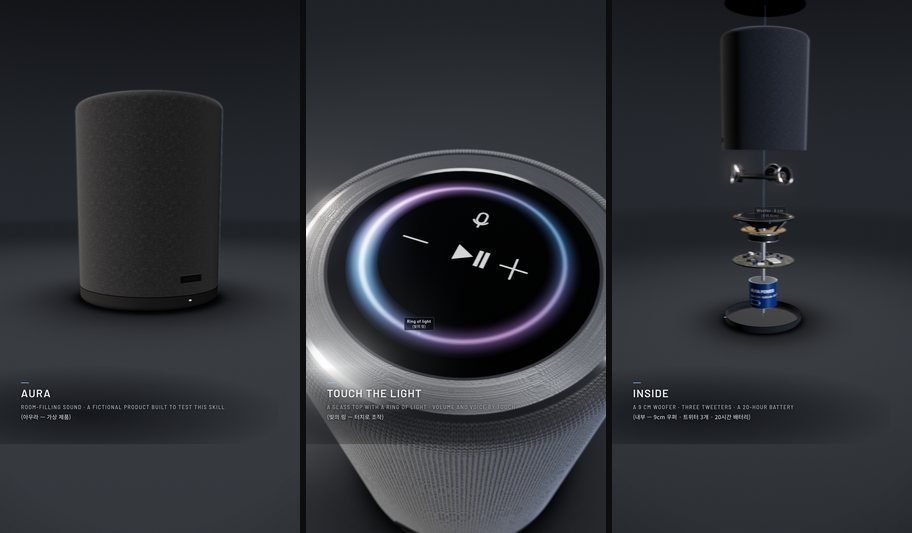
A 9:16 product film from the engine's test set (a fictional speaker)
How it works
| Step | What happens | |
|---|---|---|
| 1 | Ask | One kickoff question: research depth, aspect, loop length, caption languages. Then it works on its own. |
| 2 | Research | Sourced facts, reference photos, frames from reference videos. |
| 3 | Storyboard | Scene cards with a time budget, opened in the Studio for your approval. |
| 4 | Build | Claude writes the film on the bundled engine. |
| 5 | Check | Automated QA, a fresh-eyes review and a final gate. It fixes and re-checks until the gate says READY. |
| 6 | Deliver | The HTML (every version kept) and, when you want it, a 1080p 60 fps MP4. |
[!NOTE]
A film takes hours of agent work and a lot of tokens: research, building and several rounds of checks.
The Studio
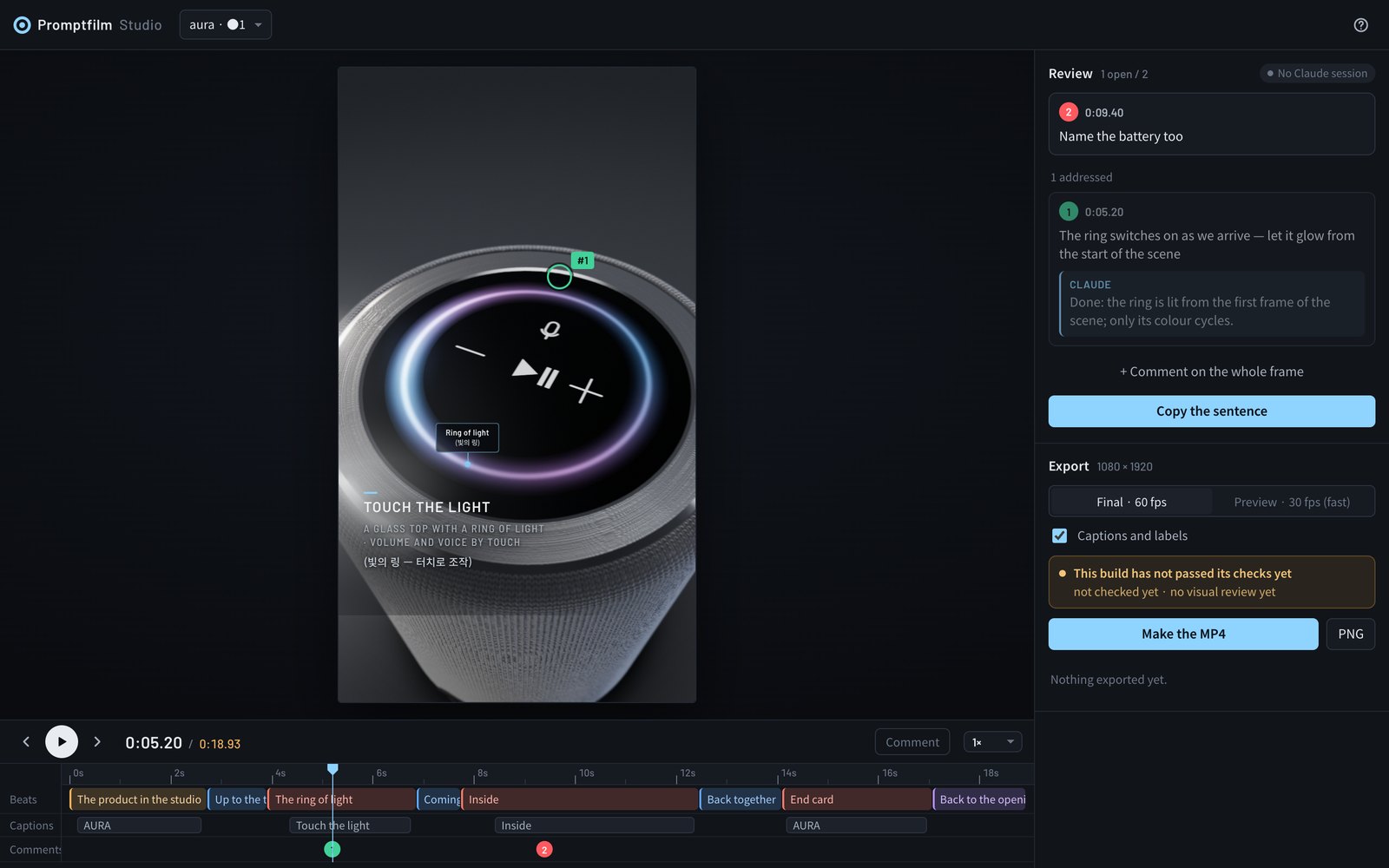
A local page that opens by itself while a film is being made:
- Play and scrub on a timeline of beats, captions and comments.
- Comment on the frame — click where something is wrong; Claude gets your note with a snapshot, fixes it and replies.
- Change the pace of any section; your edits are kept when the film is rebuilt.
- Approve the storyboard before anything is built.
- Export a frame-exact MP4 or a PNG still. A build that hasn't passed its checks is marked as such.
Everything stays on your machine: the Studio listens on 127.0.0.1 only.
Requirements
| What | How you get it |
|---|---|
| Claude Code | Recommended: Claude Opus 5.5, Sonnet 5.5 or Fable 5.1 (or newer), effort medium or above. Elsewhere it still runs and says once that quality can't be guaranteed. |
| Node.js 20+ | Install it yourself from nodejs.org. If it's missing and you have Homebrew, the first run installs it. |
| The scripts' packages | Installed with the plugin, or by the first run |
| A headless Chrome | Your Chrome, if it runs headless; otherwise the first run installs Playwright's Chromium (~150 MB) |
| ffmpeg | Yours, if it's on your PATH; otherwise the first run downloads a copy just for the skill (~45 MB) |
| yt-dlp (optional) | Frames from reference videos: brew install yt-dlp or pipx install yt-dlp |
The first run's setup needs no admin rights and removes nothing; after that, the check takes about a second. A GPU helps: without one,
Chrome falls back to software rendering, which is slow. Developed and tested on macOS (Apple Silicon). Linux should
work; Windows is untested (WSL is the safer route).
Memory: 8 GB is enough. Checking a film runs one headless browser (about 1.4 GB; 2.6 GB for a data-heavy film). The MP4 export
opens as many as fit in half the memory, up to four: on an 8 GB Mac two for most films (about 3.5 GB with the encoder) and one for
a data-heavy film, four on a 16 GB M2 Pro (about 5 GB). On 8 GB, close other heavy apps while it exports.
Install
As a plugin (recommended)
/plugin marketplace add Seokwoooo/promptfilm
/plugin install promptfilm@promptfilm
Claude Code installs the scripts' packages for you. Start the skill with /promptfilm (its full name is /promptfilm:promptfilm); it
also starts by itself when you ask for a motion graphic.
Updates. Each time a film starts, promptfilm checks this repository for a newer version (about half a second; skipped when
offline). It installs nothing on its own: Claude asks you — update now, always update automatically, or not now. An update is
installed with Claude Code's own claude plugin update and the session carries on with it at once; "not now" isn't asked again
for that version. Changed your mind after "always"? Ask Claude to ask before updates again. To turn the check off, setPROMPTFILM_NO_UPDATE=1. You can also let Claude Code update it in the background: /plugin → Marketplaces → promptfilm →
Enable auto-update. Copies installed before October 2, 2026 don't check yet; update those once from a shell:
claude plugin marketplace update promptfilm && claude plugin update promptfilm@promptfilm
As a personal skill
git clone https://github.com/Seokwoooo/promptfilm.git
cp -R promptfilm/skills/promptfilm ~/.claude/skills/
The skill is then /promptfilm, and its first run installs the packages.
Check your setup
Ask Claude Code to "run the promptfilm selftest". It takes about 5 minutes: it builds the engine's test films in a temporary folder
and runs every check, including checks that must catch planted faults.
Usage
After /promptfilm, ask in your own words, in any language:
/promptfilm A 30-second 16:9 explainer of how a jet engine works, captions in English only
/promptfilm An ad-style product film for our app, 9:16
/promptfilm 사람 몸에서 세포, DNA, 원자까지 확대해 들어가는 쇼츠 영상 만들어줘
In the same session, follow-ups work in plain words: "open the Studio", "apply my review comments", "render the MP4".
Films are made in your working folder, one folder each (./<film-name>/). Your answers to the kickoff question are remembered in./.promptfilm/settings.json and offered first next time.
Make it yours
The default taste profile, skills/promptfilm/taste.md, belongs to a creator making Shorts for a general
audience: nothing pops in, subjects look real, every step is shown up close, the camera moves gently, and nothing drags. Copy it to./.promptfilm/taste.md (one project) or ~/.promptfilm/taste.md (all projects) and change the format defaults, the pace, the look,
the report labels, or the list of things that must never happen.
Troubleshooting
| Message | Fix |
|---|---|
SETUP MISSING node |
Install Node.js 20+ from nodejs.org, then run /promptfilm again |
SETUP MISSING … (anything else) |
The line says what failed and the command that fixes it; usually the network. Run /promptfilm again afterwards |
Chrome not found, Cannot find package … |
Something was removed after the first run: run /promptfilm again and the setup reinstalls it |
| Using your own tools | Set CHROME=/path/to/chrome or FFMPEG=/path/to/ffmpeg |
| QA or rendering is very slow | no GPU: Chrome falls back to software rendering — it works, just slower |
| ⚠️ Not the recommended setup | shown once when the host, model or effort differs; the skill carries on |
Repository layout
.claude-plugin/          plugin and marketplace manifests
skills/promptfilm/
├── SKILL.md             the workflow
├── taste.md             the default taste profile
├── references/          principles, pacing, layout, engine API, techniques, QA, review, Studio
├── engine/              the film engine: core, a new-film template, two test films
├── scripts/             setup, new film, build, QA, time budget, render, review, gate, selftest
├── studio/              the local Studio
├── examples/            code from the two reference films (patterns, not templates)
└── evals/               test prompts with the expected behaviour
License
MIT. Third-party components, imagery credits and trademarks: THIRD_PARTY_NOTICES.md.
Promptfilm is an independent project, not affiliated with or endorsed by Anthropic.
Reviews (0)
Sign in to leave a review.
Leave a reviewNo results found